Page 250 of 716
2504-3. Operating the lights and wipers
HIGHLANDER_U (OM48F09U)■
Temporarily lowering sensor sensitivity
The sensitivity of the sensor can be temporarily lowered.
Turn the engine switch off while the following conditions are met.
• The headlight switch is in or .
• The headlight switch lever is in high beam position.
• Automatic High Beam switch is on. Turn the engine switch to IGNITION ON mode.
Within 5 seconds after , repeat pulling the headlight switch lever to the
original position then pushing it to the high beam position quickly 9 times,
then leave the lever in high beam position.
Automatic High Beam (headlights) may turn on even the vehicle is stopped.
■ If the Automatic High Beam indicator turns to yellow
It may indicate a malfunction in the system. Contact your Toyota dealer.
1
2
32
Page 255 of 716
2554-3. Operating the lights and wipers
4
Driving
HIGHLANDER_U (OM48F09U)
■The windshield wiper and washer can be operated when
Vehicles without a smart key system
The engine switch is in the “ON” position.
Vehicles with a smart key system
The engine switch is in IGNITION ON mode.
■ Dripping prevention wiper sweep (vehicles with rain-sensing windshield
wipers)
After performing a washing and wiping operation several times, the wipers
operate one more time after a short delay to prevent dripping.
However, this final wiper operation will not be performed while driving.
■ Effects of vehicle speed on wiper operation (vehicles with rain-sensing
windshield wipers)
Even when the wipers are not in “AUTO” mode, wiper operation varies
depending on vehicle speed when the washer is being used (delay until d\
rip
prevention wiper sweep occurs).
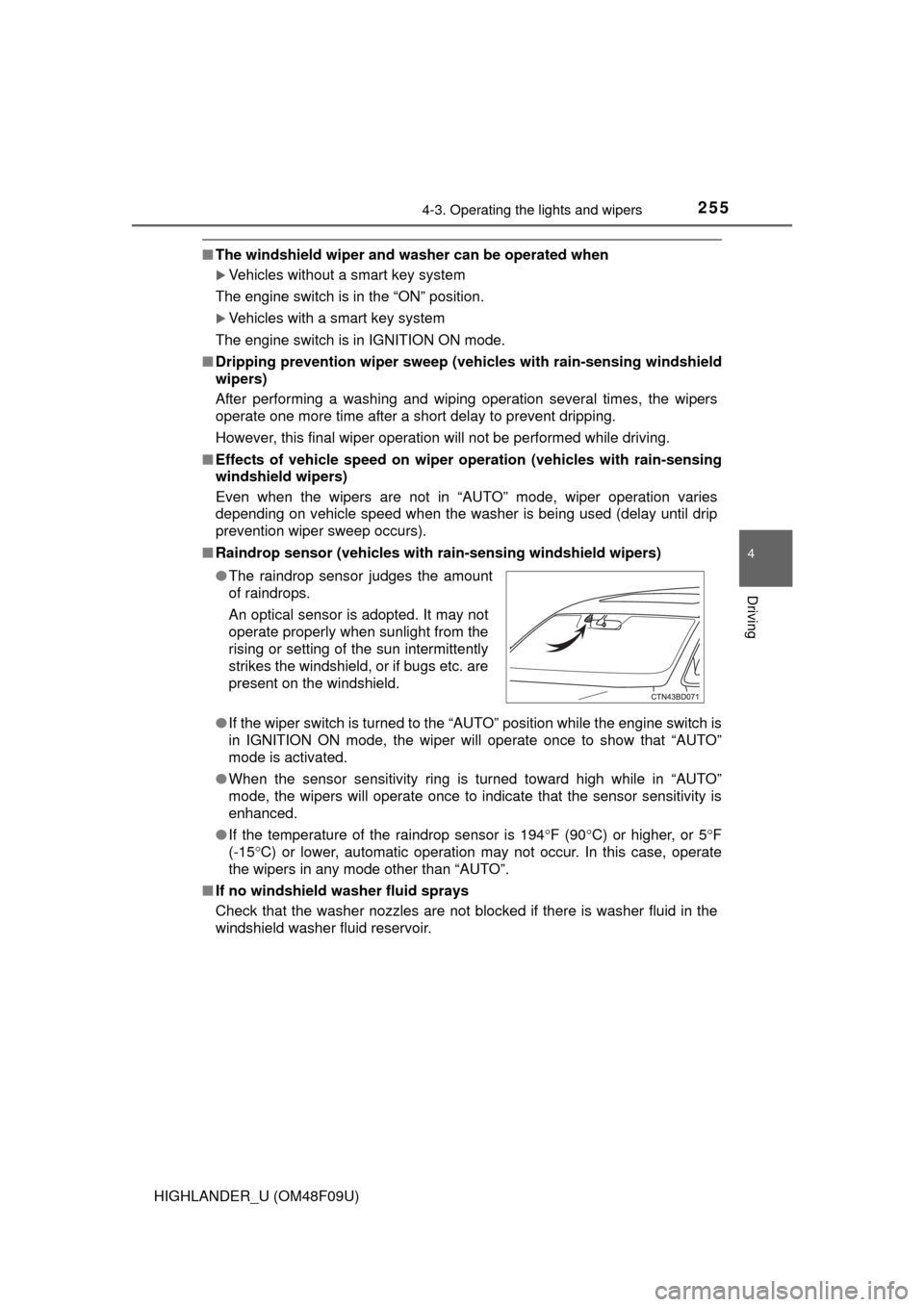
■ Raindrop sensor (vehicles with ra in-sensing windshield wipers)
● If the wiper switch is turned to the “AUTO” position while the engine switch is
in IGNITION ON mode, the wiper will operate once to show that “AUTO”
mode is activated.
● When the sensor sensitivity ring is turned toward high while in “AUTO”
mode, the wipers will operate once to indicate that the sensor sensitivity is
enhanced.
● If the temperature of the raindrop sensor is 194 F (90 C) or higher, or 5 F
(-15 C) or lower, automatic operation may not occur. In this case, operate
the wipers in any mode other than “AUTO”.
■ If no windshield washer fluid sprays
Check that the washer nozzles are not blocked if there is washer fluid in the
windshield washer fluid reservoir. ●The raindrop sensor judges the amount
of raindrops.
An optical sensor is adopted. It may not
operate properly when sunlight from the
rising or setting of the sun intermittently
strikes the windshield, or if bugs etc. are
present on the windshield.
Page 258 of 716
2584-3. Operating the lights and wipers
HIGHLANDER_U (OM48F09U)
■The rear window wiper and w asher can be operated when
● Vehicles without a smart key system:
The engine switch is in the “ON” position.
Vehicles with a smart key system:
The engine switch is in IGNITION ON mode.
● The glass hatch is closed.
■ If no washer fluid sprays
Check that the washer nozzle is not blocked if there is washer fluid in the
washer fluid reservoir.
NOTICE
■When the rear window is dry
Do not use the wiper, as it may damage the rear window.
■ When the washer fluid tank is empty
Do not operate the switch continually as the washer fluid pump may over-
heat.
■ When a nozzle becomes blocked
In this case, contact your Toyota dealer.
Do not try to clear it with a pin or other object. The nozzle will be damaged\
.
Page 260 of 716

2604-4. Refueling
HIGHLANDER_U (OM48F09U)
WARNING
■When refueling the vehicle
Observe the following precautions while refueling the vehicle. Failure to do
so may result in death or serious injury.
●After exiting the vehicle and before opening the fuel door, touch an
unpainted metal surface to discharge any static electricity. It is important to
discharge static electricity before refueling because sparks resulting from
static electricity can cause fuel vapors to ignite while refueling.
● Always hold the grips on the fuel tank cap and turn it slowly to remove it.
A whooshing sound may be heard when the fuel tank cap is loosened.
Wait until the sound cannot be heard before fully removing the cap. In hot
weather, pressurized fuel may spray out the filler neck and cause injury.
● Do not allow anyone that has not discharged static electricity from their
body to come close to an open fuel tank.
● Do not inhale vaporized fuel.
Fuel contains substances that are harmful if inhaled.
● Do not smoke while refueling the vehicle.
Doing so may cause the fuel to ignite and cause a fire.
● Do not return to the vehicle or touch any person or object that is statically
charged.
This may cause static electricity to build up, resulting in a possible ignition
hazard.
■ When refueling
Observe the following precautions to prevent fuel overflowing from the fuel
tank:
●Securely insert the fuel nozzle into the fuel filler neck.
● Stop filling the tank after the fuel nozzle automatically clicks off.
● Do not top off the fuel tank.
NOTICE
■Refueling
Do not spill fuel during refueling.
Doing so may damage the vehicle, such as causing the emission control
system to operate abnormally or damaging fuel system components or the
vehicle’s painted surface.
Page 271 of 716
2714-5. Using the driving support systems
4
Driving
HIGHLANDER_U (OM48F09U)
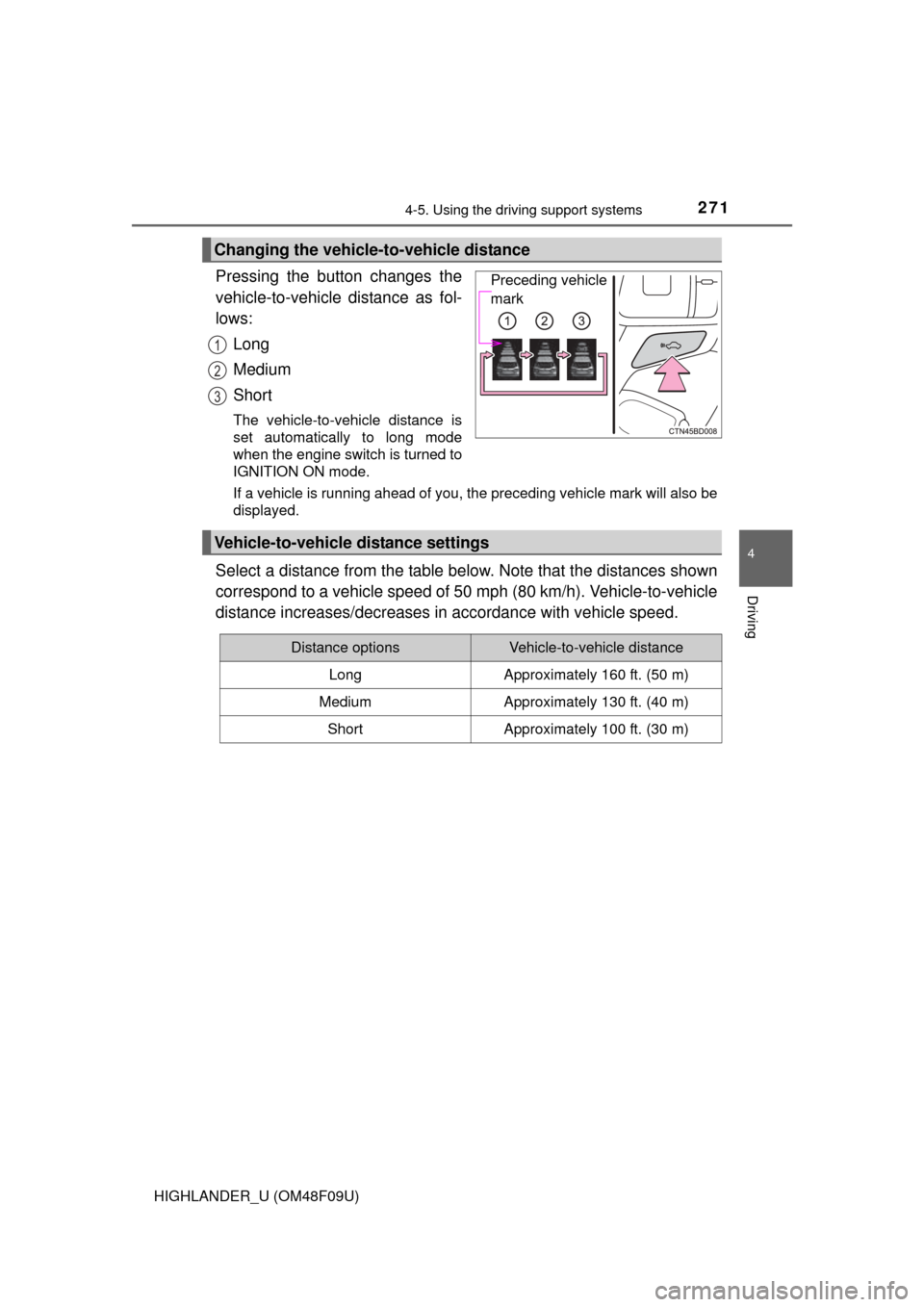
Pressing the button changes the
vehicle-to-vehicle distance as fol-
lows:Long
Medium
Short
The vehicle-to-vehicle distance is
set automatically to long mode
when the engine switch is turned to
IGNITION ON mode.
If a vehicle is running ahead of you, the preceding vehicle mark will also be
displayed.
Select a distance from the table below. Note that the distances shown
correspond to a vehicle speed of 50 mph (80 km/h). Vehicle-to-vehicle
distance increases/decreases in accordance with vehicle speed.
Changing the vehicle-to-vehicle distance
Preceding vehicle
mark
1
2
3
Vehicle-to-vehicle distance settings
Distance optionsVehicle-to-vehicle distance
LongApproximately 160 ft. (50 m)
MediumApproximately 130 ft. (40 m)
ShortApproximately 100 ft. (30 m)
Page 275 of 716
2754-5. Using the driving support systems
4
Driving
HIGHLANDER_U (OM48F09U)
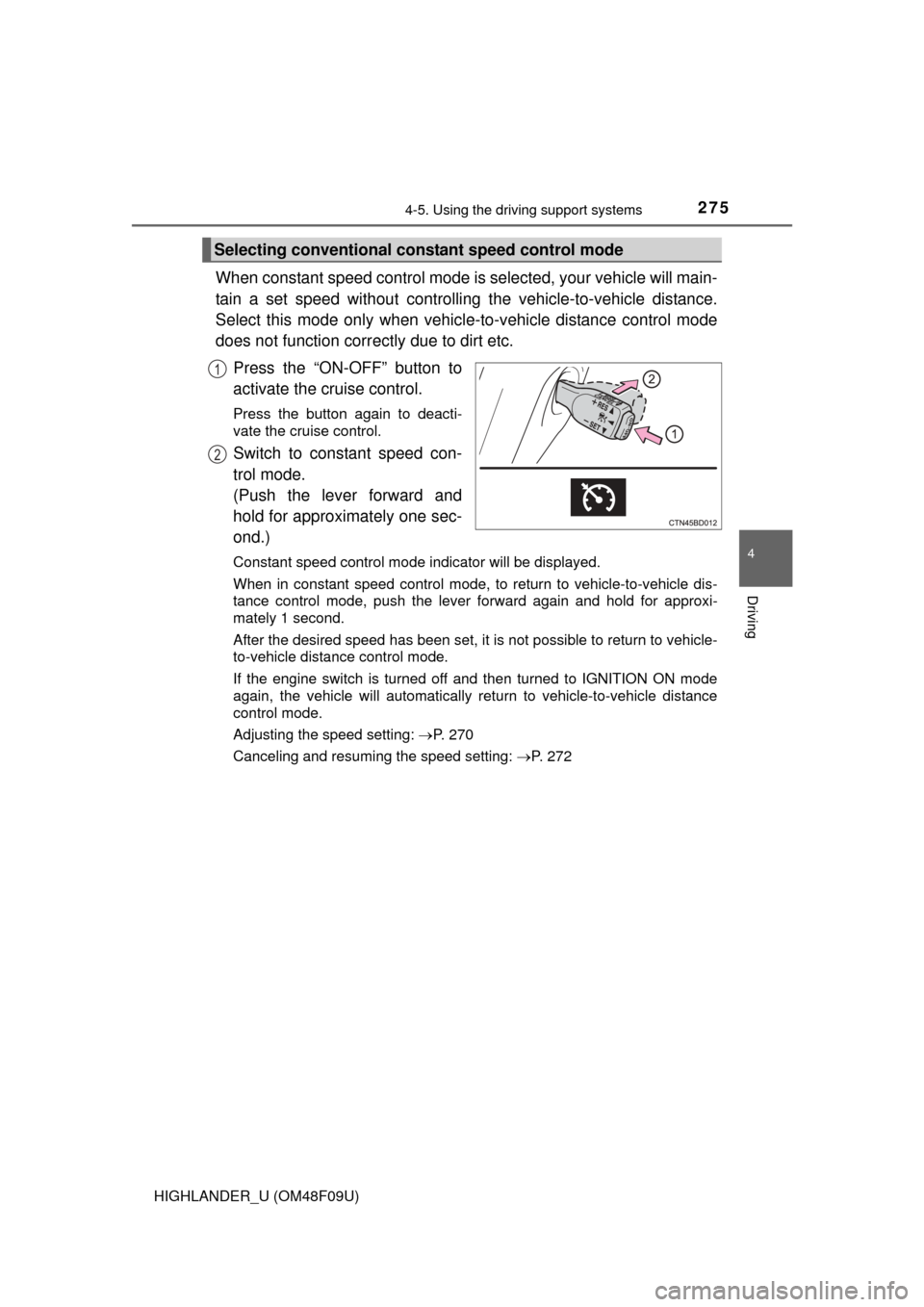
When constant speed control mode is selected, your vehicle will main-
tain a set speed without controlling the vehicle-to-vehicle distance.
Select this mode only when vehicl e-to-vehicle distance control mode
does not function corr ectly due to dirt etc.
Press the “ON-OFF” button to
activate the cruise control.
Press the button again to deacti-
vate the cruise control.
Switch to constant speed con-
trol mode.
(Push the lever forward and
hold for approximately one sec-
ond.)
Constant speed control mode indicator will be displayed.
When in constant speed control mode, to return to vehicle-to-vehicle dis-
tance control mode, push the leve r forward again and hold for approxi-
mately 1 second.
After the desired speed has been set, it is not possible to return to vehicle-
to-vehicle distance control mode.
If the engine switch is turned off and then turned to IGNITION ON mode
again, the vehicle will automatically return to vehicle-to-vehicle distance
control mode.
Adjusting the speed setting: P. 270
Canceling and resuming the speed setting: P. 272
Selecting conventional constant speed control mode
1
2
Page 284 of 716
2844-5. Using the driving support systems
HIGHLANDER_U (OM48F09U)
Press the LDA switch to activate the system.
The LDA indicator and lane lines will come on.
Press the switch again to turn the LDA system off.
The LDA system will remain on or off even if the engine switch is turned to
IGNITION ON mode.
●When the vehicle speed is approximately 32 mph (50 km/h) or
more
● When the lane width is more than approximately 8.2 ft. (2.5 m)
● When driving on a straight road or through a curve with a radius of
more than approximately 328 ft. (100 m)
Turning the LDA system on
Vehicles with monochrome dis-
playVehicles with color display
Operating conditions
Page 300 of 716
3004-5. Using the driving support systems
HIGHLANDER_U (OM48F09U)
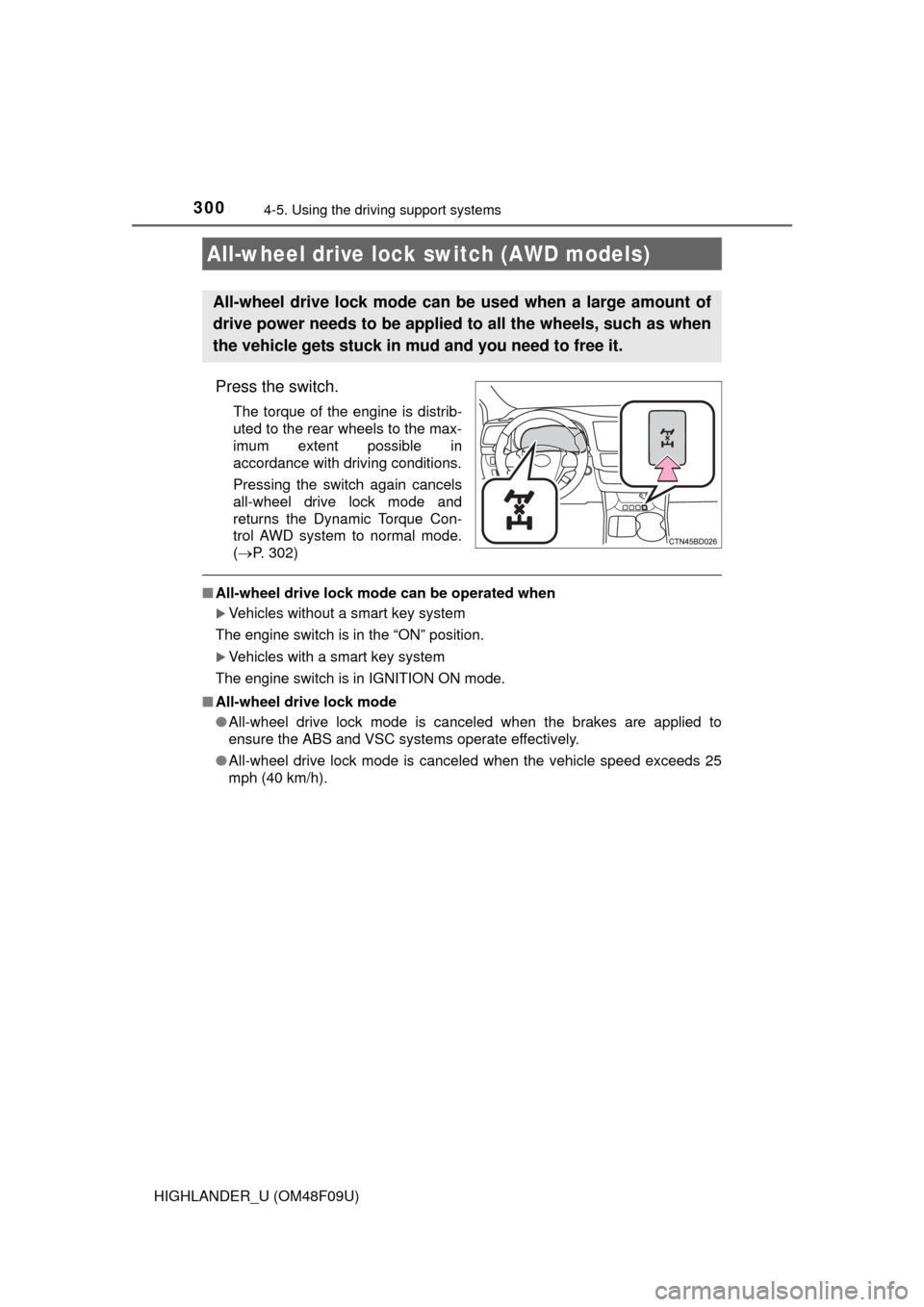
Press the switch.
The torque of the engine is distrib-
uted to the rear wheels to the max-
imum extent possible in
accordance with driving conditions.
Pressing the switch again cancels
all-wheel drive lock mode and
returns the Dynamic Torque Con-
trol AWD system to normal mode.
( P. 302)
■All-wheel drive lock mode can be operated when
Vehicles without a smart key system
The engine switch is in the “ON” position.
Vehicles with a smart key system
The engine switch is in IGNITION ON mode.
■ All-wheel drive lock mode
●All-wheel drive lock mode is canceled when the brakes are applied to
ensure the ABS and VSC systems operate effectively.
● All-wheel drive lock mode is cancel ed when the vehicle speed exceeds 25
mph (40 km/h).
All-wheel drive lock switch (AWD models)
All-wheel drive lock mode can be used when a large amount of
drive power needs to be applied to all the wheels, such as when
the vehicle gets stuck in mud and you need to free it.