Page 150 of 716

1503-2. Opening, closing and locking the doors
HIGHLANDER_U (OM48F09U)■
Note for the entry function
●Even when the electronic key is within the effective range (detection areas),
the system may not operate properly in the following cases:
• The electronic key is too close to the window or outside door handle, near
the ground, or in a high place when the doors are locked or unlocked.
• The electronic key is near the ground or in a high place, or too close to
the rear bumper center when the back door is opened.
• The electronic key is on the instrument panel or floor, or in the auxiliary box of the driver's side instrument panel, door pockets or glove box when
the engine is started or engine switch modes are changed.
● Do not leave the electronic key on top of the instrument panel or near the
door pockets when exiting the vehicle. Depending on the radio wave recep-
tion conditions, it may be detected by the antenna outside the cabin and the
door will become lockable from the outside, possibly trapping the electronic
key inside the vehicle.
● As long as the electronic key is within the effective range, the doors may be
locked or unlocked by anyone. However, only the doors detecting the elec-
tronic key can be used to unlock the vehicle.
● Even if the electronic key is not inside the vehicle, it may be possible to start
the engine if the electronic key is near the window.
● The doors may unlock or lock if a large amount of water splashes on the
door handle, such as in the rain or in a car wash when the electronic key is
within the effective range. (The doors will automatically be locked after
approximately 60 seconds if the doors are not opened and closed.)
● If the wireless remote control is used to lock the doors when the electronic
key is near the vehicle, there is a possibility that the door may not be
unlocked by the entry function. (Use the wireless remote control to unlock
the doors.)
● Touching the door lock or unlock sensor while wearing gloves may prevent
lock or unlock operation. Remove the gloves and touch the lock or unlock
sensor again.
● When the lock operation is performed using the lock sensor, recognition sig-
nals will be shown up to two consecutive times. After this, no recognition
signals will be given.
● If the door handle becomes wet while the electronic key is within the effec-
tive range, the door may lock and unlock repeatedly. In that case, follow the
following correction procedures to wash the vehicle:
• Place the electronic key in a location 6 ft. (2 m) or more away from the
vehicle. (Take care to ensure that the key is not stolen.)
• Set the electronic key to battery-saving mode to disable the smart key system. ( P. 148)
Page 230 of 716

2304-2. Driving procedures
HIGHLANDER_U (OM48F09U)
If the engine is stopped with the shift lever in a position other than P,
the engine switch will not be turned off but instead be turned to
ACCESSORY mode. Perform the following procedure to turn the
switch off:
Check that the parking brake is set.
Shift the shift lever to P.
Check that “Turn Power OFF” is displayed on the multi-information
display and then press the engine switch once.
Check that “Turn Power OFF” on the multi-information display is off.
■Message displays
Message illustrations used in this section are intended as examples, and may
differ from the image that is actually displayed on the multi-information dis-
play.
■ Auto power off function
If the vehicle is left in ACCESSORY mode for more than 20 minutes or IGNI-
TION ON mode (the engine is not running) for more than an hour with th\
e
shift lever in P, the engine switch will automatically turn off. However, this
function cannot entirely prevent battery discharge. Do not leave the vehicle
with the engine switch in ACCESSORY or IGNITION ON mode for long peri-
ods of time when the engine is not running.
■ Electronic key battery depletion
P. 1 1 6
■ Conditions affecting operation
P. 149
■ Note for the entry function
P. 150
■ If the engine does not start
●The engine immobilizer system may not have been deactivated. ( P. 80)
Contact your Toyota dealer.
● Check that the shift lever is securely set in P. The engine may not start if the
shift lever is displaced out of P.
When stopping the engine with the shift lever in a position other
than P
1
2
3
4
Page 231 of 716
2314-2. Driving procedures
4
Driving
HIGHLANDER_U (OM48F09U)■
Steering lock
After turning the engine switch off and opening and closing the doors, the
steering wheel will be locked due to the steering lock function. Operating the
engine switch again automatically cancels the steering lock.
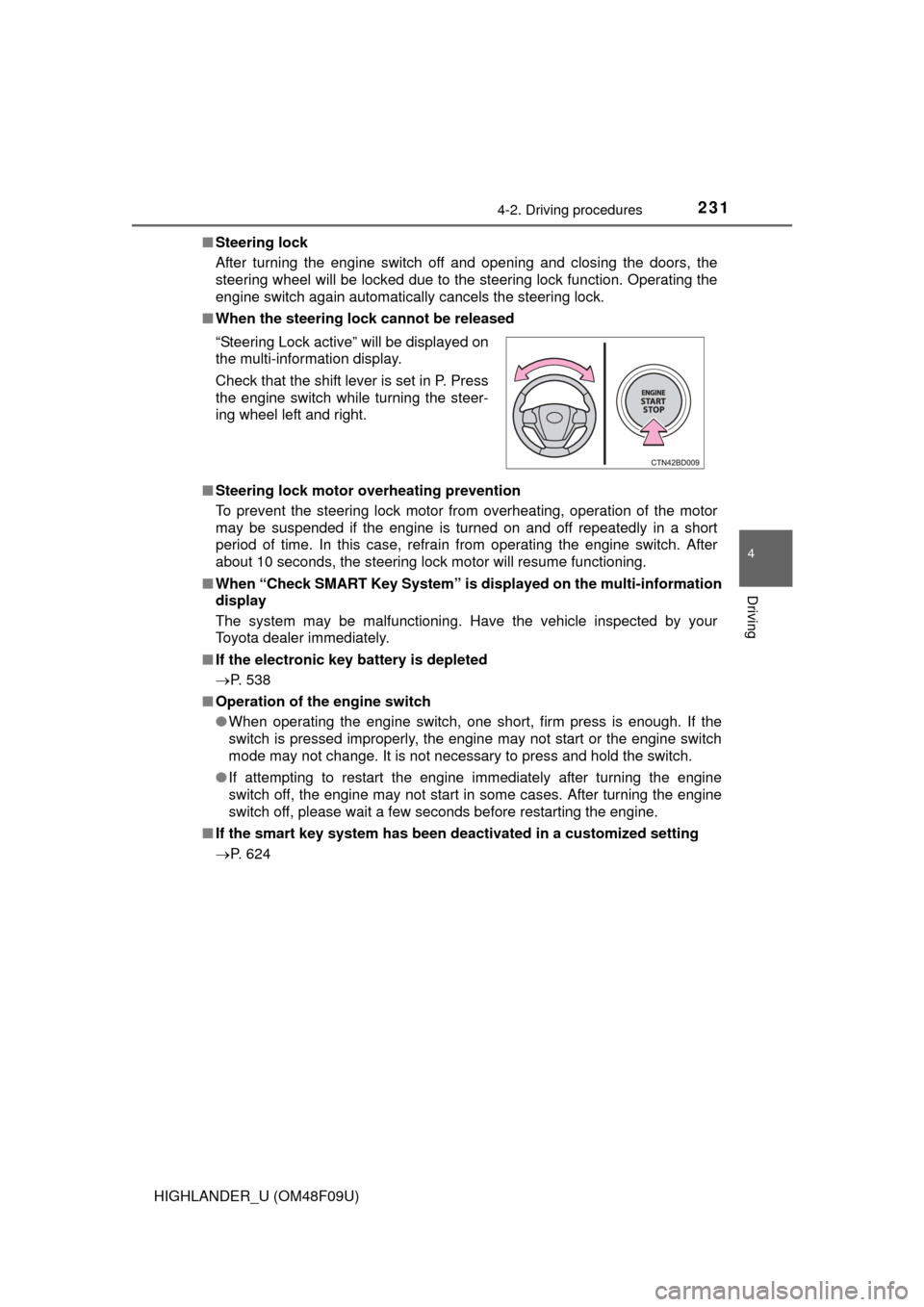
■ When the steering lock cannot be released
■ Steering lock motor overheating prevention
To prevent the steering lock motor from overheating, operation of the motor
may be suspended if the engine is turned on and off repeatedly in a short
period of time. In this case, refrain from operating the engine switch. \
After
about 10 seconds, the steering lock motor will resume functioning.
■ When “Check SMART Key System” is displayed on the multi-information
display
The system may be malfunctioning. Have the vehicle inspected by your
Toyota dealer immediately.
■ If the electronic key battery is depleted
P. 538
■ Operation of the engine switch
●When operating the engine switch, one short, firm press is enough. If the
switch is pressed improperly, the engine may not start or the engine switch
mode may not change. It is not necessary to press and hold the switch.
● If attempting to restart the engine immediately after turning the engine
switch off, the engine may not start in some cases. After turning the engine
switch off, please wait a few seconds before restarting the engine.
■ If the smart key system has been deactivated in a customized setting
P. 624 “Steering Lock active” will be displayed on
the multi-information display.
Check that the shift lever is set in P. Press
the engine switch while turning the steer-
ing wheel left and right.
Page 244 of 716

2444-3. Operating the lights and wipers
HIGHLANDER_U (OM48F09U)■
Light reminder buzzer
Vehicles without a smart key system
A buzzer sounds when the engine switch is turned to the “LOCK” or “ACC”
position and the driver’s door is opened while the lights are turned on.
Vehicles with a smart key system
A buzzer sounds when the engine switch is turned off or turned to ACCES-
SORY mode and the driver’s door is opened while the lights are turned on.
■ Battery-saving function
In the following conditions, the remaining lights will go off automatically after
20 minutes in order to prevent the vehicle battery from being discharged:
●The headlights and/or tail lights are on.
● Vehicles without a smart key system:
The engine switch is turned to the “ACC” or “LOCK” position.
Vehicles with a smart key system:
The engine switch is turned to ACCESSORY mode or turned off.
This function will be canceled in any of the following situations:
● Vehicles without a smart key system:
When the engine switch is turned to the “ON” position.
Vehicles with a smart key system:
When the engine switch is turned to IGNITION ON mode.
● When the light switch is operated.
● When any of the doors is opened or closed.
Page 449 of 716
4496-2. Using the interior lights
6
Interior features
HIGHLANDER_U (OM48F09U)
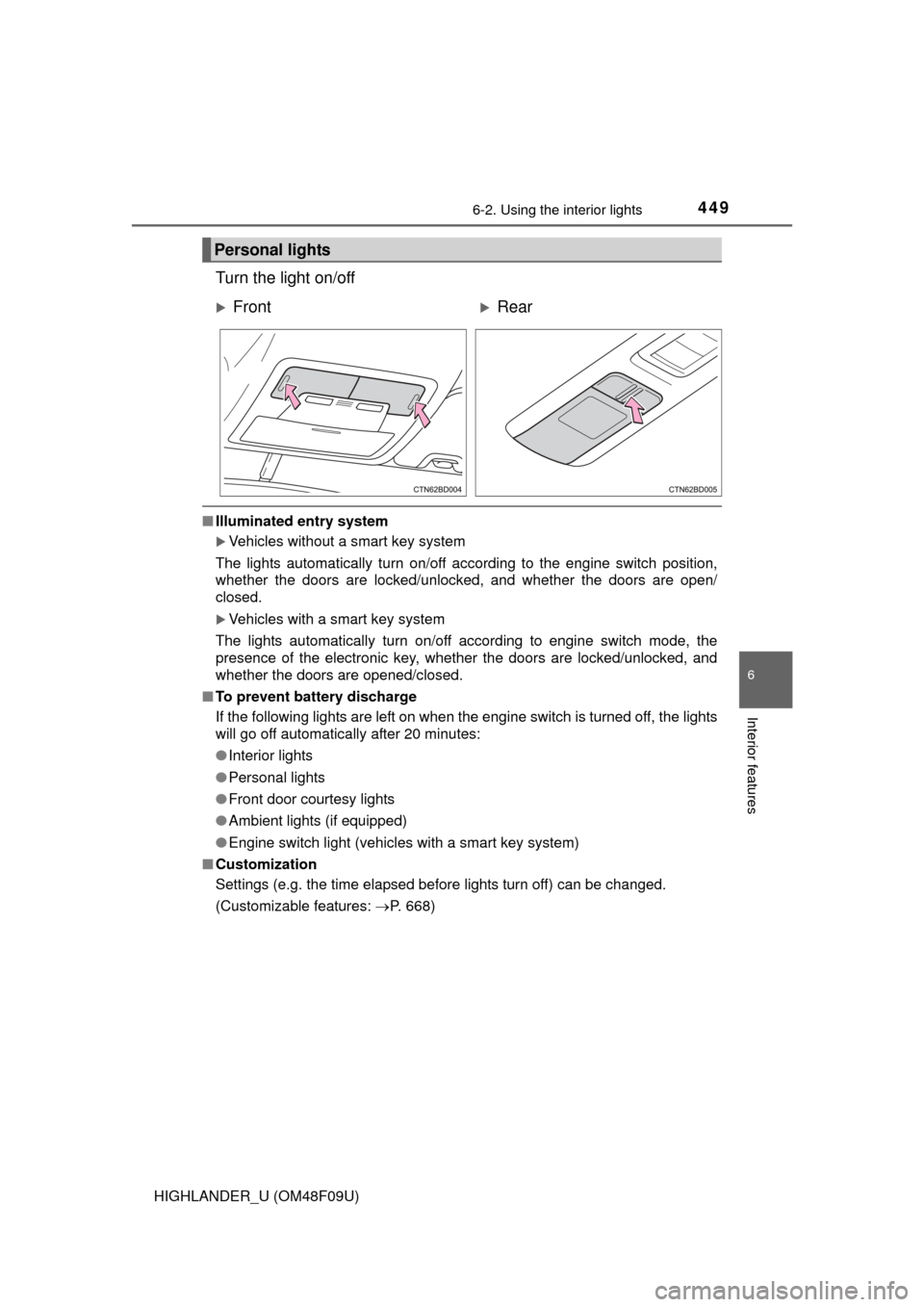
Turn the light on/off
■Illuminated entry system
Vehicles without a smart key system
The lights automatically turn on/off according to the engine switch position,
whether the doors are locked/unlocked, and whether the doors are open/
closed.
Vehicles with a smart key system
The lights automatically turn on/off according to engine switch mode, the
presence of the electronic key, whether the doors are locked/unlocked, and
whether the doors are opened/closed.
■ To prevent battery discharge
If the following lights are left on when the engine switch is turned off, the lights
will go off automatically after 20 minutes:
●Interior lights
● Personal lights
● Front door courtesy lights
● Ambient lights (if equipped)
● Engine switch light (vehicles with a smart key system)
■ Customization
Settings (e.g. the time elapsed before lights turn off) can be changed.
(Customizable features: P. 668)
Personal lights
FrontRear
Page 461 of 716
4616-4. Using the other interior features
6
Interior features
HIGHLANDER_U (OM48F09U)
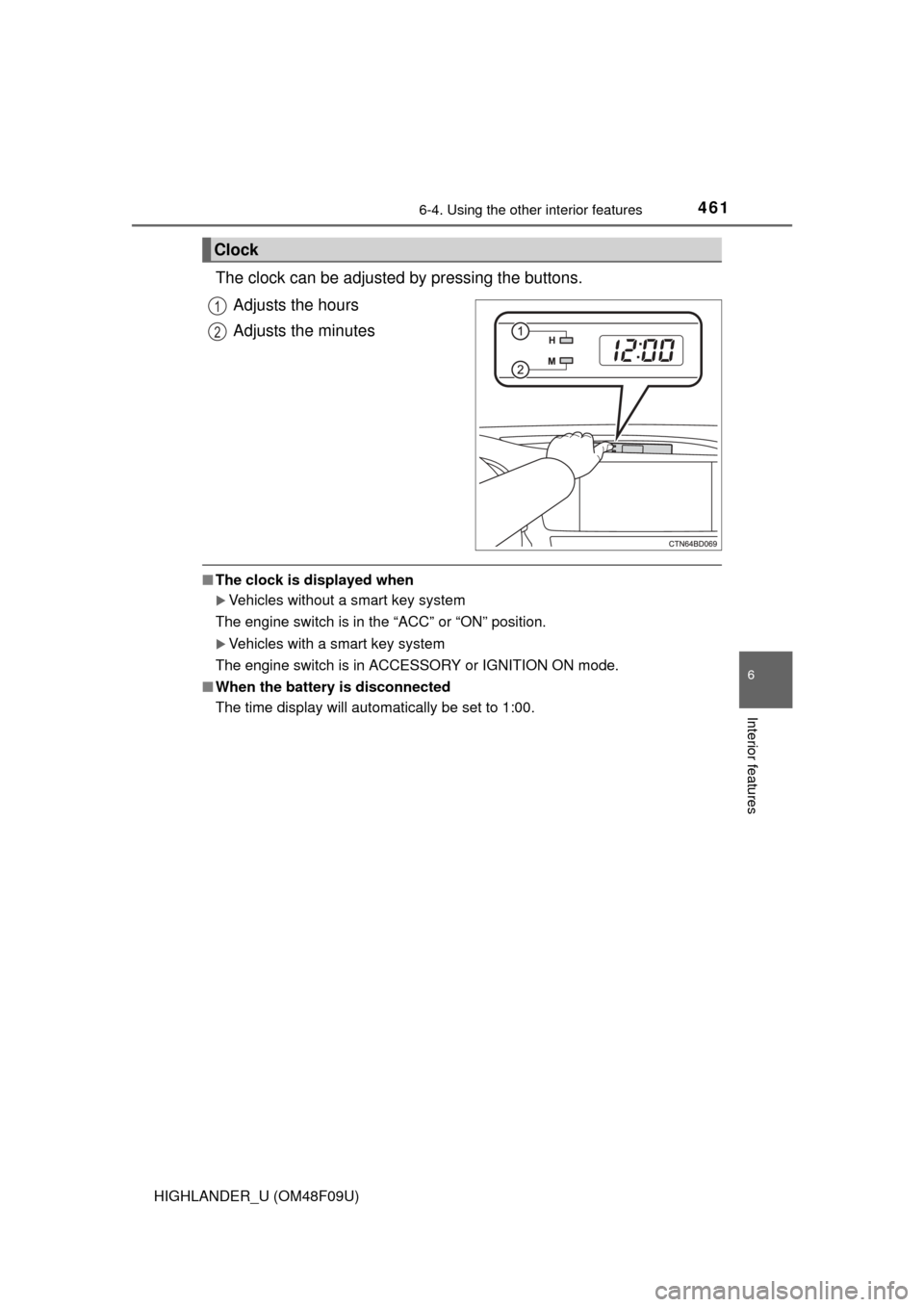
The clock can be adjusted by pressing the buttons.Adjusts the hours
Adjusts the minutes
■The clock is displayed when
Vehicles without a smart key system
The engine switch is in the “ACC” or “ON” position.
Vehicles with a smart key system
The engine switch is in ACCESSORY or IGNITION ON mode.
■ When the battery is disconnected
The time display will automatically be set to 1:00.
Clock
1
2
Page 487 of 716
487
7Maintenance and care
HIGHLANDER_U (OM48F09U)7-1. Maintenance and care
Cleaning and protecting the vehicle exterior .......... 488
Cleaning and protecting the vehicle interior ........... 492
7-2. Maintenance Maintenance requirements ................... 495
General maintenance........ 498
Emission inspection and maintenance (I/M)
programs ......................... 502
7-3. Do-it-yourself maintenance
Do-it-yourself service precautions ..................... 503
Hood ................................. 505
Positioning a floor jack ...... 507
Engine compartment ......... 508
Tires .................................. 520
Tire inflation pressure ....... 531
Wheels .............................. 534
Air conditioning filter.......... 536
Wireless remote control/ electronic key battery ...... 538
Checking and replacing fuses ................ 541
Light bulbs......................... 545
Page 489 of 716

4897-1. Maintenance and care
7
Maintenance and care
HIGHLANDER_U (OM48F09U)■
When using a car wash (veh icles with a smart key system)
If the door handle becomes wet while the electronic key is within the ef\
fective
range, the door may lock and unlock repeatedly. In that case, follow the fol-
lowing correction procedures to wash the vehicle:
● Place the key in a position 6 ft. (2 m) or more separate from the vehicle
while the vehicle is being washed. (Take care to ensure that the key is not
stolen.)
● Set the electronic key to battery-saving mode to disable the smart key sys-
tem. ( P. 148)
■ Aluminum wheels
●Remove any dirt immediately by using a neutral detergent. Do not use hard
brushes or abrasive cleaners. Do not use strong or harsh chemical clean-
ers.
Use the same mild detergent and wax as used on the paint.
● Do not use detergent on the wheels when they are hot, for example after
driving for long distance in the hot weather.
● Wash detergent from the wheels immediately after use.
■ Bumpers
Do not scrub with abrasive cleaners.