2016 TOYOTA HIGHLANDER brake light
[x] Cancel search: brake lightPage 223 of 716
2234-1. Before driving
4
Driving
HIGHLANDER_U (OM48F09U)
WARNING
●Vehicle-trailer instability is more likely on steep long downhills. Before
descending steep or long downhill grades, slow down and downshift. Do
not make sudden downshifts when descending steep or long downhill
grades. Avoid holding the brake pedal down too long or applying the
brakes too frequently. This could cause the brakes to overheat and result
in reduced braking efficiency.
● Vehicles with a compact spare tire: Do not tow a trailer when the compact
spare tire is installed on your vehicle.
■ Hitch
Trailer hitch assemblies have different weight capacities established by the
hitch manufacturer. Even though the vehicle may be physically capable of
towing a higher weight, the operator must determine the maximum weight
rating of the particular hitch assembly and never exceed the maximum
weight rating specified for the trailer-hitch. Exceeding the maximum weight
rating set by the trailer-hitch manufacturer can cause an accident resulting
in death or serious personal injuries.
■ When towing a trailer
Toyota recommends trailers with brakes that conform to any applicable fed-
eral and state/provincial regulations.
●If the gross trailer weight exceeds unbraked TWR, trailer brakes are
required. Toyota recommends trailers with brakes that conform to all appli-
cable federal and state/provincial regulations.
● Never tap into your vehicle’s hydraulic system, as this will lower the vehi-
cle’s braking effectiveness.
● Never tow a trailer without using a safety chain securely attached to both
the trailer and the vehicle. If damage occurs to the coupling unit or hitch
ball, there is danger of the trailer wandering into another lane.
NOTICE
■When installing a trailer hitch
Use only the position recommended by your Toyota dealer. Do not install
the trailer hitch on the bumper; this may cause body damage.
■ Do not directly splice trailer lights
Do not directly splice trailer lights. Directly splicing trailer lights may damage
your vehicle’s electrical system and cause a malfunction.
Page 242 of 716
2424-3. Operating the lights and wipers
HIGHLANDER_U (OM48F09U)
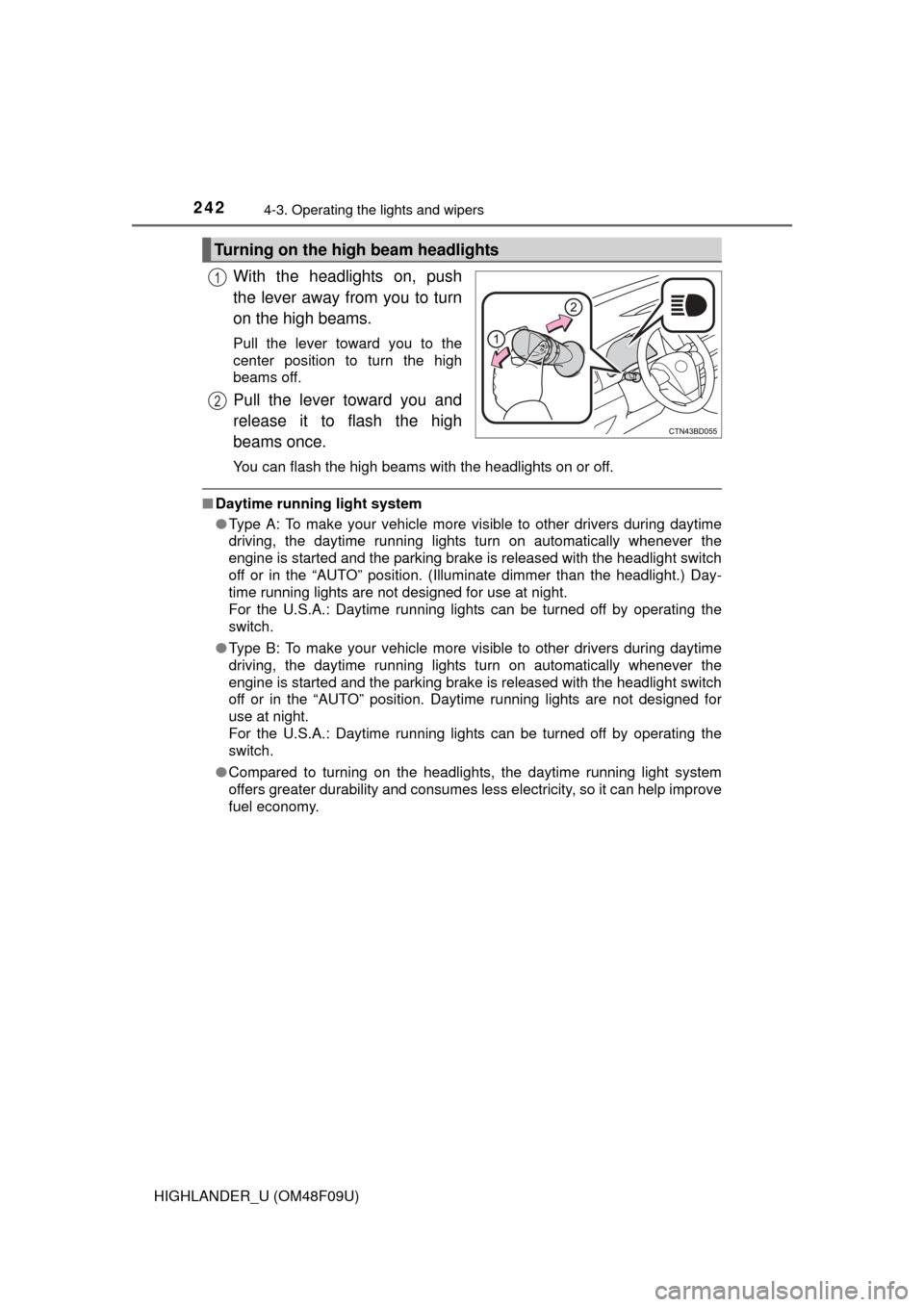
With the headlights on, push
the lever away from you to turn
on the high beams.
Pull the lever toward you to the
center position to turn the high
beams off.
Pull the lever toward you and
release it to flash the high
beams once.
You can flash the high beams with the headlights on or off.
■Daytime running light system
●Type A: To make your vehicle more visible to other drivers during daytime
driving, the daytime running lights turn on automatically whenever the
engine is started and the parking brake is released with the headlight switch
off or in the “AUTO” position. (Illuminate dimmer than the headlight.) Day-
time running lights are not designed for use at night.
For the U.S.A.: Daytime running lights can be turned off by operating the
switch.
● Type B: To make your vehicle more visible to other drivers during daytime
driving, the daytime running lights turn on automatically whenever the
engine is started and the parking brake is released with the headlight switch
off or in the “AUTO” position. Daytime running lights are not designed for
use at night.
For the U.S.A.: Daytime running lights can be turned off by operating the
switch.
● Compared to turning on the headlights, the daytime running light system
offers greater durability and consumes less electricity, so it can help improve
fuel economy.
Turning on the high beam headlights
1
2
Page 304 of 716
3044-5. Using the driving support systems
HIGHLANDER_U (OM48F09U)
■Turning off both TRAC and VSC systems
To turn the TRAC and VSC systems off, press and hold for more than 3
seconds while the vehicle is stopped.
The VSC OFF indicator light will come on and the “TRAC OFF” will be shown
on the multi-information display.
*
Press again to turn the systems back on.
*: On vehicles with pre-collision system, pre-collision brake assist and pre-
collision braking will also be disabled. The pre-collision system warning
light will come on and the message will be shown on the multi-information
display. ( P. 309)
■ When the message is displayed on th e multi-information display show-
ing that TRAC has been disabled even if switch has not been
pressed
TRAC, hill-start assist control and downhill assist control cannot be operated.
Contact your Toyota dealer.
■ Sounds and vibrations caused by th e ABS, brake assist, TRAC, VSC and
hill-start assist control systems
● A sound may be heard from the engine compartment when the brake pedal
is depressed repeatedly, when the engine is started or just after the vehicle
begins to move. This sound does not indicate that a malfunction has
occurred in any of these systems.
● Any of the following conditions may occur when the above systems are
operating. None of these indicates that a malfunction has occurred.
• Vibrations may be felt through the vehicle body and steering.
• A motor sound may be heard after the vehicle comes to a stop.
• The brake pedal may pulsate slightly after the ABS is activated.
• The brake pedal may move down slightly after the ABS is activated.
■ EPS operation sound
When the steering wheel is operated, a motor sound (whirring sound) may be
heard. This does not indicate a malfunction.
■ Automatic reactivation of TRAC and VSC systems
After turning the TRAC and VSC systems off, the systems will be automati-
cally re-enabled in the following situations:
● Vehicles without a smart key system: When the engine switch is turned to
the “LOCK” position
Vehicles with a smart key system: When the engine switch is turned off
● If only the TRAC system is turned off, the TRAC will turn on when vehicle
speed increases
If both the TRAC and VSC systems are turned off, automatic re-enabling will
not occur when vehicle speed increases.
Page 306 of 716

3064-5. Using the driving support systems
HIGHLANDER_U (OM48F09U)
WARNING
■TRAC may not operat e effectively when
Directional control and power may not be achievable while driving on slip-
pery road surfaces, even if the TRAC system is operating.
Drive the vehicle carefully in conditions where stability and power may be
lost.
■ Hill- start assist control
●Do not overly rely on hill-start assist control. Hill-start assist control may
not operate effectively on steep inclines and roads covered with ice.
● Unlike the parking brake, hill-start assist control is not intended to hold the
vehicle stationary for an extended period of time. Do not attempt to use
hill-start assist control to hold the vehicle on an incline, as doing so may
lead to an accident.
■ When the VSC is activated
The slip indicator light flashes. Always drive carefully. Reckless driving may
cause an accident. Exercise particular care when the indicator light flashes.
■ When the TRAC/VSC syst ems are turned off
Be especially careful and drive at a speed appropriate to the road condi-
tions. As these are the systems to help ensure vehicle stability and driving
force, do not turn the TRAC/VSC systems off unless necessary.
■ Replacing tires
Make sure that all tires are of the specified size, brand, tread pattern and
total load capacity. In addition, make sure that the tires are inflated to the
recommended tire inflation pressure level.
The ABS, TRAC and VSC systems will not function correctly if different tires
are installed on the vehicle.
Contact your Toyota dealer for further information when replacing tires or
wheels.
■ Handling of tires and the suspension
Using tires with any kind of problem or modifying the suspension will affect
the driving assist systems, and may cause a system to malfunction.
Page 307 of 716
3074-5. Using the driving support systems
4
Driving
HIGHLANDER_U (OM48F09U)■
Activating the downhill assist control system
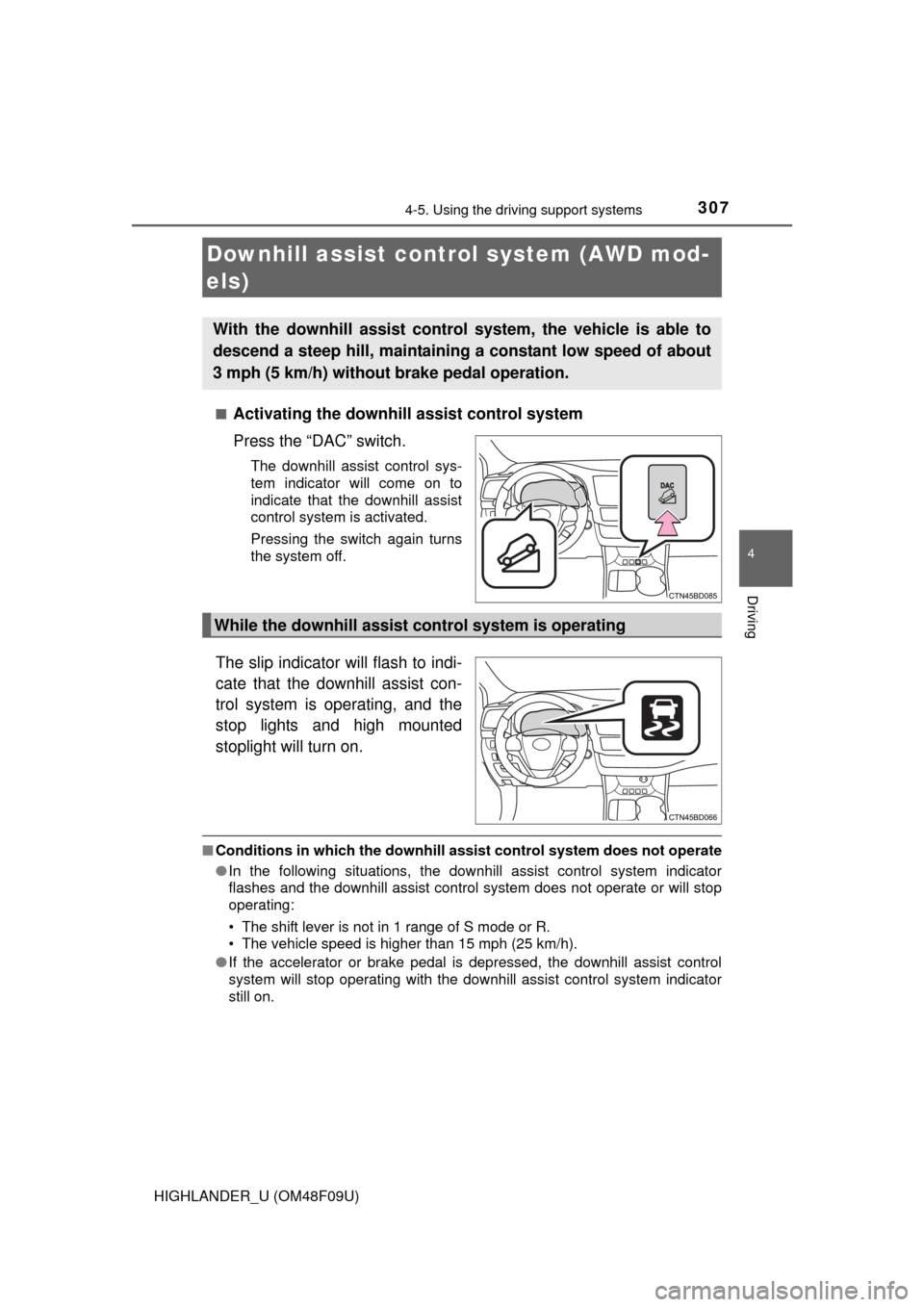
Press the “DAC” switch.
The downhill assist control sys-
tem indicator will come on to
indicate that the downhill assist
control system is activated.
Pressing the switch again turns
the system off.
The slip indicator will flash to indi-
cate that the downhill assist con-
trol system is operating, and the
stop lights and high mounted
stoplight will turn on.
■
Conditions in which the downhill assist control system does not operate
● In the following situations, the downhill assist control system indicator
flashes and the downhill assist control system does not operate or will stop
operating:
• The shift lever is not in 1 range of S mode or R.
• The vehicle speed is higher than 15 mph (25 km/h).
● If the accelerator or brake pedal is depressed, the downhill assist control
system will stop operating with the downhill assist control system indicator
still on.
Downhill assist control system (AWD mod-
els)
With the downhill assist control system, the vehicle is able to
descend a steep hill, maintaining a constant low speed of about
3 mph (5 km/h) without brake pedal operation.
While the downhill assist control system is operating
Page 309 of 716
3094-5. Using the driving support systems
4
Driving
HIGHLANDER_U (OM48F09U)
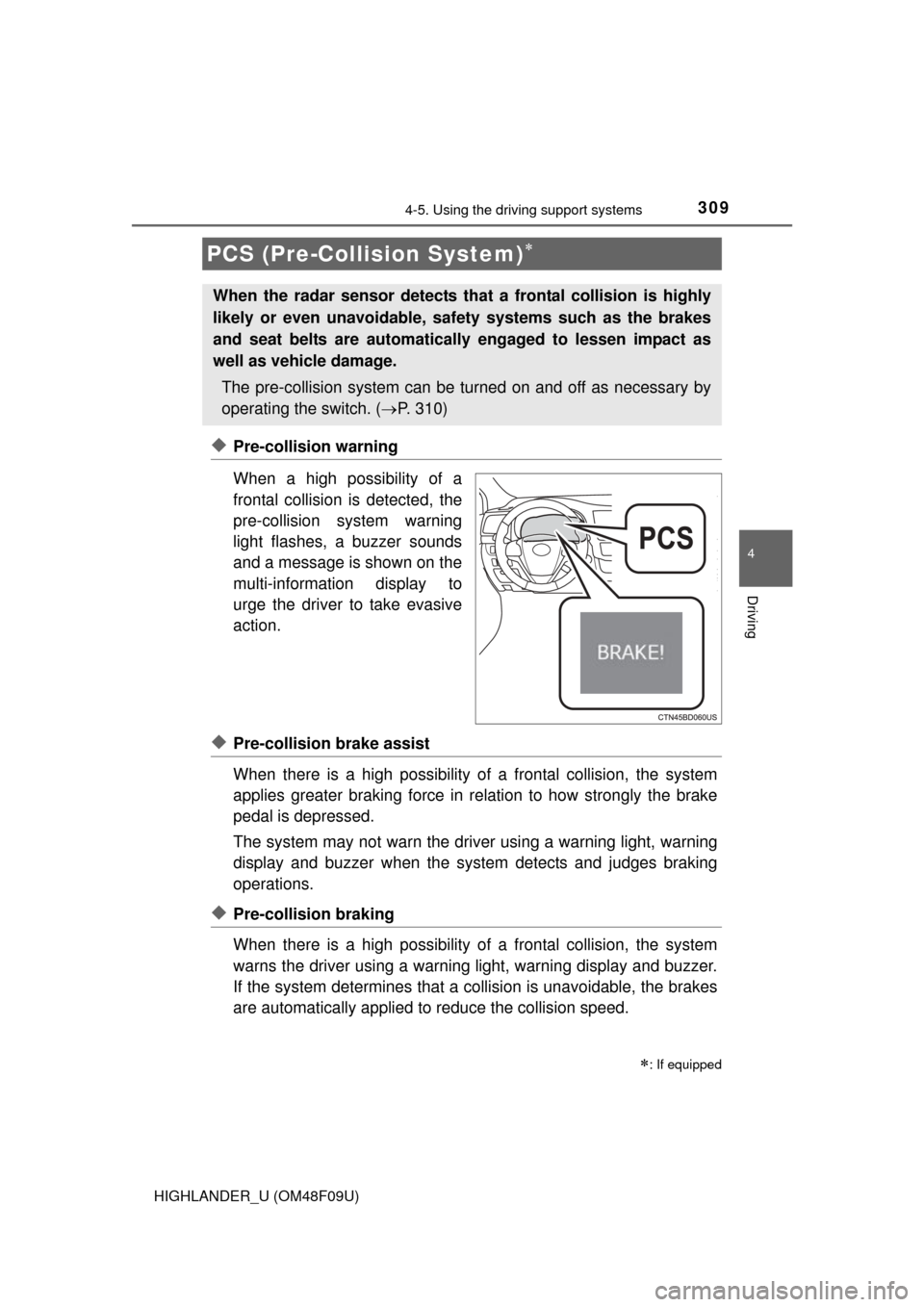
◆Pre-collision warning
When a high possibility of a
frontal collision is detected, the
pre-collision system warning
light flashes, a buzzer sounds
and a message is shown on the
multi-information display to
urge the driver to take evasive
action.
◆Pre-collision brake assist
When there is a high possibility of a frontal collision, the system
applies greater braking force in relation to how strongly the brake
pedal is depressed.
The system may not warn the driver using a warning light, warning
display and buzzer when the system detects and judges braking
operations.
◆Pre-collision braking
When there is a high po ssibility of a frontal collision, the system
warns the driver using a warning light, warning display and buzzer.
If the system determines that a collision is unavoidable, the brakes
are automatically applied to reduce the collision speed.
PCS (Pre-Collision System)
: If equipped
When the radar sensor detects th at a frontal collision is highly
likely or even unavoidable, safety systems such as the brakes
and seat belts are automatically engaged to lessen impact as
well as vehicle damage.
The pre-collision system can be tu rned on and off as necessary by
operating the switch. ( P. 310)
Page 311 of 716
3114-5. Using the driving support systems
4
Driving
HIGHLANDER_U (OM48F09U)
■The pre-collision system is operational when
The PCS OFF switch is not pressed and the following conditions are met:
● Pre-collision warning:
• Vehicle speed is greater than about 10 mph (15 km/h).
• The speed at which your vehicle is approaching the obstacle or the vehi-
cle running ahead of you is greater than about 10 mph (15 km/h).
● Pre-collision brake assist:
• The VSC OFF switch is not pressed.
• Vehicle speed is greater than about 19 mph (30 km/h).
• The speed at which your vehicle is approaching the obstacle or the vehi-
cle running ahead of you is greater than about 19 mph (30 km/h).
• The brake pedal is depressed.
● Pre-collision braking:
• The VSC OFF switch is not pressed.
• Vehicle speed is greater than about 10 mph (15 km/h).
• The speed at which your vehicle is approaching the obstacle or the vehi-
cle running ahead of you is greater than about 10 mph (15 km/h).
■ Conditions that may trigger the system even if there is no danger of a
collision
In any of the following situations where the frontal area of the radar sensor is
interrupted, the radar sensor may detect possibility of a frontal collision and
the system may be activated.
● When passing by an oncoming vehicle in a curve or a turn to the right or the
left
● When rapidly approaching an obstacle ahead (e.g. preceding vehicle, toll
gate barrier, etc.)
● When there is a structural object (billboard, low ceiling, fluorescent light,
etc.) above the uphill road ahead
● When driving on a narrow road or through under a low overhead structure
(bridge, tunnel, fly-under, etc.)
● When driving on an uneven road surface
● When there is a metal object, bump, or protrusion on the road surface
● When vehicle’s front part is raised or lowered depending on loading condi-
tions
● When the direction of radar sensor is misaligned by strong impact applied
on an area around the radar sensor, etc.
● When there is an obstacle (guard rail, etc.) by the roadside at the entrance
to a curve
● When the front of your vehicle is pointing upwards (caused by towing a
trailer, during emergency towing or putting a heavy load in the luggage com-
partment etc.)
When the system is activated in the situations described above, there is also
a possibility that the brakes may be applied with a force greater than normal.
Page 314 of 716
3144-5. Using the driving support systems
HIGHLANDER_U (OM48F09U)
WARNING
■Limitations of the pre-collision system
The driver is solely responsible for safe driving. Always drive safely, taking
care to observe your surroundings.
Do not use the pre-collision system instead of normal braking operations
under any circumstances. This system will not prevent collisions or lessen
damage or injuries in all cases. Do not overly rely on this system.
Failure to do so may cause an accident, resulting in death or serious injury.
This system has been designed to help avoid and reduce the impact of col-
lisions. However, the system operates differently depending on the situation
(P. 311). As a result, the same level of performance may not be expected
in all cases. Also, the pre-collision brakes may not operate if the driver is
depressing the brake pedal or turning the steering wheel, as the system will
determine such conditions as collision avoidance operations.
■ When the sensor may not be correct ly detecting the vehicle ahead
Apply the brakes as necessary in any of the following situations:
● When water or snow thrown up by the surrounding vehicles hinders the
functioning of the sensor
● When your vehicle is pointing upwards (caused by a heavy load in the lug-
gage compartment etc.)
● Vehicles that cut in suddenly
● Vehicles with small rear ends (trailers with no load on board etc.)
● Motorcycles traveling in the same lane
■ Handling the radar sensor
Observe the following to ensure the pre-collision system can function effec-
tively.
Otherwise, the system may not function correctly and could result in an
accident.
●Keep the sensor and grille cover clean at all times.
Clean the sensor and grille cover with a soft cloth so you do not mark or
damage them.
● Do not subject the sensor or surrounding area to a strong impact.
If the sensor moves even slightly off position, the system may malfunction.
If the sensor or surrounding area is subject to a strong impact, always
have the area inspected and adjusted by your Toyota dealer.
● Do not disassemble the sensor.
● Do not attach accessories or stickers to the sensor, grille cover or sur-
rounding area.
● Do not modify or paint the sensor and grille cover.
● If the radar sensor needs to be replaced, contact your Toyota dealer.