2016 TOYOTA HIGHLANDER AUX
[x] Cancel search: AUXPage 9 of 352
9
HIGHLANDER_Navi_U
1
2
3
4
5
6
7
9
8
3. MEDIA OPERATION ..................... 100
CD ....................................................... 100
USB MEMORY .................................... 103
iPod ..................................................... 107
Bluetooth
® AUDIO ............................... 111
AUX ..................................................... 116
4. AUDIO/VISUAL REMOTE CONTROLS ................................. 118
STEERING SWITCHES ...................... 118
5. SETUP ........................................... 121
AUDIO SETTINGS .............................. 121
6. TIPS FOR OPERATING THE AUDIO/VISUAL SYSTEM ............ 123
OPERATING INFORMATION ............. 123
7. REAR SEAT ENTERTAINMENT SYSTEM OPERATION ................ 133
REAR SEAT ENTERTAINMENT
SYSTEM FEATURES ........................... 133
PLAYING A Blu-ray Disc™ (BD) AND DVD DISCS .............................. 146
PLAYING AN AUDIO CD AND MP3/WMA DISCS ............................. 159
PLAYING AN SD CARD ...................... 162
USING THE VIDEO MODE ................. 167
1. VOICE COMMAND SYSTEM OPERATION ................................ 170
VOICE COMMAND SYSTEM.............. 170
CASUAL SPEECH
RECOGNIZATION ............................ 176
COMMAND LIST ................................. 177
2. MOBILE ASSISTANT OPERATION ................................ 179
MOBILE ASSISTANT .......................... 179
1. USEFUL INFORMATION .............. 182
RECEIVING WEATHER
INFORMATION ................................. 182
RECEIVING TRAFFIC MAP INFORMATION ................................. 184
DATA SERVICES SETTINGS ............. 185
Driver Easy Speak ............................... 186
1. REAR VIEW MONITOR SYSTEM ....... ............................ ... 190
REAR VIEW MONITOR SYSTEM ....... 190
REAR VIEW MONITOR SYSTEM
PRECAUTIONS ................................ 192
THINGS YOU SHOULD KNOW .......... 197
2. TOYOTA PARKING ASSIST MONITOR ...................... 198
TOYOTA PARKING
ASSIST MONITOR ............................ 198
ESTIMATED COURSE LINE DISPLAY MODE ............................... 203
PARKING ASSIST GUIDE LINE DISPLAY MODE ............................... 205
TOYOTA PARKING ASSIST MONITOR PRECAUTIONS............... 207
THINGS YOU SHOULD KNOW .......... 212
3. INTUITIVE PARKING ASSIST ...... 214
INTUITIVE PARKING ASSIST............. 214
INTUITIVE PARKING ASSIST SETTING ............................. 219
4VOICE COMMAND SYSTEM
5INFORMATION
6PERIPHERAL MONITORING
SYSTEM
Page 48 of 352

48
2. Bluetooth® SETTINGS
HIGHLANDER_Navi_U
U.S.A. (Entune Audio Plus)
Canada (Entune Audio Plus)
CERTIFICATION
FCC ID: AJDK066
This device complies with Part 15 of
FCC Rules and Industry Canada
licence-exempt RSS standard(s).
Operation is subject to the following two
conditions: (1) this device may not
cause interference, and (2) this device
must accept any interference, including
interference that may cause undesired
operation of this device.
CAUTION:
FCC WARNING:
Information to User-Alteration or modifi-
cations carried out without appropriate
authorization may invalidate the user’s
right to operate the equipment.
RF Exposure Compliance:
This equipment complies with FCC/IC
radiation exposure limits set forth for an
uncontrolled environment and meets the
FCC radio frequency (RF) Exposure
Guidelines and RSS-102 of the IC radio
frequency (RF) Exposure rules. This
equipment should be installed and oper-
ated keeping the radiator at least 20cm
or more away from person’s body.
Co-location: This transmitter must not
be co-located or operated in conjunction
with any other antenna or transmitter.
IC: 775E-K066
This device complies with part 15 of
FCC Rules and Industry Canada
licence-exempt RSS standard(s). Oper-
ation is subject to the following two con-
ditions: (1) This device may not cause
interference, and (2) this device must
accept any interference, including inter-
ference that may cause undesired oper-
ation of this device.
Le présent appareil est conforme aux la
partie 15 des règles de la FCC et CNR
d'Industrie Canada applicables aux
appareils radio exempts de licence.
L'exploitation est autorisée aux deux
conditions suivantes: (1) l'appareil ne
doit pas produire de brouillage, et (2)
l'utilisateur de l'appareil doit accepter
tout brouillage radioélectrique subi,
même si le brouillage est susceptible
d'en compromettre le fonctionnement.
Page 49 of 352

49
2. Bluetooth® SETTINGS
HIGHLANDER_Navi_U
BASIC FUNCTION
2
U.S.A. (Entune Premium Audio) This equipment complies with FCC/IC
radiation exposure limits set forth for an
uncontrolled environment and meets the
FCC radio frequency (RF) Exposure
Guidelines and RSS-102 of the IC radio
frequency (RF) Exposure rules. This
equipment should be installed and oper-
ated keeping the radiator at least 20cm
or more away from person’s body.
Cet équipement est conforme aux lim-
ites d’exposition aux rayonnements
énoncées pour un environnement non
contrôlé et respecte les règles les
radioélectriques (RF) de la FCC lignes
directrices d'exposition et d’exposition
aux fréquences radioélectriques (RF)
CNR-102 de l’IC. Cet équipement doit
être installé et utilisé en gardant une
distance de 20 cm ou plus entre le dis-
positif rayonnant et le corps.
FCC ID: ACJ932YEAP01A727
NOTE:
This device complies with Part 15 of the
FCC Rules. Operation is subject to the
following two conditions: (1) this device
may not cause harmful interference,
and (2) this device must accept any
interference received, including
interference that may cause undesired
operation.
FCC WARNING:
Changes or modifications not expressly
approved by the party responsible for
compliance could void the user’s
authority to operate the equipment.
Any unauthorized changes or modifica-
tions to this equipment would void the
user’s authority to operate this device.
CAUTION:
Radio frequency radiation exposure
information:
This equipment complies with FCC radi-
ation exposure limits set forth for an
uncontrolled environment. This equip-
ment should be installed and operated
with minimum distance of 20cm
between the radiator and your body.
This transmitter must not be co-located
or operating in conjunction with any
other antenna or transmitter.
Page 50 of 352

50
2. Bluetooth® SETTINGS
HIGHLANDER_Navi_U
Canada (Entune Premium Audio) Mexico
This device complies with Industry
Canada license-exempt RSS stan-
dard(s). Operation is subject to the fol-
lowing two conditions: (1) this device
may not cause interference, and (2)this
device must accept any interference,
including interference that may cause
undesired operation of the device.
Le présent appareil est conforme aux
CNR d'Industrie Canada applicables
aux appareils radio exempts de licence.
L'exploitation est autorisée aux deux
conditions suivantes: (1)l'appareil ne
doit pas produire de brouillage, et (2)
l'utilisateur de l'appareil doit accepter
tout brouillage radioélectrique subi,
même si le brouillage est susceptible
d'en compromettre le fonctionnement.
This radio transmitter (identify the
device by certification number, or model
number if Category II) has been
approved by Industry Canada to oper-
ate with the antenna types listed below
with the maximum permissible gain and
required antenna impedance for each
antenna type indicated. Antenna types
not included in this list, having a gain
greater than the maximum gain indi-
cated for that type, are strictly prohibited
for use with this device.
Le présent émetteur radio (identifier le
dispositif par son numéro de certifica-
tion ou son numéro de modèle s'il fait
partie du matériel de catégorie II) a été
approuvé par Industrie Canada pour
fonctionner avec les types d'antenne
énumérés ci-dessous et ayant un gain
admissible maximal et l'impédance req-
uise pour chaque type d'antenne. Les
types d'antenne non inclus dans cette
liste, ou dont le gain est supérieur au
gain maximal indiqué, sont strictement
interdits pour l'exploitation de l'émetteur.La operación de está equipo esta sujeta
a las siguientes dos condiciones:
(1) es posible que este equipo o dispos-
itivo no cause interferencia peljudicial y
(2) este equipo o dispositivo debe
aceptar cualquier interferencia, incluy-
endo Ia que pueda causar su operación
no deseada.
Page 73 of 352
3
73
HIGHLANDER_Navi_U
4
5
6
7
8
9
1
2
3
1. QUICK REFERENCE ..................... 76
2. SOME BASICS .............................. 77
TURNING THE SYSTEM ON AND OFF ...................................... 78
SELECTING AN AUDIO SOURCE ....... 78
DISC SLOT............................................ 79
USB/AUX PORT .................................... 80
SOUND SETTINGS............................... 80
VOICE COMMAND SYSTEM................ 82
1. AM/FM RADIO............................... 83
OVERVIEW............................................ 83
PRESETTING A STATION .................... 86
SELECTING A STATION FROM THE LIST ............................................. 86
CACHING A RADIO PROGRAM ........... 87
RADIO BROADCAST DATA SYSTEM .............................................. 88
TRAFFIC ANNOUNCEMENT (FM RADIO) ........................................ 89
USING HD Radio™ TECHNOLOGY ..... 89
AVAILABLE HD Radio™ TECHNOLOGY ................................... 90
TROUBLESHOOTING GUIDE .............. 92
2. XM Satellite Radio ........................ 93
OVERVIEW............................................ 93
HOW TO SUBSCRIBE TO AN XM Satellite Radio ......................... 95
DISPLAYING THE RADIO ID ................ 97
PRESETTING A CHANNEL .................. 97
SELECTING A CHANNEL FROM THE LIST ............................................. 97
IF THE SATELLITE RADIO TUNER MALFUNCTIONS ................... 98
3. INTERNET RADIO ..... ................... 99
LISTENING TO INTERNET RADIO ....... 99
1BASIC OPERATION2RADIO OPERATION
AUDIO/VISUAL SYSTEM
Page 74 of 352
74
HIGHLANDER_Navi_U
1. CD................................................. 100
OVERVIEW.......................................... 100
PLAYING AN AUDIO CD ..................... 102
PLAYING AN MP3/WMA/AAC DISC .................................................. 102
2. USB MEMORY ............................. 103
OVERVIEW.......................................... 103
PLAYING A USB AUDIO ..................... 106
3. iPod .............................................. 107
OVERVIEW.......................................... 107
iPod AUDIO ......................................... 110
4. Bluetooth® AUDIO .......... ............ 111
OVERVIEW.......................................... 111
CONNECTING A Bluetooth®
DEVICE ............................................. 115
LISTENING TO Bluetooth
® AUDIO ..... 115
5. AUX .............................................. 116
OVERVIEW.......................................... 116
1. STEERING SWITCHES ............... 118
1. AUDIO SETTINGS....... ................ 121
AUDIO SETTINGS SCREEN ............... 121
1. OPERATING INFORMATION ..... 123
RADIO .................................................. 123
CD PLAYER AND DISC ....................... 124
iPod ...................................................... 126
FILE INFORMATION............................ 128
TERMS ................................................. 130
ERROR MESSAGES ........................... 132
3MEDIA OPERATION4AUDIO/VISUAL REMOTE
CONTROLS
5SETUP
6TIPS FOR OPERATING THE
AUDIO/VISUAL SYSTEM
Page 76 of 352
76
HIGHLANDER_Navi_U
1. BASIC OPERATION
1. QUICK REFERENCE
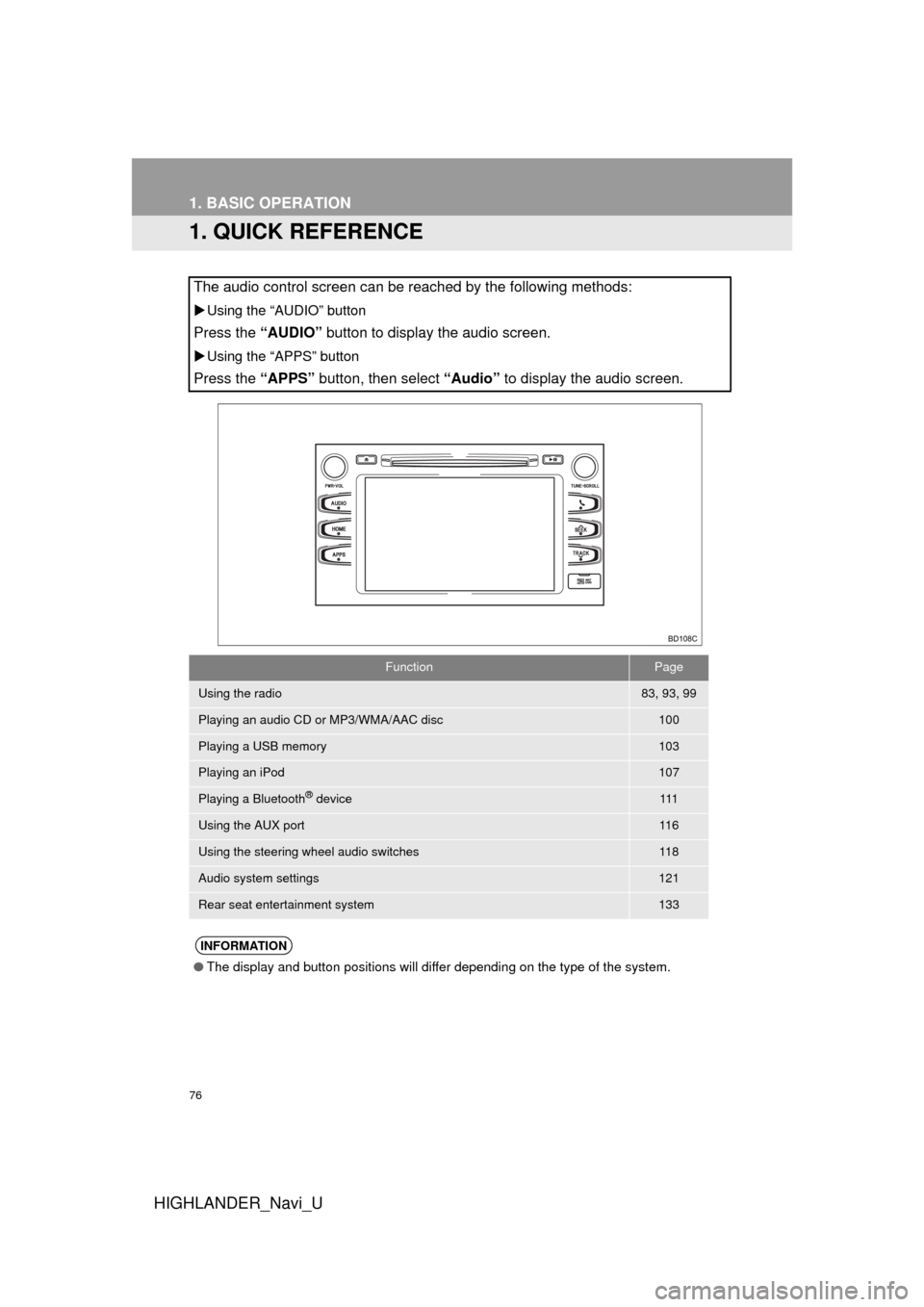
The audio control screen can be reached by the following methods:
Using the “AUDIO” button
Press the “AUDIO” button to display the audio screen.
Using the “APPS” button
Press the “APPS” button, then select “Audio” to display the audio screen.
FunctionPage
Using the radio83, 93, 99
Playing an audio CD or MP3/WMA/AAC disc100
Playing a USB memory103
Playing an iPod107
Playing a Bluetooth® device111
Using the AUX port11 6
Using the steering wheel audio switches11 8
Audio system settings121
Rear seat entertainment system133
INFORMATION
●The display and button positions will differ depending on the type of the system.
Page 80 of 352

80
1. BASIC OPERATION
HIGHLANDER_Navi_U
1Open the cover and connect a device.
Turn on the power of the device if it is not
turned on.
1Display the “Audio Settings” screen.
(P.121)
Type A
2Select “Automatic Sound Levelizer” .
3Select “High”, “Mid” , “Low” , or
“Off” .
Type B
2Select “Auto Sound Levelizer” .
1Display the “Audio Settings” screen.
(P.121)
2Select “Surround” .
USB/AUX PORT
INFORMATION
●If a USB hub is plugged-in, two devices
can be connected at a time.
● Even if a USB hub is used to connect
more than two USB devices, only the
first two connected devices will be rec-
ognized.
SOUND SETTINGS
AUTOMATIC SOUND
LEVELIZER (ASL)
The system adjusts to the optimum vol-
ume and tone quality according to ve-
hicle speed to compensate for
increased vehicle noise.
SURROUND*
*: If equipped