Page 221 of 620

221
4
Driving
COROLLA_TMMMS_TMMC_U (OM12J84U)
4-6. Driving tips
lUse fluids that are appropriate to the prevailing outside tempera-
tures.
• Engine oil
• Engine coolant
• Washer fluid
l Have a service technician ins pect the condition of the battery.
l Have the vehicle fitted with four snow tires or purchase a set of tire
chains for the front tires.
Ensure that all tires are the same size and brand, and that chains match
the size of the tires.
Perform the following accordin g to the driving conditions:
l Do not try to forcibly open a window or move a wiper that is frozen.
Pour warm water over the frozen area to melt the ice. Wipe away
the water immediately to prevent it from freezing.
l To ensure proper operation of the climate control system fan,
remove any snow that has accumulated on the air inlet vents in
front of the windshield.
l Check for and remove any excess ice or snow that may have accu-
mulated on the exterior lights, ve hicle’s roof, chassis, around the
tires or on the brakes.
l Remove any snow or mud from the bottom of your shoes before
getting in the vehicle.
Winter driving tips
Carry out the necessary preparations and inspections before
driving the vehicle in winter. Always drive the vehicle in a man-
ner appropriate to the prevailing weather conditions.
Preparation for winter
Before driving the vehicle
Page 265 of 620
2655-6. Using Bluetooth® devices
5
Audio system
COROLLA_TMMMS_TMMC_U (OM12J84U)
To enter a menu, press and navigate menus by using :
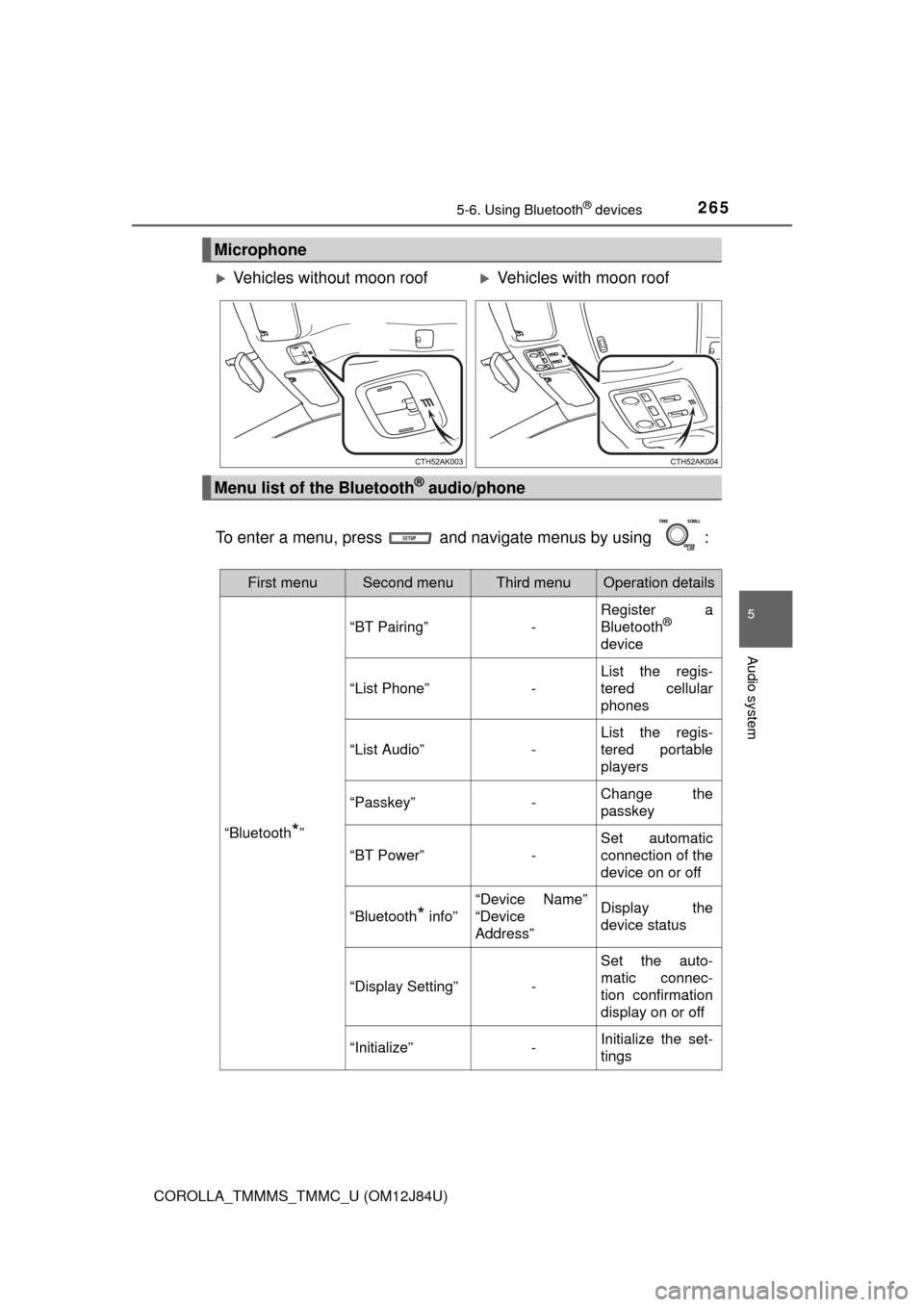
Microphone
Vehicles without moon roofVehicles with moon roof
Menu list of the Bluetooth® audio/phone
First menuSecond menuThird menuOperation details
“Bluetooth*”
“BT Pairing”-
Register a
Bluetooth®
device
“List Phone”-
List the regis-
tered cellular
phones
“List Audio”-
List the regis-
tered portable
players
“Passkey”-Change the
passkey
“BT Power”-
Set automatic
connection of the
device on or off
“Bluetooth* info”
“Device Name”
“Device
Address”Display the
device status
“Display Setting”-
Set the auto-
matic connec-
tion confirmation
display on or off
“Initialize”-Initialize the set-
tings
Page 344 of 620
3445-19. Bluetooth® phone (Multimedia system)
COROLLA_TMMMS_TMMC_U (OM12J84U)n
Telephone switch (
P. 359)
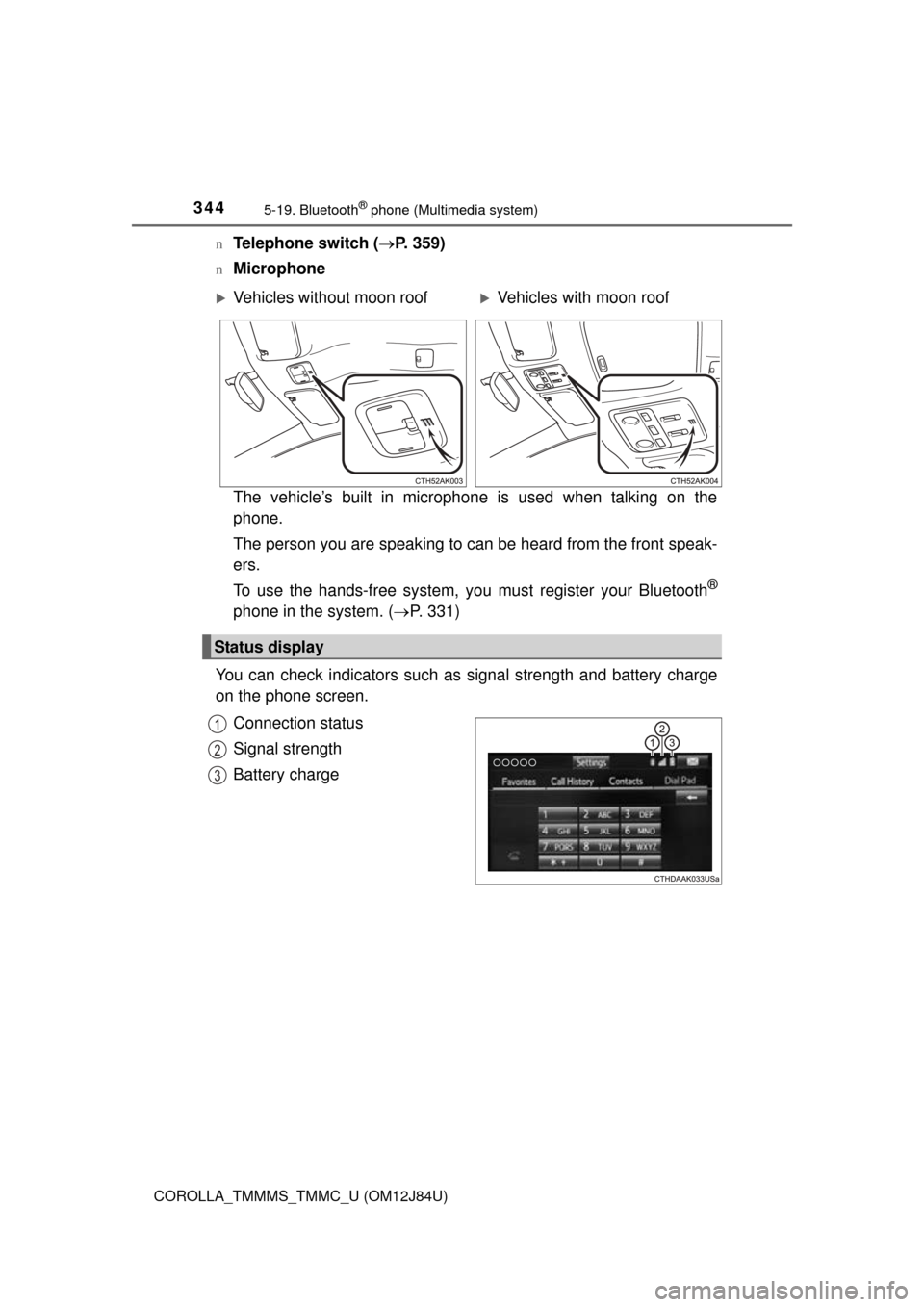
nMicrophone
The vehicle’s built in microphone is used when talking on the
phone.
The person you are speaking to can be heard from the front speak-
ers.
To use the hands-free system, you must register your Bluetooth
®
phone in the system. (P. 331)
You can check indicators such as signal strength and battery charge
on the phone screen.
Connection status
Signal strength
Battery charge
Vehicles without moon roofVehicles with moon roof
Status display
1
2
3
Page 376 of 620

376
COROLLA_TMMMS_TMMC_U (OM12J84U)
5-20.Bluetooth® (Multimedia system)
nWhen using the Bluetooth® audio system
l In the following conditions, the system may not function.
• If the portable audio player is turned off
• If the portable audio player is not connected
• If the portable audio player’s battery is low
l There may be a delay if a cellular phone connection is made during
Bluetooth
® audio play.
l Depending on the type of portable audio player that is connected to the sys-
tem, operation may differ slightly and certain functions may not be available.
n When using the hands-free system
lThe multimedia system is muted when making a call.
l If both parties speak at the same time, it may be difficult to hear.
l If the received call volume is overly loud, an echo may be heard.
If the Bluetooth
® phone is too close to the system, quality of the sound may
deteriorate and connection status may deteriorate.
l In the following circumstances, it may be difficult to hear the other party:
• When driving on unpaved roads
• When driving at high speeds
• If a roof or window is open
• If the air conditioning is blowing directly on the microphone
• If there is interference from the network of the cellular phone
n Conditions under which th e system will not operate
l If using a cellular phone that does not support Bluetooth
®
lIf the cellular phone is turned off
l If you are outside of cellular phone service coverage
l If the cellular phone is not connected
l If the cellular phone’s battery is low
l When outgoing calls are controlled, due to heavy traffic on telephone lines,
etc.
l When the cellular phone itself cannot be used
l When transferring contact data from the cellular phone
Bluetooth®
Page 382 of 620

3825-21. Using the voice command system (Multimedia system)
COROLLA_TMMMS_TMMC_U (OM12J84U)• Spoken too quickly.
• Spoken at a low or high volume.
• The roof or windows are open.
• Passengers are talking while voice commands are spoken.
• The air conditioning speed is set high.
• The air conditioning vents are turned towards the microphone.
l In the following conditions, the system may not recognize the command
properly and using voice commands may not be possible:
• The command is incorrect or unclear. Note that certain words, accents or
speech patterns may be difficult for the system to recognize.
• There is excessive background noise, such as wind noise.
Due to natural language speech recognition technology, this system
enables recognition of a command when spoken naturally. However,
the system cannot recognize ev ery variation of each command.
In some situations, it is possibl e to omit the command for the proce-
dure and directly state the desired operation.
Not all voice commands are displayed in the short cut menu.
This function is available in English, Spanish and French.
nExpression examples for each function
Casual speech recognization
CommandExpression examples
“Call (name)
(type)”Get me (Robert Brown).
I need to call (Robert Brown) at (Work) right away.
“Dial (number)”Please dial the number (3334445555).
Ring (3334445555).
Page 416 of 620

4166-4. Other interior features
COROLLA_TMMMS_TMMC_U (OM12J84U)
nConditions unfavorable to correct operation
The compass may not show the correct direction in the following conditions:
lThe vehicle is stopped immediately after turning.
l The vehicle is on an inclined surface.
l The vehicle is in a place where the earth's magnetic field is subject to inter-
ference by artificial magnetic fiel ds (underground car park/parking lot, under
a steel tower, between buildings, roof car park/parking lot, near an intersec-
tion, near a large vehicle, etc.).
l The vehicle has become magnetized.
(There is a magnet or metal object near the inside rear view mirror.)
l The battery has been disconnected.
l A door is open.
CAUTION
n While driving the vehicle
Do not adjust the display. Adjust the display only when the vehicle is
stopped.
n When doing the circling calibration
Secure a wide space, and watch out for people and vehicles in the neigh-
borhood. Do not violate any local traffic rules while performing circling cali-
bration.
NOTICE
nTo avoid compass malfunctions
Do not place magnets or any metal objects near the inside rear view mirror.
Doing this may cause the compass sensor to malfunction.
n To ensure normal operation of the compass
lDo not perform circling calibration of the compass in a place where the
earth's magnetic field is subject to inte rference by artificial magnetic fields.
l During calibration, do not operate electric systems (moon roof, power win-
dows, etc.) as they may interfere with the calibration.
Page 420 of 620
420
COROLLA_TMMMS_TMMC_U (OM12J84U)
7-1. Maintenance and care
lWorking from top to bottom, liber ally apply water to the vehicle
body, wheel wells and underside of the vehicle to remove any dirt
and dust.
l Wash the vehicle body using a sponge or soft cloth, such as a
chamois.
l For hard-to-remove marks, use car wash soap and rinse thoroughly
with water.
l Wipe away any water.
l Wax the vehicle when the wate rproof coating deteriorates.
If water does not bead on a clean surface, apply wax when the vehicle
body is cool.
nAutomatic car washes
lFold the mirrors before washing the vehi cle. Start washing from the front of
the vehicle. Make sure to extend the mirrors before driving.
l Brushes used in automatic car washes may scratch the vehicle surface and
harm your vehicle's paint.
l Vehicles with rear spoiler: In certain automatic car washes, the rear spoiler
may interfere with machine operation. This may prevent the vehicle from
being cleaned properly or result in damage to the rear spoiler.
n High pressure car washes
lDo not allow the nozzles of the car wash to come within close proximity of
the windows.
l Before using the car wash, check that the fuel filler door on your vehicle is
closed properly.
Cleaning and prot ecting the vehicle
exterior
Perform the following to protect the vehicle and maintain it in
prime condition:
Page 512 of 620
5128-2. Steps to take in an emergency
COROLLA_TMMMS_TMMC_U (OM12J84U)
*: Refer to the separate “Scheduled Maintenance Guide” or “Owner’s ManualSupplement” for the maintenance interval applicable to your vehicle.
n Warning buzzer
P. 506
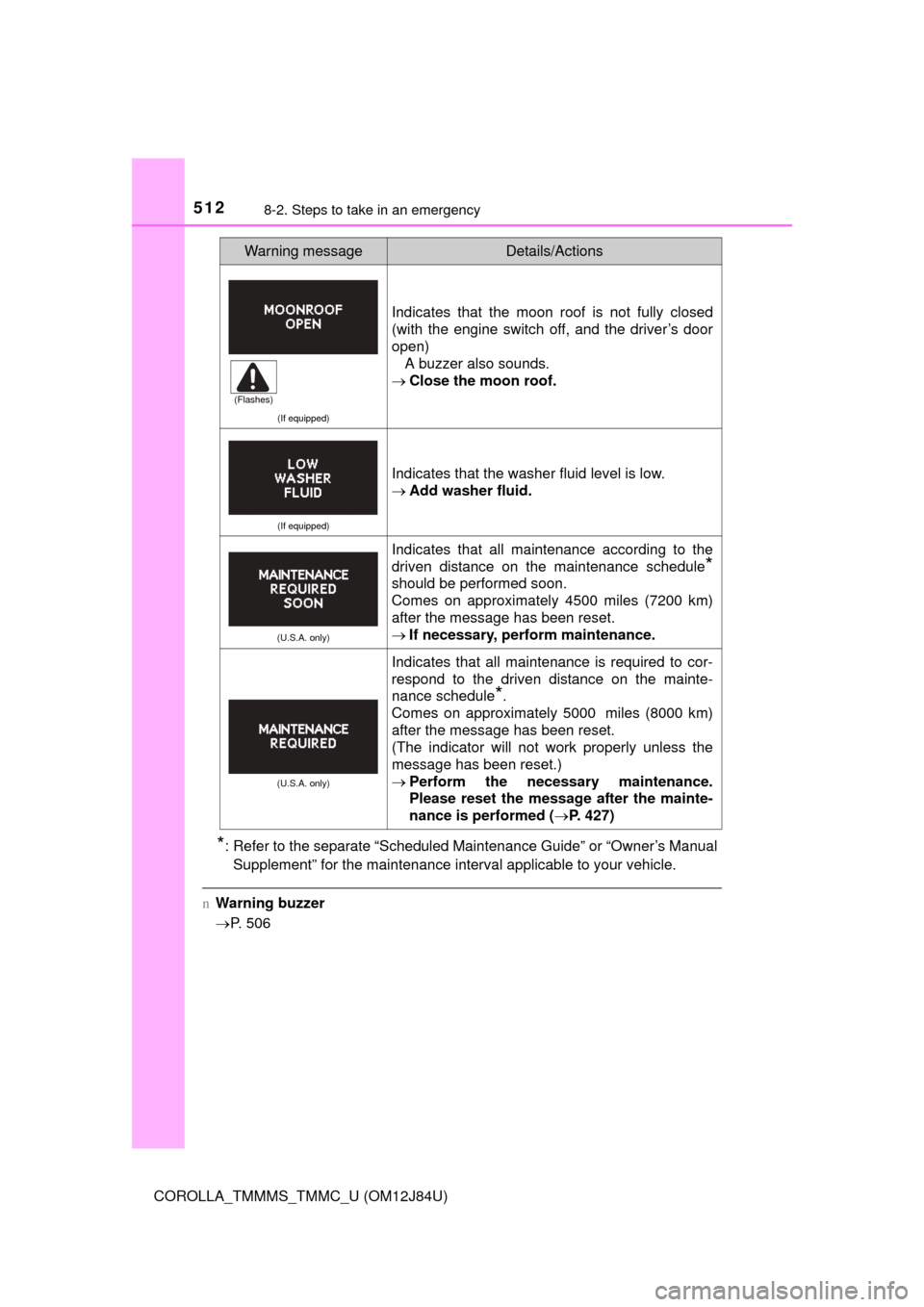
(If equipped)
Indicates that the moon roof is not fully closed
(with the engine switch off, and the driver’s door
open)
A buzzer also sounds.
Close the moon roof.
(If equipped)
Indicates that the washer fluid level is low.
Add washer fluid.
(U.S.A. only)
Indicates that all maintenance according to the
driven distance on the maintenance schedule
*
should be performed soon.
Comes on approximately 4500 miles (7200 km)
after the message has been reset.
If necessary, perform maintenance.
(U.S.A. only)
Indicates that all maintenance is required to cor-
respond to the driven distance on the mainte-
nance schedule
*.
Comes on approximately 5000 miles (8000 km)
after the message has been reset.
(The indicator will not work properly unless the
message has been reset.)
Perform the necessary maintenance.
Please reset the message after the mainte-
nance is performed ( P. 427)
Warning messageDetails/Actions
(Flashes)