Page 87 of 620

872. Instrument cluster
2
Instrument cluster
COROLLA_TMMMS_TMMC_U (OM12J84U)n
Items that can be changed
*: Except vehicles with a manual transmission
n
The meters and display illuminate when
Vehicles without a smart key system
The engine switch is in the “ON” position.
Vehicles with a smart key system
The engine switch is in IGNITION ON mode.
n When disconnecting and reco nnecting battery terminals
The following information data will be reset:
l Driving range
l Average vehicle speed
l Elapsed time
l Average fuel consumption
n Liquid crystal display
Small spots or light spots may appear on the display. This phenomenon is
characteristic of liquid crystal displays, and there is no problem continuing to
use the display.
n Setting display automatic suspension
In the following situations, the setting display will be suspended.
lWhen a message appears.
l When the vehicle begins to move.
FunctionDefault settingCustomized setting
LanguageEnglishFrench
Spanish
ECO Driving Indicator
Light
*ON (Self-lighting)OFF
Page 90 of 620
902. Instrument cluster
COROLLA_TMMMS_TMMC_U (OM12J84U)
Average vehicle speed
Elapsed time
Range
Previous fuel consumption
per minute
Current fuel consumption
Reset the trip information
data
“Past Record” screen appears
Vehicles without a smart key system:
Average fuel consumption for the past 15 minutes is divided by color
into past averages and averages attained since the engine switch was
last turned to the “ON” position. Use the displayed average fuel con-
sumption as a reference.
Vehicles with a smart key system:
Average fuel consumption for the past 15 minutes is divided by color
into past averages and averages attained since the engine switch was
last turned to IGNITION ON mode. Use the displayed average fuel
consumption as a reference.
This image is an example only.
1
2
3
4
5
6
7
Page 93 of 620
932. Instrument cluster
2
Instrument cluster
COROLLA_TMMMS_TMMC_U (OM12J84U)
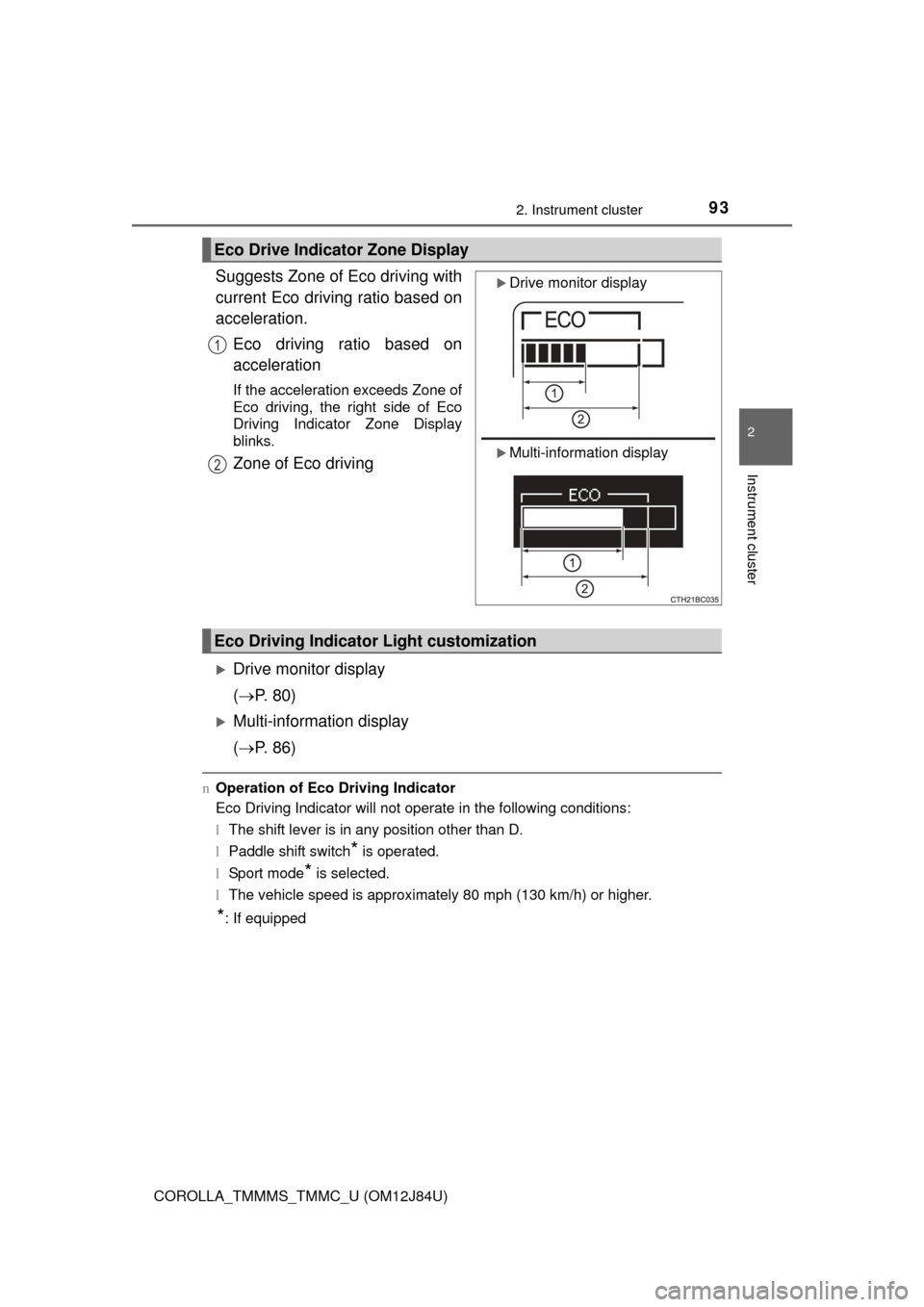
Suggests Zone of Eco driving with
current Eco driving ratio based on
acceleration.Eco driving ratio based on
acceleration
If the acceleration exceeds Zone of
Eco driving, the right side of Eco
Driving Indicator Zone Display
blinks.
Zone of Eco driving
Drive monitor display
( P. 80)
Multi-information display
( P. 86)
nOperation of Eco Driving Indicator
Eco Driving Indicator will not operate in the following conditions:
lThe shift lever is in any position other than D.
l Paddle shift switch
* is operated.
l Sport mode
* is selected.
l The vehicle speed is approximately 80 mph (130 km/h) or higher.
*: If equipped
Eco Drive Indicator Zone Display
Drive monitor display
Multi-information display
1
2
Eco Driving Indicator Light customization
Page 98 of 620

983-1. Key information
COROLLA_TMMMS_TMMC_U (OM12J84U)
nPanic mode (with a wireless remote control function)
Vehicles without a smart key system
Vehicles with a smart key system
n If you lose your keys
New genuine keys can be made by your Toyota dealer using the other key
(vehicles without a smart key system) or mechanical key (vehicles with a
smart key system) and the key number stamped on your key number plate.
Keep the plate in a safe place such as your wallet, not in the vehicle.
n When riding in an aircraft
When bringing a key with wireless remote control function onto an aircraft,
make sure you do not press any button on the key while inside the aircraft
cabin. If you are carrying the key in your bag etc., ensure that the buttons are
not likely to be pressed accidentally. Pressing a button may cause the key to
emit radio waves that could interfere with the operation of the aircraft. When is pressed for longer than
about one second, an alarm will sound
intermittently and the vehicle lights will
flash to deter any person from trying to
break into or damage your vehicle.
To stop the alarm, press any button on the
wireless remote control.
When is pressed for longer than
about one second, an alarm will sound
intermittently and the vehicle lights will
flash to deter any person from trying to
break into or damage your vehicle.
To stop the alarm, press any button on the
electronic key.
Page 106 of 620
1063-2. Opening, closing and locking the doors
COROLLA_TMMMS_TMMC_U (OM12J84U)
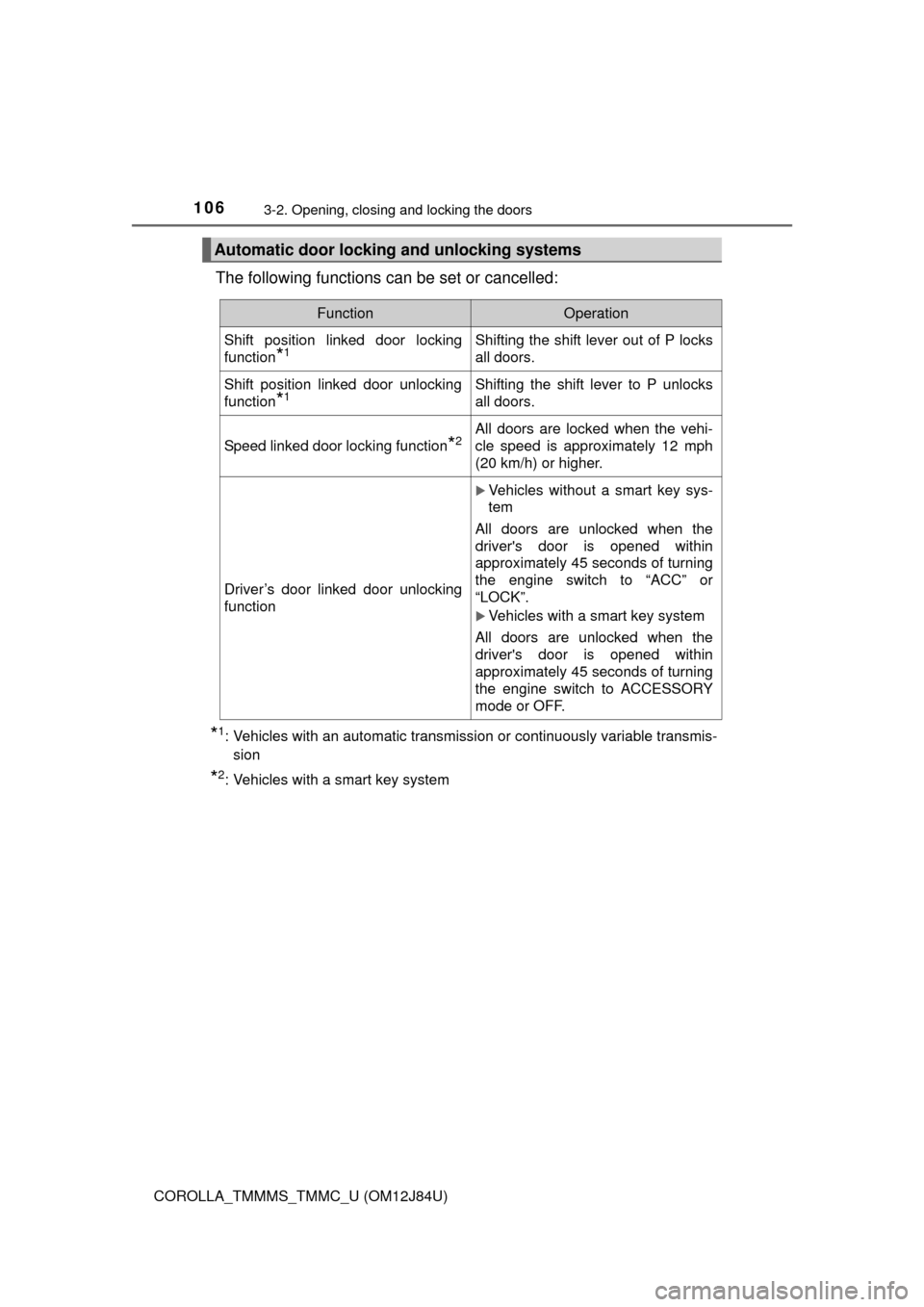
The following functions can be set or cancelled:
*1: Vehicles with an automatic transmission or continuously variable transmis-sion
*2: Vehicles with a smart key system
Automatic door lockin g and unlocking systems
FunctionOperation
Shift position linked door locking
function
*1Shifting the shift lever out of P locks
all doors.
Shift position linked door unlocking
function
*1Shifting the shift lever to P unlocks
all doors.
Speed linked door locking function*2All doors are locked when the vehi-
cle speed is approximately 12 mph
(20 km/h) or higher.
Driver’s door linked door unlocking
function
Vehicles without a smart key sys-
tem
All doors are unlocked when the
driver's door is opened within
approximately 45 seconds of turning
the engine switch to “ACC” or
“LOCK”.
Vehicles with a smart key system
All doors are unlocked when the
driver's door is opened within
approximately 45 seconds of turning
the engine switch to ACCESSORY
mode or OFF.
Page 107 of 620
1073-2. Opening, closing and locking the doors
3
Operation of each component
COROLLA_TMMMS_TMMC_U (OM12J84U)n
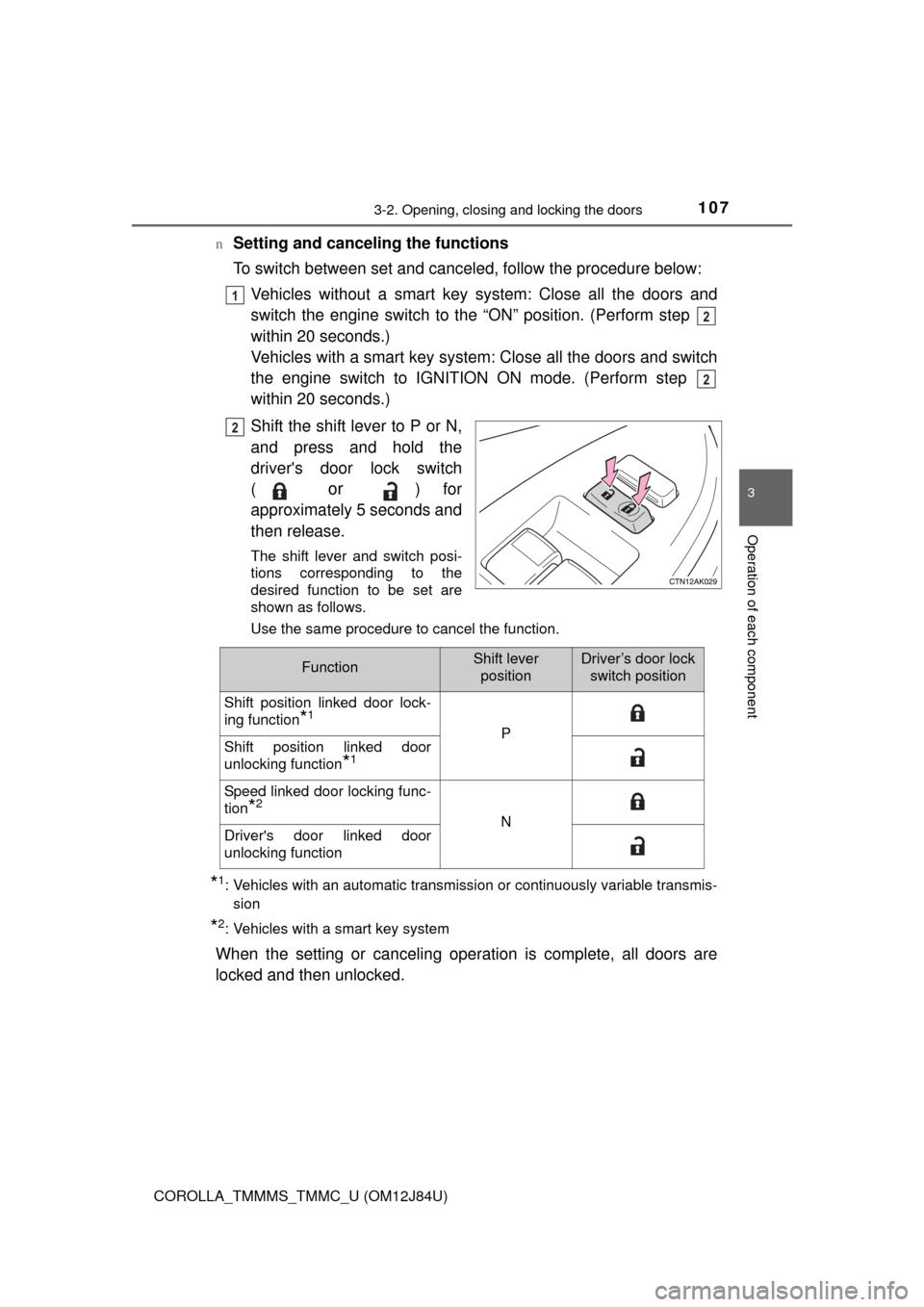
Setting and canceling the functions
To switch between set and canceled, follow the procedure below:
Vehicles without a smart key sy stem: Close all the doors and
switch the engine switch to the “ON” position. (Perform step
within 20 seconds.)
Vehicles with a smart key system: Close all the doors and switch
the engine switch to IGNITION ON mode. (Perform step
within 20 seconds.)
Shift the shift lever to P or N,
and press and hold the
driver's door lock switch
(
or ) for
approximately 5 seconds and
then release.
The shift lever and switch posi-
tions corresponding to the
desired function to be set are
shown as follows.
Use the same procedure to cancel the function.
*1: Vehicles with an automatic transmission or continuously variable transmis- sion
*2: Vehicles with a smart key system
When the setting or canceling operation is complete, all doors are
locked and then unlocked.
1
2
2
2
FunctionShift leverpositionDriver’s door lock switch position
Shift position linked door lock-
ing function
*1
PShift position linked door
unlocking function
*1
Speed linked door locking func-
tion
*2
NDriver's door linked door
unlocking function
Page 117 of 620
1173-2. Opening, closing and locking the doors
3
Operation of each component
COROLLA_TMMMS_TMMC_U (OM12J84U)
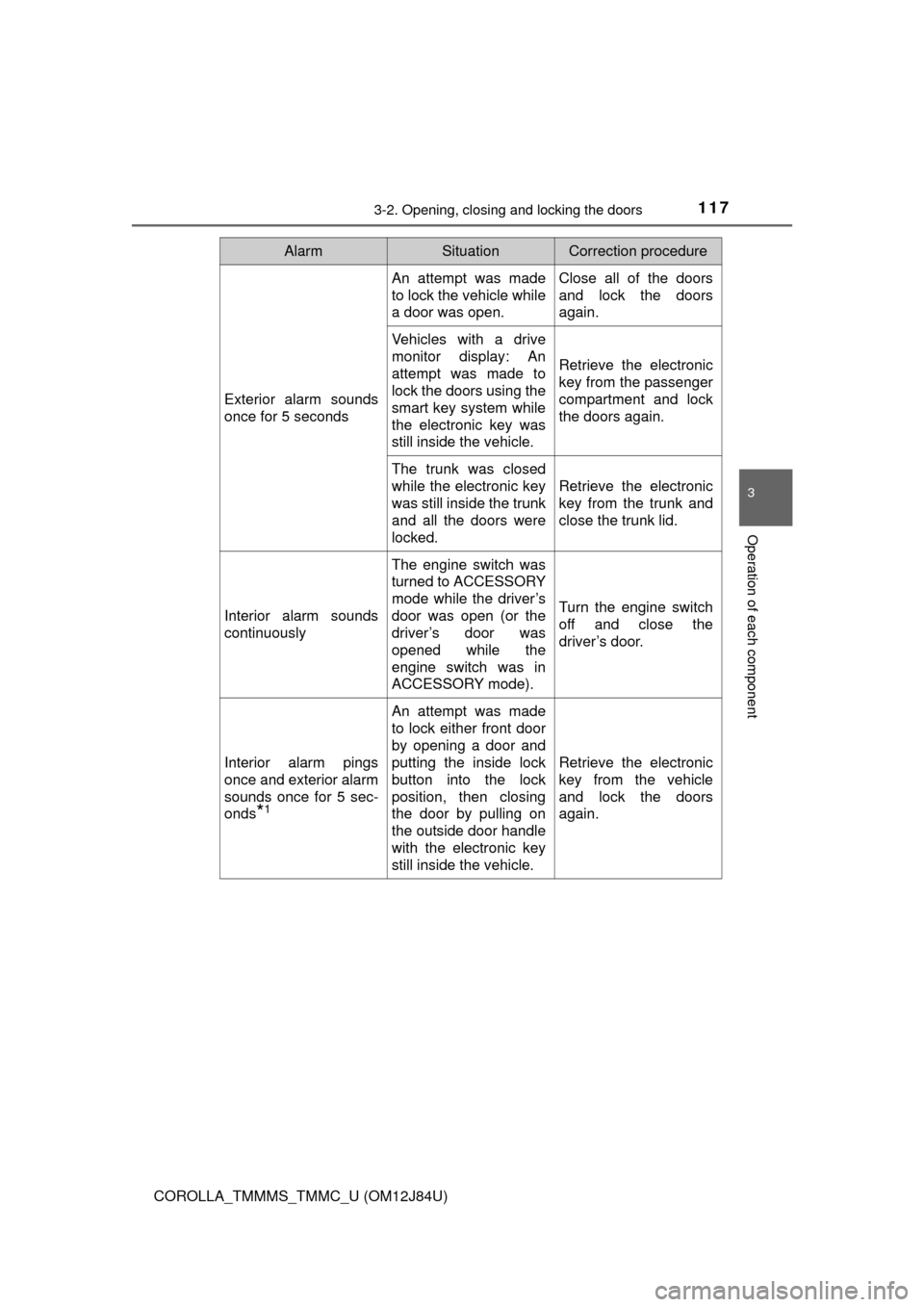
AlarmSituationCorrection procedure
Exterior alarm sounds
once for 5 seconds
An attempt was made
to lock the vehicle while
a door was open.Close all of the doors
and lock the doors
again.
Vehicles with a drive
monitor display: An
attempt was made to
lock the doors using the
smart key system while
the electronic key was
still inside the vehicle.
Retrieve the electronic
key from the passenger
compartment and lock
the doors again.
The trunk was closed
while the electronic key
was still inside the trunk
and all the doors were
locked.
Retrieve the electronic
key from the trunk and
close the trunk lid.
Interior alarm sounds
continuously
The engine switch was
turned to ACCESSORY
mode while the driver’s
door was open (or the
driver’s door was
opened while the
engine switch was in
ACCESSORY mode).
Turn the engine switch
off and close the
driver’s door.
Interior alarm pings
once and exterior alarm
sounds once for 5 sec-
onds
*1
An attempt was made
to lock either front door
by opening a door and
putting the inside lock
button into the lock
position, then closing
the door by pulling on
the outside door handle
with the electronic key
still inside the vehicle.
Retrieve the electronic
key from the vehicle
and lock the doors
again.
Page 120 of 620

1203-2. Opening, closing and locking the doors
COROLLA_TMMMS_TMMC_U (OM12J84U)n
Note for the entry function
lEven when the electronic key is within the effective range (detection areas),
the system may not operate properly in the following cases:
• The electronic key is too close to the window or outside door handle, near
the ground, or in a high place when the doors are locked or unlocked.
• The electronic key is near the ground or in a high place, or too close to
the rear bumper center when the trunk is opened.
• The electronic key is on the instrument panel, rear package tray or floor, or in the door pockets or glove box when the engine is started or engine
switch modes are changed.
l Do not leave the electronic key on top of the instrument panel or near the
door pockets when exiting the vehicle. Depending on the radio wave recep-
tion conditions, it may be detected by the antenna outside the cabin and the
doors will become lockable from the outside, possibly trapping the electronic
key inside the vehicle.
l As long as the electronic key is within the effective range, the doors may be
locked or unlocked by anyone. However, only the doors detecting the elec-
tronic key can be used to unlock the vehicle.
l Even if the electronic key is not inside the vehicle, it may be possible to start
the engine if the electronic key is near the window.
l The doors may unlock or lock if a large amount of water splashes on the
door handle, such as in the rain or in a car wash, when the electronic key is
within the effective range. (The doors will automatically be locked after
approximately 60 seconds if the doors are not opened and closed.)
l If the wireless remote control is used to lock the doors when the electronic
key is near the vehicle, there is a possibility that the door may not be
unlocked by the entry function. (Use the wireless remote control to unlock
the doors.)
l Touching the door lock or unlock sensor while wearing gloves may prevent
lock or unlock operation.
l When the lock operation is performed using the lock sensor, recognition sig-
nals will be shown up to two consecutive times. After this, no recognition
signals will be given.
l If the door handle becomes wet while the electronic key is within the effec-
tive range, the door may lock and unlock repeatedly. In this case, follow the
following correction procedures to wash the vehicle:
• Place the electronic key in a location 6 ft. (2 m) or more away from the
vehicle. (Take care to ensure that the key is not stolen.)
• Set the electronic key to battery-saving mode to disable the smart key
system. ( P. 118)
l Vehicles with a drive monitor display: If the electronic key is inside the vehi-
cle and a door handle becomes wet during a car wash, a buzzer will sound
outside the vehicle. To turn off the alarm, lock all the doors.