Page 187 of 572
1874-5. Using the driving support systems
4
Driving
CAMRY_HV_U (OM33C35U)
nCruise control can be set when
lThe shift lever is in D.
l Vehicle speed is above approximately 25 mph (40 km/h).
n Accelerating after setting the vehicle speed
lThe vehicle can be accelerated normally. After acceleration, the set speed
resumes.
l Even without canceling the cruise control, the set speed can be increased
by first accelerating the vehicle to the desired speed and then pushing the
lever down to set the new speed.
n Automatic cruise co ntrol cancelation
Cruise control will stop maintaining the vehicle speed in any of the following
situations:
l Actual vehicle speed falls more than approximately 10 mph (16 km/h) below
the preset vehicle speed.
At this time, the memorized set speed is not retained.
l Actual vehicle speed is below approximately 25 mph (40 km/h).
l VSC is activated.
l Enhanced VSC is activated.
l TRAC is activated for a period of time.
l When the VSC or TRAC system is turned off by pressing the VSC OFF
switch
n If a warning message for the cruise control is shown on the multi-infor-
mation display
Press the “ON-OFF” button once to deactivate the system, and then press
the button again to reactivate the system.
If the cruise control speed cannot be set or if the cruise control cancels imme-
diately after being activated, there may be a malfunction in the cruise control
system. Have the vehicle inspected by your Toyota dealer.
Page 188 of 572
1884-5. Using the driving support systems
CAMRY_HV_U (OM33C35U)
WARNING
nTo avoid operating the cruise control by mistake
Switch the cruise control off using the “ON-OFF” button when not in use.
n Situations unsuitable for cruise control
Do not use cruise control in any of the following situations.
Doing so may result in loss of control and could cause an accident resulting
in death or serious injury.
lIn heavy traffic
l On roads with sharp bends
l On winding roads
l On slippery roads, such as those covered with rain, ice or snow
l On steep hills
Vehicle speed may exceed the set speed when driving down a steep hill.
Page 189 of 572
1894-5. Using the driving support systems
4
Driving
CAMRY_HV_U (OM33C35U)
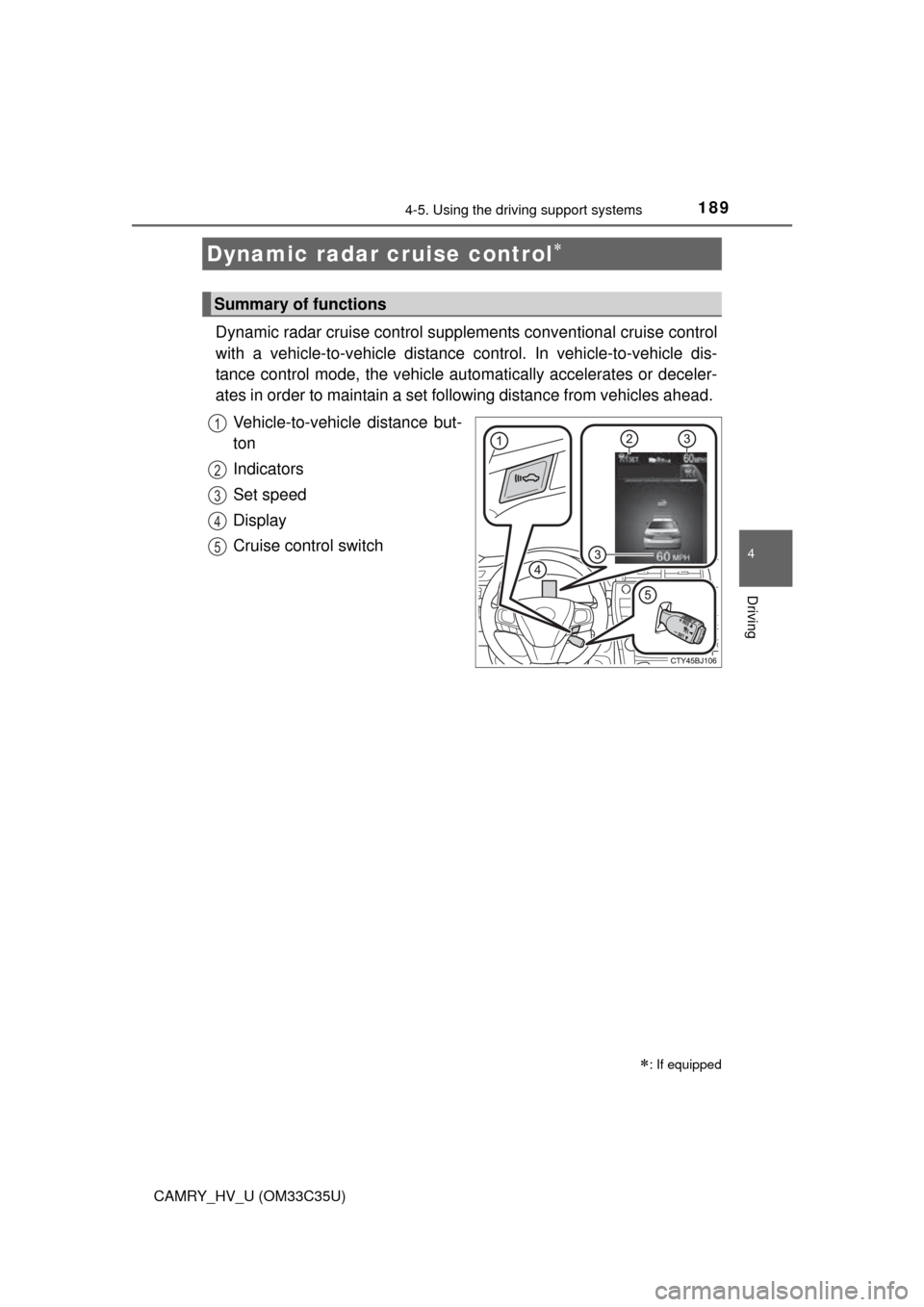
Dynamic radar cruise control supplements conventional cruise control
with a vehicle-to-vehicle distance control. In vehicle-to-vehicle dis-
tance control mode, the vehicle automatically accelerates or deceler-
ates in order to maintain a set fo llowing distance from vehicles ahead.
Vehicle-to-vehicle distance but-
ton
Indicators
Set speed
Display
Cruise control switch
Dynamic radar cruise control
: If equipped
Summary of functions
1
2
3
4
5
Page 190 of 572
1904-5. Using the driving support systems
CAMRY_HV_U (OM33C35U)
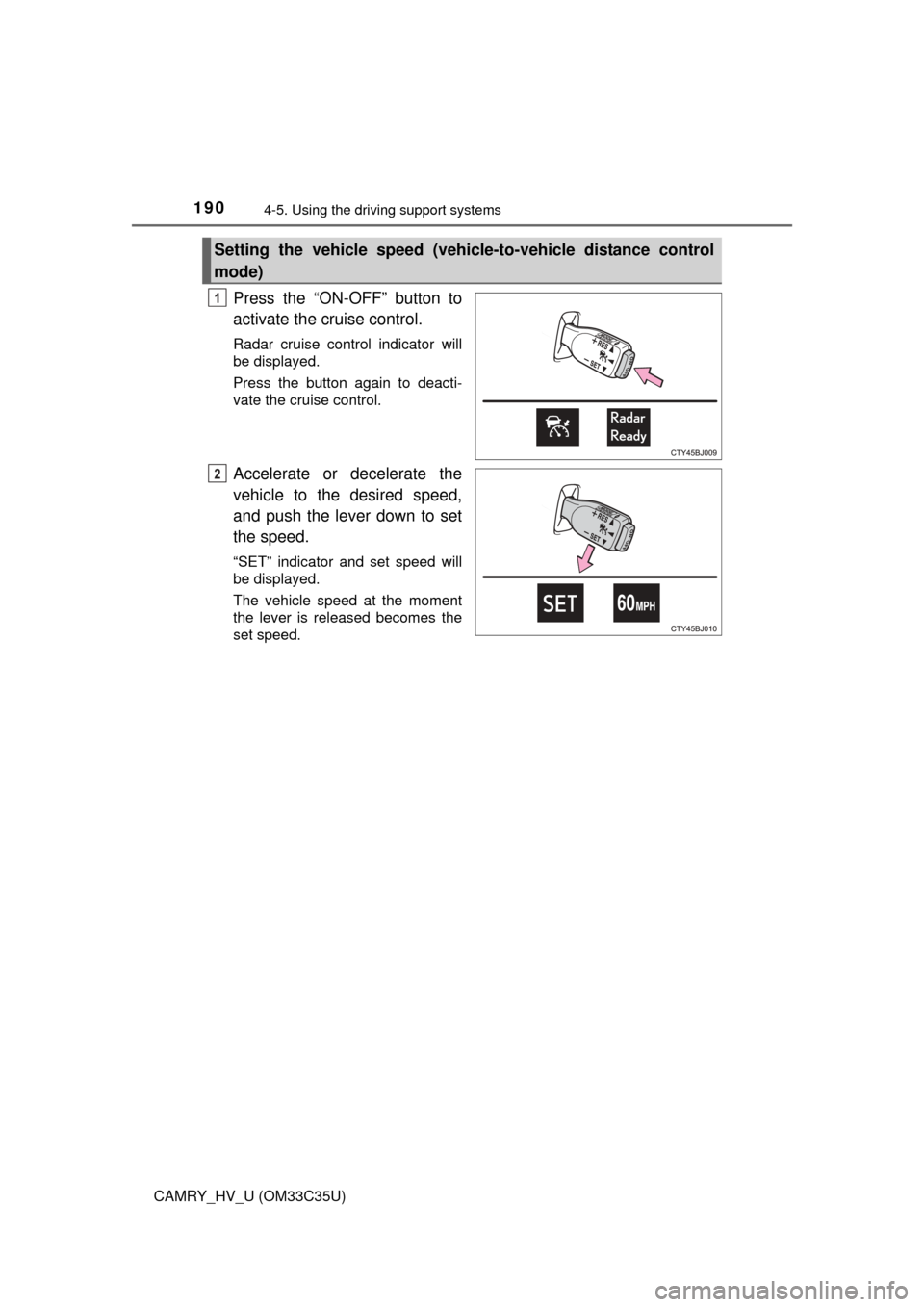
Press the “ON-OFF” button to
activate the cruise control.
Radar cruise control indicator will
be displayed.
Press the button again to deacti-
vate the cruise control.
Accelerate or decelerate the
vehicle to the desired speed,
and push the lever down to set
the speed.
“SET” indicator and set speed will
be displayed.
The vehicle speed at the moment
the lever is released becomes the
set speed.
Setting the vehicle speed (vehicle-to-vehicle distance control
mode)
1
2
Page 192 of 572
1924-5. Using the driving support systems
CAMRY_HV_U (OM33C35U)
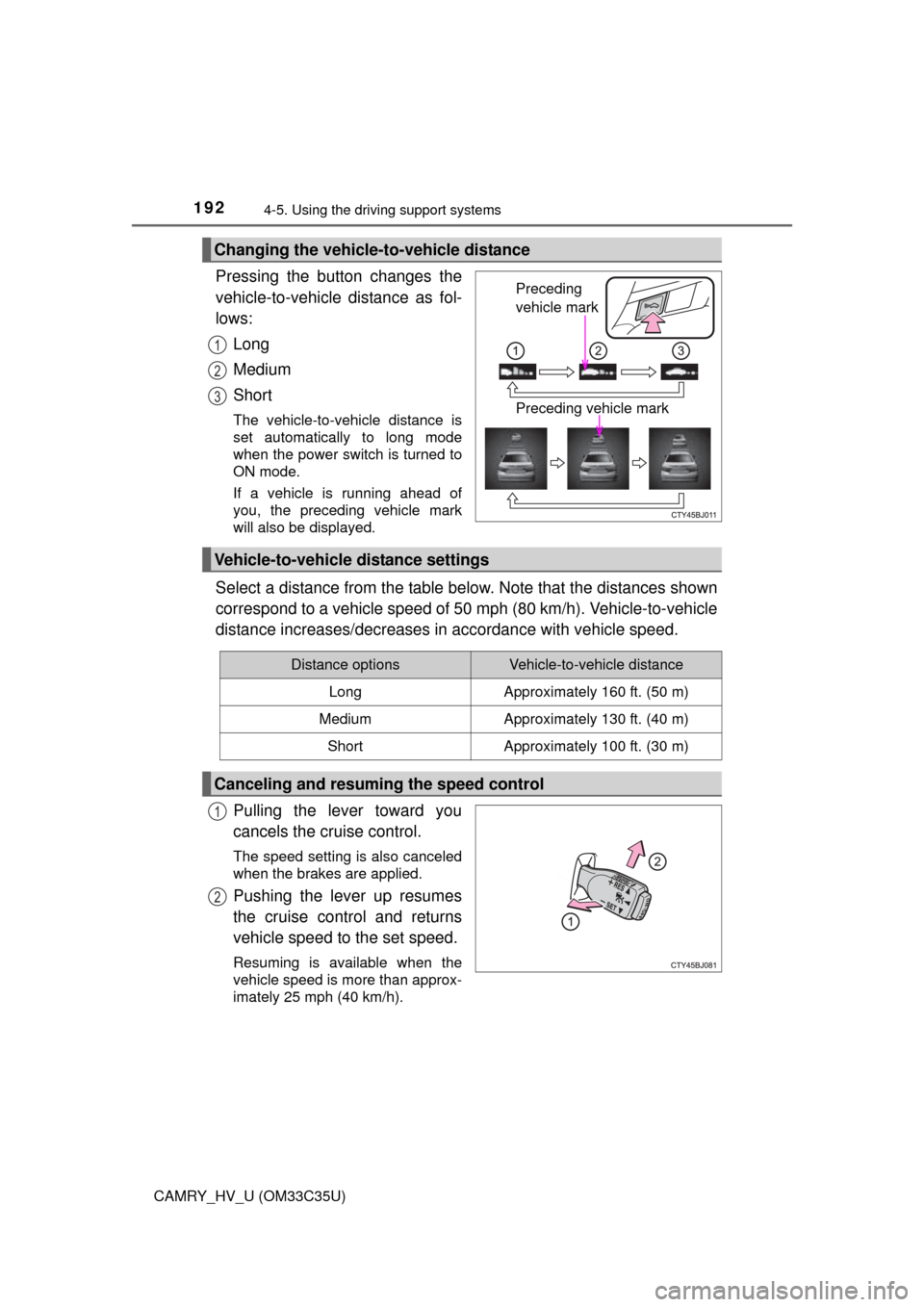
Pressing the button changes the
vehicle-to-vehicle distance as fol-
lows:
Long
Medium
Short
The vehicle-to-vehicle distance is
set automatically to long mode
when the power switch is turned to
ON mode.
If a vehicle is running ahead of
you, the preceding vehicle mark
will also be displayed.
Select a distance from the table below. Note that the distances shown
correspond to a vehicle speed of 50 mph (80 km/h). Vehicle-to-vehicle
distance increases/decreases in accordance with vehicle speed.
Pulling the lever toward you
cancels the cruise control.
The speed setting is also canceled
when the brakes are applied.
Pushing the lever up resumes
the cruise control and returns
vehicle speed to the set speed.
Resuming is available when the
vehicle speed is more than approx-
imately 25 mph (40 km/h).
Changing the vehicle-to-vehicle distance
Preceding
vehicle mark
Preceding vehicle mark
1
2
3
Vehicle-to-vehicle distance settings
Distance optionsVehicle-to-vehicle distance
LongApproximately 160 ft. (50 m)
MediumApproximately 130 ft. (40 m)
ShortApproximately 100 ft. (30 m)
Canceling and resuming the speed control
1
2
Page 194 of 572
1944-5. Using the driving support systems
CAMRY_HV_U (OM33C35U)
Example of follow-up cruising
When following a vehicle driving slower than the set speed
The system continues follow-up cruising while adjusting for changes in the
speed of the vehicle ahead in order to maintain the vehicle-to-vehicle dis-
tance set by the driver.
Example of acceleration
When there are no longer any vehi cles ahead driving slower than
the set speed
The system accelerates until the set speed is reached. The system then
returns to constant speed cruising.
When your vehicle is too close to a vehicle ahead, and sufficient auto-
matic deceleration via the cruise control is not possible, the display
will flash and the buzzer will sound to alert the driver. An example of
this would be if another driver cuts in front of you while you are follow-
ing a vehicle. Apply the brakes to ensure an appropriate vehicle-to-
vehicle distance.
nWarnings may not occur when
In the following instances, there is a possibility that the warnings will
not occur:
l When the speed of the vehicle ahead matches or exceeds your
vehicle speed
l When the vehicle ahead is traveling at an extremely slow speed
l Immediately after the crui se control speed was set
l At the instant the accelerator is applied
Approach warning
3
4
Page 195 of 572
1954-5. Using the driving support systems
4
Driving
CAMRY_HV_U (OM33C35U)
When constant speed control mode is selected, your vehicle will main-
tain a set speed without controlling the vehicle-to-vehicle distance.
Select this mode only when vehicl e-to-vehicle distance control mode
does not function corr ectly due to dirt etc.
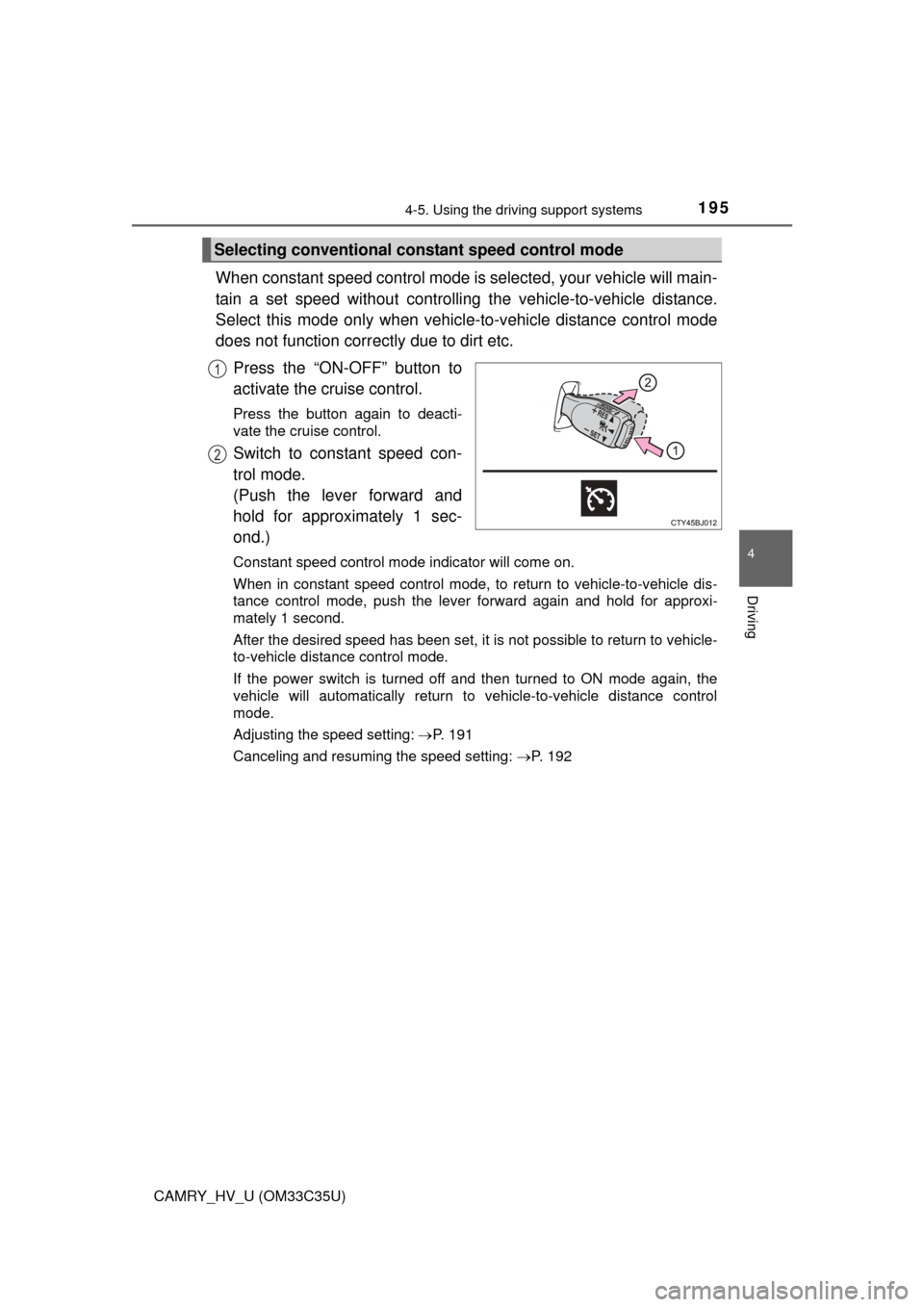
Press the “ON-OFF” button to
activate the cruise control.
Press the button again to deacti-
vate the cruise control.
Switch to constant speed con-
trol mode.
(Push the lever forward and
hold for approximately 1 sec-
ond.)
Constant speed control mode indicator will come on.
When in constant speed control mode, to return to vehicle-to-vehicle dis-
tance control mode, push the leve r forward again and hold for approxi-
mately 1 second.
After the desired speed has been set, it is not possible to return to vehicle-
to-vehicle distance control mode.
If the power switch is turned off and then turned to ON mode again, the
vehicle will automatically return to vehicle-to-vehicle distance control
mode.
Adjusting the speed setting: P. 191
Canceling and resuming the speed setting: P. 192
Selecting conventional constant speed control mode
1
2
Page 196 of 572
1964-5. Using the driving support systems
CAMRY_HV_U (OM33C35U)
nDynamic radar cruise control can be set when
lThe shift lever is in D.
l Vehicle speed is above approximately 30 mph (50 km/h).
n Accelerating after setting the vehicle speed
The vehicle can accelerate normally. After acceleration, the set speed
resumes. However, during vehicle-to-vehicle distance control mode, the vehi-
cle speed may decrease below the set speed in order to maintain the dis-
tance to the vehicle ahead.
n Automatic cancelation of vehic le-to-vehicle distance control
Vehicle-to-vehicle distance control driving is automatically canceled in the fol-
lowing situations:
l Actual vehicle speed falls below approximately 25 mph (40 km/h).
l VSC is activated.
l Enhanced VSC is activated.
l TRAC is activated for a period of time.
l When the VSC or TRAC system is turned off by pressing the VSC OFF
switch
l Pre-collision braking is activated.
l The sensor cannot operate correctly because it is covered in some way.
l The windshield wipers are operating at high speed (when the wiper switch is
set to the high speed wiper operation position).
If vehicle-to-vehicle distance control driving is automatically canceled for any
other reason, there may be a malfunction in the system. Contact your Toyota
dealer.
n Automatic cancelation of constant speed control
The cruise control will stop maintaining the vehicle speed in the following situ-
ations:
l Actual vehicle speed is more than approximately 10 mph (16 km/h) below
the set vehicle speed.
At this time, the memorized set speed is not retained.
l Vehicle speed falls below approximately 25 mph (40 km/h).
l VSC is activated.
l Enhanced VSC is activated.
l TRAC is activated for a period of time.
l When the VSC or TRAC system is turned off by pressing the VSC OFF
switch
l Pre-collision braking is activated.