Page 241 of 492
2414-5. Using the driving support systems
4
Driving
AVALON (U)_(01999-07001)
■The Blind Spot Monitor function is operational when
●The BSM main switch is set to on
● Vehicle speed is greater than approximately 10 mph (16 km/h).
■ The Blind Spot Monitor function will detect a vehicle when
●A vehicle in an adjacent lane overtakes your vehicle.
● Another vehicle enters the detection area when it changes lanes.
■ Conditions under which the Blind Spot Monitor function will not detect a
vehicle
The Blind Spot Monitor function is not designed to detect the following types
of vehicles and/or objects:
● Small motorcycles, bicycles, pedestrians etc.
*
●Vehicles traveling in the opposite direction
● Guardrails, walls, signs, parked vehicles and similar stationary objects
*
●Following vehicles that are in the same lane*
●Vehicles driving 2 lanes across from your vehicle*
*
: Depending on conditions, detection of a vehicle and/or object may occur.
Page 242 of 492

2424-5. Using the driving support systems
AVALON (U)_(01999-07001)■
Conditions under which the Blind Spot Monitor function may not func-
tion correctly
●The Blind Spot Monitor function may not detect vehicles correctly in the fol-
lowing conditions:
• During bad weather such as heavy rain, fog, snow etc.
• When ice or mud etc. is attached to the rear bumper
• When driving on a road surface that is wet due to rain, standing water etc.
• When there is a significant difference in speed between your vehicle and
the vehicle that enters the detection area
• When a vehicle is in the detection area from a stop and remains in the detection area as your vehicle accelerates
• When driving up or down consecutive steep inclines, such as hills, a dip
in the road etc.
• When multiple vehicles approach with only a small gap between each vehicle
• When vehicle lanes are wide, and the vehicle in the next lane is too far away from your vehicle
• When the vehicle that enters the detection area is traveling at about the
same speed as your vehicle
• When there is a significant difference in height between your vehicle and the vehicle that enters the detection area
• Directly after the BSM main switch is set to on
● Instances of the Blind Spot Monitor function unnecessarily detecting a vehi-
cle and/or object may increase under the following conditions:
• When there is only a short distance between your vehicle and a guardrail,
wall etc.
• When there is only a short distance between your vehicle and a following
vehicle
• When vehicle lanes are narrow and a vehicle driving 2 lanes across from your vehicle enters the detection area
• When items such as a bicycle carrier ar e installed on the rear of the vehi-
cle
Page 244 of 492
2444-5. Using the driving support systems
AVALON (U)_(01999-07001)
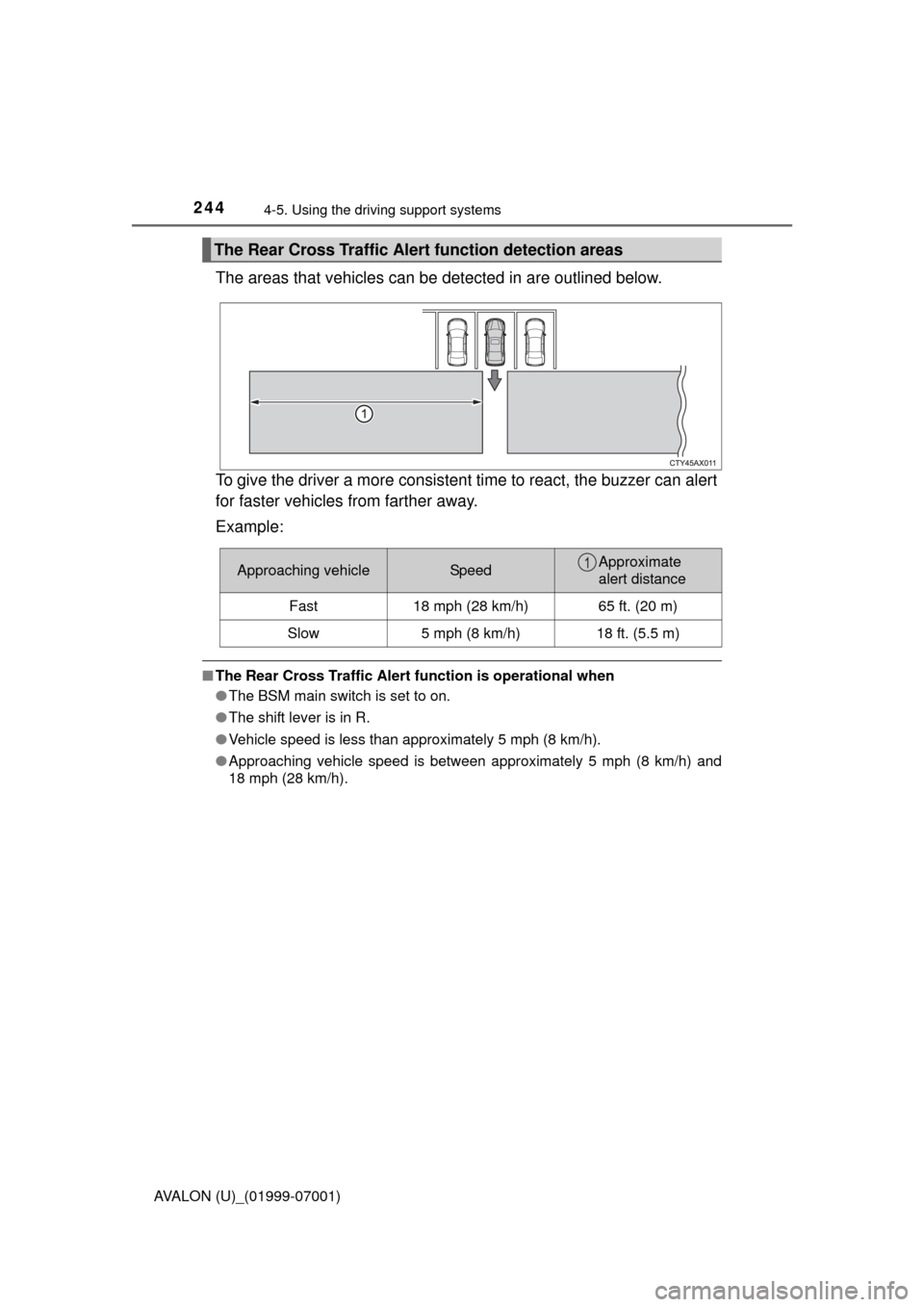
The areas that vehicles can be detected in are outlined below.
To give the driver a more consistent time to react, the buzzer can alert
for faster vehicles from farther away.
Example:
■ The Rear Cross Traffic Alert function is operational when
● The BSM main switch is set to on.
● The shift lever is in R.
● Vehicle speed is less than approximately 5 mph (8 km/h).
● Approaching vehicle speed is between approximately 5 mph (8 km/h) and
18 mph (28 km/h).
The Rear Cross Traffic Alert function detection areas
Approaching vehicleSpeedApproximate
alert distance
Fast 18 mph (28 km/h) 65 ft. (20 m)
Slow 5 mph (8 km/h) 18 ft. (5.5 m)1