Page 162 of 492

1624-2. Driving procedures
AVALON (U)_(01999-07001)
■Auto power off function
If the vehicle is left in ACCESSORY mode for more than 20 minutes or IGNI-
TION ON mode (the engine is not running) for more than an hour with th\
e
shift lever in P, the engine switch will automatically turn off. However, this
function cannot entirely prevent battery discharge. Do not leave the vehicle
with the engine switch in ACCESSORY or IGNITION ON mode for long peri-
ods of time when the engine is not running.
■ Electronic key battery depletion
P. 9 4
■ Conditions affecting operation
P. 1 1 4
■ Notes for the entry function
P. 1 1 5
■ If the engine does not start
●The engine immobilizer system may not have been deactivated. ( P. 68)
Contact your Toyota dealer.
● Check that the shift lever is securely set in P. The engine may not start if the
shift lever is displaced out of P.
■ Steering lock
After turning the engine switch off and opening and closing the doors, the
steering wheel will be locked due to the steering lock function. Operating the
engine switch again automatically cancels the steering lock.
Page 163 of 492

1634-2. Driving procedures
4
Driving
AVALON (U)_(01999-07001)■
When the steering lock cannot be released
■ Steering lock motor overheating prevention
To prevent the steering lock motor from overheating, the motor may be sus-
pended if the engine is turned on and off repeatedly in a short period of time.
In this case, refrain from operating the engine. After about 10 seconds, the
steering lock motor will resume functioning.
■ When a message requesting the smart key system be inspected is dis-
played on the multi-information display
The system may be malfunctioning. Have the vehicle inspected by your
Toyota dealer immediately.
■ If the electronic key battery is depleted
P. 358
■ Operation of the engine switch
●When operating the engine switch, one short, firm press is enough. If the
switch is pressed improperly, the engine may not start or the engine switch
mode may not change. It is not necessary to press and hold the switch.
● If attempting to restart the engine immediately after turning the engine
switch off, the engine may not start in some cases. After turning the engine
switch off, please wait a few seconds before restarting the engine.
■ If the smart key system has been deactivated in a customized setting
P. 410
■ Customization
The time elapsed before the engine switch related messages on the multi-
information display turn off can be changed.
(Customizable features: P. 449)
A message informing the driver that the
steering wheel is locked will be displayed
on the multi-information display.
Check that the shift lever is set in P. Press
the engine switch while turning the steer-
ing wheel left and right.
Page 164 of 492

1644-2. Driving procedures
AVALON (U)_(01999-07001)
WARNING
■When starting the engine
Always start the engine while sitting in the driver’s seat. Do not depress the
accelerator pedal while starting the engine under any circumstances.
Doing so may cause an accident resulting in death or serious injury.
■ Caution while driving
If engine failure occurs while the vehicle is moving, do not lock or open the
doors until the vehicle reaches a safe and complete stop. Activation of the
steering lock in this circumstance may lead to an accident, resulting in
death or serious injury.
■ Stopping the engine in an emergency
If you want to stop the engine in an emergency while driving the vehicle,
press and hold the engine switch for more than 2 seconds, or press it briefly
3 times or more in succession. ( P. 379)
However, do not touch the engine switch while driving except in an emer-
gency. Turning the engine off while driving will not cause loss of steering or
braking control, but the power assist to these systems will be lost. This will
make it more difficult to steer and brake, so you should pull over and stop
the vehicle as soon as it is safe to do so.
NOTICE
■ To prevent battery discharge
●Do not leave the engine switch in ACCESSORY or IGNITION ON mode
for long periods of time without the engine running.
● Do not stop the engine when the shift lever is in a position other than P. If
the engine is stopped in another shift lever position, the engine switch will
not be turned off but instead be turned to ACCESSORY mode. If the vehi-
cle is left in ACCESSORY mode, battery discharge may occur.
■ When starting the engine
●Do not race a cold engine.
● If the engine becomes difficult to star t or stalls frequently, have your vehi-
cle checked by your Toyota dealer immediately.
■ Symptoms indicating a malfunction with the engine switch
If the engine switch seems to be operating somewhat differently than usual,
such as the switch sticking slightly, there may be a malfunction. Contact
your Toyota dealer immediately.
Page 188 of 492
188
AVALON (U)_(01999-07001)
4-5. Using the driving support systems
◆PCS (Pre-Collision System)
P. 1 9 6
◆LDA (Lane Departure Alert with steering control)
P. 2 0 9
◆Dynamic radar cruise control
P. 2 2 0
◆Automatic High Beam
P. 1 7 4
Toyota Safety Sense P
: If equipped
The Toyota Safety Sense P consists of the following drive assist
systems and contributes to a safe and comfortable driving expe-
rience:
WARNING
■Toyota Safety Sense P
The Toyota Safety Sense P is designed to operate under the assumption
that the driver will drive safely, and is designed to help reduce the impact to
the occupants and the vehicle in the case of a collision or assist the driver in
normal driving conditions. As there is a limit to the degree of recognition
accuracy and control performance that this system can provide, do not
overly rely on this system. The driver is always responsible for paying atten-
tion to the vehicle's surroundings and driving safely.
Page 198 of 492

1984-5. Using the driving support systems
AVALON (U)_(01999-07001)
WARNING
■Limitations of the pre-collision system
●The driver is solely responsible for safe driving. Always drive safely, taking
care to observe your surroundings.
Do not use the pre-collision system instead of normal braking operations
under any circumstances. This system will not prevent collisions or lessen
collision damage or injury in every situation. Do not overly rely on this sys-
tem. Failure to do so may lead to an accident, resulting in death or serious
injury.
● Although this system is designed to help avoid and reduce the impact of a
collision, its effectiveness may change according to various conditions,
therefore the system may not always be able to achieve the same level of
performance.
Read the following conditions carefully. Do not overly rely on this system
and always drive carefully.
• Conditions under which the system may operate even if there is no pos-
sibility of a collision: P. 203
• Conditions under which the system may not operate properly: P. 205
● Do not attempt to test the operation of the pre-collision system yourself, as
the system may not operate properly, possibly leading to an accident.
■ Pre-collision braking
*3
●The pre-collision braking function may not operate if certain operations are
performed by the driver. If the accelerator pedal is being depressed
strongly or the steering wheel is being turned, the system may determine
that the driver is taking evasive action and possibly prevent the pre-colli-
sion braking function from operating.
● In some situations, while the pre-collision braking function is operating,
operation of the function may be canceled if the accelerator pedal is
depressed strongly or the steering wheel is turned and the system deter-
mines that the driver is taking evasive action.
● A large amount of braking force is applied while the pre-collision braking
function is operating. Additionally, as the vehicle may creep after the pre-
collision braking function has operated, the driver should depress the
brake pedal as necessary.
● If the brake pedal is being depressed, the system may determine that the
driver is taking evasive action and possibly delay the operation timing of
the pre-collision braking function.
*3: Depending on the region in which the vehicle was sold, the pre-collision
braking function may not be available.
Page 203 of 492
2034-5. Using the driving support systems
4
Driving
AVALON (U)_(01999-07001)■
Pedestrian detection function
*5
*5: Depending on the region in which the vehicle was sold, the pedestrian
detection function may not be available.
■ Cancelation of the pre-collision braking
*3
●If either of the following occur while the pre-collision braking function is
operating, it will be canceled:
• The accelerator pedal is depressed strongly.
• The steering wheel is turned sharply or abruptly.
● If the vehicle is stopped by the operation of the pre-collision braking func-
tion, the operation of the pre-collision braking function will be canceled after
the vehicle has been stopped for approximately 2 seconds.
*3: Depending on the region in which the vehicle was sold, the pre-collision
braking function may not be available.
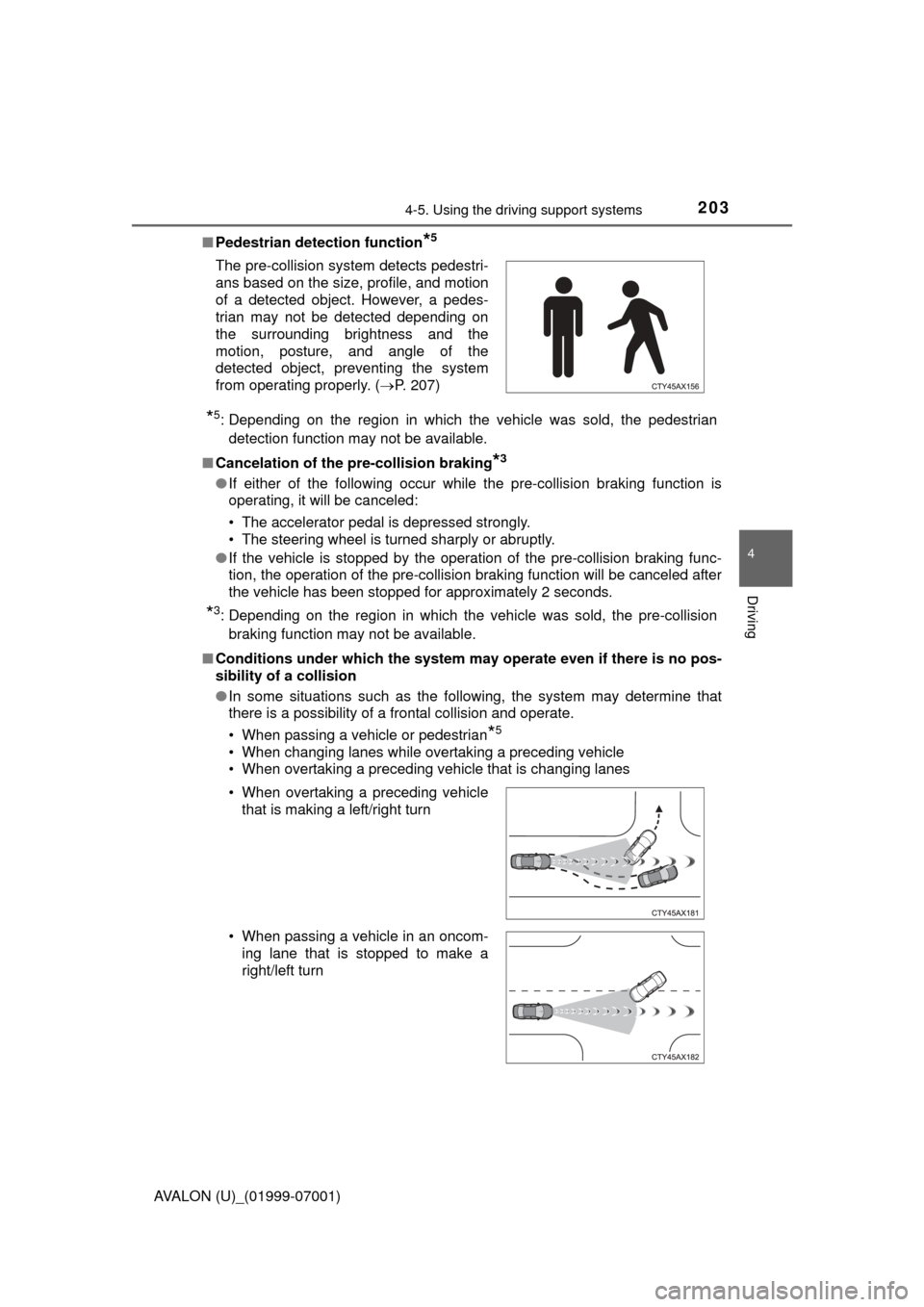
■ Conditions under which the system ma y operate even if there is no pos-
sibility of a collision
● In some situations such as the following, the system may determine that
there is a possibility of a frontal collision and operate.
• When passing a vehicle or pedestrian
*5
• When changing lanes while overtaking a preceding vehicle
• When overtaking a preceding vehicle that is changing lanes
The pre-collision system detects pedestri-
ans based on the size, profile, and motion
of a detected object. However, a pedes-
trian may not be detected depending on
the surrounding brightness and the
motion, posture, and angle of the
detected object, preventing the system
from operating properly. (
P. 207)
• When overtaking a preceding vehicle that is making a left/right turn
• When passing a vehicle in an oncom- ing lane that is stopped to make a
right/left turn
Page 209 of 492
2094-5. Using the driving support systems
4
Driving
AVALON (U)_(01999-07001)
When driving on highways and freeways with white (yellow) lines, this
function alerts the driver when the vehicle might depart from its lane
and provides assistance by operating the steering wheel to keep the
vehicle in its lane.
The LDA system recognizes visi-
ble white (yellow) lines with the
camera sensor on the upper por-
tion of the front windshield.
LDA (Lane Depar ture Al ert with steering
control)
: If equipped
Summary of functions
Page 210 of 492
2104-5. Using the driving support systems
AVALON (U)_(01999-07001)
◆Lane departure alert function
When the system determines
that the vehicle might depart
from its lane, a warning is dis-
played on the multi-information
display and the warning buzzer
sounds to alert the driver.
When the warning buzzer
sounds, check the surrounding
road situation and carefully
operate the steering wheel to
move the vehicle back to the
center within the white (yellow)
lines.
◆Steering control function
When the system determines
that the vehicle might depart
from its lane, the system pro-
vides assistance as necessary
by operating the steering wheel
in small amounts for a short
period of time to keep the vehi-
cle in its lane.
If the system detects that the
steering wheel has not been
operated for a fixed amount of
time or the steering wheel is not
being firmly gripped, a warning
is displayed on the multi-infor-
mation display and the warning
buzzer sounds.
Functions included in LDA system