Page 227 of 492

2274-5. Using the driving support systems
4
Driving
AVALON (U)_(01999-07001)
Pulling the lever toward you
cancels the speed control.
The speed control is also canceled
when the brake pedal is
depressed.
Pushing the lever up resumes
the cruise control and returns
vehicle speed to the set speed.
However, cruise control does not
resume when the vehicle speed is
approximately 25 mph (40 km/h) or
less.
When your vehicle is too close to
a vehicle ahead, and sufficient
automatic deceleration via the
cruise control is not possible, the
display will flash and the buzzer
will sound to alert the driver. An
example of this would be if
another driver cuts in front of you
while you are following a vehicle.
Depress the brake pedal to
ensure an appropriate vehicle-to-
vehicle distance.
■Warnings may not occur when
In the following instances, warnings may not occur even when the
vehicle-to-vehicle distance is small.
●When the speed of the preceding vehicle matches or exceeds
your vehicle speed
● When the preceding vehicle is traveling at an extremely slow
speed
● Immediately after the crui se control speed was set
● When depressing the accelerator pedal
Canceling and resuming the speed control
1
2
Approach warning (vehicle-to-vehicle distance control mode)
Page 231 of 492
2314-5. Using the driving support systems
4
Driving
AVALON (U)_(01999-07001)■
When the sensor may not be correctly detecting the vehicle ahead
In the case of the following and depending on the conditions, operate the
brake pedal when deceleration of the system is insufficient or operate the
accelerator pedal when acceleration is required.
As the sensor may not be able to correctly detect these types of vehicles, the
approach warning ( P. 227) may not be activated.
● Vehicles that cut in suddenly
● Vehicles traveling at low speeds
● Vehicles that are not moving in the same lane
● Vehicles with small rear ends (trailers with no load on board, etc.)
● Motorcycles traveling in the same lane
● When water or snow thrown up by the surrounding vehicles hinders the
detecting of the sensor
● When your vehicle is pointing upwards
(caused by a heavy load in the luggage
compartment, etc.)
● Preceding vehicle has an extremely
high ground clearance
Page 232 of 492
2324-5. Using the driving support systems
AVALON (U)_(01999-07001)■
Conditions under which the vehicle -to-vehicle distance control mode
may not function correctly
In the case of the following conditions, operate the brake pedal (or accelera-
tor pedal, depending on the situation) as necessary.
As the sensor may not be able to correctly detect vehicles ahead, the system
may not operate properly.
● When the vehicle ahead of you decelerates suddenly
● When the road curves or when the
lanes are narrow
● When steering wheel operation or your
position in the lane is unstable
Page 234 of 492
2344-5. Using the driving support systems
AVALON (U)_(01999-07001)
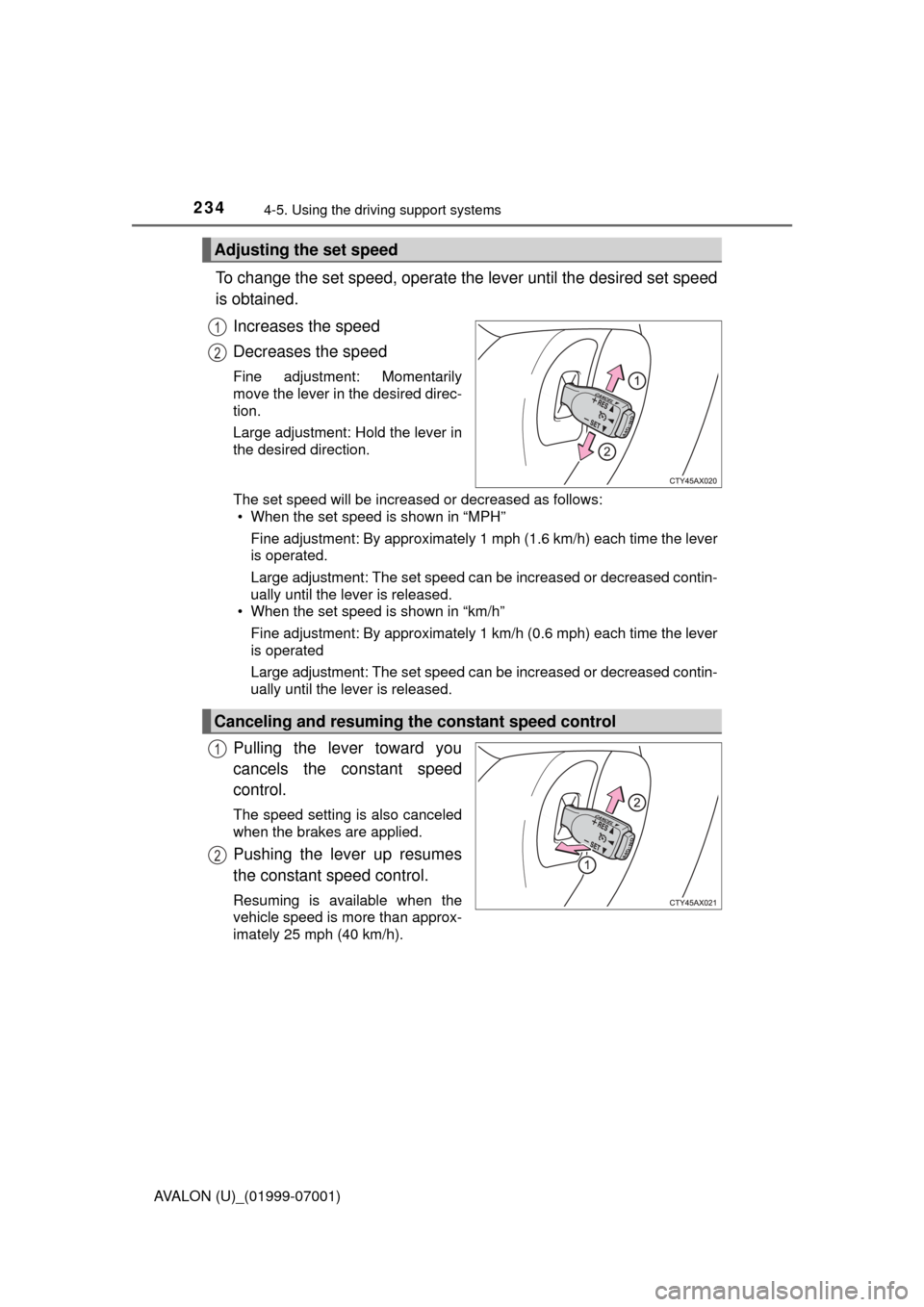
To change the set speed, operate the lever until the desired set speed
is obtained.
Increases the speed
Decreases the speed
Fine adjustment: Momentarily
move the lever in the desired direc-
tion.
Large adjustment: Hold the lever in
the desired direction.
The set speed will be increased or decreased as follows:• When the set speed is shown in “MPH”
Fine adjustment: By approximately 1 mph (1.6 km/h) each time the lever
is operated.
Large adjustment: The set speed can be increased or decreased contin-
ually until the lever is released.
• When the set speed is shown in “km/h”
Fine adjustment: By approximately 1 km/h (0.6 mph) each time the lever
is operated
Large adjustment: The set speed can be increased or decreased contin-
ually until the lever is released.
Pulling the lever toward you
cancels the constant speed
control.
The speed setting is also canceled
when the brakes are applied.
Pushing the lever up resumes
the constant speed control.
Resuming is available when the
vehicle speed is more than approx-
imately 25 mph (40 km/h).
Adjusting the set speed
1
2
Canceling and resuming the constant speed control
1
2
Page 248 of 492

2484-5. Using the driving support systems
AVALON (U)_(01999-07001)
◆ABS (Anti-lock Brake System)
Helps to prevent wheel lock when the brakes are applied suddenly,
or if the brakes are applied while driving on a slippery road surface
◆Brake assist
Generates an increased level of braking force after the brake pedal
is depressed when the system detects a panic stop situation
◆VSC (Vehicle Stability Control)
Helps the driver to control skidding when swerving suddenly or
turning on slippery road surfaces
◆TRAC (Traction Control)
Helps to maintain drive power and prevent the drive wheels from
spinning when starting the vehicle or accelerating on slippery roads
◆EPS (Electric Power Steering)
Employs an electric motor to redu ce the amount of effort needed to
turn the steering wheel
◆BSM (Blind Spot Monitor) (if equipped)
P. 2 3 7
Driving assist systems
To help enhance driving safety and performance, the following
systems operate automatically in response to various driving
situations. Be aware, however, that these systems are supple-
mentary and should not be relied upon too heavily when operat-
ing the vehicle.
Page 250 of 492

2504-5. Using the driving support systems
AVALON (U)_(01999-07001)
■Turning off both TRAC/VSC systems
To turn the TRAC/VSC systems off, press and hold the switch for more than 3
seconds while the vehicle is stopped.
The VSC OFF and “TRAC OFF” and a message will be shown on the mult\
i-
information display
*.
Press the switch again to turn the systems back on.
*: On vehicles with pre-collision system, pre-collision brake assist and pre- collision braking will also be disabled. The pre-collision system warning
light will come on and the message will be shown on the multi-information
display. ( P. 208)
■ When the message is displayed on th e multi-information display show-
ing that TRAC has been disabled even if the TRAC/VSC OFF switch has
not been pressed
TRAC cannot be operated. Contact your Toyota dealer.
■ Sounds and vibrations caused by the ABS, brake assist, VSC and TRAC
systems
● A sound may be heard from the engine compartment when the brake pedal
is depressed repeatedly, when the engine is started or just after the vehicle
begins to move. This sound does not indicate that a malfunction has
occurred in any of these systems.
● Any of the following conditions may occur when the above systems are
operating. None of these indicates that a malfunction has occurred.
• Vibrations may be felt through the vehicle body and steering.
• A motor sound may be heard after the vehicle comes to a stop.
• The brake pedal may pulsate slightly after the ABS is activated.
• The brake pedal may move down slightly after the ABS is activated.
■ EPS operation sound
When the steering wheel is operated, a motor sound (whirring sound) may be
heard. This does not indicate a malfunction.
■ Automatic reactivation of TRAC and VSC systems
After turning the TRAC and VSC systems off, the systems will be automati-
cally re-enabled in the following situations:
● When the engine switch is turned off
● If only the TRAC system is turned off, the TRAC will turn on when vehicle
speed increases
If both the TRAC and VSC systems are turned off, automatic re-enabling will
not occur when vehicle speed increases.
■ Reduced effectiveness of the EPS system
The effectiveness of the EPS system is reduced to prevent the system from
overheating when there is frequent steering input over an extended period of
time. The steering wheel may feel heavy as a result. Should this occur, refrain
from excessive steering input or stop the vehicle and turn the engine off. The
EPS system should return to normal within 10 minutes.
Page 253 of 492

253
4
Driving
AVALON (U)_(01999-07001)
4-6. Driving tips
●Use fluids that are appropriate to the prevailing outside tempera-
tures.
• Engine oil
• Engine coolant
• Washer fluid
● Have a service technician ins pect the condition of the battery.
● Have the vehicle fitted with four snow tires or purchase a set of tire
chains for the front tires.
Ensure that all tires are the specified size and brand, and that chains
match the size of the tires.
Perform the following accordin g to the driving conditions:
● Do not try to forcibly open a window or move a wiper that is frozen.
Pour warm water over the frozen area to melt the ice. Wipe away
the water immediately to prevent it from freezing.
● To ensure proper operation of the climate control system fan,
remove any snow that has accumulated on the air inlet vents in
front of the windshield.
● Check for and remove any excess ice or snow that may have accu-
mulated on the exterior lights, ve hicle’s roof, chassis, around the
tires or on the brakes.
● Remove any snow or mud from the bottom of your shoes before
getting in the vehicle.
Winter driving tips
Carry out the necessary preparations and inspections before
driving the vehicle in winter. Always drive the vehicle in a man-
ner appropriate to the prevailing weather conditions.
Preparation for winter
Before driving the vehicle
Page 254 of 492
2544-6. Driving tips
AVALON (U)_(01999-07001)
Accelerate the vehicle slowly, keep a safe distance between you and
the vehicle ahead, and drive at a reduced speed suitable to road con-
ditions.
Park the vehicle and move the shift lever to P without setting the park-
ing brake. The parking brake may freeze up, preventing it from being
released. If necessary, block the wheels to prev ent inadvertent sliding
or creeping.
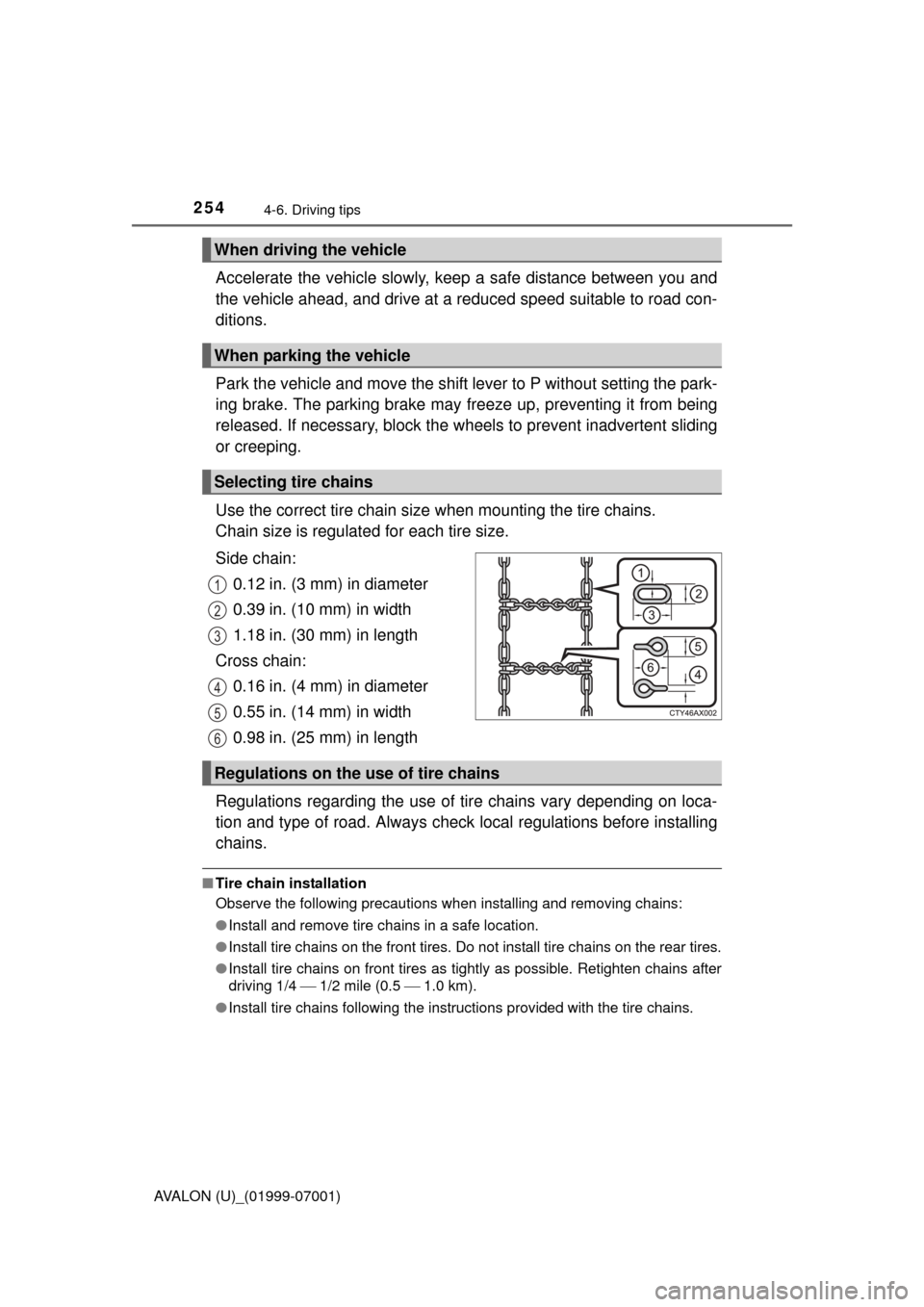
Use the correct tire chain size when mounting the tire chains.
Chain size is regulated for each tire size.
Side chain:
0.12 in. (3 mm) in diameter
0.39 in. (10 mm) in width
1.18 in. (30 mm) in length
Cross chain: 0.16 in. (4 mm) in diameter
0.55 in. (14 mm) in width
0.98 in. (25 mm) in length
Regulations regarding the use of tire chains vary depending on loca-
tion and type of road. Al ways check local regulations before installing
chains.
■ Tire chain installation
Observe the following precautions when installing and removing chains:
●Install and remove tire chains in a safe location.
● Install tire chains on the front tires. Do not install tire chains on the rear tires.
● Install tire chains on front tires as tightly as possible. Retighten chains after
driving 1/4 1/2 mile (0.5 1.0 km).
● Install tire chains following the instructions provided with the tire chains.
When driving the vehicle
When parking the vehicle
Selecting tire chains
1
2
3
4
5
6
Regulations on the use of tire chains

