Page 274 of 492
2745-3. Using the storage features
AVALON (U)_(01999-07001)
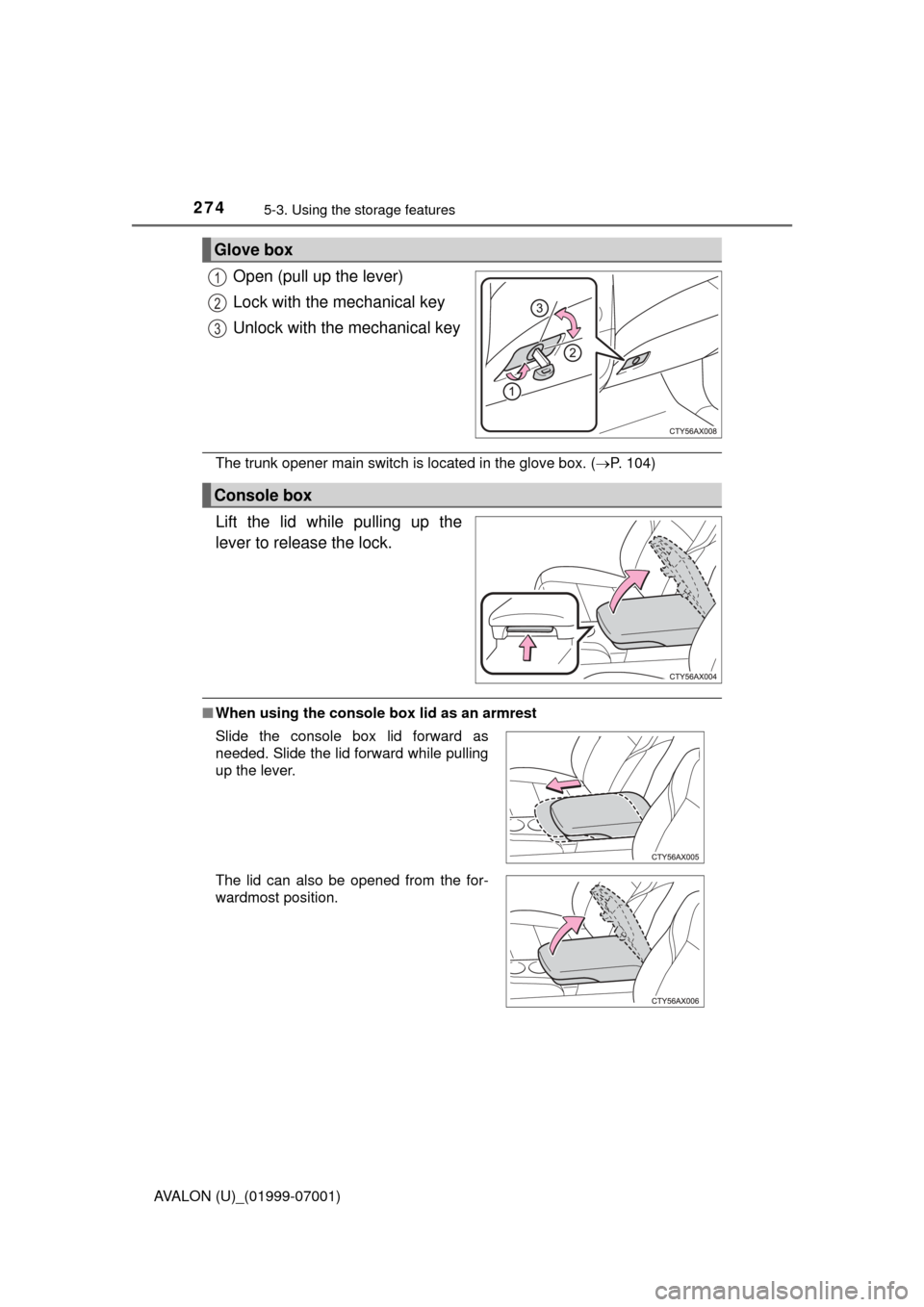
Open (pull up the lever)
Lock with the mechanical key
Unlock with the mechanical key
The trunk opener main switch is located in the glove box. ( P. 104)
Lift the lid while pulling up the
lever to release the lock.
■When using the console box lid as an armrest
Glove box
1
2
3
Console box
Slide the console box lid forward as
needed. Slide the lid forward while pulling
up the lever.
The lid can also be opened from the for-
wardmost position.
Page 275 of 492
2755-3. Using the storage features
5
Interior features
AVALON (U)_(01999-07001)■
Tray in the console box
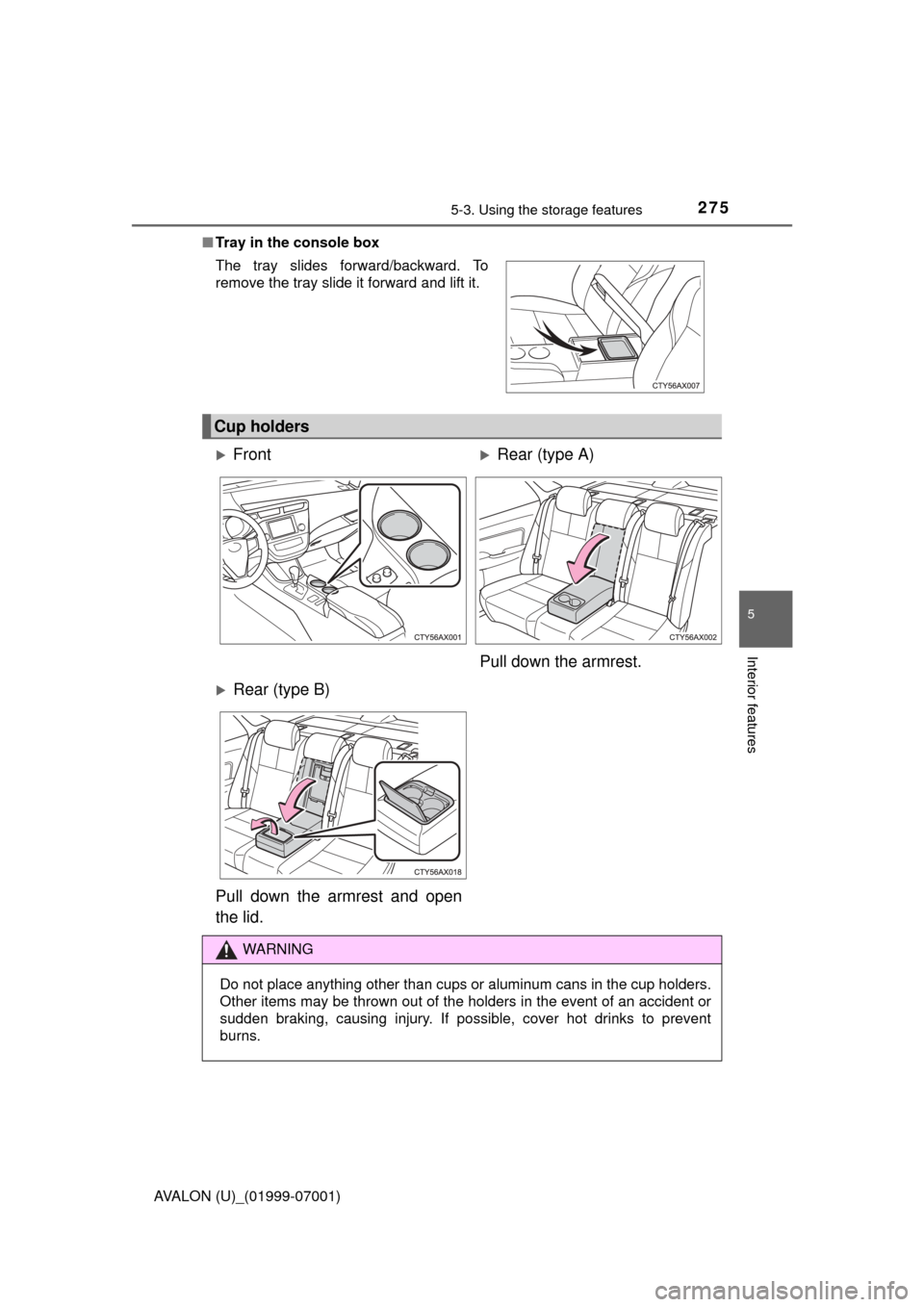
The tray slides forward/backward. To
remove the tray slide it forward and lift it.
Cup holders
FrontRear (type A)
Pull down the armrest.
Rear (type B)
Pull down the armrest and open
the lid.
WARNING
Do not place anything other than cups or aluminum cans in the cup holders.
Other items may be thrown out of the holders in the event of an accident or
sudden braking, causing injury. If possible, cover hot drinks to prevent
burns.
Page 276 of 492
2765-3. Using the storage features
AVALON (U)_(01999-07001)
Auxiliary boxes
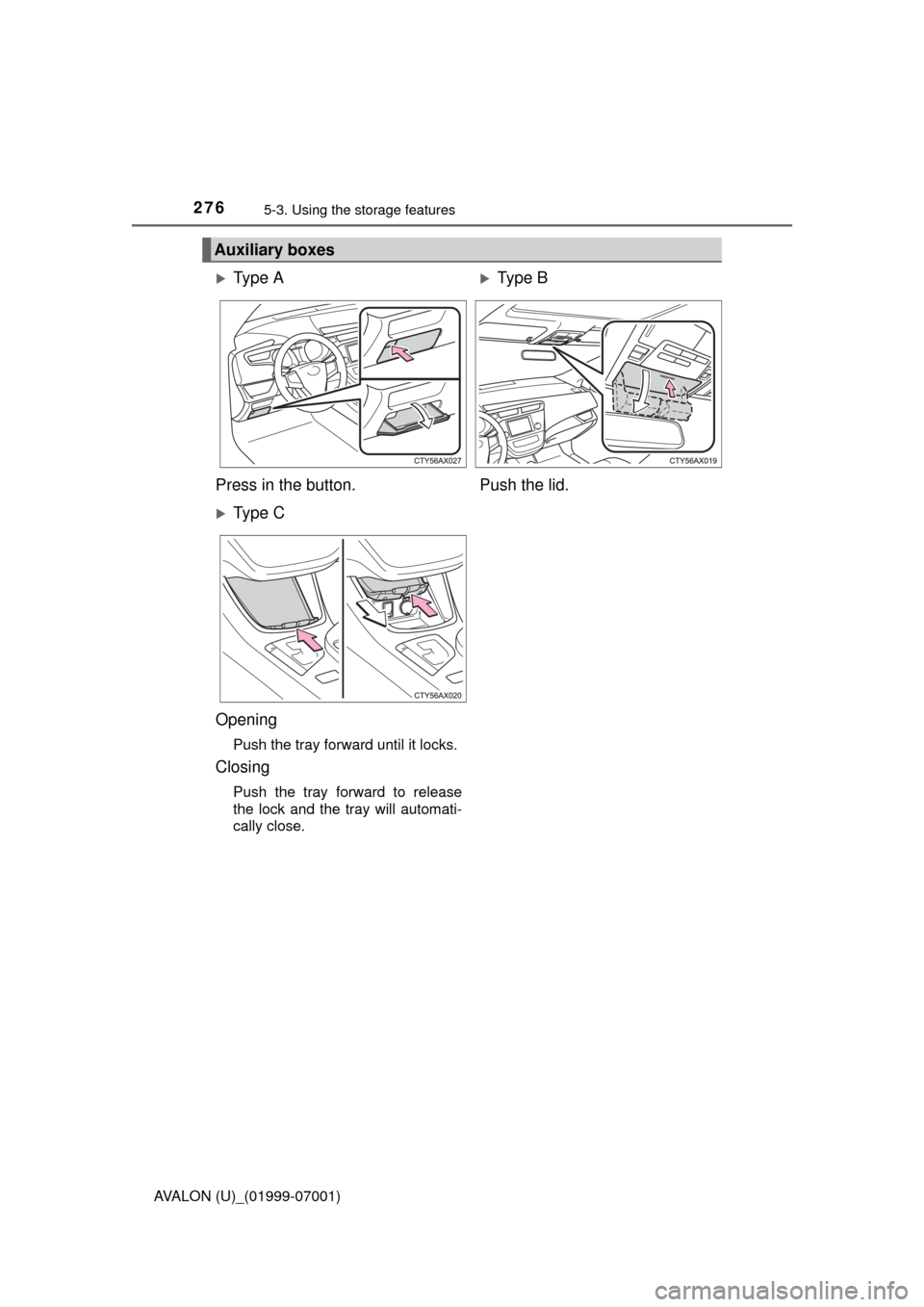
Ty p e AType B
Press in the button. Push the lid.
Ty p e C
Opening
Push the tray forward until it locks.
Closing
Push the tray forward to release
the lock and the tray will automati-
cally close.
Page 278 of 492
2785-3. Using the storage features
AVALON (U)_(01999-07001)■
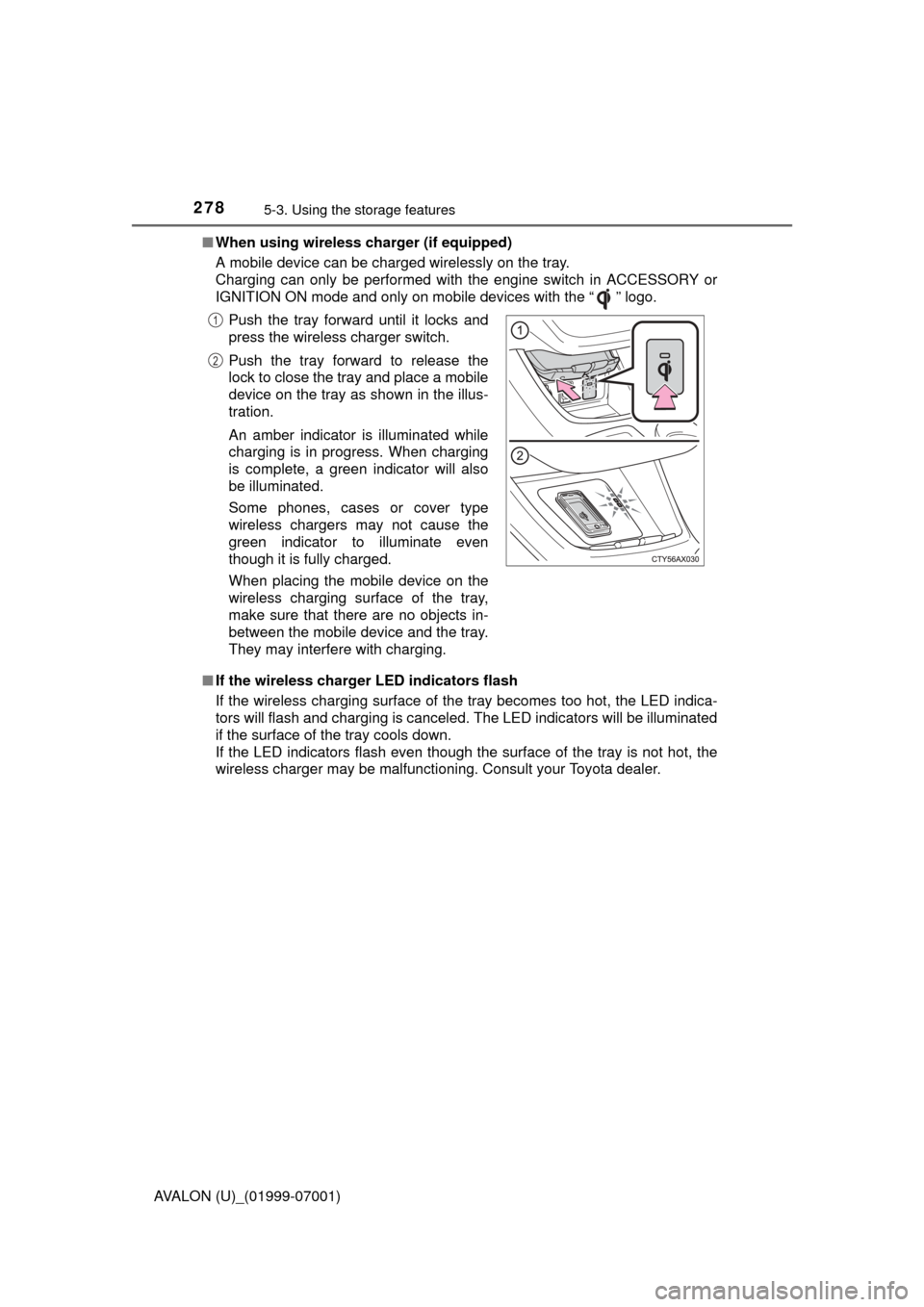
When using wireless charger (if equipped)
A mobile device can be charged wirelessly on the tray.
Charging can only be performed with the engine switch in ACCESSORY or
IGNITION ON mode and only on mobile devices with the “ ” logo.
■ If the wireless charger LED indicators flash
If the wireless charging surface of the tray becomes too hot, the LED indica-
tors will flash and charging is canceled. The LED indicators will be illuminated
if the surface of the tray cools down.
If the LED indicators flash even though the surface of the tray is not hot, the
wireless charger may be malfunctioning. Consult your Toyota dealer.Push the tray forward until it locks and
press the wireless charger switch.
Push the tray forward to release the
lock to close the tray and place a mobile
device on the tray as shown in the illus-
tration.
An amber indicator is illuminated while
charging is in progress. When charging
is complete, a green indicator will also
be illuminated.
Some phones, cases or cover type
wireless chargers may not cause the
green indicator to illuminate even
though it is fully charged.
When placing the mobile device on the
wireless charging surface of the tray,
make sure that there are no objects in-
between the mobile device and the tray.
They may interfere with charging.
1
2
Page 283 of 492
283
5
Interior features
AVALON (U)_(01999-07001)
5-4. Other interior features
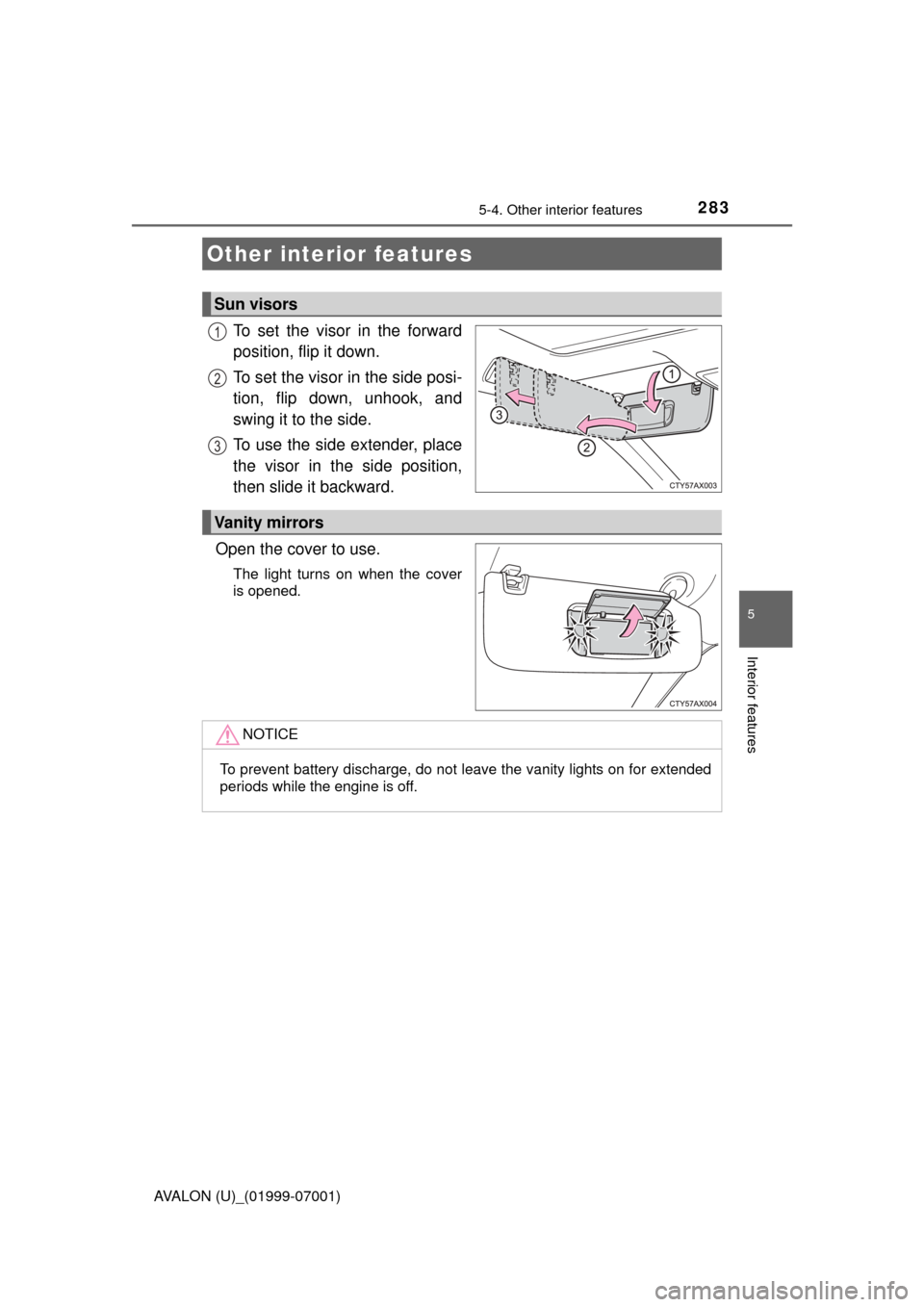
To set the visor in the forward
position, flip it down.
To set the visor in the side posi-
tion, flip down, unhook, and
swing it to the side.
To use the side extender, place
the visor in the side position,
then slide it backward.
Open the cover to use.
The light turns on when the cover
is opened.
Other interior features
Sun visors
1
2
3
Vanity mirrors
NOTICE
To prevent battery discharge, do not leave the vanity lights on for extended
periods while the engine is off.
Page 284 of 492
2845-4. Other interior features
AVALON (U)_(01999-07001)
The clock can be adjusted by pressing the buttons.
■The clock is displayed when
The engine switch is in ACCESSORY or IGNITION ON mode.
■ When disconnecting and reco nnecting battery terminals
Type A
The time display will automatically be set to 12:00 AM.
Type B
The time display will automatically be set to 12:00.
■ Time display (Type B)
After pressing “H” or “M” to show the setting screen, press “H” and “M” at the
same time to change between the analog and digital displays.
Clock
Ty p e AType B
Adjusts the hours
Pressing and holding the button adjusts the hours forward quickly 1 hour at
a time.
Adjusts the minutes
Pressing and holding the button adjusts the minutes forward quickly by 1
minute at a time. If the button is pressed and held for 5 seconds or more,
the minutes move forward by 5 minutes at a time.
1
2
Page 420 of 492

4207-2. Steps to take in an emergency
AVALON (U)_(01999-07001)
Stop the engine. Set the parking brake and shift the shift lever to P.
Remove the mud, snow or sand from around the front wheels.
Place wood, stones or some other material under the front wheels
to help provide traction.
Restart the engine.
Shift the shift lever to D or R and release the parking brake. Then,
while exercising caution, depress the accelerator pedal.
■ When it is difficult to free the vehicle
If the vehicle becomes stuck
Carry out the following procedures if the tires spin or the vehicle
becomes stuck in mud, dirt or snow:
Press to turn off TRAC.
WARNING
■When attempting to free a stuck vehicle
If you choose to push the vehicle back and forth to free it, make sure the
surrounding area is clear to avoid striking other vehicles, objects or people.
The vehicle may also lunge forward or lunge back suddenly as it becomes
free. Use extreme caution.
■ When shifting the shift lever
Be careful not to shift the shift lever with the accelerator pedal depressed.
This may lead to unexpected rapid acceleration of the vehicle that may
cause an accident resulting in death or serious injury.
1
2
3
4
5
Page:
< prev 1-8 9-16 17-24