Page 75 of 492
752. Instrument cluster
2
Instrument cluster
AVALON (U)_(01999-07001)
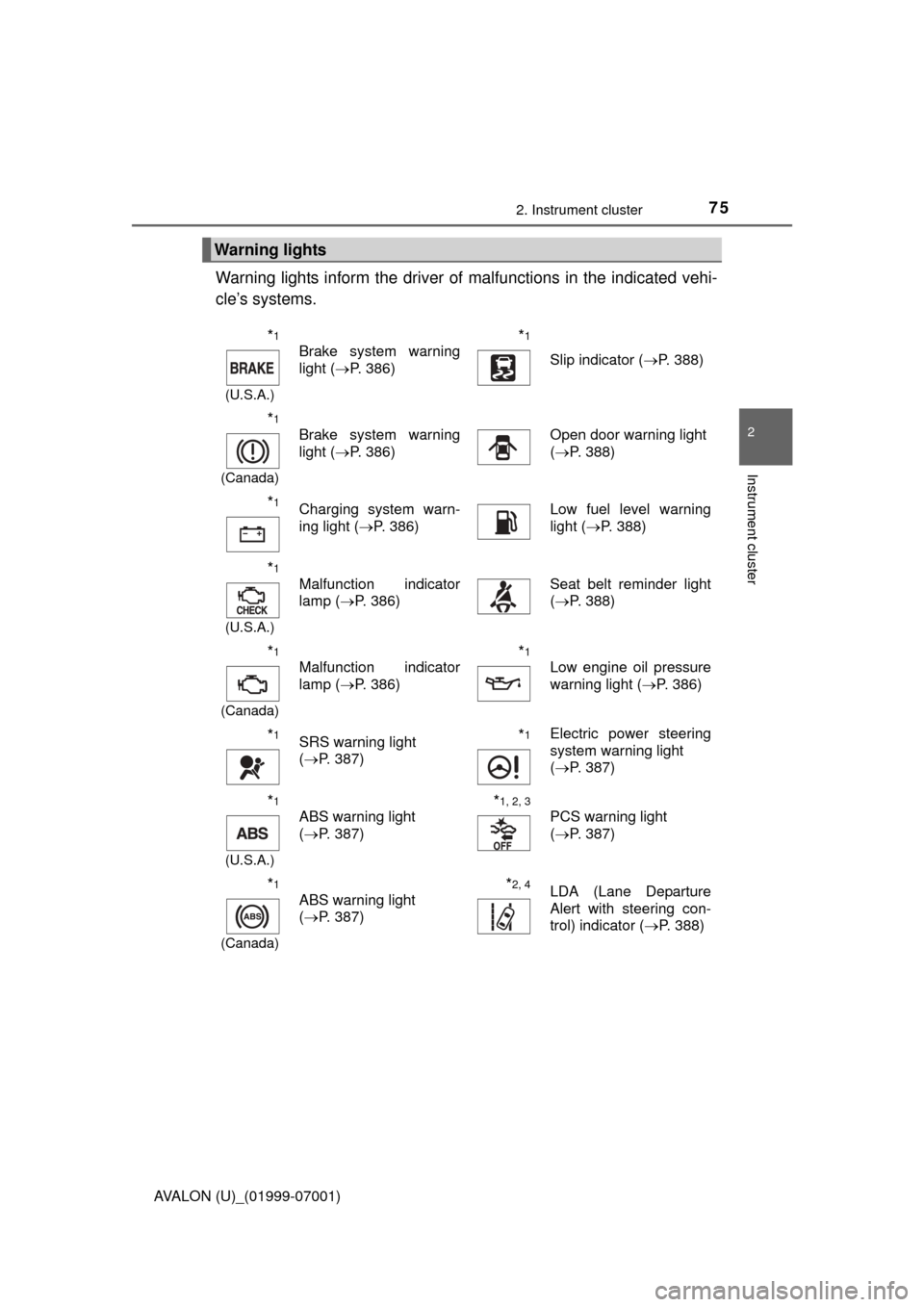
Warning lights inform the driver of malfunctions in the indicated vehi-
cle’s systems.
Warning lights
*1
(U.S.A.)
Brake system warning
light ( P. 386)*1
Slip indicator ( P. 388)
*1
(Canada)
Brake system warning
light (P. 386)Open door warning light
(P. 388)
*1Charging system warn-
ing light ( P. 386)Low fuel level warning
light (P. 388)
*1
(U.S.A.)
Malfunction indicator
lamp ( P. 386)Seat belt reminder light
(P. 388)
*1
(Canada)
Malfunction indicator
lamp ( P. 386)*1
Low engine oil pressure
warning light ( P. 386)
*1SRS warning light
(P. 387)*1Electric power steering
system warning light
(P. 387)
*1
(U.S.A.)
ABS warning light
(P. 387)*1, 2, 3
PCS warning light
(P. 387)
*1
(Canada)
ABS warning light
(P. 387)*2, 4LDA (Lane Departure
Alert with steering con-
trol) indicator ( P. 388)
Page 79 of 492
792. Instrument cluster
2
Instrument cluster
AVALON (U)_(01999-07001)The units used on the speedometer may differ depending on where the
vehicle is sold.
Tachometer
Displays the engine speed in revolutions per minute
Multi-information display
Presents the driver with a variety of driving-related data (
P. 82)
Speedometer
Displays the vehicle speed
Fuel gauge
Displays the quantity of fuel remaining in the tank
Trip meter reset knob/instrument panel light control knob
P. 8 0
Odometer and trip meter display
Odometer:
Displays the total distance the vehicle has been driven
Trip meter:
Displays the distance the vehicle has been driven since the meter was last
reset. Trip meters “A” and “B” can be used to record and display different
distances independently.
Shift position and shift range
Displays the selected shift position or selected shift range ( P. 165)
Engine coolant temperature gauge
Displays the engine coolant temperature
Gauges and meters
1
2
3
4
5
6
7
8
Page 82 of 492

822. Instrument cluster
AVALON (U)_(01999-07001)
The multi-information display presents the driver with a variety of driv-
ing-related data.
● Trip information ( P. 8 3 )
Displays the following items: • Distance to empty
• Average fuel economy
• Current fuel economy
• ECO Drive Level
• Turn-by-turn navigation (vehicles with a navigation
system)
● Settings ( P. 8 5 )
● Warning messages and reminder messages ( P. 394)
● Automatically displayed when a malfunction occurs in one of the
vehicle’s systems or when a reminder message is required. The
display returns to the previous screen by pressing the “DISP” but-
ton. ( P. 8 3 )
● Cruise control display (if equipped) ( P. 233)
● Dynamic radar cruise control display (if equipped) ( P. 220)
● LDA (Lane Departure Alert with steering control) display (if
equipped) ( P. 209)
● PCS (Pre-Collision System ) display (if equipped) (P. 196)
● Tire pressure warning system display ( P. 341)
Multi-infor mation display
Display contents
Page 83 of 492

832. Instrument cluster
2
Instrument cluster
AVALON (U)_(01999-07001)■
Switching the display
Items displayed can be
switched by pressing the
“DISP” button.
■Distance to empty
Displays the estimated maximum distance that can be driven with
the quantity of fuel remaining.
• This distance is computed based on your average fuel consumption. As
a result, the actual distance that can be driven may differ from that dis-
played.
• When only a small amount of fuel is added to the tank, the display may
not be updated.
When refueling, turn the engine switch off. If the vehicle is refueled with-
out turning the engine switch off, the display may not be updated.
■
Digital speedometer
Displays the current vehicle speed.
■Average fuel economy
Displays the average fuel consum ption since the function was
reset.
• The function can be reset by pressing and holding the “DISP” button\
when the average fuel consumption is displayed.
• Use the displayed average fuel consumption as a reference.
■
Current fuel economy
Displays the current rate of fuel consumption.
Trip information
Page 89 of 492
892. Instrument cluster
2
Instrument cluster
AVALON (U)_(01999-07001)
Audio system
Press “APPS” button and select
“Eco” to display the “Trip Informa-
tion” screen.
If the “Trip Information” screen
does not appear, select “Trip
Information”.
Average vehicle speed
Elapsed time
Range
Previous fuel consumption per
minute
Current fuel consumption
Reset the trip information data
“Past Record” screen appears
These images are examples only, an d may vary slightly from actual
conditions.
Fuel consumption information
Fuel consumption information can be displayed on the audio
system screen.
Trip information
1
2
3
4
5
6
7
Page 90 of 492
902. Instrument cluster
AVALON (U)_(01999-07001)
Press “APPS” button and select “Eco” to display the “Past Record”
screen.
If the “Past Record” screen does not appear, select “Past Record”.
Previous fuel economy record
Current fuel economy
Best recorded fuel economy
Update the past record data
Reset the past record data
“Trip Information” screen
appears
Average recorded fuel economy
These images are examples only, and may vary slightly from actual
conditions.
■ Updating the past record data
Selecting “Update” on the “Past Record” screen will update t\
he past record
data.
■ Resetting the data
Selecting “Clear” on the consumption screen will reset the consumption data.
Selecting “Clear” on the “Past Record” screen will reset the past record data.
■ Customization
The touch button sensitivity can be changed.
(Customizable features: P. 449)
Past record
1
2
3
4
5
6
7
Page 143 of 492

143
Driving4
AVALON (U)_(01999-07001)4-1. Before driving
Driving the vehicle ............. 144
Cargo and luggage ........... 154
Vehicle load limits ............. 157
Trailer towing..................... 158
Dinghy towing ................... 159
4-2. Driving procedures Engine (ignition) switch ..... 160
Automatic transmission ..... 165
Turn signal lever................ 169
Parking brake .................... 170 4-3. Operating the lights
and wipers
Headlight switch ................ 171
Automatic High Beam ....... 174
Windshield wipers and washer ............................ 178
4-4. Refueling Opening the fuel tank cap .................................. 184
4-5. Using the driving support systems
Toyota Safety Sense P ..... 188
PCS (Pre-Collision System) .... 196
LDA (Lane Departure Alert with steering
control) ............................ 209
Dynamic radar cruise control ............................. 220
Cruise control .................... 233
BSM (Blind Spot Monitor) ........ 237
• The Blind Spot Monitor function ......................... 239
• The Rear Cross Traffic Alert function ................. 243
Driving mode select switches .......................... 246
Driving assist systems ...... 248
4-6. Driving tips Winter driving tips ............. 253
Page 146 of 492

1464-1. Before driving
AVALON (U)_(01999-07001)■
Breaking in your new Toyota
To extend the life of the vehicle, observing the following precautions is recom-
mended:
●For the first 186 miles (300 km):
Avoid sudden stops.
● For the first 621 miles (1000 km):
• Do not drive at extremely high speeds.
• Avoid sudden acceleration.
• Do not drive continuously in low gears.
• Do not drive at a constant speed for extended periods.
■ Drum-in-disc type parking brake system
Your vehicle has a drum-in-disc type parking brake system. This type of brake
system needs bedding-down of the brake shoes periodically or whenever the
parking brake shoes and/or drum are replaced. Have your Toyota dealer per-
form the bedding down operation.
■ Operating your vehicle in a foreign country
Comply with the relevant vehicle registration laws and confirm the availability
of the correct fuel. ( P. 433)
WARNING
Observe the following precautions.
Failure to do so may result in death or serious injury.
■When starting the vehicle
Always keep your foot on the brake pedal while stopped with the engine
running. This prevents the vehicle from creeping.
■ When driving the vehicle
●Do not drive if you are unfamiliar with the location of the brake and ac\
cel-
erator pedals to avoid depressing the wrong pedal.
• Accidentally depressing the accelerator pedal instead of the brake
pedal will result in sudden acceleration that may lead to an accident.
• When backing up, you may twist your body around, leading to a diffi- culty in operating the pedals. Make sure to operate the pedals properly.
• Make sure to keep a correct driving posture even when moving the
vehicle only slightly. This allows you to depress the brake and accelera-
tor pedals properly.
• Depress the brake pedal using your right foot. Depressing the brake
pedal using your left foot may delay response in an emergency, result-
ing in an accident.
● Do not drive the vehicle over or stop the vehicle near flammable materials.
The exhaust system and exhaust gases can be extremely hot. These hot
parts may cause a fire if there is any flammable material nearby.