2016 TOYOTA 4RUNNER warning
[x] Cancel search: warningPage 77 of 528
772. Instrument cluster
2
Instrument cluster
4RUNNER (U)_(OM35B23U)
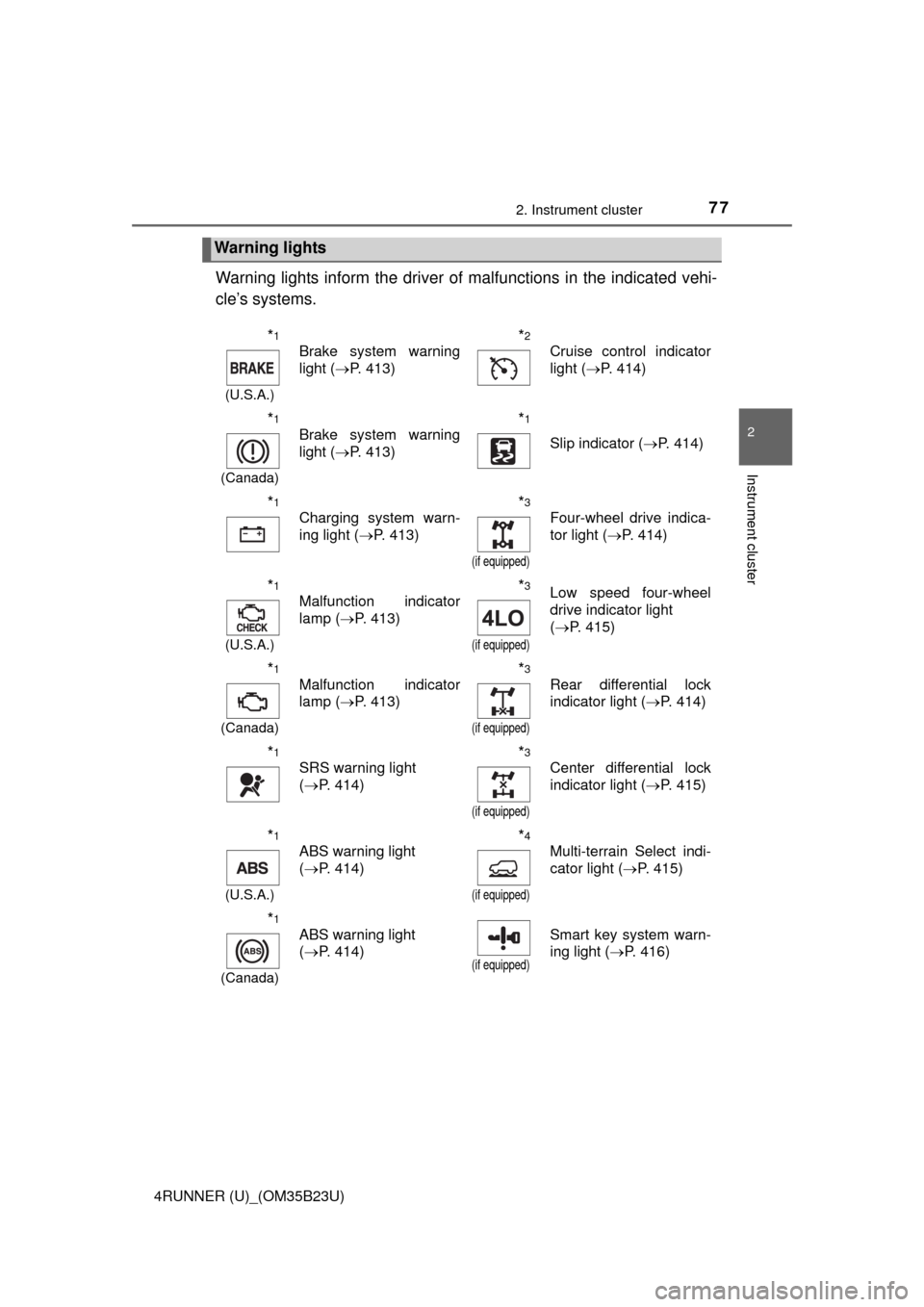
Warning lights inform the driver of malfunctions in the indicated vehi-
cle’s systems.
Warning lights
*1
(U.S.A.)
Brake system warning
light (P. 413)*2
Cruise control indicator
light (P. 414)
*1
(Canada)
Brake system warning
light (P. 413)*1
Slip indicator (P. 414)
*1
Charging system warn-
ing light (P. 413)*3
(if equipped)
Four-wheel drive indica-
tor light (P. 414)
*1
(U.S.A.)
Malfunction indicator
lamp (P. 413)*3
(if equipped)
Low speed four-wheel
drive indicator light
(P. 415)
*1
(Canada)
Malfunction indicator
lamp (P. 413)*3
(if equipped)
Rear differential lock
indicator light (P. 414)
*1
SRS warning light
(P. 414)*3
(if equipped)
Center differential lock
indicator light (P. 415)
*1
(U.S.A.)
ABS warning light
(P. 414)*4
(if equipped)
Multi-terrain Select indi-
cator light (P. 415)
*1
(Canada)
ABS warning light
(P. 414)
(if equipped)
Smart key system warn-
ing light (P. 416)
Page 78 of 528

782. Instrument cluster
4RUNNER (U)_(OM35B23U)
*1: These lights turn on when the engine switch is turned to IGNITION ON
mode (vehicles with a smart key system) or the engine switch is turned to
the “ON” position (vehicles without a smart key system) to indicate that a
system check is being performed. They will turn off after the engine is
started, or after a few seconds. There may be a malfunction in a system if
the lights do not come on, or do not turn off. Have the vehicle inspected by
your Toyota dealer.
*2: The light flashes to indicate a malfunction.
*3: The light flashes rapidly to indicate a malfunction.
*4: The light flashes continuously to indicate a malfunction.
Open door warning light
(P. 415)*1Master warning light
(P. 422)
Low fuel level warning
light (P. 415)*1Tire pressure warning
light (P. 416)
Seat belt reminder light
(P. 416)
(if equipped)
Unengaged “Park” warn-
ing light (P. 415)
*1
Low engine oil pressure
warning light (P. 413)*1
(if equipped)
KDSS warning light
(P. 415)
*1
Power steering warning
light (P. 415)*1, 2
(if equipped)
Automatic running
boards indicator light
(P. 415)
Page 80 of 528

802. Instrument cluster
4RUNNER (U)_(OM35B23U)
*1: These lights turn on when the engine switch is turned to the “ON” position
(vehicles without a smart key system) or the engine switch is turned to
IGNITION ON mode (vehicles with a smart key system) to indicate that a
system check is being performed. They will turn off after the engine is
started, or after a few seconds. There may be a malfunction in a system if
the lights do not come on, or do not turn off. Have the vehicle inspected by
your Toyota dealer.
*2: The light flashes to indicate that the system is operating.
*3: The light does not turn on when the system is disabled.
*4: This light illuminates on the center panel.
(if equipped)
“A-TRAC” indicator
(P. 239)*1
(if equipped)
Crawl Control indicator
(P. 249)
*1
(if equipped)
“AUTO LSD” indicator
(P. 241)*1, 2
(if equipped)
Automatic running
boards indicator
(P. 111 )
(if equipped)
Multi-terrain Select indi-
cator (P. 252)
CAUTION
■If a safety system warning light does not come on
Should a safety system light such as the ABS and SRS warning light not
come on when you start the engine, this could mean that these systems are
not available to help protect you in an accident, which could result in death
or serious injury. Have the vehicle inspected by your Toyota dealer immedi-
ately if this occurs.
Page 83 of 528

832. Instrument cluster
2
Instrument cluster
4RUNNER (U)_(OM35B23U)
The multi-information display presents the driver with a variety of driv-
ing-related data.
*1: If equipped
*2: Vehicles with a navigation system
■
Switching the display
Items displayed can be
switched by pressing the dis-
play change button.
■Odometer
Displays the total distance the vehicle has been driven.
Multi-infor mation display
Display contents
Driving monitor (P. 84)
Warning messages
(P. 422)
Multi-terrain Select messages
*1
(P. 256)
Eco Driving Indicator Zone Dis-
play (P. 8 7 )Outside temperature display
(P. 310)
Trip information
Ice indicator (P. 310)
Compass*2 (P. 8 5 )
Multi-terrain Select display
*1
(P. 252)
Trip information
1
2
3
4
5
6
7
8
9
Page 95 of 528
953-1. Key information
3
Operation of each component
4RUNNER (U)_(OM35B23U)NOTE:
This device complies with part 15 of the FCC Rules. Operation is subject to
the following two conditions: (1) This device may not cause harmful interfer-
ence, and (2) this device must accept any interference received, including
interference that may cause undesired operation.
FCC WARNING:
Changes or modifications not expressly approved by the party responsible for
compliance could void the user’s authority to operate the equipment.
For vehicles sold in Canada
NOTE:
This device complies with Industry Canada licence-exempt RSS standard(s).
Operation is subject to the following two conditions: (1) this device may not
cause interference, and (2) this device must accept any interference, includ-
ing interference that may cause undesired operation of the device.
NOTICE
■To prevent key damage
●Do not drop the keys, subject them to strong shocks or bend them.
●Do not expose the keys to high temperatures for long periods of time.
●Do not get the keys wet or wash them in an ultrasonic washer etc.
●Do not attach metallic or magnetic materials to the keys or place the keys
close to such materials.
●Do not disassemble the keys.
●Do not attach a sticker or anything else to the surface of the electronic key
and key (with a wireless remote control function).
●Vehicles with a smart key system: Do not place the keys near objects that
produce magnetic fields, such as TVs, audio systems and induction cook-
ers, or medical electrical equipment, such as low-frequency therapy equip-
ment.
■Carrying the electronic key on your person (vehicles with a smart key
system)
Carry the electronic key 3.9 in. (10 cm) or more away from electric appli-
ances that are turned on. Radio waves emitted from electric appliances
within 3.9 in. (10 cm) of the electronic key may interfere with the key, caus-
ing the key to not function properly.
■In case of a smart key system malfunction or other key-related prob-
lems (vehicles with a smart key system)
Take your vehicle with all the electronic keys provided with your vehicle to
your Toyota dealer.
■When an electronic key is lost (vehicles with a smart key system)
If the electronic key remains lost, the risk of vehicle theft increases signifi-
cantly. Visit your Toyota dealer immediately with all remaining electronic
keys that was provided with your vehicle.
Page 105 of 528
1053-2. Opening, closing and locking the doors
3
Operation of each component
4RUNNER (U)_(OM35B23U)
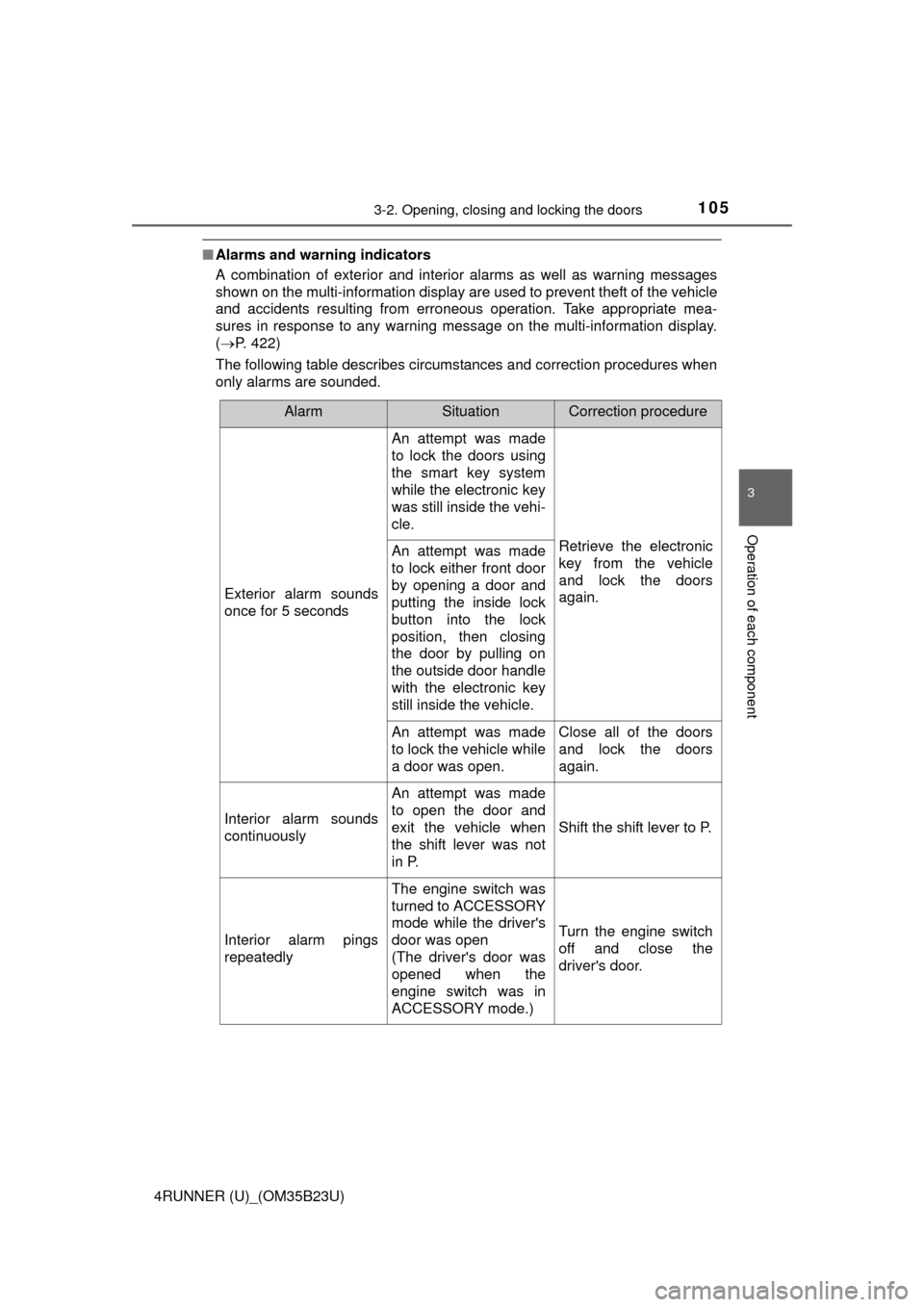
■Alarms and warning indicators
A combination of exterior and interior alarms as well as warning messages
shown on the multi-information display are used to prevent theft of the vehicle
and accidents resulting from erroneous operation. Take appropriate mea-
sures in response to any warning message on the multi-information display.
(P. 422)
The following table describes circumstances and correction procedures when
only alarms are sounded.
AlarmSituationCorrection procedure
Exterior alarm sounds
once for 5 seconds
An attempt was made
to lock the doors using
the smart key system
while the electronic key
was still inside the vehi-
cle.
Retrieve the electronic
key from the vehicle
and lock the doors
again.An attempt was made
to lock either front door
by opening a door and
putting the inside lock
button into the lock
position, then closing
the door by pulling on
the outside door handle
with the electronic key
still inside the vehicle.
An attempt was made
to lock the vehicle while
a door was open.Close all of the doors
and lock the doors
again.
Interior alarm sounds
continuously
An attempt was made
to open the door and
exit the vehicle when
the shift lever was not
in P.
Shift the shift lever to P.
Interior alarm pings
repeatedly
The engine switch was
turned to ACCESSORY
mode while the driver's
door was open
(The driver's door was
opened when the
engine switch was in
ACCESSORY mode.)
Turn the engine switch
off and close the
driver's door.
Page 109 of 528
1093-2. Opening, closing and locking the doors
3
Operation of each component
4RUNNER (U)_(OM35B23U)■If the smart key system has been deactivated in a customized setting
●Locking and unlocking the doors: P. 446
●Starting the engine and changing engine switch modes: P. 447
●Stopping the engine: P. 1 9 5
■Certification for the smart key system
For vehicles sold in the U.S.A.
FCC ID: HYQ14ACX
FCC ID: HYQ13CZD
FCC ID: HYQ14ADF
FCC ID: HYQ13CZE
NOTE:
This device complies with part 15 of the FCC Rules. Operation is subject to
the following two conditions: (1) This device may not cause harmful interfer-
ence, and (2) this device must accept any interference received, including
interference that may cause undesired operation.
FCC WARNING:
Changes or modifications not expressly approved by the party responsible for
compliance could void the user’s authority to operate the equipment.
For vehicles sold in Canada
NOTE:
This device complies with Industry Canada licence-exempt RSS standard(s).
Operation is subject to the following two conditions: (1) this device may not
cause interference, and (2) this device must accept any interference, includ-
ing interference that may cause undesired operation of the device.
For vehicles sold in the U.S.A.
FCC ID: NI4TMLF8-14
This device complies with part 15 of the FCC Rules. Operation is subject to
the following two conditions: (1) This device may not cause harmful interfer-
ence, and (2) this device must accept any interference received, including
interference that may cause undesired operation.
Changes or modifications not expressly approved by the party responsible for
compliance could void the user’s authority to operate the equipment.
For vehicles sold in Canada
This device complies with Industry Canada licence-exempt RSS standard(s).
Operation is subject to the following two conditions: (1) this device may not
cause interference, and (2) this device must accept any interference, includ-
ing interference that may cause undesired operation of the device.
Page 201 of 528

2014-2. Driving procedures
4
Driving
4RUNNER (U)_(OM35B23U)
■S mode
When the shift range is “3” or lower, holding the shift lever toward “+” sets the
shift range to “5”.
■AI-SHIFT
AI-SHIFT automatically selects the optimal gear according to driver perfor-
mance and driving conditions.
AI-SHIFT automatically operates when the shift lever is in the D position.
(Shifting the shift lever to the S position or paddle shifting cancels the func-
tion.)
The engine speed may remain high after releasing the accelerator pedal. This
does not indicate a malfunction.
■When driving with cruise control system
Engine braking will not occur in S mode, even when downshifting to “4”.
(P. 221)
■If the shift lever cannot be shifted from P
P. 444
■If the “S” indicator does not come on even after shifting the shift lever to
S
This may indicate a malfunction in the automatic transmission system. Have
the vehicle inspected by your Toyota dealer immediately.
(In this situation, the transmission will operate in the same manner as when
the shift lever is in D.)
■Downshift restriction warning buzzer (S mode)
To help ensure safety and driving performance, downshifting operation may
sometimes be restricted. In some circumstances, downshifting may not be
possible even when the shift lever is operated. (A buzzer will sound twice.)
CAUTION
■When driving on slippery road surfaces
Be careful of downshifting and sudden acceleration, as this could result in
the vehicle skidding to the side or spinning.