Page 295 of 528
2955-2. Using the interior lights
5
Interior features
4RUNNER (U)_(OM35B23U)
■Illuminated entry system
Vehicles without a smart key system
The lights automatically turn on/off according to the engine switch position,
whether the doors are locked/unlocked, and whether the doors are open/
closed.
Vehicles with a smart key system
The lights automatically turn on/off according to engine switch mode, the
presence of the electronic key, whether the doors are locked/unlocked, and
whether the doors are opened/closed.
■To prevent battery discharge
If the following lights remain on, the lights will go off automatically after 20
minutes:
●Engine switch light
●Front interior light
●Rear interior light
●Personal lights
●Footwell lights
●Inside door handle lights
●Door courtesy lights
■Customization
Setting (e.g. the time elapsed before lights turn off) can be changed.
(Customizable features: P. 485)
NOTICE
■To prevent battery discharge
Do not leave the lights on longer than necessary when the engine is not
running.
Page 309 of 528
3095-4. Other interior features
5
Interior features
4RUNNER (U)_(OM35B23U)
The clock can be adjusted by pressing the buttons.
Adjusts the hours
Adjusts the minutes
■The clock is displayed when
Vehicles without a smart key system
The engine switch is in the “ACC” or “ON” position.
Vehicles with a smart key system
The engine switch is in ACCESSORY or IGNITION ON mode.
■When disconnecting and reconnecting battery terminals
The clock data will be reset.
Clock
1
2
Page 318 of 528
3185-4. Other interior features
4RUNNER (U)_(OM35B23U)
■The power outlets can be used when
Vehicles without a smart key system
The engine switch is in the “ACC” or “ON” position.
Vehicles with a smart key system
The engine switch is in ACCESSORY or IGNITION ON mode.
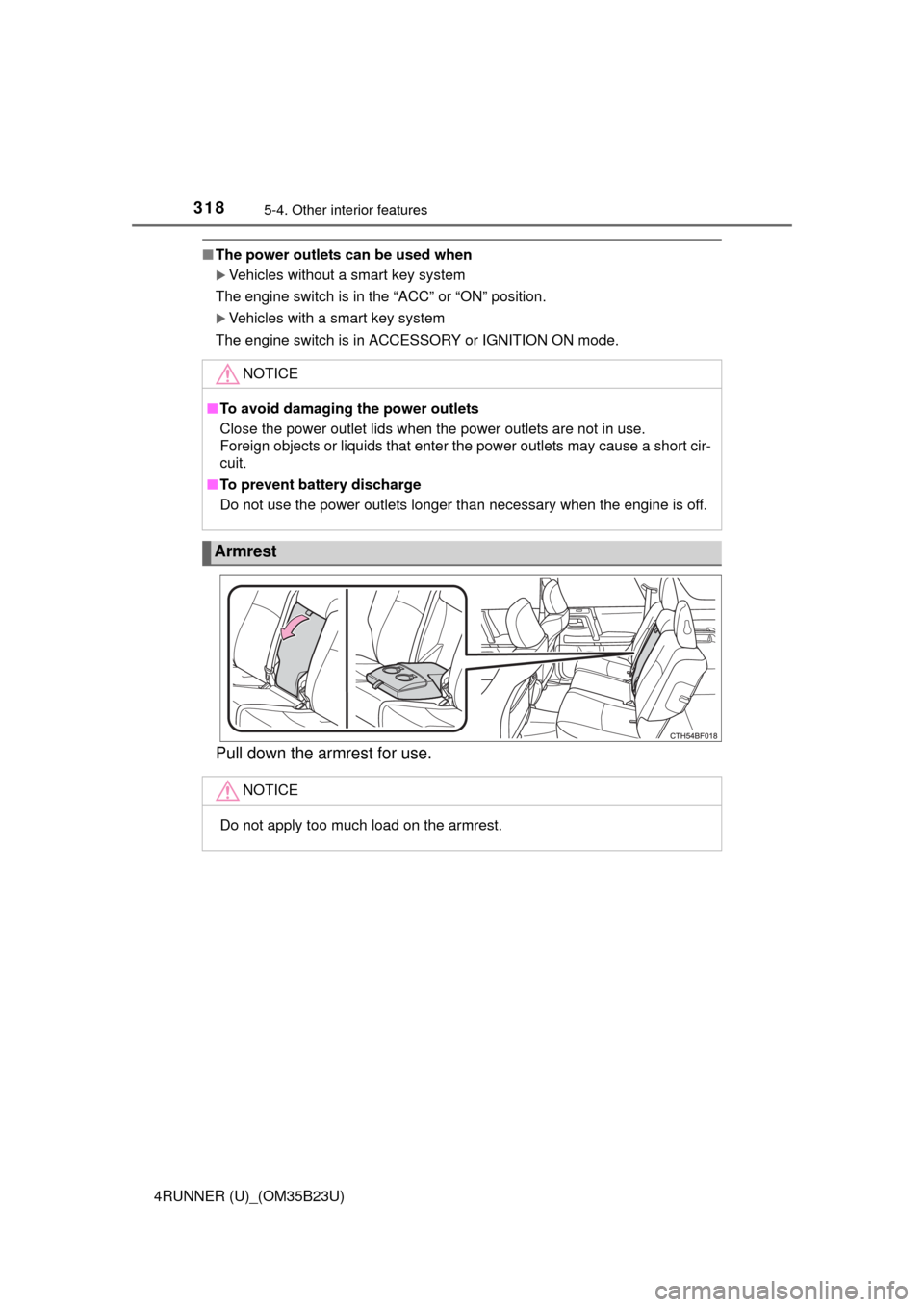
Pull down the armrest for use.
NOTICE
■To avoid damaging the power outlets
Close the power outlet lids when the power outlets are not in use.
Foreign objects or liquids that enter the power outlets may cause a short cir-
cuit.
■To prevent battery discharge
Do not use the power outlets longer than necessary when the engine is off.
Armrest
NOTICE
Do not apply too much load on the armrest.
Page 333 of 528
333
Maintenance and care6
4RUNNER (U)_(OM35B23U)6-1. Maintenance and care
Cleaning and protecting
the vehicle exterior .......... 334
Cleaning and protecting
the vehicle interior ........... 337
6-2. Maintenance
Maintenance
requirements ................... 340
General maintenance........ 342
Emission inspection and
maintenance (I/M)
programs......................... 345
6-3. Do-it-yourself
maintenance
Do-it-yourself service
precautions ..................... 346
Hood ................................. 349
Engine compartment ......... 350
Tires .................................. 365
Tire inflation pressure ....... 371
Wheels .............................. 374
Air conditioning filter.......... 377
Wireless remote
control/electronic
key battery ...................... 379
Checking and replacing
fuses ............................... 382
Light bulbs......................... 385
Page 341 of 528
3416-2. Maintenance
6
Maintenance and care
4RUNNER (U)_(OM35B23U)■Resetting the message indicating maintenance is required (U.S.A. only)
After the required maintenance is performed according to the maintenance
schedule, please reset the message.
To reset the message, follow the procedures described below:
Turn the engine switch off with the trip meter A reading shown. (P. 84)
Vehicles without a smart key system:
While pressing the display change button (P. 83), turn the engine switch
to the “ON” position (do not start the engine because reset mode will be
canceled).
Vehicles with a smart key system:
While pressing the display change button (P. 83), turn the engine switch
to the IGNITION ON mode (do not start the engine because otherwise the
reset mode will be canceled).
Continue to press and hold the button until the trip meter displays “000000”.
■Allow inspection and repairs to be performed by a Toyota dealer
●Toyota technicians are well-trained specialists and are kept up to date with
the latest service information. They are well informed about the operations
of all systems on your vehicle.
●Keep a copy of the repair order. It proves that the maintenance that has
been performed is under warranty coverage. If any problem should arise
while your vehicle is under warranty, your Toyota dealer will promptly take
care of it.
CAUTION
■If your vehicle is not properly maintained
Improper maintenance could result in serious damage to the vehicle and
possible death or serious injury.
■Handling of the battery
●Engine exhaust, some of its constituents, and a wide variety of automobile
components contain or emit chemicals known to the State of California to
cause cancer and birth defects and other reproductive harm. Work in a
well ventilated area.
●Oils, fuels and fluids contained in vehicles as well as waste produced by
component wear contain or emit chemicals known to the State of Califor-
nia to cause cancer and birth defects or other reproductive harm. Avoid
exposure and wash any affected area immediately.
●Battery posts, terminals and related accessories contain lead and lead
compounds which are known to cause brain damage. Wash your hands
after handling. (P. 360)
1
2
3
Page 361 of 528
3616-3. Do-it-yourself maintenance
6
Maintenance and care
4RUNNER (U)_(OM35B23U)■After recharging/reconnecting the battery (vehicles with a smart key sys-
tem)
The engine may not start. Follow the procedure below to initialize the system.
Shift the shift lever to P.
Open and close any of the doors.
Restart the engine.
●Unlocking the doors using the smart key system may not be possible imme-
diately after reconnecting the battery. If this happens, use the wireless
remote control or the mechanical key to lock/unlock the doors.
●Start the engine with the engine switch in ACCESSORY mode. The engine
may not start when the engine switch turned from off. However, the engine
will operate normally from the second attempt.
●The engine switch mode is recorded by the vehicle. If the battery is recon-
nected, the vehicle will return the engine switch mode to the status it was in
before the battery was disconnected. Make sure to turn off the engine
before disconnect the battery. Take extra care when connecting the battery
if the engine switch mode prior to discharge is unknown.
If the system will not start even after multiple attempts, contact your Toyota
dealer.
CAUTION
■Chemicals in the battery
Batteries contain poisonous and corrosive sulfuric acid and may produce
hydrogen gas which is flammable and explosive. To reduce the risk of death
or serious injury, take the following precautions while working on or near the
battery:
●Do not cause sparks by touching the battery terminals with tools.
●Do not smoke or light a match near the battery.
●Avoid contact with eyes, skin and clothes.
●Never inhale or swallow electrolyte.
●Wear protective safety glasses when working near the battery.
●Keep children away from the battery.
1
2
3
Page 379 of 528
3796-3. Do-it-yourself maintenance
6
Maintenance and care
4RUNNER (U)_(OM35B23U)
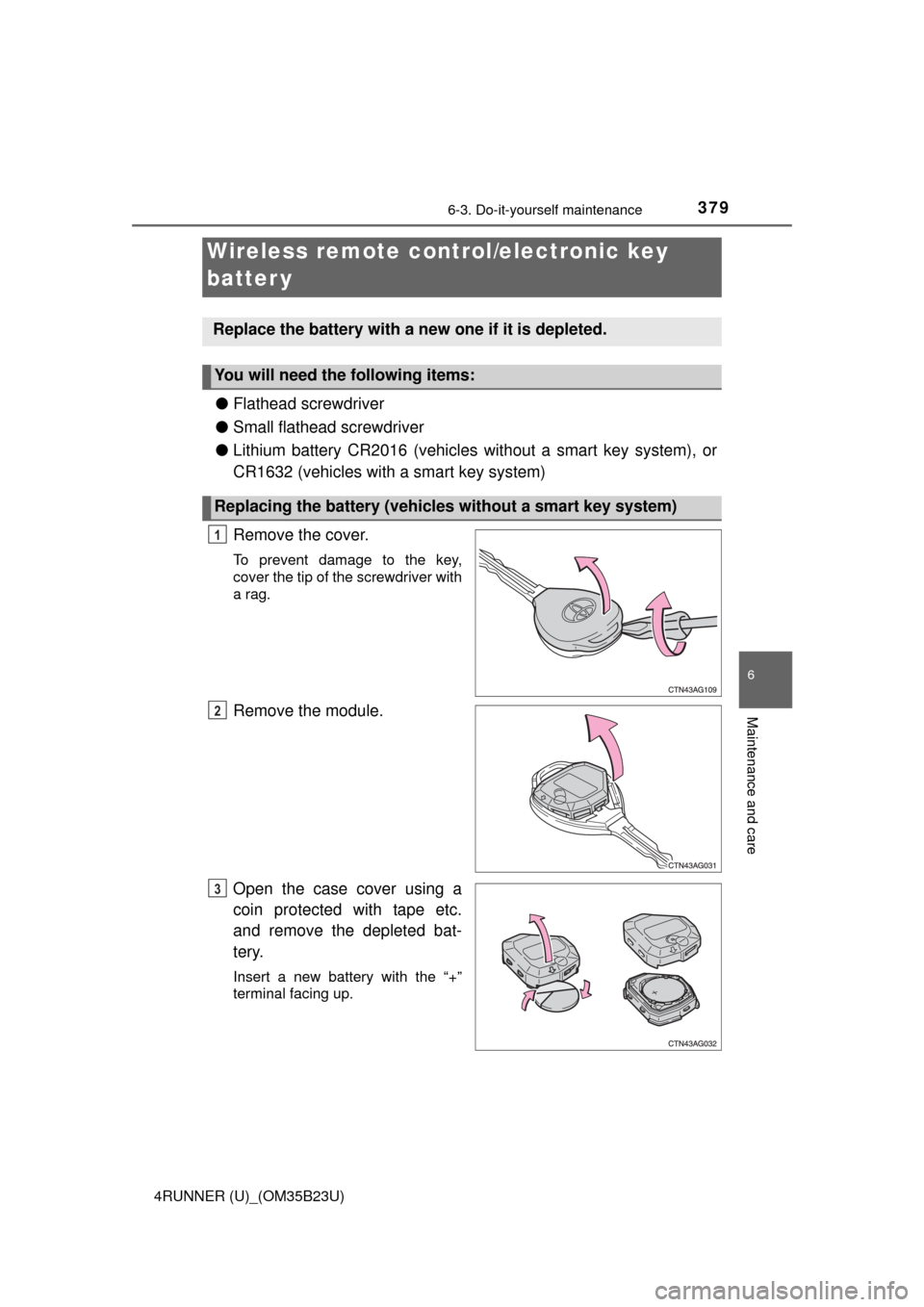
●Flathead screwdriver
●Small flathead screwdriver
●Lithium battery CR2016 (vehicles without a smart key system), or
CR1632 (vehicles with a smart key system)
Remove the cover.
To prevent damage to the key,
cover the tip of the screwdriver with
a rag.
Remove the module.
Open the case cover using a
coin protected with tape etc.
and remove the depleted bat-
tery.
Insert a new battery with the “+”
terminal facing up.
Wireless remote control/electronic key
batter y
Replace the battery with a new one if it is depleted.
You will need the following items:
Replacing the battery (vehicles without a smart key system)
1
2
3
Page 380 of 528
3806-3. Do-it-yourself maintenance
4RUNNER (U)_(OM35B23U)
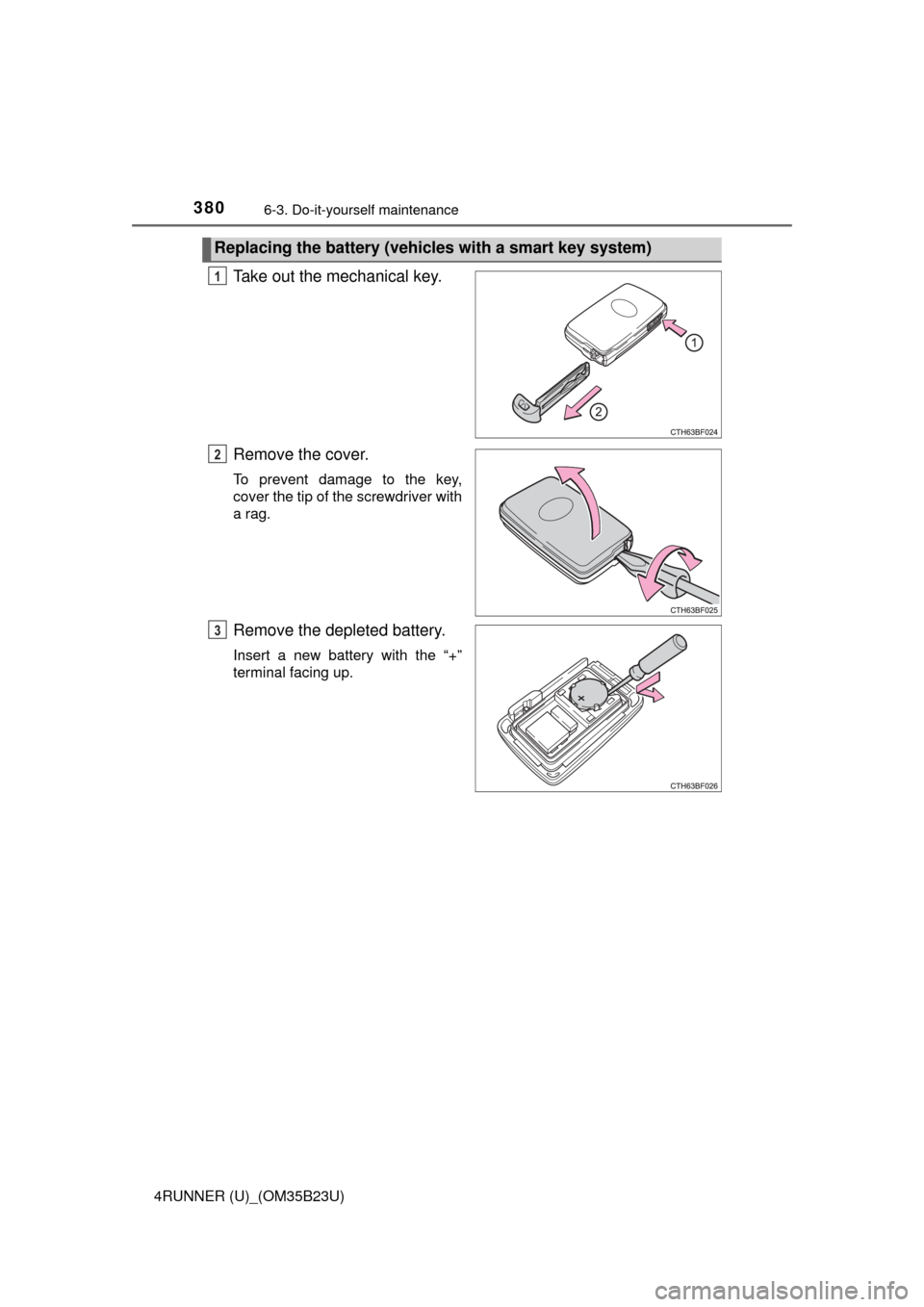
Take out the mechanical key.
Remove the cover.
To prevent damage to the key,
cover the tip of the screwdriver with
a rag.
Remove the depleted battery.
Insert a new battery with the “+”
terminal facing up.
Replacing the battery (vehicles with a smart key system)
1
2
3