Page 167 of 594

Instruments and controls/Multi information display
Multi information display
1) ECO gauge (refer to “ ECO gauge ” F 3-
12.)
2) Warning screen (refer to “ Warning
screen ” F 3-39.)/Basic screen (refer to
“ Basic screens ” F 3-44.)
3) Cruise control information display/
C.DIFF/DCCD indicator 4) Warning indicator
5) Select lever/gear position indicator (refer
to “ Select lever/gear position indicator
(CVT models) ” F 3-34.)
6) SI-DRIVE indicator light (refer to “ SI-
DRIVE indicator ” F 3-34.)
7) Odometer (refer to “ Odometer ” F 3-9.)/
double trip meter (refer to “ Double trip
meter ” F 3-9.)
& Basic operation By operating “ ” or “ ” of the control
switch, the screens and selection items
can be switched. When the “
/SET ”
switch is pulled toward you, the item can
be selected and set.
If there are some useful messages, such
as vehicle information, warning informa-
tion, etc., they will interrupt the current
screen, and appear on the display accom-
panied by a beep. If such a screen is
displayed, take proper action according to
the message shown on the screen. & Welcome screen
When the door is unlocked, and the
driver ’ s door is opened and then closed,
the welcome screen will appear for ap-
proximately 20 seconds.
NOTE . Once the welcome screen appears,
it takes a certain period of time to
display it again.
. The welcome screen will disappear
when the ignition switch is turned to
the “ ON ” position while the welcome
screen is displayed.
. If any of the doors is opened while
the welcome screen is displayed, the
door ajar warning will appear.
. The welcome screen can be set to
on or off. For details, refer to “ Welcome3-38
Page 171 of 594
Instruments and controls/Multi information display
Item Icon “ ” information reminder Refer to page
Automatic headlight beam leveler system malfunction warning
(models with LED headlights) Yellow 3-35
LED low beam headlight system malfunction warning (if equipped) Yellow 3-25
The keyless access with push-button start system malfunction
warning* ——
Low battery warning of the access key* — 3-28
Driver ’ s control center differential system malfunction warning Yellow 3-35
Deactivation of switching SI-DRIVE mode — 7-29, 7-31
Windshield washer fluid warning Yellow 11-38
BSD/RCTA halt or warning (if equipped) Yellow 7-56
*: Models with keyless access with push-button start system3-42
Page 172 of 594
! Items of display message (for operation and vehicle condition) Item Icon “ ” information reminder Refer to page
Deactivation of the selection of the SI-DRIVE Sport Sharp (S#)
mode when the engine is cold —— 7-29, 7-31
Pedal operation for starting engine
— 7-12
Select lever into “ P ” operation ——
Access key warning* (The vehicle was driven while the access key
is not inside the vehicle.) — 3-28
Push-button ignition switch without “ OFF ” warning* —— 3-28
Access key lock-in warning* — 3-28
Emergency operation of push-button ignition switch* — 9-16
Release operation for steering lock* — 3-28
Power save function operation* —— 2-15
Key in the ignition switch reminder (if equipped) —— 3-5
Headlights ON warning —— 3-94
*: Models with keyless access with push-button start system Instruments and controls/Multi information display
– CONTINUED –3-43
Page 175 of 594
Instruments and controls/Multi information display
The menu list is as follows. Top menu Menu option Possible settings Initial settings
Screen Settings Welcome Good-bye Screen On or Off On
Gauge Initial Movement On or Off On
Gear Position Indicator Setting (MT
models) On or Off On
Languages Select the display language. The default language settings vary
depending on individual countries.
(For U.S. models: English)
REV settings (STI) REV Indicator Light On or Off Off
REV Alarm Level Engine Speed 2000 rpm - RED ZONE 2000 rpm
REV Buzzer On or Off Off
EyeSight (models with EyeSight
system) Warning Volume Max/Mid/Min Mid
Lead Vehicle Acquisition Sound On or Off On
Lead Vehicle Moving Monitor
Function On or Off On
BSD/RCTA (if equipped) Warning Volume Max/Mid/Min/OFF Mid
Default Settings ― Ye s o r N o ―3-46
Page 176 of 594

By operating the “ ” or “ ” switch on the
steering wheel, you can select the menu.
Pull the “
/SET ” switch to enter the
selected menu.
NOTE If you enter the “ Return ” menu, the
system will return to the previous
screen.
! Screen Settings
After entering the “ Screen Settings ” menu,
select one of the following menus.
! Welcome Good-bye Screen
The welcome screen/good-bye screens
can be activated or deactivated. Select
“ On ” to activate the screens. Select “ Off ”
to deactivate the screens.
! Gauge Initial Movement
The movement of the meter needles and
gauge needles that occurs when the
ignition switch is turned to the “ ON ”
position can be activated or deactivated.
Select “ On ” to activate. Select “ Off ” to
deactivate.
! Gear Position Indicator Setting
(MT models)
Display of the shift position indicator can
be activated or deactivated. Select “ On ” to
activate display of the shift position in- dicator or “ Off ” to deactivate it.
! Languages
Operate the “
” or “ ” switch on the
steering wheel to display the preferred
language. Then pull the “
/SET ” switch to
select the displayed language.
! REV settings (STI)
NOTE If the setting of the REV Indicator Light
is “ Off ” , the setting menus of the REV
Alarm Level Engine Speed and the REV
Buzzer are not displayed.
After entering the “ REV settings ” menu,
select any of the following menus.
! REV Indicator Light
Display of the REV indicator light can be
activated or deactivated. Select “ On ” to
activate display of the REV indicator light
or “ Off ” to deactivate it.
! REV Alarm Level Engine Speed
The alarm-level engine speed can be set
(in 100 rpm steps) within the range from
2,000 rpm to the red zone.
! REV Buzzer
The REV buzzer can be activated or
deactivated. Select “ On ” to activate the
REV buzzer or “ Off ” to deactivate it. ! EyeSight (models with EyeSight
system)
NOTE For models with the EyeSight system,
refer to the Owner ’ s Manual supple-
ment for the EyeSight system.
After entering the “ EyeSight ” menu, select
one of the following menus.
! Warning Volume
The volume of the warning buzzer that
sounds when the EyeSight system is in
use can be set in 3 stages ( “ Max ” , “ Mid ”
and “ Min ” ).
! Lead Vehicle Acquisition Sound
When adaptive cruise control is used, the
buzzer that sounds under any of the
following conditions can be activated or
deactivated.
. A vehicle is detected in front
. Detection is not possible
Select “ On ” to activate the buzzer. Select
“ Off ” to deactivate the buzzer.
! Lead Vehicle Moving Monitor
Function
When the lead vehicle moving monitor
function is operated, the buzzer that
sounds if a vehicle in front has started
can be activated or deactivated. SelectInstruments and controls/Multi information display
– CONTINUED –3-47
Page 189 of 594

Instruments and controls/Multi function display
Top menu Menu option Description Initial setting Page
Mainte-
nance Engine Oil Set and adjust the oil maintenance notification date.
The default va-
lues for the main-
tenance settings
vary depending
on individual
countries. 3-79
Oil Filter Set and adjust the oil filter maintenance notification date. 3-80
Tires Set and adjust the tire maintenance notification date. 3-80
Maintenance Schedule Set and adjust the vehicle maintenance notification date. 3-80
On/Off Turn on or off the self-check screen that is
activated when the ignition switch is turned to
the “ ON ” position. On or Off Off 3-80
Clear All Settings Clear all items to the factory default settings. Yes or No — 3-81
Go Back Return to the top menu. ——
Driving
History Set Register and overwrite the driving record. — 3-82
Go Back Return to the top menu. ——
Car
Setting Keyless Buzzer Vo-
lume Set the audible signal volume. 0 (OFF) to 7 On 3-84
Hazard Warning
Flasher Set the hazard warning flasher. On or Off On 3-84
Defogger Set and customize the operation of the
defogger. 15 minutes or Continuous 15 minutes 3-85
Interior Light Set and customize the interior light off delay
timer. 10, 20, 30 seconds or Off 30 seconds 3-87
Auto Light Sensor (if
equipped) Set and customize the sensitivity of the auto
light sensor. Low, Mid, High or Max Mid 3-88
Keyless Access
Setting Driver ’ s Door
Unlock (if equipped) Set and customize the keyless access func-
tion. Driver ’ s Door Only, All Driver ’ s Door
Only 3-89
Welcome Lighting Set the leaving time and approaching time. 30, 60, 90 seconds or Off 30 seconds 3-90
Go Back Return to top menu. ——3-60
Page 226 of 594
& Daytime running light system WARNINGThe brightness of the illumination of
the high beam headlights is reduced
by the daytime running light system.
The light switch must always be
turned to the “
” position when it
is dark outside.
The high beam headlights will automati-
cally illuminate at reduced brightness
when the following conditions are fulfilled.
. The engine is running.
. The parking brake is fully released.
. The light control switch is in the
“ AUTO ” (if equipped), “
” or off position.
. For CVT models, the select lever is in a
position other than the “ P ” position.
NOTE . When the light switch is in the “ ”
position, the instrument panel illumina-
tion, front side marker lights, tail lights
and license plate lights are also illumi-
nated.
. For models with the auto on/off
headlights, while the light control
switch is in the “ AUTO ” position and
the system is activated to the auto-on
mode depending on the ambient light level, the high beam headlights that
have illuminated at reduced brightness
turn off, and the low beam headlights
turn on alternatively. At this time, the
instrument panel illumination, front
side marker lights, tail lights and
license plate lights are also illuminated.
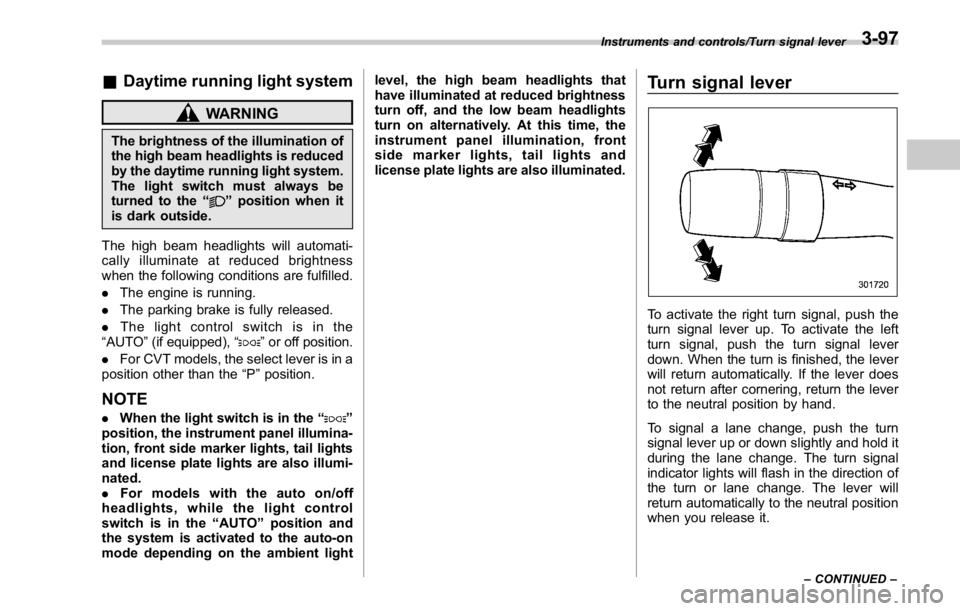
Turn signal lever
To activate the right turn signal, push the
turn signal lever up. To activate the left
turn signal, push the turn signal lever
down. When the turn is finished, the lever
will return automatically. If the lever does
not return after cornering, return the lever
to the neutral position by hand.
To signal a lane change, push the turn
signal lever up or down slightly and hold it
during the lane change. The turn signal
indicator lights will flash in the direction of
the turn or lane change. The lever will
return automatically to the neutral position
when you release it. Instruments and controls/Turn signal lever
– CONTINUED –3-97
Page 232 of 594
! Windshield washer
To wash the windshield, pull the wiper
control lever toward you. The washer fluid
sprays until you release the lever. The
wipers operate while you pull the lever. NOTE
The windshield washer fluid warning
indicator appears when the washer
fluid level in the tank has dropped to
the lower limit. If the warning indicator
appears, refill the tank with fluid. For
the refilling procedure, refer to “ Wind-
shield washer fluid ” F 11-38.Mirrors Always check that the inside and outside
mirrors are properly adjusted before you
start driving.
& Inside mirror
The inside mirror has a day and night
position. Pull the tab at the bottom of the
mirror toward you for the night position.
Push it away for the day position. The
night position reduces glare from head-
lights. Instruments and controls/Mirrors
– CONTINUED –3-103


