2016 SUBARU WRX lock
[x] Cancel search: lockPage 72 of 594

communications equipment or other
critical navigation or communication
equipment operating between 0.45-30
MHz.
! Conditions in which front passen-
ger ’ s SRS frontal airbag is not
activated
The front passenger ’ s SRS frontal airbag
will not be activated when any of the
following conditions are met regarding the
front passenger ’ s seat:
. The seat is empty.
. The seat is equipped with an appro-
priate child restraint system and an infant
is restrained in it. (See WARNING that
follows.)
. The front passenger ’ s occupant detec-
tion system is malfunctioning.
WARNING
NEVER INSTALL A FORWARD OR
REARWARD FACING CHILD SEAT
IN THE FRONT PASSENGER ’ S SEAT
EVEN IF THE FRONT PASSEN-
GER ’ S SRS FRONTAL AIRBAG IS
DEACTIVATED. Be sure to install it
in the REAR seat in a correct
manner. Also, it is strongly recom-
mended that any forward facing
child seat or booster seat be in- stalled in the REAR seat, and that
even children who have outgrown a
child restraint system be also
seated in the REAR seat. This is
because children sitting in the front
passenger ’ s seat may be killed or
severely injured should the front
passenger ’ s SRS frontal airbag de-
ploy. REAR seats are the safest
place for children.
CAUTIONWhen the front passenger ’ s seat is
occupied by an infant in an appro-
priate child restraint system, ob-
serve the following precautions.
Failure to do so may interfere with
the proper operation of the occu-
pant detection system, activating
the front passenger ’ s SRS frontal
airbag even though that seat is
occupied by the infant in the child
restraint system.
. Do not place any article (includ-
ing electronic devices) on the
seat other than the infant in the
child restraint system. . Do not place more than one
infant in the child restraint sys-
tem.
! If the front passenger ’ s frontal
airbag ON indicator illuminates
and the OFF indicator turns off
even when an infant or a small
child is in a child restraint sys-
tem (including booster seat)
1. Turn the ignition switch to the “ LOCK ” /
“ OFF ” position.
2. Remove the child restraint system
from the seat.
3. By referring to the child restraint
manufacturer ’ s recommendations as well
as the child restraint system installation
procedures in “ Child restraint systems ”
F 1-21, correctly install the child restraint
system.
4. Turn the ignition switch to the “ ON ”
position and make sure that the front
passenger ’ s frontal airbag ON indicator
turns off and the OFF indicator illuminates.
If still the ON indicator remains illuminated
while the OFF indicator turns off, take the
following actions.
. Ensure that no article is placed on the
seat other than the child restraint system
and the child occupant.Seat, seatbelt and SRS airbags/*SRS airbag (Supplemental Restraint System airbag)
– CONTINUED –1-43
Page 73 of 594

Seat, seatbelt and SRS airbags/*SRS airbag (Supplemental Restraint System airbag)
. Ensure that the backward-forward po-
sition and seatback of front passenger ’ s
seat are locked into place securely by
moving the seat back and forth.
If the ON indicator still remains illuminated
while the OFF indicator turns off after
taking relevant corrective actions de-
scribed above, relocate the child restraint
system to the rear seat and immediately
contact your SUBARU dealer for an
inspection.
NOTE When a child who has outgrown a child
restraint system or a small adult is
seated in the front passenger ’ s seat,
the SUBARU advanced frontal airbag
system may or may not activate the
front passenger ’ s SRS frontal airbag
depending on the occupant ’ s seating
posture. Children should always wear a
seatbelt when sitting in the seat irre-
spective of whether the airbag is
deactivated or activated. If the front
passenger ’ s SRS frontal airbag is acti-
vated (the ON indicator remains illumi-
nated while the OFF indicator turns off),
ensure that no article is placed on the
seat other than the occupant.
If the ON indicator still remains illumi-
nated while the OFF indicator turns off
despite the fact that the actions noted above have been taken, seat the child/
small adult in the rear seat and im-
mediately contact your SUBARU dealer
for an inspection. Even if the system
has passed the dealer inspection, it is
recommended that on subsequent trips
the child/small adult always take the
rear seat.
Children who have outgrown a child
restraint system should always wear the
seatbelt irrespective of whether the airbag
is deactivated or activated.
! Conditions in which front passen-
ger ’ s SRS frontal airbag is activated
The front passenger ’ s SRS frontal airbag
will be activated for deployment upon
impact when any of the following condi-
tions are met regarding the front passen-
ger ’ s seat.
. When the seat is occupied by an adult.
. When certain items (e.g. jug of water)
are placed on the seat.
! If the passenger ’ s frontal airbag
OFF indicator illuminates and
the ON indicator turns off even
when the front passenger ’ s seat
is occupied by an adult
This can be caused by the adult incor-
rectly sitting in the front passenger ’ s seat.
1. Turn the ignition switch to the “ LOCK ” / “ OFF ” position.
2. Ask the front passenger to set the
seatback to the upright position, sit up
straight in the center of the seat cushion,
correctly fasten the seatbelt, position his/
her legs out forward, and adjust the seat to
the rearmost position.
3. Turn the ignition switch to the “ ON ”
position.
If the OFF indicator remains illuminated
while the ON indicator remains off, take
the following actions.
1. Turn the ignition switch to the “ LOCK ” /
“ OFF ” position.
2. Make sure that the front passenger
does not use a blanket, seat cushion, seat
cover, seat heater or massager, etc.
3. If wearing excessive layers of clothing,
the front passenger should remove any
unnecessary items before sitting in the
front passenger ’ s seat, or should sit in a
rear seat.
4. Turn the ignition switch to the “ ON ”
position and wait 6 seconds to allow the
system to complete self-checking. Follow-
ing the system check, both indicators turn
off for 2 seconds. Now, the ON indicator
should illuminate while the OFF indicator
remains off.
If the OFF indicator still remains illumi-1-44
Page 90 of 594

Keys ..................................................................... 2-3Key number plate ................................................ 2-3
Immobilizer .......................................................... 2-3Security indicator light ........................................ 2-4
Key replacement ................................................. 2-4
Certification for immobilizer system ..................... 2-4
Door locks ........................................................... 2-5Locking and unlocking from the outside . ............. 2-5
Locking and unlocking from the inside ................ 2-7
Battery drainage prevention function ................... 2-7
Power door locking switches ............................. 2-8Key lock-in prevention function ........................... 2-9
Keyless access with push-button start
system (if equipped) ........................................ 2-9Safety precautions ............................................. 2-10
Locking and unlocking with “ keyless access ”
entry function. .................................................. 2-13
Selecting audible signal operation ...................... 2-16
Warning chimes and warning indicator ............... 2-16
Disabling keyless access function ...................... 2-16
When access key does not operate properly ....... 2-18
Replacing battery of access key ......................... 2-18
Replacing access key ......................................... 2-18
Certification for keyless access with push-button
start system ..................................................... 2-18
PIN Code Access (models with “ keyless
access with push-button start system ” )........ 2-19
Registering a PIN code ....................................... 2-20
Unlocking .......................................................... 2-21
Remote keyless entry system ........................... 2-21
Locking the doors .............................................. 2-22 Unlocking the doors .......................................... 2-22
Opening the trunk lid ......................................... 2-23
Vehicle finder function ....................................... 2-23
Sounding a panic alarm ..................................... 2-23
Selecting audible signal operation (models
without “ keyless access with push-button start
system ” ).......................................................... 2-23
Replacing the battery ......................................... 2-24
Replacing lost transmitters ................................ 2-24
Welcome lighting (if equipped) . .......................... 2-24
Certification for Remote keyless entry
system ............................................................ 2-24
Alarm system ..................................................... 2-25System operation ............................................... 2-26
Activating and deactivating the alarm system ..... 2-26
If you have accidentally triggered the alarm
system ............................................................ 2-26
Arming the system ............................................ 2-27
Disarming the system ........................................ 2-29
Valet mode ........................................................ 2-30
Passive arming (models without “ keyless access
with push-button start system ” ) ....................... 2-30
Tripped sensor identification .............................. 2-31
Shock sensors (dealer option).. .......................... 2-31
Child safety locks .............................................. 2-32
Windows ............................................................. 2-32
Power window operation by driver ..................... 2-33
Power window operation by passengers ............. 2-35
Initialization of power window .. .......................... 2-36
Trunk lid ............................................................. 2-36
To open and close the trunk lid from outside . ..... 2-36Keys and doors 2
Page 92 of 594

Keys NOTE For models with “ keyless access with
push-button start system ” , refer to
“ Keyless access with push-button start
system ” F 2-9.
1) Master key
2) Submaster key
3) Sub key
4) Key number plate
Three types of keys are provided for your
vehicle.
CAUTION
Do not attach a large key holder or
key case to either key. If it bangs against your knees while you are
driving, it could turn the ignition
switch from the “ ON ” position to the
“ ACC ” or “ LOCK ” position, thereby
stopping the engine.
& Key number plate The key number is stamped on the key
number plate attached to the key set.
Write down the key number and keep it in
another safe place, not in the vehicle. This
number is needed to make a replacement
key if you lose your key or lock it inside the
vehicle. Refer to “ Key replacement ” F 2-4.Immobilizer The immobilizer system is designed to
prevent an unauthorized person from
starting the engine. Only keys registered
with your vehicle ’ s immobilizer system can
be used to operate your vehicle. This
system, however, is not a 100% anti-theft
guaranty.
For models with “ keyless access with
push-button start system ” :
If you press the push-button ignition
switch when carrying an unregistered
access key, the switch will not turn to the
“ ON ” position and the engine will not start.
For models without “ keyless access
with push-button start system ” :
Even if an unregistered key fits into the
ignition switch and can be turned to the
“ START ” position, the engine will auto-
matically stop after several seconds.
If the engine does not start, perform either
of the following procedures.
. Perform the procedure described in
“ Starting engine ” F 9-17 (models with
“ keyless access with push-button start
system ” ).
. Pull out the key once before trying
again (models without “ keyless access
with push-button start system ” ). Refer toKeys and doors/Keys
– CONTINUED –2-3
Page 93 of 594

Keys and doors/Immobilizer
“ Ignition switch (models without push-
button start system) ” F 3-4.
CAUTION. Do not place the key under direct
sunlight or anywhere it may
become hot.
. Do not get the key wet. If the key
gets wet, wipe it dry with a cloth
immediately.
. Donotmodifyorremovethe
system. If modified or removed,
the proper operation of the sys-
tem cannot be guaranteed.
NOTE . To protect your vehicle from theft,
please pay close attention to the fol-
lowing security precautions:
– Never leave your vehicle unat-
tended with its keys inside.
– Before leaving your vehicle,
close all windows and the moon-
roof, and lock the doors.
– Do not leave spare keys or any
record of your key number in the
vehicle.
. The vehicle has a maintenance-free
type immobilizer system. & Security indicator light Refer to “ Security indicator light ” F 3-33.
& Key replacement Your key number plate will be required if
you ever need a replacement key made.
Any new key must be registered for use
with your vehicle ’ s immobilizer system
before it can be used. The maximum
number of keys that can be registered
for use with one vehicle is as follows.
. Four (models without “ keyless access
with push-button start system ” )
. Seven (models with “ keyless access
with push-button start system ” )
One key that has already been registered
is required in order to register a new key.
If you lose a key, the lost key ’ s ID code still
remains in the memory of the vehicle ’ s
immobilizer system. For security reasons,
the lost key ’ s ID code should be erased
from the memory. To erase the lost key ’ s
ID code, all keys that will be used are
required.
For details about new key registration and
erasing the lost key ’ s ID code, contact
your SUBARU dealer. & Certification for immobilizer
system For models with “ keyless access with
push-button start system ” :
Refer to “ Certification for keyless access
with push-button start system ” F 2-18.
For models without “ keyless access
with push-button start system ” :
! U.S.-spec. models
FCC ID: MOZRI-38BFH
CAUTIONFCC WARNING
Changes or modifications not ex-
pressly approved by the party re-
sponsible for compliance could void
the user ’ s authority to operate the
equipment.
This device complies with part 15 of the
FCC Rules. Operation is subject to the
following two conditions: (1) This device
may not cause harmful interference, and
(2) this device must accept any interfer-
ence received, including interference that
may cause undesired operation.2-4
Page 94 of 594

! Canada-spec. models
NOTE This device complies with Industry
Canada licence-exempt RSS standard
(s). Operation is subject to the follow-
ing two conditions: (1) this device may
not cause interference, and (2) this
device must accept any interference,
including interference that may cause
undesired operation of the device.
NOTE Le présent appareil est conforme aux
CNR d ’ Industrie Canada applicables
aux appareils radio exempts de licence.
L ’ exploitation est autorisée aux deux
conditions suivantes: (1) l ’ appareil ne
doit pas produire de brouillage, et (2)
l ’ utilisateur de l ’ appareil doit accepter
tout brouillage radioélectrique subi,
même si le brouillage est susceptible
d ’ en compromettre le fonctionnement. ! Mexico-spec. models
Door locks & Locking and unlocking from
the outside
NOTE If you unlock the driver ’ s door with a
key (including a mechanical key) and
open the door while the alarm system
is armed, the alarm system is triggered
and the vehicle ’ s horn sounds. In this
case, perform any of the following
operations:
Models with “ keyless access with
push-button start system ” :
. Press any button on the access key
(except when the access key battery is
discharged).
. Turn the push-button ignition switch
to the “ ACC ” position.
Models without “ keyless access with
push-button start system ” :
. Press any button on the remote
transmitter (except when the transmit-
ter battery is discharged).
. Insert the key into the ignition
switch and turn the ignition switch to
the “ ON ” position.
For details about the alarm system,
refer to “ Alarm system ” F 2-25.Keys and doors/Door locks
– CONTINUED –2-5
Page 95 of 594
Keys and doors/Door locks
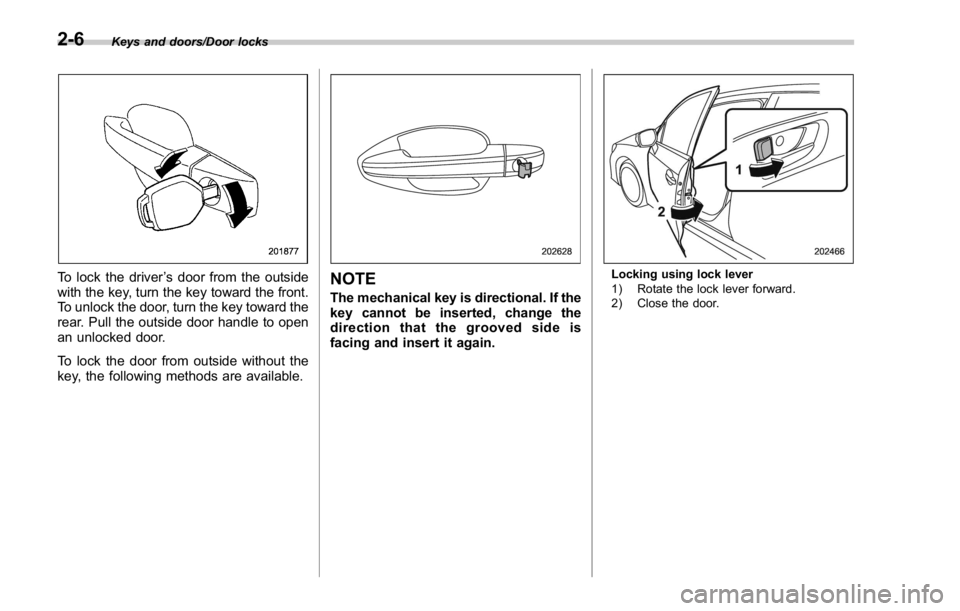
To lock the driver ’ s door from the outside
with the key, turn the key toward the front.
To unlock the door, turn the key toward the
rear. Pull the outside door handle to open
an unlocked door.
To lock the door from outside without the
key, the following methods are available. NOTE The mechanical key is directional. If the
key cannot be inserted, change the
direction that the grooved side is
facing and insert it again. Locking using lock lever
1) Rotate the lock lever forward.
2) Close the door.2-6
Page 96 of 594
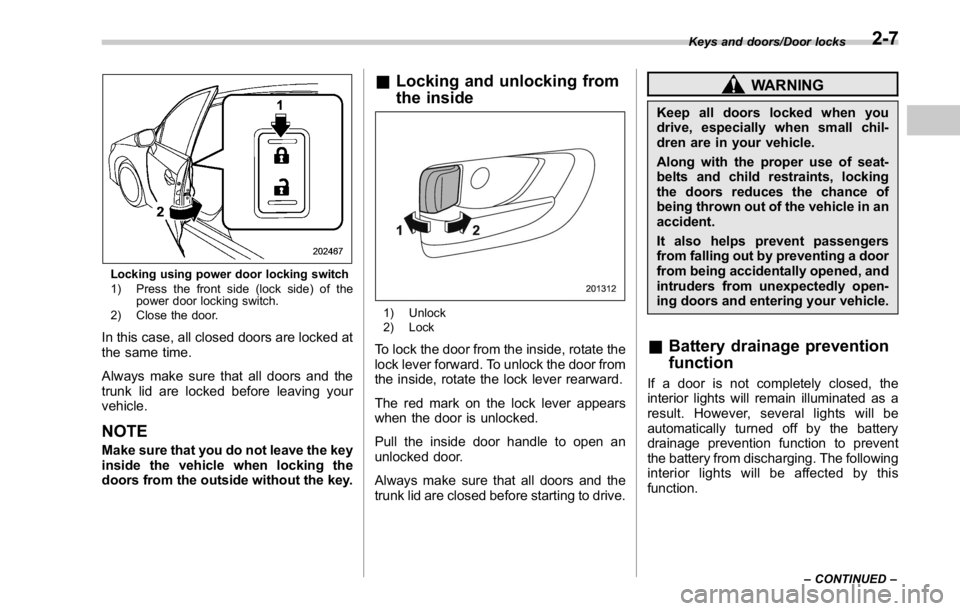
Locking using power door locking switch
1) Press the front side (lock side) of the
power door locking switch.
2) Close the door.
In this case, all closed doors are locked at
the same time.
Always make sure that all doors and the
trunk lid are locked before leaving your
vehicle.
NOTE Make sure that you do not leave the key
inside the vehicle when locking the
doors from the outside without the key. & Locking and unlocking from
the inside
1) Unlock
2) Lock
To lock the door from the inside, rotate the
lock lever forward. To unlock the door from
the inside, rotate the lock lever rearward.
The red mark on the lock lever appears
when the door is unlocked.
Pull the inside door handle to open an
unlocked door.
Always make sure that all doors and the
trunk lid are closed before starting to drive. WARNINGKeep all doors locked when you
drive, especially when small chil-
dren are in your vehicle.
Along with the proper use of seat-
belts and child restraints, locking
the doors reduces the chance of
being thrown out of the vehicle in an
accident.
It also helps prevent passengers
from falling out by preventing a door
from being accidentally opened, and
intruders from unexpectedly open-
ing doors and entering your vehicle.
& Battery drainage prevention
function If a door is not completely closed, the
interior lights will remain illuminated as a
result. However, several lights will be
automatically turned off by the battery
drainage prevention function to prevent
the battery from discharging. The following
interior lights will be affected by this
function. Keys and doors/Door locks
– CONTINUED –2-7