2016 SUBARU WRX remote control
[x] Cancel search: remote controlPage 273 of 594
Audio/Audio/visual remote controls
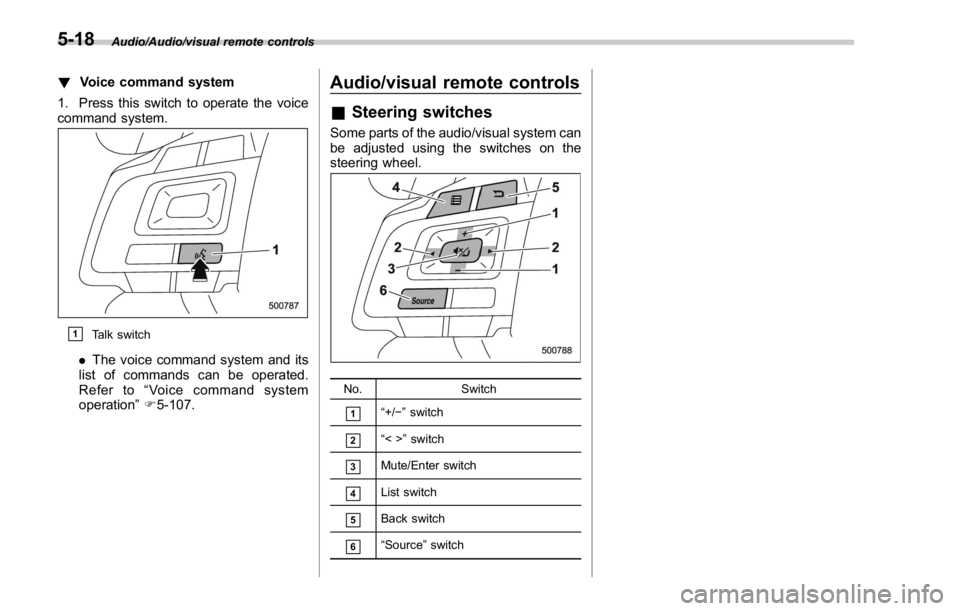
! Voice command system
1. Press this switch to operate the voice
command system.
& 1
Talk switch
. The voice command system and its
list of commands can be operated.
Refer to “ Voice command system
operation ” F 5-107. Audio/visual remote controls & Steering switches Some parts of the audio/visual system can
be adjusted using the switches on the
steering wheel.
No. Switch
& 1
“ +/ − ” switch
& 2
“ <> ” switch
& 3
Mute/Enter switch
& 4
List switch
& 5
Back switch
& 6
“ Source ” switch5-18
Page 274 of 594

“ +/- ” switch Mode Operation Function
Except list screen Press Volume up/down
Press and hold Volume up/down continuously
List screen Press Move cursor up/down
“ <> ” switch Mode Operation Function
AM/FM Radio, SiriusXM Press Preset channel up/down
Press and hold Seek up/down continuously
while the switch is being
pressed
aha Press Content up/down
Press and hold Reverse the current content
item for 15 seconds/Fast for-
ward the current content item
for 30 seconds
Audio CD, MP3/WMA/AAC
disc, USB, iPod, BT audio Press Select a track/file
Press and hold Fast forward/rewind
Pandora Press and hold Thumbs up
List screen Press Move cursor left/right Audio/Audio/visual remote controls
– CONTINUED –5-19
Page 275 of 594

Audio/Audio/visual remote controls
Mute/Enter switch Mode Operation Function
Except list screen Press Audio ON/OFF
List screen Press Select cursor entry
Back switch Mode Operation Function
All (except STARLINK) Press Return to the previous screen
All Press and hold Return to the HOME screen
List switch Mode Operation Function
All (except STARLINK) Press Show list screen
“ Source ” switch
Mode Operation Function
All Press Change audio modes
NOTE In the aha, Pandora and STARLINK mode, some operation may be done on the
screen depend on the selected APPS.5-20
Page 390 of 594

Fuel ...................................................................... 7-3Fuel requirements ............................................... 7-3
Fuel filler lid and cap ........................................... 7-5
State emission testing (U.S. only) ...................... 7-7
Preparing to drive ............................................... 7-8
Starting and stopping the engine (models
without push-button start system) .................. 7-9Starting engine .................................................... 7-9
Stopping the engine ........................................... 7-11
Starting and stopping engine (models with
push-button start system) .............................. 7-12Safety precautions ............................................. 7-12
Operating range for push-button start
system ............................................................. 7-12
Starting engine ................................................... 7-12
Stopping engine ................................................. 7-14
When access key does not operate properly ....... 7-14
Remote engine start system (dealer
option) .............................................................. 7-14Models with “ keyless access with push-button
start system ” ................................................... 7-15
Entering the vehicle while it is running via remote
start ................................................................. 7-16
Entering the vehicle following remote engine start
shutdown ......................................................... 7-16
Pre-heating or pre-cooling the interior of the
vehicle ............................................................. 7-16
System maintenance .......................................... 7-16
Manual transmission .......................................... 7-17
Shifting speeds .................................................. 7-18
Driving tips ........................................................ 7-18 Driver ’ s Control Center Differential (C.DIFF/
DCCD) (STI) ..................................................... 7-19To change mode of driver ’ s control center
differential ....................................................... 7-20
Auto mode ........................................................ 7-20
Manual mode ..................................................... 7-21
Temporary release ............................................. 7-23
Continuously variable transmission ................. 7-23Select lever ....................................................... 7-24
Selection of manual mode .................................. 7-26
Shift lock function ............................................. 7-27
Driving tips ........................................................ 7-28
SI-DRIVE (STI) .................................................... 7-29Intelligent (I) mode ............................................. 7-29
Sport (S) mode .................................................. 7-30
Sport Sharp (S#) mode. ...................................... 7-30
SI-DRIVE selector .............................................. 7-30
SI-DRIVE (except STI: CVT models) ................. 7-31Intelligent (I) mode ............................................. 7-31
Sport (S) mode .................................................. 7-31
Sport Sharp (S#) mode. ...................................... 7-32
SI-DRIVE switches ............................................. 7-32
Limited slip differential (LSD) (STI) .................. 7-33
Power steering ................................................... 7-33
STI .................................................................... 7-33
Except STI ......................................................... 7-34
Braking ............................................................... 7-35
Braking tips ....................................................... 7-35
Brake system .................................................... 7-35
Disc brake pad wear warning indicators ............. 7-36Starting and operating
7
Page 405 of 594

Starting and operating/Remote engine start system (dealer option)
! Stopping the engine
Press and hold the lock button to stop the
engine with remote engine start system.
! Automatic engine shutdown
The remote engine start system will
automatically shut down or will not start
the engine under the following conditions.
. The total run-time has exceeded 20
minutes.
. Any door is opened.
. The select lever is moved to any
position other than “ P ” .
. The engine hood is opened.
. Thepush-buttonignitionswitchis
pressed.
. The brake pedal is depressed.
. The engine speed is 3,000 rpm or
more.
The time setting until the engine auto-
matically stops can be changed. To
change it, please contact your SUBARU
dealer. Note that some settings may
violate state, provincial, or local laws and
regulations. Check the laws in your area to
determine which setting is permitted. & Entering the vehicle while it
is running via remote start 1. Unlock the vehicle doors using the
keyless access function. If the vehicle ’ s
doors are unlocked manually using the
key, the vehicle ’ s alarm system will trigger
(if the alarm system is armed prior to
activating the remote engine start system)
and the engine will turn off. Perform either
of the following procedures to disarm the
alarm system. Refer to “ Alarm system ”
F 2-25.
. Switch the ignition to the “ ACC ” or
“ ON ” state by pressing the push-button
ignition switch once or twice, respec-
tively.
. Press any button on the access key/
transmitter.
2. Enter the vehicle.
3. The engine will shut down when any
door is opened.
4. Press the push-button ignition switch
while depressing the brake pedal to restart
the engine.
& Entering the vehicle follow-
ing remote engine start shut-
down
An alarm trigger may occur if the vehicle is
opened by the remote keyless entry
transmitter within a few seconds immedi- ately following remote engine start shut-
down.
& Pre-heating or pre-cooling
the interior of the vehicle Before exiting the vehicle, set the tem-
perature controls to the desired setting
and operation. After the system starts the
engine, the heater or air conditioning will
activate and heat or cool the interior to
your setting.
& System maintenance For models with “ keyless access with
push-button start system ” :
Perform the procedure described in “ Re-
placing battery of access key ” F 11-50.7-16
Page 541 of 594
Maintenance and service/Replacing battery
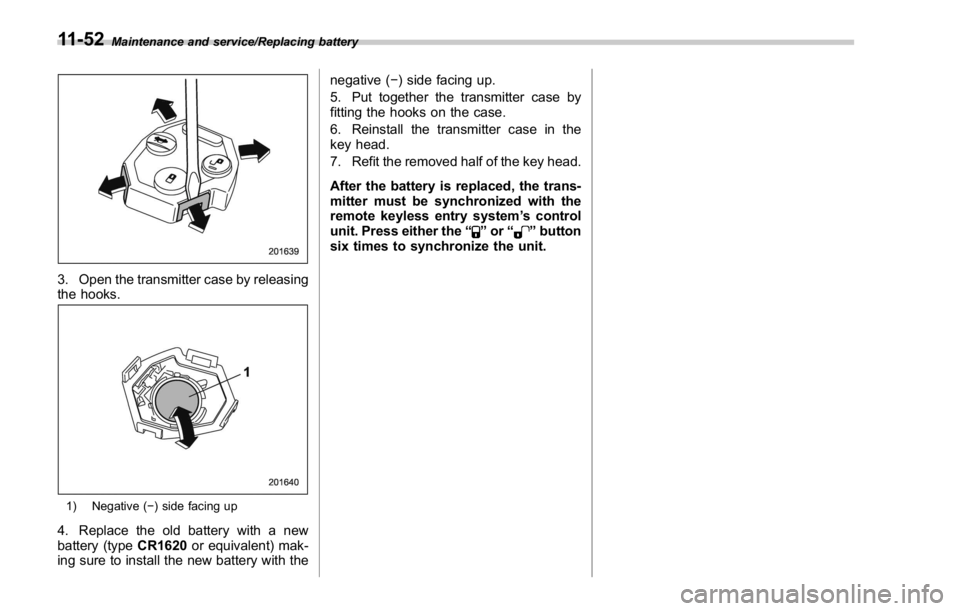
3. Open the transmitter case by releasing
the hooks.
1) Negative ( − ) side facing up
4. Replace the old battery with a new
battery (type CR1620 or equivalent) mak-
ing sure to install the new battery with the negative ( − ) side facing up.
5. Put together the transmitter case by
fitting the hooks on the case.
6. Reinstall the transmitter case in the
key head.
7. Refit the removed half of the key head.
After the battery is replaced, the trans-
mitter must be synchronized with the
remote keyless entry system ’ s control
unit. Press either the “
” or “ ” button
six times to synchronize the unit.11-52
Page 551 of 594

Specifications/Fuses and circuits
Fuses and circuits & Fuse panel located in the passenger compartment Fuse
panel Fuse
rating Circuit
1 20A
(Not available)
2 7.5A
. Combination meter
3 15A
. Door locking
4 10A
. Front wiper deicer relay
5 Empty
6 7.5A
. Remote control rear
view mirrors
. Seat heater relay
7 10A
. Combination meter
. Integrated unit
8 7.5A
. Stop light
9 7.5A
. Front wiper deicer
10 7.5A
. Power supply (battery)
11 7.5A
. Turn signal unit
12 15A
. Transmission control
unit
. Engine control unit
. Integrated unit
13 20A
. Accessory power outlet
(center console)
14 10A
. Parking light
. Tail light
. Rear combination light12-10
Page 577 of 594

14-2 Index
A
Abbreviation ................................................................... 2
ABS (Anti-lock Brake System) ..................................... 7-36
Warning light ......................................................... 3-20
Access key ................................................................. 2-9
Warning light ................................................. 3-28, 3-29
Accessories ....................................................... 5-3, 11-44
Accessory power outlet ................................................. 6-8
Air cleaner element ................................................... 11-19
Air conditioner
Automatic climate control .......................................... 4-5
Manual climate control .............................................. 4-6
Air flow mode .............................................................. 4-6
Alarm system ............................................................ 2-25
All-Wheel Drive warning light ....................................... 3-25
Aluminum wheel ....................................................... 11-38
Cleaning ............................................................... 10-3
Antenna system ........................................................... 5-2
Anti-lock Brake System (ABS) ..................................... 7-36
Arming the system ..................................................... 2-27
Ashtray ..................................................................... 6-10
AT OIL TEMP warning light ......................................... 3-18
Audio
Antenna system ....................................................... 5-2
Set......................................................................... 5-3
Audio/visual remote controls ........................................ 5-18
Steering switches ................................................... 5-18
Auto-dimming mirror/compass ........................... 3- 104, 3-105
Automatic headlight beam leveler ................................. 3-99
Warning light ......................................................... 3-35 Automatic Locking Retractor/Emergency Locking
Retractor (ALR/ELR) ................................................ 1-13
Automatic transmission
Oil temperature warning light (AT OIL TEMP) ............. 3-18
B
Basic information before use ......................................... 5-5
Connecting and disconnecting a USB memory/portable
device .................................................................. 5-6
Entering letters and numbers/list screen operation ... .... 5-8
Initial screen ........................................................... 5-5
Loading and unloading a disc ................................... 5-5
Screen adjustment ................................................... 5-9
Touch screen gestures ............................................. 5-7
Touch screen operation ............................................ 5-7
Basic operation .......................................................... 5-12
Battery .................................................................... 11-41
Drainage prevention function ..................................... 2-7
Jump starting .......................................................... 9-9
Replacement (access key) ..................................... 11-50
Replacement (keyless access with push-button
start system) .............................................. 2-18, 11-50
Replacement (remote keyless entry system) .... 2-24, 11-51
Replacement (transmitter) ...................................... 11-51
Bluetooth ®
settings ..................................................... 5-81
Registering/connecting Bluetooth ®
device .................. 5-81
Setting Bluetooth details .......................................... 5-84
Booster seat .............................................................. 1-28
Bottle holder ............................................................... 6-7
Brake
Assist .................................................................... 7-35