2016 SUBARU WRX keyless entry
[x] Cancel search: keyless entryPage 111 of 594

Keys and doors/Remote keyless entry system
than the “ OFF ” position.
. For models without “ keyless access
with push-button start system ” ,the
remote keyless entry system will not
be activated when the key is inserted in
the ignition switch.
Access key
1) Lock/arm button
2) Unlock/disarm button
3) Trunk lid unlock button
4) PANIC button Transmitter
1) Lock/arm button
2) Unlock/disarm button
3) Trunk lid unlock button
4) PANIC button
NOTE The hazard warning flashers will flash
once or twice when the transmitter
button is pressed in the following
cases.
– When locking the doors
– When unlocking the doors
– When unlocking the trunk lid
Operation of the hazard warning
flashers in the above cases can be set
to “ On ” or “ Off ” by a SUBARU dealer.
Consult your SUBARU dealer for de- tails. Also, the setting can be changed
using the display. For details, refer to
“ Hazard warning flasher setting ” F 3-
84.
& Locking the doors Press the lock/arm button to lock all doors.
An electronic chirp will sound once and
the hazard warning flashers will flash
once.
If any of the doors or the trunk lid is not
fully closed, an electronic chirp will sound
five times and the hazard warning flashers
will flash five times to alert you that the
doors (or the trunk lid) are not properly
closed. When you close the door, it will
automatically lock and then an electronic
chirp will sound once and the hazard
warning flashers will flash once.
& Unlocking the doors Press the unlock/disarm button to unlock
the driver ’ s door. An electronic chirp will
sound twice and the hazard warning
flashers will flash twice. To unlock all
doors, briefly press the unlock/disarm
button a second time within 5 seconds.2-22
Page 112 of 594

NOTE If the interval between the first and
second presses of the unlock/disarm
button (for unlocking of all of the
doors) is extremely short, the system
may not respond.
& Opening the trunk lid The trunk lid opens when the “ ” button
is pressed continuously for at least 2
seconds. An electronic chirp will sound
twice and the turn signal lights will flash
twice.
& Vehicle finder function Use this function to find your vehicle
parked among many vehicles in a large
parking lot. Provided you are within 30 feet
(10 meters) of the vehicle, pressing the
lock/arm button three times in a 5-second
period will cause your vehicle ’ s horn to
sound once and its hazard warning
flashers to flash three times.
NOTE If the interval between presses is too
short when you press the lock/arm
button three times, the system may
not respond to the signals from the
access key/remote transmitter. & Sounding a panic alarm To activate the alarm, press the “ PANIC ”
button once.
The horn will sound and the hazard
warning flashers will flash.
To deactivate the panic alarm, press any
button on the access key/remote transmit-
ter. Unless a button on the access key/
remote transmitter is pressed, the alarm
will be deactivated after approximately 30
seconds.
& Selecting audible signal op-
eration (models without
“ keyless access with push-
button start system ” )Using an electronic chirp, the system will
give you an audible signal when the doors
lock and unlock. If desired, you may turn
the audible signal off.
Perform the following steps to deactivate
the audible signal. You can also use the
same steps to restore the function.
1. Sit in the driver ’ s seat and shut all
doors and the trunk. 2. Hold down the REAR (UNLOCK) side
of the power door locking switch.
3. While holding down the REAR (UN-
LOCK) side of the power door locking
switch, pull the key out and re-insert it into
the ignition switch at least 6 times within
10 seconds after Step 2.
4. Open and close the driver ’ s door once
within 10 seconds after Step 3.
5. The hazard warning flashers flash 3
times to indicate completion of the setting.
You may have the above settings done by
your SUBARU dealer. Also, the setting
can be changed using the multi function
display. For details, refer to “ Keyless
buzzer volume setting ” F 3-84.
You may also change the volume of the
audible signal by operating the multi Keys and doors/Remote keyless entry system
– CONTINUED –2-23
Page 113 of 594

Keys and doors/Remote keyless entry system
function display.
& Replacing the batteryRefer to “ Replacing battery ” F 11-50.
& Replacing lost transmittersIf you lose a transmitter or want to
purchase additional transmitters (up to
four can be programmed), your transmit-
ters should be reprogrammed for security
reasons. For details, contact your
SUBARU dealer and have the transmitters
programmed into the remote keyless entry
system.
& Welcome lighting (if
equipped)The welcome lighting turns on the head-
lights, interior lights, etc. for smooth
approaching to or exiting from the vehicle
at night or in a dark place.
NOTE . For the operation of the interior
lights, refer to “ Interior lights ” F 6-2.
. The factory setting (default setting)
of the operation duration of the head-
lights and the exterior lights is 30
seconds for both approaching and
exiting. This setting can be changed
to OFF (no operation), 30 seconds, 60
seconds, or 90 seconds, respectively for approaching and exiting at
SUBARU dealers. For more details,
contact a SUBARU dealer.
! Approaching
When it is dark and the light control switch
is in the “ AUTO ” position, if the doors are
unlocked using the unlock button on the
transmitter, the headlight low beams and
some exterior lights will illuminate. The
interior lights will also illuminate if the
dome light switch is in the “ DOOR ”
position.
The headlight low beams and the exterior
lights will illuminate for 30 seconds.
NOTE If the doors are locked using the lock
button on the transmitter or the lock
sensor on the door handle, the head-
lights and exterior lights will turn off.
! Exiting
When the light control switch is in the
“ AUTO ” position and the headlight indica-
tor light is on, if the ignition switch is turned
off or the key is removed from the ignition
switch, the headlight low beams and some
exterior lights will continue illuminating.
The headlights and exterior lights will turn
off under either of the following conditions. . 30 seconds have elapsed since the
driver ’ s door was opened and closed.
. The lock button on the transmitter or
the lock sensor on the door handle is
operated two times successively.
NOTE . If the light control switch is set to a
position other than “ AUTO ” position,
the headlights and the exterior lights
will turn off.
. When exiting from the vehicle, the
headlights and exterior lights will turn
off if the driver ’ s door is not opened
and closed within 3 minutes from turn-
ing on of the welcome lighting.
& Certification for Remote key-
less entry system ! U.S.-spec. models
FCC ID: CWTWB1U811
FCC ID: CWTWD1U781
CAUTION
FCC CAUTION
Changes or modifications not ex-
pressly approved by the party re-
sponsible for compliance could void
the user ’ s authority to operate the
equipment.2-24
Page 115 of 594

Keys and doors/Alarm system
& System operationThe alarm system will give the following
alarms when triggered.
. The vehicle ’ s horn will sound for 30
seconds.
. The hazard warning flashers will flash
for 30 seconds.
If any of the doors or the trunk lid remains
open after the 30-second period, the horn
will continue to sound for a maximum of 3
minutes. If the door or the trunk lid is
closed while the horn is sounding, the
horn will stop sounding with a delay of up
to 30 seconds.
The alarm is triggered by:
. Opening any of the doors or the trunk
lid
. Physical impact to the vehicle, such as
forced entry (only models with shock
sensors (dealer option))
NOTE The alarm system can be set to trigger
the illumination of the following interior
lights.
. Map lights (for models with moon-
roof)
. Dome light (illuminates only when
the dome light switch is in the “ DOOR ”
position) The notifications regarding the map
lights (for models with moonroof) and
dome light are deactivated as the
factory setting. A SUBARU dealer can
activate the system. Contact your
SUBARU dealer for details.
& Activating and deactivating
the alarm system To change the setting of your vehicle ’ s
alarm system for activation or deactiva-
tion, do the following.
1. Disarm the alarm system. Refer to
“ Disarming the system ” F 2-29.
2. Sit in the driver ’ s seat and shut all
doors and the trunk lid.
3. Turn the ignition switch to the “ ON ”
position.
4. Hold down the REAR (UNLOCK) side
of the driver ’ s power door locking switch,
open the driver ’ s door within the following
1 second, and wait 10 seconds without
releasing the switch. The setting will then
be changed as follows.
If the system was previously activated:
The odometer/trip meter screen displays
“ AL OF ” and the horn sounds twice,
indicating that the system is now deacti-
vated. If the system was previously deacti-
vated:
The odometer/trip meter screen displays
“ AL ON ” and the horn sounds once,
indicating that the system is now acti-
vated.
NOTE You may have the above setting
change done by your SUBARU dealer.
& If you have accidentally trig-
gered the alarm system ! To stop the alarm
Perform any of the following operations.
. Press any button on the access key/
remote transmitter.
. Turn the ignition switch to the “ ON ”
position (models without “ keyless access
with push-button start system ” ).
. Turn the push-button ignition to the
“ ACC ” position (models with “ keyless
access with push-button start system ” ).
NOTE Only registered keys will stop the
alarm. If the key is not registered, the
alarm will not stop.2-26
Page 125 of 594

Keys and doors/Trunk lid
& Initialization of power win-
dowIf the vehicle ’ s battery is disconnected due
to situations such as battery or fuse
replacement, the following functions will
be deactivated.
. One-touch auto up/down function
. Anti-entrapment function
Initialize the power window using the
following procedure to reactivate these
functions.
1. Close the driver ’ s door.
2. Turn the ignition switch to the “ ON ”
position.
3. Open the driver ’ s side window halfway
by pushing down the power window
switch.
4. Pull up the power window switch and
close the window completely. Continue
pulling up the switch for approximately 1
second after the window is closed com-
pletely.
5. Open the driver ’ s side window com-
pletely by fully pushing down the power
windows switch. Trunk lid WARNING. To prevent dangerous exhaust
gas from entering the vehicle,
always keep the trunk lid closed
while driving.
. Help prevent children, adults or
animals from locking themselves
in the trunk. On hot or sunny
days, the temperature in the
trunk could quickly become high
enough to cause death or serious
heat-related injuries including
brain damage to anyone locked
inside, particularly for small chil-
dren.
. When leaving the vehicle, close
all windows and lock all doors.
Also make certain that the trunk
is closed.
& To open and close the trunk
lid from outside The trunk lid can be opened using the
keyless access function or remote keyless
entry system. For details, refer to the
following section.
. For models with “ keyless access with push-button start system ” , refer to “ Open-
ing trunk ” F 2-15.
. For models without “ keyless access
with push-button start system ” , refer to
“ Opening the trunk lid ” F 2-23.
To close the trunk lid, lightly press the
trunk lid down until the latch engages.
NOTE Do not leave your valuables in the
trunk when you leave your vehicle.
& To open the trunk lid from
inside
Press the trunk lid opener switch for more
than 1 second.2-36
Page 135 of 594

Instruments and controls/Push – button ignition switch (models with push – button start system)
& Ignition switch lightFor easy access to the ignition switch in
the dark, the ignition switch light illumi-
nates when the driver ’ s door is opened or
when the driver ’ s door is unlocked using
the remote keyless entry transmitter.
The light remains illuminated for several
tens of seconds and then gradually turns
off under the following conditions.
. when the driver ’ s door is closed
. when the doors are unlocked using the
remote keyless entry transmitter
The light turns off immediately under the
following conditions.
. when the ignition switch is turned to the
“ ON ” position
. when all doors are locked using the
remote keyless entry transmitter Push-button ignition switch
(models with push-button
start system) & Safety precautions Refer to “ Safety precautions ” F 2-10.
& Operating range for push-
button start system
1) Antenna
2) Operating range
NOTE . If the access key is not detected
within the operating range of the an-
tennas inside the vehicle, the push-
button ignition switch and the engine
start cannot be operated. . Even when the access key is outside
the vehicle, if it is placed too close to
the glass, it may be possible to switch
the power or to start the engine.
. Do not leave the access key in the
following places. It may become im-
possible to operate the push-button
ignition switch and the engine start.
– On the instrument panel
– On the floor
– Inside the glove box
– Inside the door trim pocket
– On the rear seat
– On the rear shelf
– Inside the trunk
. When operating the push-button
ignition switch or starting the engine,
if the access key battery is discharged,
perform the procedure described in
“ Access key – if access key does not
operate properly ” F 9-16. In such a
case, replace the battery immediately.
Refer to “ Replacing battery of access
key ” F 11-50.3-6
Page 373 of 594
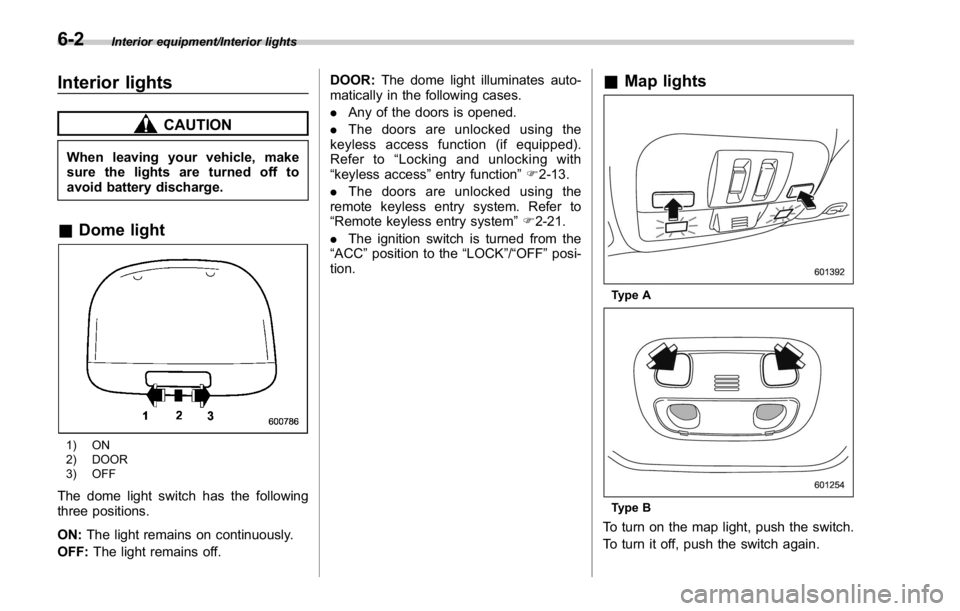
Interior equipment/Interior lights
Interior lights CAUTIONWhen leaving your vehicle, make
sure the lights are turned off to
avoid battery discharge.
& Dome light
1) ON
2) DOOR
3) OFF
The dome light switch has the following
three positions.
ON: The light remains on continuously.
OFF: The light remains off. DOOR: The dome light illuminates auto-
matically in the following cases.
. Any of the doors is opened.
. The doors are unlocked using the
keyless access function (if equipped).
Refer to “ Locking and unlocking with
“ keyless access ” entry function ” F 2-13.
. The doors are unlocked using the
remote keyless entry system. Refer to
“ Remote keyless entry system ” F 2-21.
. The ignition switch is turned from the
“ ACC ” position to the “ LOCK ” / “ OFF ” posi-
tion. & Map lights
Type A
Type B
To turn on the map light, push the switch.
To turn it off, push the switch again.6-2
Page 374 of 594

When leaving the vehicle, make sure the
lights are turned off to avoid battery
discharge.
! Automatic illumination (type A map
lights)
The map lights illuminate automatically in
the following cases.
. Any of the doors is opened.
. The doors are unlocked using the
keyless access function (if equipped).
Refer to “ Locking and unlocking with
“ keyless access ” entry function ” F 2-13.
. The doors are unlocked using the
remote keyless entry transmitter.
. The ignition switch is turned from the
“ ACC ” position to the “ LOCK ” / “ OFF ” posi-
tion. & OFF delay timer The following lights have an automatic
illumination function.
. dome light (when the dome light switch
is in the “ DOOR ” position)
. map light (type A)
After being illuminated automatically,
these lights remain on for several seconds
and then gradually turn off after all doors
are closed.
While the lights are illuminated, if any of
the following operations are performed,
the lights turn off immediately.
. The ignition switch is turned from the
“ LOCK ” / “ OFF ” position to the “ ACC ” or
“ ON ” position.
. All doors are locked using the keyless
access function (if equipped).
. All doors are locked using the remote
keyless entry system.
The setting for the period of time in which
the lights remain on (OFF delay timer) can
be changed by a SUBARU dealer. Con-
tact your SUBARU dealer for details. Also,
the setting can be changed by operating
the multi function display. For details, refer
to “ Interior light off delay timer setting ” F 3-
87. Sun visors
To block out glare, swing down the visors.
To use the sun visor at a side window,
swing it down and move it sideways. Interior equipment/Sun visors
– CONTINUED –6-3