2016 SUBARU WRX differential
[x] Cancel search: differentialPage 164 of 594

& Turn signal indicator
lightsThese lights show the operation of the turn
signal or lane change signal.
If the indicator lights do not blink or blink
rapidly, the turn signal bulb may be burned
out. Replace the bulb as soon as possible.
Refer to “ Replacing bulbs ” F 11-44.
& High beam indicator
lightThis light shows that the headlights are in
the high beam mode.
This indicator light also illuminates when
the headlight flasher is operated.
& Cruise control indica-
torThis indicator appears when the cruise
control main button is pressed to activate
the cruise control function. For details,
refer to “ To set cruise control ” F 7-53.
CAUTION
If the CHECK ENGINE warning light/
malfunction indicator light illumi-
nates, the cruise control indicator
flashes at the same time. At this
time, avoid driving at high speed and have your vehicle inspected at a
SUBARU dealer as soon as possi-
ble.
& Cruise control set in-
dicator This indicator appears when vehicle
speed has been set to use the cruise
control function. Refer to “ To set cruise
control ” F 7-53.
& Automatic headlight
beam leveler warning
light (models with LED
headlights) This light illuminates when the automatic
headlight beam leveler does not operate
normally.
If this light illuminates while driving or does
not turn off approximately 3 seconds after
turning the ignition switch to the “ ON ”
position, have your vehicle inspected at
your SUBARU dealer.
& Front fog light indicator
light (if equipped)
This indicator light illuminates while the
front fog lights are illuminated. & Headlight indicator
light This indicator light illuminates under the
following conditions.
. when the light switch is turned to the
“
” or “ ” position
. when the light control switch is in the
“ AUTO ” position and the headlights illumi-
nate automatically
& Driver ’ s control center differ-
ential auto indicator (STI)
This indicator functions while the ignition
switch is “ ON ” . When it appears, it
indicates that the driver ’ s control center
differential is set to the auto mode. It
disappears when the driver ’ s control
center differential is set to the manualInstruments and controls/Warning and indicator lights
– CONTINUED –3-35
Page 165 of 594
Instruments and controls/Warning and indicator lights
mode. For details, refer to “ Driver ’ s Con-
trol Center Differential (C.DIFF/DCCD)
(STI) ” F 7-19.
! Driver ’ s control center dif-
ferential auto [+] indicator
(STI)
When the AUTO [+] mode is set, the
AUTO [+] indicator appears.
For details, refer to “ Driver ’ sControl
Center Differential (C.DIFF/DCCD) (STI) ”
F 7-19.
! Driver ’ s control center dif-
ferential auto [ − ] indicator
(STI)
When the AUTO [ − ] mode is set, the
AUTO [ − ] indicator appears.
For details, refer to “ Driver ’ sControl
Center Differential (C.DIFF/DCCD) (STI) ”
F 7-19. & Driver ’ s control center differ-
ential indicator and warning
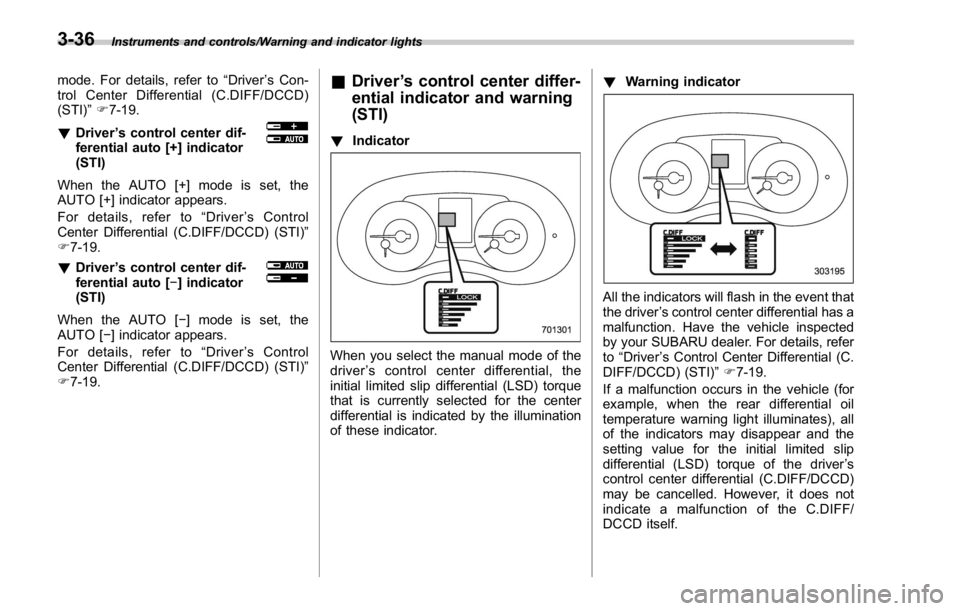
(STI) ! Indicator
When you select the manual mode of the
driver ’ s control center differential, the
initial limited slip differential (LSD) torque
that is currently selected for the center
differential is indicated by the illumination
of these indicator. ! Warning indicator
All the indicators will flash in the event that
the driver ’ s control center differential has a
malfunction. Have the vehicle inspected
by your SUBARU dealer. For details, refer
to “ Driver ’ s Control Center Differential (C.
DIFF/DCCD) (STI) ” F 7-19.
If a malfunction occurs in the vehicle (for
example, when the rear differential oil
temperature warning light illuminates), all
of the indicators may disappear and the
setting value for the initial limited slip
differential (LSD) torque of the driver ’ s
control center differential (C.DIFF/DCCD)
may be cancelled. However, it does not
indicate a malfunction of the C.DIFF/
DCCD itself.3-36
Page 171 of 594

Instruments and controls/Multi information display
Item Icon “ ” information reminder Refer to page
Automatic headlight beam leveler system malfunction warning
(models with LED headlights) Yellow 3-35
LED low beam headlight system malfunction warning (if equipped) Yellow 3-25
The keyless access with push-button start system malfunction
warning* ——
Low battery warning of the access key* — 3-28
Driver ’ s control center differential system malfunction warning Yellow 3-35
Deactivation of switching SI-DRIVE mode — 7-29, 7-31
Windshield washer fluid warning Yellow 11-38
BSD/RCTA halt or warning (if equipped) Yellow 7-56
*: Models with keyless access with push-button start system3-42
Page 390 of 594

Fuel ...................................................................... 7-3Fuel requirements ............................................... 7-3
Fuel filler lid and cap ........................................... 7-5
State emission testing (U.S. only) ...................... 7-7
Preparing to drive ............................................... 7-8
Starting and stopping the engine (models
without push-button start system) .................. 7-9Starting engine .................................................... 7-9
Stopping the engine ........................................... 7-11
Starting and stopping engine (models with
push-button start system) .............................. 7-12Safety precautions ............................................. 7-12
Operating range for push-button start
system ............................................................. 7-12
Starting engine ................................................... 7-12
Stopping engine ................................................. 7-14
When access key does not operate properly ....... 7-14
Remote engine start system (dealer
option) .............................................................. 7-14Models with “ keyless access with push-button
start system ” ................................................... 7-15
Entering the vehicle while it is running via remote
start ................................................................. 7-16
Entering the vehicle following remote engine start
shutdown ......................................................... 7-16
Pre-heating or pre-cooling the interior of the
vehicle ............................................................. 7-16
System maintenance .......................................... 7-16
Manual transmission .......................................... 7-17
Shifting speeds .................................................. 7-18
Driving tips ........................................................ 7-18 Driver ’ s Control Center Differential (C.DIFF/
DCCD) (STI) ..................................................... 7-19To change mode of driver ’ s control center
differential ....................................................... 7-20
Auto mode ........................................................ 7-20
Manual mode ..................................................... 7-21
Temporary release ............................................. 7-23
Continuously variable transmission ................. 7-23Select lever ....................................................... 7-24
Selection of manual mode .................................. 7-26
Shift lock function ............................................. 7-27
Driving tips ........................................................ 7-28
SI-DRIVE (STI) .................................................... 7-29Intelligent (I) mode ............................................. 7-29
Sport (S) mode .................................................. 7-30
Sport Sharp (S#) mode. ...................................... 7-30
SI-DRIVE selector .............................................. 7-30
SI-DRIVE (except STI: CVT models) ................. 7-31Intelligent (I) mode ............................................. 7-31
Sport (S) mode .................................................. 7-31
Sport Sharp (S#) mode. ...................................... 7-32
SI-DRIVE switches ............................................. 7-32
Limited slip differential (LSD) (STI) .................. 7-33
Power steering ................................................... 7-33
STI .................................................................... 7-33
Except STI ......................................................... 7-34
Braking ............................................................... 7-35
Braking tips ....................................................... 7-35
Brake system .................................................... 7-35
Disc brake pad wear warning indicators ............. 7-36Starting and operating
7
Page 408 of 594
as necessary; this helps to maintain a safe
speed and to extend brake pad life.
In this way, the engine provides a braking
effect. Remember, if you “ ride ” (over use)
the brakes while descending a hill, they
may overheat and not work properly.
The engine may, on rare occasions, knock
when the vehicle rapidly accelerates or
rapidly pulls away from a standstill. This
phenomenon is not an indication of a
problem in your vehicle. Driver ’ s Control Center Dif-
ferential (C.DIFF/DCCD) (STI) WARNINGAlways use the utmost care when
driving. Being overconfident be-
cause you are driving a vehicle with
a driver ’ s control center differential
could easily lead to a serious acci-
dent.
CAUTION
. All the indicators will flash in the
event that the driver ’ s control
center differential has a malfunc- tion. Have the vehicle inspected
by your SUBARU dealer.
. If a malfunction occurs in the
vehicle (for example, when the
rear differential oil temperature
warning light illuminates), all of
the indicators may disappear and
the setting value for the initial
limited slip differential (LSD) tor-
que of the driver ’ s control center
differential (C.DIFF/DCCD) may
be cancelled. However, it does
not indicate a malfunction of the
C.DIFF/DCCD itself.
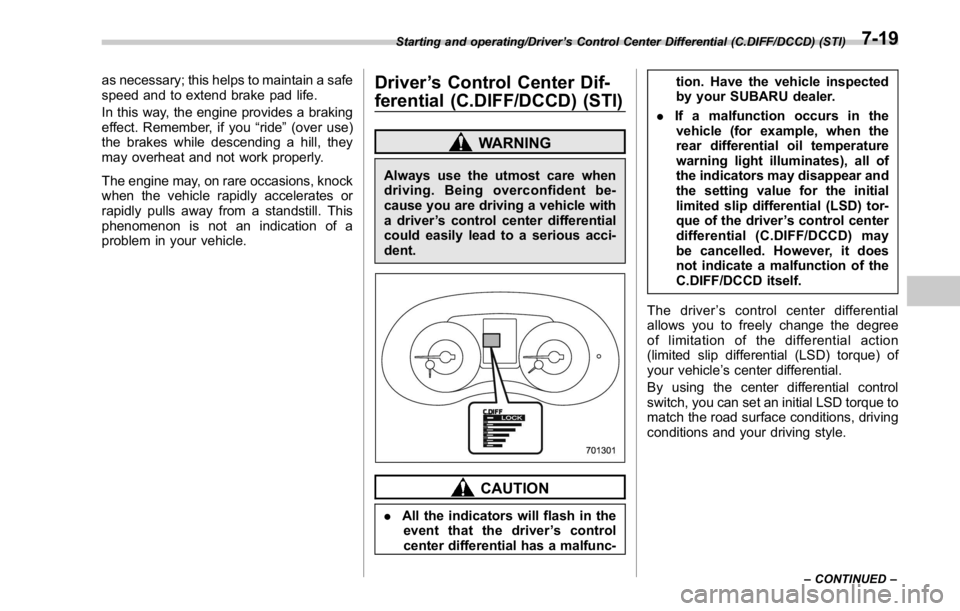
The driver ’ s control center differential
allows you to freely change the degree
of limitation of the differential action
(limited slip differential (LSD) torque) of
your vehicle ’ s center differential.
By using the center differential control
switch, you can set an initial LSD torque to
match the road surface conditions, driving
conditions and your driving style.Starting and operating/Driver ’ s Control Center Differential (C.DIFF/DCCD) (STI)
– CONTINUED –7-19
Page 409 of 594

Starting and operating/Driver ’ s Control Center Differential (C.DIFF/DCCD) (STI)
1) LSD torque
2) Traction torque
3) Initial LSD torque (maximum)
4) Initial LSD torque (minimum)
A) Initial LSD torque (adjustable)
B) Mechanical LSD torque
The driver ’ s control center differential has
an auto mode and a manual mode. In the
auto mode, the system automatically
adjusts the initial LSD torque. In the
manual mode, you can change to the
desired mode manually by using the
center differential control switch.
NOTE If you rapidly depress and release the
accelerator pedal while driving at low
speed, you may hear a knocking sound
from the vicinity of the center differen- tial and rear differential. This sound
occurs because of the structure of the
center differential. It does not indicate a
problem.
& To change mode of driver ’ s
control center differential
Press the “ AUTO-MANU ” switch on the
center console to switch from auto mode
to manual mode or vice versa. When you
select the auto mode, the “ AUTO ” indica-
tor appears. When you select the manual
mode, the “ AUTO ” indicator disappears. & Auto mode
In the auto mode, the system estimates
the driving and road conditions using
signals from the wheel speed sensor,
throttle position sensor, steering angle
sensor and brake switch, etc. According
to the result, it electronically and auto-
matically controls the degree of limitation
of the differential action (LSD torque) to
optimize the differential action of the
center differential. When the ignition
switch is turned ON, the “ AUTO ” indicator
on the combination meter appears.7-20
Page 410 of 594
![SUBARU WRX 2016 Owners Manual The auto mode has 3 modes as follows. Mode Operation
AUTO [+] This mode emphasizes traction
control and strengthens the
limitation of differential action
that is suitable for driving on
slippery roads](/manual-img/17/59229/w960_59229-409.png "SUBARU WRX 2016 Owners Manual The auto mode has 3 modes as follows. Mode Operation
AUTO [+] This mode emphasizes traction
control and strengthens the
limitation of differential action
that is suitable for driving on
slippery roads")
The auto mode has 3 modes as follows. Mode Operation
AUTO [+] This mode emphasizes traction
control and strengthens the
limitation of differential action
that is suitable for driving on
slippery roads for vehicle stabi-
lity.
AUTO This mode is suitable for most
driving situations.
AUTO [ − ] This mode is suitable when you
seek quick response from the
steering wheel and smooth
driving.
! Mode setting method
In most situations, it is recommended that
the “ AUTO ” mode is selected.
Push the control switch forward to select the “ AUTO [+] ” mode. After setting the
mode, “ AUTO [+] ” appears.
Pull the control switch rearward to select
the “ AUTO [ − ] ” mode. After setting the
mode, “ AUTO [ − ] ” appears.
When the “ AUTO [+] ” mode is selected,
pull the control switch rearward to change
to the “ AUTO ” mode. When the “ AUTO
[ − ] ” mode is set, push the control switch
forward to change to the “ AUTO ” mode.& Manual mode
In the manual mode, you can use the
center differential control switch to adjust
the initial LSD torque as desired. When
this mode is selected, the “ AUTO ” indica-
tor disappears.Starting and operating/Driver ’ s Control Center Differential (C.DIFF/DCCD) (STI)
– CONTINUED –7-21
Page 411 of 594

Starting and operating/Driver ’ s Control Center Differential (C.DIFF/DCCD) (STI)
! Center differential control switch
and indicator
The control switch is located beside the
parking brake lever. By pushing the
control switch forward or pulling it rear-
ward, it is possible to change the initial
LSD torque.
The center differential indicator on the
combination meter gives six levels of
indication. The indicator and control
switch are linked; when the switch is
pushed or pulled to change the initial
LSD torque, the indicator changes accord-
ingly. Push the switch forward to increase the
initial LSD torque; when the “ LOCK ”
indicator appears, the initial LSD torque
setting is maximum. The center differential
will then be almost completely locked. Pull the switch rearward to reduce the
initial LSD torque. When the lowest posi-
tion of the driver ’ s control center differen-
tial indicator is displayed, the initial LSD
torque will be minimum. Under this condi-
tion, only the Mechanical LSD torque will
limit the differential action.
CAUTION
. Do not operate the control switch
when a wheel slippage occurs.
Wait until the wheelspin has been
brought under control.
. Under any of the following con-
ditions after setting to the man-
ual mode, pull the center differ-
ential control switch to minimize
the initial LSD torque:7-22