2016 SUBARU OUTBACK open tail gate
[x] Cancel search: open tail gatePage 128 of 572

Keys and doors/Remote keyless entry system
lid) is not fully closed, the following will
occur to alert you that the doors (or the
rear gate/trunk lid) are not properly closed.
.an electronic chirp sounds five times.
.the hazard warning flashers flash five
times.
When you close the door, it will automa-
tically lock and then the following will
occur.
.an electronic chirp sounds once.
.the hazard warning flashers flash once.
!Unlocking the doors
Press the unlock/disarm button to unlock
the driver’s door. An electronic chirp will
sound twice and the hazard warning
flashers will flash twice. To unlock all
doors and the rear gate (Outback), briefly
press the unlock/disarm button a second
time within 5 seconds.
NOTE
If the interval between the first and
second presses of the unlock/disarm
button (for unlocking of all of the doors
and the rear gate) is extremely short,
the system may not respond.!Opening the trunk lid (Legacy)
Press and hold the trunk lid opener button
to open the trunk lid. An electronic chirp
will sound twice and the hazard warning
flashers will flash twice.
!Unlocking the rear gate (Outback)
Press the rear gate unlock button to
unlock the rear gate. An electronic chirp
will sound twice and the hazard warning
flashers will flash twice.
!Selecting audible signal operation
Using an electronic chirp, the system will
give you an audible signal when the doors
are locked or unlocked.
If desired, the audible signal ON/OFF
setting and the audible signal volume
can be customized by a SUBARU dealer.
Consult your SUBARU dealer for details.
!Selecting hazard warning flasher
operation
Using the hazard warning flasher, the
system will give you a visible signal when
the doors are locked or unlocked. If
desired, you can turn the hazard warning
flashers off by operating the multi informa-
tion display. For details, refer to“Keyless
Entry System”F3-42. The setting can
also be changed by a SUBARU dealer.
Consult your SUBARU dealer for details.!Vehicle finder function
Use this function to find your vehicle
parked among many vehicles in a large
parking lot. Provided you are within 30 feet
(10 meters) of the vehicle, pressing the
lock/arm button three times in a 5-second
period will cause your vehicle’s horn to
sound once and its hazard warning
flashers to flash three times.
NOTE
If the interval between presses is too
short when you press the lock/arm
button three times, the system may
not respond to the signals from the
remote transmitter.
!Sounding a panic alarm
To activate the alarm, press the“PANIC”
button once.
The horn will sound and the hazard
warning flashers will flash.
To deactivate the panic alarm, press any
button on the remote transmitter. If a
button on the remote transmitter is not
pressed, the alarm will be deactivated
after approximately 30 seconds.
&Replacing the battery
Refer to“Replacing battery”F11-49.
2-26
Page 130 of 572

Keys and doors/Alarm system
Alarm system
The alarm system helps to protect your
vehicle and valuables from theft. The horn
sounds and the hazard warning flashers
flash if someone attempts to break into
your vehicle.
For models with“keyless access with
push-button start system”:
The system can be armed or disarmed
with the keyless access function or access
key.
The system will not be activated when the
push-button ignition switch is in the“ACC”
or“ON”position.
For models without“keyless access
with push-button start system”:
The system can be armed and disarmed
with the remote transmitter.
The system will not be activated when the
key is inserted into the ignition switch.
Your vehicle’s alarm system has been set
for activation at the time of shipment from
the factory. You can set the system for
deactivation yourself or have it done by
your SUBARU dealer.
&System alarm operation
The alarm system will give the following
alarms when triggered.
.The vehicle’s horn will sound for 30
seconds.
.The hazard warning flashers will flash
for 30 seconds.
If any of the doors (or the rear gate/trunk
lid) remains open after the 30-second
period, the horn will continue to sound
for a maximum of 3 minutes. If the door (or
the rear gate/trunk lid) is closed while the
horn is sounding, the horn will stop
sounding with a delay of up to 30 seconds.
The alarm is triggered by:
.Opening any of the doors, rear gate or
the trunk lid
.Physical impact to the vehicle, such as
forced entry (only models with shock
sensors (dealer option))
NOTE
The alarm system can be set to trigger
the illumination of the following interior
lights.
.Map lights
.Dome light (illuminates only when
the dome light switch is in the“DOOR”
position)
.Cargo area light (Outback)The notifications regarding the map
lights, dome light and cargo area light
(Outback) are deactivated as the fac-
tory setting. A SUBARU dealer can
activate the system. Contact your
SUBARU dealer for details.
&Activating and deactivating
the alarm system
To change the setting of your vehicle’s
alarm system for activation or deactiva-
tion, do the following.
1. Disarm the alarm system. Refer to
“Disarming the system”F2-32.
2. Sit in the driver’s seat and shut all
doors (and the rear gate (Outback)).
3. Turn the ignition switch to the“ON”
position.
4. Hold down the REAR (UNLOCK) side
of the driver’s power door locking switch,
open the driver’s door within the following
1 second, and wait 10 seconds without
releasing the switch. The setting will then
be changed as follows:
If the system was previously activated:
The odometer screen displays“ALOF”
and the horn sounds twice, indicating that
the system is now deactivated.
2-28
Page 149 of 572

CAUTION
.If the reverse function is operated
3 times consecutively, automatic
opening and closing of the power
rear gate function will be can-
celed and the rear gate will stop
opening or closing suddenly.
Whether the rear gate opens or
closes depends on the rear gate
height when automatic operation
is ceased. Be careful that the rear
gate does not hit anyone’s head
or face, etc. and that fingers and
baggage, etc. are not caught in it.
.Take care not to damage the
touch sensors. Otherwise, the
reverse function may cease to
operate.
If, while opening or closing using power
rear gate, the rear gate catches persons
or baggage or hits an obstacle, an
electronic chirp will sound 3 times and
the rear gate will operate as follows.
When opening the rear gate:The rear
gate will automatically close.
When closing the rear gate:The rear
gate will automatically open.
1) Touch sensor
Touch sensors are attached on the left
and right edges of the rear gate. If the
touch sensors detect fingers, baggage,
etc. while closing by the power rear gate
function, an electronic chirp will sounds 3
times and the rear gate will open auto-
matically.
NOTE
When the rear gate is opened using the
reverse function, it will be opened fully
or to the height registered in the
memory function.!Rear gate drop prevention function
If, while fully opened via the power rear
gate function, the rear gate is lowered by
the weight of snow and such, an electronic
chirp will sound and the rear gate drop
prevention function will apply braking to
the rear gate so that it prevents a rapid
closure of the rear gate.
NOTE
.If there is snow on the rear gate,
only use the power rear gate function
after removing the snow.
.If you close the rear gate manually
just after the rear gate is fully opened
using the power rear gate function, the
rear gate drop prevention function will
detect a rapid closure of the rear gate
and apply braking to the rear gate. In
this case, this is not a malfunction.
!Selecting audible signal operation
Using an electronic chirp, the power rear
gate will give you an audible signal before
starting its operation. If desired, the
audible signal can be turned off by a
SUBARU dealer. Consult your SUBARU
dealer for details.
For models with“keyless access with
push-button start system”, you can turn
the audible signal off by operating the
multi information display. For details, refer
Keys and doors/Rear gate (Outback)
–CONTINUED–2-47
Page 187 of 572

as vehicle information, warning informa-
tion, etc., they will interrupt the current
screen, and appear on the display accom-
panied by a beep. If such a screen is
displayed, take proper action according to
the message shown on the screen.
The warning screen will return to the
original screen after a few seconds. While
the“
”information reminder is shown on
the display, it may be possible to display
the warning screen again. To recall the
message marked with“
”on the display,
pull the“/SET”switch on the steering
wheel toward you.
&Welcome screen and Good-
bye screen
When the driver’s door is opened and
closed after unlocking the door, the
welcome screen will appear on the multi
information display for approximately 20
seconds.
When the ignition switch is turned to the
“LOCK”/“OFF”position, the multi informa-
tion display gradually turns off (Good-bye
screen).
NOTE
.The basic screen will be shown
when the ignition switch is turned to
the“ON”position while the welcomescreen is displayed.
.Once the welcome screen appears,
it takes a certain period of time to
display it again.
.If the ignition switch is operated
after unlocking the driver’s door, the
welcome screen will not appear even
when the driver’s door is opened and
closed.
.The welcome screen will disappear
when you lock the driver’s door by
using the remote keyless entry system
(all models) or the keyless access
function (if equipped) while the wel-
come screen is displayed.
.If any of the doors (including the
rear gate) is opened while the welcome
screen is displayed, the door ajar
warning will appear.
.The welcome screen can be set to
on or off. For details, refer to“Welcome
Screen”F3-41.
.The Good-bye screen can be set to
on or off. For details, refer to“Good-
bye Screen”F3-41.
&Warning screen
Example of warning
If there is a warning message or a
maintenance notification, it will appear for
approximately 5 seconds. Take the appro-
priate actions based on the messages
indicated.
Instruments and controls/Multi information display
–CONTINUED–3-35
Page 209 of 572

!Photosensors
The mirror has a photosensor attached on
both the front and back sides. During
nighttime driving, these sensors detect
distracting glare from vehicle headlights
behind you and automatically dim the
mirror to eliminate glare and preserve
your vision. For this reason, use care not
to cover the sensors with stickers, or other
similar items. Periodically wipe the sen-
sors clean using a piece of dry soft cotton
cloth or an applicator.!Compass zone adjustmentCompass calibration zones
1. Refer to the“Compass calibration
zones”map shown above to verify that
the compass zone setting is correct for
your geographical location.
2. Press and hold the compass display
button for 3 seconds until the zone
selection comes up (a number will be
displayed in the mirror compass window).
3. Press the compass display button
repeatedly until the correct zone setting
for your location is displayed.
4. Releasing the button for 5 seconds will
exit the zone setting mode.!Compass calibration
1. If a“C”is displayed in the compass
window, the compass needs to be cali-
brated.
2. Drive the vehicle in a circle at 5 mph (8
km/h) or less until the display reads a
direction.
3. You can also calibrate the compass by
driving your vehicle on your everyday
routine. The compass will be calibrated
once it has tracked a complete circle.
4. To recalibrate your compass, push and
hold the compass display button for 9
seconds until a“C”appears in the
compass window.
5. Calibrate the compass according to
step 2 or step 3.
!HomeLink
®Wireless Control Sys-
tem
The HomeLink
®Wireless Control System
can be used to activate remote control
devices such as gate operators, garage
door openers, door locks, home lighting
and security systems.
There are three HomeLink
®buttons on the
mirror, each of which can be programmed
for operation of one desired device. For
details on the device types which can be
operated by this system, consult the
HomeLink
®website at:
Instruments and controls/Mirrors
–CONTINUED–3-57
Page 324 of 572
Interior equipment/Interior light
Interior light
CAUTION
When leaving your vehicle, make
sure the lights are turned off to
avoid battery discharge.
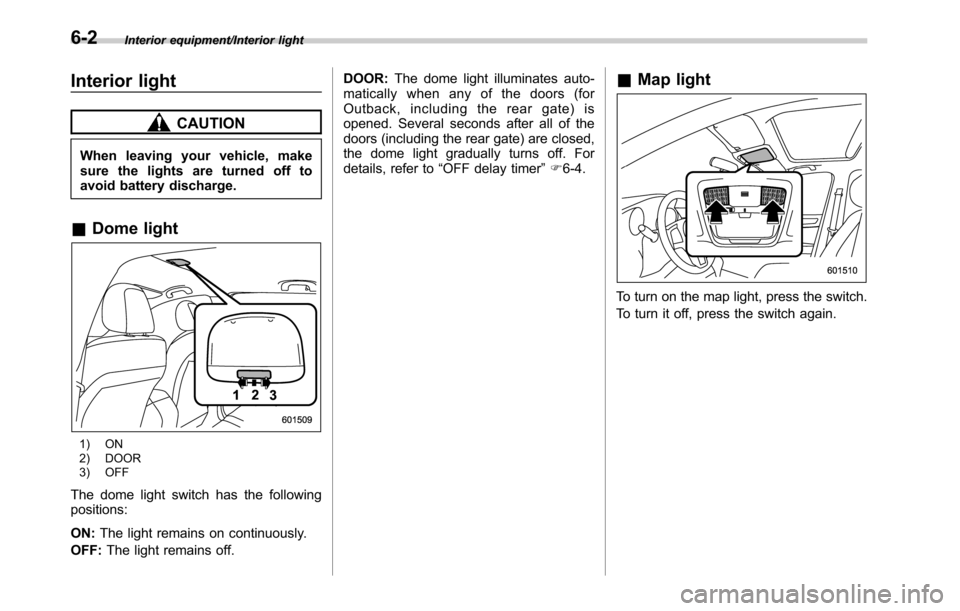
&Dome light
1) ON
2) DOOR
3) OFF
The dome light switch has the following
positions:
ON:The light remains on continuously.
OFF:The light remains off.DOOR:The dome light illuminates auto-
matically when any of the doors (for
Outback, including the rear gate) is
opened. Several seconds after all of the
doors (including the rear gate) are closed,
the dome light gradually turns off. For
details, refer to“OFF delay timer”F6-4.
&Map light
To turn on the map light, press the switch.
To turn it off, press the switch again.
6-2
Page 325 of 572
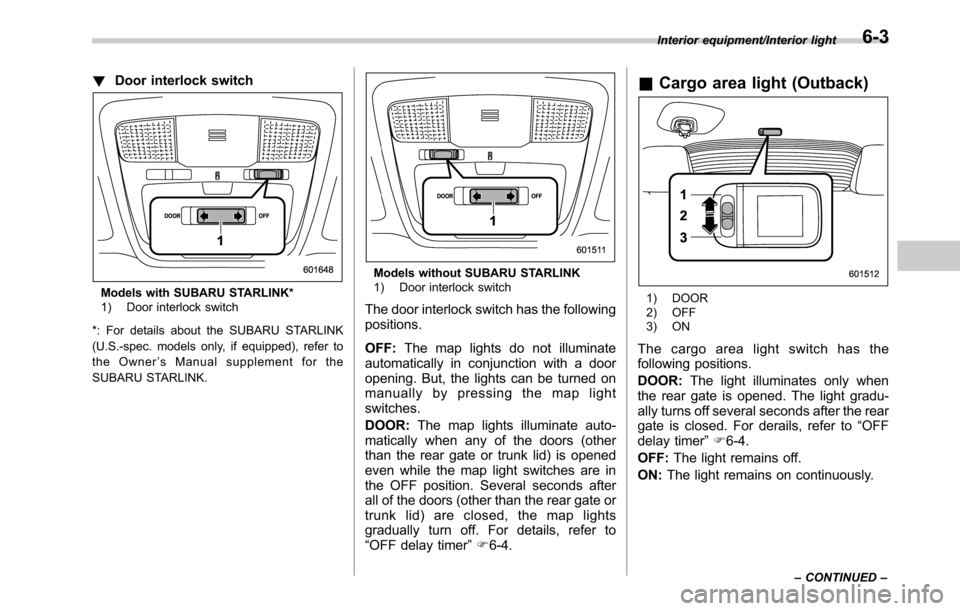
!Door interlock switch
Models with SUBARU STARLINK*
1) Door interlock switch
*: For details about the SUBARU STARLINK
(U.S.-spec. models only, if equipped), refer to
the Owner’s Manual supplement for the
SUBARU STARLINK.
Models without SUBARU STARLINK
1) Door interlock switch
The door interlock switch has the following
positions.
OFF:The map lights do not illuminate
automatically in conjunction with a door
opening. But, the lights can be turned on
manually by pressing the map light
switches.
DOOR:The map lights illuminate auto-
matically when any of the doors (other
than the rear gate or trunk lid) is opened
even while the map light switches are in
the OFF position. Several seconds after
all of the doors (other than the rear gate or
trunk lid) are closed, the map lights
gradually turn off. For details, refer to
“OFF delay timer”F6-4.
&Cargo area light (Outback)
1) DOOR
2) OFF
3) ON
The cargo area light switch has the
following positions.
DOOR:The light illuminates only when
the rear gate is opened. The light gradu-
ally turns off several seconds after the rear
gate is closed. For derails, refer to“OFF
delay timer”F6-4.
OFF:The light remains off.
ON:The light remains on continuously.
Interior equipment/Interior light
–CONTINUED–6-3
Page 365 of 572
!Automatic engine shutdown
The remote engine start system will
automatically shut down or will not start
the engine under the following conditions.
.The total run-time has exceeded 20
minutes.
.Any door or the rear gate is opened.
.The select lever is moved to any
position other than“P”.
.The engine hood is opened.
.Thepush-buttonignitionswitchis
pressed.
.The brake pedal is depressed.
.The engine speed is 3,000 rpm or
more.
The time until the engine automatically
stops differs according to the setting.
To change the time until the engine
automatically stops, contact your
SUBARU dealer. However, local laws
and regulations may prohibit changing
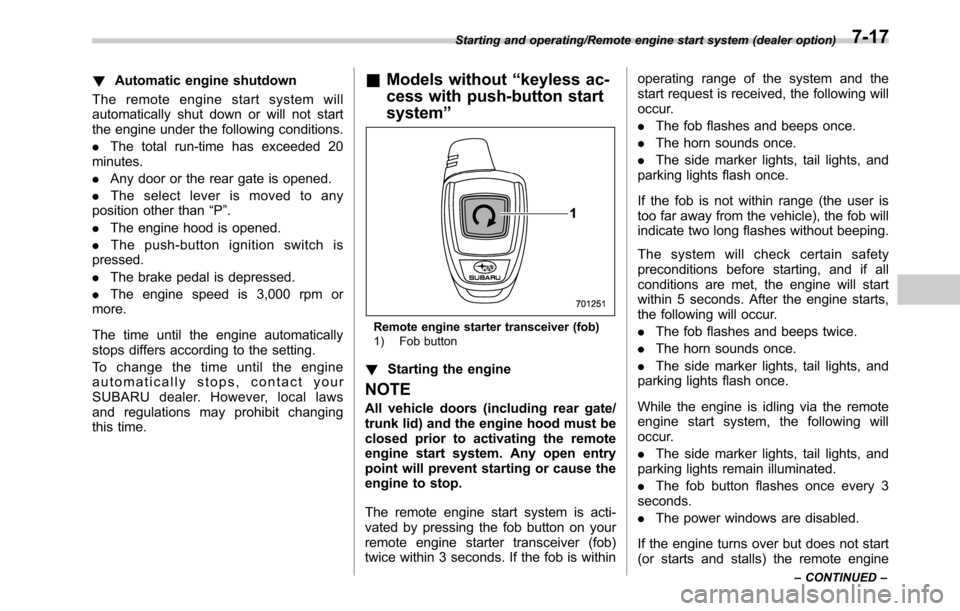
this time.&Models without“keyless ac-
cess with push-button start
system”
Remote engine starter transceiver (fob)
1) Fob button
!Starting the engine
NOTE
All vehicle doors (including rear gate/
trunk lid) and the engine hood must be
closed prior to activating the remote
engine start system. Any open entry
point will prevent starting or cause the
engine to stop.
The remote engine start system is acti-
vated by pressing the fob button on your
remote engine starter transceiver (fob)
twice within 3 seconds. If the fob is withinoperating range of the system and the
start request is received, the following will
occur.
.The fob flashes and beeps once.
.The horn sounds once.
.The side marker lights, tail lights, and
parking lights flash once.
If the fob is not within range (the user is
too far away from the vehicle), the fob will
indicate two long flashes without beeping.
The system will check certain safety
preconditions before starting, and if all
conditions are met, the engine will start
within 5 seconds. After the engine starts,
the following will occur.
.The fob flashes and beeps twice.
.The horn sounds once.
.The side marker lights, tail lights, and
parking lights flash once.
While the engine is idling via the remote
engine start system, the following will
occur.
.The side marker lights, tail lights, and
parking lights remain illuminated.
.The fob button flashes once every 3
seconds.
.The power windows are disabled.
If the engine turns over but does not start
(or starts and stalls) the remote engine
Starting and operating/Remote engine start system (dealer option)
–CONTINUED–7-17