Page 95 of 108
Message screen list
91
Message screen list
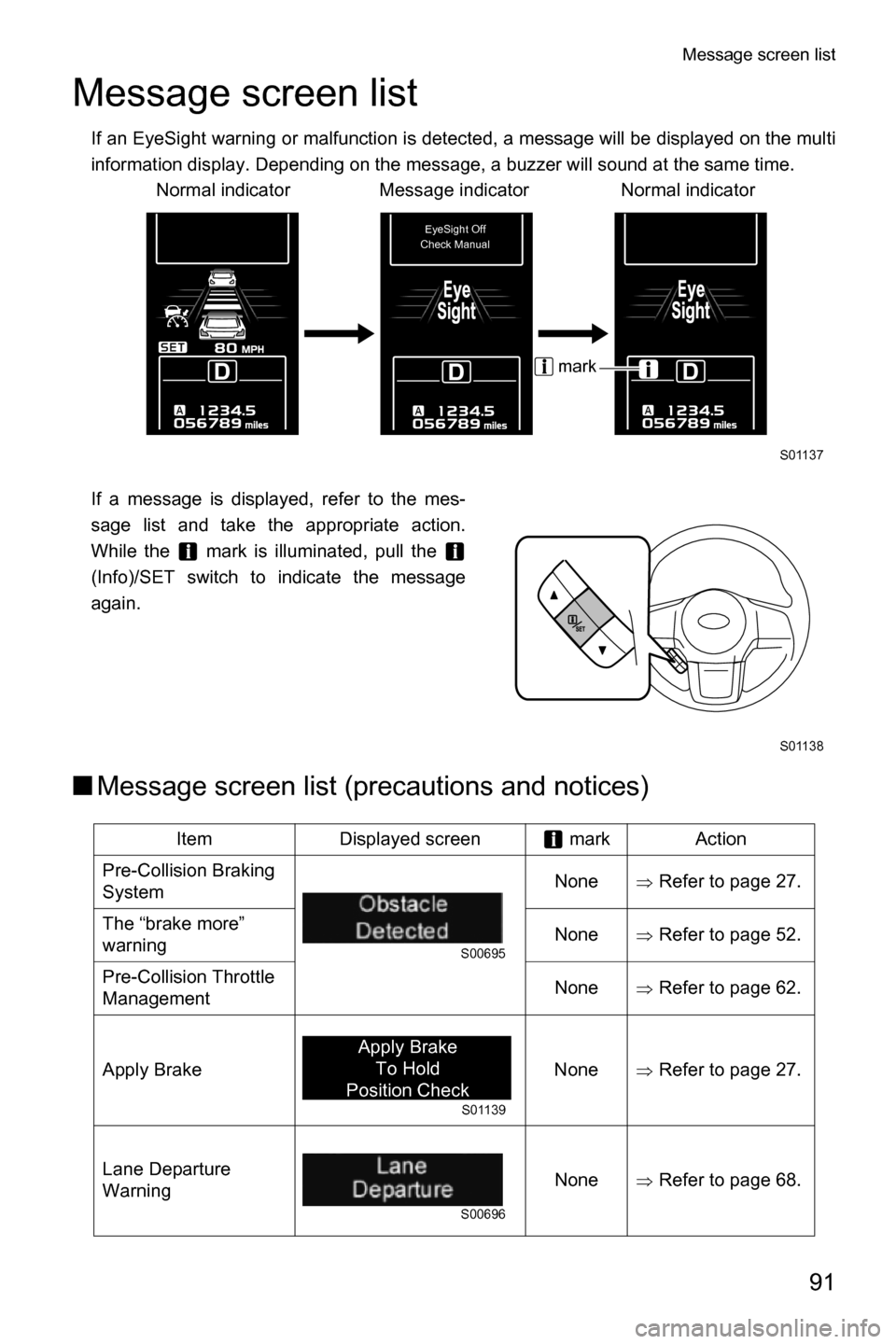
If an EyeSight warning or malfunction is detected, a message will be displayed on the multi
information display. Depending on the message, a buzzer will sound at the same time.
If a message is displayed, refer to the mes-
sage list and take the appropriate action.
While the mark is illuminated, pull the
(Info)/SET switch to indicate the message
again.
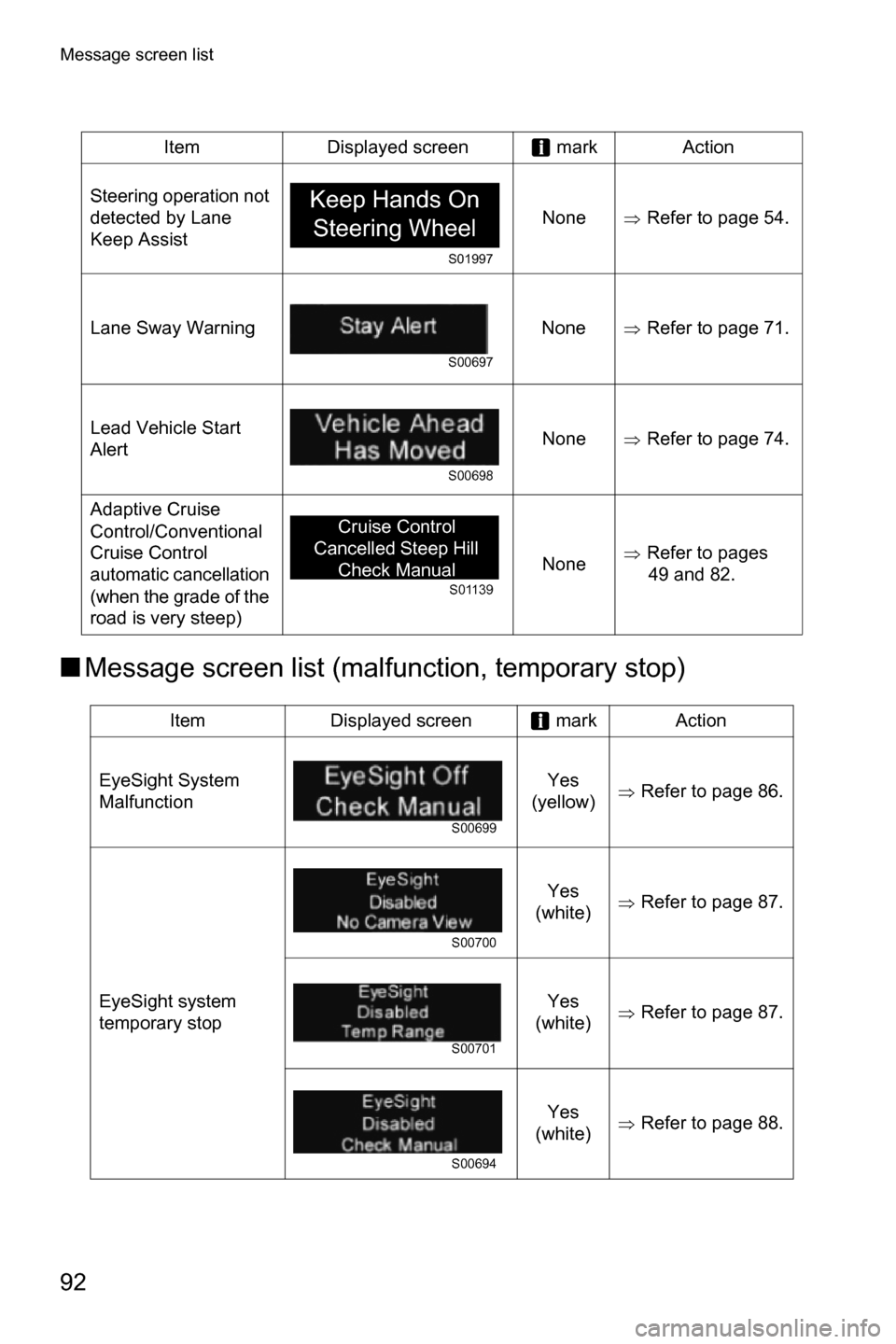
■Message screen list (precautions and notices)
Item Displayed screen mark Action
Pre-Collision Braking
SystemNone
ŸRefer to page 27.
The “brake more”
warningNone
ŸRefer to page 52.
Pre-Collision Throttle
ManagementNone
ŸRefer to page 62.
Apply Brake None
ŸRefer to page 27.
Lane Departure
WarningNone
ŸRefer to page 68.
Normal indicator Normal indicatorMessage indicator
S01137
EyeSight Off
Check Manual
mark
S01138
S00695
S01139
Apply Brake
To Hold
Position Check
Manual
S00696
Page 96 of 108
Message screen list
92
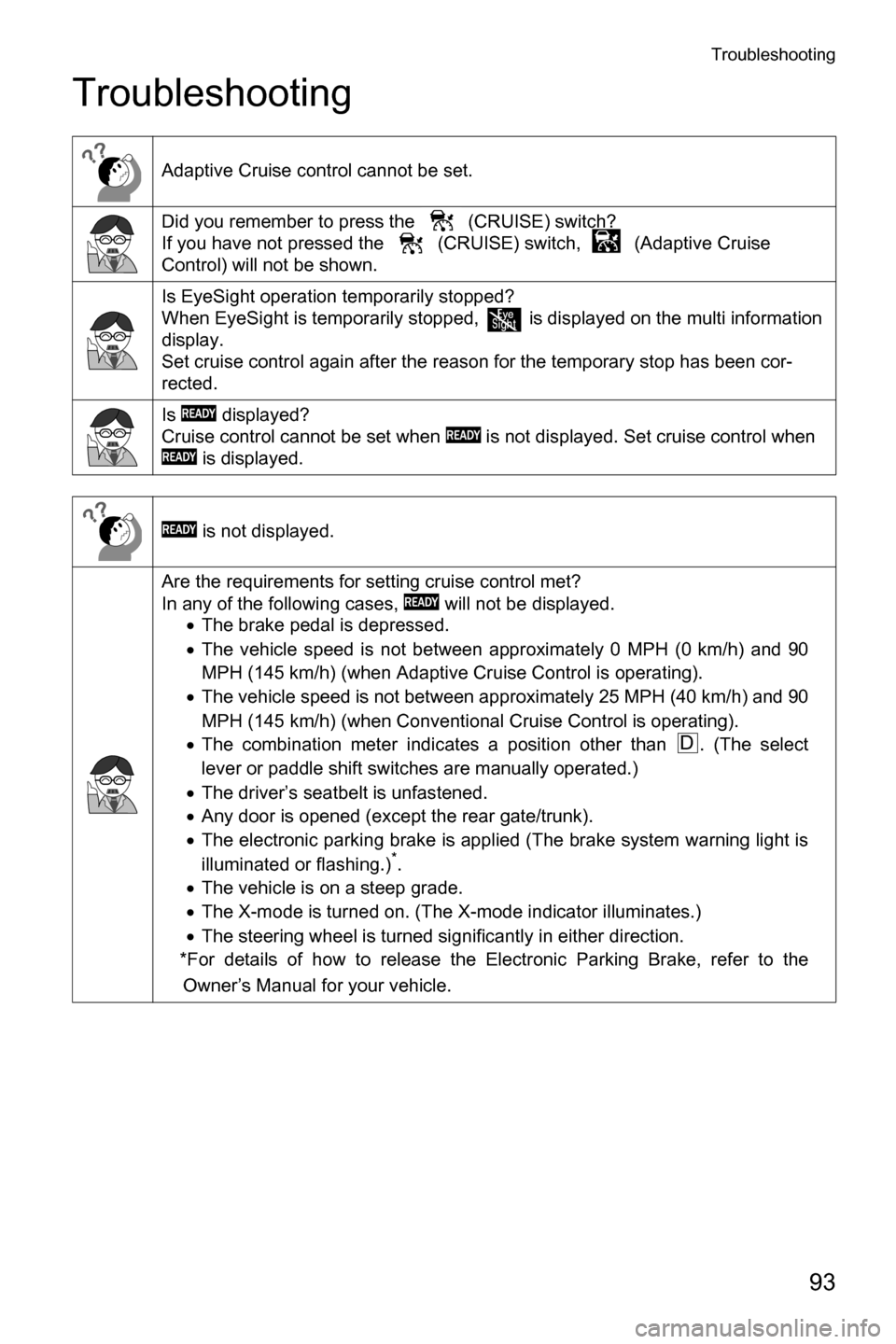
■Message screen list (malfunction, temporary stop)
Steering operation not
detected by Lane
Keep AssistNoneŸRefer to page 54.
Lane Sway Warning None
ŸRefer to page 71.
Lead Vehicle Start
AlertNone
ŸRefer to page 74.
Adaptive Cruise
Control/Conventional
Cruise Control
automatic cancellation
(when the grade of the
road is very steep)None
ŸRefer to pages
49 and 82.
Item Displayed screen mark Action
EyeSight System
MalfunctionYes
(yellow)
ŸRefer to page 86.
EyeSight system
temporary stopYes
(white)
ŸRefer to page 87.
Yes
(white)
ŸRefer to page 87.
Yes
(white)
ŸRefer to page 88. Item Displayed screen mark Action
Keep Hands On
Steering Wheel
S01997
S00697
S00698
S01139
Cruise Control
Cancelled Steep Hill
Check Manual
S00699
S00700
S00701
S00694
Page 97 of 108
Troubleshooting
93
Troubleshooting
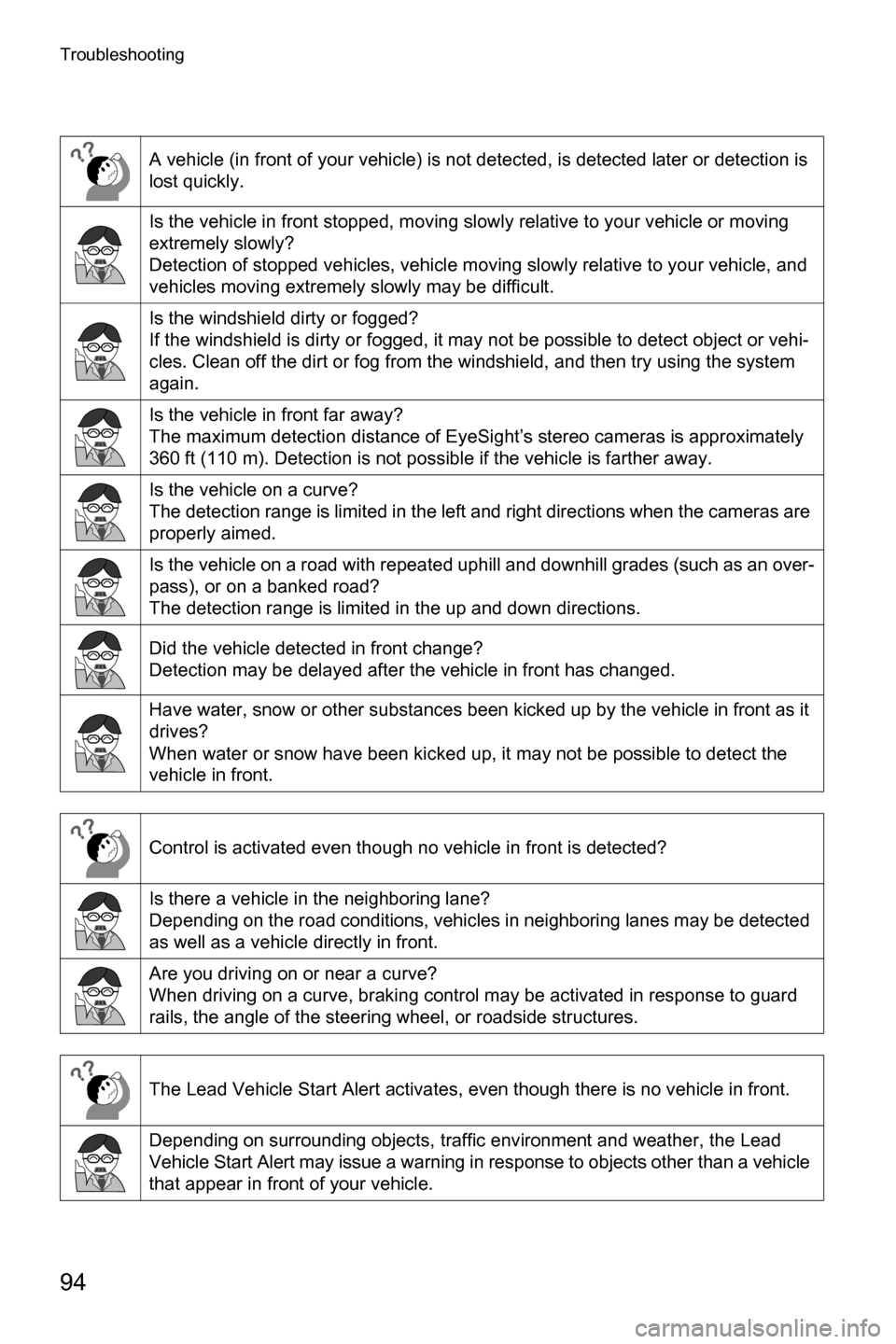
Adaptive Cruise control cannot be set.
Did you remember to press the (CRUISE) switch?
If you have not pressed the (CRUISE) switch, (Adaptive Cruise
Control) will not be shown.
Is EyeSight operation temporarily stopped?
When EyeSight is temporarily stopped, is displayed on the multi information
display.
Set cruise control again after the reason for the temporary stop has been cor-
rected.
Is displayed?
Cruise control cannot be set when is not displayed. Set cruise control when
is displayed.
is not displayed.
Are the requirements for setting cruise control met?
In any of the following cases, will not be displayed.
xThe brake pedal is depressed.
xThe vehicle speed is not between approximately 0 MPH (0 km/h) and 90
MPH (145 km/h) (when Adaptive Cruise Control is operating).
xThe vehicle speed is not between approximately 25 MPH (40 km/h) and 90
MPH (145 km/h) (when Conventional Cruise Control is operating).
xThe combination meter indicates a position other than . (The select
lever or paddle shift switches are manually operated.)
xThe driver’s seatbelt is unfastened.
xAny door is opened (except the rear gate/trunk).
xThe electronic parking brake is applied (The brake system warning light is
illuminated or flashing.)
*.
xThe vehicle is on a steep grade.
xThe X-mode is turned on. (The X-mode indicator illuminates.)
xThe steering wheel is turned significantly in either direction.
*For details of how to release the Electronic Parking Brake, refer to the
Owner’s Manual for your vehicle.
D
Page 98 of 108
Troubleshooting
94
A vehicle (in front of your vehicle) is not detected, is detected later or detection is
lost quickly.
Is the vehicle in front stopped, moving slowly relative to your vehicle or moving
extremely slowly?
Detection of stopped vehicles, vehicle moving slowly relative to your vehicle, and
vehicles moving extremely slowly may be difficult.
Is the windshield dirty or fogged?
If the windshield is dirty or fogged, it may not be possible to detect object or vehi-
cles. Clean off the dirt or fog from the windshield, and then try using the system
again.
Is the vehicle in front far away?
The maximum detection distance of EyeSight’s stereo cameras is approximately
360 ft (110 m). Detection is not possible if the vehicle is farther away.
Is the vehicle on a curve?
The detection range is limited in the left and right directions when the cameras are
properly aimed.
Is the vehicle on a road with repeated uphill and downhill grades (such as an over-
pass), or on a banked road?
The detection range is limited in the up and down directions.
Did the vehicle detected in front change?
Detection may be delayed after the vehicle in front has changed.
Have water, snow or other substances been kicked up by the vehicle in front as it
drives?
When water or snow have been kicked up, it may not be possible to detect the
vehicle in front.
Control is activated even though no vehicle in front is detected?
Is there a vehicle in the neighboring lane?
Depending on the road conditions, vehicles in neighboring lanes may be detected
as well as a vehicle directly in front.
Are you driving on or near a curve?
When driving on a curve, braking control may be activated in response to guard
rails, the angle of the steering wheel, or roadside structures.
The Lead Vehicle Start Alert activates, even though there is no vehicle in front.
Depending on surrounding objects, traffic environment and weather, the Lead
Vehicle Start Alert may issue a warning in response to objects other than a vehicle
that appear in front of your vehicle.
Page 99 of 108
Troubleshooting
95
EyeSight does not restart after a temporary stop.
Is the X-mode turned on?
EyeSight cannot be activated when the X-mode is turned on.
Are you driving in the rain with old wipers or is there an oily film on the windshield?
Replace the wipers with new ones, or clean the oily film off the windshield.
Are you driving in poor weather conditions with heavy rain, snow, fog, or dust? In
these cases, EyeSight may temporarily stop operating while visibility is very low.
Is your vehicle subject to sunlight from the front (sunset or sunrise, etc.) or to
bright headlights from oncoming vehicles at nighttime?
In these cases, EyeSight may temporarily stop operating.
Has the vehicle been parked in a cold or hot place? In either of these cases,
EyeSight may temporarily stop operating until the temperature increases or
decreases to a temperature at which the camera is operable.
The timing of the “brake more” warning is sometimes earlier and sometimes later
than what seems to be normal operation.
The “brake more” warning sounds when the system determines that more braking
is necessary, based on conditions such as the distance from the vehicle in front
and the difference in speed compared to it. As a result, timing may vary depend-
ing on how the brakes are applied in relation to the vehicle in front, and your rela-
tive speed to that vehicle.
When the vehicle in front has turned off the road away or the distance from the
vehicle in front has increased, acceleration is sometimes slower or faster.
Depending on the timing of when the detection of the vehicle in front is lost,
EyeSight’s ability to react may be slower, causing the start of acceleration to feel
delayed and braking time to feel longer than what seems to be normal operation.
Page 101 of 108
Troubleshooting
97
Lane Keep Assist was unexpectedly canceled
Did you take your hands off the steering wheel? Did you just lightly put your hands
on the steering wheel while driving?
If the system cannot detect the steering operation of the driver, it will temporarily
cancel Lane Keep Assist.
Did you turn a tight corner?
Lane Keep Assist does not operate while turning a tight corner.
Did you perform one of the following operations?
xOperating the turn signal lever
xOperating the steering wheel to depart from a lane
xDepressing the accelerator pedal deeply
xOperating the windshield wiper in a high speed
xDriving your vehicle at a speed less than approximately 37 MPH (60 km/h)
or more than approximately 93 MPH (150 km/h)
xDepressing the brake pedal
xTurning on the hazard warning flasher switch