Page 78 of 98
Conventional Cruise Control
75
CAUTION
When shifting the selector lever to the position, Adaptive Cruise Control
will be automatically canceled. Do not shift the lever to the position unless
it is an emergency. Otherwise the engine brake may not operate, which could
cause an accident.
NOTE
•If EyeSight is malfunctioning, the EyeSight warning indicator is displayed
on the multi information display and the Pre-Collision Braking System OFF
indicator light and Lane Departure Warning OFF indicator light illuminate. If
this occurs, stop the vehicle in a safe location and then stop the engine
and restart it. If the indicators remain illuminated after restarting the
engine, Conventional Cruise Control cannot be used. This will not interfere
with ordinary driving; however the system should be inspected by a
SUBARU dealer as soon as possible.
Ÿ Refer to page 79.
• When operation of Conventional Cruise Control has been automatically
canceled, perform the set operation again after the condition that caused
the cancellation has been eliminated. If cruise control cannot be set even
after the condition has been corrected, EyeSight may be malfunctioning.
This will not interfere with ordinary driving; however the system should be
inspected by a SUBARU dealer as soon as possible.
N
N
Page 79 of 98
Conventional Cruise Control
76
■Resuming a vehicle speed that was previously stored
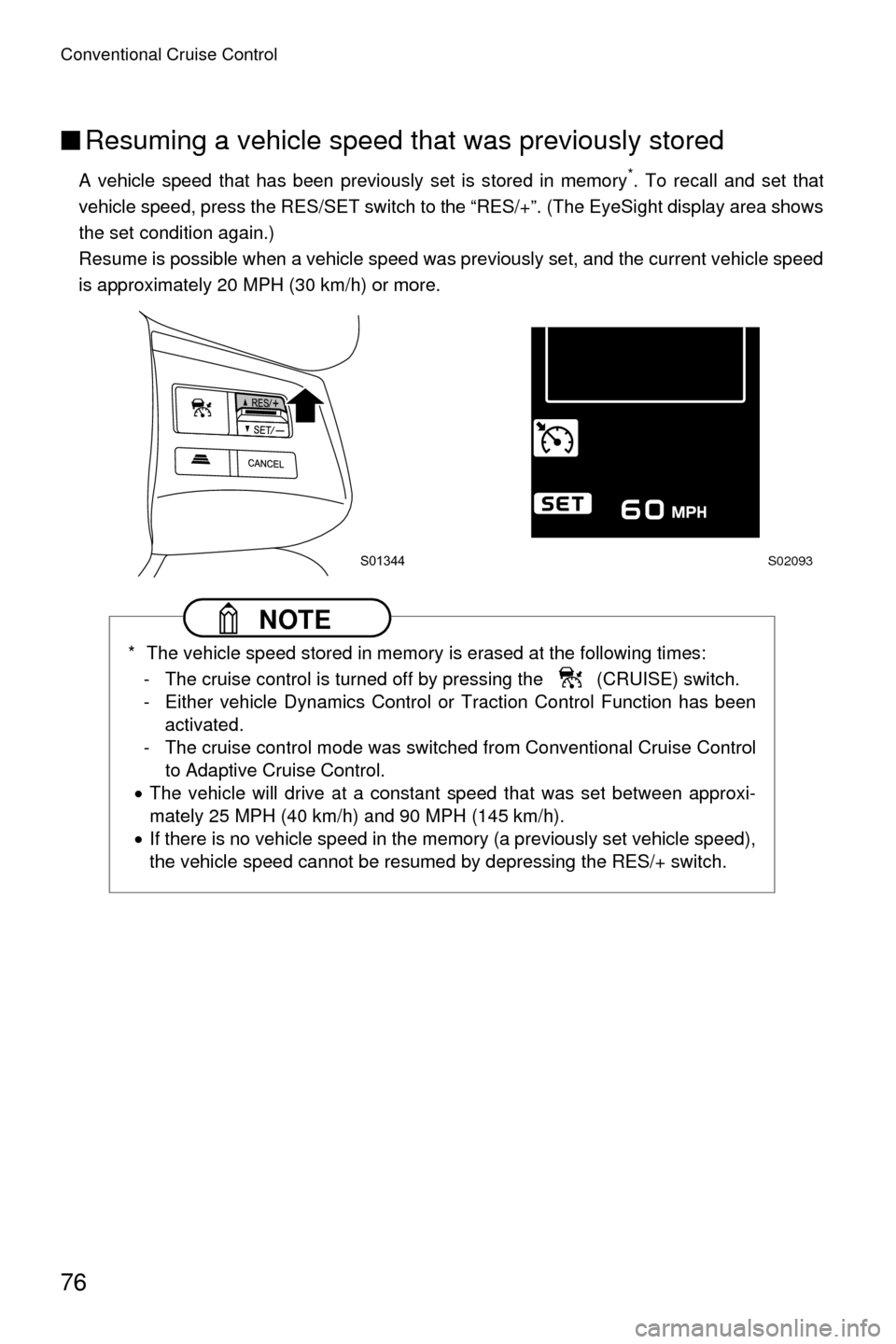
A vehicle speed that has been previously set is stored in memory*. To recall and set that
vehicle speed, press the RES/SET switch to the “RES/+”. (The EyeSight display area shows
the set condition again.)
Resume is possible when a vehicle speed was previously set, and the current vehicle speed
is approximately 20 MPH (30 km/h) or more.
NOTE
* The vehicle speed stored in memory is erased at the following times: - The cruise control is turned off by pressing the (CRUISE) switch.
- Either vehicle Dynamics Control or Traction Control Function has been activated.
- The cruise control mode was switched from Conventional Cruise Control to Adaptive Cruise Control.
• The vehicle will drive at a constant speed that was set between approxi-
mately 25 MPH (40 km/h) and 90 MPH (145 km/h).
• If there is no vehicle speed in the memory (a previously set vehicle speed),
the vehicle speed cannot be resumed by depressing the RES/+ switch.
S01344S02093
Page 82 of 98
EyeSight malfunction and temporary stop
79
EyeSight malfunction and temporary stop
If a malfunction is detected in the EyeSight system, the indicators in the instrument panel
and the multi information display inform the driver of the malfunction. Check the displayed
contents and take the appropriate action.
■ Malfunction (including position/angle misalignment of stereo
cameras)
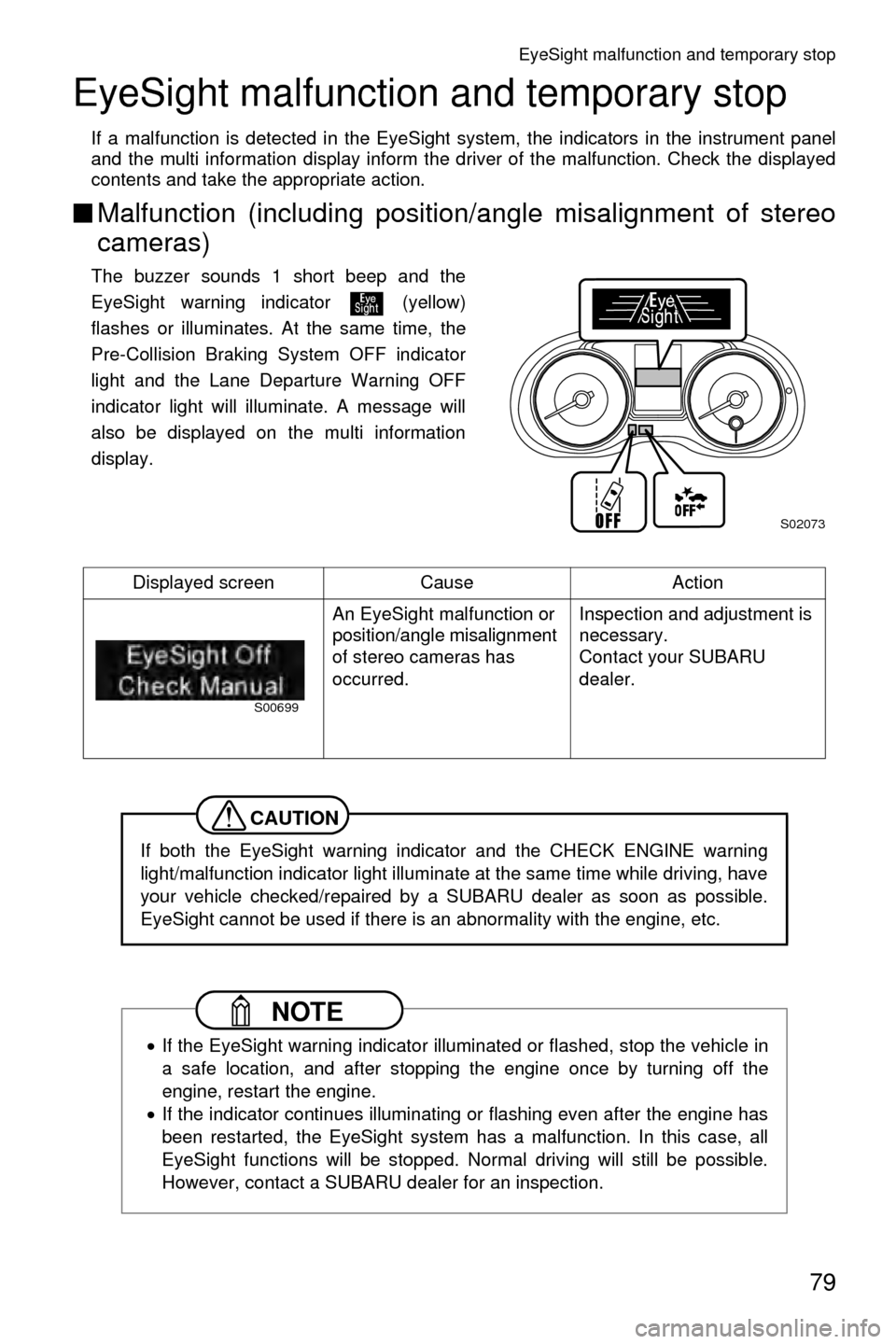
The buzzer sounds 1 short beep and the
EyeSight warning indicator (yellow)
flashes or illuminates. At the same time, the
Pre-Collision Braking System OFF indicator
light and the Lane Departure Warning OFF
indicator light will illuminate. A message will
also be displayed on the multi information
display.
Displayed screen Cause Action An EyeSight malfunction or
position/angle misalignment
of stereo cameras has
occurred. Inspection and adjustment is
necessary.
Contact your SUBARU
dealer.
CAUTION
If both the EyeSight warning indicator and the CHECK ENGINE warning
light/malfunction indicator light illuminate at the same time while driving, have
your vehicle checked/repaired by a SUBARU dealer as soon as possible.
EyeSight cannot be used if there is an abnormality with the engine, etc.
NOTE
•
If the EyeSight warning indicator illuminated or flashed, stop the vehicle in
a safe location, and after stopping the engine once by turning off the
engine, restart the engine.
• If the indicator continues illuminating or flashing even after the engine has
been restarted, the EyeSight system has a malfunction. In this case, all
EyeSight functions will be stopped. Normal driving will still be possible.
However, contact a SUBARU dealer for an inspection.
S02073
S00699
Page 83 of 98
EyeSight malfunction and temporary stop
80
■Temporary stop
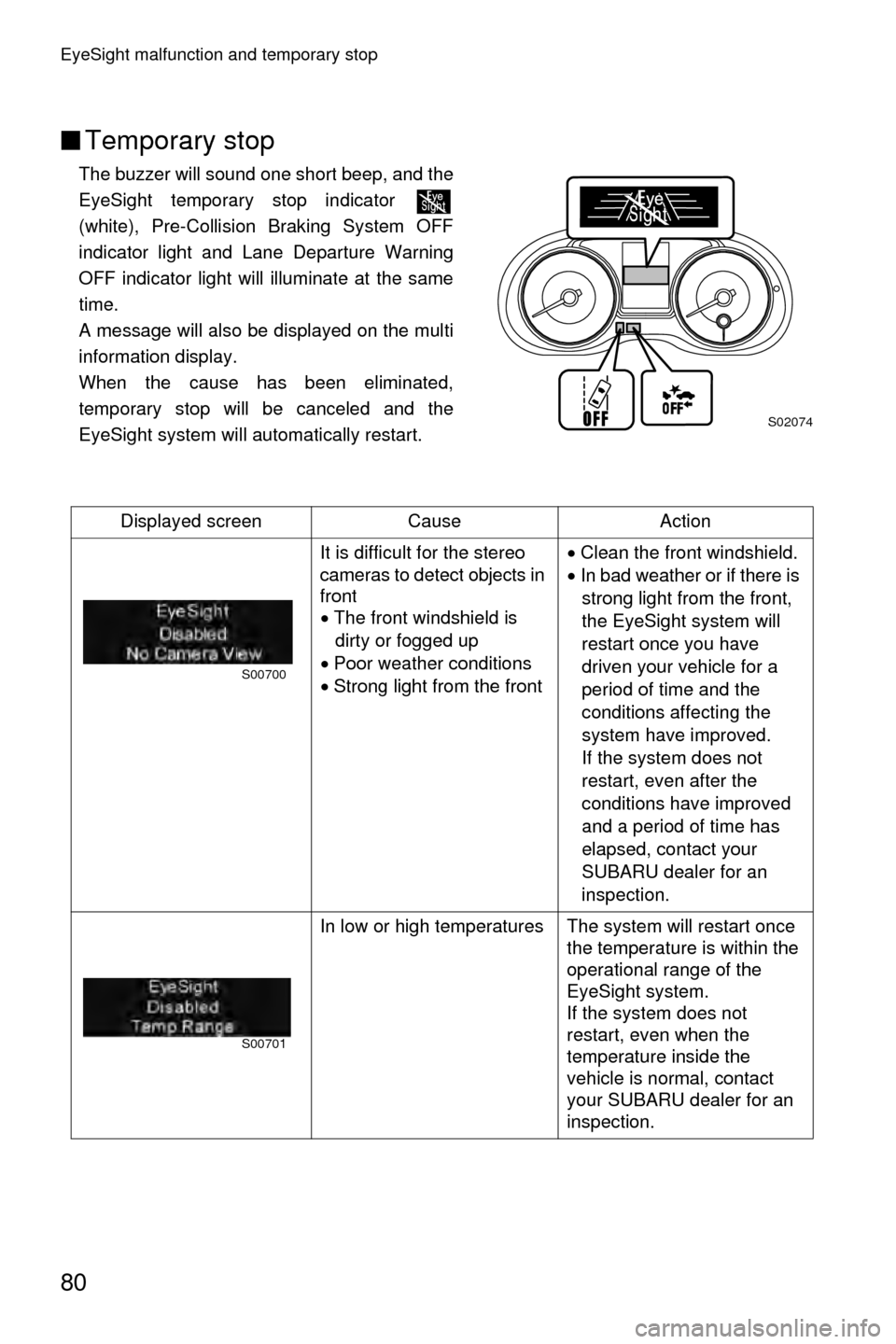
The buzzer will sound one short beep, and the
EyeSight temporary stop indicator
(white), Pre-Collision Braking System OFF
indicator light and Lane Departure Warning
OFF indicator light will illuminate at the same
time.
A message will also be displayed on the multi
information display.
When the cause has been eliminated,
temporary stop will be canceled and the
EyeSight system will automatically restart.
Displayed screen Cause Action It is difficult for the stereo
cameras to detect objects in
front• The front windshield is
dirty or fogged up
• Poor weather conditions
• Strong light from the front •
Clean the front windshield.
• In bad weather or if there is
strong light from the front,
the EyeSight system will
restart once you have
driven your vehicle for a
period of time and the
conditions affecting the
system have improved.
If the system does not
restart, even after the
conditions have improved
and a period of time has
elapsed, contact your
SUBARU dealer for an
inspection.
In low or high temperatures The system will restart once the temperature is within the
operational range of the
EyeSight system.
If the system does not
restart, even when the
temperature inside the
vehicle is normal, contact
your SUBARU dealer for an
inspection.
S02074
S00700
S00701
Page 84 of 98
EyeSight malfunction and temporary stop
81
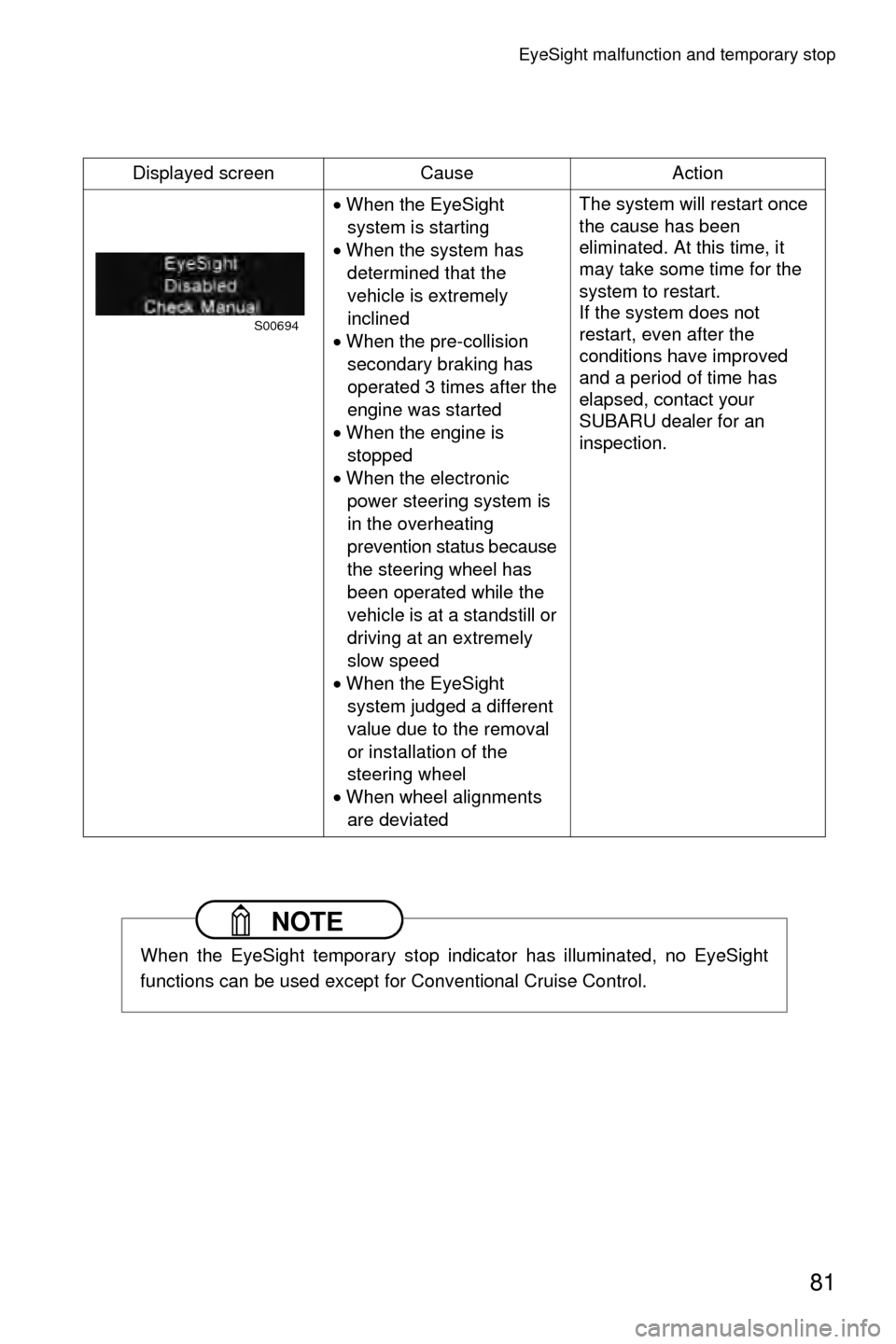
Displayed screenCauseAction
• When the EyeSight
system is starting
• When the system has
determined that the
vehicle is extremely
inclined
• When the pre-collision
secondary braking has
operated 3 times after the
engine was started
• When the engine is
stopped
• When the electronic
power steering system is
in the overheating
prevention status because
the steering wheel has
been operated while the
vehicle is at a standstill or
driving at an extremely
slow speed
• When the EyeSight
system judged a different
value due to the removal
or installation of the
steering wheel
• When wheel alignments
are deviated The system will restart once
the cause has been
eliminated. At this time, it
may take some time for the
system to restart.
If the system does not
restart, even after the
conditions have improved
and a period of time has
elapsed, contact your
SUBARU dealer for an
inspection.
NOTE
When the EyeSight temporary stop indicator has illuminated, no EyeSight
functions can be used except for Conventional Cruise Control.
S00694
Page 85 of 98
82
Customizing functions
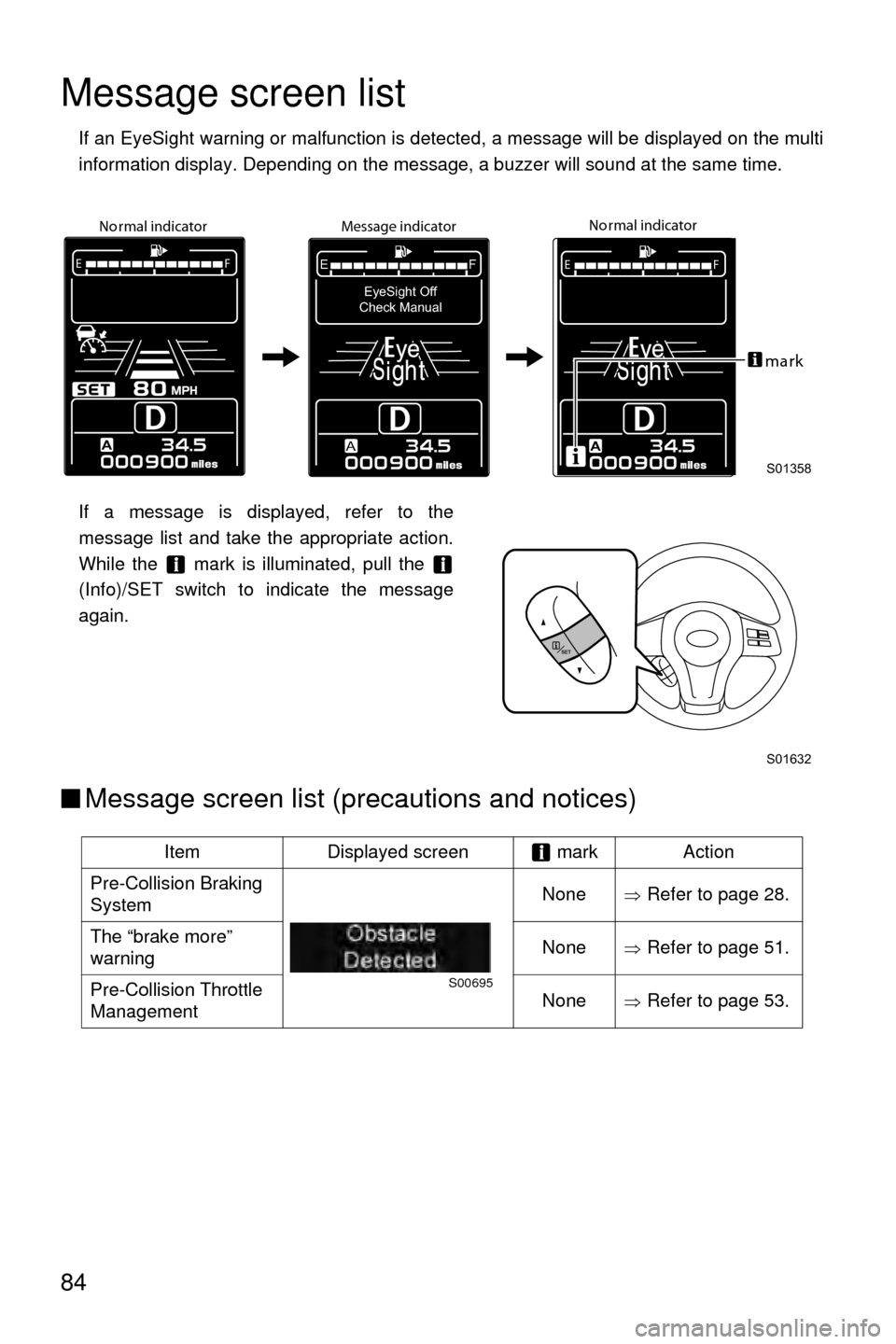
The following settings can be changed on the multi information display.
■How to customize
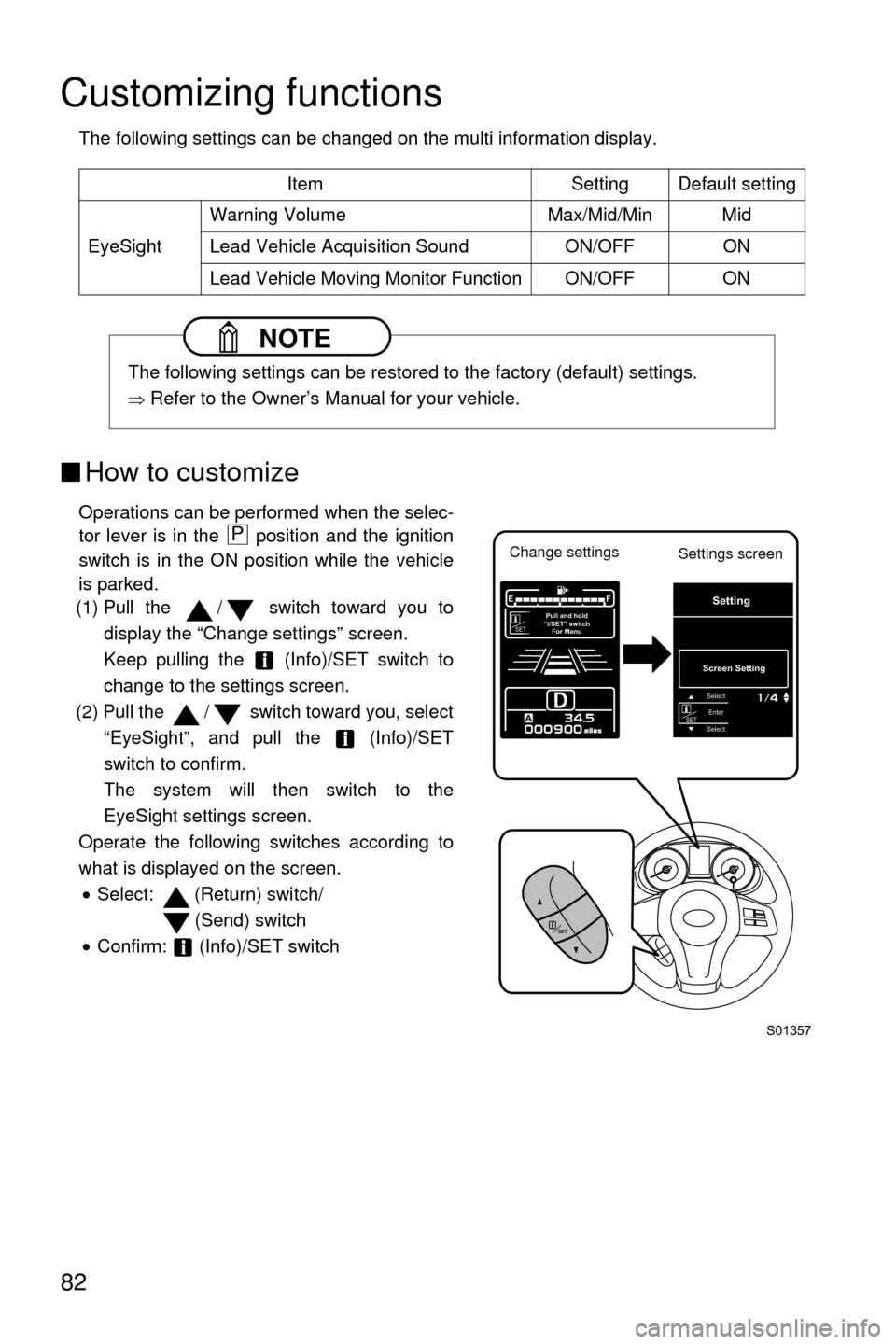
Operations can be performed when the selec-
tor lever is in the position and the ignition
switch is in the ON position while the vehicle
is parked.
(1) Pull the / switch toward you to
display the “Change settings” screen.
Keep pulling the (Info)/SET switch to
change to the settings screen.
(2) Pull the / switch toward you, select “EyeSight”, and pull the (Info)/SET
switch to confirm.
The system will then switch to the
EyeSight settings screen.
Operate the following switches according to
what is displayed on the screen. • Select: (Return) switch/
(Send) switch
• Confirm: (Info)/SET switch Item Setting Default setting
EyeSight Warning Volume Max/Mid/Min Mid
Lead Vehicle Acquisition Sound ON/OFF ON
Lead Vehicle Moving Monitor Function ON/OFF ON
NOTE
The following settings can be restored to the factory (default) settings.
Ÿ Refer to the Owner’s Manual for your vehicle.
S01357
A
EF
SEPull and hold
“i/SET” switch For MenuT
SETEnterSelect
Select
Screen Setting
Setting
Change settings Settings screenP
Page 86 of 98
Customizing functions
83
●Warning Volume setting
The volume can be set to Max/Mid/Min.
When on the Warning Volume settings screen, if the volume is selected with the /
switch, 3 short beeps will sound.
●Lead Vehicle Acquisition Sound setting
The Lead Vehicle Acquisition Sound setting can be activated (ON) or deactivated (OFF).
●Lead Vehicle Moving Monitor Function
The Lead Vehicle Start Alert function setting can be activated (ON) or deactivated (OFF).
●Canceling the custom functions
In the following cases, the custom functions will be canceled and the “Change settings”
screen will be displayed.• When you keep pulling the (Info)/SET switch toward you
• When the engine is turned off
• When the switch is not operated for approximately 30 seconds
NOTE
When “Return” is selected, the system will return to the screen directly above
the current one.
Page 87 of 98
84
Message screen list
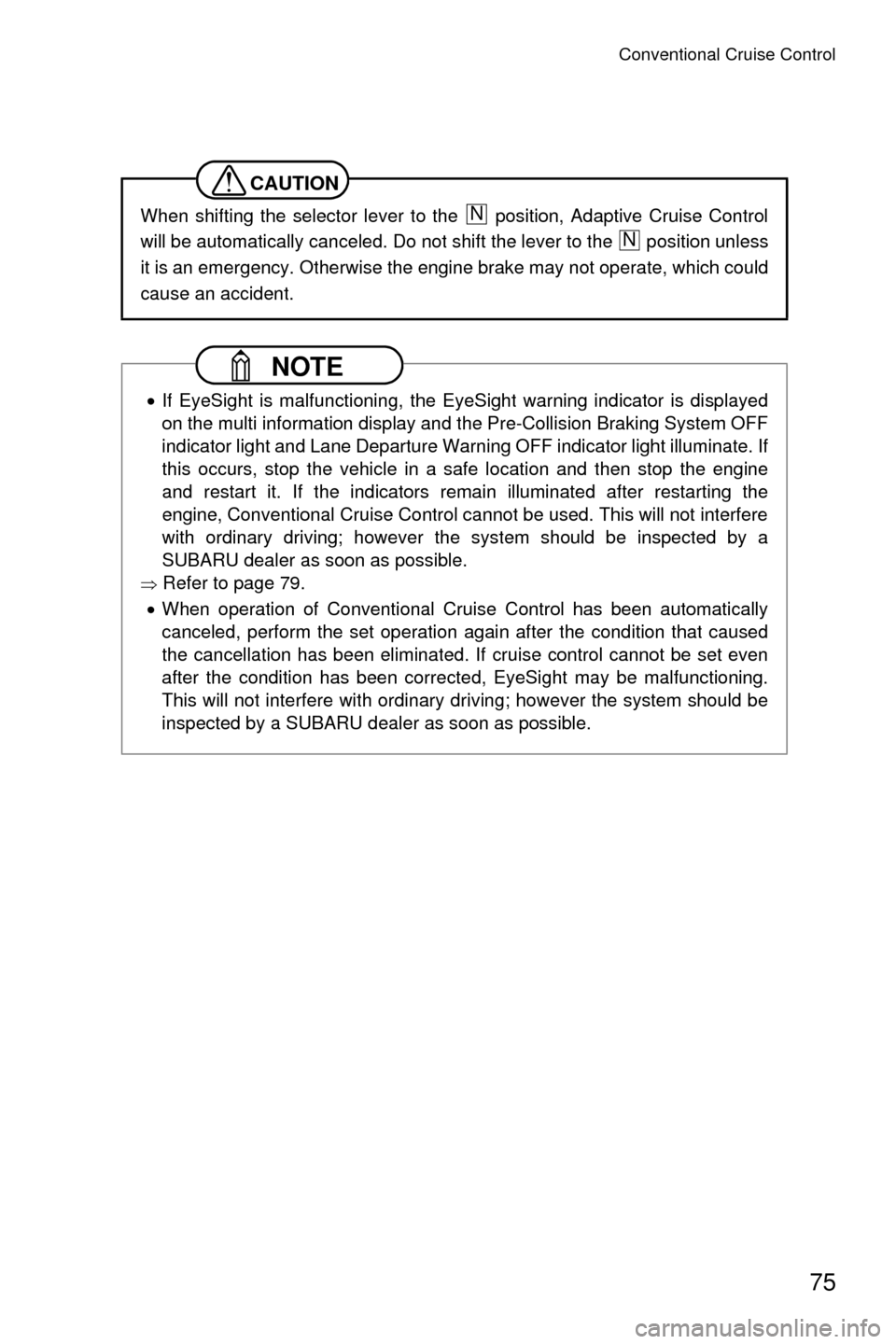
If an EyeSight warning or malfunction is detected, a message will be displayed on the multi
information display. Depending on the message, a buzzer will sound at the same time.
If a message is displayed, refer to the
message list and take the appropriate action.
While the mark is illuminated, pull the
(Info)/SET switch to indicate the message
again.
■Message screen list (precautions and notices)
Item Displayed screen mark Action
Pre-Collision Braking
System None
ŸRefer to page 28.
The “brake more”
warning None
ŸRefer to page 51.
Pre-Collision Throttle
Management None
ŸRefer to page 53.
S01358
No rmal indicator
No rmal indicator
Message indicator
A
EF
A
EF
EyeSight Off
Check Manual
A
EF
ma rk
S01632
S00695