Page 220 of 490
219 2-4. Using other driving systems
2
When driving
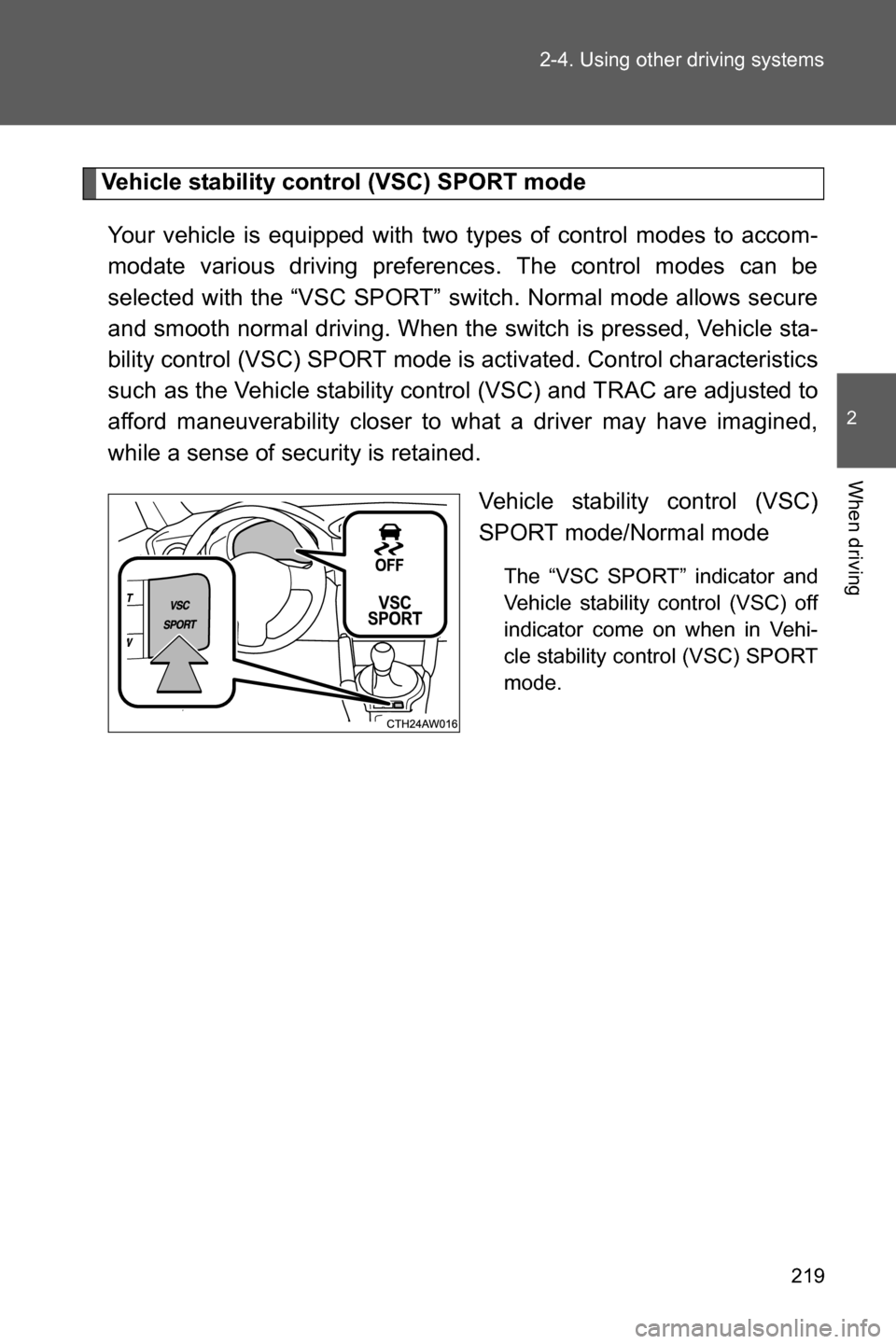
Vehicle stability control (VSC) SPORT mode
Your vehicle is equipped with two types of control modes to accom-
modate various driving preferences. The control modes can be
selected with the “VSC SPORT” switch. Normal mode allows secure
and smooth normal driving. When the switch is pressed, Vehicle sta-
bility control (VSC) SPORT mode is activated. Control characteristics
such as the Vehicle stability control (VSC) and TRAC are adjusted to
afford maneuverability closer to what a driver may have imagined,
while a sense of security is retained.
Vehicle stability control (VSC)
SPORT mode/Normal mode
The “VSC SPORT” indicator and
Vehicle stability control (VSC) off
indicator come on when in Vehi-
cle stability control (VSC) SPORT
mode.
Page 221 of 490
220 2-4. Using other driving systems
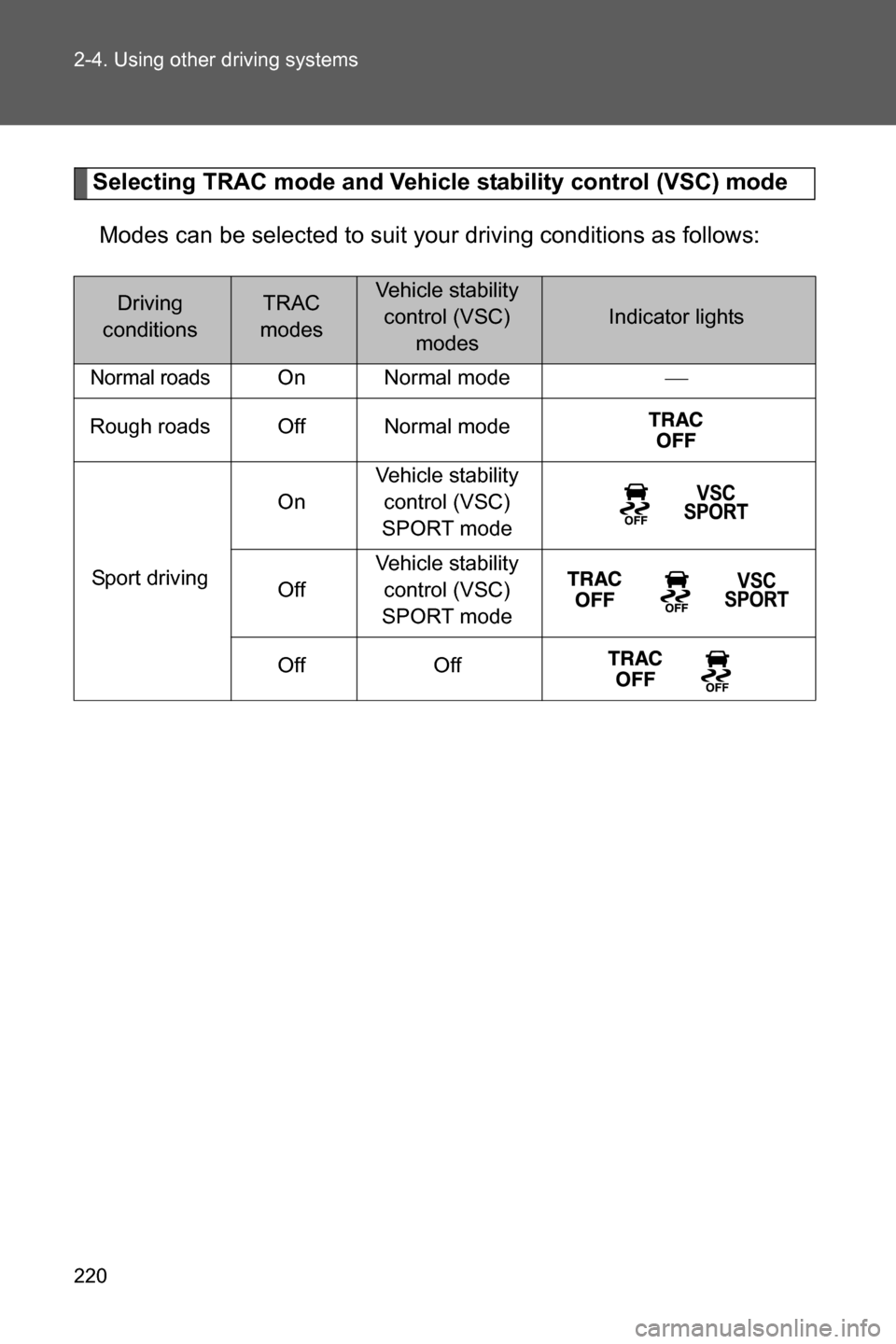
Selecting TRAC mode and Vehicle stability control (VSC) mode
Modes can be selected to suit your driving conditions as follows:
Driving
conditionsTRAC
modesVehicle stability
control (VSC)
modes
Indicator lights
Normal roadsOn Normal mode
Rough roads Off Normal mode
Sport drivingOnVehicle stability
control (VSC)
SPORT mode
OffVehicle stability
control (VSC)
SPORT mode
Off Off
Page 222 of 490

221 2-4. Using other driving systems
2
When driving
■Turning off both TRAC and Vehicle stability control (VSC) systems
To turn the TRAC and Vehicle stability control (VSC) systems off, press and
hold for more than 3 seconds while the vehicle is stopped.
The Traction Control System OFF indicator light and the Vehicle stability
control (VSC) off indicator light will come on.
In this case, the brake LSD function remains on.
Press the button again to turn the systems back on.
■Automatic reactivation of TRAC and Vehicle stability control (VSC) sys-
tems
After turning the TRAC and Vehicle stability control (VSC) systems off, the
systems will be automatically reactivated in the following situations:
●Vehicles without a keyless access with push button start system: When
the engine switch is turned to “LOCK” position
●Vehicles with a keyless access with push button start system: When the
push-button ignition switch is turned off
●If only the TRAC system is turned off, the TRAC will turn on when vehicle
speed is more than approximately 31 mph (50 km/h).
If both the TRAC and Vehicle stability control (VSC) systems are turned
off, automatic reactivation will not occur when vehicle speed increases.
■Automatic deactivation of Vehicle stability control (VSC) SPORT mode
Vehicles without a keyless access with push button start system
When the engine switch is turned to “LOCK” position after driving in Vehicle
stability control (VSC) SPORT mode, the mode is automatically deactivated.
Vehicles with a keyless access with push button start system
When the push-button ignition switch is turned off after driving in Vehicle sta-
bility control (VSC) SPORT mode, the mode is automatically deactivated.
■Sounds and vibrations caused by the ABS, brake assist, TRAC and
Vehicle stability control (VSC) systems
●A sound may be heard from the engine compartment when the brake
pedal is depressed repeatedly, when the engine is started or just after the
vehicle begins to move. This sound does not indicate that a malfunction
has occurred in any of these systems.
Page 224 of 490

223 2-4. Using other driving systems
2
When driving
WARNING
■TRAC may not operate effectively when
Directional control and power may not be achievable while driving on slip-
pery road surfaces, even if the TRAC system is operating.
Do not drive the vehicle in conditions where stability and power may be lost.
■When the Vehicle stability control (VSC) and/or brake LSD function is
activated
The slip indicator light flashes. Always drive carefully. Reckless driving may
cause an accident. Exercise particular care when the indicator light flashes.
■When the TRAC/Vehicle stability control (VSC) systems are turned off
Be especially careful and drive at a speed appropriate to the road condi-
tions. As these are the systems to help ensure vehicle stability and driving
force, do not turn the TRAC/Vehicle stability control (VSC) systems off
unless necessary.
■Replacing tires
Make sure that all tires are of the specified size, brand, tread pattern and
total load capacity. In addition, make sure that the tires are inflated to the
recommended tire inflation pressure level.
The ABS, TRAC and Vehicle stability control (VSC) systems will not function
correctly if different tires are installed on the vehicle.
Contact your SUBARU dealer for further information when replacing tires or
wheels.
■Handling of tires and suspension
Using tires with any kind of problem or modifying the suspension will affect
the driving assist systems, and may cause a system to malfunction.
Page 225 of 490
224
2-5. Driving information
Cargo and luggage
Capacity and distribution
Cargo capacity depends on the total weight of the occupants.
(Cargo capacity) = (Total load capacity) - (Total weight of occupants)
Steps for Determining Correct Load Limit
(1)Locate the statement “The combined weight of occupants and
cargo should never exceed XXX kg or XXX lbs.” on your vehicle's
placard.
(2)Determine the combined weight of the driver and passengers that
will be riding in your vehicle.
(3)Subtract the combined weight of the driver and passengers from
XXX kg or XXX lbs.
(4)The resulting figure equals the available amount of cargo and lug-
gage load capacity.
For example, if the “XXX” amount equals 1400 lbs. and there will
be five 150 lb passengers in your vehicle, the amount of available
cargo and luggage load capacity is 650 lbs. (1400 - 750 (5 u 150) =
650 lbs.)
(5)Determine the combined weight of luggage and cargo being
loaded on the vehicle. That weight may not safely exceed the avail-
able cargo and luggage load capacity calculated in Step 4.
Take notice of the following information about storage precau-
tions, cargo capacity and load:
●Stow cargo and luggage in the trunk whenever possible.
●Be sure all items are secured in place.
●To maintain vehicle balance while driving, position luggage
evenly within the luggage compartment.
●For better fuel economy, do not carry unnecessary weight.
Page 232 of 490

231 2-5. Driving information
2
When driving
Tire chains
Tire chains cannot be used on your vehicle because of the lack of
clearance between the tires and vehicle body.
When tire chains cannot be used, use of another type of traction
device (such as spring chains) may be acceptable if use on your vehi-
cle is recommended by the device manufacturer, taking into account
tire size and road conditions.
Follow the device manufacturer's instructions, especially regarding
maximum vehicle speed.
To help avoid damage to your vehicle, drive slowly, readjust or
remove the device if it is contacting your vehicle, and do not spin your
wheels. Damage caused to your vehicle by use of a traction device is
not covered under warranty.
Make certain that any traction device you use is an SAE class “S”
device, and use it on the rear wheels only.
Always use the utmost care when driving with a traction device. Over-
confidence because you are using a traction device could easily lead
to a serious accident.
Selecting tire chains
We recommend that you consult your SUBARU dealer for information
about the chains that you can use.
Page 280 of 490
279 4-1. Maintenance and care
4
Maintenance and care
CAUTION
■Cleaning the exterior lights
●Wash carefully. Do not use organic substances or scrub with a hard brush.
This may damage the surfaces of the lights.
●Do not apply wax on the surfaces of the lights.
Wax may cause damage to the lenses.
■To prevent damage to the windshield wiper arms
When lifting the wiper arms away from the windshield, pull the driver side
wiper arm upward first, and repeat for the passenger side. When returning
the wipers to their original position, do so from the passenger side first.
■When using a high pressure car wash
Do not bring the nozzle tip close to following parts and boots (Rubber or
resin manufactured cover), or connectors. Parts may be damages if they
come into contact with high pressure water.
• Traction related parts
• Steering parts
• Suspension parts
• Brake parts
Page 281 of 490

280
4-1. Maintenance and care
Cleaning and protecting the vehicle interior
The following procedures will help protect your vehicle's interior and
keep it in top condition:
■Protecting the vehicle interior
●Remove dirt and dust using a vacuum cleaner. Wipe dirty sur-
faces with a cloth dampened with lukewarm water.
●When the interior is extremely dirty, wipe away the dirt using a
soft cloth slightly dampened with diluted neutral detergent.
■Cleaning the leather areas
●Remove dirt and dust using a vacuum cleaner.
●Wipe any excess dirt and dust with a soft cloth dampened with
diluted detergent.
Use a diluted water solution of approximately 5% neutral wool
detergent.
●Wring out any excess water from the cloth and thoroughly
wipe off all remaining traces of detergent.
●Wipe the surface with a dry, soft cloth to remove any remain-
ing moisture. Allow the leather to dry in a shaded ventilated
area.
■Cleaning the synthetic leather areas
●Remove loose dirt using a vacuum cleaner.
●Apply a mild soap solution to the synthetic leather.
●Allow the solution to soak in for a few minutes. Remove the
dirt and wipe off the solution with a clean, damp cloth.