Page 200 of 490
199 2-2. Instrument cluster
2
When driving
Setting the REV indicator
■Changing the REV indicator settings
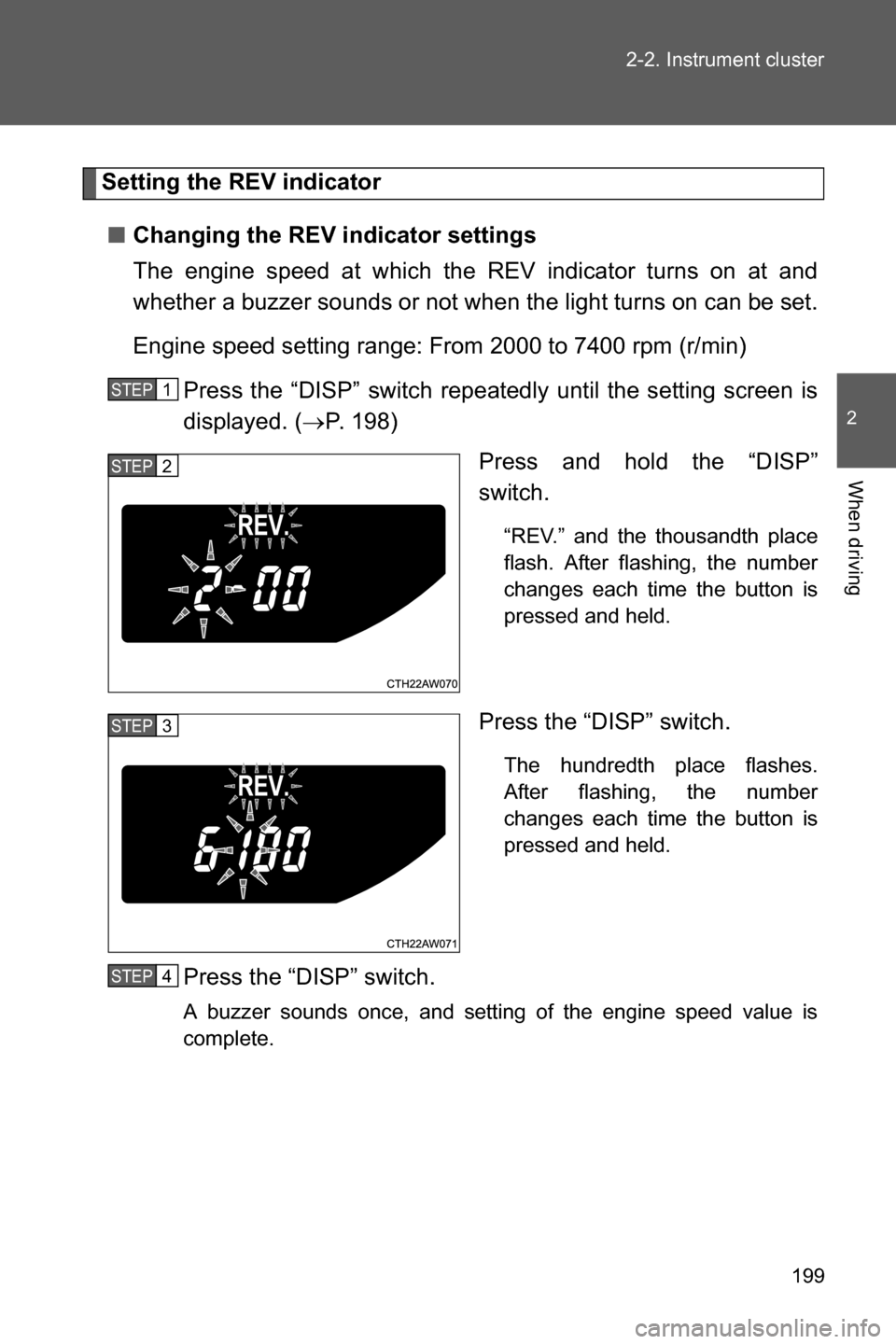
The engine speed at which the REV indicator turns on at and
whether a buzzer sounds or not when the light turns on can be set.
Engine speed setting range: From 2000 to 7400 rpm (r/min)
Press the “DISP” switch repeatedly until the setting screen is
displayed. (oP. 198)
Press and hold the “DISP”
switch.
“REV.” and the thousandth place
flash. After flashing, the number
changes each time the button is
pressed and held.
Press the “DISP” switch.
The hundredth place flashes.
After flashing, the number
changes each time the button is
pressed and held.
Press the “DISP” switch.
A buzzer sounds once, and setting of the engine speed value is
complete.
STEP 1
STEP 2
STEP 3
STEP 4
Page 201 of 490
200 2-2. Instrument cluster
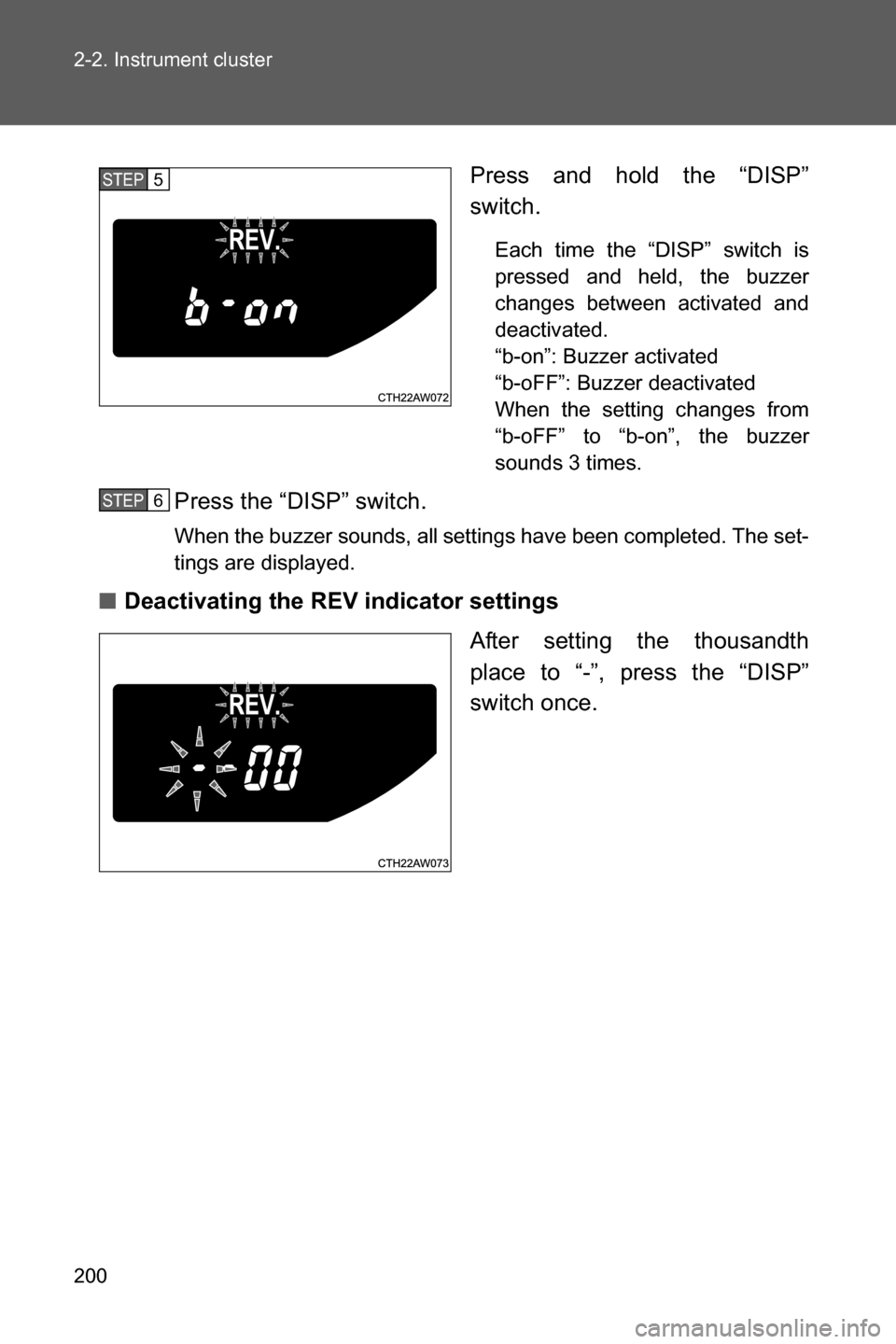
Press and hold the “DISP”
switch.
Each time the “DISP” switch is
pressed and held, the buzzer
changes between activated and
deactivated.
“b-on”: Buzzer activated
“b-oFF”: Buzzer deactivated
When the setting changes from
“b-oFF” to “b-on”, the buzzer
sounds 3 times.
Press the “DISP” switch.
When the buzzer sounds, all settings have been completed. The set-
tings are displayed.
■Deactivating the REV indicator settings
After setting the thousandth
place to “-”, press the “DISP”
switch once.
STEP 5
STEP 6
Page 202 of 490
201 2-2. Instrument cluster
2
When driving
■The multi-information display operate when
Vehicles without a keyless access with push button start system
The engine switch is in the “ON” position.
Vehicles with a keyless access with push button start system
The push-button ignition switch is in “ON” mode.
WARNING
■The information display at low temperatures
Allow the interior of the vehicle to warm up before using the liquid crystal
information display. At extremely low temperatures, the information display
monitor may respond slowly, and display changes may be delayed.
For example, there is a lag between the driver's shifting and the new shift
position number appearing on the display. In this case, wait until the display
changes and take care not to downshift again, causing rapid and excessive
engine braking and possibly an accident resulting in death or serious injury.
Page 238 of 490
Interior features3
237
3-1. Using the air conditioning
system and defogger
Manual air
conditioning system ....... 238
Automatic air
conditioning system ....... 245
Rear window and
outside rear view
mirror defoggers ............ 254
3-2. Using the audio system
Using the AUX/USB
port................................. 256
Using the microphone ...... 2573-3. Using the interior lights
Interior lights list ............... 258
• Interior light .................... 259
3-4. Using the storage
features
List of storage
features .......................... 260
• Glove box ....................... 261
• Bottle holders ................. 262
• Cup holders/
console tray ................... 263
3-5. Other interior features
Sun visors ........................ 265
Vanity mirrors ................... 266
Clock ................................ 267
Outside temperature
display ............................ 268
Power outlets ................... 269
Seat heaters..................... 271
Floor mat .......................... 273
Page 246 of 490
245
3-1. Using the air conditioning system and defogger
3
Interior features
Automatic air conditioning system
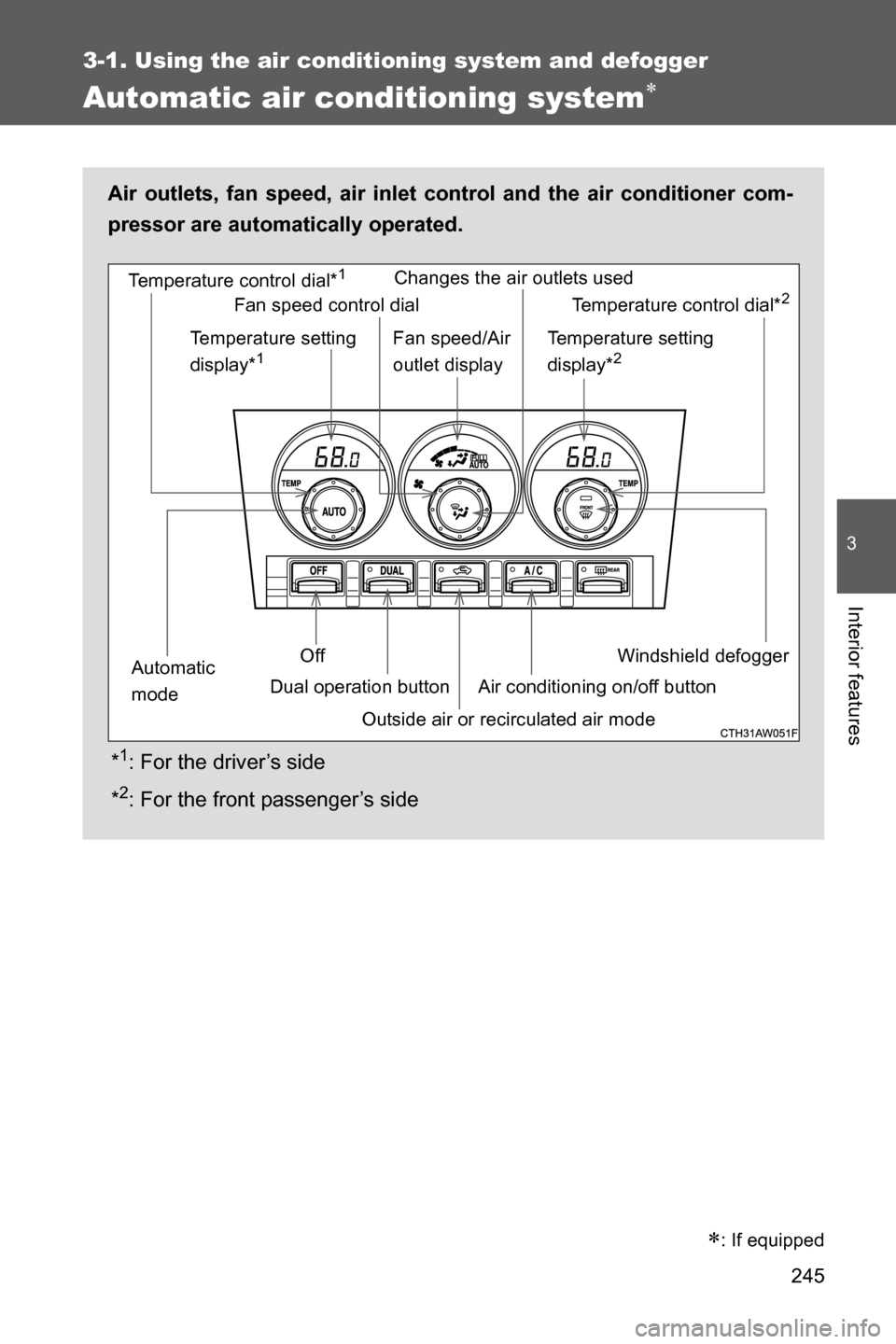
Air outlets, fan speed, air inlet control and the air conditioner com-
pressor are automatically operated.
*
1: For the driver’s side
*
2: For the front passenger’s side
Windshield defogger Temperature control dial*
1
Outside air or recirculated air mode Temperature setting
display*
1
Off
Automatic
modeDual operation buttonChanges the air outlets used
Air conditioning on/off buttonTemperature control dial*
2
Temperature setting
display*2
Fan speed control dial
Fan speed/Air
outlet display
: If equipped
Page 268 of 490
267
3-5. Other interior features
3
Interior features
Clock
■The clock is displayed when
Vehicles without a keyless access with push button start system
The engine switch is in the “ACC” or “ON” position.
Vehicles with a keyless access with push button start system
The push-button ignition switch is in “ACC” or “ON” mode.
■When disconnecting and reconnecting battery terminals
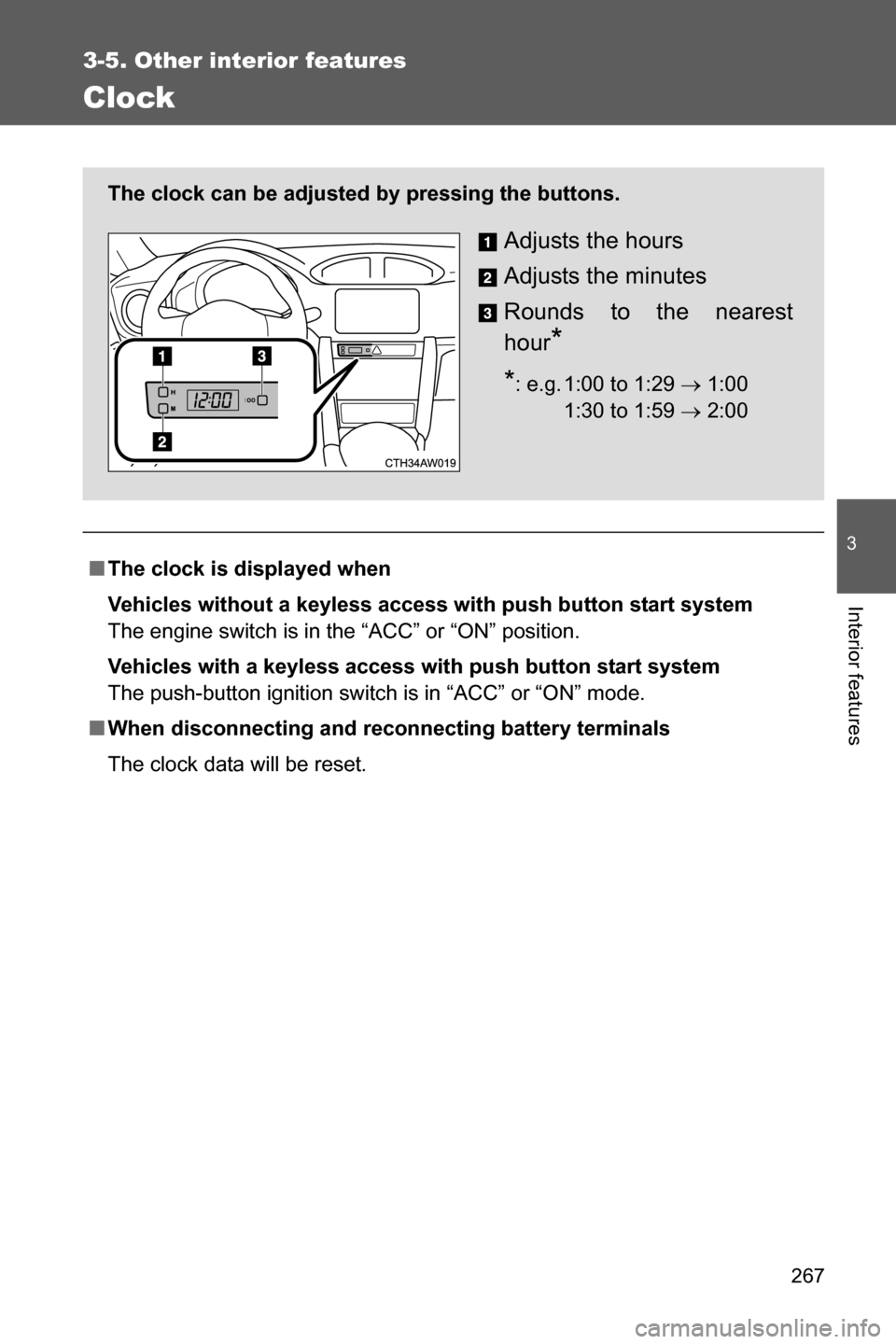
The clock data will be reset. The clock can be adjusted by pressing the buttons.
Adjusts the hours
Adjusts the minutes
Rounds to the nearest
hour
*
*: e.g. 1:00 to 1:29 o 1:00
1:30 to 1:59 o 2:0000
Page 269 of 490
268
3-5. Other interior features
Outside temperature display
■The outside temperature is displayed when
Vehicles without a keyless access with push button start system
The engine switch is in the “ON” position.
Vehicles with a keyless access with push button start system
The push-button ignition switch is in “ON” mode.
■Display
In the following situations, the correct outside temperature may not be dis-
played, or the display may take longer than normal to change:
●When the vehicle is stopped, or moving at low speeds (less than 12 mph
[20 km/h])
●When the outside temperature has changed suddenly (at the entrance/
exit of a garage, tunnel, etc.)
■When “- -” is displayed more than 1 minute or the outside temperature
is not displayed
The system may be malfunctioning. Take your vehicle to your SUBARU
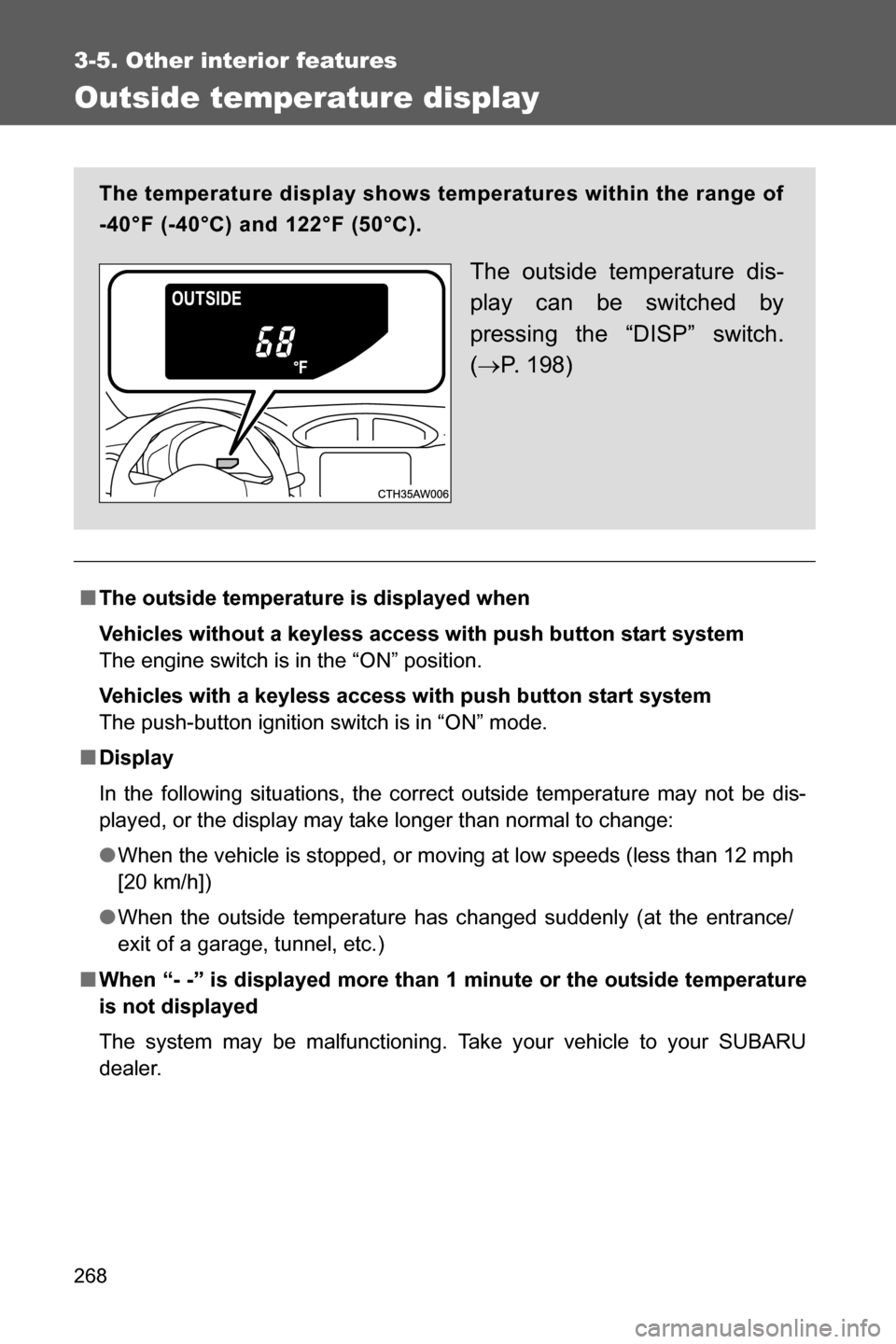
dealer. The temperature display shows temperatures within the range of
-40°F (-40°C) and 122°F (50°C).
The outside temperature dis-
play can be switched by
pressing the “DISP” switch.
(oP. 1 9 8 )
Page 420 of 490
419 6-1. Specifications
6
Vehicle specifications
Oil viscosity (0W-20 is explained here as an example):
• The 0W in 0W-20 indicates the characteristic of the oil which allows
cold startability. Oils with a lower value before the W allow for easier
starting of the engine in cold weather.
• The 20 in 0W-20 indicates the viscosity characteristic of the oil when
the oil is at high temperature. An oil with a higher viscosity (one with a
higher value) may be better suited if the vehicle is operated at high
speeds, or under extreme load conditions.
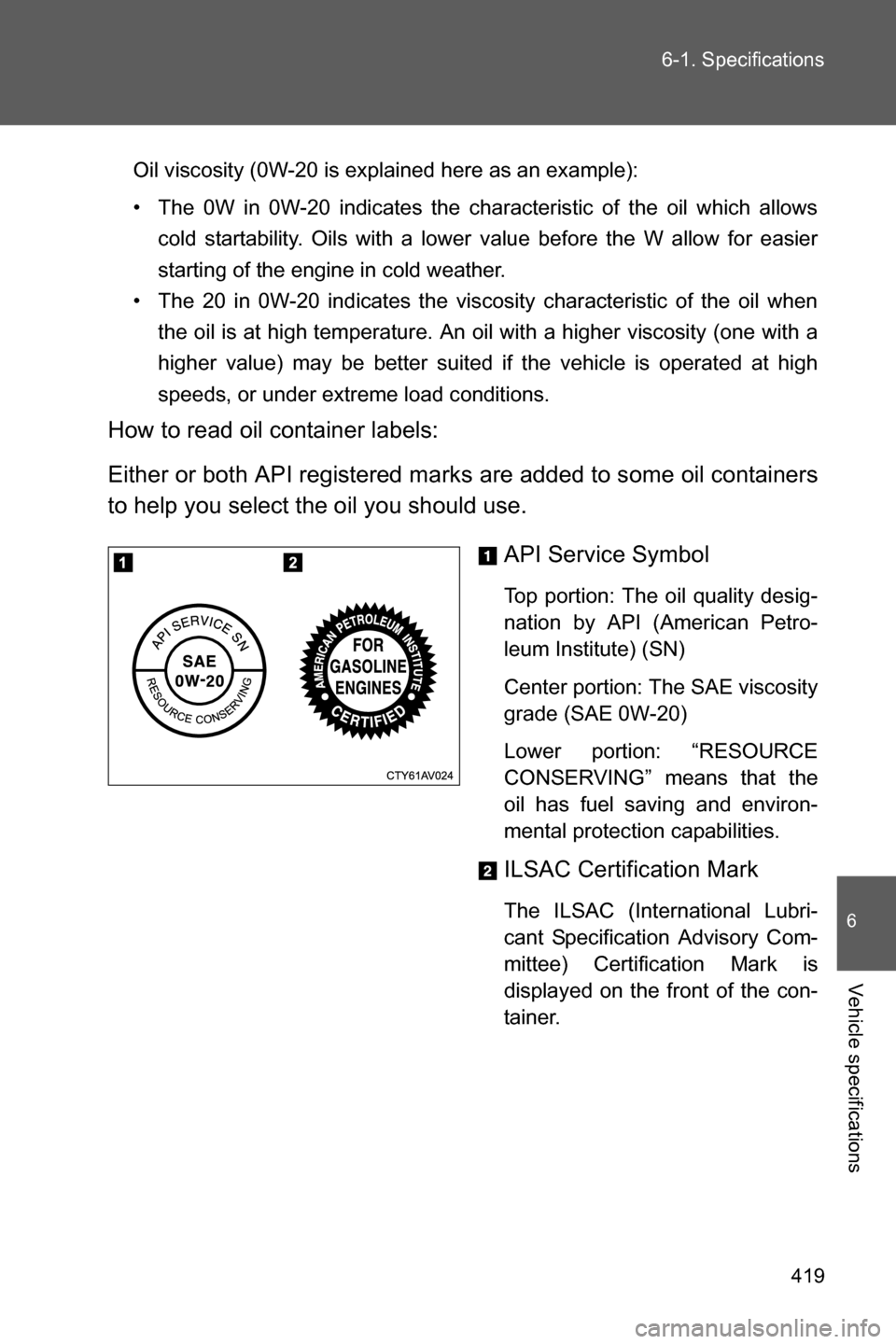
How to read oil container labels:
Either or both API registered marks are added to some oil containers
to help you select the oil you should use.
API Service Symbol
Top portion: The oil quality desig-
nation by API (American Petro-
leum Institute) (SN)
Center portion: The SAE viscosity
grade (SAE 0W-20)
Lower portion: “RESOURCE
CONSERVING” means that the
oil has fuel saving and environ-
mental protection capabilities.
ILSAC Certification Mark
The ILSAC (International Lubri-
cant Specification Advisory Com-
mittee) Certification Mark is
displayed on the front of the con-
tainer.