2016 SKODA SUPERB tyres
[x] Cancel search: tyresPage 288 of 336

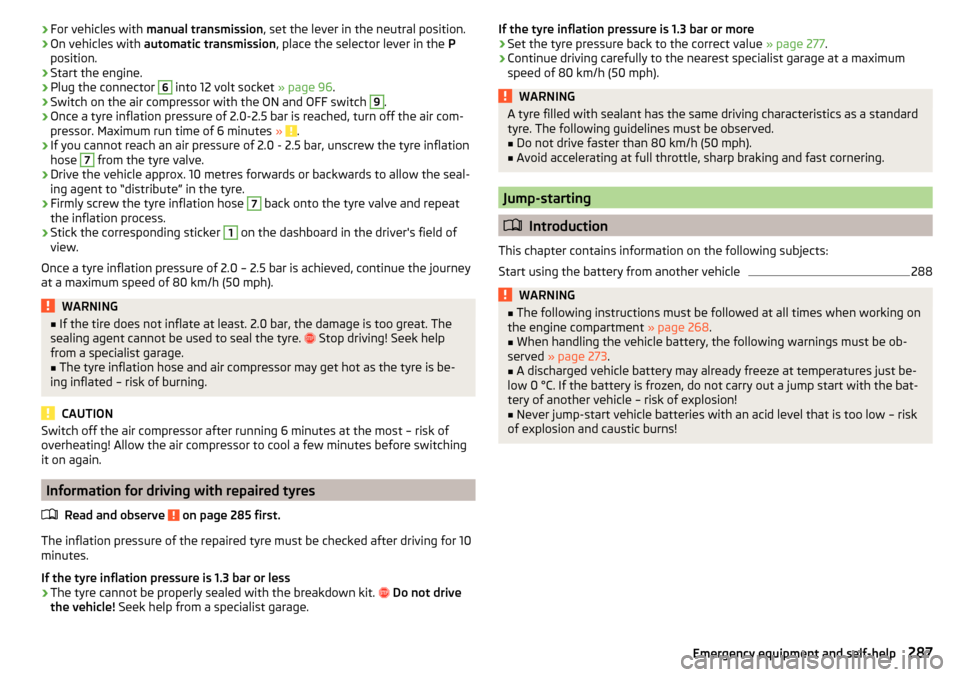
Description of puncture repair kitFig. 338
Description of puncture repair kit
Read and observe
on page 285 first.
The kit is located in a box under the floor covering in the luggage compart-
ment.
Sticker with speed designation “max. 80 km/h”/“max. 50 mph”Valve remover
Inflation hose with plug
Air compressor (the layout of the controls may be different depending on
the type of air compressor delivered with the vehicle)
Button for the tyre pressure reduction
12 volt cable connector
Tyre inflation hose
Tyre inflation pressure indicator
ON and OFF switch
Tyre inflation bottle with sealing agent
Replacement valve core
Note
The declaration of conformity is included with the air compressor or the log
folder.1234567891011Preparing to use the puncture repair kit
Read and observe
on page 285 first.
For safety's sake, the following instructions must be observed before
performing a wheel repair the road.
›
As far as possible, park the vehicle far away from the traffic flow - find a
place with a flat and firm surface.
›
Switch off the engine.
›
For vehicles with manual transmission , select 1st gear.
›
For vehicles with automatic transmission , place the selector lever in the P
position.
›
Switch on the parking brake.
›
Position the hazard warning system and the warning triangle at the prescri-
bed distance.
›
All the occupants should get out of the vehicle. The passengers should not
stand on the road (instead they should remain behind a crash barrier, for in-
stance) while the wheel is being repaired.
›
Uncouple any trailers.
Sealing and inflating tyres
Read and observe
on page 285 first.
Sealing
›
Unscrew the valve cap from the damaged tyre.
›
Insert the valve remover
2
» Fig. 338 on page 286 on the valve insert, so
that the valve insert fits into the slot of the valve remover.
›
Unscrew the valve insert and lay it on a clean surface (e.g. cloth, paper etc.).
›
Forcefully shake bottle
10
several times.
›
Firmly screw the inflation hose
3
onto the tyre inflater bottle
10
. The film on
the cap is pierced automatically.
›
Remove the plug from the inflation hose
3
and plug the open end fully onto
the tyre valve.
›
Hold the bottle
10
with the bottom facing upwards and fill all of the sealing
agent from the tyre inflator bottle into the tyre.
›
Remove the filler plug from the tyre valve.
›
Screw in the valve insert using the valve remover
2
.
Inflating
›
Screw the air compressor tyre inflation hose
7
» Fig. 338 on page 286 firmly
onto the tyre valve.
286Do-it-yourself
Page 289 of 336
›For vehicles with
manual transmission , set the lever in the neutral position.›On vehicles with automatic transmission , place the selector lever in the P
position.›
Start the engine.
›
Plug the connector
6
into 12 volt socket » page 96.
›
Switch on the air compressor with the ON and OFF switch
9
.
›
Once a tyre inflation pressure of 2.0-2.5 bar is reached, turn off the air com-
pressor. Maximum run time of 6 minutes » .
›
If you cannot reach an air pressure of 2.0 - 2.5 bar, unscrew the tyre inflation
hose
7
from the tyre valve.
›
Drive the vehicle approx. 10 metres forwards or backwards to allow the seal-
ing agent to “distribute” in the tyre.
›
Firmly screw the tyre inflation hose
7
back onto the tyre valve and repeat
the inflation process.
›
Stick the corresponding sticker
1
on the dashboard in the driver's field of
view.
Once a tyre inflation pressure of 2.0 – 2.5 bar is achieved, continue the journey
at a maximum speed of 80 km/h (50 mph).
WARNING■ If the tire does not inflate at least. 2.0 bar, the damage is too great. The
sealing agent cannot be used to seal the tyre. Stop driving! Seek help
from a specialist garage.■
The tyre inflation hose and air compressor may get hot as the tyre is be-
ing inflated – risk of burning.
CAUTION
Switch off the air compressor after running 6 minutes at the most – risk of
overheating! Allow the air compressor to cool a few minutes before switching
it on again.
Information for driving with repaired tyres
Read and observe
on page 285 first.
The inflation pressure of the repaired tyre must be checked after driving for 10
minutes.
If the tyre inflation pressure is 1.3 bar or less
›
The tyre cannot be properly sealed with the breakdown kit.
Do not drive
the vehicle! Seek help from a specialist garage.
If the tyre inflation pressure is 1.3 bar or more›Set the tyre pressure back to the correct value » page 277.›
Continue driving carefully to the nearest specialist garage at a maximum
speed of 80 km/h (50 mph).
WARNINGA tyre filled with sealant has the same driving characteristics as a standard
tyre. The following guidelines must be observed.■
Do not drive faster than 80 km/h (50 mph).
■
Avoid accelerating at full throttle, sharp braking and fast cornering.
Jump-starting
Introduction
This chapter contains information on the following subjects:
Start using the battery from another vehicle
288WARNING■ The following instructions must be followed at all times when working on
the engine compartment » page 268.■
When handling the vehicle battery, the following warnings must be ob-
served » page 273 .
■
A discharged vehicle battery may already freeze at temperatures just be-
low 0 °C. If the battery is frozen, do not carry out a jump start with the bat-
tery of another vehicle – risk of explosion!
■
Never jump-start vehicle batteries with an acid level that is too low – risk
of explosion and caustic burns!
287Emergency equipment and self-help
Page 306 of 336

The approved tyres and rim sizes for your vehicle are listed in the vehicle's
technical documentation (the so called COC document) and this also states the
declaration of conformity.
Type plate
The rating plate » Fig. 370 is located at the bottom of the B-column on the
right-hand driver's side.
The type plate contains the following data. Vehicle manufacturers
Vehicle identification number (VIN)
Maximum permissible gross weight
Maximum permissible towed weight (towing vehicle and trailer)
Maximum permissible front axle load
Maximum permissible rear axle load
Vehicle identification number (VIN)
The vehicle identification number - VIN (vehicle body number) is stamped into
the engine compartment on the right hand suspension strut dome. This num-
ber is also located on a sign on the lower left hand edge below the windscreen
(together with a VIN bar code), and on the type plate.
The VIN number can also be displayed in Infotainment in the
→
→
serv-ice
menu.
Engine number
The engine number (three-digit identifier and serial number) is stamped on the
engine block.
Supplementary Information (applies to Russia)
The full type approval number of the means of transport is indicated in the
registration documents, field 17.
Maximum permissible towed weight
The listed maximum allowable trailer weight is only valid for altitudes up to
1000 m above sea level.
The engine output falls as altitude increases, as does the vehicle's climbing
power. Therefore, for every additional 1000 m in height (or part), the maximum
permissible towed weight must be reduced by 10%.
The towed weight is made up of the actual weights of the loaded towing vehi-
cle and the loaded trailer.
123456WARNINGDo not exceed the specified maximum permissible weights – risk of acci-
dent and damage!
Operating weight
This value is only a guide value and corresponds to the lowest possible operat-
ing weight without further weight-reducing equipment (e.g. air conditioning,
spare wheel etc.). The operating weight also includes the weight of the driver
(75 kg), the weight of the operating fluids, the tool kit, and a fuel tank filled to
90 % capacity.
Operating weight - Superb
EngineTransmissionOperating weight (kg)1.4 l/92 kW TSIMG1375
1.4 l/110 kW TSI ACT
MG1395MG 4x41505DSG14251.4 l/110 kW TSIMG1388DSG14181.8 l./132 kW TSIMG1465DSG14852.0 l./162 kW TSIDSG (EU6)1505DSG (EU4)15002.0 l/206 kW TSIDSG 4x41615
1.6 l/88 kW TDI CR
MG1465MG (Green Line)1485DSG1480
2.0 l/110 kW TDI CR
MG1485MG 4x41605DSG15002.0 l/130 kW TDI CRDSG1515
2.0 l/140 kW TDI CR
MG1505DSG1555DSG 4x41615 304Technical data
Page 315 of 336

Index
A
A2DP/AVRCP
164
Abort route guidance192
ABS Operation
213
Warning light36
ACC233
Settings in Infotainment233
Acceptance and recycling of used vehicles258
Accessories256
Active steering assist (DSR)214
Adaptive Chassis Control Warning light
42
Adaptive Chassis Control (DCC)240
Adaptive cruise control Operation
234
Set/change the desired speed236
Start control235
Warning light35, 42
Adaptive cruise Control Settings in Infotainment
233
Adaptive Cruise Control233
automatic stopping and starting234
Malfunctions237
Operation overview235
Overtaking237
Radar sensor212
Set the clearance level236
Special driving situations236
Stop/resume control235
Trailer towing237
Adaptive headlight see xenon headlight
69
AdBlue267
Check level267
refill267
Warning light40
Additional keypad languages132, 140
Additional windows Audio
182
Compass182
Manoeuvre182
Map182
Menus182
Most frequent routes182
Satellite data182
Turn on/off182
Waypoint tour182
Adjusting Steering wheel
13
Adjusting seats manually80
Adjusting the seats12
Advice on tyre/wheel usage276
AHL See xenon headlight
69
Aim Enter destination using the address
183
Air-conditioning system Air outlet vents
117
Airbag18
Adjustments and impairments on the airbag system
257
Deactivation21
Deployment19
Warning light37
Airbag system18
Air conditioning113
Air distribution control117
Climatronic114
Manual air conditioning114
Air distribution control117
Air outlet vents117
Alarm58
Trailer255
All season tyres278
Alphanumeric with keyboard126
Alternative routes137
Ambient lighting73
Android Auto177
Connection establishment177
Disconnection177
Main menu177
Anti-lock braking system (ABS)213
Anti-theft alarm system58
Trailer255
Anti-theft wheel bolts284
APN133
Apple CarPlay178
Connection establishment178
Disconnection178
Main menu178
Armrest Front
82
rear94
Rear83
Ashtray98
Assistant for emergencies246
Assist systems212
AT THE142, 143
Audio source149
Auto Check Control44
Auto Hold204
Warning light39
Auto Hold function204
Warning light39
Automatic consumer shutdown273
Automatic drive Kickdown
208
Selector lever207
Automatic driving light control68
Automatic gearbox Launch control
209
Malfunction39
Manual shifting on the multifunction steering wheel
208
Release gear selector lever207
313Index
Page 325 of 336

Rims276
Road sign189
Roller blind Luggage compartment cover
105
Roof Load
112
Roof racks112
Route190
New route194
Route list194
Store route192
Route calculation190
Trailer towing191
Route information192
Route list194
Route options137
Route schedule192
rSAP167
Running in Brake pads
203
Engine209
Tyres276
S
SafeLock
56
Safe removal of the data source133, 140
Safety12
Airbag18
Child safety22
Child seats22
Correct seated position12
Headrests84
I-Size27
ISOFIX26
TOP TETHER27
SAFE, SAFELOCK See SafeLock
56
Save station144
Saving electrical energy209
Saving fuel209
Screen see Infotainment screen
124
See Infotainment screen124
SD card150
Safe removal140
Search for car park184
Search for destination182
Search for petrol station184
Search for restaurant184
Seat belt height adjustment
16
Warning light35, 39
Seat belts15
Belt tensioners17
fastening and unfastening16
Inertia reels17
reversible17
Seat electrical adjustment80
Seats Convenience operation of the front passengerseat
81
Electrical adjustment80
Folding front passenger seat82
Front80
Front armrest82
Headrests84
Heating85, 86
Manually adjusting80
Memory Function of the electrically adjustable seat
81
Rear83
Rear armrest83
Rear seat backrests83
Setting80
Storing in memory of remote control key81
Ventilation86
Seats and head restraint80
see Instrument cluster see Instrument cluster
32
Select broadcastingSee main menu142
Select Image Source Images
153
Selector lever207
Selector lever control207
Selector lever lock Warning light
38
Select source Media
146
Select station See main menu
142
Select video source Video DVD
155
service Images
154
Service256
Service interval display49
Warning light42
Service Interval259
Service intervals258
Service Plan260
Setting Auxiliary heating (auxiliary heating and ventila- tion)
119
Headrests84
Mirror78
Positions of the variable loading floor110
Seat belt height16
Seats80
Settings Additional keypad languages
132, 140
Advanced settings138
AUX135
Bluetooth133, 136, 140
Codecs135
Configuration wizard127
DAB134, 141
Data connection133
Equaliser131
323Index
Page 328 of 336

Telephone PremiumrSAP167
SIM card166
Teletext TV tuner
157
Text messages172
new172
Received173
Through-loading bag95
Tilt / slide sunroof Sunblind
65
Tilting / sliding sunroof Operation
64
Time44, 132, 139
Tiptronic208
Tire Wear indicator
277
TMC Detail of the traffic report
197
dynamic route197
List of traffic reports196
Requirements196
TMC (Traffic reports)196
Tone dialling171
Tools281
Top speeds138
TOP TETHER27
Touch screen124
Towing288, 290
Towing a trailer254
Towing device Accessories
251
Vertical load250
Towing eye289
Towing protection58
Towing the vehicle288
Traction control (TCS)36, 214
Traffic Detail of the traffic report197
dynamic route197
List of traffic reports196
Requirements196
Traffic jam ahead197
Traffic jam assistant245
Traffic obstruction197
Traffic program (TP)145
Traffic reports (TMC) Detail of the traffic report
197
List of traffic reports196
Requirements196
Traffic sign recognition246
Traffic signs see Traffic sign recognition
246
Trailer Connect and disconnect
252
Load253
loading252
Towing a trailer254
Trailer stabilisation system (TSA)215
Trailer towing250
navigation191
Trailer towing device Handling
250
Warning message250
Transit point193
Transport Luggage compartment
101
Roof racks112
Towing device and trailer250
Transporting children22
Traverse camera Mode - Traverse parking
224
Trays87
Triangle280
TSA215
Turning off Infotainment126
Turning on Infotainment126
Turn signal68
Turn signal system Warning light
38
TV function156
TV tuner156
EPG157
List of available stations157
Main menu156
Preset list157
Search for stations157
Select station157
Set135
Teletext157
Type plate303
Tyre load capacity278
Tyre pressure277
Warning light37
Tyre pressure monitor refer to the tyre pressure monitoring
249
Tyre pressure monitoring249
Warning light37
Tyre repair285
Tyres276
damage276
Explanation of the label278
new276
Tyre pressure277
Tyre size278
U
Umbrella Tray
93
Units132, 140
Unlock Individual settings
56
KESSY55
326Index
Page 329 of 336

UnlockingCentral locking button55
in case of emergency292
Remote control54
Unlocking and locking53
Unlock steering lock199
Update navigation data181
Update the navigation data138
USB90, 150
Safe removal140
Used vehicles Acceptance and recycling
258
Useful equipment Clothes hook
93
Cup holders90
Glasses compartment92
Removable through-loading bag95
User account Configuration wizard
127
User profile136, 141
V
Variable loading floor
109
vCard185, 186
Vehicle - Settings198
Vehicle battery charging
275
Safety instructions273
Warning light39
Vehicle care Outside
261
Vehicle condition See Auto Check Control
44
Vehicle data sticker303
Vehicle data sticker and type plate Vehicle data sticker and type plate
303
Vehicle dimensions306, 307
Vehicle height306, 307
Vehicle identification number (VIN)303
Vehicle length306, 307
Vehicle systems198
Vehicle tool kit281
Vehicle width306, 307
Ventilation Seats
85
Vest280
Video DVD Compatible sources
156
Main menu155
Play back155
Select video source155
Supported file formats156
Video DVD menu155
Menu155
Video player155
VIN Vehicle identification number
303
Virtual pedal61
Visibility74
Visors75
Voice control128
Commands130
Correction of a voice command input130
Help130
Not recognising a voice command130
on / off129
Operation principle129
Settings133
Stop / restore command130
Voicemail168
Volume127
Volume setting127
W
Waiter Voice control
129
Warning display - low temperature42
Warning lights33
Warning symbols see Warning lights33
Warning triangle280
Warning when speeding47
Warranty5
Washing the vehicle260
Waste container91
Water in the fuel filter42
Waypoint mode194
Main menu194
Record waypoints195
Set waypoint manually195
Waypoint tour memory195, 196
Waypoint tour memory195, 196
Weather conditions256
Weights303, 304, 305
Wheel bolts Anti-theft wheel bolts
284
Caps283
Loosening and tightening284
Wheels276
Changing282
Full trim283
Load Index278
Snow chains279
Speed symbol278
Tyre age276
Tyre damage276
Tyre pressure277
Tyre storage276
Uni-directional tires276
Winter tyres278
Wi-Fi51
Wi-Fi direct52
Window operation
62
Window operation62
Windscreen Heating
198
327Index
Page 330 of 336

Windscreen - heating74
Windscreen heating198
Windscreen washer fluid Refill
270
Warning light41
Windscreen washing system76
Windscreen wipers and washers76
Activation76
Replacing the windscreen wiper blade295
Replacing the windscreen wiper blades294
Service position of the windscreen wiper arms 294
Winter operation
278
All season tyres278
Car battery274
Diesel fuel266
Snow chains279
Winter tyres278
Winter tyres278
Wiper and Washers Automatic rear window wipers
77
Wipers and washer Warning light for windscreen washer fluid level 41
Wipers and washers Activate
77
Refill fluid270
Wiping interval76
Wireless Internet Hotspot set to
133
Wizard for blind spot monitoring218
Driving situations and warnings220
Operation220
WLAN151, 174
Client174
Connect174
Device hotspot174
Search174
WLAN on / off174
WPS133
WLAN client set to
133
WLAN hotspot174
WPS133
X
XDS
214
Xenon headlight69
328Index