2016 SKODA RAPID SPACEBACK rear brake
[x] Cancel search: rear brakePage 93 of 184

A warning signal sounds if the vehicle is inadvertently driven off with the
handbrake applied. The handbrake warning is activated if the vehicle is driven
at a speed of over 5 km/h for more than 3 seconds.WARNINGDisengage the handbrake completely. A handbrake which is only partially
disengaged can result in the rear brakes overheating. This can have a nega-
tive effect on the operation of the brake system – risk of accident!
Parking
Read and observe
on page 90 first.
When stopping and parking, look for a place with a suitable surface » .
Only carry out the activities while parking in the specified order.
›
Bring the vehicle to a stop and depress the brake pedal.
›
Firmly apply the handbrake.
›
On vehicles with automatic transmission , place the selector lever in the P
position.
›
Switch off the engine.
›
For vehicles with manual transmission , select gear 1 or reverse gear R .
›
Release the brake pedal.
WARNING■
The parts of the exhaust system can become very hot. Therefore, never
stop the vehicle in places where the underside of your vehicle could come
into contact with flammable materials (e.g. dry grass, leaves, spilled fuel or
the like). - Risk of fire and serious injury can occur!■
When leaving the vehicle, never leave people unattended in the car who
could, for example, lock the vehicle or release the brake - risk of accidents
and injury!
Manual gear changing and pedals
Introduction
This chapter contains information on the following subjects:
Manual gear changing
91
Pedals
91Manual gear changingFig. 109
The shift pattern
The gearshift pattern for the individual gear positions is shown on the gear
lever » Fig. 109 .
The gearshift indicator should be observed when changing gear » page 38.
Always depress the clutch pedal all the way down. This prevents uneven wear
to the clutch.
Engaging reverse gear
›
Stop the vehicle.
›
The clutch pedal must be fully depressed.
›
Switch the gear lever to N.
›
Push the shift lever downwards fully to the left and then forward into
R » Fig. 109 .
The reversing lights will come on once the reverse gear is engaged, provided
the ignition is on.
WARNINGNever engage reverse gear when driving – risk of accident!
CAUTION
If not in the process of changing gear, do not leave your hand on the gear shift
lever while driving. The pressure from the hand can cause the gear shift mech-
anism to wear excessively.
Pedals
The operation of the pedals must not be hindered under any circumstances!
91Starting-off and Driving
Page 100 of 184

Electronic Differential Lock (EDL)Read and observe
on page 97 first.
EDL prevents the turning of the respective wheel of the driven axle. EDL
brakes a spinning wheel if required and transfers the drive power force to the
other drive wheel. Driving becomes easier on road surfaces with different trac-
tion under each wheel of the driven axle.
The EDL switches off automatically in order to avoid excessive heat generation
on the brake of the wheel being braked. Once the brakes have cooled down,
there is an automatic re-activation of EDL.
Brake Assist (HBA)
Read and observe
on page 97 first.
The HBA increases the braking effect and helps to reduce the braking dis-
tance.
The HBA is activated by the very quick operation of the brake pedal. In order to
achieve the shortest possible braking distance, the brake pedal must be ap-
plied firmly until the vehicle has come to a standstill.
The HBA function is automatically deactivated when the brake pedal is re-
leased.
Hill Start Assist (HHC)
Read and observe
on page 97 first.
When moving off on a gradient, HHC allows you to move your foot from the
brake pedal to the accelerator pedal without the vehicle rolling downhill.
The vehicle is braked by the system for about 2 seconds after releasing the
brake pedal.
The HHC is active on gradients upwards up 5% if the driver door is closed. HHC
is only ever active on slopes when in forward or reverse start off.
Multi collision brake (MCB)
Read and observe
on page 97 first.
MCB helps to decrease speed after a collision by means of automatic braking
interventions and to stabilise the vehicle. This reduces the risk of a subse-
quent crash due to uncontrolled vehicle movement.
The automatic brake interventions can take place only if the following condi-
tions are met.
There was a front, side and rear-end collision of a certain severity.
The impact speed was greater than approx. 10 km/h.
The brakes, the ESL and other required electrical systems remain function-
al after impact.
The accelerator pedal is not actuated.
Trailer stabilization system (TSA)
Read and observe
on page 97 first.
The TSA helps the combination stable in situations where the trailer sways
and then the whole trailer combination.
TSA brakes the individual wheels of the towing vehicle in order to damp the
rocking motion of the entire vehicle combination.
The following conditions are required for the correct TSA function. The trailer was shipped from the factory or purchased from the ŠKODA
genuine accessories.
The trailer is electrically connected to the towing vehicle by means of the
trailer socket.
The TCS is activated.
The speed is greater than 60 km/h.
Further information » page 111, Towing device and trailer .
98Driving
Page 105 of 184

CAUTIONThe objects shown in the display can be closer or even further away than they
appear. This is especially the case in the following situations.■
Protruding objects, such as the rear of a truck and the like.
■
When driving from a horizontal surface into a slope or a depression.
■
When driving from a slope or a depression onto a horizontal surface.
Speed control system
Introduction
This chapter contains information on the following subjects:
Operation
103
Operation description
104
The Cruise Control System (CCS) maintains a set speed without you having to
actuate the accelerator pedal. The status where the CCS maintains the speed
is referred to hereinafter as the control.
WARNING■
The general information relating to the use of assistance systems must
be observed » page 96, in section Introduction .■
After pressing the clutch pedal, no interrupted control occurs! For exam-
ple, if a different gear is engaged and the clutch pedal is released, control is
continued.
Operation
Fig. 123
MAXI DOT display: Examples of status displays the CCS
Fig. 124
Segment display: Examples of status displays the CCS
Read and observe
on page 103 first.
CCS status displays » Fig. 123 , » Fig. 124
Speed set, but control is inactive.
Control is active.
No speed set.
System fault - seek assistance from a specialist garage immediately.
Basic requirements for starting the control The CCS is activated.
On vehicles with a manual transmission , the second gear or higher is en-
gaged.
On vehicles with an automatic transmission , the selector lever is in the
D/S position or in the Tiptronic position.
The current speed is higher than 20 km/h.
This, however, is only possible to the extent permitted by the engine output
and braking power of the vehicle.
WARNINGIf the engine output or engine braking effect is insufficient to maintain the
set speed, the driver must assume control of the accelerator and brake
pedals!103Assist systems
Page 118 of 184

Exterior mirrors
You should have additional exterior mirrors fitted if you are not able to see the
traffic behind the trailer using the standard rear-view mirrors.
Headlights
The front of the vehicle may lift up when a trailer (accessory) is being towed
and the headlights may dazzle other road users. Set the range of the head-
lights » page 54 .
Power supply of the trailer / accessory power system
In the electrical connection between the vehicle and trailer (accessory), the
trailer (accessories) is supplied with power from the vehicle (with ignition
switched on and off).
With the engine switched off, the vehicle battery is discharged by the connec-
ted consumers.
At low charge state of the vehicle battery, the power supply to the trailer (ac-
cessories) is interrupted.WARNING■ An improperly connected electrical installation of the trailer (accessories)
may result in an accident or serious injury from electrical shock.■
Do not make any adjustments to the electrical installation of the vehicle
and the trailer (accessories) - risk of an accident or serious injury from elec-
trical shock.
WARNING (Continued)■ After the electrical connection between the vehicle and trailer (accessory)
the trailer / accessory lights should be checked for function.■
Never use the securing eye to tow - risk of accident!
CAUTION
■ An improperly connected electrical installation of the trailer (accessories) can
lead to the inoperability of the vehicle electronics.■
The total power consumption of all the connected consumers to the trailer
power supply must not exceed 350 watts, otherwise there is a risk of damage
to the electrical system of the vehicle.
Loading a trailer
Correct the tyre inflation pressure on the vehicle for “full load” » page 137.
Distribution of the cargo
Distribute the cargo in the trailer in such a way that heavy items are located as
close to the trailer axle as possible. Secure the load from slipping.
The distribution of the weight is very poor if your vehicle is unladen and the
trailer is laden. Nevertheless, maintain a particularly low speed if you cannot
avoid driving with this combination.
WARNINGA sliding cargo can significantly adversely affect stability and driving safety
- there is a risk of accident!
Trailer load
The permissible trailer load must not be exceeded under any circumstances.Permissible trailer loadEngineGearboxPermissible trailer load, braked (kg)Permissible trailer load, unbraked (kg)Gradients of up to 12 %Gradients of up to 8% a)1.2 l/66 kW TSIMG9001000580DSG90010005901.2 ltr./81 kW TSIMG110012005901.4 ltr./92 kW TSIDSG12001200600DSG (Green tec)12001200610
116Driving
Page 150 of 184
›Attach clamp 3 to the negative terminal of the power-supplying battery.›For vehicles
with the START-STOPsystem, attach clamp 4 to the earth point
of the engine A
» Fig. 171 .
›
For vehicles without the START-STOPsystem, attach clamp
4
to a solid
metal part firmly attached to the engine block or directly to the engine block.
Installation location of the positive terminal and the earth point in vehicles
with the vehicle battery in the luggage compartment
The positive terminal
B
is located under a cover in the engine compartment
» Fig. 172 .
›
Unlock the lock buttons of the cover in the direction of arrow
1
and remove
the cover in the direction of arrow
2
.
›
Clamp the positive terminal of the jumper cable to the position
B
» Fig. 172 .
›
Clamp the negative terminal of the jumper cable to the earth point of the en-
gine
A
or on a metal part firmly connected to the engine block or directly on
the engine block.
Starting engine
›
Start the engine on the vehicle providing the power and allow it to idle.
›
Initiate the starting process in the vehicle with the discharged battery.
›
If the engine does not start within 10 s, then cancel the starting procedure
and repeat after half a minute.
›
Remove the jump start cables in the reverse order as attachment.
WARNING■
Never clamp the jump cable to the negative terminal of the discharged
battery - risk of explosion.■
The non-insulated parts of the terminal clamps must never touch each
other – there is a risk of short circuit!
■
The jump-start cable connected to the positive terminal of the battery
must not come into contact with electrically conducting parts of the vehicle
– there is a risk of short circuit!
■
Position the jump cables so that they cannot be caught in rotating parts
in the engine compartment - danger of injuries and the risk of vehicle dam-
age.
Towing the vehicle
Information about the towing process
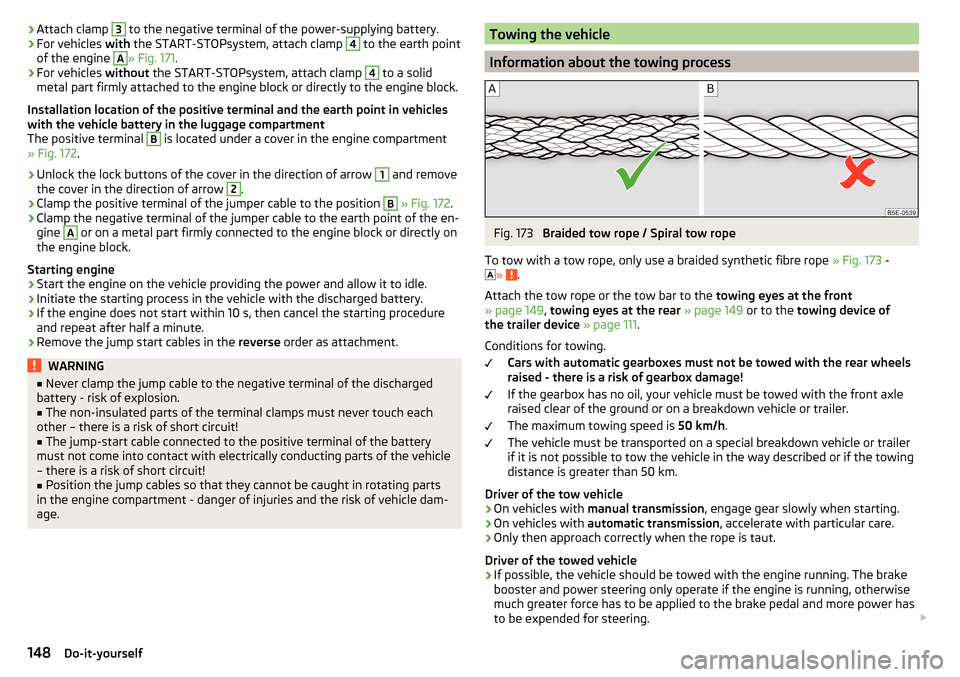
Fig. 173
Braided tow rope / Spiral tow rope
To tow with a tow rope, only use a braided synthetic fibre rope » Fig. 173 -
»
.
Attach the tow rope or the tow bar to the towing eyes at the front
» page 149 , towing eyes at the rear » page 149 or to the towing device of
the trailer device » page 111 .
Conditions for towing. Cars with automatic gearboxes must not be towed with the rear wheels
raised - there is a risk of gearbox damage!
If the gearbox has no oil, your vehicle must be towed with the front axle
raised clear of the ground or on a breakdown vehicle or trailer.
The maximum towing speed is 50 km/h.
The vehicle must be transported on a special breakdown vehicle or trailer
if it is not possible to tow the vehicle in the way described or if the towing
distance is greater than 50 km.
Driver of the tow vehicle
›
On vehicles with manual transmission , engage gear slowly when starting.
›
On vehicles with automatic transmission , accelerate with particular care.
›
Only then approach correctly when the rope is taut.
Driver of the towed vehicle
›
If possible, the vehicle should be towed with the engine running. The brake
booster and power steering only operate if the engine is running, otherwise
much greater force has to be applied to the brake pedal and more power has
to be expended for steering.
148Do-it-yourself
Page 153 of 184
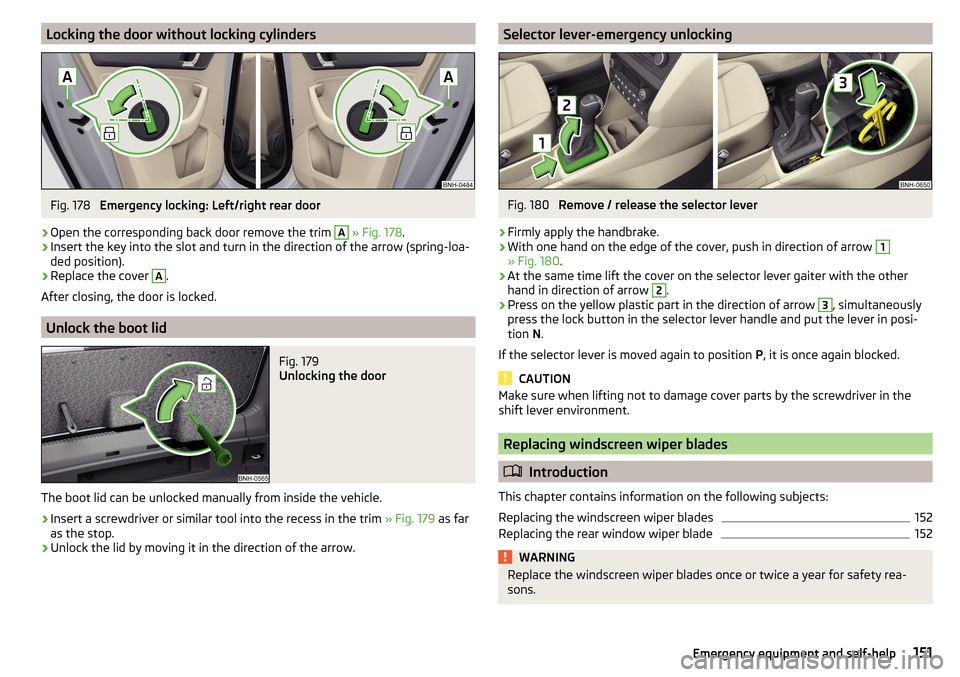
Locking the door without locking cylindersFig. 178
Emergency locking: Left/right rear door
›
Open the corresponding back door remove the trim
A
» Fig. 178 .
›
Insert the key into the slot and turn in the direction of the arrow (spring-loa-
ded position).
›
Replace the cover
A
.
After closing, the door is locked.
Unlock the boot lid
Fig. 179
Unlocking the door
The boot lid can be unlocked manually from inside the vehicle.
›
Insert a screwdriver or similar tool into the recess in the trim » Fig. 179 as far
as the stop.
›
Unlock the lid by moving it in the direction of the arrow.
Selector lever-emergency unlockingFig. 180
Remove / release the selector lever
›
Firmly apply the handbrake.
›
With one hand on the edge of the cover, push in direction of arrow
1
» Fig. 180 .
›
At the same time lift the cover on the selector lever gaiter with the other
hand in direction of arrow
2
.
›
Press on the yellow plastic part in the direction of arrow
3
, simultaneously
press the lock button in the selector lever handle and put the lever in posi-
tion N.
If the selector lever is moved again to position P, it is once again blocked.
CAUTION
Make sure when lifting not to damage cover parts by the screwdriver in the
shift lever environment.
Replacing windscreen wiper blades
Introduction
This chapter contains information on the following subjects:
Replacing the windscreen wiper blades
152
Replacing the rear window wiper blade
152WARNINGReplace the windscreen wiper blades once or twice a year for safety rea-
sons.151Emergency equipment and self-help
Page 171 of 184

Index
A
ABS Operation
97
Warning light32
Acceptance and recycling of used vehicles
120
Accessories118
Adjusting Steering wheel
11
Adjusting the seats10
Adjustment Beam range
54
Advance warning / emergency braking37
Advice on tyre/wheel usage136
Air-conditioning system Air outlet vents
84
Airbag15
Adjustments and impairments to the airbag system
119
Deactivation18
Deployment16
Warning light32
Airbag system15
Air conditioning82
Air distribution control84
Climatronic83
Manual air conditioning82
Air distribution control84
Air outlet vents84
Alarm49
Trailer117
All-year tyres139
Anti-lock braking system (ABS)97
Anti-theft alarm system49
Trailer117
Anti-theft wheel bolts143
Armrest Front64
Rear65
Ashtray70
Assembling the tow bar, Step 1
113
tow bar, Step 2113
Assist systems96
Auto Check Control38
Automatic drive Selector lever
92
Automatic driving light control55
Automatic gearbox92
Kickdown94
Malfunction34
Selector lever-emergency unlocking151
Selector lever lock93
Starting-off and driving94
Tiptronic93
Warning light34
Automatic shutdown of consumers133
Automatic transmission Selector lever lock
93
AUX68
Avoiding damage to your vehicle95
B
Ball bar Standby position
112
Ball head Check fitting
114
Ready position112
Battery Change in key
150
Belts12
Belt tensioners14
Bluetooth See Owner´s Manual -Infotainment
6
Bonnet Closing129
Opening129
Boot Cargo element
79
Class N1 vehicles79
Hooks77
See boot lid51
Storage compartments78
Boot cover Parking position
78
Boot lid Automatic locking
51
Open/Close51
Brake Assist (HBA)98
Brake booster89
Brake fluid133
Check133
specification133
Brake pads New
89
Brake pedal (automatic transmission) Warning light
34
Brakes Brake booster
89
Brake fluid133
Braking and stabilisation systems96
Handbrake90
Information on braking89
Warning lights30
Brake system96
Braking Running in
94
Breakdown kit145
Breakdown service see Help in an emergency
8
Buttons in the door Electric window
52
169Index
Page 172 of 184

C
Camera See reversing camera
101
CAR See Owner´s Manual -Infotainment
6
Car battery Check condition
134
Cover134
Disconnecting and reconnecting135
Replacing135
Warning light34
Winter operation134
CAR button See Owner´s Manual -Infotainment
6
Car care Exterior
123
Interior125
Outside124
Car computer see multifunction display
39
Care and maintenance118
Cargo element79
Carrier81
Car washing122
Exterior123
Interior125
Washing122
Central locking45
Problems49
Central locking button47
Change battery
150
Changing Windscreen wiper blades
152
Changing a wheel141
Changing141
Changing gear Selector lever
92
Changing wheelsWheels141
Charging a vehicle battery135
Check Brake fluid
133
Engine oil131
Fit ball head properly114
Oil level131
Checking Battery status
134
Coolant132
Checks Statutory checks
118
Children and safety19
Child safety lock49
Child seat19
Classification21
Installation location21, 23
ISOFIX22, 23
on the front passenger seat20, 21
TOP TETHER24
Cigarette lighter70
Cleaning the vehicle Outside
124
Windows124
Climatronic82
air distribution control84
Automatic mode84
Operating elements83
Clothes hook73
Cockpit27
Lighting57
Comfort signalling55
COMING HOME56
Compartments67
Component protection119
Computer see multifunction display
39
Coolant131
Checking132
Refilling132
Temperature display29
Warning light35
CORNER See Fog lights with the CORNER function
56
Correct routing of seat belt
13
Correct seated position10
Correct seating position12
Cup holders69
D
DAY LIGHT See Daytime running lights
54
Daytime running lights54
Dazzle60
De-icing the windscreen and rear window59
Deactivation Airbag
18
Delayed locking of the boot lid See boot lid
51
Departure angle166
Diesel127
Diesel fuel127
Diesel particle filter (DPF)36
Digital Clock38
Digital Service Plan121
Dipstick131
Display Cardinal points
37
Coolant temperature29
Fuel level29
Gear changes38
In the instrument cluster37
MAXI DOT41
Service intervals42
170Index