2016 SKODA RAPID warning lights
[x] Cancel search: warning lightsPage 82 of 184

WARNING■The blower should always be on to prevent the windows from misting.
Otherwise there is a risk of accident.■
Under certain circumstances, air at a temperature of about 5 °C can flow
out of the vents when the cooling system is switched on.
Note
■ The air inlet in front of the windscreen must be free of e.g. ice, snow or
leaves to ensure that the heating and cooling system operates properly.■
After switching on the cooling Condensation from the evaporator of the air
conditioning may drip down and form a puddle below the vehicle. This is not a
leak!
■
If the coolant temperature is too high, the cooling system is switched off to
ensure that the engine cools down.
Heating and manual air conditioning
Fig. 95
Controls of the heating / air conditioning
Read and observe
on page 80 first.
Individual functions can be set or switched on by turning the dial or pressing the corresponding button » Fig. 95. When the function is activated, a warning
light illuminates in the button.
Setting temperature
▶ Reduce the temperature /
Increase the temperature
Set the blower speed (Level 0: Fan off, level 4: high-speed)
Set the direction of the air outlet » page 82
Air flow to the windows
Air flow to the upper body
ABC
Air flow in the footwell
Air flow to the windows and the footwell
Switch recirculation on/off » page 81
Switch the cooling system on/off
Information on the cooling system
After pressing the button
» Fig. 95 the warning light on the button lights
up, even if not all the conditions for the cooling system have been met. The
cooling system starts to work as soon as the following conditions have been
met » page 79 .
Note
To ensure adequate thermal comfort, during operation of the manual air condi-
tioning there could be an increase in the engine idle speed in some circum-
stances.
Climatronic (automatic air conditioning)
Fig. 96
Controls the Climatronic
Read and observe
on page 80 first.
Individual functions can be set or switched on by turning the dial or pressing the corresponding button » Fig. 96.
Setting temperature
▶ Reduce the temperature /
Increase the temperature
Selected temperature
Degrees Celsius or Fahrenheit
Automatic operation of the air conditioning system is switched on
Intensive air flow to the windscreen switched on
Direction of air flow
12345680Using the system
Page 83 of 184
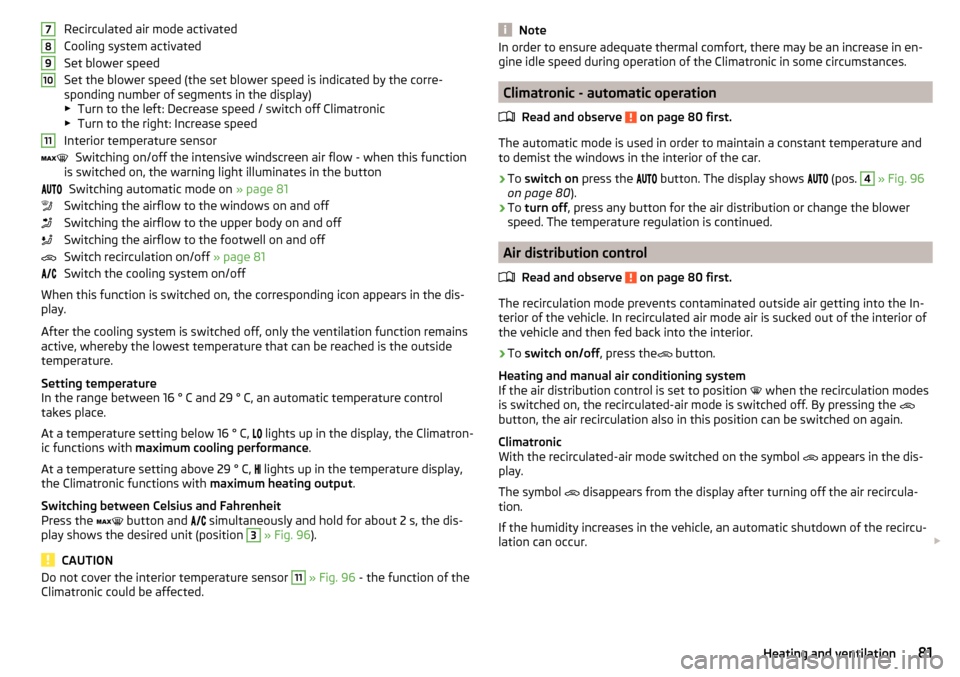
Recirculated air mode activated
Cooling system activated
Set blower speed
Set the blower speed (the set blower speed is indicated by the corre-
sponding number of segments in the display)
▶ Turn to the left: Decrease speed / switch off Climatronic
▶ Turn to the right: Increase speed
Interior temperature sensor Switching on/off the intensive windscreen air flow - when this function
is switched on, the warning light illuminates in the button
Switching automatic mode on » page 81
Switching the airflow to the windows on and off
Switching the airflow to the upper body on and off
Switching the airflow to the footwell on and off
Switch recirculation on/off » page 81
Switch the cooling system on/off
When this function is switched on, the corresponding icon appears in the dis-
play.
After the cooling system is switched off, only the ventilation function remains
active, whereby the lowest temperature that can be reached is the outside
temperature.
Setting temperature
In the range between 16 ° C and 29 ° C, an automatic temperature control
takes place.
At a temperature setting below 16 ° C, lights up in the display, the Climatron-
ic functions with maximum cooling performance .
At a temperature setting above 29 ° C, lights up in the temperature display,
the Climatronic functions with maximum heating output.
Switching between Celsius and Fahrenheit
Press the button and
simultaneously and hold for about 2 s, the dis-
play shows the desired unit (position 3
» Fig. 96 ).
CAUTION
Do not cover the interior temperature sensor 11 » Fig. 96 - the function of the
Climatronic could be affected.7891011NoteIn order to ensure adequate thermal comfort, there may be an increase in en-
gine idle speed during operation of the Climatronic in some circumstances.
Climatronic - automatic operation
Read and observe
on page 80 first.
The automatic mode is used in order to maintain a constant temperature andto demist the windows in the interior of the car.
›
To switch on press the
button. The display shows
(pos.
4
» Fig. 96
on page 80 ).
›
To turn off , press any button for the air distribution or change the blower
speed. The temperature regulation is continued.
Air distribution control
Read and observe
on page 80 first.
The recirculation mode prevents contaminated outside air getting into the In-terior of the vehicle. In recirculated air mode air is sucked out of the interior of
the vehicle and then fed back into the interior.
›
To switch on/off , press the
button.
Heating and manual air conditioning system
If the air distribution control is set to position when the recirculation modes
is switched on, the recirculated-air mode is switched off. By pressing the
button, the air recirculation also in this position can be switched on again.
Climatronic
With the recirculated-air mode switched on the symbol appears in the dis-
play.
The symbol disappears from the display after turning off the air recircula-
tion.
If the humidity increases in the vehicle, an automatic shutdown of the recircu-
lation can occur.
81Heating and ventilation
Page 89 of 184

The wear and tear on the brake pads is dependent on the operating condi-
tions and driving style. In difficult conditions (e.g. urban, sporty driving), the
condition of the brakes should be checked between services by a specialist ga-
rage.
Brake response can be slower if the brakes are covered in moisture or, in win-
ter, have a layer of ice or salt on them . The brakes should be cleaned and
dried by applying the brakes many times over »
.
Corrosion on the brake discs and dirt on the brake pads can occur if the vehicle
has been parked for a long period and if you do not make much use of the
braking system. The brakes are cleaned by applying the brakes several times
over »
.
Before negotiating a long or steep gradient , reduce speed and shift down a
gear. As a result, the braking effect of the engine will be used, reducing the
load on the brakes. If, nevertheless, there is a need for additional braking, it
should be carried out at intervals.
Emergency braking warning - if it is necessary to brake hard, the system may
cause the brake lights to automatically flash, to alert the traffic behind.
New brake pads must first be ““run in”” because these do not initially have the
best possible braking effect. Drive especially carefully for the first 200 km or
so.
If the brake fluid level is too low, it can cause faults in the braking system ;
the warning light will illuminate in the instrument cluster
» page 30,
Braking system
. If the warning light does not light up, yet the stopping dis-
tance is perceived to be longer than before, the driving style should be adap-
ted in view of the unknown cause of the problem, and braking kept to a mini-
mum - seek the help of a specialist garage without delay.
The brake booster increases the pressure generated with the brake pedal. The
brake booster only operates when the engine is running.
WARNING■ Greater physical effort is required for braking when the engine is switch-
ed off – risk of accident!■
The clutch pedal must be actuated when braking on a vehicle with man-
ual transmission, when the vehicle is in gear and at low revs. Otherwise,
the functionality of the brake system may be impaired – risk of accident!
WARNING (Continued)■ Do not depress the brake pedal, if there is no requirement to slow down.
This causes the brakes to overheat and can also result in a longer braking
distance and excessive wear - risk of accident!■
Only brake for the purpose of drying and cleaning the brake discs if the
traffic conditions permit this. Do not place any other road users in jeopardy.
■
Recommendations for new brake pads should be followed.
■
When stopping and parking, the parking brake should always be applied
firmly, otherwise the vehicle could move off - risk of accident!
■
If a front spoiler, full wheel trim, etc. is mounted retrospectively, it must
be ensured that the air supply to the front wheel brakes is not reduced.
Otherwise, the front brakes could be in danger of overheating – risk of acci-
dent!
Handbrake
Fig. 102
Handbrake
Read and observe on page 87 first.
The handbrake secures the vehicle against unwanted movement when stop-
ping and parking.
Apply
›
Pull the handbrake lever firmly upwards.
Release
›
Pull the handbrake lever up slightly and at the same time push in the locking
button » Fig. 102 .
›
Move the lever right down while pressing the lock button.
The handbrake warning light
lights up when the handbrake is applied, pro-
vided the ignition is on.
87Starting-off and Driving
Page 90 of 184

A warning signal sounds if the vehicle is inadvertently driven off with the
handbrake applied. The handbrake warning is activated if the vehicle is driven
at a speed of over 5 km/h for more than 3 seconds.WARNINGDisengage the handbrake completely. A handbrake which is only partially
disengaged can result in the rear brakes overheating. This can have a nega-
tive effect on the operation of the brake system – risk of accident!
Parking
Read and observe
on page 87 first.
When stopping and parking, look for a place with a suitable surface » .
Only carry out the activities while parking in the specified order.
›
Bring the vehicle to a stop and depress the brake pedal.
›
Firmly apply the handbrake.
›
On vehicles with automatic transmission , place the selector lever in the P
position.
›
Switch off the engine.
›
For vehicles with Manual transmission , select 1st gear or Reverse gear R .
›
Release the brake pedal.
WARNING■
The parts of the exhaust system can become very hot. Therefore, never
stop the vehicle in places where the underside of your vehicle could come
into contact with flammable materials (e.g. dry grass, leaves, spilled fuel or
the like). - Risk of fire and serious injury can occur!■
When leaving the vehicle, never leave people unattended in the car who
could, for example, lock the vehicle or release the brake - risk of accidents
and injury!
Manual gear changing and pedals
Introduction
This chapter contains information on the following subjects:
Manual gear changing
88
Pedals
88Manual gear changingFig. 103
The shift pattern
The shift pattern for the individual gear positions is shown on the gear lever » Fig. 103 .
The gearshift indicator should be observed when changing gear » page 38.
Always depress the clutch pedal all the way down. This prevents uneven wear
to the clutch.
Engaging reverse gear
›
Stop the vehicle.
›
The clutch pedal must be fully depressed.
›
Switch the gear lever to N.
›
Push the shift lever downwards fully to the left and then forward into
R » Fig. 103 .
The reversing lights will come on once the reverse gear is engaged, provided the ignition is on.
WARNINGNever engage reverse gear when driving – risk of accident!
CAUTION
If not in the process of changing gear, do not leave your hand on the gear shift
lever while driving. The pressure from the hand can cause the gear shift mech-
anism to wear excessively.
Pedals
The operation of the pedals must not be hindered under any circumstances!
88Driving
Page 95 of 184

The following instructions must be observed if vehicle damage is to be avoided
when driving through water (e.g. flooded roads).›
Therefore determine the depth of the water before driving through water.
The water level must not go above the web of the lower beam » Fig. 108.
›
Drive at no more than walking pace, otherwise a wave may form in front of
the vehicle, which could cause the water to enter into the vehicle’s systems
(e.g. the air intake system for the engine).
›
Never stop in the water, do not reverse and do not switch the engine off.
CAUTION
■ If water gets into the vehicle’s systems (e.g. the air intake system for the en-
gine) it can cause serious damage to the vehicle!■
Oncoming vehicles can generate water waves which can exceed the permis-
sible water level for your vehicle.
■
Do not drive through salt water, as the salt can cause corrosion. A vehicle
coming into contact with salt water is to be thoroughly rinsed with fresh wa-
ter.
Assist systems
General information
Introduction
WARNING■
The assistance systems only serve to support and do not relieve the driv-
er of the responsibility for driving the vehicle.■
The increased safety provision, as well as the increased occupant protec-
tion provided by the assistance systems must not tempt you to take risks -
risk of accident!
■
Adjust the speed and driving style to the current visibility, weather, road
and traffic conditions.
■
The assistance systems have physical and system-related limitations. For
this reason, the driver may experience some undesired or delayed system
responses in certain situations. You should therefore always be alert and
ready to intervene!
■
Only enable, disable or set the assistance systems so that you have the
vehicle fully under control in every traffic situation - risk of accident!
Braking and stabilisation systems
Introduction
This chapter contains information on the following subjects:
Stability Control (ESC)
94
Anti-lock braking system (ABS)
94
Engine drag torque control (MSR)
94
Traction control (TCS)
94
Electronic Differential Lock (EDL)
95
Brake Assist (HBA)
95
Hill Start Assist (HHC)
95
Multi collision brake (MCB)
95
Trailer stabilization system (TSA)
95
The brake and stabilization systems are automatically activated each time the
ignition is switched on, unless otherwise indicated.
The error display is in Chapter » page 29, Warning lights .
93Assist systems
Page 96 of 184

WARNINGThe general information relating to the use of assistance systems must be
observed » page 93, in section Introduction .
Stability Control (ESC)
Read and observe
on page 94 first.
The ESC improves vehicle stability when driving at the limit (e.g. if the vehicle
starts to skid) by braking individual wheels to maintain the desired direction.
If there is an ESC intervention, the warning light flashes in the instrument
cluster.
Anti-lock braking system (ABS)
Read and observe
on page 94 first.
ABS prevents the wheels locking when braking. Thus helping the driver to
maintain control of the vehicle.
The intervention of the ABS is noticeable from the pulsating movements of
the brake pedal which is accompanied by noises.
When the ABS system is active, do not brake periodically or reduce the pres- sure on the brake pedal.
Engine drag torque control (MSR)
Read and observe
on page 94 first.
MSR counteracts the tendency of the drive wheels to lock during downshifts
or sudden deceleration (e.g. on icy or an otherwise slippery road surface).
If the drive wheels should lock, then the engine speed is automatically in-
creased. This reduces the braking effect of the engine and the wheels can ro-
tate freely again.
Traction control (TCS)Fig. 109
Button for the TCS system:
Read and observe on page 94 first.
TCS prevents the spinning of the wheels of the driven axle. TCS reduces the
drive power transmitted to the wheels in the case of slipping wheels. Thus, for
example, driving on road surfaces with low grip is made easier.
During a TCS intervention, the indicator light flashes in the instrument clus-
ter.
The deactivation/activation of TCS can be carried out, depending on equip-
ment, in one of the following ways. ▶ Infotainment » Owner's Manual - Infotainment .
▶ By pressing the
» Fig. 109 button.
With deactivation , the warning light lights up in the instrument cluster
and
an appropriate message is displayed in the instrument cluster.
With activation , the warning light
is
extinguished and an appropriate mes-
sage is displayed in the instrument cluster.
The TCS should normally always be enabled. The system should be deactivated
only in the following situations, for example. ▶ When driving with snow chains.
▶ When driving in deep snow or on a very loose surface.
▶ When “rocking a car free” when it has become stuck.
94Driving
Page 103 of 184

Operation descriptionFig. 119
Cruise control system controls
Read and observe on page 100 first.
Overview of the CCS controls » Fig. 119AActivate CCS (control deactivated) Interrupt control (sprung position) Deactivate CCS (delete set speed)BTake control again a)
/ Increase speedCStart control / reduce speedDSwitching between CCS and speed limitera)
If no speed is set the current speed is adopted.
Once the controls are activated, the CCS maintains the vehicle at the set
speed; the warning light lights up in the instrument cluster.
Controls are automatically interrupted if any of the following occur.
▶ The brake pedal is operated.
▶ When one of the brake assist systems (e.g. ESC) intervenes.
▶ Through an airbag deployment.
▶ By pressing the button
D
.
WARNING■ Always deactivate the cruise control system after use to prevent the sys-
tem being switched on unintentionally.■
Control may only be resumed if the set speed is not too high for the cur-
rent traffic conditions.
Note■ During control, speed can be increased by pressing the accelerator pedal. Re-
leasing the accelerator pedal will cause the speed to drop again to the set
speed.■
By pressing the button
D
during the regulation, this is cancelled and the
speed limiter is activated.
Speed limiter
Introduction
This chapter contains information on the following subjects:
Operation
101
Description of operation
102
The speed limiter limits the maximum driving speed to the set speed limit.
This limit can only be exceeded by depressing the accelerator pedal fully.
The condition in which the speed limiter monitors a potential set speed limit
excess is referred to as Regulation.
WARNINGThe general information relating to the use of assistance systems must be
observed » page 93, in section Introduction .
Operation
Fig. 120
MAXI DOT display: Examples of speed limiter status displays
101Assist systems
Page 104 of 184

Fig. 121
Segment display: Examples of Speed Limiter status displays
Read and observe
on page 101 first.
Status displays of the speed limiter » Fig. 120, » Fig. 121
Speed limit set, but regulation is inactive.
Control is active.
No speed limit set.
System fault - seek assistance from a specialist garage immediately.
Basic requirements for start of control The speed limiter is activated.
The current speed is higher than 30 km/h.
Description of operation
Fig. 122
Operating elements of the speed
limiter
Read and observe on page 101 first.
Overview of the control elements of the speed limiter » Fig. 122AActivate CCS (required condition for the subsequent activation of
the speed limiter) To activate the speed limiter, the switch must be adjusted to posi-
tion
, then press D
to operate. Interrupt control (sprung position) Deactivate speed limiter (set limit delete)BTake control again a)
/ increase speed - press (in increments of 1
km/h), hold (in increments of 10 km/h)CStart regulation / reduce speed - press (in increments of 1 km/h),
hold (in increments of 10 km/h)DSwitching between CCS and speed limitera)
If no speed limit is set, the current speed is set as the speed limit.
After starting the system, the current speed is set as the speed limit, the
warning light lights up in the instrument cluster.
Exceeding the speed limit during the regulation
If, during the control, it is necessary to exceed the speed limit (e.g. to over-
take), the accelerator pedal must be pressed fully.
When exceeding the speed limit (e.g. driving down a hill), an acoustic signal
sounds and the warning light flashes in the instrument cluster.
The regulation is resumed once the speed has fallen below the set limit.
Note
By pressing the button D during the regulation this is cancelled and the CCS is
activated.
Front Assist
Introduction
This chapter contains information on the following subjects:
Radar sensor
103
Operation
103
Distance warning
104
Warning and automatic braking
104
Deactivation/activation
105
Malfunctions
105
102Driving