2016 SKODA OCTAVIA mirror
[x] Cancel search: mirrorPage 167 of 324

SmartLink
Introductory information
Introduction to the subject
Applies to Infotainment Columbus, Amundsen, Bolero.
Fig. 195
Information on SmartLink on the
ŠKODA websites
Read in the QR code » Fig. 195orenter the following address in the web brows-
er to open the website with information on the SmartLink system.
http://go.skoda.eu/connectivity-smartlink
SmartLink offers the option to display certified applications on an external de-
vice equipped with a USB device on the Infotainment screen and to operate
them.
SmartLink supports the following communication systems. ▶ Android Auto
▶ Apple CarPlay
▶ MirrorLink ®
Using the applications in the connected external device, you can use naviga-
tion to make a call and to listen to music.
For reasons of safety, the operation of some applications while driving is not
possible or only limited.
Depending on the model of the connected external device, some applications
can be started using voice activation, via the Infotainment screen, using the
operating elements on Infotainment, or using the buttons on the multi-func-
tion steering wheel.
The voice control of the connected external device can be activated by holding
the button
or holding the button
on the multifunction steering wheel.
CAUTIONTo establish the connection, it is necessary that the date and time in Infotain-
ment are set correctly. If the date and time setting is based on the GPS signal,
then problems may arise with establishing a connection with a poor GPS signal
reception.
Note
■ During the connection process, information messages may be displayed on
the Infotainment screen, and in the phone display. These messages must be
observed and confirmed if necessary (e.g. Release of data transfer, enabling
the contact import, release of text messages).■
We recommend that you use extension cords from ŠKODA Original Accesso-
ries.
■
With some connected devices, it is necessary that the connected external
device is unlocked over the entire duration of the connection for trouble-free
functioning of the SmartLink function“”.
Main menu
Fig. 196
Main menu: No connection / example of an active connection
›
To display the main menu SmartLinkpress the button , then the function
surface
.
Main menu - Functional surfaces Active connection
Display of information about SmartLink
Disconnection
Settings for the menu SmartLink » page 128
A165SmartLink
Page 169 of 324

Apple CarPlay
Introduction to the subject
The Apple CarPlay connection can be set up under the following conditions. The ignition is switched on.
Infotainment is switched on.
The external device to be connected is switched on.
The data connection is turned on in the device to be connected.
Voice control is turned on in the device to be connected.
If Infotainment is connected to an external device via Apple CarPlay then the use of the Bluetooth ®
connection is not possible and the Telephone menu is
not available. A possible data connection via the SIM card remains operational
» page 164 .
A device connected using Apple CarPlay cannot be used as an audio source in
the menu Media.
If route guidance is taking place at this moment using Infotainment, then this
is terminated by starting the route guidance in the Apple CarPlay application.
This is also true reciprocally.
A list of devices and applications that the Apple CarPlayconnection supports
can be found on the Apple websites. Functionality is not guaranteed outside of
the supported regions.
Main menu
Fig. 198
Apple CarPlay: Main menu
Main menu - function surfaces and information List of available applications
Other pages with applications (by running your finger sideways across the
screen or by turning the dial, the next page can be displayed
)
Depending on how long the function surface is pressed: ▶ Tap - Return to main menu Apple Carplay
▶ Hold - Switching on voice control
Start the application ▶ In the Apple CarPlay main menu connection select the desired application in
the field A
» Fig. 198 .
MirrorLink ®
Introduction to the subject
Fig. 199
Information about MirrorLink®
on the ŠKODA websites
The MirrorLink ®
- connection can be set up under the following conditions.
The ignition is switched on.
Infotainment is switched on.
The external device to be connected is switched on.
Some applications require the data connection in the connected external de-
vice to be switched on.
If you want to use the menu Telephone, then before establishing the
MirrorLink ®
connection with the telephone then connect Infotainment first via
Bluetooth ®
.
An external device connected using MirrorLink ®
cannot be used as an audio
source in the Media menu.
AB167SmartLink
Page 170 of 324

If route guidance is taking place at this moment using Infotainment, then this
is not terminated by starting the route guidance in the MirrorLink ®
- applica-
tion.
Read in the QR code » Fig. 199orenter the following address in the web brows-
er to open the website with information on the supported MirrorLink ®
system.
http://go.skoda.eu/connectivity
Main menu
Fig. 200
MirrorLink®: Main menu
Main menu - function surfaces and information Return to SmartLink main menu » page 165
Displays a list of running applications with the ability to terminate them
Display the application last shown (as long as the application is running)/
show the display content of the connected external device
Settings for the SmartLink menu » page 128
List of applications
Other pages with applications (by performing a finger movement sideways
across the screen, other pages with applications are displayed)
Application is not certified for use while driving
ABOperationFig. 201
Example of a running Mirror-
Link® application
Start the application ▶ In the Mirrorlink ®
connection main menu, select the desired application in the
field
A
» Fig. 200 on page 168 .
The application starts and the following function surfaces are displayed. Display of function surfaces below / above
Return to MirrorLink ®
main menu
Hide/ show the function surfaces ▶ Turning the control knob press.
Display of the running application
▶ In the main menu of the MirrorLink ®
- connection, press the function surface
» Fig. 200 on page 168 The last displayed application is displayed.
If you want to display a different application, then the function surface of the
desired application must be tapped in the main menu of the MirrorLink ®
con-
nection
A
» Fig. 200 on page 168 .
Ending the current application
▶ Tap on the function surface
→
.
▶ Press the function surface of the desired application with the symbol .
By tapping the function surface
Close all
, all running applications are closed.
Function issues
If problems occur with the MirrorLink ®
connection, then one of the following
messages may occur on the screen.
■
Error: Transfer
- Disconnect the external device and reconnect
■
MirrorLink® audio is not available.
- Disconnect the external device and reconnect
168Infotainment
Page 171 of 324

■MirrorLink® availability on this mobile device is restricted. Using of the connected de-
vice is not possible while driving
■The mobile device is locked. Please unlock the mobile device to use MirrorLink®
- Unlock
the connected “external device”
■
Unable to start app or app not working.
- Disconnect the external device and recon-
nect
Navigation
Introductory information
Navigation - Function sequence
Applies to Infotainment Columbus, Amundsen.
Route guidance is started as follows.
›
Search for/ enter a new destination or Select one of the stored destinations.
›
Confirm the route calculation in the destination details or if necessary, adjust
the route options.
›
Select the preferred route type, if this is requested by Infotainment.
A route calculation occurs and route guidance starts.
The route guidance is provided by graphical driving recommendations and nav. announcements.
The is an option to add additional destinations during route guidance, or to
adapt the route.
If a traffic radio station is available, information concerning traffic delays is
evaluated by Infotainment and, if necessary, an alternative route is offered.
If you deviate from the route, then a new route calculation is carried out.
GPS satellite signal
Infotainment uses the GPS (Global Positioning System) satellite signal for
route guidance.
Outside the range of the GPS satellite signal (e.g. in dense vegetation, in tun-
nels, parking garages, etc.), Infotainment navigates only with restrictions using
vehicle sensors.
Infotainment offers the option to show in the split screen display the following
Position
» Fig. 204 on page 171 information about the current geographical po-
sition of the vehicle and the satellite signal.
Geographical longitude
Geographical latitude
Elevation
Number of received/available satellites
If no GPS satellite signal is available, no values are displayed.
169Navigation
Page 210 of 324

OperationFig. 248
Installation location of the camera / scanned area behind the ve-
hicle
Read and observe
and on page 207 first.
The camera for capturing the area behind the vehicle is in the grip of the bootlid » Fig. 248 .
Area behind the vehicle » Fig. 248
Detection range of the camera
Area outside the detection range of the camera
The system can assist the driver when parking and manoeuvring under the fol-
lowing basic conditions.
The ignition is switched on.
The reverse gear is engaged. 1)
The luggage compartment lid is completely closed.
The vehicle is travelling at less than 15 km/h.
The area behind the vehicle is clearly visible.
The selected parking / manoeuvring area is clear and even.
Note
■ The screen display can be interrupted by pressing the symbol button
» Fig. 246 on page 206 .■
After disengaging the reverse gear, automatic screen display of the parking
aid is carried out (variant 2, 3) » page 205.
ABGuidelines and function surfacesFig. 249
Infotainment screen: Orientation lines / function interfaces
Read and observe
and on page 207 first.
Orientation lines are shown along with the monitored area behind the vehicle
on the screen.
Distance of the orientation lines behind the vehicle » Fig. 249
The distance is about 40 cm (safety distance limit).
The distance is about 100 cm.
The distance is about 200 cm.
The distance may vary slightly depending on the load of the vehicle and the
road inclination.
The distance between the side lines corresponds approximately to the vehicle
width including mirrors.
Function surfaces » Fig. 249
Depending on the Infotainment model: Turns the display of the area
behind the vehicle off
Screen settings - brightness, contrast, colour Switching audible parking signals on/off
Enabling and reduced park assistance display
Change to park assistance display
ABC
1)
The area behind the vehicle can be displayed for a few seconds more after disengaging the reverse gear.
208Driving
Page 237 of 324

Vertical load with mounted accessoriesFig. 281
Representation of the maximum
length of the mounted accesso-
ries and the permissible total
weight of the accessory depend-
ing on the load centre of gravity
Read and observe on page 230 first.
When using the accessories (e.g. bicycle carrier), the maximum length and the
permissible total weight including load must be considered.
The maximum length of the mounted accessories (from the ball of the towing
device) is 70 cm » Fig. 281 .
The total permitted weight of the accessories including load changes with in-
creasing distance of the load centre of gravity from the ball head of the towing
device.
Distance of the load centre of gravity from the ball headPermissible total weight of the accessory, in- cluding loadA0 cm75 kg / 56 kga)B30 cm75 kg / 56 kg a)C60 cm35 kg / 28 kg a)D70 cm0 kg / 0 kga)a)
Applies to G-TEC vehicles.
CAUTION
Never exceed the permissible
total weight of the accessories incl. load and
maximum length of the accessories - There is a risk of damage to the towing
device.
Note
We recommend that you use accessories from ŠKODA Original Accessories.Using hitch
Trailer (accessory) connect and disconnect
Fig. 282
Swivel out the 13-pin power
socket, safety eyelet
Connect / disconnect
›
Fit the ball rod.
›
Grip the 13-pin socket at point
A
and swing out in the direction of the arrow
» Fig. 282 .
›
Remove the protective cap
5
» Fig. 270 on page 231 .
›
Place the trailer (the accessory) onto the tow ball.
›
Open the socket cap and insert the plug of the trailer (accessories) into the
13-pin socket
A
» Fig. 282 . (If the trailer / accessories have a 7-pin connector,
use a corresponding reduction piece from the ŠKODA Original Accessories).
›
Suspend the breakaway cable of the trailer at the safety eyelet
B
(the
breakaway cable must sag in all trailer settings in view of the vehicle).
Uncoupling takes place in reverse order.
Exterior mirrors
You should have additional exterior mirrors fitted if you are not able to see the
traffic behind the trailer using the standard rear-view mirrors.
Headlights
The front of the vehicle may lift up when a trailer (accessory) is being towed
and the headlights may dazzle other road users. Set the range of the head-
lights » page 64 , Operating the lights 1)
.
Power supply of the trailer / accessory power system
In the electrical connection between the vehicle and trailer (accessory), the
trailer (accessories) is supplied with power from the vehicle (with ignition
switched on and off).
1)
Applies to vehicles with xenon headlights.
235Towing device and trailer
Page 247 of 324
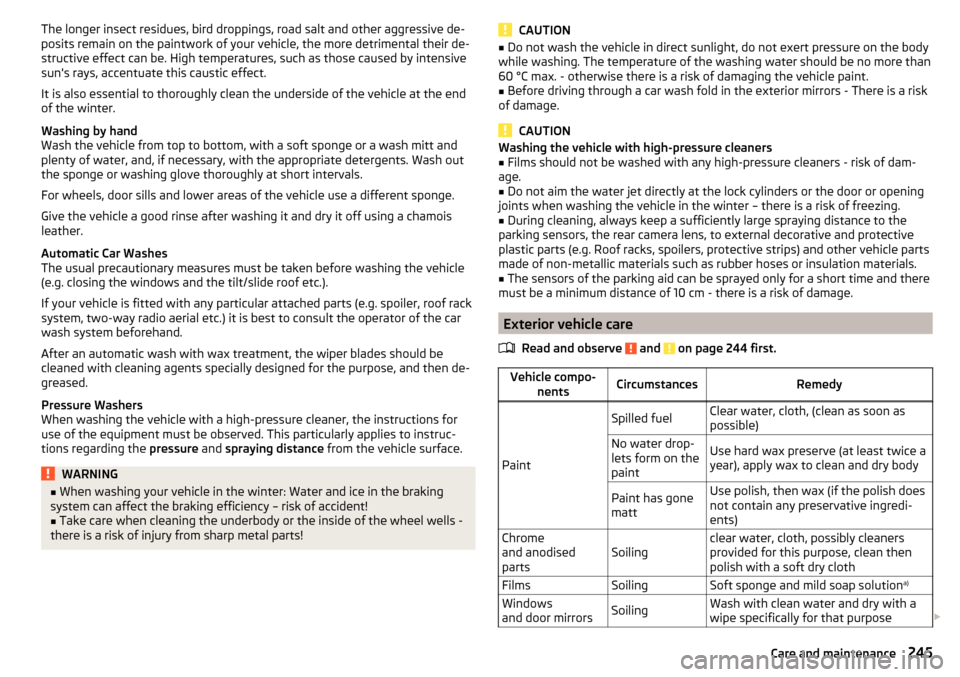
The longer insect residues, bird droppings, road salt and other aggressive de-
posits remain on the paintwork of your vehicle, the more detrimental their de-
structive effect can be. High temperatures, such as those caused by intensive
sun's rays, accentuate this caustic effect.
It is also essential to thoroughly clean the underside of the vehicle at the end
of the winter.
Washing by hand
Wash the vehicle from top to bottom, with a soft sponge or a wash mitt and
plenty of water, and, if necessary, with the appropriate detergents. Wash out
the sponge or washing glove thoroughly at short intervals.
For wheels, door sills and lower areas of the vehicle use a different sponge.
Give the vehicle a good rinse after washing it and dry it off using a chamois
leather.
Automatic Car Washes
The usual precautionary measures must be taken before washing the vehicle
(e.g. closing the windows and the tilt/slide roof etc.).
If your vehicle is fitted with any particular attached parts (e.g. spoiler, roof rack system, two-way radio aerial etc.) it is best to consult the operator of the car
wash system beforehand.
After an automatic wash with wax treatment, the wiper blades should be
cleaned with cleaning agents specially designed for the purpose, and then de-
greased.
Pressure Washers
When washing the vehicle with a high-pressure cleaner, the instructions for
use of the equipment must be observed. This particularly applies to instruc-
tions regarding the pressure and spraying distance from the vehicle surface.WARNING■
When washing your vehicle in the winter: Water and ice in the braking
system can affect the braking efficiency – risk of accident!■
Take care when cleaning the underbody or the inside of the wheel wells -
there is a risk of injury from sharp metal parts!
CAUTION■ Do not wash the vehicle in direct sunlight, do not exert pressure on the body
while washing. The temperature of the washing water should be no more than
60 °C max. - otherwise there is a risk of damaging the vehicle paint.■
Before driving through a car wash fold in the exterior mirrors - There is a risk
of damage.
CAUTION
Washing the vehicle with high-pressure cleaners■Films should not be washed with any high-pressure cleaners - risk of dam-
age.■
Do not aim the water jet directly at the lock cylinders or the door or opening
joints when washing the vehicle in the winter – there is a risk of freezing.
■
During cleaning, always keep a sufficiently large spraying distance to the
parking sensors, the rear camera lens, to external decorative and protective
plastic parts (e.g. Roof racks, spoilers, protective strips) and other vehicle parts
made of non-metallic materials such as rubber hoses or insulation materials.
■
The sensors of the parking aid can be sprayed only for a short time and there
must be a minimum distance of 10 cm - there is a risk of damage.
Exterior vehicle care
Read and observe
and on page 244 first.
Vehicle compo- nentsCircumstancesRemedy
Paint
Spilled fuelClear water, cloth, (clean as soon as
possible)No water drop-
lets form on the
paintUse hard wax preserve (at least twice a
year), apply wax to clean and dry bodyPaint has gone
mattUse polish, then wax (if the polish does
not contain any preservative ingredi-
ents)Chrome
and anodised
partsSoilingclear water, cloth, possibly cleaners
provided for this purpose, clean then
polish with a soft dry clothFilmsSoilingSoft sponge and mild soap solution a)Windows
and door mirrorsSoilingWash with clean water and dry with a
wipe specifically for that purpose 245Care and maintenance
Page 248 of 324

Vehicle compo-nentsCircumstancesRemedyHead / tail lightsSoilingSoft sponge and mild soap solution a)
Reversing cameraSoilingWash with clean water and dry with a
soft clothSnow/iceHand brush / de-icerDoor lock cylin-
dersSnow/iceDe-icing fluid specifically for that pur-
poseWipers / wiper
bladesSoilingWindscreen cleaner, sponge or clothWheelsSoilingClear water, then apply appropriate
substancea)
Mild soap solution = 2 tablespoons of natural soap to 1 litre of lukewarm water.
The jack is maintenance-free. If necessary, the moving parts of the jack should
be lubricated with a suitable lubricant.
The towing device is maintenance-free. Coat the ball head of the towing de-
vice with a suitable grease whenever necessary.
Protection of cavities
All the cavities of your vehicle which are at risk from corrosion are protected by
a layer of long-lasting protective wax applied in the factory.
If any small amount of wax flow out of the cavities at high temperatures, these
must be removed with a plastic scraper and the stains cleaned using a petrole-
um cleaner.
Underbody
The underside of your vehicle is already permanently protected by the factory
against chemical and mechanical influences.
We recommend having the protective coating — preferably before the begin-
ning of winter and at the end of winter.
Product life of the films
Environmental influences (e.g. sunlight, humidity, air pollution, rockfall) affect
the life of the films. Films will age and become brittle – this is entirely normal;
this is not a fault.
Sunlight may also affect the strength of the film colour.
When transporting a load on the roof rack (e.g. roof box or similar), there is an
increased risk of film damage (e.g. of chipping from the secured load).
CAUTION■ Vehicle paint
■ Repair damaged areas as soon as possible.
■ Matt-painted parts should not be treated with polishes or hard waxes.
■ Do not polish in a dusty environment - risk of paint scratches.
■ Do not apply any paint care products to door seals or window guides.■
Plastic parts
■ Do not use paint polish.
■
Chromed and anodised parts
■ Do not polish in a dusty environment - risk of surface scratches.
■
Films
The following instructions must be observed, otherwise there is a risk of film
damage. ■ Do not use dirty cloths or sponges for cleaning.
■ Do not use a scraper or other means to remove ice and snow.
■ Do not polish the films
■ Do not use a high pressure cleaner on the films.
■
Rubber seals
■ Do not treat the door seals and window guides deal with anything - the
protective varnish coating could be damaged.
■
Windows and door mirrors ■ Do not clean the insides of the windows/mirrors with sharp objects - There
is a risk of damage to the filaments or the antenna. ■ Do not use a cloth which has been used to polish the body - this could dirty
the window and impair visibility.
■
Head / tail lights
■ Do not wipe head/tail lamps dry, do not use any sharp objects - risk of dam-
age to the protective coating and cracks forming on the headlamp glass cov-
ers.
■
Reversing camera
The following instructions must be observed, otherwise there is a risk of
camera damage.
■ Do not remove snow / ice with warm / hot water.
■ To wash, never use a pressure washer or steam jet.
■ For cleaning, do not use abrasive cleaners.
■
Door lock cylinders
■ Make sure that as little water as possible gets into the locking cylinder
when washing the vehicle - there is a risk of freezing the lock cylinder!
■
Wheels
■ Heavy soiling of the wheels can affect the balance of the wheels - the re-
sult can be a vibration, which can cause premature wear of the steering.
246General Maintenance