2016 SKODA OCTAVIA warning
[x] Cancel search: warningPage 197 of 324

Forward mode / sport programme - the gear change takes place in the
position S at higher engine speeds than in mode D
(Sprung position) - choice between positions D and S
If the Sport driving mode is selected with the engine running » page 221, Se-
lect the driving mode (Driving Mode Selection) , the transmission is automati-
cally set in the S mode.
E – Economical driving mode
If the driving mode Eco or Individual (engine - Eco) » page 221 is selected and
the selection lever is in the setting D/S, the transmission is automatically set
to mode E. This mode cannot be selected with the selector lever.
The forward mode is switched up or down automatically in mode E at lower en-
gine speeds than in mode D.
Selector lever lock
Fig. 236
Shift lock button
Read and observe and on page 194 first.
The selector lever is locked in mode P and N to prevent that the forward driv-
ing is selected accidentally, thereby setting the vehicle in motion.
The selector lever is locked only when the vehicle is stationary and at speeds
up to 5 km/h.
The selector lever lock is indicated by the illumination of the warning light .
Disengage selector lever from P mode or N
›
Press the brake pedal and the lock button at the same time in the direction
of
1
» Fig. 236 .
To move the selector lever from mode N to D / S only the brake pedal is press-
ed.
D/SThe selector lever is not locked when quickly moving across the position N
(e.g. from R to D/S ). This, for example, helps to rock out a vehicle that is stuck,
e.g. in a bank of snow. The selector lever lock will engage if the lever is in posi-
tion N for more than approx. 2 seconds without the brake pedal being de-
pressed.
If it is not possible to release the gear selector from mode P in the usual man-
ner, then this can be emergency unlocked » page 277.
Note
If you want to switch the selector lever from mode P to mode D/S or vice ver-
sa, move the selector lever quickly. This prevents that you accidentally select
mode R or N.
Manual shifting of gears (Tiptronic)
Fig. 237
Selector lever/multi-function
steering wheel
Read and observe and on page 194 first.
Tiptronic mode makes it possible to manually shift gears with the selector lev-
er or multifunction steering wheel.
Switching to manual shifting using the selector lever
›
Push the gear selector from position D/S towards the right, or left in a right-
hand drive vehicle. The current gear is maintained.
Switching to manual shifting by using the rocker switches under the
multifunction steering wheel
›
To change gear , pull one of the rocker switches
-
/
+
briefly towards the
steering wheel » Fig. 237.
›
To cancel manual shift, pull the rocker switch
+
towards the steering wheel
for more than 1 s.
If you do not pull one of the rocker switches
-
/
+
for more than 1 minute,
manual shifting of the gears is deactivated automatically.
195Starting-off and Driving
Page 198 of 324

Changing gear›To shift up , tap the selector lever forwards + or pull the rocker switch +
briefly towards the steering wheel » Fig. 237.
›
To shift down , tap the selector lever backwards
-
or pull the rocker switch
-
briefly towards the steering wheel » Fig. 237.
The currently selected gear is indicated in the » Fig. 235 on page 194 display.
The gearshift indicator must be observed when changing gear » page 42.
When accelerating, the gearbox automatically shifts up into the higher gear
just before the maximum permissible engine speed is reached. If a lower gear
is selected, the gearbox does not shift down until there is no risk of the engine
overrevving.
Note
It may be beneficial, for example, when travelling downhill, to use manual
shifting of gears. Shifting to a lower gear reduces the load on the brakes and
hence the wear on the brakes.
Start and drive
Read and observe
and on page 194 first.
Moving off and stopping temporarily
›
Firmly depress and hold the brake pedal.
›
Start the engine.
›
Press the locking button and move the selector lever to the desired position
» page 194 .
›
Release the brake pedal and accelerate.
The selector lever position N does not have to be selected when stopping for a
short time (e.g. at a crossroads). However, the brake pedal should be de-
pressed, in order to prevent the vehicle from rolling.
Accelerate to max. speed during the journey (kickdown function)
If the accelerator pedal is depressed while the vehicle is in forward drive mode,
the kick-down function is turned on.
The gear change is adjusted accordingly to achieve maximum acceleration.
Accelerate to maximum speed when starting (launch control function) 1)
The launch control function is available in mode S or Tiptronic.
› Disable the TCS
» page 200, Braking and stabilisation systems .›START STOP deactivate » page 191, manually activate/deactivate system .›
Fully depress and hold the brake pedal with your left foot.
›
Fully depress the accelerator pedal with your right foot.
›
Release the brake pedal - the vehicle is running at maximum acceleration.
Driving in neutral (“coasting”)
When releasing the accelerator pedal, the vehicle moves without the braking
effect of the engine.
Operating conditions
▶ The selector lever is in the D/S position.
▶ Driving mode Eco or Individual (Drive - Eco) is selected » page 221, Select the
driving mode (Driving Mode Selection) .
▶ The vehicle is travelling at more than 20 km/h.
▶ No trailer or other accessory is connected to the trailer socket.
The gear is selected again automatically, when you depress the accelerator or
brake pedal or pull the left rocker switch
-
towards the steering wheel
» page 195 , Manual shifting of gears (Tiptronic) .
WARNINGRapid acceleration ( e.g. on slippery roads) can lead to a loss of control over
the vehicle – There is a risk of accident!
Running in and economical driving
Introduction
This chapter contains information on the following subjects:
Run in engine
196
Tips on economical driving
197
DriveGreen function
197
Radiator shutters
198
Run in engine
During the first 1 500 km, the driving style is decisive for successful the run-
ning in process is.
1)
This function is only valid for some engines.
196Driving
Page 200 of 324

NoteResetting the single-trip memory “since start” also resets the average con-
sumption E, the driving assessment D, and the diagram C.
Radiator shutters
The radiator shutters located in front of the radiator (hereinafter: shutter) help
to reduce CO 2 emissions as well as harmful emissions and to save fuel.
If the system detects that it is possible to reduce the amount of air flowing to
the radiator, it closes the blinds. As a result, the air resistance of the vehicle is
reduced.
If, due to a function impairment of the shutters, a driving speed of 150 km/h is
reached, an appropriate message is shown in the display of the instrument
cluster.
After the display of the above message, the top speed of the vehicle is auto-
matically limited to around 160 km/h.
If this message appears in the winter, the cause may be ice or snow caught up
in the blinds. After the ice or snow has thawed, the blinds are functional again.
If the impairment not due to ice or snow, then assistance from a specialist
should be sought.
Avoiding damage to your vehicle
Introduction
This chapter contains information on the following subjects:
Driving Tips
198
Driving through water
198
Driving Tips
Only drive on roads and terrain that correspond to the vehicle parame-
ters » page 288 , Technical data .
The driver is always responsible for deciding whether the vehicle can cope
with the conditions and the terrain.
WARNING■ Adjust the speed and driving style to the current visibility, weather, road
and traffic conditions. Too high a speed or an erroneous manoeuvre may
cause serious injury and damage to the vehicle.■
Combustible objects such as dry leaves or twigs caught under the base of
the vehicle could ignite on hot vehicle parts - risk of fire!
CAUTION
■ Pay attention to the ground clearance of the vehicle! When driving over ob-
jects which are larger than the ground clearance, the vehicle can get damaged.■
Any objects that get trapped under the vehicle floor must be removed as
soon as possible. These items can cause damage to the vehicle (e.g. to parts of
the fuel or brake system).
Driving through water
Fig. 239
Maximum permissible water lev-
el when driving through water
The following must be observed to avoid damage to the vehicle when driving
through bodies of water (e.g. flooded roads).
›
Therefore determine the depth of the water before driving through bodies of
water. The water level must not go above the web of the lower beam
» Fig. 239 .
›
Drive at no more than walking pace, otherwise a wave may form in front of
the vehicle, which could cause the water to enter into the vehicle’s systems
(e.g. the air intake system for the engine).
›
Never stop in the water, do not reverse and do not switch the engine off.
198Driving
Page 201 of 324
CAUTION■If water gets into the vehicle’s systems (e.g. the air intake system for the en-
gine) it can cause serious damage to the vehicle!■
Oncoming vehicles can generate water waves which can exceed the permis-
sible water level for your vehicle.
■
Do not drive through salt water, as the salt can cause corrosion. An vehicle
coming into contact with salt water is to be thoroughly rinsed with fresh wa-
ter.
Assist systems
General information
Introduction
This chapter contains information on the following subjects:
Radar sensor
199WARNING■ The assistance systems only serve to support and do not relieve the driv-
er of the responsibility for driving the vehicle.■
The increased safety provision, as well as the increased occupant protec-
tion provided by the assistance systems must not tempt you to take risks -
risk of accident!
■
Adjust the speed and driving style to the current visibility, weather, road
and traffic conditions.
■
The assistance systems have physical and system-related limitations. For
this reason, the driver may experience some undesired or delayed system
responses in certain situations. You should therefore always be alert and
ready to intervene!
■
Only activate, deactivate or set the assistance systems so that you have
the vehicle fully under control in every traffic situation - risk of accident!
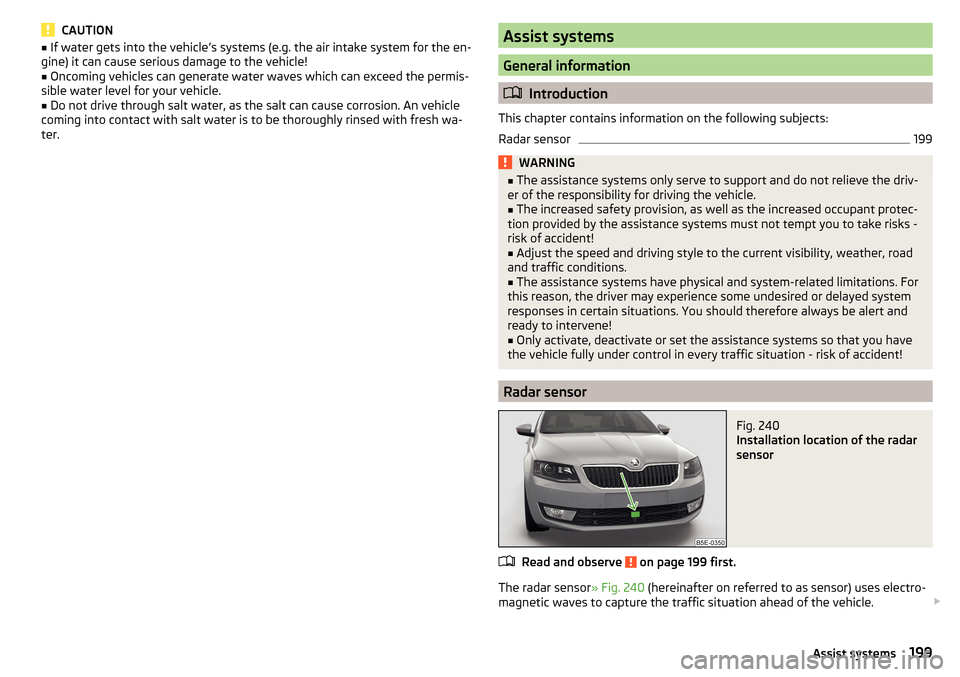
Radar sensor
Fig. 240
Installation location of the radar
sensor
Read and observe on page 199 first.
The radar sensor » Fig. 240 (hereinafter on referred to as sensor) uses electro-
magnetic waves to capture the traffic situation ahead of the vehicle.
199Assist systems
Page 202 of 324

The sensor is a component of the ACC » page 214 and Front Assist
» page 219 systems.
The sensor function may be impaired in the events of one of the following. ▶ The sensor cover is soiled (e.g. with mud, snow etc.).
▶ The area in front of and around the sensor cover is obscured (e.g. by labels,
auxiliary headlights etc.).
▶ When visibility is poor, (e.g. fog, heavy rain, thick snowfall).
If the sensor is covered or dirty, the corresponding message appears in the in-
strument cluster display for the ACC system » page 218, Malfunctions or Front
Assist system » page 221, Malfunctions .WARNING■
If you suspect that the sensor is damaged, deactivate the ACC system and
Front Assist system » page 216» page 220 . Have the sensor checked by a
specialist garage.■
A collision or damage in the front or lower area of the vehicle could affect
the sensor function - there is risk of accident! Have the sensor checked by
a specialist garage.
■
Do not cover the area in front of and around the sensor cover. This can
lead to impaired function of the sensor - risk of accidents!
CAUTION
Remove the snow with a brush and the ice with a solvent-free de-icer.
Braking and stabilisation systems
Introduction
This chapter contains information on the following subjects:
Stability Control (ESC)
200
ESC Sport
200
Anti-lock braking system (ABS)
201
Engine drag torque control (MSR)
201
Traction control (TCS)
201
Electronic Differential Lock (EDL and XDS)
201
Active steering assist (DSR)
202
Brake Assist (HBA)
202
Hill Start Assist (HHC)
202Multicollision brake (MCB)202Trailer stabilisation system (TSA)202
The brake and stabilization systems are automatically activated each time the
ignition is switched on, unless otherwise indicated.
The error display is in Chapter » page 32, Warning lights .
WARNINGThe general information relating to the use of assistance systems must be
observed » page 199, in section Introduction .
Stability Control (ESC)
Read and observe
on page 200 first.
ESC improves vehicle stability in critical driving situations (e.g. if the vehicle
starts to skid) by the braking the individual wheels to maintain the direction.
If there is a TCS intervention, the indicator light flashes in the instrument
cluster.
ESC Sport
Read and observe
on page 200 first.
ESC Sport allows for a sportier driving style. With ESC Sport activated, no ESC
intervention takes place when the vehicle slightly oversteers and understeers,
and ASR is so limited that the drive wheels can be spun.
Activation
›
Press and hold down the
» Fig. 241 on page 201 button.
›
or: On Infotainment, press the button
→ Press the function area
→
ESC system:
→
ESC Sport
.
With activation the warning light
lights up in the instrument cluster and an
appropriate message is displayed in the instrument cluster.
Deactivation
›
Press the
» Fig. 241 on page 201 button.
›
or: On Infotainment, press the button
→ Press the function area
→
ESC system:
→
Activated
.
With deactivation the warning light extinguishes in the instrument cluster
and an appropriate message is displayed in the instrument cluster.
200Driving
Page 203 of 324

Anti-lock braking system (ABS)Read and observe
on page 200 first.
ABS prevents the wheels locking when braking. Thus helping the driver to
maintain control of the vehicle.
The intervention of the ABS is noticeable from the pulsating movements of
the brake pedal which is accompanied by noises.
When the ABS system is active, do not brake periodically or reduce the pres-
sure on the brake pedal.
Engine drag torque control (MSR)
Read and observe
on page 200 first.
MSR counteracts the tendency of the drive wheels to lock during downshifts
or sudden deceleration (e.g. on icy or an otherwise slippery road surface).
If the drive wheels should lock, then the engine speed is automatically in-
creased. This reduces the braking effect of the engine and the wheels can ro-
tate freely again.
Traction control (TCS)
Fig. 241
System button: Vehicle with ESC / vehicle without ESC
Read and observe
on page 200 first.
The ASR prevents spinning of the drive wheels. TCS reduces the drive power transmitted to the wheels in the case of slipping wheels. Thus, for example,
driving on road surfaces with low grip is made easier.
During a TCS intervention, the indicator light flashes in the instrument clus-
ter.
Deactivation›
Press the
» Fig. 241 button.
›
or:press the button
» Fig. 241
›
or: On Infotainment, press the button
→ Press the function area
→
ESC system:
→
ASR off
.
During deactivation the warning light lights up in the instrument cluster
and
an appropriate message is displayed in the instrument cluster.
Activation
›
Press the
» Fig. 241 button.
›
or:press the button
» Fig. 241
›
or: On Infotainment, press the button
→ Press the function area
→
ESC system:
→
Activated
.
During activation extinguished the warning light
is and an appropriate mes-
sage is displayed in the instrument cluster.
The TCS should normally always be enabled. The system should be deactivated
only in the following situations, for example. ▶ When driving with snow chains.
▶ When driving in deep snow or on a very loose surface.
▶ When it is necessary to “rock” a car free when it has become stuck.
Note
On vehicles without the ESC system, the warning light does not illuminate
upon deactivation of the TCS system, but a message is only displayed on the
display of the instrument cluster.
Electronic Differential Lock (EDL and XDS)
Read and observe
on page 200 first.
EDL prevents the turning of the respective wheel of the driven axle. EDL
brakes a spinning wheel if required and transfers the drive power force to the
other drive wheel. Driving becomes easier on road surfaces with different trac-
tion under each wheel of the driven axle.
EDL switches off automatically to avoid excessive heat generation on the
brake of the wheel being braked. Once the brakes have cooled down, there is
an automatic re-activation of EDL.
201Assist systems
Page 205 of 324

OFF ROADmode
Introduction
This chapter contains information on the following subjects:
Operation
203
Hill Descent Assistant
203
ESC OFF ROAD
204
ASR OFF ROAD
204
EDS OFF ROAD
204
ABS OFF ROAD
204
The OFF ROAD mode includes functions that help to overcome routes that are
difficult to navigate when travelling on non-paved roads.
But even with OFF ROAD mode activated, your vehicle is never a true SUV.
WARNINGThe general information relating to the use of assistance systems must be
observed » page 199, in section Introduction .
CAUTION
■
The OFF ROAD mode is not designed for the use on common roads.■All four wheels must be fitted with the same tyres approved by ŠKODA AUTO
to ensure the OFF ROAD mode operates correctly.
Operation
Fig. 242
Button for selecting the driving mode / function surface on the
Infotainment screen
Read and observe and on page 203 first.
OFF ROAD mode intervenes at a speed up to 30 km / h.
We recommend that you activate the OFF ROAD mode for every trip on non-
paved roads.
›
To activate , press the
» Fig. 242 button.
In the Infotainment screen, a running mode menu » Fig. 242 appears.
›
Press the
Offroad
function surface on the Infotainment screen. The warning
light
lights up in the instrument cluster.
›
to deactivate press the button
» Fig. 242 and in the infotainment screen,
choose another mode than the
Offroad
mode.
The following functions are integrated in the OFF ROAD mode.
▶ Hill Descent Assistant » page 203
▶ ESC OFF ROAD » page 204
▶ TCS OFF ROAD » page 204
▶ EDL OFF ROAD » page 204
▶ ABS OFF ROAD » page 204
Note
If the engine “stalls” while driving and is started again within 30 seconds, then
OFF ROAD mode will be automatically activated.
Hill Descent Assistant
Read and observe
and on page 203 first.
The hill descent assistant (hereinafter referred to as assist system), with itsautomatic braking action on all wheels, ensures a constant speed is main-
tained on a steep slope when driving forwards and reversing.
During an intervention of the assistant, the warning light flashes in the in-
strument cluster.
The assistant is automatically engaged under the following conditions. The engine is running.
For vehicles with Manual transmission the shift lever is in the neutral po-
sition and or the 1st, 2nd, 3rd gear, or reverse gear is engaged.
On vehicles with an automatic transmission , the selector lever is in the R,
N, D/S position or in the Tiptronic position.
203Assist systems
Page 206 of 324

The downhill gradient is at least 10 % (when driving over sleepers, the lim-
it can briefly drop to 8 %).
Neither the accelerator nor the brake pedal is operated.
Driving speed
Initiate the downhill decent at a reasonable speed of approx. 2 - 30 km / h the
assist maintains this speed when driving downhill constant.
If a forwards or reverse gear is engaged for vehicles with Manual transmis-
sion , the speed must be high enough to avoid “stalling the engine”.
The driving speed can be changed by the brake or accelerator pedal. This is
true even if the shift lever is in the neutral position and the selector lever in
the N position. The engagement of the assistant is resumed after the pedal is
released.WARNINGFor the correct operation of the assistant the road surface must be suffi-
ciently adherent. The assistant cannot properly fulfil its function on slushy
soil due to physical reasons (e.g. ice or mud). - there is a risk of an accident!
Note
When the wizard brakes the vehicle automatically, then the brake light does
not come on.
ESC OFF ROAD
Read and observe
and on page 203 first.
The ESC OFF ROAD makes driving on a dirt roads easier, as no ESC interven-tions occur when the vehicle is slightly over or under steered.
ASR OFF ROAD
Read and observe
and on page 203 first.
The TCS OFF ROAD makes starting and driving on an unpaved surface easier as
it partially allows wheel-spin.
Note
When disabled, the TCS » page 201 OFF ROAD mode works without the sup-
port of the TCS OFF ROAD.EDS OFF ROAD
Read and observe
and on page 203 first.
The EDS OFF ROAD supports the driver when driving on a surface with differ-
ent grip under the drive wheels or when driving over bumps.
A spinning wheel or wheels are braked earlier and with more force than with
the intervention of the standard EDS system.
ABS OFF ROAD
Read and observe
and on page 203 first.
The ABS OFF ROAD supports the driver when braking on an unpaved surface
(e.g. gravel, snow etc.).
The system generated by a controlled locking of the wheels braked wheel be-
fore a “wedge” of piled material, which shortens the braking distance.
Maximum system efficiency is achieved when the front wheels are in the
straight ahead position.
Parking aid (Park Pilot)
Introduction
This chapter contains information on the following subjects:
Settings in Infotainment
205
Operation
205
Display Infotainment screen
206
Activation / deactivation
206
Automatic system activation when moving forward
207
The parking aid (hereinafter referred to as system) uses acoustic signals on the
Infotainment screen when manoeuvring around obstacles in the vicinity of the
vehicle.
WARNING■ The general information relating to the use of assistance systems must
be observed » page 199, in section Introduction .■
Moving persons or objects may not be recognized by the system sensors.
204Driving