2016 SKODA KODIAQ Passenger Airbag
[x] Cancel search: Passenger AirbagPage 55 of 344
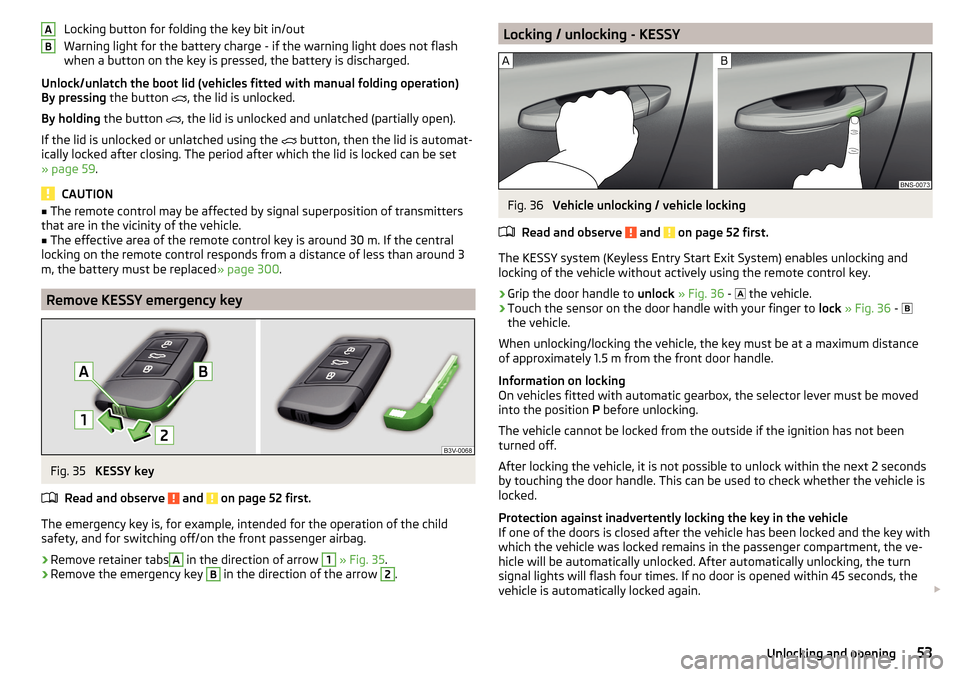
Locking button for folding the key bit in/out
Warning light for the battery charge - if the warning light does not flash
when a button on the key is pressed, the battery is discharged.
Unlock/unlatch the boot lid (vehicles fitted with manual folding operation)
By pressing the button
, the lid is unlocked.
By holding the button
, the lid is unlocked and unlatched (partially open).
If the lid is unlocked or unlatched using the
button, then the lid is automat-
ically locked after closing. The period after which the lid is locked can be set
» page 59 .
CAUTION
■
The remote control may be affected by signal superposition of transmitters
that are in the vicinity of the vehicle.■
The effective area of the remote control key is around 30 m. If the central
locking on the remote control responds from a distance of less than around 3
m, the battery must be replaced » page 300.
Remove KESSY emergency key
Fig. 35
KESSY key
Read and observe
and on page 52 first.
The emergency key is, for example, intended for the operation of the child
safety, and for switching off/on the front passenger airbag.
›
Remove retainer tabs
A
in the direction of arrow
1
» Fig. 35 .
›
Remove the emergency key
B
in the direction of the arrow
2
.
ABLocking / unlocking - KESSYFig. 36
Vehicle unlocking / vehicle locking
Read and observe
and on page 52 first.
The KESSY system (Keyless Entry Start Exit System) enables unlocking and
locking of the vehicle without actively using the remote control key.
›
Grip the door handle to unlock » Fig. 36 -
the vehicle.
›
Touch the sensor on the door handle with your finger to
lock » Fig. 36 -
the vehicle.
When unlocking/locking the vehicle, the key must be at a maximum distance
of approximately 1.5 m from the front door handle.
Information on locking
On vehicles fitted with automatic gearbox, the selector lever must be moved
into the position P before unlocking.
The vehicle cannot be locked from the outside if the ignition has not been
turned off.
After locking the vehicle, it is not possible to unlock within the next 2 seconds
by touching the door handle. This can be used to check whether the vehicle is
locked.
Protection against inadvertently locking the key in the vehicle
If one of the doors is closed after the vehicle has been locked and the key with
which the vehicle was locked remains in the passenger compartment, the ve-
hicle will be automatically unlocked. After automatically unlocking, the turn
signal lights will flash four times. If no door is opened within 45 seconds, the
vehicle is automatically locked again.
53Unlocking and opening
Page 82 of 344

Folding front passenger seatFig. 72
Folding the front passenger seat
forward
Read and observe on page 78 first.
The front passenger seat can, (depending on vehicle equipment fitted), be fol- ded forward into a horizontal position.
›
To fold down , pull the lever in direction of arrow
1
, fold the seat backrest in
the direction of arrow
2
» Fig. 72 . The locking mechanism must audibly snap
into place.
›
To fold up , pull the lever in direction of arrow
1
, fold back the seat backrest
against the direction of arrow
2
. The locking mechanism must audibly snap
into place.
›
Check this by pulling on the seat and on the seat backrest.
WARNING■ If the seat backrest is folded down, only the seat behind the driver´s seat
can be used to transport passengers.■
The front passenger airbag should be switched off when transporting ob-
jects on the seat which was folded forwards » page 22.
■
Do not adjust the seat backrest while driving - it can cause injury and ac-
cidents!
■
When moving the seat backrest, keep limbs out of the area between the
seat and seat backrest – risk of injury!
■
Never transport the following items on the seat backrest when folded
forwards. ■ Objects that could restrict the driver's view.
■ Objects which make it impossible for the driver to control the vehicle,
e.g. if they roll under the pedals, or could protrude into the driver's zone. ■ Objects which could lead to injury to passengers due to a change of di-
rection or braking manoeuvre when accelerating sharply.
Armrest settingFig. 73
Adjust armrest
Read and observe on page 78 first.
›
To adjust the height , lift the armrest in the direction of the arrow
A
into one
of the locking positions » Fig. 73.
›
To close , lift the armrest in the direction of arrow
A
past the stop and then
fold down again.
›
To Set the armrest lengthways in the direction of arrow
B
Move to the de-
sired position.
Rear seats
Introduction
This chapter contains information on the following subjects:
Setting the second seat row
81
Easy Entry function
81
Fold down outer backrests of the second seat row
81
Fold forward middle seat backrest
82
Folding seat backs of the third row of seats up / down
82
Third-row seats fold up / fold down
83
Fold down armrest
8380Operation
Page 255 of 344
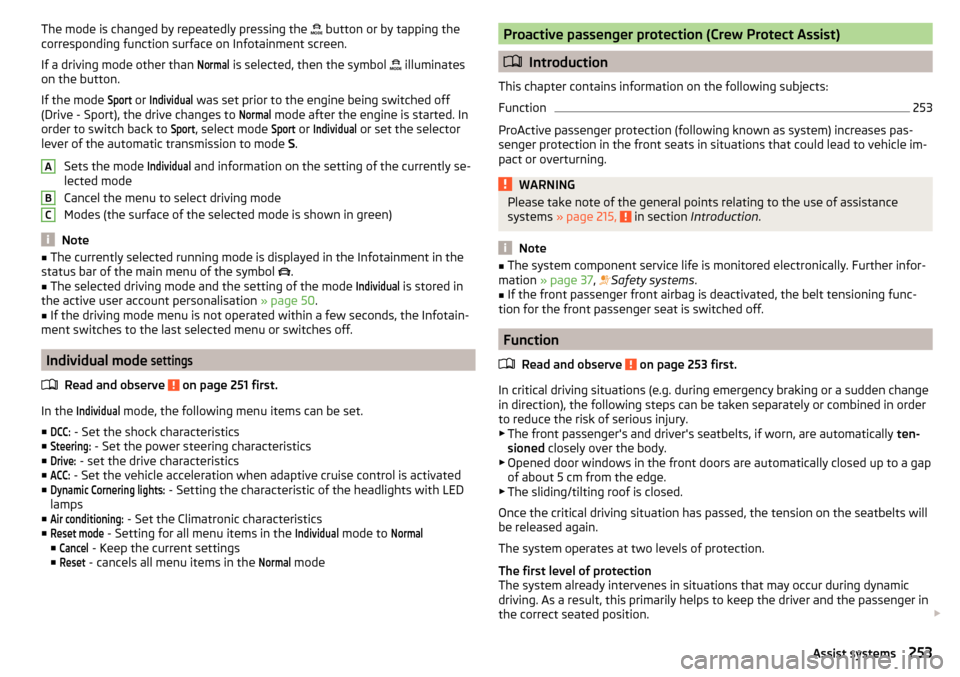
The mode is changed by repeatedly pressing the button or by tapping the
corresponding function surface on Infotainment screen.
If a driving mode other than Normal
is selected, then the symbol
illuminates
on the button.
If the mode
Sport
or
Individual
was set prior to the engine being switched off
(Drive - Sport), the drive changes to
Normal
mode after the engine is started. In
order to switch back to
Sport
, select mode
Sport
or
Individual
or set the selector
lever of the automatic transmission to mode S.
Sets the mode
Individual
and information on the setting of the currently se-
lected mode
Cancel the menu to select driving mode
Modes (the surface of the selected mode is shown in green)
Note
■ The currently selected running mode is displayed in the Infotainment in the
status bar of the main menu of the symbol .■
The selected driving mode and the setting of the mode
Individual
is stored in
the active user account personalisation » page 50.
■
If the driving mode menu is not operated within a few seconds, the Infotain-
ment switches to the last selected menu or switches off.
Individual mode
settings
Read and observe on page 251 first.
In the
Individual
mode, the following menu items can be set.
■
DCC:
- Set the shock characteristics
■
Steering:
- Set the power steering characteristics
■
Drive:
- set the drive characteristics
■
ACC:
- Set the vehicle acceleration when adaptive cruise control is activated
■
Dynamic Cornering lights:
- Setting the characteristic of the headlights with LED
lamps
■
Air conditioning:
- Set the Climatronic characteristics
■
Reset mode
- Setting for all menu items in the
Individual
mode to
Normal
■
Cancel
- Keep the current settings
■
Reset
- cancels all menu items in the
Normal
mode
ABCProactive passenger protection (Crew Protect Assist)
Introduction
This chapter contains information on the following subjects:
Function
253
ProActive passenger protection (following known as system) increases pas-
senger protection in the front seats in situations that could lead to vehicle im-
pact or overturning.
WARNINGPlease take note of the general points relating to the use of assistance
systems » page 215, in section Introduction .
Note
■
The system component service life is monitored electronically. Further infor-
mation » page 37 , Safety systems .■
If the front passenger front airbag is deactivated, the belt tensioning func-
tion for the front passenger seat is switched off.
Function
Read and observe
on page 253 first.
In critical driving situations (e.g. during emergency braking or a sudden changein direction), the following steps can be taken separately or combined in order
to reduce the risk of serious injury.
▶ The front passenger's and driver's seatbelts, if worn, are automatically ten-
sioned closely over the body.
▶ Opened door windows in the front doors are automatically closed up to a gap
of about 5 cm from the edge.
▶ The sliding/tilting roof is closed.
Once the critical driving situation has passed, the tension on the seatbelts will
be released again.
The system operates at two levels of protection.
The first level of protection
The system already intervenes in situations that may occur during dynamic
driving. As a result, this primarily helps to keep the driver and the passenger in
the correct seated position.
253Assist systems
Page 325 of 344

ChangingBatteries for the removable light302
Battery300, 301
Wheels291
Windscreen wiper blades304
Changing a wheel291
Changing gear Selector lever
210
Tiptronic211
Charging a vehicle battery284
Check Brake fluid
282
Engine oil281
Oil level281
Checking Battery status
284
Coolant282
Checks Statutory checks
266
Children and safety23
Child safety lock56
Child seat23
Classification26
I-Size28
Installation location26, 27, 28
ISOFIX27
on the front passenger seat24, 25
TOP TETHER28
Cigarette lighter99
Cleaning the vehicle Interior
273
Outside271
Washing270
Climatronic109
air distribution control113
Automatic operation112
Operate in Infotainment112
Operating elements110
Clock change display
125
Clothes hook94
Cockpit31
Lighting71
Columbus external module
123
infotainment Description121
Comfort flashing67
COMING HOME69
Compartments87
Compatible sources DVD video
154
Pictures152
Component protection267
Computer see multifunction display
46
Conditions for pairing160
Conference call167
Configuration wizard126
Connection with the infotainment Hotspot170
Connect to the hotspot of the external device170
Coolant281
Checking282
Refilling282
Temperature display32
Warning light39
CORNER See Fog lights with CORNER function
69
Correct routing of seat belt
16
Correct seated position12
Correct seating position14
Crew Protect Assist253
Cruise control240
Cruise Control System239
Cup holders90
D
DAB
141, 142
additional information141
Radio Text and images presentation141
set to134, 140
DAB Slideshow141
Data Connection Carstick
171
connection171
Internet171
rSAP171
SIM card171
WIRELESS INTERNET ACCESS171
Data roaming132
Data transfer of external devices127
Date131, 138
DAY LIGHT See Daytime running lights
66
Daytime running lights66
Dazzle73
DCC42, 251
De-icing the windscreen and rear window72
Deactivation Airbag
22
default settings201
Delayed locking of the boot lid See boot lid
59
Delete destination192
Demo mode138, 193
Descent Control System42
Destination Enter destination using the address
183
Favourite192
final destinations184
Home address185
Image with GPS189
Memory192
Destination details192
323Index