2016 Seat Toledo light
[x] Cancel search: lightPage 138 of 248
Operation
Front seat backrest net pockets Fig. 157
Front seats backrests: net pockets. There are net pockets on the inside part of
the fr
ont
se
ats backrests ››› Fig. 157.
These pockets are designed to hold light-
weight objects such as a mobile phone or an
mp3 player. WARNING
● Do not e x
ceed the maximum load that the
net pockets can support. Heavy objects can-
not be safely secured. Risk of injuries! CAUTION
● The net poc k
ets support a maximum load of
150 g.
● Do not place overly large objects in the
pocket
s (e.g. bottles) or objects with sharp
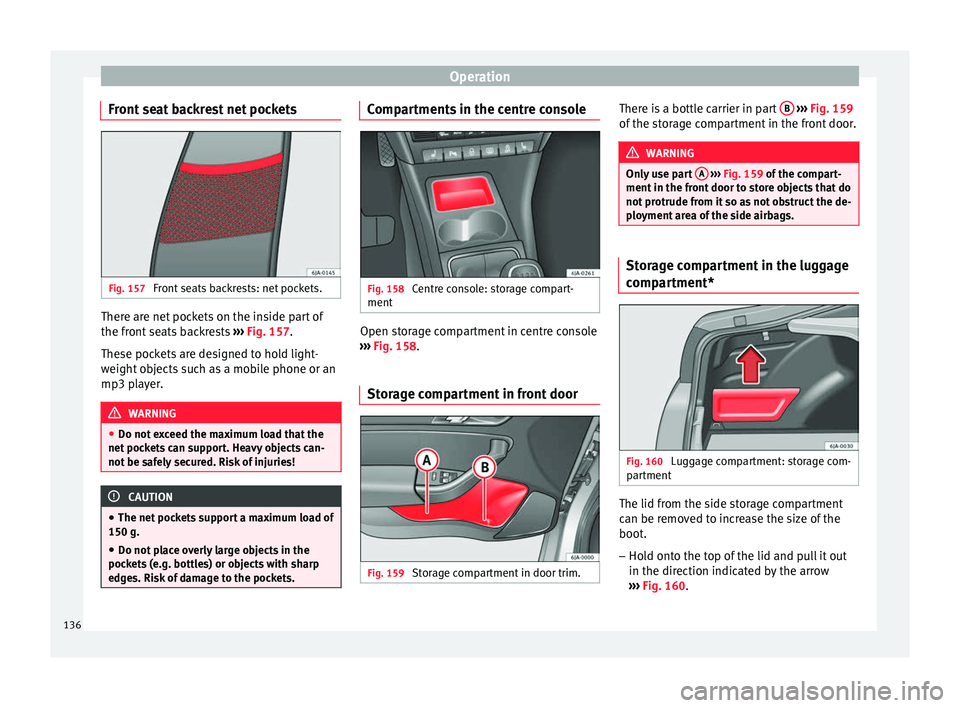
edges. Risk of damage to the pockets. Compartments in the centre console
Fig. 158
Centre console: storage compart-
ment Open storage compartment in centre console
› ›
›
Fig. 158.
Storage compartment in front door Fig. 159
Storage compartment in door trim. There is a bottle carrier in part
B
› ››
Fig. 159
of the s
torage compartment in the front door. WARNING
Only use part A
››› Fig. 159 of
the compart-
ment in the front door to store objects that do
not protrude from it so as not obstruct the de-
ployment area of the side airbags. Storage compartment in the luggage
comp
ar
tment* Fig. 160
Luggage compartment: storage com-
p ar
tment The lid from the side storage compartment
c
an be r
emo
ved to increase the size of the
boot.
– Hold onto the top of the lid and pull it out
in the direction indicat
ed by the arrow
››› Fig. 160.
136
Page 139 of 248

Transport and practical equipment
CAUTION
● The comp ar
tments are designed to hold
small objects with a total weight of 1.5 kg.
● Make sure you do not damage the storage
compar
tment or the boot trim when using the
compartment. Storing objects
Lo a
ding the luggage compartment All luggage and other loose objects must be
s
af
ely
secured in the luggage compartment.
Unsecured objects which shift back and forth
could impair the driving safety or driving
characteristics of the vehicle by shifting the
centre of gravity. – Distribute the load evenly in the luggage
compar
tment.
– Place heavy objects as far forward as possi-
ble in the lug
gage compartment.
– Place the heavy objects first.
– Secure heavy objects to the fastening rings
›››
page 137. WARNING
● Loo se lug
gage and other objects in the lug-
gage compartment could cause serious inju-
ries. ●
Alw a
ys stow objects in the luggage com-
partment and secure them on the fastening
rings.
● Use suitable straps to secure heavy ob-
jects.
● D
uring sudden manoeuvres or accidents,
loose ob
jects can be thrown forward, injuring
vehicle occupants or passers-by. This in-
creased risk of injury will be further increased
if a loose object is struck by an inflating air-
bag. If this happens, objects may shoot out-
ward like a missile. Risk of fatal injury.
● Please note that the centre of gravity may
shift when tr
ansporting heavy objects; this
may affect vehicle handling and lead to an ac-
cident. Therefore, it is essential to adjust
your speed and driving style accordingly, to
avoid accidents.
● Never exceed the allowed axle weights or
allo
wed maximum weight. If said weights are
exceeded, the driving characteristics of the
vehicle may change, leading to accidents, in-
juries and damage to the vehicle.
● Never leave your vehicle unattended, espe-
cia
lly when the rear lid is open. Children
could climb into the luggage compartment,
closing the door behind them; they will be
trapped and run the risk of death.
● Never allow children to play in or around
the vehic
le. Close and lock all the doors and
rear lid when you leave the vehicle. Before
you lock the vehicle, make sure that there are
no adults or children in the vehicle. Note
● Air cir c
ulation in the vehicle helps reduce
fogging of the windows. Used air escapes
through ventilation slits in the side trim of
the luggage compartment. Ensure that the
ventilation slots are never covered.
● Straps for securing the load to the fasten-
ing ring
s are commercially available. Fastening rings*
There can be four fastening rings in the lug-
g
ag
e c
ompartment for fastening luggage and
other objects.
– Always use suitable and undamaged straps
to secur
e luggage and other objects to the
fastening rings ››› in Loading the lug-
g ag
e c
ompartment on page 137.
– Pull up the fastening rings to attach the
strap
s.
During a collision or an accident, even small
and light objects can build up so much ener-
gy that they can cause very severe injuries.
The amount of kinetic “energy” depends on
the speed of the vehicle and the weight of
the object. The most significant factor, how-
ever, is the speed of the vehicle.
Example: An object weighing 4.5 kg is lying
unsecured in the vehicle. During a frontal col-
lision at a speed of 50 km/h (31 mph), this »
137
Technical data
Advice
Operation
Emergencies
Safety
Page 140 of 248

Operation
object generates a force corresponding to 20
time s
its
weight. That means that the effec-
tive weight of the object increases to approxi-
mately 90 kg. You can imagine the severity of
the injuries which might be sustained if this
“object” strikes an occupant as it flies
through the interior of the vehicle. This in-
creased risk of injury will be further increased
if a loose object is struck by an inflating air-
bag. WARNING
● If piec e
s of baggage or other objects are se-
cured to the fastening rings with inappropri-
ate or damaged retaining cords, injuries
could result in the event of braking manoeu-
vres or accidents.
● Never secure a child seat on the fastening
rings. Luggage compartment
Intr oduction Please observe the following points to ensure
the
v
ehic
le handles well at all times:
– Distribute the load as evenly as possible.
– Place heavy objects as far forward in the
luggag
e compartment as possible.
– Secure luggage using the fastening rings or
retainin
g net ›››
page 139. During an accident, even small and light ob-
jects c
an have so much kinetic energy that
they can cause very severe injuries. The
amount of kinetic energy depends on the
speed of the vehicle and the weight of the
object. However, the speed of the vehicle is
the most important factor.
Example: An unsecured object weighing 4.5
kg produces energy corresponding to 20
times its weight in a frontal collision at 50
km/h (31 mph). This means that its weight
reaches around 90 kg. You can imagine the
severity of the injuries that might be sus-
tained if this “projectile” strikes an occupant
as it flies through the vehicle interior. WARNING
● Stor e o
bjects in the luggage compartment
and secure to the fastening points.
● In an accident or sudden manoeuvre, loose
obj
ects in the interior can be flung forward
and possibly injure vehicle occupants or oth-
ers. This risk is even greater if the flying ob-
jects hit a triggering airbag. In this case, any
rebounding objects could injure vehicle occu-
pants. Risk of fatal injuries!
● Take into account that transporting heavy
obj
ects changes the centre of gravity that
could also cause changes in vehicle handling.
Risk of accident! Therefore, always adjust
your speed and driving style to suit these cir-
cumstances. ●
Securin g the lo
ad to the rings using unsuit-
able or damaged straps could lead to injuries
in the event of an accident or sudden braking
manoeuvre. Secure suitable straps safely to
the rings to ensure this does not happen.
● Position the load so it cannot move forward
during a sud
den braking manoeuvre. Risk of
injuries!
● If transporting sharp or dangerous objects
in the spac
e provided when the rear seats are
folded, ensure the safety of the occupant of
the remaining rear seat ››› page 58.
● If the rear seat located alongside a folded
seat i
s occupied, ensure safety, for example,
by placing the load so that it stops the seat
from folding backward in the event of being
hit from behind.
● Never drive with the rear lid open or half-
closed, e
xhaust gases may penetrate into the
interior of the vehicle. Danger of poisoning!
● Never exceed the allowed axle loads or al-
lowed m
aximum weight. Risk of accident!
● Never transport passengers in the luggage
compar
tment! CAUTION
Make sure sharp objects stored in the boot
cannot not
damage the rear window heating
filaments. 138
Page 141 of 248

Transport and practical equipment
Note
Tyre pressure must be adapted to suit the
loa d ›
›› page 216, Useful life of tyres .Category N1 vehicles
Category N1 vehicles with no protection grille
mus
t
use a retaining set compliant with
Standard EN 12195 (1 – 4) to secure the
load.
Retaining elements* Fig. 161
Luggage compartment: retaining el-
ements. The following retaining elements are fitted in
the boot
›
›
› Fig. 161:
Rings to secure the load and the retain-
ing nets.
Rings used solely for the retaining nets.
A B CAUTION
The rings support a maximum load of 3.5 kN
(350 kg). Note
The front ring B is below the folding back-
re s
t of the rear seats ››› Fig. 161. Hook*
Fig. 162
Luggage compartment: hook. There are hooks on both sides of the boot to
sec
ur
e light
items of luggage such as bags,
etc. ›››
Fig. 162. CAUTION
The side hooks support a maximum load of
7.5 kg. Retaining nets*
Fig. 163
Retaining nets. Fig. 164
Retaining nets. Example of securing retaining nets
› ›
›
Fig. 163 and ››› Fig. 164.
Sideways bag
Ground net
Lengthways bag »
A B
C
139
Technical data
Advice
Operation
Emergencies
Safety
Page 146 of 248

Operation
Closing air vents 3 and 4
– Turn the vertical circular control down-
war
d
s.
Changing the direction of air delivery from
air vents 3 and 4
– The air circulation height can be varied by
chan
ging the position of the sliding adjust-
er upwards or downwards ››› Fig. 168 .
– The air circulation direction can be varied
by c
hanging the position of the sliding ad-
juster to the right or to the left.
The flow of air from the vents is controlled us-
ing control C
› ›
› Fig. 169
. Vents 3 ››› Fig. 168
and 4 can be opened and closed individually.
Depending on the position of the adjusters
and on the weather, open vents can provide
air which is either heated, unheated or
cooled. Heating and fresh air
Operation Fig. 169
Heating: controls. Read the additional information carefully
› ›
›
page 38
Temperature selection
– Turn rotary control A
› ›
› Fig. 169
clockwise
to increase the temperature.
– Turn rotary control A anti-clockwise to re-
duc e the t
emper
ature.
Blower selection
– Turn rotary control B
› ›
› Fig. 169
to posi-
tion 1 to 4 to switch the blower on.
– Turn rotary control B to position 0 to
sw it
c
h the blower off. –
Pres
s button 1
› ›› in Air recirculation
on page 145 t
o c
lo se the fresh air vent.
Air distribution selection – Turn rotary control C
› ››
Fig. 169
t
o select
the air vents ››› page 143, Air vents you
wish to activate.
All controls, except control B
› ››
Fig. 169
,
c
an be set to any intermediate position.
Leave the blower activated at all times to pre-
vent the windows from misting over. Note
If the system is set so that all of the air is
used t o defr
ost the windows, no air is sup-
plied to the footwell area. This could limit
heating comfort. Air recirculation
Air recirculation prevents unpleasant smells,
e.
g. when p
a
ssing through a tunnel or in
queuing traffic, from entering the interior.
If the rotary switch C
› ›
›
Fig. 169 is in the
thaw position, the recirculation flap will al-
ways be open (button light off).
If the rotary switch C is switched from any
po sition t
o the thaw position, recirculation
will be automatically deactivated.
144
Page 147 of 248

Air conditioning
Connecting the recirculation
In an y
po
sition of rotary switch C except
th a
w:
● Pr
ess button 1
› ››
Fig. 169
, the sw
itch's
lamp will light up, indicating that air recircu-
lation inside the vehicle has been activated.
Disconnecting the recirculation
In any position of rotary switch C except
th a
w:
● Pr
ess button 1 again and the button's
l amp w
i
ll go off, indicating that air recircula-
tion from the outside has been activated.
In the thaw position of rotary switch C , the
entr y
of
air into the vehicle interior is always
from the outside. WARNING
Read and observe the safety warnings ›››
in
Genera l
notes on page 142. Air conditioning (manual)*
Gener a
l
notesThe air cooling system only works if
A/C but-
t on 2
› ›
›
Fig. 170 ›››
page 145 is pressed
and under following conditions:
● The engine is running, ●
The outside temper
ature is above +2°C
(+36°F),
● The blower control is in position 1–4.
When the coolin
g system is on and under cer-
tain conditions, air can be blown from the
vents at a temperature of approximately +5°C
(+41°F). In the event of prolonged, irregular
distribution of the air flow from the outlets
and significant differences in temperature,
e.g. on leaving the vehicle, sensitive people
may catch cold. Note
A visit to the specialised service once a year
is r
ecommended to clean the air conditioning
system. Manual operation
Fig. 170
Air conditioning: controls. Read the additional information carefully
› ›
›
page 37
Temperature selection – Turn rotary control A
› ››
Fig. 170
c
lockwise
to increase the temperature.
– Turn rotary control A anti-clockwise to re-
duc e the t
emper
ature.
Blower selection
– Turn rotary control B
› ››
Fig. 170
t
o posi-
tion 1 to 4 to switch the blower on.
– Turn rotary control B to position 0 to
sw it
c
h the blower off.
– Press button
1
› ›
› p
age 146, Air recir-
culation to close the fresh air vent.
Air distribution selection – Turn rotary control C
› ›
› Fig. 170
to select
the air vents ››› page 143 you wish to acti-
vate.
Switching cooling on and off
– Press the button A/C
2
› ›
› Fig. 170
and
the lamp in the button will illuminate.
– Press the A/C
2 button again and the
light in the b
utt
on will switch off. »
145
Technical data
Advice
Operation
Emergencies
Safety
Page 148 of 248

Operation
Coldest setting – On turning control A to the coldest setting
(b lue indic
at
or), buttons 1
and
2 A/C
, light up
– The recirculation function is activated auto-
matic
al
ly in order to cool faster. Note
● If the air di s
tribution is directed towards
the windows, all, of the heating power is
used to defrost the windscreen. No warm air
is directed to the footwell area. This could
limit heating comfort.
● The AC button lamp will illuminate after
the sys t
em has been switched on, even if not
all of the conditions for cooling system oper-
ations are met. Cooling is indicated as availa- ble once all of the conditions are met
›› ›
page 145, General notes . Air recirculation
Air recirculation prevents unpleasant smells,
e.g. when p
a
ssing through a tunnel or in
queuing traffic, from entering the interior.
If the rotary switch C
››› Fig. 170 i
s in the
thaw position, the recirculation flap will al-
ways be open (button light off).
If the rotary switch C is switched from any
po s
ition t
o the thaw position, recirculation
will be automatically deactivated.
Connecting the recirculation
In any position of rotary switch C except
th a
w: ●
Pr
es
s button 1
› ››
Fig. 170
, the sw itch's
lamp will light up, indicating that air recircu-
lation inside the vehicle has been activated.
Disconnecting the recirculation
In any position of rotary switch C except
th a
w:
● Pr
ess button 1 again and the button's
l amp w
i
ll go off, indicating that air recircula-
tion from the outside has been activated.
In the thaw position of rotary switch C , the
entr y
of
air into the vehicle interior is always
from the outside. WARNING
Read and observe the safety warnings ›››
in
Genera l
notes on page 142. 146
Page 149 of 248

Air conditioning
Climatronic* (automatic air conditioning) Gener a
l
notes Fig. 171
Climatronic: controls. Read the additional information carefully
› ›
›
page 36
Climatronic automatically maintains a com-
fortable temperature. To do so, it automati-
cally regulates the supplied air temperature
and the blower and air distribution levels.
The system also allows for the effect of sun-
light, so there is no need for manual adjust-
ment. It also has a humidity sensor that
helps to automatically demist the wind-
screen.
Automatic operations ››› page 148 guaran-
tee maximum comfort any time of year. Climatronic description
Coolin
g only works if the following conditions
are met:
● The engine is running
● the outside temperature is above +2°C
(+36°F);
● A/C
18
› ››
Fig. 171
sw
itched on.
Starting the Climatronic
The corresponding function will be switched
on when a button is pressed, turning on the
air conditioning if it was switched off, with
the exception of button 17
›
› ›
Fig. 171
(recir-
culation). Switching off the Climatronic
●
Turn control 10 to the left until the seg-
ments of
c
olumn 9
› ››
Fig. 171
sw itch off.
● After 1 second has elapsed, turn the control
again t
o switch off the display.
In order to ensure engines subject to heavy
loads are cooled, the air conditioning com-
pressor is switched off in the event of high
coolant temperatures.
Recommended setting for all seasons of the
year
● Set the required temperature. We recom-
mend +22°C (72°F). »
147
Technical data
Advice
Operation
Emergencies
Safety