2016 Seat Toledo bulb
[x] Cancel search: bulbPage 88 of 248

Emergencies
– Remo
v
e connector ››› Fig. 92 1 by pulling
outw ar
d.
– Unc
lip the retainer spring ›››
Fig. 92 2 pressing clockwise and inwards.
– Extract the bulb and fit the replacement so
th at
the lug on the b
ase fits into the recess
on the reflector.
– Fit the connector.
– Fit the protective cover. Make sure that the
cov
er fits correctly on the housing during
operation.
– Replace the wheel housing cover.
– Check whether the new bulb is working.
Changing turn signal bulbs Fig. 93
Changing turn signal bulbs. –
Raise the bonnet. –
Turn the b
u
lb holder ››› Fig. 93 1 anti-
c loc
k
wise and remove it.
– Remove the bulb by pressing on the bulb
holder and t
urning it anti-clockwise at the
same time.
– Fit the replacement bulb in the bulb holder
and turn cloc
kwise as far as it will go.
– Check whether the new bulb is working.
Changing daytime driving light bulbs Fig. 94
Changing daytime driving light bulbs. –
Raise the bonnet.
– Turn the bulb holder ›
››
Fig. 94 1 anti-
c loc
k
wise and remove it.
– Remove the bulb by pressing on the bulb
holder and t
urning it anti-clockwise at the
same time. –
Fit the rep
lacement bulb in the bulb holder
and turn clockwise as far as it will go.
– Check whether the new bulb is working.
Changing the fog light bulbs Front f
og light bulb Fig. 95
Front fog light. Fig. 96
Front fog light.86
Page 89 of 248
Fuses and bulbs
– Remo
v
e the bolt ››› Fig. 95 1 from the fog
light gri
l
le with a screwdriver.
– Subsequently, remove the clips located on
the edge of the gri
lle with gentle leverage.
– Remove the bolts (3x) ›››
Fig. 96 2 to re-
mo v
e the f
og light.
– Remove the metal clip situated on the up-
per part
of the fog light by pulling towards
the exterior of the vehicle ››› Fig. 96 3 .
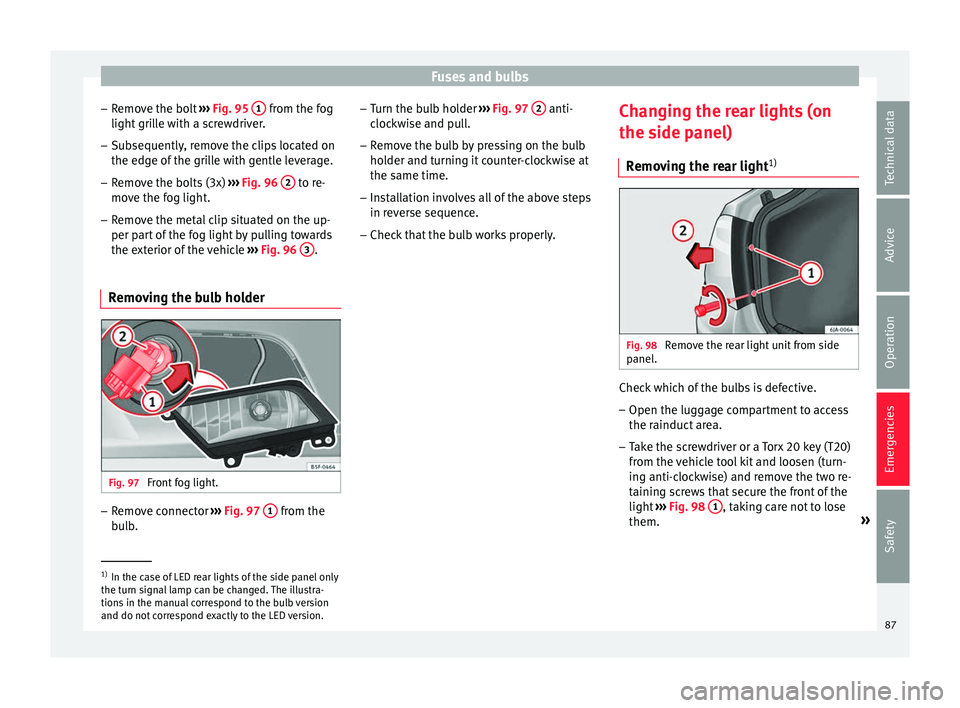
Removing the bulb holder Fig. 97
Front fog light. –
Remove connector ››
›
Fig. 97 1 from the
b u
l
b. –
Turn the bu
lb holder ››› Fig. 97 2 anti-
c loc
k
wise and pull.
– Remove the bulb by pressing on the bulb
holder and t
urning it counter-clockwise at
the same time.
– Installation involves all of the above steps
in rever
se sequence.
– Check that the bulb works properly. Changing the rear lights (on
the side panel)
R
emoving the rear light 1) Fig. 98
Remove the rear light unit from side
p anel
. Check which of the bulbs is defective.
– Open the luggage compartment to access
the r ainduct
ar
ea.
– Take the screwdriver or a Torx 20 key (T20)
from the v
ehicle tool kit and loosen (turn-
ing anti-clockwise) and remove the two re-
taining screws that secure the front of the
light ›››
Fig. 98 1 , taking care not to lose
them. »1)
In the case of LED rear lights of the side panel only
the turn s ign
al lamp can be changed. The illustra-
tions in the manual correspond to the bulb version
and do not correspond exactly to the LED version. 87
Technical data
Advice
Operation
Emergencies
Safety
Page 90 of 248

Emergencies
– Pu
l
l the rear light unit backward ( ››› Fig. 98
2 ) to remove the light from its housing.
Removing the bulb holder Fig. 99
Light connector at the rear of the rear
light u
nit
. Fig. 100
Retaining screws on reverse side of
r e
ar light
unit. –
Di s
c
onnect the light connector A ›››
Fig. 99 b y moving its side levers (arrows)
and p u
lling the connector outwards.
– Place the light on a level, horizontal surface
on top of a sof
t cloth so as not to scratch
the outer glass.
– Unscrew the four retaining screws from the
bul
b holder anti-clockwise using a screw-
driver or a Torx 20 key (T20) from the vehi-
cle tool kit ››› Fig. 100. Take care not to lose
the bulb holder retaining screws.
Changing bulbs Fig. 101
Position of the bulbs in the bulb
ho l
der The bulbs are secured with a bayonet fasten-
er
.
The t
able below gives an overview of the
bulb positions. –
Lightly pre
ss the defective bulb into the
bulb holder, then turn it anti-clockwise and
remove it.
– Fit the new bulb, pressing it into the bulb
holder and t
urn it clockwise as far as it will
go.
– Use a cloth to remove any fingerprints from
the glas
s part of the bulb.
– Check that the new bulb works properly.
– Replace the bulb holder.
– Screw in the bulb holder using the four
scr
ews, turning them clockwise.
Position of the bulbs
››› Fig. 101Bulb function
ATurn signals: PY21W NA LL
BSide lights-brake lights: P21/5W
CSide lights: P21/5W Note
Check the condition of the seal. If damaged, a
rep l
acement can be acquired from an Official
Service. 88
Page 91 of 248

Fuses and bulbs
Fitting the rear light Fig. 102
Fit the tail light unit. Fig. 103
Fit the tail light unit. –
Make sure the connector is correctly in
pl
ac
e. –
Pres
s the rear light unit backwards (driving
direction) by fitting the fastenings into the
rubber mountings ››› Fig. 102 A .
– Take the screwdriver or a Torx 20 key (T20)
from the
v
ehicle tool kit and tighten (turn-
ing clockwise ››› Fig. 103) the two retaining
screws that secure the front of the light.
Changing tail lights (on the
rear lid) R
emoving the bulb holder 1) Fig. 104
Remove the cover from the boot lid. Fig. 105
Remove the bulb holder. The rear lid must be open to change the
b
u
l
bs.
You can access the bulb holder for the inner
tail lights through the inside of the rear lid.
– Check which of the bulbs is defective. »1)
For rear-lid LED rear lights, only the reverse and
retr o f
og bulb can be replaced. The illustrations in
the manual correspond to the bulb version and do
not correspond exactly to the LED version. 89
Technical data
Advice
Operation
Emergencies
Safety
Page 92 of 248

Emergencies
– Open the c o
v
er to access the lights, turning
it by hand in the direction indicated by the
arrows.
– Access the lights by disconnecting the con-
nector 1
› ››
Fig. 105
and unscrewing
the bulb holder ››› Fig. 105 . Take care not
to lose the bulb holder retaining screw.
– Change the bulbs ›››
page 90.
Changing bulbs Fig. 106
Position of the bulbs in the bulb
ho l
der The bulbs are secured with a bayonet fasten-
er
.
The t
able below gives an overview of the
bulbs ››› table on page 90.
– Lightly press the defective bulb into the
bul
b holder, then turn it anti-clockwise and
remove it. –
Fit the new bu
lb, pressing it into the bulb
holder and turn it clockwise as far as it will
go.
– Use a cloth to remove any fingerprints from
the glas
s part of the bulb.
– Check that the new bulb works properly.
– Re-install the bulb holder ›››
page 90.
– Screw in the bulb holder.
Pos
ition of the bulbs
››› Fig. 106Bulb function
AReversing lights: P21W
BSide lights: R5W LL
CFog lights: P21W Note
One of the two sides may not be fitted with a
fog light, dependin g on the c
ountry and type
of driving. In this case, the hole for the light
is covered. Fitting the bulb-holder
–
Position the bulb holder on the tail light
and align it so th
at
it is securely seated.
– Screw in the bulb holder using the corre-
sponding s
crew. –
Make s
ure the connector is correctly in
place.
– Close the inner trim cover. Note
Check the condition of the seal. If damaged, a
rep l
acement can be acquired from an Official
Service. 90
Page 93 of 248

Fuses and bulbs
Changing the bulb on the num-
ber p l
at
e
Removing the bulb holder Fig. 107
Removing number plate light Fig. 108
Changing the bulb. –
Unscrew the screws to remove the bulb
› ›
›
Fig. 107. –
Remov
e the bulb, moving it in the direction
of the arrow and outwards ››› Fig. 108.
– Installation involves all of the above steps
in rever
se sequence. Note
Depending on how equipped the vehicle is,
the number pl at
e lights may be LEDs. LEDs
have an estimated life that exceeds than that
of the car. If a light with LEDs fails, go to an
authorised workshop for replacement. 91
Technical data
Advice
Operation
Emergencies
Safety
Page 119 of 248

Lights and visibility
It lights up
Main beam on or flasher on
››› page 118.
It lights up
Bulb failure
››› page 83
For example, the information display indicates:
Check front right dipped headlight! Several warning and control lamps light up
for a f
ew sec
onds when the ignition is switch-
ed on, signalling that the function is being
verified. They will switch off after a few sec-
onds. WARNING
Observe the safety warnings ›››
in Warning
and contr o
l lamps on page 98. Note
The rear side lights and number plate light
cont ain sev
eral bulbs. The control lamp
lights up only when there is a fault in all the
number plate bulbs or side light bulbs (of a
combined tail light). Therefore it is advisable
to regularly check the bulb operation. Side light and dipped beam headlight
Fig. 129
Instrument panel: light control. Switching on side lights
– Turn the light switch ››
›
Fig. 129 to position
.
Switching on dipped beam
– Turn the light switch ›››
Fig. 129 to position
.
Switching off lights (except daytime driving
lights) – Turn the light switch ›››
Fig. 129 to position
0. Main light range control
Fig. 130
Instrument panel: light range con-
tr o
l
. –
Turn the control ››
›
Fig. 130 to set the lights
to the required setting.
Positions
The control positions roughly correspond to
the following vehicle load conditions. Two front occupants, luggage compart-
ment empty.
All seats occupied, luggage compartment
empty.
All seats occupied, luggage compartment
fully loaded.
Driver only, luggage compartment fully
loaded. CAUTION
Always adjust the range of the lights so that: » -
1
2
3
117
Technical data
Advice
Operation
Emergencies
Safety
Page 121 of 248

Lights and visibility
Convenience turn signals
F or the c
on
venience turn signals, move the
lever as far as possible upwards or down-
wards and release the lever. The turn signal
will flash three times.
The convenience turn signals are activated
and deactivated in the Easy Connect system
via the key and the
Set
up function button
› ›
›
page 99.
In vehicles that do not have the correspond-
ing menu, this function can be deactivated in
a specialised workshop.
Main beams
● Switch on the dipped beam ›››
page 117.
● Press the lever ›››
Fig. 131 forward in the di-
rection indicated by arrow 3 .
● Pull the lever back to its original position in
the dir ection indic
at
ed by arrow 4 to switch
the m ain be
am off
.
Headlight flasher
● Pull the lever ›››
Fig. 131 towards the steer-
ing wheel (point of resistance) in the direc-
tion indicated by arrow 4 .
P ark
in
g lights
● Instructions for use ›››
page 121. CAUTION
Never use the main beam headlights or the
hea dlight
flasher if they could dazzle other
drivers. Note
● If the c on
venience turn signals are operat-
ing (three flashes) and the other convenience
turn signals are switched on, the active part
stops flashing and only flashes once in the
new part selected.
● The turn signals only work when the igni-
tion is sw
itched on. The corresponding warn-
ing lamp or flashes in the general instru-
ment panel.
● The turn signals switch off automatically
when the steerin
g wheel is returned to the
straight-ahead position.
● If a turn signal bulb is defective, the control
lamp fla
shes at double speed. Automatic dipped beam control
If the light switch is in this position
› ›
› Fig. 129, the side lights, headlights and
the number plate lights will turn on or off au-
tomatically.
The light is adjusted according to the data re-
corded by the light sensor that is installed
between the windscreen and the inside rear
view mirror. If the light switch is in position
, the sym-
bol
located next to the light switch will il-
luminate. If the light illuminates automatical-
ly, symbol located next to the light switch
will also illuminate.
Automatic headlights in case of rain
If the light switch is in position and is
connected to the automatic wipe in case of
rain for more than 10 seconds or wipe (posi-
tion 2 or
3 ) for longer than 15 seconds,
› ›
›
page 125 then the side lights and head-
lights will automatically switch on.
The light automatically switches off if more
than 4 minutes have elapsed and the auto-
matic wipe or wipe (position 2 or
3 ) have
not been sw
it
ched on. CAUTION
Do not cover the windscreen light sensor with
stic k
ers or similar objects; this could impair
operation. 119
Technical data
Advice
Operation
Emergencies
Safety