2016 Seat Mii change wheel
[x] Cancel search: change wheelPage 94 of 232
Operation
Opening and closing V ehic
l
e key set
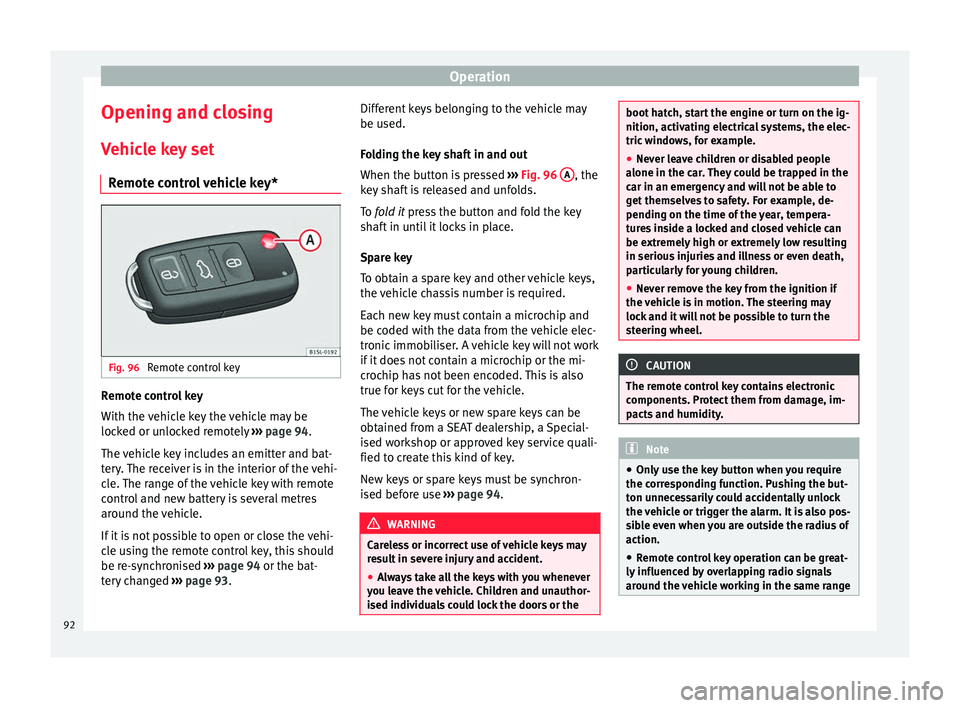
Remote control vehicle key* Fig. 96
Remote control key Remote control key
W
ith the
v
ehicle key the vehicle may be
locked or unlocked remotely ››› page 94.
The vehicle key includes an emitter and bat-
tery. The receiver is in the interior of the vehi-
cle. The range of the vehicle key with remote
control and new battery is several metres
around the vehicle.
If it is not possible to open or close the vehi-
cle using the remote control key, this should
be re-synchronised ››› page 94 or the bat-
tery changed ››› page 93. Different keys belonging to the vehicle may
be used.
Fo
lding the key shaft in and out
When the button is pressed ››› Fig. 96 A , the
k ey
sh
aft is released and unfolds.
To fold it press the button and fold the key
shaft in until it locks in place.
Spare key
To obtain a spare key and other vehicle keys,
the vehicle chassis number is required.
Each new key must contain a microchip and
be coded with the data from the vehicle elec-
tronic immobiliser. A vehicle key will not work
if it does not contain a microchip or the mi-
crochip has not been encoded. This is also
true for keys cut for the vehicle.
The vehicle keys or new spare keys can be
obtained from a SEAT dealership, a Special-
ised workshop or approved key service quali-
fied to create this kind of key.
New keys or spare keys must be synchron-
ised before use ››› page 94. WARNING
Careless or incorrect use of vehicle keys may
re s
ult in severe injury and accident.
● Always take all the keys with you whenever
you le
ave the vehicle. Children and unauthor-
ised individuals could lock the doors or the boot hatch, start the engine or turn on the ig-
nition, activatin
g el
ectrical systems, the elec-
tric windows, for example.
● Never leave children or disabled people
alone in the car
. They could be trapped in the
car in an emergency and will not be able to
get themselves to safety. For example, de-
pending on the time of the year, tempera-
tures inside a locked and closed vehicle can
be extremely high or extremely low resulting
in serious injuries and illness or even death,
particularly for young children.
● Never remove the key from the ignition if
the vehic
le is in motion. The steering may
lock and it will not be possible to turn the
steering wheel. CAUTION
The remote control key contains electronic
component s. Pr
otect them from damage, im-
pacts and humidity. Note
● Only u
se the key button when you require
the corresponding function. Pushing the but-
ton unnecessarily could accidentally unlock
the vehicle or trigger the alarm. It is also pos-
sible even when you are outside the radius of
action.
● Remote control key operation can be great-
ly influenced b
y overlapping radio signals
around the vehicle working in the same range 92
Page 135 of 232

Driving
Recommended settings in case of heating
and fr e
sh air sy
stem, and manual air condi-
tioning.
● Disconnect the air recirculation.
● Select speed o from the blo
wer.
● Put the temperature control in the inter-
mediate po
sition.
● Open and direct all of the air outlets on the
dash p
anel .
● Turn the air distribution regulator to the de-
sired po
sition.
● Manual air conditioning: pres
s the button
on the control panel to connect the cool-
in g.
The air i
s dehumidified in the cooling
mode.
Recommended settings in case of Climatron-
ic
● Press the button on the control panel.
● Set the temperature to +22 °C (+72 °F).
● Open the air vents on the dash panel and
dir ect
them.
M
aximum cooling or heating output in case
of Climatronic
While in gear, the maximum cooling and
heating output is set by pressing button 1or
2 several times
›
››
Fig. 144. The tempera-
ture is not regulated. ●
Maximum coo
ling output: set the cooling
below +16 °C (+60 °F). The following appears
on the screen LO.
● Maximum heating output: set the coo
ling
above +29 °C (+84 °F). The following appears
on the screen HI .
Dust and pollen filter
The dirt and pollen filter must be changed
regularly so that the air conditioning output
does not decrease.
If the vehicle is used frequently in areas
where the outside air is very contaminated, it
is possible that you may have to change the
filter prior to the next suggested service.
Water under the vehicle
When the outside humidity and ambient tem-
perature are high, it is possible that conden-
sation water may drip from the cooling evap-
orator and a puddle may from below the vehi-
cle. This is normal and does not indicate a
leak! Driving
St eerin
g
Intr
oduction The power steering* is not hydraulic but elec-
tromec
h
anical. The advantage of this steer-
ing system is that it disposes of hydraulic
tubes, hydraulic oil, the pump, filter and oth-
er components. The electromechanical sys-
tem saves fuel. While a hydraulic system re-
quires oil pressure to be maintained, electro-
mechanical steering only requires energy
when the steering wheel is turned.
With the power steering system, the assisted
steering function automatically adjusts ac-
cording to the vehicle speed, the steering tor-
que and the wheel turning angle. The power
steering only works when the engine is run-
ning. WARNING
If the power steering is not working then the
st eerin
g wheel is much more difficult to turn
and the vehicle more difficult to control.
● The power steering only works when the
engine is
running.
● Never allow the vehicle to move when the
engine is
switched off.
● Never remove the key from the ignition if
the vehic
le is in motion. The steering may » 133
Technical data
Advice
Operation
Emergencies
Safety
Page 138 of 232

Operation
in the car in an emergency and not be able to
get
themselv
es to safety. For example, de-
pending on the time of the year, tempera-
tures inside a locked and closed vehicle can
be extremely high or extremely low resulting
in serious injuries and illness or even death,
particularly for young children.
● Never remove the key from the ignition if
the vehic
le is in motion. The steering may
lock and it will not be possible to turn the
steering wheel. CAUTION
● An attempt t
o start the engine while driving
or starting the engine immediately after turn-
ing it off can cause damage to the engine or
starter motor.
● When the engine is cold, avoid high revs
and heavy ac
celeration and do not make the
engine work hard.
● Do not push or tow start the engine. Un-
burnt f
uel could damage the catalytic con-
verter. For the sake of the environment
Do not warm the engine at idle speed; start
drivin g immedi
ately if the visibility is OK.
This helps the engine reach operating tem-
perature faster and reduces emissions. Note
● If the k ey
is left in the ignition lock with the
engine off for long periods, the vehicle bat-
tery will run flat.
● For automatic gearbox vehicles, the key can
only be r
emoved from the ignition lock if the
gear selector lever is in position N. In this
case, press and release the selector lever
locking button.
● Electrical devices with a high power con-
sumption are sw
itched off temporarily when
the engine starts.
● When the engine is started cold, there may
be stron
g vibrations for a few moments for
technical reasons. This is quite normal, and
no cause for concern.
● Natural gas engines always start up with
petrol, a
s a certain operating temperature is
required for running with gas. Once the re-
quired operating temperature is reached, the
engine will change to operate with natural
gas. Stopping the engine
Switching off the engine
– Stop the vehicle ››
›
.
– Turn the ignition key to position 1 ›››
Fig. 145. Engaging the steering wheel lock
In
v
ehic
les with automatic gearbox, the igni-
tion key can only be removed when the selec-
tor lever is in position N.
– Remove the key from the ignition in posi-
tion 1
› ››
Fig. 145
›
›› .
– Turn the steering wheel until you hear it en-
gag
e.
P
ossible vehicle theft is prevented with the
steering lock engaged. WARNING
Never switch off the engine while the vehicle
is mo
ving. You may lose control of the vehicle
and there is a risk of serious accident.
● The airbags and belt tensioners do not
work when the ignition i
s switched off.
● The brake servo does not work with the en-
gine off. T
o stop, the brake pedal must be
pressed with more force.
● As the power steering does not work if the
engine is
not running, you will need more
strength to steer than normally.
● If the key is removed from the ignition, the
steerin
g may lock and it will not be possible
to steer the vehicle. 136
Page 141 of 232

Driving
wheels lock this could result in loss of vehicle
contr
o
l! If possible, reduce your speed and
drive carefully to a specialised workshop
close by to check the brake system. During
the following journey, avoid sudden braking
and manoeuvres.
● If the ABS warning lamp does not
go out
or if it lights while driving, the ABS is mal-
functioning. The vehicle can only be stopped
using normal braking without ABS. The pro-
tection provided by the ABS is not available.
Visit a specialised workshop as soon as pos-
sible. CAUTION
Failure to heed the warning lamps when they
appe ar m
ay result in faults in the vehicle. Brake assist systems
The assisted braking systems ESC*, ABS,
EB
V
, B
AS, ASR, TC and EDL only operate when
the ignition is switched on. They contribute
significantly to increasing active safety.
Electronic Stability Control (ESC)*
ESC* reduces the risk of skidding and increa-
ses the vehicle stability by braking individual
wheels under specific driving conditions.
ESC* detects critical handling situations, such as understeer, oversteer and wheelspin
on the driven wheels.
The system stabilises
the vehicle by braking individual wheels or
by reducing the engine torque.
The ESC* has limits. It is important to realise
that ESC* is also subject to the laws of phys-
ics. ESC* will not be able to deal with all sit-
uations with which drivers may be faced. For
example, if the road surface changes sudden-
ly then ESC* will not be useful in all cases. If
the vehicle suddenly enters a section cov-
ered by water, mud or snow then ESC* will
not provide assistance in the same way as on
dry ground. If the vehicle loses its grip on the
ground and moves on a film of water (“aqua-
planing”), the ESC* will not be able to help
the driver control the vehicle due to the loss
of adherence with the road surface prevent-
ing braking and steering. If the vehicle is
driven through series of bends at high
speed, the ESC* will not always be as effec-
tive: the vehicle reaction to aggressive driv-
ing is not the same as at reduced speeds.
Adjust your speed and driving style to suit
visibility, and weather, road and traffic condi-
tions. ESC* cannot push the limits of the laws
of physics; improve the transmission availa-
ble or maintain the vehicle on the road if a
lack of driver attention creates an inevitable
situation. Otherwise, ESC* assists in main-
taining vehicle control in extreme situations and uses the movements of the steering
made b
y the driver to maintain the vehicle
moving in the desired direction. If the vehicle
is driven at such a speed that it will leave the
road before ESC* can intervene then the sys-
tem cannot provide assistance.
The ABS, BAS, ASR and EDL systems are in-
corporated into the ESC*. The ESC* is always
on 1)
.
Anti-lock system (ABS)
ABS can prevent the wheels from locking dur-
ing braking until just before the vehicle stops
thus helping the driver to steer the vehicle
and maintain control. This means that, even
during full braking, the risk of skidding is re-
duced: ● Press and hold the brake pedal fully. Do not
remov
e your foot from the brake pedal or re-
duce braking force!
● Do not “pump” the brake pedal, or reduce
brakin
g force!
● Maintain vehicle direction when braking
ful
ly.
● When the brake pedal is released or when
the brake f
orce is reduced, ABS is turned off.
ABS control can be observed by vibration of
the brake pedal and noise. You should never »1)
Depending on the version.
139
Technical data
Advice
Operation
Emergencies
Safety
Page 142 of 232

Operation
expect the ABS to reduce the braking dis-
t anc
e u
nder any circumstances. This distance
will increase when driving on gravel, recent
snow or on icy or slippery ground.
Brake assist system (BAS)
The brake assist system may reduce the re-
quired braking distance. The brake assist
system boosts the braking force if you press
the brake pedal quickly in an emergency. As
a result, the braking pressure increases rap-
idly, the braking force is multiplied and the
braking distance is reduced. This enables the
ABS to be activated more quickly and effec-
tively.
¡Do not lift your foot off the brake pedal!
When the brake pedal is released or when
the brake force is reduced, braking assist au-
tomatically turns off the brake servo.
Traction control system (ASR) or Traction
Control (TC)*
In the event of wheelspin, the traction control
system ASR or TC reduces the engine torque
to match the amount of grip available. The
ASR or TC makes some situations easier, for
example, when starting, accelerating or go-
ing uphill, even in unfavourable road condi-
tions. Electronic differential lock (EDS)
EDL is
available when driving in straight lines
under normal conditions. When the EDL de-
tects wheelspin, it brakes the spinning wheel
and directs the power to the other one. To
prevent the disc brake of the braked wheel
from overheating, the EDL cuts out automati-
cally if subjected to excessive loads. The EDL
will switch on again automatically when the
brake has cooled down. WARNING
Driving at high speed on icy, slippery or wet
grou nd c
an result in loss of vehicle control
and serious injury to the driver and passen-
gers.
● Adjust your speed and driving style to visi-
bility
, road, traffic and weather conditions.
Even though the brake assist systems, ABS,
BAS, EDL, ASR and ESC* provide more securi-
ty, do not take unnecessary risks while driv-
ing.
● Brake assist systems can not overcome the
law
s of physics. Even with ESC* and other
systems, slippery and wet roads will always
be dangerous.
● Driving to quickly on wet ground can result
in the wheels lo
sing contact with the ground
in an effect known as “aquaplaning”. Without
adherence, it is impossible to brake, steer or
control the vehicle.
● Brake assist systems cannot avoid acci-
dents if
, for example, the driver does not re- spect safety distances or drives to quickly in
difficu
lt
conditions.
● Even though brake assist systems are ex-
tremely eff
ective and help control the vehicle
in difficult situations, remember that the ve-
hicle stability depends on tyre grip.
● When accelerating on a slippery surface,
for ex
ample on ice or snow, press the acceler-
ator carefully. The wheels can still slip even
with brake assist systems resulting in loss of
vehicle control. WARNING
The effectiveness of the ESC* can be consid-
erab ly
reduced if other components and sys-
tems affecting driving dynamics are not main-
tained or are not functioning correctly. This
includes, among others, brakes, tyres and
other systems already mentioned.
● Remember that changing and fitting other
components
to the vehicle can affect opera-
tion of the ABS, BAS, ASR TC, EDL and ESC*.
● Changes to the vehicle suspension or using
unap
proved wheel/tyre combinations can af-
fect operation of the ABS, BAS, ASR, TC, EDL
and ESC* and their effectiveness.
● Likewise, the effectiveness of ESC* de-
pends on the u
se of suitable tyres
››› page 199.140
Page 145 of 232

Driving
If the brake servo does not operate or the ve-
hic l
e mu
st be towed, then the brake pedal
will have to be pressed with more force given
that the braking distance will be increased
when the brake servo does not operate ››› .
WARNING
New brake pads do not brake to full efficien-
cy.
● For the fir
st 320 km, new brake pads have
not y
et reached their maximum braking ca-
pacity, and need to be “run in” first. For this,
to compensate for reduced braking efficiency
the brake pedal will have to be pressed with
more force.
● To avoid losing control of the vehicle and
caus
ing serious accidents, always take great
care when driving with new brake pads.
● When running in new brake pads, always
res
pect the safety distances between you and
other vehicles and do not cause situations re-
quiring extreme braking performance. WARNING
When brakes overheat, braking is less effi-
cient and br
aking distances increase.
● When driving on slopes, brakes can be
overlo
aded and overheat quickly.
● Reduce speed or change down a gear when
faced w
ith steep and long slopes. This allows
you to use the engine braking effect and to
reduce the strain on the brake system. ●
Non-s t
andard or damaged front spoilers
could restrict the airflow to the brakes and
cause them to overheat. WARNING
Wet, frozen or salt-covered brakes take lon-
g er t o en
gage and this increases braking dis-
tances.
● Test the brakes carefully.
● Dry the brakes, free them of ice and salt by
brakin
g gently several times, when visibility,
weather, and road and traffic conditions per-
mit. WARNING
Driving without the brake servo may signifi-
cantly inc
rease the braking distance and re-
sult in a severe accident.
● Never allow the vehicle to move forwards
when the engine is
switched off.
● If the brake servo does not operate or the
vehicl
e must be towed, then the brake pedal
will have to be pressed with more force given
that the braking distance will be increased
when the brake servo does not operate. CAUTION
● Never m ak
e the brakes “slip” by pressing
the pedal gently, if it is not really necessary
to brake. Continuously pressing on the brake
pedal will heat the brakes. This could signifi-
cantly reduce braking power, increase brak- ing distance or even result in the total failure
of the br
ak
e system.
● Reduce speed or change down a gear when
faced w
ith steep and long slopes. This allows
you to use the engine braking effect and to
reduce the strain on the brake system. Other-
wise, the brakes may overheat and fail. Only
use the brakes to reduce speed or to stop. Note
Make use, when having the front brake pads
c hec k
ed, and have the rear pads checked al-
so. The thickness of the brake pads should be
checked visually and regularly, by looking
through the openings in the wheel rims or
from underneath the vehicle. If necessary, re-
move the wheels to check them thoroughly.
SEAT recommends taking your car in for tech-
nical service. Changing gear
Intr oduction When reverse gear is engaged and the igni-
tion i
s
sw
itched on the following takes place:
● Reverse lights light up.
● The rear wiper blade performs one move-
ment when the wind
screen wiper is activa-
ted. »
143
Technical data
Advice
Operation
Emergencies
Safety
Page 147 of 232

Driving
Manual gear change Fig. 147
Gear shift pattern of a 5-speed man-
ual g
e
arbox Read the additional information carefully
› ›
›
page 26
Shifting down a gear
Shifting down a gear while driving must be
carried out gear by gear, i.e. to the gear im-
mediately preceding the current gear and at
an engine speed that is not excessive ››› .
At high s
peed
s, or high engine speeds, skip-
ping one or various gears when shifting
down a gear can cause damage to the clutch
and the gearbox, even if the clutch is not en-
gaged during the process ››› .
WARNING
When the engine is running, the vehicle will
st ar
t to move as soon as a gear is engaged
and the clutch released. ●
Never en g
age the reverse gear when a vehi-
cle is moving forward. WARNING
As a consequence of shifting down a gear in-
c orr ectly
, you may lose control of the vehicle
and cause an accident with serious conse-
quences. CAUTION
If, at high speeds or high engine speeds, the
ge ar l
ever is shifted down to a gear that is too
low, serious damage can be caused to the
clutch and gearbox. This may also happen if
you press the clutch pedal and it does not en-
gage. CAUTION
To prevent damage and avoid premature
we ar
, please observe the following:
● While driving, do not leave your hand rest-
ing on the ge
ar stick. The pressure applied by
your hand is transmitted to the gearbox se-
lector forks.
● Always ensure that the vehicle is complete-
ly st
opped before engaging the reverse gear.
● When changing gear, always make sure the
clutc
h pedal is pushed right to the floor.
● Never hold the vehicle “on the clutch” on
hill
s with the engine on. Automatic gear change
Fig. 148
Automatic gearbox diagram of gears Read the additional information carefully
› ›
›
page 26
Put the selector lever into position N for:
● Starting up the engine
● Remove the key from the ignition switch
● Engage the steering wheel lock
Move the sel
ector lever to the D or R position
to:
● Park the vehicle
● Repair a puncture
● Changing a wheel
To mov
e the gear selector lever from the posi-
tion N to D or to R, first press and hold the
brake pedal. »
145
Technical data
Advice
Operation
Emergencies
Safety
Page 148 of 232

Operation
In the instrument panel display, with the igni-
tion sw it
c
hed on, the selected gear range or
the gear engaged in the gearbox is shown.
- Reverse gear
Reverse gear is selected. Engage only when
the vehicle is stopped.
- Neutral
The gearbox is in neutral. No movement is
transmitted to the wheels and the engine
does not act as a brake.
- Standard driving position
The gears are changed (up and down) auto-
matically. The gear shifts are determined by
the engine load, your individual driving style
and the speed of the vehicle.
- Tiptronic driving position (manual shift
programme)
All gears can be changed (up and down)
manually ››› page 146. This is possible as
long as the system is not changing gear auto-
matically due to a traffic situation. WARNING
Placing the selector lever in an incorrect posi-
tion ma y
cause loss of control of the vehicle
and a serious accident.
● Do not press the accelerator when engag-
ing a ran
ge of gears. ●
With the en gine ru
nning and a gear range
selected, the vehicle will move when the ac-
celerator is pressed.
● Never engage reverse gear while driving.
● Unintentional movements of the vehicle
coul
d cause serious injury.
● As a driver, you should never leave your ve-
hicle if
the engine is running and a gear range
is engaged. If you have to leave your vehicle
while the engine is running, you must always
apply the handbrake and put the selector lev-
er in position N.
● Never engage the R gear range when the
vehicl
e is moving.
● Never leave the vehicle without applying
the handbrak
e. With the engine running the
vehicle moves downhill regardless of the gear
range selected. Note
If, while driving, the selector lever is acciden-
ta l
ly placed in position N, lift your foot off the
accelerator. Wait until the engine is running
at idle speed before selecting a new gear
range. Engaging gear with Tiptronic
Fig. 149
Lever in the Tiptronic position With Tiptronic, the gears can be changed up
or do
wn m
anual
ly with the automatic gear-
box. When you change to the Tiptronic pro-
gramme, the vehicle remains in the currently
selected gear. This is possible as long as the
system is not changing gear automatically
due to a traffic situation.
Using Tiptronic
● Place the lever in the position D to the lef
t
on the Tiptronic shift gate M ››› in Auto-
m atic
g
ear change on page 146.
● Press the lever forwards + or backwards
– to move up or down a gear
››
›
Fig. 149.
● Place the lever back to the position M to
the lef
t on the Tiptronic shift gate, to leave
Tiptronic mode ››› in Automatic gear
c h
an
ge on page 146.
146