2016 Seat Leon 5D brake
[x] Cancel search: brakePage 217 of 324
Driver assistance systems
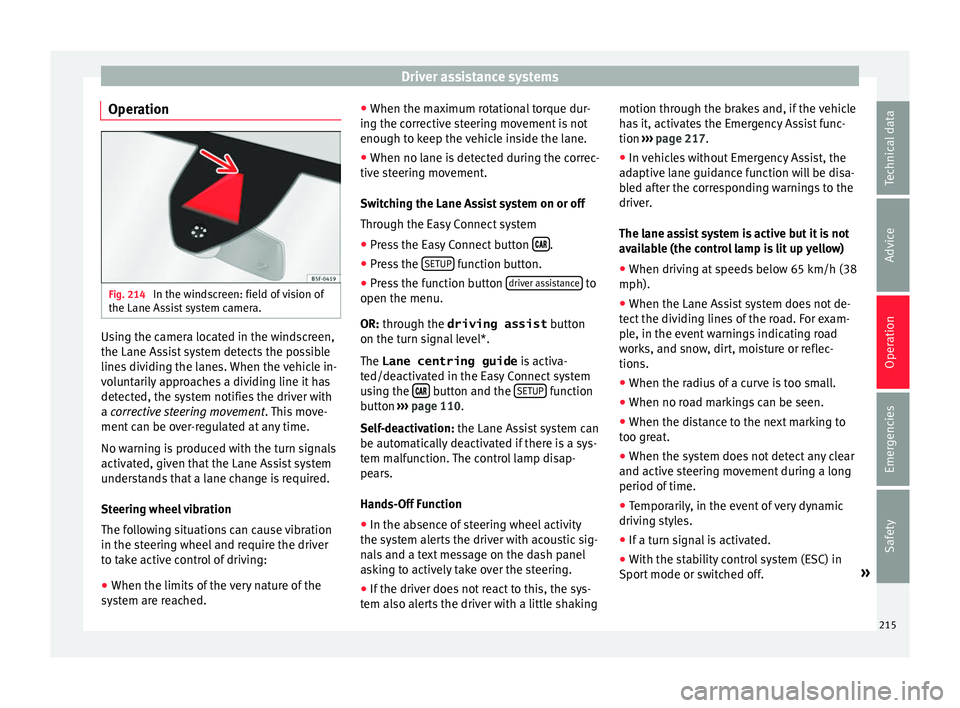
Operation Fig. 214
In the windscreen: field of vision of
the Lane As s
i
st system camera. Using the camera located in the windscreen,
the Lane As
s
i
st system detects the possible
lines dividing the lanes. When the vehicle in-
voluntarily approaches a dividing line it has
detected, the system notifies the driver with
a corrective steering movement . This move-
ment can be over-regulated at any time.
No warning is produced with the turn signals
activated, given that the Lane Assist system
understands that a lane change is required.
Steering wheel vibration
The following situations can cause vibration
in the steering wheel and require the driver
to take active control of driving:
● When the limits of the very nature of the
syst
em are reached. ●
When the maximum r
otational torque dur-
ing the corrective steering movement is not
enough to keep the vehicle inside the lane.
● When no lane is detected during the correc-
tive st
eering movement.
Switching the Lane Assist system on or off
Through the Easy Connect system
● Press the Easy Connect button .
● Press the S
ETUP function button.
● Press the function button driv
er a
s
sistance to
open the menu.
OR: thr ough the driving assist
b
utt
on
on the turn signal level*.
The Lane centring guide is activa-
ted/deactivated in the Easy Connect system
using the button and the
S
ETUP function
b utt
on ›
›› page 110.
Self-deactivation: the Lane Assist system can
be automatically deactivated if there is a sys-
tem malfunction. The control lamp disap-
pears.
Hands-Off Function
● In the absence of steering wheel activity
the syst
em alerts the driver with acoustic sig-
nals and a text message on the dash panel
asking to actively take over the steering.
● If the driver does not react to this, the sys-
tem also al
erts the driver with a little shaking motion through the brakes and, if the vehicle
has
it, activates the Emergency Assist func-
tion ››› page 217.
● In vehicles without Emergency Assist, the
adaptiv
e lane guidance function will be disa-
bled after the corresponding warnings to the
driver.
The lane assist system is active but it is not
available (the control lamp is lit up yellow)
● When driving at speeds below 65 km/h (38
mph).
● When the Lane Assist system does not de-
tect the div
iding lines of the road. For exam-
ple, in the event warnings indicating road
works, and snow, dirt, moisture or reflec-
tions.
● When the radius of a curve is too small.
● When no road markings can be seen.
● When the distance to the next marking to
too gre
at.
● When the system does not detect any clear
and active st
eering movement during a long
period of time.
● Temporarily, in the event of very dynamic
driving s
tyles.
● If a turn signal is activated.
● With the stability control system (ESC) in
Sport
mode or switched off. »
215
Technical data
Advice
Operation
Emergencies
Safety
Page 218 of 324

Operation
Note
● Bef or
e starting a journey, verify that the
field of vision of the camera is not covered
››› Fig. 214.
● Always keep the field of vision of the cam-
era cl
ean. Switching off the Lane Assist system
in the fo
l
lowing situationsDue to the limits of the Lane Assist system,
sw
it
c
h it off in the following situations:
● When more attention is required of the
driver
● When drivin
g in a sporty style
● In unfavourable weather conditions
● On roads in poor condition
● In areas of road works Note
The Lane Assist system deactivates when
drivin g belo
w 60 km/h (37 mph).Traffic Jam Assist
D e
s
cription and operation
››
›
table on page 2 Traffic Jam Assist helps the driver keep the
car w
ithin its
lane and to move in convoy in
case of traffic congestion or slow traffic.
Traffic Jam Assist is an additional function of
Lane Assist ››› page 213 and combines Lane
Assist functions with Adaptive Cruise Control
(ACC) ››› page 196. Therefore, it is essential
that you read these two chapters carefully
and note the limitations of the systems and
the information about them.
Operation of Traffic Jam Assist
At speeds of below 60 km/h (40 mph), Traffic
Jam Assist can maintain a (temporary) dis-
tance preset by the driver with respect to the
vehicle ahead and help stay within the lane
››› .
T o do thi
s, the sy
stem automatically controls
the acceleration, brakes and steering, and
slows down the vehicle until it stops fully
when behind another vehicle that is stop-
ping. It then automatically moves off again
when the car in front does so.
Traffic Jam Assist is designed only for use on
motorways and wide roads. Therefore, never
use it in city traffic.
Switching Traffic Jam Assist on and off
If Lane Assist is on, ›››
page 213 Traffic Jam
Assist is switched on and off in the infotain-
ment system using the button and theSETUP and
Driv
er a
s
sistance function buttons
› ›
›
page 27.
It is activated by switching on Lane Assist
and the lane centring guide in the infotain-
ment system. If the lane centring guide is not
active, the Traffic Jam Assist system is not ac-
tive
Traffic Jam Assist may be disconnected using
the button for driver assistance systems to-
gether with Lane Assist ›››
page 31.
Technical requirements for using Traffic Jam
Assist
● Lane Assist must be activated ›››
page 213,
Lane Assist system*.
● Adaptive Cruise Control (ACC) must be con-
nected and active ›
›› page 196.
● The selector lever must be in the D/S posi-
tion or in the
Tiptronic selection track.
● The speed must be below 60 km/h
(38 mph).
● The lane centring guide must be active
›››
page 215.
Traffic Jam Assist is not active (the Lane As-
sist control light turns yellow) ● If any of the conditions mentioned on
page 216, T
echnical requirements for using
Traffic Jam Assist are no longer met.
216
Page 219 of 324

Driver assistance systems
● If an
y
of the conditions required for opera-
tion of the Lane Assist are not met
››› page 213.
● If any of the conditions necessary for the
adaptiv
e cruise control (ACC) to work are no
longer fulfilled ››› page 196.
Situations in which Traffic Jam Assist must
be switched off
Due to the limitations of the system, Traffic
Jam Assist must always be switched off in the
following situations:
● When more attention is required by the
driver.
● When driv
ing in a very sporty style.
● In adverse weather conditions, e.g. in case
of sno
w or heavy rain.
● When driving on roads in poor condition.
● In sections with roadworks.
● In city journeys. WARNING
The smart technology incorporated into Traf-
fic Jam As s
ist cannot defy the laws of phys-
ics; it only works within the limits of the sys-
tem. Accidents and severe injury may occur if
Traffic Jam Assist is used negligently or invol-
untarily. The system is not a replacement for
driver awareness.
● Adapt your speed and safe distance to the
vehicl
e in front of you at all times to suit the visibility, weather, road and traffic condi-
tions.
● Do not u
se Traffic Jam Assist in city jour-
neys.
● Do not u
se Traffic Jam Assist if there is poor
vis
ibility, for example, in case of snow, ice,
rain or loose gravel, or on steep or slippery
sections or flooded roads.
● Do not use Traffic Jam Assist offroad or on
roa
ds where the surface is not firm. Traffic
Jam Assist has been designed for use on
paved roads only.
● Traffic Jam Assist does not react to people
or animal
s or vehicles crossing your path or
that approach you head-on down the same
lane.
● If Traffic Jam Assist does not reduce speed
sufficiently
, brake the vehicle immediately by
applying the pedal.
● If the vehicle continues to move when you
wish it
to stop after a driver intervention
prompt, brake the vehicle by applying the
pedal.
● If driver intervention is requested on the
da
sh panel display, immediately resume con-
trol of the vehicle.
● Keep your hands on the wheel at all times
to be re
ady to intervene in the steering at any
time. The driver is always responsible for
keeping the vehicle in its own lane.
● Always be prepared to take charge of driv-
ing (acc
elerating or braking) yourself. Note
● If T
raffic Jam Assist does not work as de-
scribed in this chapter, stop using it and con-
tact a specialised workshop.
● If the system is faulty, take it to a special-
ised work
shop and have it checked. Emergency Assist
De s
cription and operation Emergency Assist detects whether there is in-
activ
ity
b
y the driver and can automatically
keep the car within the lane and stop it alto-
gether if necessary. This way the system can
actively help avoid an accident.
Emergency Assist is an additional function of
Lane Assist ›››
page 213 and combines Lane
Assist functions with Adaptive Cruise Control
(ACC) ›››
page 196. Therefore, it is essential
that you read these two chapters carefully
and note the limitations of the systems and
the information about them.
Operation of Emergency Assist
Emergency Assist detects when the driver
ceases to perform any activity and repeatedly
requests that he/she regain active control of
the vehicle, through the use of optical and
acoustic warnings and by applying the
brakes. »
217
Technical data
Advice
Operation
Emergencies
Safety
Page 220 of 324

Operation
If the driver continues to do nothing, the sys-
t em aut
om
atically takes over the accelerator,
brakes and steering in order to brake the ve-
hicle and keep it in its lane ››› . If the re-
m ainin
g br
aking distance is sufficient, if nec-
essary the system slows down the vehicle un-
til it stops completely and automatically
switches on the electronic parking brake
››› page 172.
When the Emergency Assist is actively adjust-
ing, the hazard warning lights come on
››› page 135 and the vehicle makes slight zig-
zag movements in the lane in order to warn
other drivers.
Switching the Emergency Assist on and off
The Emergency Assist is switched on auto-
matically when the Lane Assist is switched on
››› page 213.
Technical requirements for using the Emer-
gency Assist ● The adaptive cruise control (ACC) must be
switc
hed on ››› page 196.
● The Lane Assist must be switched on
›››
page 213.
● The selector lever must be at the D/S posi-
tion or in the
Tiptronic selection track.
● The system must have detected a lane sep-
aration line on both side
s of the vehicle
››› Fig. 213. The following conditions may cause the
Emergency
Assist not to react or to switch off
automatically:
● If the driver accelerates, brakes or moves
the steerin
g wheel.
● If any of the conditions mentioned in
›››
page 218, Technical requirements for us-
ing the Emergency Assist are not fulfilled.
● If any of the conditions required for opera-
tion of the Lane Ass
ist are not met
››› page 213.
● If any of the conditions necessary for the
adaptiv
e cruise control (ACC) to work are no
longer fulfilled ››› page 196. WARNING
The smart technology incorporated into the
Emerg ency
Assist cannot overcome the limits
imposed by the laws of physics; it only works
within the limits of the system. The driver is
responsible for driving the vehicle.
● Adapt your speed and safe distance to the
vehicl
e in front of you at all times to suit the
visibility, weather, road and traffic condi-
tions.
● Keep your hands on the wheel at all times
to be re
ady to intervene in the steering at any
time.
● The Emergency Assist alone cannot always
avoid acc
idents or serious injuries.
● If the operation of the Emergency Assist is
impaired, f
or example if the radar sensor of the adaptive cruise control (ACC) or the Lane
Ass
i
st camera are covered or have lost their
settings, the system may intervene inoppor-
tunely in braking or in steering.
● The Emergency Assist does not react to
people or anim
al or vehicles crossing your
path or which approach you head-on in the
same lane. WARNING
If the Emergency Assist Intervenes inoppor-
t u nely
, serious accidents and injuries may oc-
cur.
● If the Emergency Assist does not operate
properly, sw
itch off the Lane Assist
››› page 213. Doing so will also switch off the
Emergency Assist.
● Have the system checked by a specialised
workshop
. SEAT recommends visiting a SEAT
dealership for this. Note
● Autom atic
interventions by the Emergency
Assist on the brakes may be interrupted by
pressing the accelerator or brake or by mov-
ing the wheel.
● Hazard warning lights that come on auto-
matica
lly can be switched off by pressing the
accelerator or the break, moving the steering
wheel or pressing the hazard warning light
switch. 218
Page 233 of 324

Driver assistance systems
The Easy Connect system screen will only dis-
p l
a
y objects detected at the front, and the ve-
hicle's trajectory will be hidden.
Braked manoeuvre function* 3 Valid only with Parking system plus
If an o
bstacle is detected while reversing, the
braked manoeuvre function activates the
emergency brake. Depending on the equip-
ment, the braked manoeuvre function can al-
so activate the emergency brake while mov-
ing forwards.
The emergency braking function helps to
minimise collisions. The vehicle's speed
must be no higher than 10 km/h.
The braked manoeuvre function is active or
inactive when the parking light is lit or off, re-
spectively. If the emergency brake has been
activated, the function will remain inactive
until the gear is changed.
The limitations of Parking Aid apply.
The braked manoeuvre function is configured
in the Easy Connect system with the but-
t on and the f
u
nction buttons SETUP and
P ark
in
g and manoeuvring .
● on – enables use of the braked ma-
noeu
vre function.
● off – disab
les use of the braked ma-
noeuvre function. Temporary suppression of emergency brak-
ing
● When de activ
ating the function with the
Braked m
anoeuvre button, which appears on
the P ark
in
g aid screen of the Easy Connect
system.
● When any of the doors, the rear lid or the
bonnet are opened.
R
ear Assist “Rear View Cam-
era”*
Operatin
g and safety warnings WARNING
● The Re ar As
sist does not make it possible
to precisely calculate the distance from ob-
stacles (people, vehicles, etc.) and nor can it
overcome the system's own limits, hence us-
ing it may cause serious accidents and inju-
ries if used negligently or without due care.
The driver should be aware of his/her sur-
roundings at all times to ensure safe driving.
● The camera lens expands and distorts the
field of
vision and displays the objects on the
screen in a different, vague manner. The per-
ception of distances is also distorted by this
effect.
● Some objects may, due to the resolution of
the disp
lay screen - not be displayed in a sat-
isfactory manner or may not be displayed at all. Take special care with thin posts, fences,
rai
lin
gs or trees that might not be displayed
on screen and could damage the vehicle.
● The rear assist has blind spots where it is
not pos
sible to represent people or objects
(small children, animals and certain objects
cannot be detected in its field of vision). Mon-
itor the vehicle's surrounding area at all
times.
● Keep the camera lens clean, free of ice and
snow
, and do not cover it.
● The system is not a replacement for driver
awar
eness. Supervise the parking operation
at all times, as well as the vehicle's surround-
ing area. Adapt your speed and driving style
at all times to suit visibility, weather, road
and traffic conditions.
● Do not be distracted from the traffic by
looking at
the screen.
● The images on the rear assist screen are
only tw
o-dimensional. Due to a lack of spatial
depth, protruding parts or holes in the road,
for example, are more difficult to detect or
may not be seen at all.
● Vehicle load modifies the representation of
the orientation lines
displayed. The width
represented by the lines diminishes with ve-
hicle load. Pay special attention to the vehi-
cle's surroundings when the inside of the ve-
hicle of the luggage compartment is carrying
a heavy load.
● In the following situations, the objects or
other vehic
les shown in the navigation sys-
tem display appear to be further away or » 231
Technical data
Advice
Operation
Emergencies
Safety
Page 234 of 324

Operation
closer than they really are: Pay special atten-
tion:
– On mov in
g from a horizontal plane to a
slope.
– On moving from a slope to a horizontal
plane.
– If the vehicle is heavily loaded at the
rear.
– When the vehicle approaches objects
that are not on the ground surface or are
jutting out from it. These objects may al-
so be outside the camera's angle of vi-
sion when reversing. Note
● It i s
important to take great care and pay
special attention if you are not yet familiar
with the system.
● Rear assist will not be available if the vehi-
cle's
rear lid is open. Instructions for use
Fig. 223
On the rear bumper: location of the
r e
ar a
ssist camera A camera on the rear bumper aids the driver
durin
g r
ev
erse parking or manoeuvring
››› Fig. 223. The camera image is viewed to-
gether with orientation lines projected by the
system on the Easy Connect system screen.
The bottom of the screen displays part of the
bumper corresponding to the number plate
area that will be used as reference by the
driver.
Rear assist settings:
Rear assist offers the user the possibility to
change the image's brightness, contrast and
colour settings.
To change these settings:
● Park the vehicle in a safe place.
● Apply the parking brake. ●
Switc
h the ignition on.
● If necessary, switch on the Easy Connect
syst
em.
● Engage reverse gear or turn the selector
lever t
o position R.
● Press the function b
utton displayed on
the right of the image.
● Make the desired adjustments on the menu
by pr
essing the –/+ function buttons or by
moving the corresponding scroll button.
Necessary conditions for parking and ma-
noeuvring with the rear assist
The system should not be used in the follow-
ing cases:
● If the image displayed is not very reliable or
is di
storted, for example low visibility or dirty
lens.
● If the area behind the vehicle is not dis-
pla
yed very clearly or is incomplete.
● If the vehicle is heavily loaded at the rear.
● If the position and installation angle of the
camera h
ave been changed, e.g. after a rear-
end collision. Have the system checked by a
specialised workshop.
Familiarising yourself with the system
To familiarise yourself with the system, the
orientation lines and their function, SEAT rec-
ommends practising parking and manoeu-
vring with the rear assist in a place without
232
Page 242 of 324

Operation
Exterior mirrors
Chec k
whether
you can see enough of the
road behind the trailer with the standard rear
vision mirrors. If this is not the case, you
should have additional exterior mirrors fitted.
Both exterior mirrors should be mounted on
hinged extension brackets. Adjust the mirrors
to give sufficient vision to the rear.
Tow rope
Always use a cable between the vehicle and
the trailer ››› page 240.
Trailer rear lights
The trailer's rear lights should comply with
the statutory safety regulations ››› page 240. WARNING
Never transport people in a trailer. This could
re s
ult in fatal accidents. Note
● To w
ing a trailer places additional demands
on the vehicle. We recommend additional
services between the normal inspection inter-
vals if the vehicle is used frequently for tow-
ing a trailer.
● Find out whether special regulations apply
to to
wing a trailer in your country. Hitching and connecting the trailer
Fig. 236
Schematic diagram: assignment of
the pins of
the trailer's electrical socket.
Key of the Schematic diagram ››› Fig. 236:
PinMeaning
1Left turn signal
2Rear fog light
3Earth, pins 1, 2, 4 to 8
4Right turn signal
5Rear light, right
6Brake lights
7Rear light, left
8Reverse lights
9Permanent live
10Cable without positive charge
11Earth, pin 10
Key of the Schematic diagram ››› Fig. 236:
PinMeaning
12Unassigned
13Earth, pin 9 Electrical socket for trailer
The v
ehic
le is fitted with a 13-pole power
socket for the electrical connection between
the trailer and the vehicle. If the system de-
tects that a trailer has been connected elec-
trically, the electrical equipment on the trailer
will receive voltage through this connection.
Pin 9 has a permanent live. This powers, for
example, the trailer's interior lighting. Pin 10
is only powered when the engine is running.
The charge wire (pin 10) charges, for exam-
ple, a caravan battery.
Pin 9 and 10 should not be connected to
each other to avoid discharging or damaging
the vehicle's battery.
The earth wires, pin 3, pin 11 and pin 13,
should never be connected to each other to
avoid overloading the electrical system.
If the trailer has a 7-contact connector , you
will need to use an adapter cable. In this case
the function corresponding to pin 10 will not
be available.
240
Page 243 of 324

Towing bracket device
Trailer maximum electricity consumptionBrake lights (total)84 Watts
Turn signal, on each side42 Watts
Side lights (total)100 Watts
Rear lights (total)42 Watts
Rear fog light42 Watts
Never exceed the values indicated! Note
● If the r e
ar lights of the trailer are not cor-
rectly connected, the vehicle electronics may
be damaged.
● If the trailer absorbs excessive electric cur-
rent, the v
ehicle electronics may be dam-
aged.
● Never connect the trailer's electric system
directly t
o the electrical connections of the
tail lights or any other power sources. Only
use the connections intended for providing
electric current to the trailer. Ball coupling of towing bracket de-
v
ic
e* The ball coupling is provided with instruc-
tions
on fittin
g and removing the ball cou-
pling of the towing bracket. WARNING
The towing bracket ball coupling must be
st or
ed securely in the luggage compartment
to prevent them being flung through the vehi-
cle and causing injury. Note
● By l
aw, the ball coupling must be removed
if a trailer is not being towed if it obscures
the number plate. Driving with a trailer
Fig. 237
Turn the 13-pin connector Before driving
● Grip the 13-pin connector at area A and
r emo
v
e it in the direction of the arrow
››› Fig. 237.
● Remove the protective cover 5
› ›
› Fig. 225
up
wards.
After driving
● Grip the 13-pin connector at area A and
in ser
t
it in the opposite direction to the arrow
››› Fig. 237.
● Fit the protective cover 5
› ›
›
Fig. 225 on
the ball coupling. »
241
Technical data
Advice
Operation
Emergencies
Safety