2016 Seat Ateca low beam
[x] Cancel search: low beamPage 136 of 328

Operation
Fog lights Fig. 134
Dash panel: light control. The warning lamps
or also sho
w, on the
light switch or instrument panel, when the
fog lights are on.
● Switching on front fog lights* : pu
ll the
light switch to the first point ››› Fig. 134 1 ,
fr om po
sitions , or .
● Switching on the rear fog light : com-
p
letely pull the light switch 2 from position
, or .
● T
o switch off the fog lights, press the light
swit
ch or turn it to position .Cornering lights*
1) When turning slowly or on very tight bends,
the c
ornerin
g lights are activated automati-
cally. The cornering lights may be integrated
in the fog lights and are switched on only at
speeds of less than 40 km/h (25 mph).
When reverse gear is engaged, the cornering
lights on both sides of the vehicle switch on,
in order to better illuminate the area for park-
ing.
Function “Coming home”
› ›
›
table on page 2
This function may be connected/disconnec-
ted through the radio menu. The “Coming
Home” and/or “Leaving Home” delay time
may also be set (default: 30 sec).
Vehicle with halogen headlights
In the “Coming Home” function, the daytime
running lights (DRL), the rear side lights and
the licence plate lights are turned on. Vehicle with full-LED headlights
In the “C
omin
g Home” function, the dipped
beams, the daytime running lights (DRL), the
rear side lights and the registration plate
lights switch on (“Welcome Light”).
Automatic* activation of “Coming Home”
For vehicles with a light and rain sensor (rota-
ry light switch in position ).
● Switch off the engine and remove the key
from the ignition w
ith the rotary light switch
in position ›››
page 23.
● The automatic “Coming Home” function is
only
active when the light sensor detects
darkness.
● When the car door is opened, the “Coming
Home” lighting c
omes on.
Manual “Coming Home” activation
For vehicles with a light and rain sensor (rota-
ry light switch without position ).
● Switch off the engine and remove the key
from the ignition.
● A
ctivate the headlight flashers for approxi-
mat
ely 1 second.
● Activated for any position of the rotary light
swit
ch. 1)
This function is not available on vehicles equipped
w ith f
ull-LED headlights.
134
Page 138 of 328

Operation
6. Use the warning triangle to draw the atten- tion of other r
oad users to your vehicle.
7. Always take the vehicle key with you when you l
eave the vehicle.
All turn signals flash simultaneously when
the hazard warning lights are switched on.
The two turn signal turn signal lamps
and the turn signal lamp in the switch will
flash at the same time. The simultaneous
hazard warning lights also work when the ig-
nition is switched off.
Emergency braking warning
If the vehicle brakes suddenly and continu-
ously at a speed of more than 80 km/h (50
mph), the brake light flashes several times
per second to warn the vehicles driving be-
hind. If you continue braking, the hazard
warning lights will come on automatically
when the vehicle comes to a standstill. They
switch off automatically when the vehicle
starts to move again. WARNING
● The ri sk
of an accident increases if your ve-
hicle breaks down. Always use the hazard
warning lights and a warning triangle to draw
the attention of other road users to your sta-
tionary vehicle.
● Due to the high temperatures that the cata-
lytic c
onverter can reach, never park in an
area where the catalytic converter could come into contact with highly inflammable materi-
a
l
s, for example dry grass or spilt petrol. This
could start a fire. Note
● The b att
ery will run down if the hazard
warning lights are left on for a long time,
even if the ignition is switched off.
● The use of the hazard warning lights de-
sc
ribed here is subject to the relevant statu-
tory requirements. Parking lights
When the parking light is switched on, (right
or l
ef
t turn signal), the front side light and
the rear light on the corresponding side of
the vehicle stay lit. The parking lights can on-
ly be activated with the ignition switched off
and the turn signal and main beam lever in
the central position, before being triggered.
Parking light on both sides With the ignition switched off and the light
sw
it
ch in position , when locking the vehi-
cle from the outside, the parking lights on
both sides of the vehicle light up. In doing
so, only the side lights of both headlights
light up, and additionally the tail lights will
do so partially. Motorway light* The motorway light is available on vehicles
equip
ped w
ith full-LED lights.
The function is connected/disconnected via
the corresponding Easy Connect system
menu.
● Activation: when goin
g above 110 km/h
(68 mph) for more than 30 seconds, the dip-
ped beam raises slightly to increase the driv-
er's visibility distance.
● Deactivation: when r educ
ing the speed of
the car below 100 km/h (62 mph), the dip-
ped beam returns to its normal position.
Driving abroad The light beam of the dipped beam lights is
a
symmetric: the s
ide of the road on which
you are driving is lit more intensely.
When a car that is manufactured in a country
that drives on the right travels to a country
that drives on the left (or vice versa), it is nor-
mally necessary to cover part of the headlight
bulbs with stickers or to change the adjust-
ment of the headlights to avoid dazzling oth-
er drivers.
In such cases, the regulations specify certain
light values that must be complied with for
designated points of the light distribution.
This is known as “Tourist light”.
136
Page 139 of 328

Lights and visibility
The light distribution of the halogen and full-
LED he a
dlights allows the specific “tourist
light” values to be met without the need for
stickers or changes in the settings. Note
“Tourist light” is only allowed temporarily. If
y ou ar
e planning a long stay in a country that
drives on the other side, you should take the
vehicle to an Authorised Technical Service to
change the headlights. Headlight range control, lighting of
the in
s
trument and control panel Fig. 136
Next to the steering wheel: Head-
light r
ange control Lighting of the instrument panel, screens
and c
ontr
ols*
Depending on the model, lighting of the in-
strument panel and controls can be adjusted in the Easy Connect system, using the button
and the function button
S
ETUP ›››
p
age 26.
He
adlight range control
The headlight range control ››› Fig. 136 is
modified according to the value of the head-
light beam and the vehicle load status. This
offers the driver optimum visibility and the
headlights do not dazzle oncoming drivers
››› .
The he a
dlights can only be adjusted when
the dipped beam is switched on.
To reset, turn switch ››› Fig. 136:
ValueVehicle load status a)
–Two front occupants, luggage compart-
ment empty
1All seats occupied, luggage compartment
empty
2All seats occupied, luggage compartment
full With trailer and minimum drawbar load
3Driver only, luggage compartment full With
trailer and maximum drawbar load
a)
If the vehicle load does not correspond to those shown in the
table, it is possible to select intermediary positions.
Dynamic headlight range control
The control is not mounted in vehicles with
dynamic headlight range control. The head- light range is automatically adjusted accord-
ing t
o the vehicle load status when they are
switched on.
Instrument panel lighting
With the ignition on and without light activa-
tion, the instrument panel lighting remains
activated in daytime light conditions. The
lighting is reduced as the exterior light di-
minishes. In some cases, e.g. when driving
through a tunnel without the function
active, the instrument panel lighting may
even switch off. The objective of this function
is to provide the driver with a visual indica-
tion that he or she should activate the dip-
ped beam. WARNING
Heavy objects in the vehicle may mean that
the he a
dlights dazzle and distract other driv-
ers. This could result in a serious accident.
● Adjust the light beam to the vehicle load
st
atus so that it does not blind other drivers. 137
Technical data
Advice
Operation
Emergencies
Safety
Page 166 of 328

Operation
WARNING
Never programme the auxiliary heater so that
it sw
itches itself on and is running in an en-
closed space or an area with no ventilation.
The auxiliary heater exhaust fumes contain
carbon monoxide, an odourless and colour-
less toxic gas. Carbon monoxide can cause
people to lose consciousness. It can also
cause death. Operating instructions
The auxiliary heater exhaust system located
belo
w the
vehicle must be kept clear of snow,
mud and other objects. The exhaust fumes
must be able to exit freely. The emissions
generated by the auxiliary heater are re-
moved via an exhaust pipe fitted underneath
the vehicle.
On heating the vehicle interior, depending on
the outside temperature, the warm air is first
directed at the windscreen and then to the
rest of the vehicle interior through the air
vents. Directing the diffusers – towards the
windows for example – can affect air distribu-
tion.
When will the auxiliary heater not be activa-
ted?
● The auxiliary heater requires about as
muc h po
wer as the dipped beam headlights.
If the 12-volt battery charge is too low, the auxiliary heater switches off automatically
and c
annot
be switched on. This avoids prob-
lems when starting the engine.
● The heating must be activated every time
you w
ant to set off. Similarly, the departure
time must reactivate each time.
● The control lamp (fuel
level indicator)
lights up. Note
● Noi se
s will be heard while the auxiliary
heater is running.
● When the air humidity is high and the in-
side t
emperature low, condensation from the
heating and ventilating system may evapo-
rate when the auxiliary heater is switched on.
In this case, steam may be released from un-
derneath the vehicle. This does not mean
that there is a vehicle malfunction.
● If the vehicle is tilted, e.g. if parked on a
slope, the oper
ation of the auxiliary heater
may be restricted if the fuel tank level is low
(just above the reserve level).
● If the auxiliary heater is used a number of
times
for a long period of time, the 12-volt
battery will lose its charge. To recharge the
battery, the vehicle must be driven for a num-
ber of kilometres from time to time. As a
guideline: The journey should last approxi-
mately as long as the heater was connected.
● At temperatures below +5°C (+41°F), the
auxi
liary heater may switch itself on automat-
ically when the engine is switched on. The auxiliary heater is switched off again after a
c
er
tain time.164
Page 169 of 328
Driving
remains switched on. Make sure that the igni-
tion i
s
switched off before leaving the
vehicle, otherwise the battery could dis-
charge. Starter button*
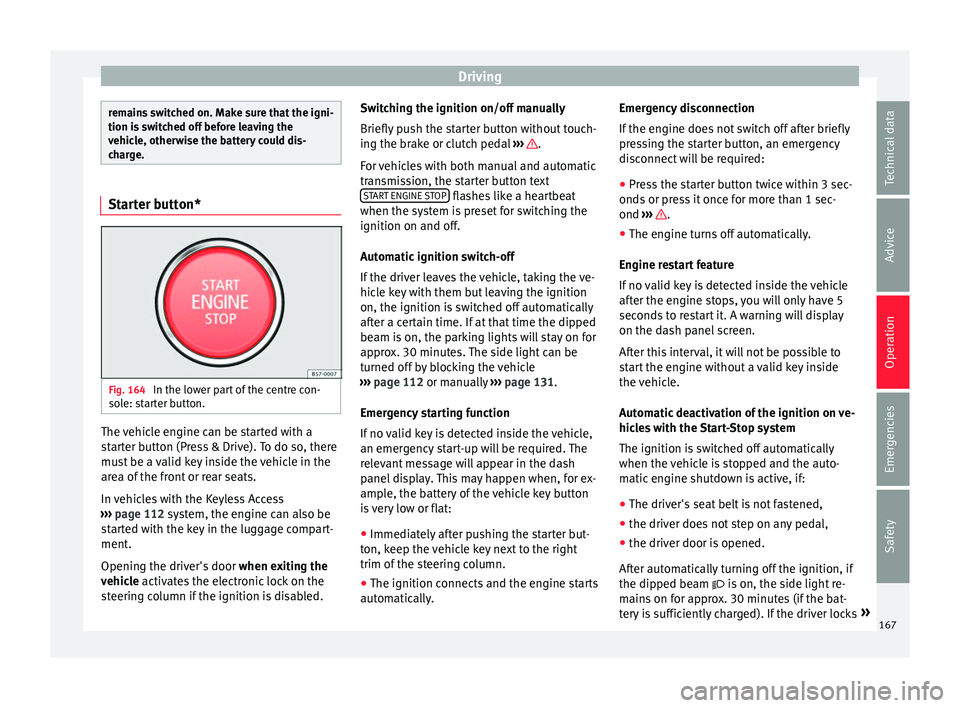
Fig. 164
In the lower part of the centre con-
so l
e: starter button. The vehicle engine can be started with a
s
t
arter button (Press & Drive). To do so, there
must be a valid key inside the vehicle in the
area of the front or rear seats.
In vehicles with the Keyless Access
››› page 112 system, the engine can also be
started with the key in the luggage compart-
ment.
Opening the driver's door when exiting the
vehicle activates the electronic lock on the
steering column if the ignition is disabled. Switching the ignition on/off manually
Briefly p
ush the starter button without touch-
ing the brake or clutch pedal ››› .
F or
vehicles with both manual and automatic
transmission, the starter button text START ENGINE STOP flashes like a heartbeat
when the sy s
tem is preset for switching the
ignition on and off.
Automatic ignition switch-off
If the driver leaves the vehicle, taking the ve-
hicle key with them but leaving the ignition
on, the ignition is switched off automatically
after a certain time. If at that time the dipped
beam is on, the parking lights will stay on for
approx. 30 minutes. The side light can be
turned off by blocking the vehicle
››› page 112 or manually ››› page 131.
Emergency starting function
If no valid key is detected inside the vehicle,
an emergency start-up will be required. The
relevant message will appear in the dash
panel display. This may happen when, for ex-
ample, the battery of the vehicle key button
is very low or flat: ● Immediately after pushing the starter but-
ton, k
eep the vehicle key next to the right
trim of the steering column.
● The ignition connects and the engine starts
autom
atically. Emergency disconnection
If the en
gine does not switch off after briefly
pressing the starter button, an emergency
disconnect will be required:
● Press the starter button twice within 3 sec-
onds
or press it once for more than 1 sec-
ond ››› .
● The engine turns off automatically.
En gine r
estart feature
If no valid key is detected inside the vehicle
after the engine stops, you will only have 5
seconds to restart it. A warning will display
on the dash panel screen.
After this interval, it will not be possible to
start the engine without a valid key inside
the vehicle.
Automatic deactivation of the ignition on ve-
hicles with the Start-Stop system
The ignition is switched off automatically
when the vehicle is stopped and the auto-
matic engine shutdown is active, if:
● The driver's seat belt is not fastened,
● the driver does not step on any pedal,
● the driver door is opened.
Aft
er automatically turning off the ignition, if
the dipped beam is on, the side light re-
mains on for approx. 30 minutes (if the bat-
tery is sufficiently charged). If the driver locks »
167
Technical data
Advice
Operation
Emergencies
Safety
Page 226 of 328

Operation
● in the c a
se of special constructions to the
side of the vehicle, e.g., high or irregular di-
viders.
Parking assistant (RTA) Fig. 196
Schematic representation of the rear
c r
oss traffic alert: monitored zone around the
vehicle being parked. The parking assistant uses the radar sensors
on the r
e
ar bumper ››› Fig. 193 to monitor the
traffic crossing behind the vehicle as it backs
out of a parallel parking space or as it is be-
ing manoeuvred, for example in very low visi-
bility conditions.
If the system detects that someone else on
the road is approaching the rear of the vehi-
cle ››› Fig. 196, an acoustic alarm is heard. ●
The acou
stic alarm comes from the same
acoustic indicator used by the ParkPilot.
In addition to the acoustic alarm, the driver is
also informed by means of a visual signal on
the radio screen. This signal is displayed in
the form of a red strip at the back of the im-
age of the vehicle on the radio screen. This
strip displays the side of the vehicle towards
which traffic is approaching.
Automatic braking to reduce damages
If the rear cross traffic alert detects that
someone else on the road is approaching the
rear of the vehicle and the driver does not
step on the brake, the system will engage the
brakes automatically.
The parking system helps the driver by auto-
matically engaging the brakes to reduce any
damage. The system will brake automatically
if the vehicle is reversing at a speed of ap-
proximately 1-12 km (1-7 mph). Once it has
detected that the vehicle has stopped, the
system will keep the vehicle stopped for ap-
prox. 2 seconds.
After automatically braking to reduce dam-
age, the system will not be able to automati-
cally brake again for approximately 10 sec-
onds.
You can interrupt the automatic braking by
stepping hard on the accelerator pedal or the
brake pedal in order to regain control of the
vehicle. WARNING
The smart technology incorporated into the
r e
ar cross traffic alert cannot overcome the
limits imposed by the laws of physics; it only
works within the limits of the system. The
parking assistant function should not tempt
you into taking any risks. The system is not a
replacement for driver awareness.
● The system should never be used in limited
vi
sibility conditions or complicated traffic,
e.g., in high-traffic areas or when crossing
multiple lanes.
● Be sure to always be aware of the vehicle's
surr
oundings, since the system often fails to
detect things such as bicycles or pedestrians.
● The rear cross traffic alert itself will not
brak
e the vehicle to a complete stop. Using the blind spot detector (BSD)
w
ith p
arking assistant (RTA) Activating and deactivating the blind spot
det
ect
or (BSD) with parking assistant (RTA)
The blind spot detector with parking assis-
tant can be switched on and off by accessing
the Assistance systems menu on the
dash panel display using the steering wheel
controls. If the vehicle is equipped with a
multifunction camera, it can also be ac-
cessed by means of the driver assistance sys-
tems key located on the main beam head-
light lever.
224
Page 264 of 328

Operation
Driving with a trailer Adjusting the headlights
When t
o
wing a trailer, the front part of the ve-
hicle could lift up, and if the dipped beams
are on, this could dazzle other drivers. Use
the headlight range control to lower the cone
of light. If you do not have headlight range
control, have the headlights adjusted by a
specialised workshop.
Special characteristics of driving with a trail-
er
● If your trailer has an ov
errun brake, brake
gently at first and then rapidly. This will pre-
vent the jerking that can be caused by the
locking of trailer wheels.
● Due to the gross combination weight of the
to
wing vehicle and trailer, the braking dis-
tance increases.
● When going down a slope, go into lower
ge
ar (if using a manual gearbox or the Tip-
tronic automatic gearbox) to take advantage
of the braking power provided by the engine.
Otherwise, the braking system could over-
heat and even fail.
● The trailer weight, as well as the gross com-
bin
ation weight of the towing vehicle and
trailer, change the centre of gravity and the
properties of the vehicle.
● If the towing vehicle is empty and the trail-
er is
loaded, then the load distribution is in- correct. Under these conditions, drive slowly
and with e
xtra caution.
Hill starts with a trailer
Depending on the slope of the hill and the
combination weight of the towing vehicle
and trailer, the vehicle might start rolling
backwards slightly when you first start up.
For hill-starting with a trailer, do the follow-
ing:
● Press and hold the brake pedal.
● Press the butt
on to disconnect the elec-
tronic parking brake ››› page 170.
● If the vehicle is equipped with a manual
ge
arbox, push the clutch pedal all the way
down.
● Put the vehicle into first gear or turn the se-
lect
or lever to position D/S ››› page 176.
● Pull out the butt
on and hold it in that
position to stop the towing vehicle and trailer
with the electronic parking brake.
● Release the brake pedal.
● Start driving slowly. To do this, in the case
of a m
anual gearbox, slowly release the
clutch pedal.
● Do not release the butt
on until the en-
gine has sufficient force to start driving. WARNING
If a trailer is pulled incorrectly, this may lead
t o lo
ss of control of the vehicle and serious
injury.
● Driving with a trailer and transporting
heavy
or large objects will change the vehicle
handling and braking distances.
● Always drive cautiously and carefully.
Brak
e earlier than usual.
● Adapt your speed and driving style at all
times
to suit visibility, weather, road and traf-
fic conditions. Slow down, especially when
driving down hills or slopes.
● Accelerate with particular care and caution.
Av
oid sudden braking and manoeuvres.
● Take great care when overtaking. Reduce
speed immedi
ately if you notice that the trail-
er is swaying, however slightly.
● Never attempt to “straighten” the towing
vehic
le and trailer while accelerating.
● Take into account the speed limit for vehi-
cl
es with a trailer, as it could be lower than
for vehicles without a trailer. Stabilisation of the towing vehicle
and tr
ai
ler The stabilisation of the towing vehicle and
tr
ai
ler together is an additional function of
the electronic stability control (ESC).
262