2016 RENAULT TALISMAN Multi media
[x] Cancel search: Multi mediaPage 30 of 328

1.24
FRONT SEATS: Functions (1/3)Massage
You can activate the driver and front
passenger seat massage function.
Using the multifunction screen,
select menu “Vehicle”, “Seats” then
“Massage”. Browse menu “Driver” or “Passenger”
to:
– select the type of massage (Tonic,
Relaxing or Lumbar);
– adjust the intensity (+ or -);
– adjust the speed (+ or -);
– reset the selected settings. Press 2
then “Reset”;
– activate/deactivate the massage seat (ON or OFF).
Note: the mode selected in the “Multi-
Sense” menu may affect the massage
configuration (please refer to the infor-
mation in “Multi-Sense” in Section 3).
2
Using the multifunction screen, de-
pending on the vehicle you can access
a number of seat functions.
On equipped vehicles, switch 1 grants
direct access to the seat menu on the
multifunction screen.
Please refer to the multimedia equip-
ment instructions for further informa-
tion.
1
Massage
Passenger
Driver
Massage ON
Tonic Relaxing Lumbar Intensity
Speed
Page 32 of 328
1.26
FRONT SEATS: Functions (3/3)
Position
It is possible to store six profiles from
the multifunction screen (refer to the
multimedia equipment instructions).
Each profile includes the driving posi-
tion of driver’s seat as well as the front
passenger seat position.
A driving position includes the settings
for the driver’s seat base and seatback
and, depending on the vehicle, the door
mirrors.
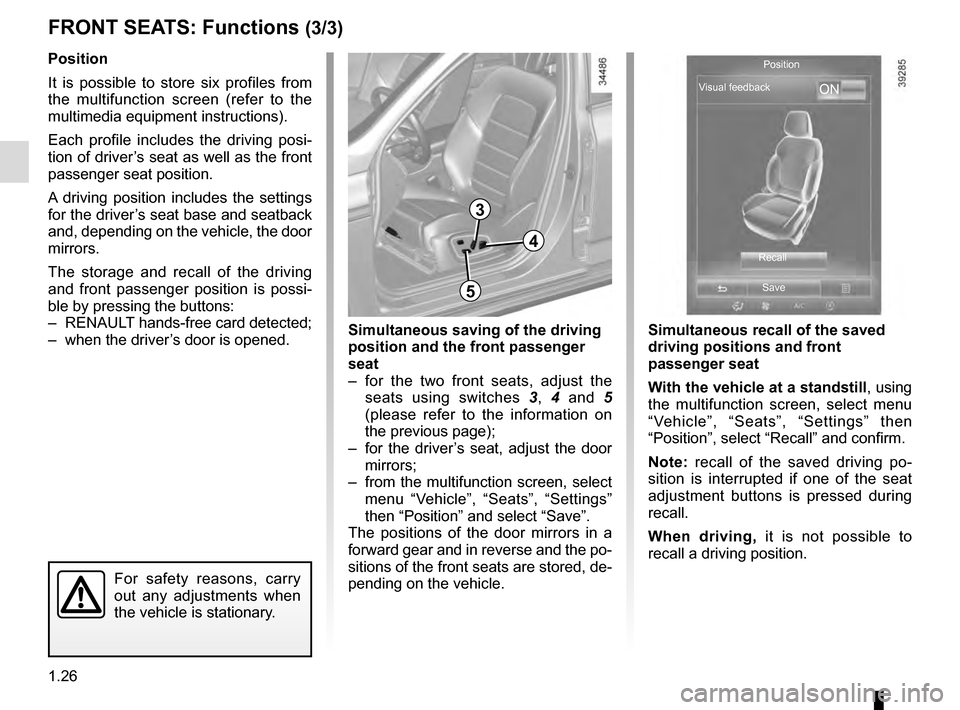
The storage and recall of the driving
and front passenger position is possi-
ble by pressing the buttons:
– RENAULT hands-free card detected;
– when the driver’s door is opened.
3
3
Simultaneous recall of the saved
driving positions and front
passenger seat
With the vehicle at a standstill, using
the multifunction screen, select menu
“Vehicle”, “Seats”, “Settings” then
“Position”, select “Recall” and confirm.
Note: recall of the saved driving po-
sition is interrupted if one of the seat
adjustment buttons is pressed during
recall.
When driving, it is not possible to
recall a driving position.
4
5
For safety reasons, carry
out any adjustments when
the vehicle is stationary.
Simultaneous saving of the driving
position and the front passenger
seat
– for the two front seats, adjust the seats using switches 3, 4 and 5
(please refer to the information on
the previous page);
– for the driver’s seat, adjust the door mirrors;
– from the multifunction screen, select menu “Vehicle”, “Seats”, “Settings”
then “Position” and select “Save”.
The positions of the door mirrors in a
forward gear and in reverse and the po-
sitions of the front seats are stored, de-
pending on the vehicle.
ON
Position
Visual feedback
RecallSave
Page 61 of 328

1.55
DRIVING POSITION (2/2)
The equipment fitted, described below, DEPENDS ON THE VERSION AND COUNTRY.
1 Side air vent.
2 Demister outlet.
3 Stalk for:
– direction indicator lights;
– exterior lights;
– fog lights.
4 Driver Airbag and horn location.
5 Instrument panel.
6 Head-up display.
7 Controls for:
– on-board computer information
read-out and vehicle settings cus-
tomisation menu,
– remote radio and navigation
system.
8 Steering column stalk for winds-
creen and rear screen wash/wiper.
9 Centre air vents.
10 Windscreen demister outlet.
11 Multimedia touchscreen.
12 Multifunction screen controls:
– screen activation/deactivation;
– volume;
– welcome menu;
– driving aids menu;
– settings.
13 Switches for:
– hazard warning lights,
– electric door locking.
14 Heating or air conditioning con-
trols.
15 Passenger Airbag location.
16 Glovebox.
17 Storage compartment.
18 Accessories and multimedia
socket
19 Cup holders
20 Controls for:
– electronic parking brake.
– cruise control/speed limiter.
21 Central multifunction and Multi-
Sense control.
22 Gearstick.
23 Controls for:
– heated front seats,
– ventilated front seats,
– activation/deactivation of ECO
mode,
– activation/deactivation of assisted
parking,
– activation/deactivation of the Stop
and Start function.
24 Engine start/stop button (vehicles
with RENAULT
card).
25 Ignition switch (vehicles with key).
26 Control for adjusting steering
wheel height and reach.
27 Cruise control/speed limiter and
adaptive cruise control controls.
28 Bonnet release control.
29 Controls for:
– electric headlight beam adjust-
ment,
– instrument panel lighting dimmer,
– lane departure warning,
– ESP and traction control system,
– heated steering wheel.
Page 84 of 328

1.78
External temperature
indicator
Special note:
When the exterior temperature is - 3 °C
to + 3 °C, the °C characters flash (sig-
nalling a risk of ice on the road).
Display 1
Vehicles fitted with a touchscreen
multimedia screen, navigation aid
systems, etc.
The time and exterior temperature are
displayed on the multifunction screen 1.
Refer to the handbook for the equip-
ment.
CLOCK AND EXTERIOR TEMPERATURE
External temperature
indicator
As ice formation is related
to climatic exposure, local
air humidity and temperature, the
external temperature alone is not
sufficient to detect ice.
1
If the electrical supply is cut (battery
disconnected, broken supply wire,
etc.), the clock will automatically
go back to the right time after a few
minutes once the system is capable
of receiving information GPS.
Page 126 of 328

2.18
DRIVING ADVICE, ECO-DRIVING (1/5)
2
Gear change indicator 2
Depending on the vehicle, to obtain op-
timum consumption levels, a warning
light on the instrument panel lets you
know the best time to move up or down
a gear:
Š move up a gear;
‰ move down a gear.
If you regularly follow this indicator, you
will reduce your vehicle’s fuel consump-
tion.
Fuel consumption is accredited in ac-
cordance with a standard regulatory
method. Identical for all manufactur-
ers, this enables vehicles to be com-
pared with one another. Consumption
in real time depends on vehicle usage
conditions, the equipment fitted and the
user’s driving style. To optimise fuel
consumption, please refer to the follow-
ing advice.
Depending on the vehicle, you will have
various functions which enable you to
lower your fuel consumption:
– the rev counter;
– gear change indicator;
– the driving style indicator;
– the journey record and eco-driving
advice via the multimedia screen;
– ECO mode.
If fitted on the vehicle, the navigation
system provides additional information.
On the instrument panel
The information display can be organ-
ised and customised based on the in-
strument panel customisation style se-
lected from the multimedia screen.
Rev counter with ECO zone 1
Driving in the ECO zone helps you op-
timise fuel consumption under most cir-
cumstances.
1
Page 127 of 328

2.19
DRIVING ADVICE, ECO-DRIVING (2/5)
4
3
If you regularly follow this indicator, you
will reduce your vehicle’s fuel consump-
tion.
On the multifunction screen
Journey record
Once the engine is switched off, you
will see “Journey record” displayed on
the screen 4, enabling you to view in-
formation relating to your last journey.
Driving style indicator
3
Informs you about the driving style
adopted in real time. You will be notified
by indicator 3.
The more petals there are on indica-
tor 3, the smoother and more economi-
cal your driving.
If you regularly monitor this indicator,
you will reduce your vehicle’s fuel con-
sumption.
To activate/deactivate the driving style
indicator, please see the multimedia
system instructions. This indicates:
– average fuel consumption;
– number of miles/kilometres travelled;
– number of miles/kilometres saved.
This corresponds to driving without
fuel consumption (deceleration and/
or foot off the accelerator pedal).
An overall rating from 0 to 100 is dis-
played to let you assess your eco driv-
ing performance. The higher the rating,
the lower the fuel consumption.
Eco advice is given to help improve
your performance.
With your favourite journeys saved,
you can compare your performance
between trips and the performance of
other vehicle users.
For more information, please see the
multimedia system instructions.
Page 128 of 328

2.20
DRIVING ADVICE, ECO-DRIVING (3/5)
4
5
ECO mode
ECO mode is a function which opti-
mises fuel consumption. This acts on
all power consuming elements (engine
power, switching gears for vehicles
fitted with an automatic gearbox, heat-
ing and/or air conditioning, etc.).
Limiting acceleration enables low fuel
consumption in urban and surrounding
areas. The air conditioning and heating
limiter enables you to save fuel without
affecting your heating comfort.
Activating the function
The function can be activated:
– by pressing switch 4;
– using the central control 5 (please
refer to the information on “Multi-
Sense” in Section 3);
– Depending on the vehicle, from the navigation menu on the multimedia
screen (please refer to the multime-
dia instructions).
The warning light
comes on on
the instrument panel to confirm activa-
tion. Disabling the function
Press switch 4.
The warning light
goes out on
the instrument panel to confirm deac-
tivation.
While driving, it is possible to leave the
ECO mode temporarily in order to im-
prove engine performance.
To do this, press the accelerator pedal
firmly and fully.
ECO mode is reactivated when you
take pressure off the accelerator pedal.
Page 179 of 328
2.71
REVERSING CAMERA (1/3)
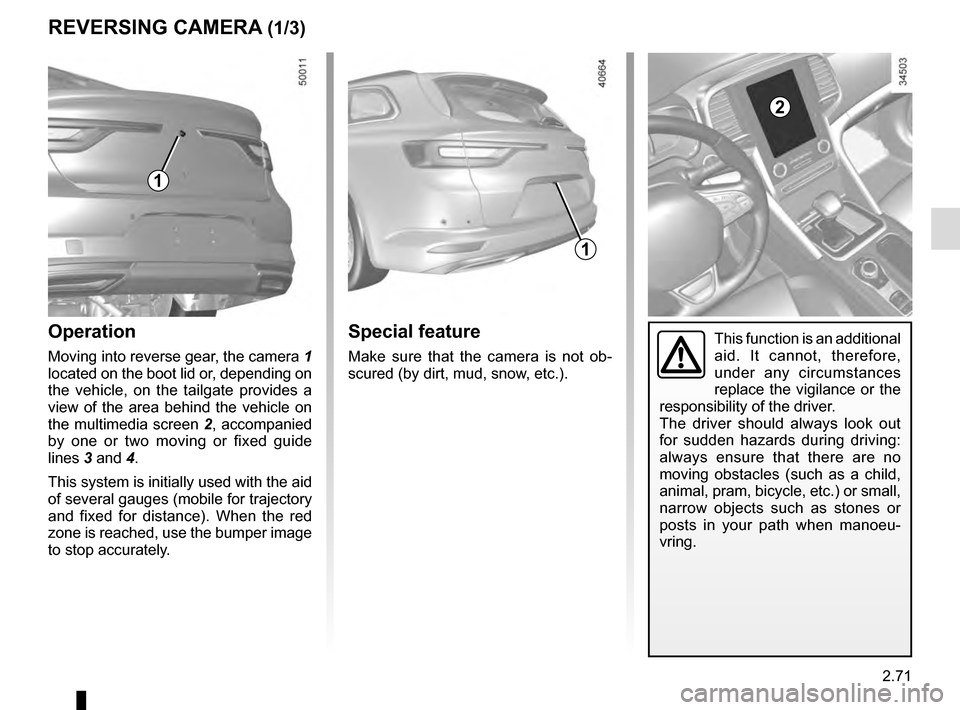
Operation
Moving into reverse gear, the camera 1
located on the boot lid or, depending on
the vehicle, on the tailgate provides a
view of the area behind the vehicle on
the multimedia screen 2, accompanied
by one or two moving or fixed guide
lines 3 and 4.
This system is initially used with the aid
of several gauges (mobile for trajectory
and fixed for distance). When the red
zone is reached, use the bumper image
to stop accurately.
1
2
Special feature
Make sure that the camera is not ob-
scured (by dirt, mud, snow, etc.).
1
This function is an additional
aid. It cannot, therefore,
under any circumstances
replace the vigilance or the
responsibility of the driver.
The driver should always look out
for sudden hazards during driving:
always ensure that there are no
moving obstacles (such as a child,
animal, pram, bicycle, etc.) or small,
narrow objects such as stones or
posts in your path when manoeu-
vring.