2016 RENAULT TALISMAN seat
[x] Cancel search: seatPage 70 of 328

1.64
DISPLAYS AND INDICATORS (3/4)
Head-up display 8
The display details driving and navi-
gation information from the instrument
panel and the multifunction screen.
If fitted to the vehicle, this comes on
when the engine is started and is re-
tracted when the engine is switched off.
8
You can adjust certain settings from the
multifunction screen: with the engine
running, access menu “System”,
“Display” then “Head-up display”.
Adjusting the display information
height
Depending on your driving position,
you can raise or lower the information
on the display.
Adjusting the display brightness
You can adjust the brightness (day or
night mode)
– automatically : the brightness will
vary depending on the outdoor light.
– manually: the brightness automati-
cally switches with the activation/de-
activation of the lights.
In both cases, the day mode varies
based on the outdoor brightness.
Good information visibility can be af-
fected by:
– the seat position;
– the presence of an object placed
on the opened display;
– the polarisation of some spectacle
lenses;
– extreme weather conditions (rain,
snow, very strong sunlight, etc.).
In the event of contradic-
tory information between
the instrument panel and
the head-up display/multi-
function screen, please refer to the
information displayed on the instru-
ment panel.
Do not manually force the opening/
closure of the head-up display.
For safety reasons, carry
out any adjustments when
the vehicle is stationary.
Page 80 of 328

1.74
TRIP COMPUTER AND WARNING SYSTEM: operating fault messages
These appear with the © warning light and mean that you should drive very carefully to an author\
ised dealer as
soon as possible. If you fail to follow this recommendation, you risk da\
maging your vehicle.
They disappear when the display selection key is pressed or after severa\
l seconds and are stored in the computer log. The
© warning light stays on. Examples of operating fault messages are given \
in the following pages.
Examples of messages Interpreting the display selected
« Clean diesel filter » Indicates the presence of water in the diesel filter; contact an approve\
d Dealer
as soon as possible.
« Check lighting » Indicates a fault in the headlights.
« Check vehicle » Indicates a fault in one of the pedal sensors, battery management system\
or oil
level sensor.
« Check airbag » Indicates a fault in the restraint system in addition to the seat belts.\
In the event
of an accident, it is possible that they may not be triggered.
« Check anti-pollution system » Indicates a fault in the vehicle’s particle filter system.
Page 88 of 328
1.82
Position memory
– Adjust the door mirrors (see previous paragraphs);
– from the multifunction screen, select menu “Vehicle”, “Seats”, “Settings”
then “Position” and select “Save”.
The positions of the door mirrors in a
forward gear, reverse and of the front
seats are simultaneously saved.
Rear view mirrors which tilt
in reverse gear
For vehicles equipped with the driver’s
seat with position memory, you can
enter a specific setting for the door mir-
rors when reversing and store the po-
sition.
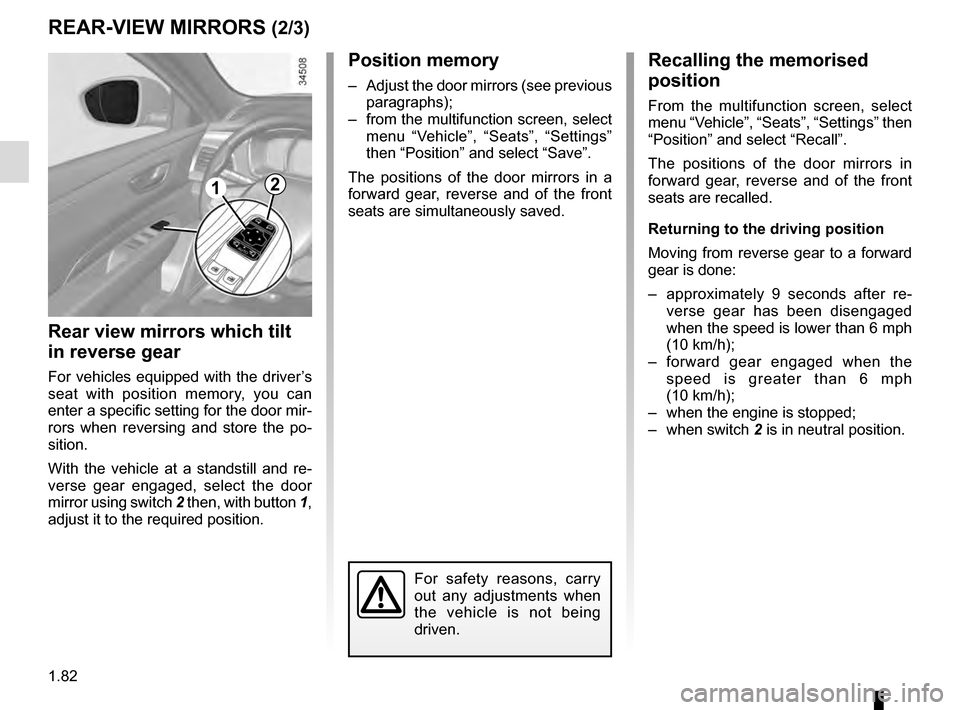
With the vehicle at a standstill and re-
verse gear engaged, select the door
mirror using switch 2 then, with button 1,
adjust it to the required position.
REAR-VIEW MIRRORS (2/3)
1
Recalling the memorised
position
From the multifunction screen, select
menu “Vehicle”, “Seats”, “Settings” then
“Position” and select “Recall”.
The positions of the door mirrors in
forward gear, reverse and of the front
seats are recalled.
Returning to the driving position
Moving from reverse gear to a forward
gear is done:
– approximately 9 seconds after re- verse gear has been disengaged
when the speed is lower than 6 mph
(10 km/h);
– forward gear engaged when the speed is greater than 6 mph
(10 km/h);
– when the engine is stopped;
– when switch 2 is in neutral position.
For safety reasons, carry
out any adjustments when
the vehicle is not being
driven.
2
Page 118 of 328

2.10
STOP AND START FUNCTION (3/4)
Conditions preventing the
standby of the engine
Certain conditions prevent the system
from using the engine standby function,
including when:
For vehicles with a RENAULT card:
– the driver’s door is not closed;
– the driver’s seatbelt is not fastened;
For all vehicles:
– reverse gear is engaged;
– the bonnet is not locked;
– the outdoor temperature is too low or too high (less than around 5°C or
higher than around 30°C);
– the battery is not sufficiently char- ged;
– the difference between the vehicle interior temperature and the automa-
tic climate control instruction is too
high;
– parking distance control is in opera- tion; – for vehicles with automatic gear-
boxes, the gradient is steeper than
approximately 12%;
– the «Clear View» function is activa- ted (please see «Automatic climate
control» in Section 3);
– the engine temperature is too low;
– the emission control system is being regenerated;
– ...
Warning light
is displayed on the
instrument panel. This notifies you that
engine standby is not available.
Deactivate the Stop and
Start function when perfor-
ming any operations in the
engine compartment.
Special cases for vehicles
with a RENAULT card
With the engine on standby (traffic jam,
traffic lights, etc.), if the driver unfastens
the seat belt and opens the driver’s
door, or gets out of the seat, the ignition
is switched off.
The assisted parking brake is applied
automatically.
To restart and reactivate the Stop and
Start system, start the engine (please
refer to “Starting, stopping the engine”
in Section 2).
Special case of vehicles with
a key
With the engine on standby (traffic
jam, traffic lights, etc.), if you get out of
the vehicle, a beep warns you that the
engine is on standby and has not been
stopped.
Page 124 of 328

2.16
ELECTRONIC PARKING BRAKE (2/3)Special cases
To park on a slope or while towing a
trailer, for example, pull switch 1 for
a few seconds to gain the maximum
braking.
To park the vehicle without applying the
electronic parking brake (if there is a
risk of freezing, for example):
– with the engine running, while si- multaneously depressing the brake
pedal and the switch 1, stop the
engine (not standby for vehicles
fitted with Stop and Start);
– with a gear or position P engaged,
release the brake pedal and the
switch 1.
For vehicles fitted with a Stop and Start
function, with the engine on standby,
the electronic parking brake is automat-
ically activated if the driver unfastens
their seat belt and opens the driver’s
door or gets out of their seat.
Brief stop
To manually activate the electronic
parking brake, (when stopping at a red
light, or stopping when the engine is
running etc.) : pull and release switch 1.
The brake is released as soon as the
vehicle is started up again.
Manual operationYou can apply the electronic parking
brake manually.
Applying the electronic parking
brake
Pull switch 1. Warning light 2 and warn-
ing light
} on the instrument panel
light up.
Releasing the assisted parking
brake
With the ignition on, depress the brake
pedal then press switch 1: indicator
lights 2 and
} go out.
Special feature related to
the Stop and Start function:
if the driver’s seat is unfas-
tened before the engine
goes into standby due to the Stop
and Start function, make sure that
the parking brake is applied: the
indicator light
} on the instru-
ment panel confirms this. Risk of
loss of immobilisation.
2
1
Page 191 of 328

3.1
Section 3: Your comfort
Multi-Sense . . . . . . . . . . . . . . . . . . . . . . . . . . . . . . \
. . . . . . . . . . . . . . . . . . . . . . . . . . . . . . . . . . . . . . 3.2
Air Vents . . . . . . . . . . . . . . . . . . . . . . . . . . . . . . . . . . . .\
. . . . . . . . . . . . . . . . . . . . . . . . . . . . . . . . . . 3.4
Automatic climate control . . . . . . . . . . . . . . . . . . . . . . . . . . . . . . . . . . . .\
. . . . . . . . . . . . . . . . . . . . . 3.6
Air conditioning: information and advice on use . . . . . . . . . . . . . . . . . . . . . . . . . . . . . . . . . . . .\
. . . . 3.16
Electric windows . . . . . . . . . . . . . . . . . . . . . . . . . . . . . . . . . . . .\
. . . . . . . . . . . . . . . . . . . . . . . . . . . . 3.17
Electric sunroof . . . . . . . . . . . . . . . . . . . . . . . . . . . . . . . . . . . .\
. . . . . . . . . . . . . . . . . . . . . . . . . . . . . 3.19
Interior lighting . . . . . . . . . . . . . . . . . . . . . . . . . . . . . . . . . . . . \
. . . . . . . . . . . . . . . . . . . . . . . . . . . . . . 3.22
Sun visor . . . . . . . . . . . . . . . . . . . . . . . . . . . . . . . \
. . . . . . . . . . . . . . . . . . . . . . . . . . . . . . . . . . . . . . . 3.24
Passenger compartment storage/fittings . . . . . . . . . . . . . . . . . . . . . . . . . . . . . . . . . . . . \
. . . . . . . . . . 3.25
Accessories socket . . . . . . . . . . . . . . . . . . . . . . . . . . . . . . . . . . . .\
. . . . . . . . . . . . . . . . . . . . . . . . . . 3.28
Ashtray . . . . . . . . . . . . . . . . . . . . . . . . . . . . . . . . . . . .\
. . . . . . . . . . . . . . . . . . . . . . . . . . . . . . . . . . . 3.28
Cigarette lighter . . . . . . . . . . . . . . . . . . . . . . . . . . . . . . . . . . . . \
. . . . . . . . . . . . . . . . . . . . . . . . . . . . . 3.28
Headrests - Rear seats . . . . . . . . . . . . . . . . . . . . . . . . .\
. . . . . . . . . . . . . . . . . . . . . . . . . . . . . . . . . . 3.29
Rear bench seat . . . . . . . . . . . . . . . . . . . . . . . . . . . . . . . . . . . .\
. . . . . . . . . . . . . . . . . . . . . . . . . . . . 3.30
Luggage compartment. . . . . . . . . . . . . . . . . . . . . . . . . . .\
. . . . . . . . . . . . . . . . . . . . . . . . . . . . . . . . . 3.32
Automatic tailgate . . . . . . . . . . . . . . . . . . . . . . . . . . . . . . . . . . . .\
. . . . . . . . . . . . . . . . . . . . . . . . . . . 3.37
Luggage cover . . . . . . . . . . . . . . . . . . . . . . . . . . . . . . . . . . . . \
. . . . . . . . . . . . . . . . . . . . . . . . . . . . . . 3.42
Luggage net. . . . . . . . . . . . . . . . . . . . . . . . . . . . . . .\
. . . . . . . . . . . . . . . . . . . . . . . . . . . . . . . . . . . . . 3.43
Luggage compartment storage . . . . . . . . . . . . . . . . . . . . . . . . . . . . . . . . . . . .\
. . . . . . . . . . . . . . . . . 3.45
Transporting objects in the luggage compartment . . . . . . . . . . . . . . . . . . . . . . . . . . . . . . . . . . . .\
. . 3.47
Transporting objects: . . . . . . . . . . . . . . . . . . . . . . . . . . . . . . . . . . . . \
. . . . . . . . . . . . . . . . . . . . . . . . . 3.48 equipment . . . . . . . . . . . . . . . . . . . . . . . . . . . . . . . . . . . .\
. . . . . . . . . . . . . . . . . . . . . . . . . . . 3.48
Roof bars . . . . . . . . . . . . . . . . . . . . . . . . . . . . . . . . . . . . \
. . . . . . . . . . . . . . . . . . . . . . . . . . . . . . . . . . 3.49
Multimedia equipment . . . . . . . . . . . . . . . . . . . . . . . . . . . . . . . . . . . . \
. . . . . . . . . . . . . . . . . . . . . . . . 3.50
Page 192 of 328
3.2
MULTI-SENSE (1/2)
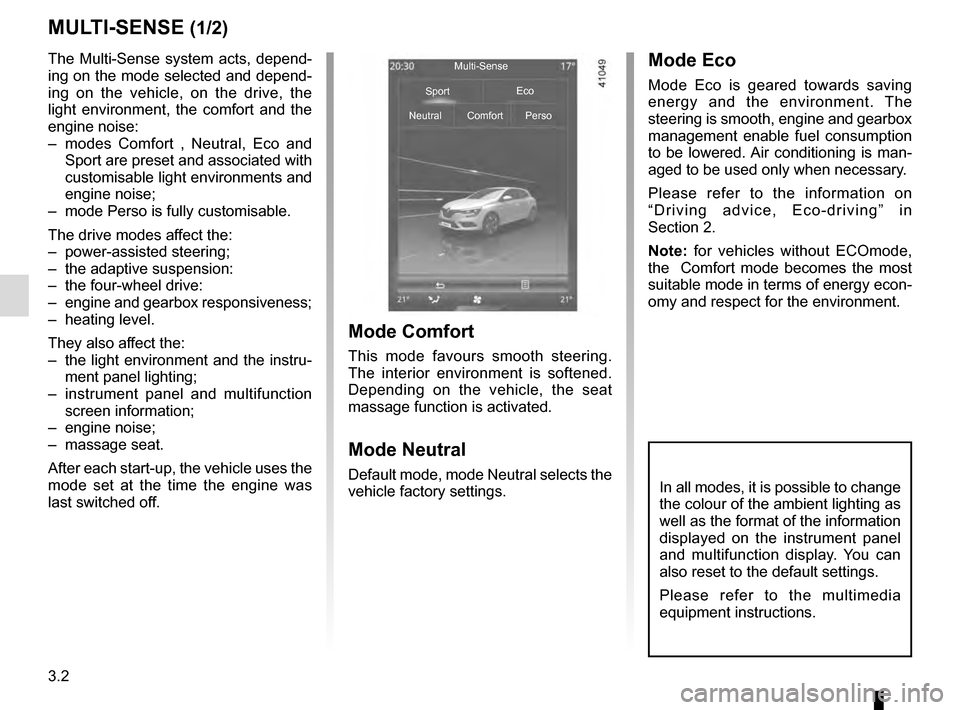
The Multi-Sense system acts, depend-
ing on the mode selected and depend-
ing on the vehicle, on the drive, the
light environment, the comfort and the
engine noise:
– modes Comfort , Neutral, Eco and Sport are preset and associated with
customisable light environments and
engine noise;
– mode Perso is fully customisable.
The drive modes affect the:
– power-assisted steering;
– the adaptive suspension:
– the four-wheel drive:
– engine and gearbox responsiveness;
– heating level.
They also affect the:
– the light environment and the instru- ment panel lighting;
– instrument panel and multifunction screen information;
– engine noise;
– massage seat.
After each start-up, the vehicle uses the
mode set at the time the engine was
last switched off.
Mode Comfort
This mode favours smooth steering.
The interior environment is softened.
Depending on the vehicle, the seat
massage function is activated.
Mode Neutral
Default mode, mode Neutral selects the
vehicle factory settings.
Mode Eco
Mode Eco is geared towards saving
energy and the environment. The
steering is smooth, engine and gearbox
management enable fuel consumption
to be lowered. Air conditioning is man-
aged to be used only when necessary.
Please refer to the information on
“Driving advice, Eco-driving” in
Section 2.
Note: for vehicles without ECOmode,
the Comfort mode becomes the most
suitable mode in terms of energy econ-
omy and respect for the environment.
Multi-Sense
Sport Eco
Neutral Comfort Perso
In all modes, it is possible to change
the colour of the ambient lighting as
well as the format of the information
displayed on the instrument panel
and multifunction display. You can
also reset to the default settings.
Please refer to the multimedia
equipment instructions.
Page 194 of 328
3.4
AIR VENTS: air outlets (1/2)
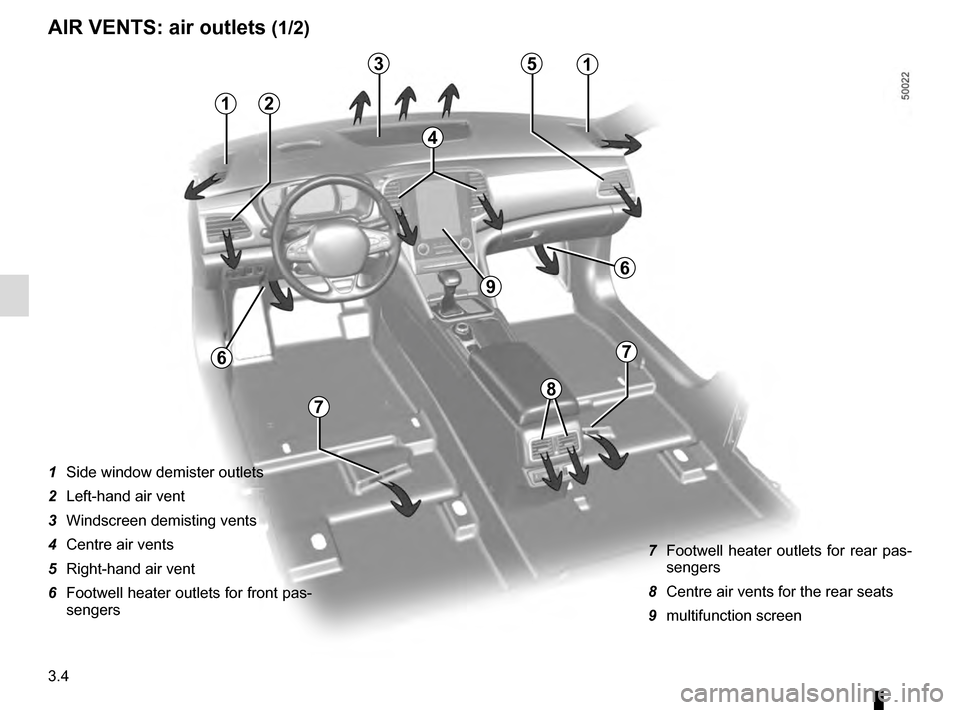
7 Footwell heater outlets for rear pas-sengers
8 Centre air vents for the rear seats
9 multifunction screen
2
5
76
6
1
7
4
1
3
9
8
1 Side window demister outlets
2 Left-hand air vent
3 Windscreen demisting vents
4 Centre air vents
5 Right-hand air vent
6 Footwell heater outlets for front pas- sengers