Page 68 of 328
1.62
DISPLAYS AND INDICATORS (1/4)
A
2
3
1
Instrument panel A
lights up when the driver’s door is
opened. In some cases, the appear-
ance of a warning light is accompanied
by a message.
On a vehicle equipped with a multifunc-
tion screen you can customise your in-
strument panel with the content and
colours of your choice.
From the multifunction screen, select
the menu “System”, then “User profile”.
Refer to the handbook for the equip-
ment.
Rev counter 1
(graduations x 1000)
Speedometer 2
This is displayed differently according
to how the instrument panel is custom-
ised.
Overspeed buzzer
Depending on the vehicle and coun-
try, a buzzer sounds for approximately
10 seconds every 40 seconds, as long
as the vehicle is travelling in excess of
72 mph (120 km/h). Driving style indicator
3
Please refer to the information on “Eco-
driving” in Section 2.
Trip computer and warning system
Refer to the information on the “Trip
computer and warning system” in
Section 1.
Page 69 of 328
1.63
DISPLAYS AND INDICATORS (2/4)
6
7A
Engine oil level low warning
When the engine is started, the instru-
ment panel display A alerts you when
the minimum oil level is reached. Refer
to the information on the “Engine oil
level” in Section 4.
The first time the warning appears,
it can be cleared by pressing the OK
button 7. Subsequent warnings will dis-
appear automatically after around
30 seconds.
4
Fuel gauge 6
If the level is at the minimum, warn-
ing light
M integrated in the indica-
tor comes on orange, accompanied by
a beep. Fill up as soon as possible.
Coolant temperature indicator 4
In normal use, indicator 4 should be
before area 5. Under “intensive” oper-
ating conditions, the needle may ap-
proach this zone. This is not serious
unless the warning light
® comes
on accompanied by a message on the
instrument panel and a beep.
5
Page 70 of 328

1.64
DISPLAYS AND INDICATORS (3/4)
Head-up display 8
The display details driving and navi-
gation information from the instrument
panel and the multifunction screen.
If fitted to the vehicle, this comes on
when the engine is started and is re-
tracted when the engine is switched off.
8
You can adjust certain settings from the
multifunction screen: with the engine
running, access menu “System”,
“Display” then “Head-up display”.
Adjusting the display information
height
Depending on your driving position,
you can raise or lower the information
on the display.
Adjusting the display brightness
You can adjust the brightness (day or
night mode)
– automatically : the brightness will
vary depending on the outdoor light.
– manually: the brightness automati-
cally switches with the activation/de-
activation of the lights.
In both cases, the day mode varies
based on the outdoor brightness.
Good information visibility can be af-
fected by:
– the seat position;
– the presence of an object placed
on the opened display;
– the polarisation of some spectacle
lenses;
– extreme weather conditions (rain,
snow, very strong sunlight, etc.).
In the event of contradic-
tory information between
the instrument panel and
the head-up display/multi-
function screen, please refer to the
information displayed on the instru-
ment panel.
Do not manually force the opening/
closure of the head-up display.
For safety reasons, carry
out any adjustments when
the vehicle is stationary.
Page 71 of 328
1.65
DISPLAYS AND INDICATORS (4/4)
Operating faults
In the event of a malfunction (the dis-
play fails to open when the engine is
started, or the display retracts, with the
engine running, following an object im-
pacting the display):
– stop and restart the engine;
or
– from the multifunction screen, change the display opening settings.
If there is still a problem, contact an au-
thorised dealer.
With the display opened or closed,
no object should be placed on it or
in its housing.
Do not use solvents, detergents or
an abrasive cloth to clean the dis-
play.
Only use a microfibre wipe.
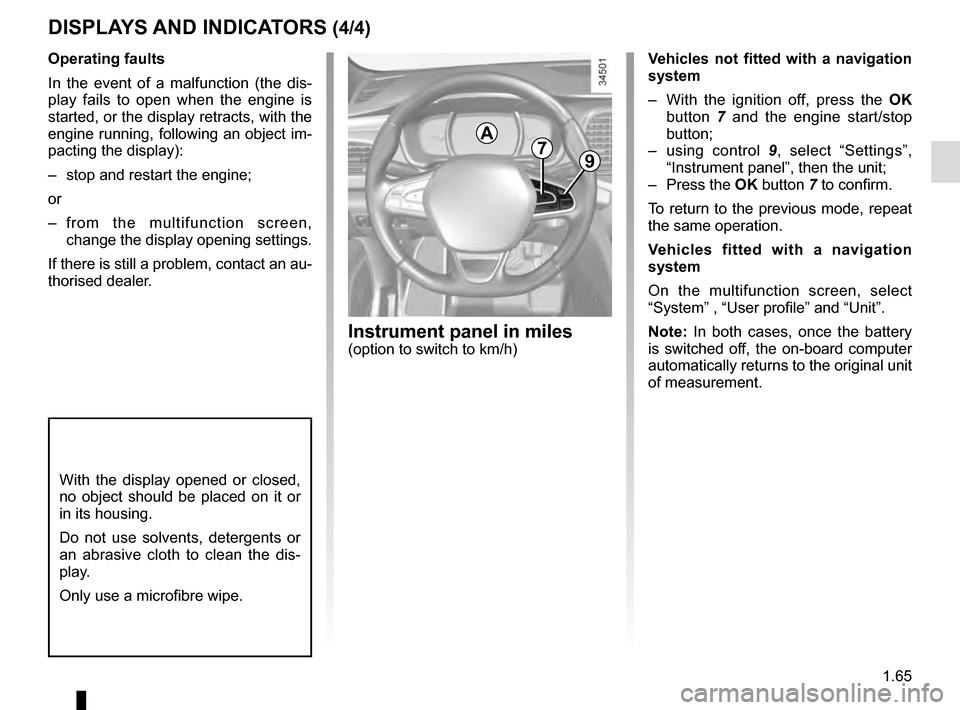
Vehicles not fitted with a navigation
system
– With the ignition off, press the OK
button 7 and the engine start/stop
button;
– using control 9, select “Settings”,
“Instrument panel”, then the unit;
– Press the OK button 7 to confirm.
To return to the previous mode, repeat
the same operation.
Vehicles fitted with a navigation
system
On the multifunction screen, select
“System” , “User profile” and “Unit”.
Note: In both cases, once the battery
is switched off, the on-board computer
automatically returns to the original unit
of measurement.
A79
Instrument panel in miles(option to switch to km/h)
Page 81 of 328

1.75
TRIP COMPUTER AND WARNING SYSTEM: warning message
These appear with the ® warning light and require you to stop immediately, for your own safety, as soon as traf-
fic conditions allow. Stop your engine and do not restart it. Contact an approved Dealer.
Some examples of warning messages are given below. Note: the messages appear on the display either individually or al-
ternately (when there are several messages to be displayed), and may b\
e accompanied by a warning light and/or a beep.
Examples of messages Interpreting the display selected
« Engine failure hazard » Indicates an injection fault, the vehicle’s engine has overheated or there is a
serious engine fault.
“Power steering fault” Indicates a fault in the steering or a problem with the four-wheel drive\
.
“Braking system fault” or ”Stop vehicle” Indicates a fault in the braking system. Apply the electronic parking brake ma-
nually and ensure that the vehicle is immobilised using a chock.
« Electric failure DANGER » Indicates a fault in the vehicle battery charging circuit (alternator e\
tc.).
« Puncture » Indicates a puncture on the tyre displayed on the instrument panel.
Page 83 of 328
1.77
VEHICLE SETTINGS CUSTOMISATION MENU (2/2)
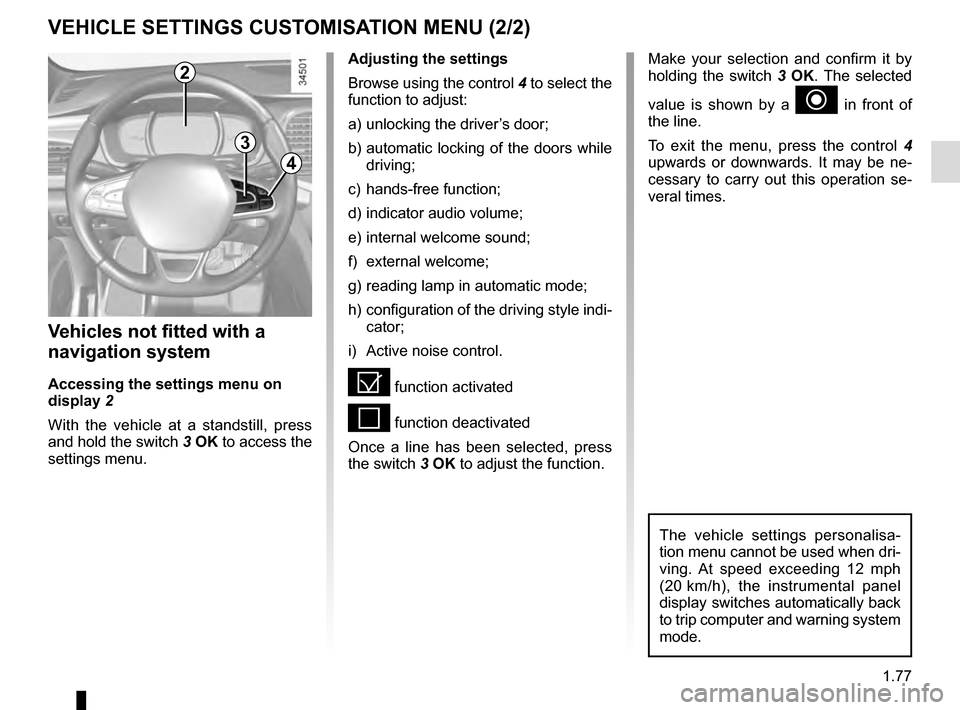
Adjusting the settings
Browse using the control 4 to select the
function to adjust:
a) unlocking the driver’s door;
b) automatic locking of the doors while driving;
c) hands-free function;
d) indicator audio volume;
e) internal welcome sound;
f) external welcome;
g) reading lamp in automatic mode;
h) configuration of the driving style indi- cator;
i) Active noise control.
= function activated
< function deactivated
Once a line has been selected, press
the switch 3 OK to adjust the function.
Vehicles not fitted with a
navigation system
Accessing the settings menu on
display 2
With the vehicle at a standstill, press
and hold the switch 3 OK to access the
settings menu.
2
3
4
Make your selection and confirm it by
holding the switch 3 OK. The selected
value is shown by a
~ in front of
the line.
To exit the menu, press the control 4
upwards or downwards. It may be ne-
cessary to carry out this operation se-
veral times.
The vehicle settings personalisa-
tion menu cannot be used when dri-
ving. At speed exceeding 12 mph
(20 km/h), the instrumental panel
display switches automatically back
to trip computer and warning system
mode.
Page 91 of 328

1.85
áMain beam headlights
With the dipped beam
headlights lit, push stalk 1. This indica-
tor light on the instrument panel comes
on.
To return to the dipped headlight posi-
tion, pull the stalk 1 towards you again.
EXTERIOR LIGHTING AND SIGNALS (1/5)
šSide lights
Turn ring 4 until the symbol is
opposite mark 3: this indicator light on
the instrument panel comes on.
If the side lights are switched on, it is
possible to set the brightness of the
instrument panel and the dashboard by
turning control knob 2.
kDipped beam
headlights
Manual operation
Turn ring 4 until the symbol is opposite
mark 3 . This indicator light on the ins-
trument panel comes on.
Automatic operation
Turn ring 4 until the AUTO symbol is op-
posite mark 3: with the engine running,
the dipped beam headlights switch on
or off automatically depending on the
brightness of the light outside, without
any action on stalk 1.
Before driving at night: check that the electrical equipment is operatin\
g
correctly. As a general precaution, check that the lights are not obscured
(by dirt, mud, snow or objects being transported).
1
4
3
2
1
When driving on the left in a
left-hand drive vehicle (or vice
versa), drivers must readjust their
lights throughout their stay (see
«Electrical adjustment of the dipped
beam headlights» in Section 1).
Page 92 of 328
1.86
Automatic main beam
headlights
Depending on the vehicle, this system
switches the main beam headlights on
and off automatically. The function uses
a camera located behind the interior
rear-view mirror to detect vehicles that
are following and coming in the oppo-
site direction.
The main beam headlights come on au-
tomatically if:
– exterior light is weak;
– no other vehicles or lighting are de-tected;
– the vehicle speed is above approxi- mately 30 mph (45 km/h).
If any of the above conditions are not
fulfilled, the system switches to dipped
beam headlights.
The “automatic main beam
headlights” system should
under no circumstances be
used to replace driver atten-
tion and responsibility with regard
to vehicle lighting and adapting to
light, visibility and traffic conditions.Using the portable naviga-
tion system at night in the
windscreen area below the
camera may disturb the
operation of the “automatic main
beam headlights” system (risk of re-
flection on the windscreen).
EXTERIOR LIGHTING AND SIGNALS (2/5)
4
3
The system may encounter difficul-
ties under certain conditions, inclu-
ding :
– extreme weather conditions (rain, snow, fog, etc.);
– obstruction in front of the winds- creen or camera;
– when a following or oncoming vehicle has weak or hidden li-
ghting;
– incorrect settings for the front headlights;
– reflective systems;
– ...
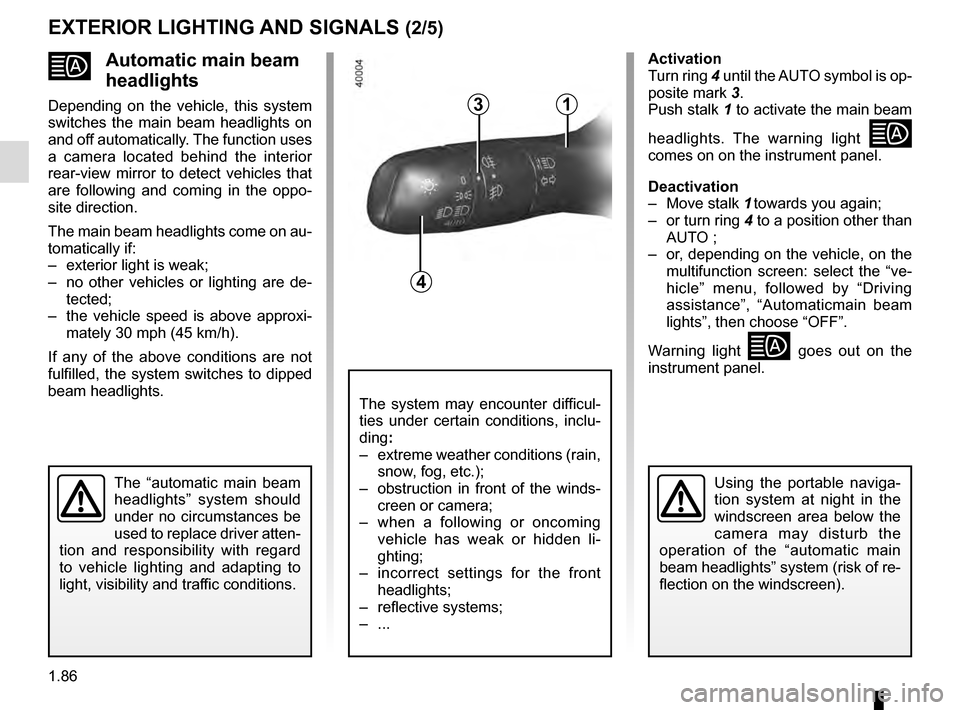
Activation
Turn ring 4 until the AUTO symbol is op-
posite mark 3.
Push stalk 1 to activate the main beam
headlights. The warning light
comes on on the instrument panel.
Deactivation
– Move stalk 1 towards you again;
– or turn ring 4 to a position other than AUTO ;
– or, depending on the vehicle, on the multifunction screen: select the “ve-
hicle” menu, followed by “Driving
assistance”, “Automaticmain beam
lights”, then choose “OFF”.
Warning light
goes out on the
instrument panel.
1

