2016 RENAULT MEGANE COUPE engine
[x] Cancel search: enginePage 124 of 274

2.26
The traction control system offers ad-
ditional safety. It is recommended that
you do not drive with the function di-
sabled. Correct this as soon as pos-
sible by pressing the switch 1 again.
Note: the function is reactivated auto-
matically when the ignition is switched
on or when a speed of approximately
24 mph (40 km/h) is exceeded.
Emergency brake assist
This system supplements the ABS
and helps reduce vehicle stopping dis-
tances.
Operating principle
The system is for detecting an emer-
gency braking situation. In this case,
the braking assistance immediately de-
velops maximum power and may trig-
ger ABS regulation.
ABS braking is maintained as long as
the brake pedal is applied.
Hazard warning lights switching on
Depending on the vehicle, these may
light up in the event of sudden decel-
eration.
Operating faults
When the system detects an operat-
ing fault the message “Check brak-
ing system” appears on the instrument
panel along with the
© warning
light.
Consult an approved dealer.
Braking anticipation
Depending on the vehicle, when you
rapidly release the accelerator, the
system anticipates the braking ma-
noeuvre in order to reduce stopping
distances.
Special cases
When using the cruise control:
– if you use the accelerator, when you release it, the system may be trig-
gered;
– if you do not use the accelerator, the system will not be triggered.
DRIVER CORRECTION DEVICES AND AIDS (3/4)
Disabling the traction control
system
In some situations (driving on very wet
ground: snow, mud, etc. or driving with
snow chains fitted), the system may
reduce the engine output to limit wheel-
spin. If this is not required, it is possible
to deactivate the function by pressing
switch 1.
The message “Traction control off” is
displayed on the instrument panel to
inform you.
1
Page 141 of 274
2.43
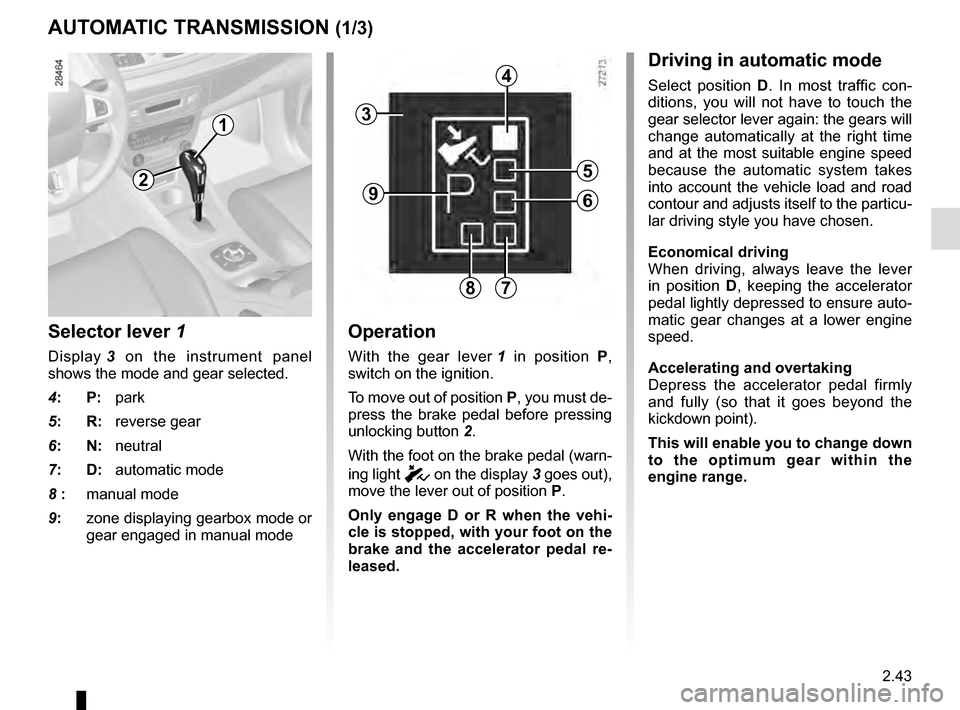
Selector lever 1
Display 3 on the instrument panel
shows the mode and gear selected.
4: P: park
5: R: reverse gear
6: N: neutral
7: D: automatic mode
8 : manual mode
9: zone displaying gearbox mode or
gear engaged in manual mode
Operation
With the gear lever 1 in position P,
switch on the ignition.
To move out of position P, you must de-
press the brake pedal before pressing
unlocking button 2.
With the foot on the brake pedal (warn-
ing light
c on the display 3 goes out),
move the lever out of position P.
Only engage D or R when the vehi-
cle is stopped, with your foot on the
brake and the accelerator pedal re-
leased.
AUTOMATIC TRANSMISSION (1/3)
Driving in automatic mode
Select position D. In most traffic con-
ditions, you will not have to touch the
gear selector lever again: the gears will
change automatically at the right time
and at the most suitable engine speed
because the automatic system takes
into account the vehicle load and road
contour and adjusts itself to the particu-
lar driving style you have chosen.
Economical driving
When driving, always leave the lever
in position D, keeping the accelerator
pedal lightly depressed to ensure auto-
matic gear changes at a lower engine
speed.
Accelerating and overtaking
Depress the accelerator pedal firmly
and fully (so that it goes beyond the
kickdown point).
This will enable you to change down
to the optimum gear within the
engine range.
3
2
1
4
5
6
78
9
Page 142 of 274

2.44
Parking the vehicle
When the vehicle is stopped, move the
lever to position P while keeping your
foot on the brake pedal: the gearbox is
in neutral and the drive wheels are me-
chanically locked by the driveshaft.
Apply the handbrake or, depending
on the vehicle, ensure that the elec-
tronic parking brake is applied.
Special circumstances
– If the road contours and bends
do not allow you to stay in auto-
matic mode (e.g.: in the mountains),
we recommend that you change to
manual mode.
This will prevent the automatic gear-
box from changing gears repeatedly
when climbing, and permit engine
braking on long descents.
– In cold weather, to prevent the
engine from stalling, wait a few mo-
ments before shifting the selector
lever from position P or N and en-
gaging D or R.
Driving in manual mode
With the selector lever in position D,
move the lever to the left. Shifting the
lever repeatedly allows you to change
gears manually:
– To move down through the gears, push the lever backwards;
– To move up through the gears, push the lever forwards.
The gear selected is displayed on the
instrument panel.
Special cases
Under certain driving conditions (e.g.
engine protection, or electronic stabil-
ity program (ESP) operational etc.): the
automatic system may change gear au-
tomatically.
Likewise, to prevent incorrect manoeu-
vres, a gear change may be refused by
the automatic system: in this case the
gear display flashes for a few seconds
as a warning.
AUTOMATIC TRANSMISSION (2/3)
In very cold weather, the system
may prevent the gears from being
shifted in manual mode until the
gearbox reaches the right tempera-
ture.
An impact to the under-
side of the vehicle while
manoeuvring (e.g.: strik-
ing a post, raised kerb or
other street furniture) may result in
damage to the vehicle (e.g.: defor-
mation of an axle).
To avoid any risk of accident, have
your vehicle checked by an ap-
proved Dealer.
Page 152 of 274

3.8
The displayed temperature values
show a comfort level.
When starting the engine, in-
creasing or decreasing the value
displayed will not allow the com-
fort level to be reached any more
quickly. The system will always op-
timise the temperature increase or
decrease (the ventilation system
does not start instantly at maximum
speed: it gradually increases). This
may take several minutes.
Generally speaking, unless there is
a particular reason not to, the dash-
board air vents should remain open.
You are recommended to use automatic mode by selecting one of the auto-
matic programmes AUTO, SOFT or FAST.
In automatic mode (indicator light for button 3 on), all heating and air conditioning
functions are controlled by the system.
You can also change the system selection. In this case, the indicator lig\
ht on the
button 3 will go out and the changed function, which is no longer controlled by \
the
system, will be shown on the display 12.
To return to automatic mode, press one of the AUTO, SOFT or FAST programmes.
AUTOMATIC CLIMATE CONTROL (3/5)
Switching air conditioning on
or off
In automatic mode, the system switches
the air conditioning system on or off,
depending on the climate conditions.
Press switch 8 to switch off the air
conditioning; the integrated indicator
comes on and “A/C OFF” is shown on
display 12.
3
812
Page 155 of 274

3.11
AIR CONDITIONING: information and advice on use
Fuel consumption
You will normally notice an increase
in fuel consumption (especially
when driving in town) when the air
conditioning is operating.
For vehicles fitted with manual air
conditioning, switch off the system
when it is not required.
Advice for reducing
consumption and therefore
helping to preserve the
environment:
Drive with the air vents open and
the windows closed.
If the vehicle has been parked in
the sun, open the doors for a few
moments to let the hot air escape
before starting the engine.
Maintenance
Refer to the Maintenance Document
for your vehicle for the inspection
frequency.Operating faults
As a general rule, contact your ap-
proved Dealer in the event of an op-
erating fault:
– reduction in de-icing, demist-
ing or air conditioning per-
formance. This may be caused
by the passenger compartment
filter cartridge becoming clogged;
– no cold air is being produced.
Check that the controls are set
correctly and that the fuses are
sound. Otherwise, switch off the
system.
Advice on use
In some situations, (air conditioning
off, air recirculation activated, venti-
lation speed at zero or low, etc.) you
may notice that condensation starts
to form on the windows and wind-
screen.
If there is condensation, use the
“Clear View” function to remove it,
then use the air conditioning in auto-
matic mode to stop it forming again.
If the condensation does not clear,
use the FAST programme.
Do not open the refriger-
ant fluid circuit. The fluid
may damage eyes or skin.
Note
Presence of water under the ve-
hicle. After prolonged use of the air
conditioning system, it is normal for
water to be present under the vehi-
cle. This is caused by condensation.
Page 156 of 274
3.12
ELECTRIC WINDOWS/ELECTRIC SUNROOF (1/4)
These systems operate with the igni-
tion on or off, until one of the front doors
is opened (limited to about 3 minutes).
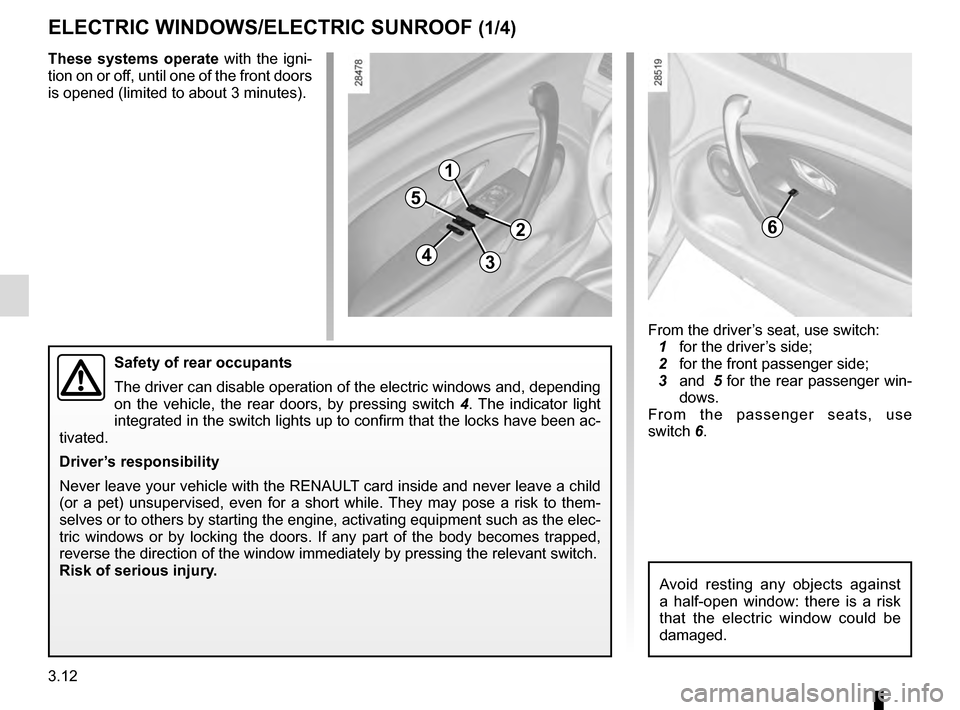
Safety of rear occupants
The driver can disable operation of the electric windows and, depending \
on the vehicle, the rear doors, by pressing switch 4. The indicator light
integrated in the switch lights up to confirm that the locks have been a\
c-
tivated.
Driver’s responsibility
Never leave your vehicle with the RENAULT card inside and never leave a child
(or a pet) unsupervised, even for a short while. They may pose a risk to them-
selves or to others by starting the engine, activating equipment such as\
the elec-
tric windows or by locking the doors. If any part of the body becomes tr\
apped,
reverse the direction of the window immediately by pressing the relevant\
switch.
Risk of serious injury.
1
2
34
5
6
From the driver’s seat, use switch:
1 for the driver’s side;
2 for the front passenger side;
3 and 5 for the rear passenger win-
dows.
From the passenger seats, use
switch 6.
Avoid resting any objects against
a half-open window: there is a risk
that the electric window could be
damaged.
Page 158 of 274

3.14
ELECTRIC WINDOWS/ELECTRIC SUNROOF (3/4)
0
AB
C
D
98
Sunroof
– Open the sun blind
– To open slightly: turn button 9 to
position A;
– To open fully: turn button 9 to po-
sition B , C or D, depending on the
opening position required;
– To close: turn button 9 to position 0.
Special noteYour vehicle is equipped with an anti-
pinch facility: when the sunroof encoun-
ters resistance whilst closing, (some-
body’s fingers, etc.) it stops and then
moves back several centimetres.
Driver’s responsibility
Never leave your vehicle
with the RENAULT card
inside, and never leave a
child who is not self-sufficient or a
pet, even for a short while.
The reason for this is that the child
may endanger himself or others by
starting the engine, activating equip-
ment such as the window winders
for example, or locking the doors.
If something gets trapped, reverse
the direction of travel as soon as
possible by turning button 9 fully to
the right (position D).
Risk of serious injury.
Page 183 of 274

4.1
Section 4: Maintenance
Bonnet . . . . . . . . . . . . . . . . . . . . . . . . . . . . . . . . . . . . \
. . . . . . . . . . . . . . . . . . . . . . . . . . . . . . . . . . . . 4.2
Engine oil level: . . . . . . . . . . . . . . . . . . . . . . . . . . . . . . . . . . . . \
. . . . . . . . . . . . . . . . . . . . . . . . . . . . . 4.4general information, use . . . . . . . . . . . . . . . . . . . . . . . . . . . . . . . . . . . . \
. . . . . . . . . . . . . . . . . 4.4
Engine oil level: topping up/filling . . . . . . . . . . . . . . . . . . . . . . . . . . . . . . . . . . . .\
. . . . . . . . . . . . . . . 4.6
Oil change . . . . . . . . . . . . . . . . . . . . . . . . . . . . . . . . . . . . \
. . . . . . . . . . . . . . . . . . . . . . . . . . . . . . . . . 4.8
Levels: . . . . . . . . . . . . . . . . . . . . . . . . . . . . . . . . . . . . \
. . . . . . . . . . . . . . . . . . . . . . . . . . . . . . . . . . . . 4.9 engine coolant . . . . . . . . . . . . . . . . . . . . . . . . . . . . . . . . . . . .\
. . . . . . . . . . . . . . . . . . . . . . . . 4.9
brake fluid . . . . . . . . . . . . . . . . . . . . . . . . . . . . . . . . . . . . \
. . . . . . . . . . . . . . . . . . . . . . . . . . . . 4.10
windscreen/headlight washer reservoir . . . . . . . . . . . . . . . . . . . . . . . . . . . . . . . . . . . .\
. . . . . 4.11
Filters . . . . . . . . . . . . . . . . . . . . . . . . . . . . . . . . . . . . \
. . . . . . . . . . . . . . . . . . . . . . . . . . . . . . . . . . . . . 4.11
Tyre Pressure . . . . . . . . . . . . . . . . . . . . . . . . . . . . . . . . . . . .\
. . . . . . . . . . . . . . . . . . . . . . . . . . . . . . 4.12
Battery . . . . . . . . . . . . . . . . . . . . . . . . . . . . . . . . . . . . \
. . . . . . . . . . . . . . . . . . . . . . . . . . . . . . . . . . . . 4.14
Bodywork maintenance . . . . . . . . . . . . . . . . . . . . . . . . . . . . . . . . . . . . \
. . . . . . . . . . . . . . . . . . . . . . . 4.16
Interior trim maintenance . . . . . . . . . . . . . . . . . . . . . . . . . . . . . . . . . . . . \
. . . . . . . . . . . . . . . . . . . . . . 4.18