2016 RENAULT MEGANE COUPE ignition
[x] Cancel search: ignitionPage 91 of 274

1.85
WINDSCREEN WASH/WIPE (3/5)
Operating fault
In the event of a malfunction of the
automatic wiping, the wiper is set to
intermittent wiping. Contact an au-
thorised dealer.
The operation of the rain sensor can
be disturbed in the event of:
– damaged wiper blades; a screen
of water or traces left by a blade in
the sensor’s detection zone may
increase the response time of the
automatic wiper, or increase the
wiping frequency;
– a windscreen with any chip or
crack level with the sensor, or a
windscreen covered in dust, dirt,
insects, ice, the use of washing
wax and water-repellent chemi-
cals; the automatic wiping will
be less sensitive, or even unres-
ponsive.
1
A
B
C
D
C slow continuous wiping
D fast continuous wiping
Position C is accessible with the
ignition on. Positions B and D are
accessible only with the engine run-
ning.
Special note
When driving the vehicle, the wiping
speed slows down whenever the vehi-
cle stops. For example, fast wiping
speed will slow to normal wiping speed.
As soon as the vehicle moves off,
wiping will return to the speed originally
selected.
If stalk 1 is operated, it overrides and
cancels the automatic function.
Precautions
– In the event of ice, check whether the
blades are stuck to the windscreen
before operating the wiping mecha-
nism. If you activate the wipers while
the blades are stuck down with ice,
you may risk damaging both the
blade and the wiper motor.
– Do not activate the wipers on a dry
screen. This will lead to the prema-
ture wear or damage to the blades.
Page 92 of 274
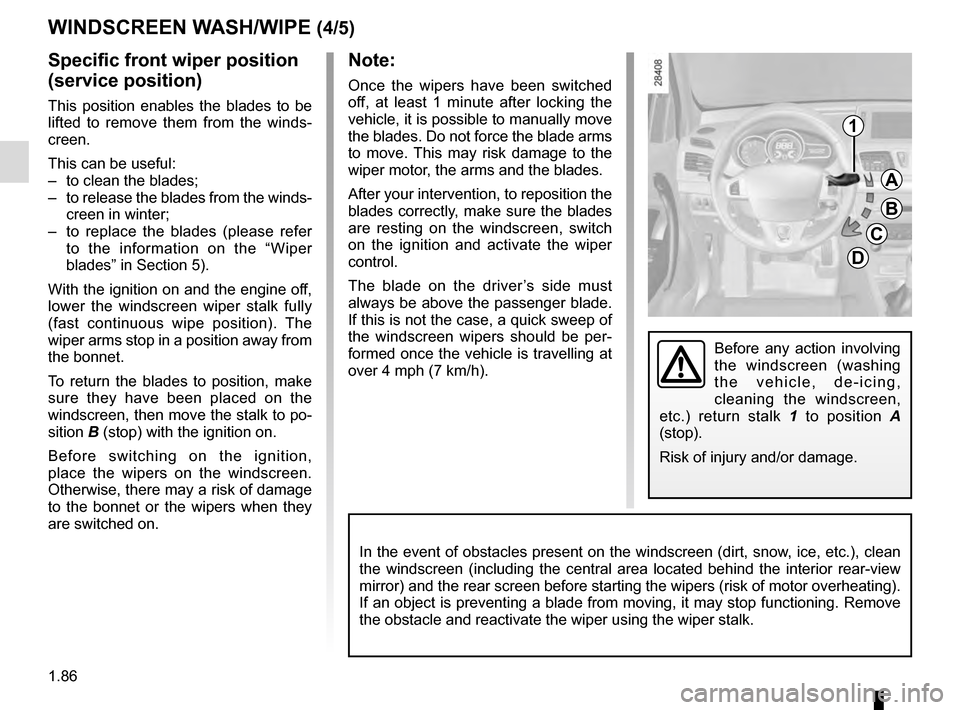
1.86
WINDSCREEN WASH/WIPE (4/5)
Specific front wiper position
(service position)
This position enables the blades to be
lifted to remove them from the winds-
creen.
This can be useful:
– to clean the blades;
– to release the blades from the winds- creen in winter;
– to replace the blades (please refer to the information on the “Wiper
blades” in Section 5).
With the ignition on and the engine off,
lower the windscreen wiper stalk fully
(fast continuous wipe position). The
wiper arms stop in a position away from
the bonnet.
To return the blades to position, make
sure they have been placed on the
windscreen, then move the stalk to po-
sition B (stop) with the ignition on.
Before switching on the ignition,
place the wipers on the windscreen.
Otherwise, there may a risk of damage
to the bonnet or the wipers when they
are switched on.
Note:
Once the wipers have been switched
off, at least 1 minute after locking the
vehicle, it is possible to manually move
the blades. Do not force the blade arms
to move. This may risk damage to the
wiper motor, the arms and the blades.
After your intervention, to reposition the
blades correctly, make sure the blades
are resting on the windscreen, switch
on the ignition and activate the wiper
control.
The blade on the driver’s side must
always be above the passenger blade.
If this is not the case, a quick sweep of
the windscreen wipers should be per-
formed once the vehicle is travelling at
over 4 mph (7 km/h).
1
A
B
C
D
In the event of obstacles present on the windscreen (dirt, snow, ice, etc.), clean
the windscreen (including the central area located behind the interior \
rear-view
mirror) and the rear screen before starting the wipers (risk of motor \
overheating).
If an object is preventing a blade from moving, it may stop functioning.\
Remove
the obstacle and reactivate the wiper using the wiper stalk.
Before any action involving
the windscreen (washing
the vehicle, de-icing,
cleaning the windscreen,
etc.) return stalk 1 to position A
(stop).
Risk of injury and/or damage.
Page 93 of 274

1.87
Headlight washers
Headlights on
On equipped vehicles, hold stalk 1
pulled towards you for about 1 second,
and the headlight washers and winds-
creen washers will be activated at the
same time.
Note:
To ensure the headlight washers ope-
rate correctly in winter, remove snow
from the jet trims and de-ice the jet
trims using an aerosol de-icer.
You are recommended to regularly
remove dirt encrusted on the headlight
glass.
When the minimum windscreen washer
fluid level is reached, the headlight
washer system may be deprimed.
Fill the windscreen washer fluid and
then activate the windscreen washer,
with the engine running , to reprime
the system.
Before any action on the
windscreen (washing the
vehicle, de-icing, cleaning
the windscreen, etc.) return
stalk 1 to position A (park).
Risk of injury and/or damage.
Windscreen washer
With the ignition on , pull stalk 1 then
release.
A brief pull will trigger a single sweep
of the wipers, in addition to the winds-
creen washer.
A longer pull will trigger three sweeps
of the wipers followed, a few seconds
later, by a fourth, in addition to the
windscreen washer.
Note:
In temperatures below zero, the washer
liquid risks freezing to the windscreen,
thereby reducing visibility. Heat the
windscreen using the demister control
before cleaning.
WINDSCREEN WASH/WIPE (5/5)
A
B
C
D
1
When working in the engine
compartment, ensure that
the windscreen wiper stalk
is in position A (park).
Risk of injury.
In the event of obstacles present
on the windscreen (dirt, snow, ice,
etc.), clean the windscreen (inclu-
ding the central area located behind
the interior rear-view mirror) and
the rear screen before starting the
wipers (risk of motor overheating).
If an object is preventing a blade
from moving, it may stop functio-
ning. Remove the obstacle and
reactivate the wiper using the wiper
stalk.
Page 94 of 274
1.88
REAR SCREEN WASH/WIPE
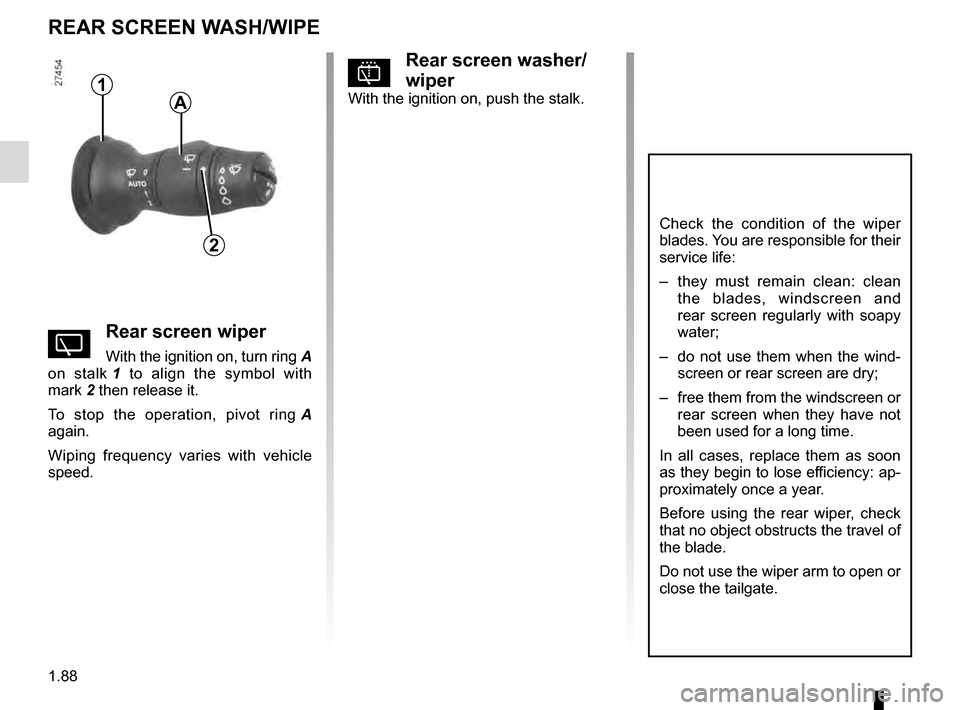
1
2
Check the condition of the wiper
blades. You are responsible for their
service life:
– they must remain clean: clean the blades, windscreen and
rear screen regularly with soapy
water;
– do not use them when the wind- screen or rear screen are dry;
– free them from the windscreen or rear screen when they have not
been used for a long time.
In all cases, replace them as soon
as they begin to lose efficiency: ap-
proximately once a year.
Before using the rear wiper, check
that no object obstructs the travel of
the blade.
Do not use the wiper arm to open or
close the tailgate.
pRear screen washer/
wiper
With the ignition on, push the stalk.
YRear screen wiper
With the ignition on, turn ring A
on stalk 1 to align the symbol with
mark 2 then release it.
To stop the operation, pivot ring A
again.
Wiping frequency varies with vehicle
speed.
A
Page 96 of 274

1.90
Filling with fuelWith the ignition off, insert the nozzle to
open valve A and insert it fully before
turning it on to fill the fuel tank (risk of
splashing).
Keep the nozzle in this position through-
out the entire filling operation.
When the pump cuts out automatically
at the end of the filling procedure, a
maximum of two further filling attempts
may be made, as there must be suffi-
cient space in the fuel tank to allow for
expansion.
Make sure that no water enters the fuel
tank during filling. The valve A and its
surround must remain clean.
Petrol versions
Using leaded petrol will damage the
antipollution system and may lead to a
loss of warranty.
To ensure that the fuel tank is not filled
with leaded petrol, the fuel tank filler
neck contains a restrictor fitted with a
foolproof system which only allows
the nozzle for unleaded petrol to be
used (at the pump).
FUEL TANK (2/3)
Persistent smell of
fuel
If you notice a persistent
smell of fuel you should:
– stop the vehicle as soon as traf- fic conditions allow and switch off
the ignition;
– switch on the hazard warning lights and ask your passengers
to leave the vehicle and to keep
away from traffic;
– contact an approved Dealer.
Vehicle fitted with the Stop and
Start function
To fill up with fuel, the engine must
be stopped (and not on standby):
stop the engine by pressing the
engine stop button 1 (please refer
to the information on “Starting and
stopping the engine” in Section 2).
1
Page 102 of 274

2.4
STARTING, STOPPING THE ENGINE (2/3)
Accessories function(switching on the ignition)
Once you have gained access to your
vehicle, you may use some of its func-
tions (radio, navigation, wipers, etc.).
Operating faults
In certain cases, the hands-free
RENAULT card may not work:
– when the RENAULT card battery is drained, flat battery, etc.
– near to appliances operating on the same frequency as the card (moni-
tor, mobile phone, video game, etc.);
– vehicle located in a high electroma- gnetic radiation zone.
The message “Please insert keycard”
appears on the instrument panel.
Insert the RENAULT card fully into card
reader 2.
1
2
For other functions:
– vehicles with remote control
RENAULT card, insert the card into
reader 2;
– vehicles with a RENAULT “hands-
free” card, with the card in the pas-
senger compartment or inserted in
the card reader 2, press button 1 wi-
thout depressing the pedals.
Note: if there is a card in the reader,
pressing button 1 starts the engine.
Driver’s responsibility when parking or stopping the vehicle
Never leave an animal, child or adult who is not self-sufficient alone in
your vehicle, even for a short time.
They may pose a risk to themselves or to others by starting the engine, \
activating
equipment such as the electric windows or locking the doors, for example\
.
Also, in hot and/or sunny weather, please remember that the temperature inside
the passenger compartment increases very quickly.
RISK OF DEATH OR SERIOUS INJURY.
Page 104 of 274

2.6
Preventing the engine from
standing by
In certain situations, such as negotiat-
ing a crossroads for instance, it is pos-
sible to keep the engine running so as
to be ready to move off quickly.
For vehicles equipped with manual
gearboxes:
Keep the clutch pedal pressed right
down
FUNCTION STOP AND START (1/3)
This system enables a reduced fuel
consumption and lower greenhouse
gas emissions. The system is activated
automatically when the vehicle is star-
ted.
While driving, the system stops the
engine (standby) when the vehicle is
at a standstill (traffic jam, traffic lights,
etc).
Conditions for engine
standby
The vehicle has set off from where it
was parked;
For vehicles equipped with manual
gearboxes:
– the gearbox is in neutral;
and
– the vehicle speed is less than ap-proximately 7 mph (3 km/h).
In all vehicles, the message «Auto
Stop» on the instrument panel appears
when the engine is on standby.
The vehicle equipment remain opera-
tional while the engine is stopped.
Engine on standby - braking
assistance is no longer ope-
rational.
Before getting out of the
vehicle, you must switch
off the ignition by pressing
the engine stop (please see
“Starting, stopping the engine”).
Do not drive off when the
engine is on standby (the
message “Auto Stop” is dis-
played on the instrument
panel).
Special feature of vehi-
cles equipped with an
electronic parking brake
If the engine is put on
standby (the message “Auto Stop”
is displayed on the instrument
panel), the electronic parking brake
is not applied automatically.
If the engine stalls while the system
is in operation, pressing the clutch
pedal right down will start it again.
Conditions for coming out of
engine standby
For vehicles equipped with manual
gearboxes:
– the gearbox is in neutral and the clutch pedal is slightly depressed;
or
– the engine is in gear and the clutch pedal is pressed right down.
Page 105 of 274

2.7
FUNCTION STOP AND START (2/3)
To fill up with fuel, the engine must
be stopped (and not on standby):
always stop the engine by pressing
the engine stop button (please see
“Starting, stopping the engine)”.
Conditions preventing the
standby of the engine
Certain conditions prevent the system
from using the engine standby function,
including when:
– reverse gear is engaged;
– the bonnet is not locked;
– the driver’s door is not closed;
– the driver’s seatbelt is not fastened;
– the outdoor temperature is too low or too high (less than around 0 °C or
higher than around 30 °C);
– the battery is not sufficiently char- ged;
– the difference between the vehicle interior temperature and the automa-
tic climate control instruction is too
high;
– the “Clear View” function is activa- ted (please see “Automatic Climate
Control” in Section 3); – the engine temperature is too low;
– the anti-pollution system is required;
or
– ...
The message “Auto Stop Unavailable”
on the instrument panel indicates that
the engine is on standby.
Special cases
With the engine on standby (traffic jam,
traffic lights, etc.), if the driver unfastens
their seat belt, opens the driver’s door
or gets out of their seat, the ignition will
be switched off.
To restart and reactivate the Stop and
Start system, press the start button
(please see “Starting, stopping the
engine” in Section 2).