Page 82 of 274
1.76
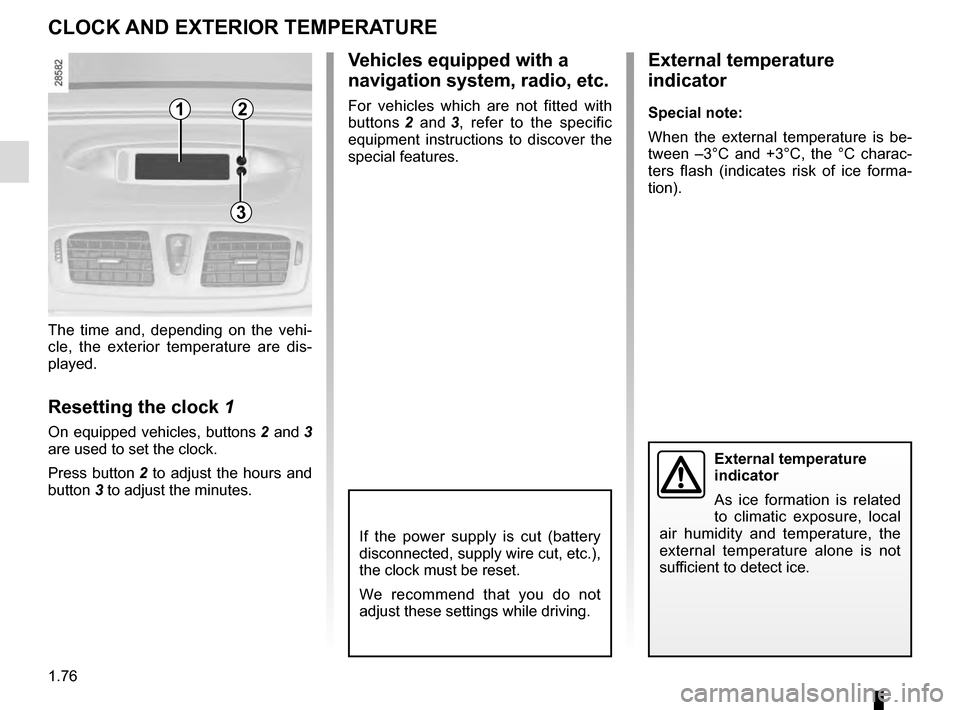
The time and, depending on the vehi-
cle, the exterior temperature are dis-
played.
Resetting the clock 1
On equipped vehicles, buttons 2 and 3
are used to set the clock.
Press button 2 to adjust the hours and
button 3 to adjust the minutes.
External temperature
indicator
As ice formation is related
to climatic exposure, local
air humidity and temperature, the
external temperature alone is not
sufficient to detect ice.
CLOCK AND EXTERIOR TEMPERATURE
External temperature
indicator
Special note:
When the external temperature is be-
tween –3°C and +3°C, the °C charac-
ters flash (indicates risk of ice forma-
tion).
Vehicles equipped with a
navigation system, radio, etc.
For vehicles which are not fitted with
buttons 2 and 3, refer to the specific
equipment instructions to discover the
special features.12
3
If the power supply is cut (battery
disconnected, supply wire cut, etc.),
the clock must be reset.
We recommend that you do not
adjust these settings while driving.
Page 151 of 274

3.7
AUTOMATIC CLIMATE CONTROL (2/5)
Varying the ventilation speed
In automatic mode, the system uses
the most suitable amount of air to reach
and maintain the desired comfort level.
You can still adjust the fan speed by
pressing the buttons 13 to increase or
reduce the fan speed.
In this case, the fan speed, which is
no longer controlled automatically, ap-
pears in zone A on the display 12.
Some buttons have an operating
tell-tale which indicates the opera-
ting status.
1
3
Temperature adjustment
Press button 1 or 6 to raise or lower the
left-hand 1 or right-hand 6 temperature.
Pressing button 3 for more than two se-
conds sets the passenger temperature
to the driver’s temperature.
Special note: The highest and lowest
settings allow the system to produce
maximum hot or cold temperature
levels (“LO” and “HI” indicated on the
multimedia display 12).
6
12
Clear View function
Press button 10: the integrated indica-
tor light comes on.
This function quickly demists and de-
ices the windscreen, the rear screen,
the front side windows, and the door
mirrors (depending on the vehicle). The
air conditioning and rear screen de-
icing functions must be activated.
Press button 9 to stop the heated rear
screen operating; the integrated indica-
tor goes out.
You can change the fan speed: press
the button 13.
To exit this function, press:
– the 10 button again;
– one of either button 2, 3 or 4.
109
24
A
13
Page 197 of 274
4.15
BATTERY (2/2)
The battery is a specific
type, please ensure it is
replaced with the same
type. Consult an approved
dealer.
8
9
Replacing the battery
As this operation is complex, we advise
you to contact an authorised dealer.
Vehicle fitted with the Stop and Start
function
After changing or disconnecting the bat-
tery, the message “New battery?” ap-
pears on the instrument panel. Select
“Yes” or “No” with a short press on one
of the buttons 8 or 9, then confirm with
a long press on one of the two buttons.
Before performing any
action in the engine com-
partment, the ignition must
be switched off by pressing
the engine stop button (please see
the information on “Starting, stop-
ping the engine” in Section 2).
Page 232 of 274
5.30
Operating faultsIf the battery is too weak to ensure cor-
rect operation, you may start (insert the
RENAULT card in the card reader) and
lock/unlock the vehicle (refer to the in-
formation on “Locking/unlocking the
doors” in Section 1).
RENAULT CARD: battery
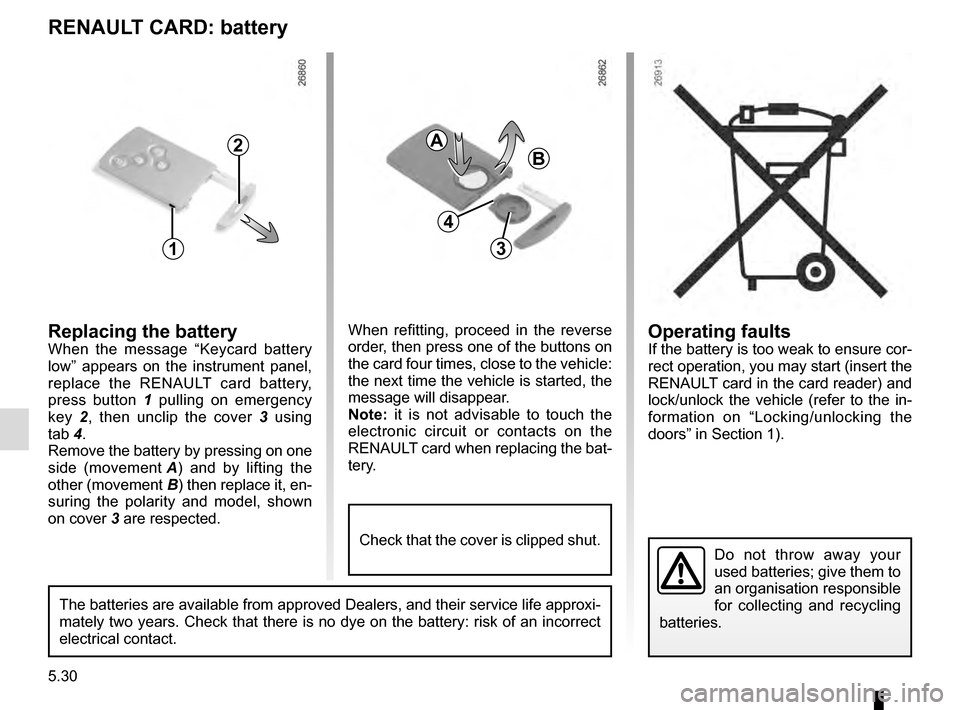
Replacing the batteryWhen the message “Keycard battery
low” appears on the instrument panel,
replace the RENAULT card battery,
press button 1 pulling on emergency
key 2, then unclip the cover 3 using
tab 4.
Remove the battery by pressing on one
side (movement A) and by lifting the
other (movement B) then replace it, en-
suring the polarity and model, shown
on cover 3 are respected.
Do not throw away your
used batteries; give them to
an organisation responsible
for collecting and recycling
batteries.
1
2
When refitting, proceed in the reverse
order, then press one of the buttons on
the card four times, close to the vehicle:
the next time the vehicle is started, the
message will disappear.
Note: it is not advisable to touch the
electronic circuit or contacts on the
RENAULT card when replacing the bat-
tery.
A
B
3
The batteries are available from approved Dealers, and their service lif\
e approxi-
mately two years. Check that there is no dye on the battery: risk of an \
incorrect
electrical contact.
4
Check that the cover is clipped shut.