2016 RENAULT MASTER cruise control
[x] Cancel search: cruise controlPage 141 of 284

2.27
CRUISE CONTROL/SPEED LIMITER: limiter function (2/3)
Exceeding the limit speed
It is possible to exceed the limit speed
at any moment. To do this: press the
accelerator pedal firmly and fully
(beyond the kickdown point).
Whilst the speed is being exceeded,
the limit speed displayed on the instru-
ment panel flashes.
Then, as far as is possible, release
the accelerator pedal: the speed lim-
iter function will return as soon as you
reach a speed lower than the memo-
rised speed.
Limited speed cannot be maintained
When driving down a steep gradient,
the system is unable to maintain the
limit speed: the memorised speed will
flash on the instrument panel informa-
tion display to inform you of this situ-
ation.
The speed limiter function is
in no way linked to the brak-
ing system.
Driving
When a limited speed has been stored
and this speed is not reached, driving is
similar to driving a vehicle without the
speed limiter function.
Once you have reached the stored
speed, no effort on the accelera-
tor pedal will allow you to exceed
the programmed speed except in an
emergency (refer to information on
“Exceeding the limit speed”).
1
Varying the limit speed
The limit speed may be changed by re-
peatedly pressing:
– Switch 1 (+) to increase the speed;
– Switch 2 (-) to decrease the speed.
2
Page 142 of 284
2.28
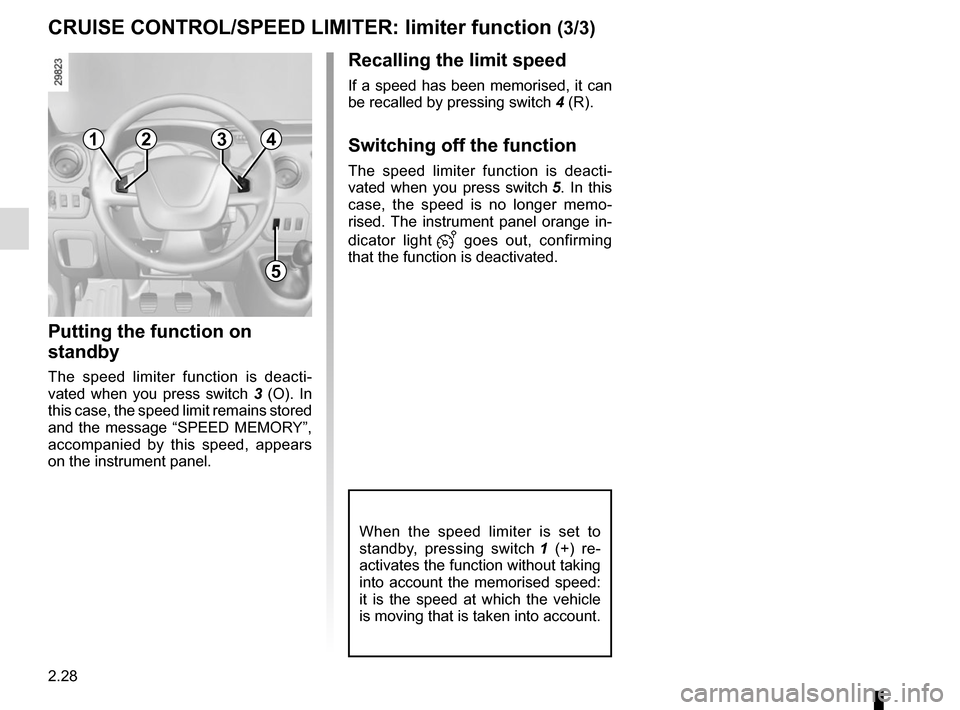
Recalling the limit speed
If a speed has been memorised, it can
be recalled by pressing switch 4 (R).
Switching off the function
The speed limiter function is deacti-
vated when you press switch 5. In this
case, the speed is no longer memo-
rised. The instrument panel orange in-
dicator light
goes out, confirming
that the function is deactivated.
CRUISE CONTROL/SPEED LIMITER: limiter function (3/3)
Putting the function on
standby
The speed limiter function is deacti-
vated when you press switch 3 (O). In
this case, the speed limit remains stored
and the message “SPEED MEMORY”,
accompanied by this speed, appears
on the instrument panel.
When the speed limiter is set to
standby, pressing switch 1 (+) re-
activates the function without taking
into account the memorised speed:
it is the speed at which the vehicle
is moving that is taken into account.
1
5
234
Page 143 of 284

2.29
CRUISE CONTROL/SPEED LIMITER: cruise control function (1/4)
The cruise control function helps you to
maintain your driving speed at a speed
that you choose, called the cruising
speed.
This cruising speed may be set at any
speed above 20 mph (30 km/h).
The cruise control function
is in no way linked to the
braking system.
This function is an addi-
tional driving aid. However,
the function does not take
the place of the driver.
Therefore, it can under no circum-
stances replace the driver’s respon-
sibility to respect speed limits and to
be vigilant (the driver must always
be ready to brake).
Cruise control must not be used in
heavy traffic, on undulating or slip-
pery roads (black ice, aquaplan-
ing, gravel) and during bad weather
(fog, rain, side winds etc.).
There is a risk of accidents.
Controls
1 Cruising speed activation, storage and increase switch (+).
2 Cruising speed decrease switch (-).
3 Switch the function to standby (with stored cruising speed) (O).
4 Activation with recall of stored gov- erned cruising speed (R).
5 Main “On/Off” switch.
1
5
234
Page 144 of 284
2.30
CRUISE CONTROL/SPEED LIMITER: cruise control function (2/4)
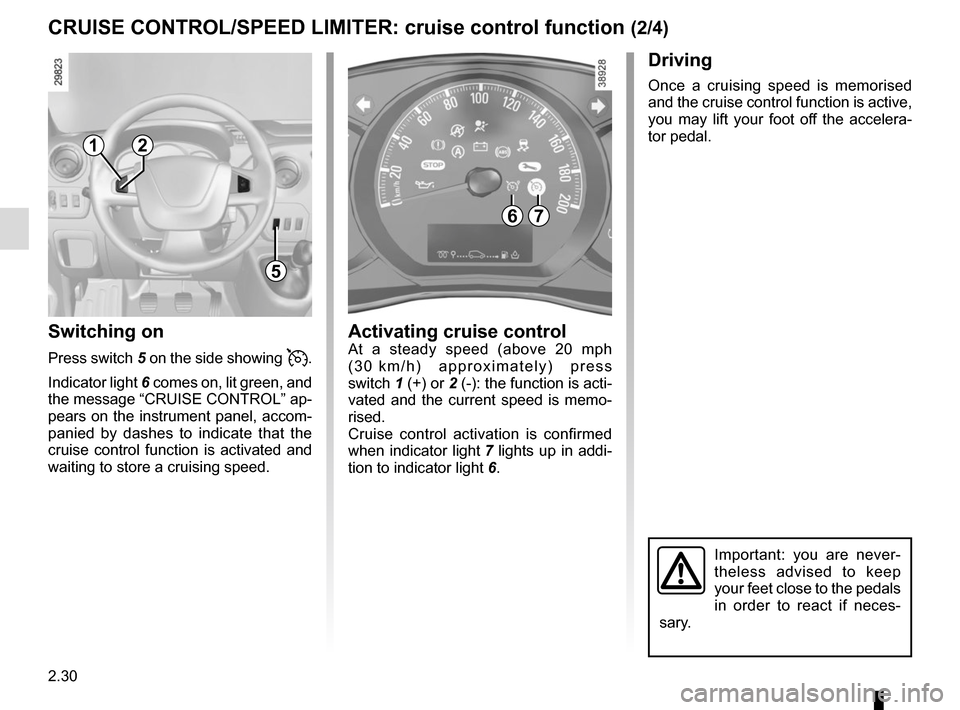
Switching on
Press switch 5 on the side showing .
Indicator light 6 comes on, lit green, and
the message “CRUISE CONTROL” ap-
pears on the instrument panel, accom-
panied by dashes to indicate that the
cruise control function is activated and
waiting to store a cruising speed.
Driving
Once a cruising speed is memorised
and the cruise control function is active,
you may lift your foot off the accelera-
tor pedal.
Activating cruise controlAt a steady speed (above 20 mph
(30 km/h) approximately) press
switch 1 (+) or 2 (-): the function is acti-
vated and the current speed is memo-
rised.
Cruise control activation is confirmed
when indicator light 7 lights up in addi-
tion to indicator light 6.
Important: you are never-
theless advised to keep
your feet close to the pedals
in order to react if neces-
sary.
67
1
5
2
Page 145 of 284

2.31
CRUISE CONTROL/SPEED LIMITER: cruise control function (3/4)
Exceeding the cruising speed
The cruising speed may be exceeded
at any time by depressing the accelera-
tor pedal. While it is being exceeded,
the cruising speed flashes on the in-
strument panel.
Then, release the accelerator pedal:
after a few seconds, the vehicle will
automatically return to its set cruising
speed.
Cruising speed cannot be
maintained
When driving down a steep gradient,
the system is unable to maintain the
cruising speed: the stored speed will
flash on the instrument panel informa-
tion display to inform you of this situ-
ation.
Adjusting the cruising speed
The cruising speed may be changed by
pressing the following repeatedly:
– switch 1 (+) to increase the speed,
– switch 2 (-) to decrease the speed.
The cruise control function
is in no way linked to the
braking system.
12
Page 146 of 284

2.32
Switching off the function
The cruise control function is deacti-
vated if you press switch 5: in this case
a speed is no longer memorised.
The
and indicator lights on the
instrument panel go out, confirming that
the function is deactivated.
Recalling the cruising speed
If a speed is memorised, it can be re-
called, once you are sure that the road
conditions are suitable (traffic, road sur-
face, weather conditions, etc.).
With a vehicle speed above 20 mph
(30 km/h), press switch 4 (R).
Note: if the speed previously stored is
much higher than the current speed,
the vehicle will accelerate more rapidly
to reach this threshold.
When the cruise control is set to
standby, pressing switch 1 (+) re-
activates the cruise control func-
tion without taking into account the
memorised speed: it is the speed at
which the vehicle is moving that is
taken into account.Putting the cruise control
on standby or switching it
off does not cause a rapid
reduction in speed: you
must brake by depressing the brake
pedal.
CRUISE CONTROL/SPEED LIMITER: cruise control function (4/4)
1
5
2
Putting the function on
standby
The function is suspended when you:
– press button 3 (O);
– the brake pedal;
– depress the clutch pedal or shift into neutral if the vehicle has an auto-
matic gearbox
In all three cases, the cruising speed
remains stored and the message
“SPEED MEMORY” appears on the in-
strument panel.
standby is confirmed when green
indicator light goes out.
43
Page 147 of 284

2.33
VEHICLE WITH OVERSPEED FUNCTION
The vehicle speed may be permanently
set at a fixed value depending on the
vehicle or on local legislation.
To adjust the value or activate/deacti-
vate the function, consult an approved
dealer.
In the event of statutory limits (depend-
ing on the vehicle), this function may
not be deactivated.
Label 1 attached to the dashboard
shows the speed limit. Special case:
if your vehicle is fitted
with the Cruise control/Speed limiter,
fully depressing the accelerator pedal
(beyond the kickdown point) will not
allow you to exceed the overspeed
function set speed (refer to the informa-
tion on the “Speed limiter” in Section 2).
In exceptional circumstances (e.g.
steep gradient), the overspeed
function speed may be exceeded
slightly as the function does not
affect the braking system.
The function does not take
the place of the driver.
Under no circumstances
should it replace observa-
tion of speed limits nor vigilance
and responsibility on the part of the
driver.
1
Page 277 of 284

A
ABS ....................................................................\
...2.16 → 2.20
accessories...................................................................")
7.1
ALPHABETICAL INDEX (1/4)
A
ABS ....................................................................\
...2.16 → 2.20
accessories........................................................................\
5.41
accessories socket ............................................................ 3.18
AdBlue ...............................................................1.103 → 1.108
AdBlue additive..................................................1.103 → 1.108
additional systems to the seat belts................................... 1.29
additive (tank) ....................................................1.103 → 1.108
additive tank ......................................................1.103 → 1.108
adjusting the seats............................................................. 1.22
adjusting your driving position ........................................... 1.22
advice on antipollution ....................................................... 2.12
air bag....................................................................1.26 → 1.29
activating the front passenger air bags ............1.68 → 1.70
deactivating the front passenger air bags ........1.68 → 1.70
air conditioning ........................................................3.2 → 3.13
air vents ...................................................................... 3.2 – 3.3
anti-corrosion check ..............................................6.16 → 6.21
anti-corrosion protection .................................................... 4.14
anti-lock braking system: ABS ...............................2.16 → 2.20
antipollution advice .................................................................\
......... 2.12
ashtrays ...............................................................\
.............. 3.18
audible and visual signals................................................ 1.100
B
battery........................................................................\
........ 4.13 troubleshooting ................................................. 5.33 – 5.34
bonnet........................................................................\
.......... 4.2
brake fluid ........................................................................\
.... 4.8
bulbs changing ......................................5.21 – 5.22, 5.25 → 5.27
C
capacity of mechanical components........................4.8 → 4.10
central door locking ........................... 1.2 → 1.11, 1.14 → 1.17changing a bulb .................................5.21 – 5.22, 5.25
→ 5.27
changing a wheel........................ 5.2 → 5.4, 5.11 → 5.15, 5.17
changing gear .................................................................... 2.14
child restraint/seat 1.28, 1.31 – 1.32, 1.36 → 1.55, 1.68 → 1.70
child safety............ 1.2, 1.31 – 1.32, 1.36 → 1.55, 1.68 → 1.70
child seats..........................................1.31 – 1.32, 1.36 → 1.55
children ............................................................ 1.2, 1.31 – 1.32
cigar lighter ........................................................................\
3.18
cleaning: inside the vehicle .............................................. 4.16 – 4.17
clock ..................................................................\
................ 1.92
control instruments ................................................1.76 → 1.83
coolant ................................................................\
............... 1.81
courtesy light ............................................................ 3.16, 5.27
cruise control .........................................................2.29 → 2.32
cruise control-speed limiter....................................2.26 → 2.32
D
demisting windscreen ..................................................3.4, 3.7 → 3.12
dimensions ................................................................. 6.6 – 6.7
dipstick................................................................\
........ 4.4 – 4.5
display .................................................................... 1.82 – 1.83
doors................................................... 1.12 – 1.13, 1.16 – 1.17
driver’s position .....................................................1.72 → 1.75
driving ...........................................2.2, 2.10, 2.16 → 2.23, 2.33
driving recommendations ........................................ 2.8 → 2.11
E
ECO driving ............................................................. 2.8 →
2.11
ECO mode ........................................................................\
... 2.9
electric beam height adjustment ........................................ 1.99
electric windows ..................................................... 3.14 – 3.15
electronic stability control: ESC .............................2.16 → 2.20
emergency brake assist.........................................2.16 → 2.20
emergency braking ................................................2.16 → 2.20