2016 RENAULT KADJAR Interior light
[x] Cancel search: Interior lightPage 11 of 300

1.5
RADIO FREQUENCY REMOTE CONTROL UNIT: deadlocking
Never use deadlocking if
someone is still inside the
vehicle.
If the vehicle is equipped with a dead-
locking function, this allows you to lock
the opening elements and to prevent
the doors from being unlocked using
the interior handles (for example, by
breaking the window and then trying to
open the door from the inside).
To activate deadlocking
Press button 1 twice in quick succes-
sion.
The hazard warning lights and indicator
lights give two slow flashes and three
quick flashes to indicate locking.
Special note: deadlocking is not pos-
sible if the hazard warning lights or the
side lights are lit.
1
To deactivate deadlocking
Unlock the vehicle using button 2.
The hazard warning lights flash once
to indicate that the doors have been un-
locked.
2
Page 13 of 300

1.7
RENAULT CARD: general information (2/2)
Advice
Avoid leaving the card in hot, cold or
humid areas.
Do not keep the RENAULT card in
a place where it could be bent or
damaged accidentally, such as in a
back pocket of a garment.
Replacement: need for an
additional RENAULT Card
If you lose your RENAULT card or
require another, you can obtain one
from an approved dealer.
If a RENAULT card is replaced, it
will be necessary to take the vehi-
cle and all of its RENAULT cards
to an approved dealer to initialise
the system.
You may use up to four RENAULT
cards per vehicle.
Distance lighting function
Pressing button 4 switches on the
dipped beam headlights and the interior
lighting for approximately 20 seconds.
This can be used, for example, to iden-
tify the vehicle from a distance when
parked in a car park.
Note: Pressing button 4 again switches
off the lighting.
4
Driver’s responsibility
when parking or stopping
the vehicle
Never leave an animal,
child or adult who is not self-suffi-
cient alone on your vehicle, even for
a short time.
They may pose a risk to themselves
or to others by starting the engine,
activating equipment such as the
electric windows or locking the
doors.
Also, in hot and/or sunny weather,
please remember that the tempera-
ture inside the passenger compart-
ment increases very quickly.
RISK OF DEATH OR SERIOUS
INJURY.
Page 18 of 300

1.12
Never use deadlocking if
someone is still inside the
vehicle.
To activate deadlocking
Press button 2 twice in quick succes-
sion.
With the vehicle unlocked, you can also
press the button 3 on the driver’s door,
passenger’s door or the boot twice in
quick succession (or, depending on the
vehicle, on the tailgate of the rear door).
In both cases, locking is indicated by
the hazard warning lights flashing five
times.
If the vehicle is equipped with a dead-
locking function, this allows you to lock
the opening elements and to prevent
the doors from being unlocked using
the interior handles (for example, by
breaking the window and then trying to
open the door from the inside).
RENAULT CARD: deadlocking
Special feature
The deadlocking cannot be activated
when the hazard warning lights or the
side lights are lit.
To deactivate deadlocking
Unlock the vehicle using button
1 on
the RENAULT card.
The hazard warning lights flash once
to indicate that the doors have been un-
locked.
1
2
3
Page 21 of 300

1.15
LOCKING, UNLOCKING THE DOORS (3/3)
Interior locking/unlocking
door control
The switch 5 located on the driver and
passenger doors simultaneously con-
trols the doors and the boot.
Unlocking: press the switch 5 on the
side
‡.
Locking: press the switch 5 on the side
….
If a door or the tailgate is open or not
closed properly, the doors and tailgate
lock/unlock quickly. If transporting an object with the tail-
gate open, you can still lock the doors:
with the engine stopped
, press and
hold the switch 5 on the side
… for
more than five seconds to lock the
other doors.
Locking the opening
elements without the
RENAULT card or the key
For example, in the event of a dis-
charged battery or the RENAULT card
or key temporarily not working, etc.
With the engine switched off and
an opening element (door or boot)
open, press and hold the switch 5 on
side
… for more than 5 seconds.
When the door is closed, all the doors
and the tailgate will be locked.
Unlocking the vehicle from the outside
is only possible with the RENAULT card
in the vehicle’s access zone or using
the key.
Door and tailgate status
indicator
With the ignition on, the warning
light 6 informs you of the locking status
of the opening elements:
– indicator light on, the doors and tail- gate are locked;
– indicator light off, the doors and tail- gate are unlocked.
When you lock the doors from the out-
side, the indicator light remains lit for a
moment, and then goes out.
6
Driver’s responsibility
If you decide to keep the
doors locked when you are
driving, remember that it
may be more difficult for those as-
sisting you to gain access to the
passenger compartment in the
event of an emergency.
5
Page 84 of 300
1.78
REAR-VIEW MIRRORS (3/3)
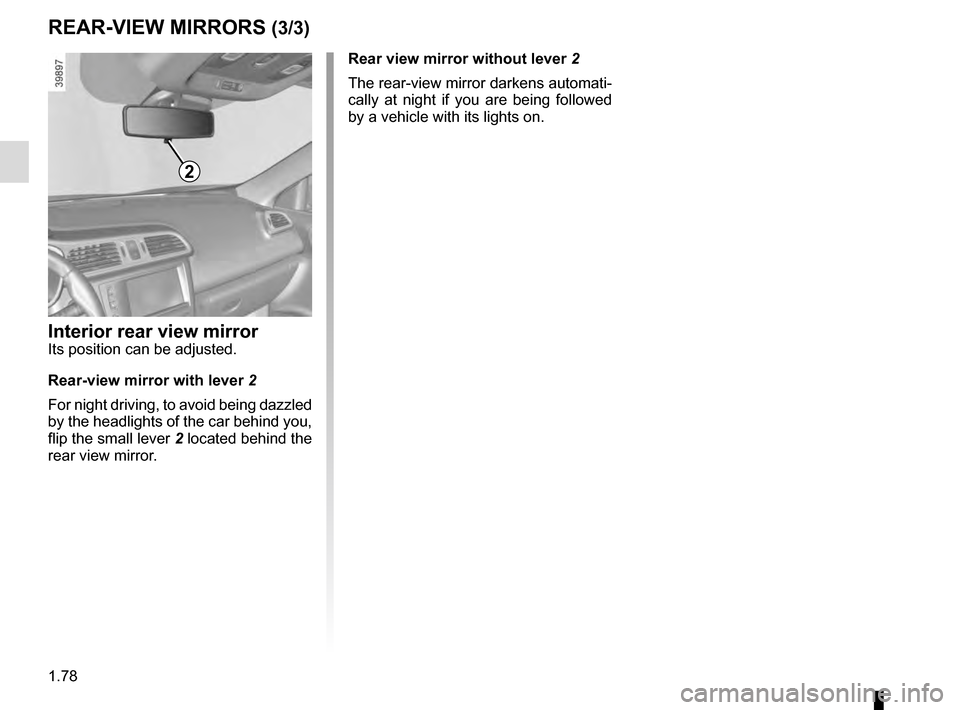
2
Interior rear view mirrorIts position can be adjusted.
Rear-view mirror with lever 2
For night driving, to avoid being dazzled
by the headlights of the car behind you,
flip the small lever 2 located behind the
rear view mirror. Rear view mirror without lever 2
The rear-view mirror darkens automati-
cally at night if you are being followed
by a vehicle with its lights on.
Page 86 of 300
1.80
Automatic main beam
headlights
Depending on the vehicle, this system
switches the main beam headlights on
and off automatically. The function uses
a camera located behind the interior
rear-view mirror to detect vehicles that
are following and coming in the oppo-
site direction.
The main beam headlights come on au-
tomatically if:
– exterior light is weak;
– no other vehicles or lighting are de-tected;
– the vehicle speed is above approxi- mately 30 mph (45 km/h).
If any of the above conditions are not
fulfilled, the system switches to dipped
beam headlights.
The “automatic main beam
headlights” system should
under no circumstances be
used to replace driver atten-
tion and responsibility with regard
to vehicle lighting and adapting to
light, visibility and traffic conditions.Using the portable naviga-
tion system at night in the
windscreen area below the
camera may disturb the op-
eration of the “automatic main beam
headlights” system (risk of reflection
on the windscreen).
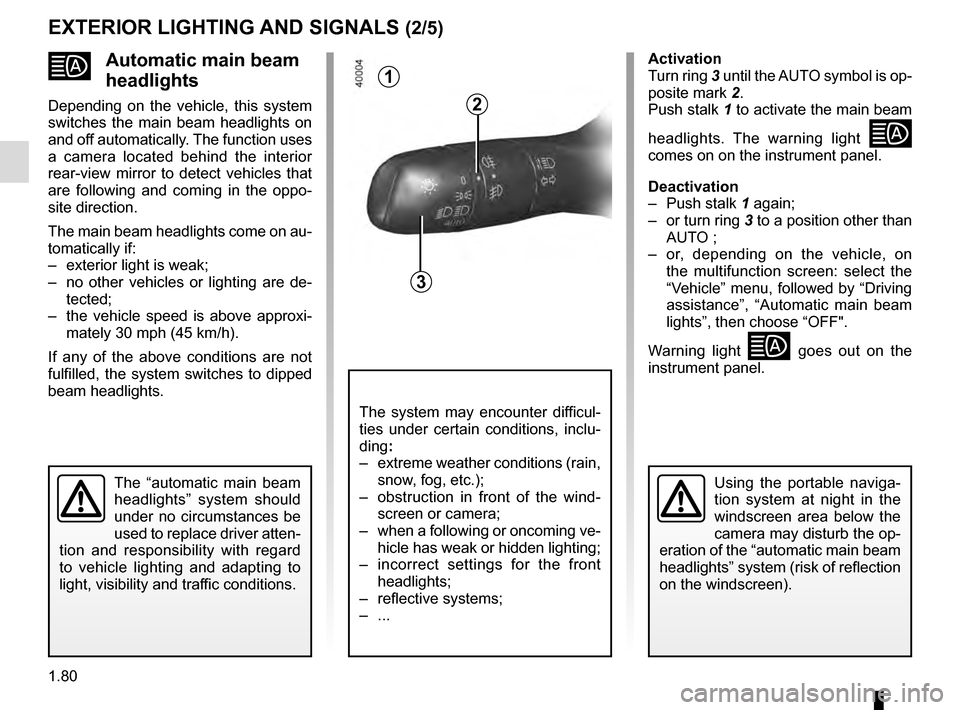
1
3
2
The system may encounter difficul-
ties under certain conditions, inclu-
ding :
– extreme weather conditions (rain, snow, fog, etc.);
– obstruction in front of the wind- screen or camera;
– when a following or oncoming ve- hicle has weak or hidden lighting;
– incorrect settings for the front headlights;
– reflective systems;
– ...
Activation
Turn ring 3 until the AUTO symbol is op-
posite mark 2.
Push stalk 1 to activate the main beam
headlights. The warning light
comes on on the instrument panel.
Deactivation
– Push stalk 1 again;
– or turn ring 3 to a position other than AUTO ;
– or, depending on the vehicle, on the multifunction screen: select the
“Vehicle” menu, followed by “Driving
assistance”, “Automatic main beam
lights”, then choose “OFF".
Warning light
goes out on the
instrument panel.
EXTERIOR LIGHTING AND SIGNALS (2/5)
Page 114 of 300

2.10
STOP AND START FUNCTION (3/4)
Conditions preventing the
standby of the engine
Certain conditions prevent the system
from using the engine standby function,
including when:
for vehicles equipped with a
RENAULT card:
– the driver’s door is not closed;
– the driver’s seatbelt is not fastened;
for all vehicles:
– reverse gear is engaged;
– the bonnet is not locked;
– the outdoor temperature is too low or too high (less than around 0 °C or
higher than around 30 °C);
– the battery is not sufficiently char- ged;
– if available, “4WD Lock” mode is activated (please see the section
“Transmission: 4-wheel drive (4WD)”
in Section 2);
– the difference between the vehicle interior temperature and the auto-
matic climate control instruction is
too high; – parking distance control is in opera-
tion;
– for vehicles with automatic gear- boxes, the gradient is steeper than
approximately 12%;
– the “Clear View” function is activa- ted (please see “Automatic Climate
Control” in Section 3);
– the engine temperature is too low;
– the emission control system is being regenerated;
or
– ...
Warning light
is displayed on the
instrument panel. This notifies you that
engine standby is not available.
Deactivate the Stop and
Start function when perfor-
ming any operations in the
engine compartment.
Special cases for vehicles
with a RENAULT card
With the engine on standby (traffic jam,
traffic lights, etc.), if the driver unfas-
tens the seat belt and opens the driv-
er’s door, or gets out of the seat, the
ignition is switched off.
The assisted parking brake is applied
automatically.
To restart and reactivate the Stop and
Start system, start the engine (please
refer to “Starting, stopping the engine”
in Section 2).
Special cases of vehicles
with a key
With the engine on standby (traffic
jam, traffic lights, etc.), if you get out of
the vehicle, a beep warns you that the
engine is on standby and has not been
stopped.
Page 179 of 300

3.1
Section 3: Your comfort
Air Vents . . . . . . . . . . . . . . . . . . . . . . . . . . . . . . . . . . . .\
. . . . . . . . . . . . . . . . . . . . . . . . . . . . . . . . . . 3.2
Manual air conditioning/heating system . . . . . . . . . . . . . . . . . . . . . . . . . . . . . . . . . . . .\
. . . . . . . . . . 3.4
Automatic climate control . . . . . . . . . . . . . . . . . . . . . . . . . . . . . . . . . . . .\
. . . . . . . . . . . . . . . . . . . . . 3.7
Air conditioning: information and advice on use . . . . . . . . . . . . . . . . . . . . . . . . . . . . . . . . . . . .\
. . . . 3.13
Outside air quality and deodorisation functions . . . . . . . . . . . . . . . . . . . . . . . . . . . . . . . . . . . . \
. . . . . 3.14
Electric windows . . . . . . . . . . . . . . . . . . . . . . . . . . . . . . . . . . . .\
. . . . . . . . . . . . . . . . . . . . . . . . . . . . 3.15
Fixed glass roof . . . . . . . . . . . . . . . . . . . . . . . . . . . . . . . . . . . . \
. . . . . . . . . . . . . . . . . . . . . . . . . . . . . 3.16
Interior lighting . . . . . . . . . . . . . . . . . . . . . . . . . . . . . . . . . . . . \
. . . . . . . . . . . . . . . . . . . . . . . . . . . . . . 3.17
Passenger compartment storage/fittings . . . . . . . . . . . . . . . . . . . . . . . . . . . . . . . . . . . . \
. . . . . . . . . . 3.18
Ashtray/cigarette lighter . . . . . . . . . . . . . . . . . . . . . . . . . . . . . . . . . . . . \
. . . . . . . . . . . . . . . . . . . . . . . 3.23
SLIDING REAR BENCH SEAT . . . . . . . . . . . . . . . . . . . . . . . . . . . . . . . . . . . . \
. . . . . . . . . . . . . . . . . 3.25
Luggage compartment. . . . . . . . . . . . . . . . . . . . . . . . . . .\
. . . . . . . . . . . . . . . . . . . . . . . . . . . . . . . . . 3.27
Luggage cover . . . . . . . . . . . . . . . . . . . . . . . . . . . . . . . . . . . . \
. . . . . . . . . . . . . . . . . . . . . . . . . . . . . . 3.28
Luggage compartment storage . . . . . . . . . . . . . . . . . . . . . . . . . . . . . . . . . . . .\
. . . . . . . . . . . . . . . . . 3.29
Transporting objects in the luggage compartment . . . . . . . . . . . . . . . . . . . . . . . . . . . . . . . . . . . .\
. . 3.31
Transporting objects: . . . . . . . . . . . . . . . . . . . . . . . . . . . . . . . . . . . . \
. . . . . . . . . . . . . . . . . . . . . . . . . 3.32 equipment . . . . . . . . . . . . . . . . . . . . . . . . . . . . . . . . . . . .\
. . . . . . . . . . . . . . . . . . . . . . . . . . . 3.32
Luggage net. . . . . . . . . . . . . . . . . . . . . . . . . . . . . . .\
. . . . . . . . . . . . . . . . . . . . . . . . . . . . . . . . . . . . . 3.33
Roof bars . . . . . . . . . . . . . . . . . . . . . . . . . . . . . . . . . . . . \
. . . . . . . . . . . . . . . . . . . . . . . . . . . . . . . . . . 3.35
Spoiler . . . . . . . . . . . . . . . . . . . . . . . . . . . . . . . . . . . . \
. . . . . . . . . . . . . . . . . . . . . . . . . . . . . . . . . . . . 3.36
Multimedia equipment . . . . . . . . . . . . . . . . . . . . . . . . . . . . . . . . . . . . \
. . . . . . . . . . . . . . . . . . . . . . . . 3.37