Page 150 of 318

2.42
1
BLIND SPOT WARNING (2/3)
Operation
This function will indicate:
– when the vehicle speed is between approximately 30 km/h (19 mph) and
140 km/h (87 mph);
– when another vehicle is in the blind spot area and travelling in the same
direction as your vehicle.
If another vehicle is being overtaken,
the indicator 4 will be activated only if
that vehicle remains in the blind spot for
more than one second.
Indicator 4
An indicator light 4 is situated on both
door mirrors 5.
Note: Clean the door mirrors 5 regu-
larly, so that the indicator lights 4 can
be seen properly.
Display B
The function is activated and has not
detected any vehicles.
Display C
Initial warning: the indicator light 4
shows that a vehicle has been detected
in the blind spot.
Display D
When the direction indicator is activa-
ted, the indicator light 4 flashes when a
vehicle is detected in the blind spot on
the side towards which you are about to
steer. If you cancel the direction indica-
tor, the function will return to the initial
warning (display C).
5
4
B
C
D
Note: The system’s detection range
operates according to a standard
lane width. If you are driving in
narrow traffic lanes, it may detect
vehicles in other lanes.
Page 166 of 318
2.58
Driving
Once a cruising speed is memorised
and the cruise control function is active,
you may lift your foot off the accelera-
tor pedal.
If a following distance is stored and a
vehicle travelling slower than yours is
detected by the system in your lane,
your vehicle will brake (with the brake
lights on) and adapt its speed to that of
the vehicle in front, respecting the fol-
lowing distance selected previously.
Overtaking
If your speed is lower than the cruise
control and you wish to perform an
overtaking manoeuvre, activating the
direction indicator will provide acceler-
ation enabling the overtaking manoeu-
vre.
Please note that you are
strongly advised to keep
your feet close to the pedals
in order to react in an emer-
gency.
ADAPTIVE CRUISE CONTROL (3/7)
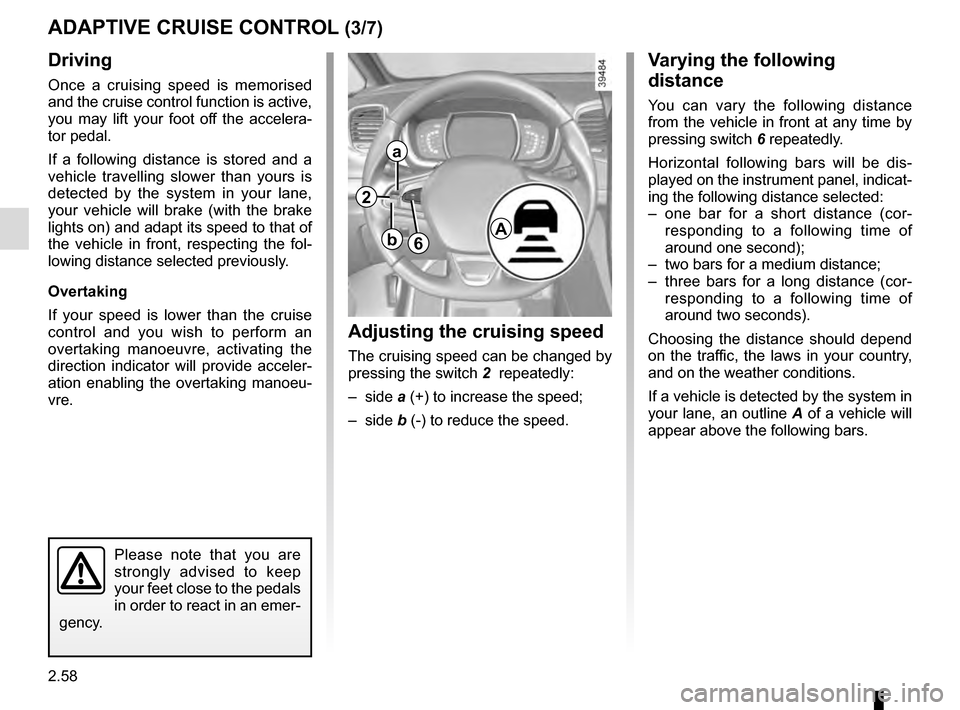
Adjusting the cruising speed
The cruising speed can be changed by
pressing the switch 2 repeatedly:
– side a (+) to increase the speed;
– side b (-) to reduce the speed.
Varying the following
distance
You can vary the following distance
from the vehicle in front at any time by
pressing switch 6 repeatedly.
Horizontal following bars will be dis-
played on the instrument panel, indicat-
ing the following distance selected:
– one bar for a short distance (cor- responding to a following time of
around one second);
– two bars for a medium distance;
– three bars for a long distance (cor- responding to a following time of
around two seconds).
Choosing the distance should depend
on the traffic, the laws in your country,
and on the weather conditions.
If a vehicle is detected by the system in
your lane, an outline A of a vehicle will
appear above the following bars.
6A
2
a
b
Page 170 of 318

Limitation of the system operation
– A vehicle travelling in the opposite direction will not trigger any alert\
or any action on the system operation.
– The sen")
2.62
ADAPTIVE CRUISE CONTROL (7/7)
Limitation of the system operation
– A vehicle travelling in the opposite direction will not trigger any alert\
or any action on the system operation.
– The sensor area should be kept clean and free of any modifications in or\
der to ensure the proper operation of the
system.
– Fixed obstacles (vehicles at a standstill, traffic jams, toll booths, etc.) or objects travelling at low speed or of a\
small size
(motorbikes, bicycles, pedestrians, etc.) may not be detected by the s\
ystem.
– A vehicle entering the same lane will only be detected once it has entere\
d the detection zone. Sudden or late braking may then take place.
– When entering a bend or curve, the sensor may temporarily no longer dete\
ct the vehicle in front, and this may lead to ac- celeration.
– When exiting a curve, the detection of the vehicle in front may be affected or delayed. Sudden or late braking may then take place.
– A slower vehicle travelling in an adjacent lane may be detected and cause\
a slowing down if one of the two vehicles is trav- elling too close to the lane of the other.
– The system is deactivated below around 20 mph (40 km/h). Drivers must \
react accordingly.
– Sudden changes in situation are not instantly taken into account by the \
system. Drivers must remain vigilant at all times and
under all circumstances.
Deactivating the function
The function should be deactivated if:
– the brake lights are not functioning;
– the front of the vehicle has undergone an impact or been damaged;
– the vehicle is being towed (breakdowns);
– traffic is heavy;
– the vehicle is travelling in a tunnel;
– the vehicle is travelling on a windy road;
– the vehicle is travelling on a slippery road or in poor weather conditio\
ns (fog, snow, rain, side winds, etc.).
If the driver notices abnormal system behaviour, please consult an authorised dealer.
Page 177 of 318
2.69
ASSISTED PARKING (1/4)
This function assists with parking ma-
noeuvres.
Take your hands off the steering wheel.
You only control the pedals and the
gear lever.
You can retake control at any time by
operating the steering wheel.Switching on
With the vehicle stationary or driving
at less than 18.6 mph (30 km/h), press
switch 1. The warning light integrated
on switch 1 lights up and the 2 screen
appears on the multifunction screen.
1
2
Special features
Ensure that the ultrasonic sensors indi-
cated by arrows 3 are not obscured (by
dirt, mud, snow, etc.).
3
Page 178 of 318

2.70
Choice of manoeuvre
The system can perform four types of
manoeuvres:
– parallel parking;
– perpendicular parking;
– angle parking;
– moving out of a parallel parking space.
From the multifunction screen, select
the manoeuvre to be performed.
Note: When starting the vehicle, or
after successfully completed parallel
parking using the system, the default
manoeuvre proposed by the system is
assistance in exiting a parallel parking
space. In other cases, the default ma-
noeuvre can be set from the multifunc-
tion screen.
ASSISTED PARKING (2/4)
Operation
Parking
As long as the vehicle speed is less
than 20 mph (30 km/h), the system
looks for available parking spaces on
both sides of the vehicle.
Once a space has been found, it is dis-
played on the multifunction screen, indi-
cated by a small letter “P”. Drive slowly,
with the indicators activated on the side
of the space, until the message “Stop”
is displayed, alongside a beep.
The space is then indicated on the mul-
tifunction screen by a capital “P”.
– Stop the vehicle;
– select reverse gear.
Warning light
lights up on the in-
strument panel, along with a beep.
– release the steering wheel;
– follow the system instructions pro- vided on the multifunction screen. Your speed should not exceed around 4
mph (7 km/h).
Once the warning light
on the
instrument panel goes off and a beep
sounds, the manoeuvre has been com-
pleted.
Page 179 of 318

2.71
ASSISTED PARKING (3/4)
Your speed should not exceed around
4 mph (7 km/h).
Once in position to exit the space, the
system will notify you of the end of the
manoeuvre.
Once the warning light
on the
instrument panel goes off and a beep
sounds, the manoeuvre has been com-
pleted.
Suspending the manoeuvreThe manoeuvre is suspended in the fol-
lowing circumstances:
– you take control of the wheel;
– a door or the boot is opened;
– the vehicle is at a standstill for too long;
– an obstacle in the direction of move- ment prevents the manoeuvre from
being completed;
– the engine will stop.
Once the warning light
on the
instrument panel goes off and a beep
sounds, the manoeuvre has been sus-
pended. Then to resume the manoeu-
vre, press and hold the system activa-
tion switch. In this case, the reason for suspending
the manoeuvre will be displayed on the
multifunction screen.
Make sure:
– you have released the steering wheel
and;
– that all doors and the boot are closed, and;
– that no obstacles are in the way of the direction of movement, and;
– that the engine is started.
Cancelling the manoeuvre
The manoeuvre can be stopped in the
following cases:
– by pressing the system activation switch;
– the vehicle speed has exceeded 4 mph (7 km/h);
– You have performed more than ten forwards/backwards movements in
one manoeuvre;
– the parking distance control sensors are dirty or blocked;
– the vehicle wheels have skidded.
Once the warning light
on the
instrument panel goes off and a beep
sounds, the manoeuvre has been
ended.
Exiting a parallel parking space
– Select “exit parallel parking space” mode;
– activate the direction indicator on the side you wish to go out of;
– press and hold switch 1 (around
2 seconds).
Warning light
lights up on the in-
strument panel, along with a beep.
– release the steering wheel;
– go forwards and backwards using the parking distance control system
alerts.
1
Page 183 of 318

2.75
To engage neutral
With the vehicle at a standstill, engine
running, depress the brake pedal and
move the selector 3 to the left:
– hold in place for about a second until a white N is displayed on the instru-
ment panel, then release;
or
– release immediately.
Note: If the current gear is R or D, it
is not necessary to depress the brake
pedal to engage position N.
AUTOMATIC GEARBOX (2/6)
To engage position P
(button 2)
With the vehicle at a standstill, engine
running or ignition on, press button 2 to
engage position P. The warning light for
button 2 lights up orange once the Park
position on the gearbox is engaged.
2
Check that warning light P
on the instrument panel and
the warning light integrated
on the button 2 are acti-
vated before leaving the vehicle.
Risk of loss of immobilisation of the
vehicle
To disengage position P
(button 2)
With the vehicle at a standstill, engine
running, depress the brake pedal and
move the selector to the desired posi-
tion R, N or D.
If the brake pedal is not fully depressed,
the message “Push brake pedal” the
warning light
� are displayed on the
instrument panel.
When position R or D is disengaged,
N is displayed on the instrument panel
and the warning light on button 2 goes
out.
Note:
– If the driver opens their door to leave the vehicle while position P has not
been engaged, a beep sounds and
the message “P not engaged” is dis-
played on the instrument panel.
– Warning light
� comes on each
time it is necessary to depress the
brake pedal to change the position
of the automatic gearbox.
In the event of the mes-
sage “Check auto gearbox”,
“Automatic gearbox posi-
tion P defective” or “Electric
failure DANGER”, or in the event of
a battery fault, immobilise the ve-
hicle using the electronic parking
brake.
3
Page 209 of 318
3.21
When the doors or boot are un-
locked and opened, the reading and
footwell lights come on temporarily.
Map reading lights
Press switch 1 to get:
– permanent lighting;
– immediate switching off.
1
1
From the multifunction screen, it is pos-
sible to deactivate/activate the cour-
tesy lights upon opening the doors or
the boot. To do this, please refer to
“Vehicle settings customisation menu”
in Section 1.
INTERIOR LIGHTING (1/2)
1

