Page 176 of 318

2.68
This function is an additional
aid. It cannot, therefore,
under any circumstances
replace the vigilance or the
responsibility of the driver.
The driver should always look out
for sudden hazards during driving:
always ensure that there are no
moving obstacles (such as a child,
animal, pram, bicycle, etc.) or small,
narrow objects such as stones or
posts in your path when manoeu-
vring.
The screen shows a reverse mirror
image.
The frames are a representation
projected onto flat ground; this in-
formation must not be taken into
account when superimposed on a
vertical object or an object on the
ground.
Objects which appear on the edge
of the screen may be deformed.
In very bright light (snow, vehicle in
sunshine etc.), the camera vision
may be adversely affected.
If the boot is open or poorly closed,
the message “Boot open” appears
and the camera display disappears.
You can also adjust the camera image
settings (brightness, contrast, etc.)
Activating, deactivating the
reversing camera
From the multifunction screen 2, select
“Vehicle”, “Settings”, “Parking as-
sistance”, then “Rear view camera”.
Activate or deactivate the reversing
camera and confirm your choice.
REVERSING CAMERA (2/2)
2
Page 178 of 318

2.70
Choice of manoeuvre
The system can perform four types of
manoeuvres:
– parallel parking;
– perpendicular parking;
– angle parking;
– moving out of a parallel parking space.
From the multifunction screen, select
the manoeuvre to be performed.
Note: When starting the vehicle, or
after successfully completed parallel
parking using the system, the default
manoeuvre proposed by the system is
assistance in exiting a parallel parking
space. In other cases, the default ma-
noeuvre can be set from the multifunc-
tion screen.
ASSISTED PARKING (2/4)
Operation
Parking
As long as the vehicle speed is less
than 20 mph (30 km/h), the system
looks for available parking spaces on
both sides of the vehicle.
Once a space has been found, it is dis-
played on the multifunction screen, indi-
cated by a small letter “P”. Drive slowly,
with the indicators activated on the side
of the space, until the message “Stop”
is displayed, alongside a beep.
The space is then indicated on the mul-
tifunction screen by a capital “P”.
– Stop the vehicle;
– select reverse gear.
Warning light
lights up on the in-
strument panel, along with a beep.
– release the steering wheel;
– follow the system instructions pro- vided on the multifunction screen. Your speed should not exceed around 4
mph (7 km/h).
Once the warning light
on the
instrument panel goes off and a beep
sounds, the manoeuvre has been com-
pleted.
Page 182 of 318
2.74
AUTOMATIC GEARBOX (1/6)
2
3
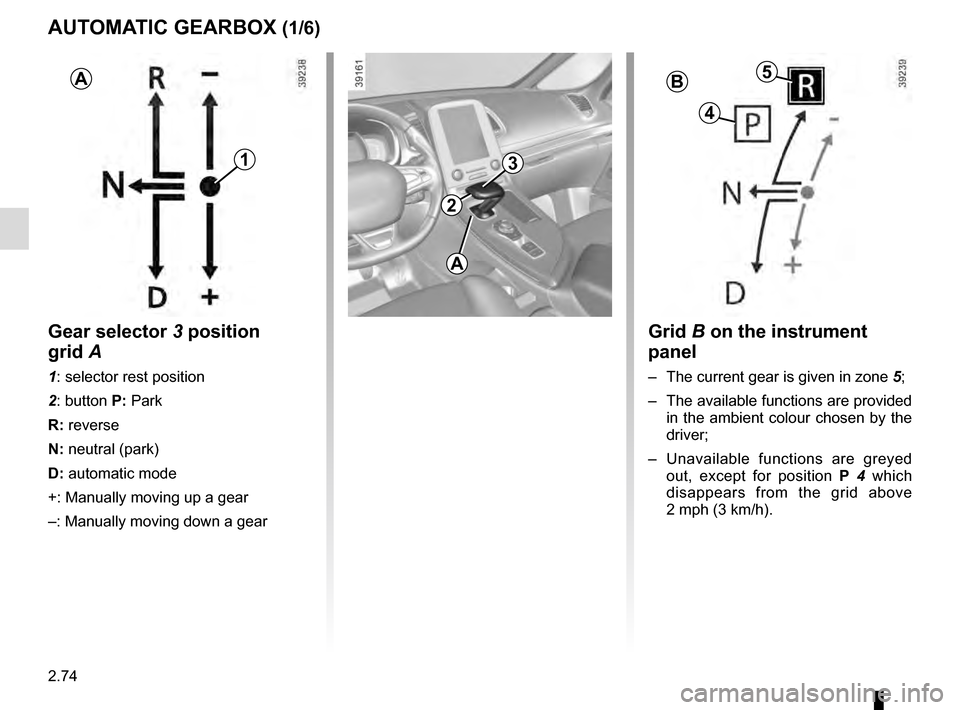
Grid B on the instrument
panel
– The current gear is given in zone 5;
– The available functions are provided in the ambient colour chosen by the
driver;
– Unavailable functions are greyed out, except for position P 4 which
disappears from the grid above
2 mph (3 km/h).
1
AB5
4
Gear selector 3 position
grid A
1: selector rest position
2: button P: Park
R: reverse
N: neutral (park)
D: automatic mode
+: Manually moving up a gear
–: Manually moving down a gear
A
Page 184 of 318
2.76
AUTOMATIC GEARBOX (3/6)
Driving in automatic mode
With the vehicle at a standstill, engine
running, position P, N or R, depress the
brake pedal and move the selector to
the left then back, and release.
If one of the conditions is not applied,
D flashes for around 5 seconds and
the message “Push brake pedal” is dis-
played on the instrument panel for ap-
proximately 15 seconds.
In most road conditions you will en-
counter, you will not need to touch your
lever again: the gears will change au-
tomatically at the right time and at the
most suitable engine speed because
the automatic system takes into ac-
count the vehicle load and road contour
and adjusts itself to the particular driv-
ing style you have chosen.
Note: With the engine running and
the vehicle travelling between 0 and
6 mph (0 and 10 km/h), position N or
R , it is not necessary to depress the
brake pedal to engage position D. This
is useful during parking manoeuvres
requiring a number of alternate forward
and reverse movements. Economical driving
When driving, always leave the lever
in position
D, keeping the accelerator
pedal lightly depressed to ensure auto-
matic gear changes at a lower engine
speed.
Accelerating and overtaking
Depress the accelerator pedal briskly
and fully (so that it goes beyond the
point of resistance).
It is also possible to change down at
any time for overtaking purposes, by
pushing the selector to position “ -”.
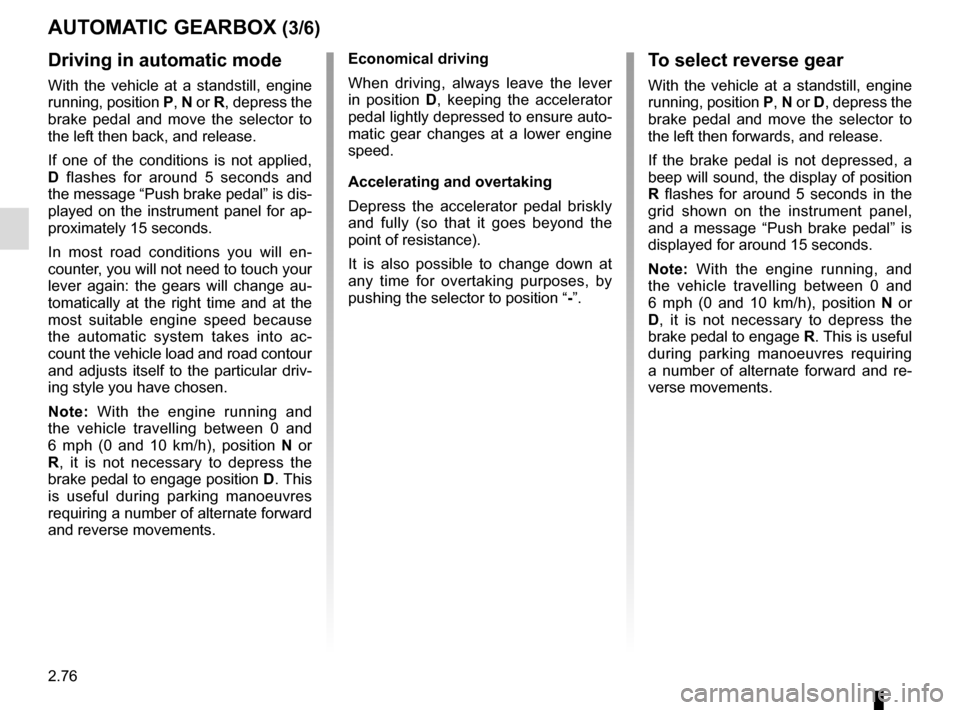
To select reverse gear
With the vehicle at a standstill, engine
running, position P, N or D, depress the
brake pedal and move the selector to
the left then forwards, and release.
If the brake pedal is not depressed, a
beep will sound, the display of position
R flashes for around 5 seconds in the
grid shown on the instrument panel,
and a message “Push brake pedal” is
displayed for around 15 seconds.
Note: With the engine running, and
the vehicle travelling between 0 and
6 mph (0 and 10 km/h), position N or
D , it is not necessary to depress the
brake pedal to engage R. This is useful
during parking manoeuvres requiring
a number of alternate forward and re-
verse movements.
Page 204 of 318

3.16
ELECTRIC WINDOWS (1/2)
1
2
34
5
6
These systems operate:
– with the engine running;
– with the ignition off until one of the front doors is opened (limited to ap-
proximately 12 minutes).
– with the engine off, front doors closed, after pressing the start
button.
Press the window switch down or pull it
up to lower or raise the window to the
desired height: the rear windows do not
open fully.
Safety of rear occupants
The driver can disable operation of the rear electric windows and doors \
by pressing switch 4. A confirmation message is displayed on the instru-
ment panel.
Driver’s responsibility
Never leave your vehicle with the RENAULT card or key inside, and never leave
a child, adult who is not self-sufficient or a pet, even for a short while. They may
pose a risk to themselves or to others by starting the engine or activat\
ing equip-
ment (such as the gear lever or electric windows). If any part of the \
body becomes
trapped, reverse the direction of the window immediately by pressing the\
relevant
switch.
Risk of serious injury.
Avoid resting any objects against
a half-open window: there is a risk
that the electric window could be
damaged.
From the driver’s seat, use switch:
1 for the driver’s side;
2 for the front passenger side;
3 and 5 for the rear passenger win-
dows.
From the passenger seats, use
switch 6.
Page 206 of 318
3.18
ELECTRIC SUNROOF (1/3)
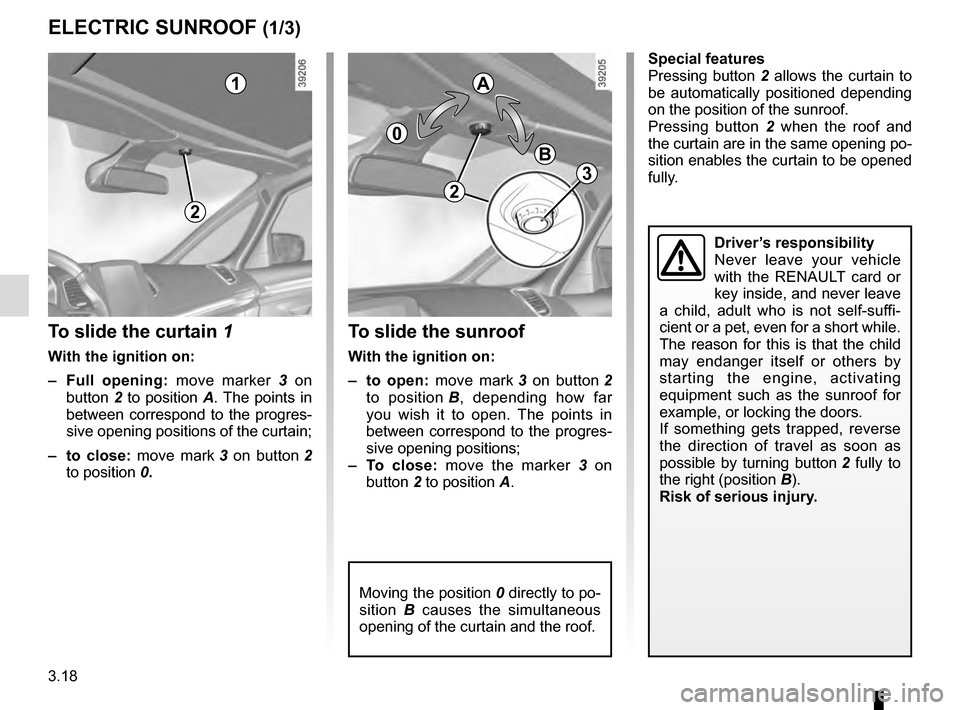
To slide the curtain 1
With the ignition on:
– Full opening: move marker 3 on
button 2 to position A. The points in
between correspond to the progres-
sive opening positions of the curtain;
– to close: move mark 3 on button 2
to position 0.
To slide the sunroof
With the ignition on:
– to open: move mark 3 on button 2
to position B, depending how far
you wish it to open. The points in
between correspond to the progres-
sive opening positions;
– To close: move the marker 3 on
button 2 to position A.
1
2
0
A
B
Moving the position 0 directly to po-
sition B causes the simultaneous
opening of the curtain and the roof.
Driver’s responsibility
Never leave your vehicle
with the RENAULT card or
key inside, and never leave
a child, adult who is not self-suffi-
cient or a pet, even for a short while.
The reason for this is that the child
may endanger itself or others by
starting the engine, activating
equipment such as the sunroof for
example, or locking the doors.
If something gets trapped, reverse
the direction of travel as soon as
possible by turning button 2 fully to
the right (position B).
Risk of serious injury.
Special features
Pressing button 2 allows the curtain to
be automatically positioned depending
on the position of the sunroof.
Pressing button 2 when the roof and
the curtain are in the same opening po-
sition enables the curtain to be opened
fully.
2
3
Page 266 of 318

5.10
CHANGING A WHEEL (1/2)
4
Vehicles equipped with a jack
and wheelbrace
If necessary, remove the wheel trim.
Use the wheelbrace 2 to slacken off the
wheel bolts. Position it so as to be able
to push from above.
Open the door nearest the wheel
concerned to identify the arrow 1 indi-
cating the jacking point 3.
Switch on the hazard war-
ning lights.
Keep the vehicle away from
traffic and on a level surface
where it will not slip.
Apply the parking brake and engage
a gear (first or reverse, or P for auto-
matic transmissions).
Ask all the passengers to leave the
vehicle and keep them away from
traffic.
If the vehicle is parked on
the hard shoulder, you must
warn other road users of
your vehicle’s presence
with a warning triangle or with other
devices as per the legislation ap-
plying to the country you are in.
2
1
3
If the vehicle is not equipped with a
jack or wheelbrace, you can obtain
these from your approved dealer.
Position the jack 4 horizontally. It is es-
sential to position the jack head in the
jacking point 3.
Close the door.
Start cranking the jack up by hand to
align the base plate (which should be
pushed slightly under the vehicle).
3
Page 272 of 318
5.16
From the outside of the vehicle, pull on
the light unit to remove it then unscrew
bulb holder 3 a quarter of a turn.
Replace the bulb.
Bulb type: W5W.
Refitting
To refit, proceed in the reverse order,
taking care not to damage the wiring.
REAR LIGHTS AND SIDE LIGHTS: changing bulbs (1/3)
The bulbs are under pres-
sure and can break when
replaced.
Risk of injury.
Side lights, brake lights and
direction indicators
Consult an approved Dealer.
Reversing lights
From the boot, unclip the cover on the
interior trim of the boot lid.
Using a screwdriver, unscrew bolt 2 to
remove the light, then change the bulb.
23
1