Page 182 of 318
2.74
AUTOMATIC GEARBOX (1/6)
2
3
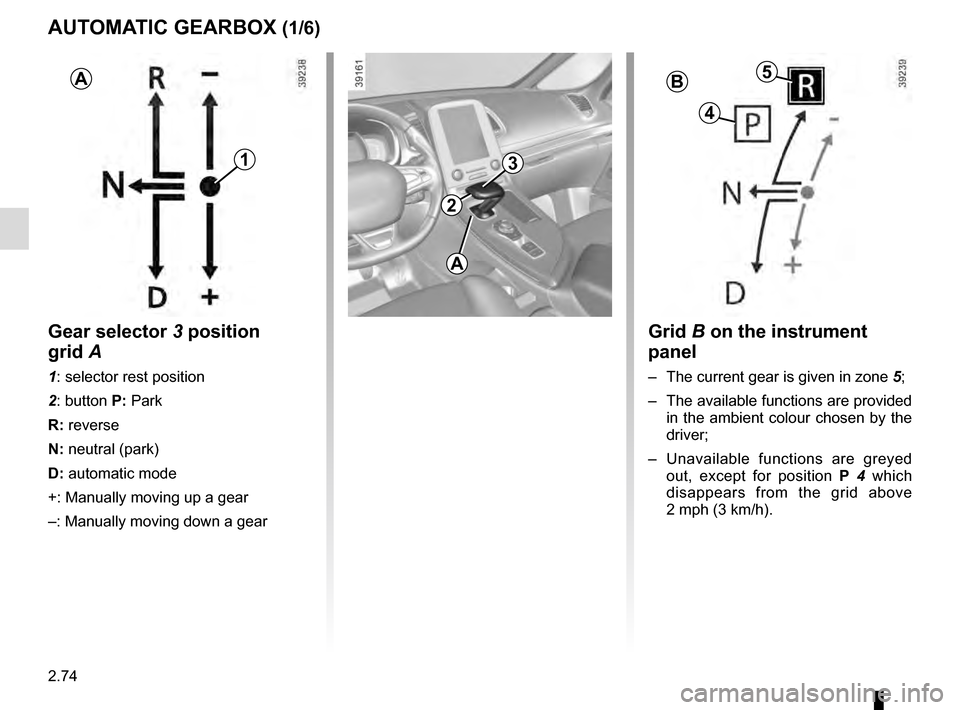
Grid B on the instrument
panel
– The current gear is given in zone 5;
– The available functions are provided in the ambient colour chosen by the
driver;
– Unavailable functions are greyed out, except for position P 4 which
disappears from the grid above
2 mph (3 km/h).
1
AB5
4
Gear selector 3 position
grid A
1: selector rest position
2: button P: Park
R: reverse
N: neutral (park)
D: automatic mode
+: Manually moving up a gear
–: Manually moving down a gear
A
Page 183 of 318

2.75
To engage neutral
With the vehicle at a standstill, engine
running, depress the brake pedal and
move the selector 3 to the left:
– hold in place for about a second until a white N is displayed on the instru-
ment panel, then release;
or
– release immediately.
Note: If the current gear is R or D, it
is not necessary to depress the brake
pedal to engage position N.
AUTOMATIC GEARBOX (2/6)
To engage position P
(button 2)
With the vehicle at a standstill, engine
running or ignition on, press button 2 to
engage position P. The warning light for
button 2 lights up orange once the Park
position on the gearbox is engaged.
2
Check that warning light P
on the instrument panel and
the warning light integrated
on the button 2 are acti-
vated before leaving the vehicle.
Risk of loss of immobilisation of the
vehicle
To disengage position P
(button 2)
With the vehicle at a standstill, engine
running, depress the brake pedal and
move the selector to the desired posi-
tion R, N or D.
If the brake pedal is not fully depressed,
the message “Push brake pedal” the
warning light
� are displayed on the
instrument panel.
When position R or D is disengaged,
N is displayed on the instrument panel
and the warning light on button 2 goes
out.
Note:
– If the driver opens their door to leave the vehicle while position P has not
been engaged, a beep sounds and
the message “P not engaged” is dis-
played on the instrument panel.
– Warning light
� comes on each
time it is necessary to depress the
brake pedal to change the position
of the automatic gearbox.
In the event of the mes-
sage “Check auto gearbox”,
“Automatic gearbox posi-
tion P defective” or “Electric
failure DANGER”, or in the event of
a battery fault, immobilise the ve-
hicle using the electronic parking
brake.
3
Page 186 of 318

2.78
AUTOMATIC GEARBOX (5/6)
Special cases
As position P is automatically en-
gaged when the engine is stopped, it is
sometimes necessary to place the vehi-
cle in position N for some car washes,
for example.
Position N can be engaged before
opening the driver’s door, and a maxi-
mum of around 25 seconds after the
engine is stopped.
After this time or after opening the
driver’s door, it will be necessary to turn
on the ignition again to disengage posi-
tion P.
In the event of a loss of in-
formation on the instrument
panel, stop and immobilise
the vehicle using the elec-
tronic parking brake or button P.
Special cases
In certain driving cases (eg: protect-
ing the engine), a gear change can be
performed automatically in the event of
over-revving or approaching under-rev-
ving. Permanent manual mode remains
activated. Similarly, to avoid making the
"wrong move", a gear change may be
refused by the gearbox. In this case,
the display for the requested gear + or –
flashes for a few seconds to warn you.
Parking the vehicleUpon stopping the engine by press-
ing the engine stop button, position P
is automatically engaged, along with
the electronic parking brake for vehi-
cles equipped with this device. P is dis-
played on the instrument panel and the
warning light on button P comes on.
Never leave the vehicle with
the engine running without
previously engaging the
Park position P.
With the engine running, the automatic
gearbox in D or R or N or M and with-
out your foot on the brake, messages
“P not engaged” and “Select P” are dis-
played on the instrument panel as soon
as the driver’s door is open.
With the engine stopped, the automatic
gearbox in N (neutral), the message “P
not engaged” is displayed on the instru-
ment panel.
Special feature related to the Stop and Start function: if you are going\
to unfasten the driver's seat belt before the
engine goes into standby due to the Stop and Start function, make sure t\
he gearbox is in position P. The P warning
light will light up on the instrument panel to confirm this. Risk of loss of immobilisation.
Page 190 of 318

3.2
MULTI-SENSE (1/2)
The Multi-Sense system enables once
of five modes to be selected which, de-
pending on the vehicle, affect the drive,
the light environment, the comfort and
the engine noise:
– modes Comfort, Neutral, Eco and Sport are preset and associated with
customisable light environments and
engine noise;
– mode Perso is fully customisable.
The drive modes affect the:
– power-assisted steering;
– piloted suspension damping;
– four-wheel drive;
– engine and gearbox responsiveness;
– heating level.
They also affect the:
– passenger compartment and instru- ment panel lighting;
– instrument panel and multifunction screen information;
– engine noise;
– massage seat.
After each start-up, the vehicle uses the
mode set at the time the engine was
last switched off.
Mode Comfort
This mode favours flexibility in the sus-
pension and steering. The interior envi-
ronment is softened.
Mode Neutral
Default mode, mode Neutral selects the
vehicle factory settings.
Mode Eco
Mode Eco is geared towards saving
energy and the environment. The sus-
pension and steering are soft, engine
and gearbox management enable fuel
consumption to be lowered. Air con-
ditioning is managed to be used only
when necessary.
Please refer to the information on
“Driving advice, Eco-driving” in
Section 2.
Multi-Sense
Sport Eco
Neutral Comfort Perso
In all modes, it is possible to change
the colour of the ambient lighting as
well as the format of the information
displayed on the instrument panel
and multifunction display.
You can also reset to the default set-
tings.
Page 285 of 318

5.29
TOWING: breakdown (1/2)
Before towing, put the gearbox in neu-
tral, unlock the steering column and re-
lease the parking brake.
For vehicles fitted with an automatic
gearbox, if it is not possible to put the
gear lever into position N, please con-
sult an authorised dealer.
Steering column unlocking
Press the engine starter button for ap-
proximately two seconds , without de-
pressing the pedals.
The column is unlocked, the acces-
sory functions are supplied: the vehi-
cle lights can be used (indicators, brake
lights etc.). Always switch on the lights
when driving at night.
Once you have finished towing, press
the engine start button twice (risk of
running down the battery). The speed specified by current legis-
lation for towing must always be ob-
served. If your vehicle is the towing
vehicle, do not exceed the maximum
towing weight for your vehicle (refer to
the information on “Weights” in
Section 6).
Towing a vehicle with an
automatic gearbox
Transport the vehicle on a trailer or tow
it with the front wheels off the ground.
In exceptional circumstances
, you
may tow it with all four wheels on the
ground, only in a forward gear, with the
gear in neutral position N over a maxi-
mum distance of 50 miles and not ex-
ceeding a speed of 15 mph (25 km/h).