Page 170 of 318

Limitation of the system operation
– A vehicle travelling in the opposite direction will not trigger any alert\
or any action on the system operation.
– The sen")
2.62
ADAPTIVE CRUISE CONTROL (7/7)
Limitation of the system operation
– A vehicle travelling in the opposite direction will not trigger any alert\
or any action on the system operation.
– The sensor area should be kept clean and free of any modifications in or\
der to ensure the proper operation of the
system.
– Fixed obstacles (vehicles at a standstill, traffic jams, toll booths, etc.) or objects travelling at low speed or of a\
small size
(motorbikes, bicycles, pedestrians, etc.) may not be detected by the s\
ystem.
– A vehicle entering the same lane will only be detected once it has entere\
d the detection zone. Sudden or late braking may then take place.
– When entering a bend or curve, the sensor may temporarily no longer dete\
ct the vehicle in front, and this may lead to ac- celeration.
– When exiting a curve, the detection of the vehicle in front may be affected or delayed. Sudden or late braking may then take place.
– A slower vehicle travelling in an adjacent lane may be detected and cause\
a slowing down if one of the two vehicles is trav- elling too close to the lane of the other.
– The system is deactivated below around 20 mph (40 km/h). Drivers must \
react accordingly.
– Sudden changes in situation are not instantly taken into account by the \
system. Drivers must remain vigilant at all times and
under all circumstances.
Deactivating the function
The function should be deactivated if:
– the brake lights are not functioning;
– the front of the vehicle has undergone an impact or been damaged;
– the vehicle is being towed (breakdowns);
– traffic is heavy;
– the vehicle is travelling in a tunnel;
– the vehicle is travelling on a windy road;
– the vehicle is travelling on a slippery road or in poor weather conditio\
ns (fog, snow, rain, side winds, etc.).
If the driver notices abnormal system behaviour, please consult an authorised dealer.
Page 176 of 318

2.68
This function is an additional
aid. It cannot, therefore,
under any circumstances
replace the vigilance or the
responsibility of the driver.
The driver should always look out
for sudden hazards during driving:
always ensure that there are no
moving obstacles (such as a child,
animal, pram, bicycle, etc.) or small,
narrow objects such as stones or
posts in your path when manoeu-
vring.
The screen shows a reverse mirror
image.
The frames are a representation
projected onto flat ground; this in-
formation must not be taken into
account when superimposed on a
vertical object or an object on the
ground.
Objects which appear on the edge
of the screen may be deformed.
In very bright light (snow, vehicle in
sunshine etc.), the camera vision
may be adversely affected.
If the boot is open or poorly closed,
the message “Boot open” appears
and the camera display disappears.
You can also adjust the camera image
settings (brightness, contrast, etc.)
Activating, deactivating the
reversing camera
From the multifunction screen 2, select
“Vehicle”, “Settings”, “Parking as-
sistance”, then “Rear view camera”.
Activate or deactivate the reversing
camera and confirm your choice.
REVERSING CAMERA (2/2)
2
Page 179 of 318

2.71
ASSISTED PARKING (3/4)
Your speed should not exceed around
4 mph (7 km/h).
Once in position to exit the space, the
system will notify you of the end of the
manoeuvre.
Once the warning light
on the
instrument panel goes off and a beep
sounds, the manoeuvre has been com-
pleted.
Suspending the manoeuvreThe manoeuvre is suspended in the fol-
lowing circumstances:
– you take control of the wheel;
– a door or the boot is opened;
– the vehicle is at a standstill for too long;
– an obstacle in the direction of move- ment prevents the manoeuvre from
being completed;
– the engine will stop.
Once the warning light
on the
instrument panel goes off and a beep
sounds, the manoeuvre has been sus-
pended. Then to resume the manoeu-
vre, press and hold the system activa-
tion switch. In this case, the reason for suspending
the manoeuvre will be displayed on the
multifunction screen.
Make sure:
– you have released the steering wheel
and;
– that all doors and the boot are closed, and;
– that no obstacles are in the way of the direction of movement, and;
– that the engine is started.
Cancelling the manoeuvre
The manoeuvre can be stopped in the
following cases:
– by pressing the system activation switch;
– the vehicle speed has exceeded 4 mph (7 km/h);
– You have performed more than ten forwards/backwards movements in
one manoeuvre;
– the parking distance control sensors are dirty or blocked;
– the vehicle wheels have skidded.
Once the warning light
on the
instrument panel goes off and a beep
sounds, the manoeuvre has been
ended.
Exiting a parallel parking space
– Select “exit parallel parking space” mode;
– activate the direction indicator on the side you wish to go out of;
– press and hold switch 1 (around
2 seconds).
Warning light
lights up on the in-
strument panel, along with a beep.
– release the steering wheel;
– go forwards and backwards using the parking distance control system
alerts.
1
Page 209 of 318
3.21
When the doors or boot are un-
locked and opened, the reading and
footwell lights come on temporarily.
Map reading lights
Press switch 1 to get:
– permanent lighting;
– immediate switching off.
1
1
From the multifunction screen, it is pos-
sible to deactivate/activate the cour-
tesy lights upon opening the doors or
the boot. To do this, please refer to
“Vehicle settings customisation menu”
in Section 1.
INTERIOR LIGHTING (1/2)
1
Page 210 of 318
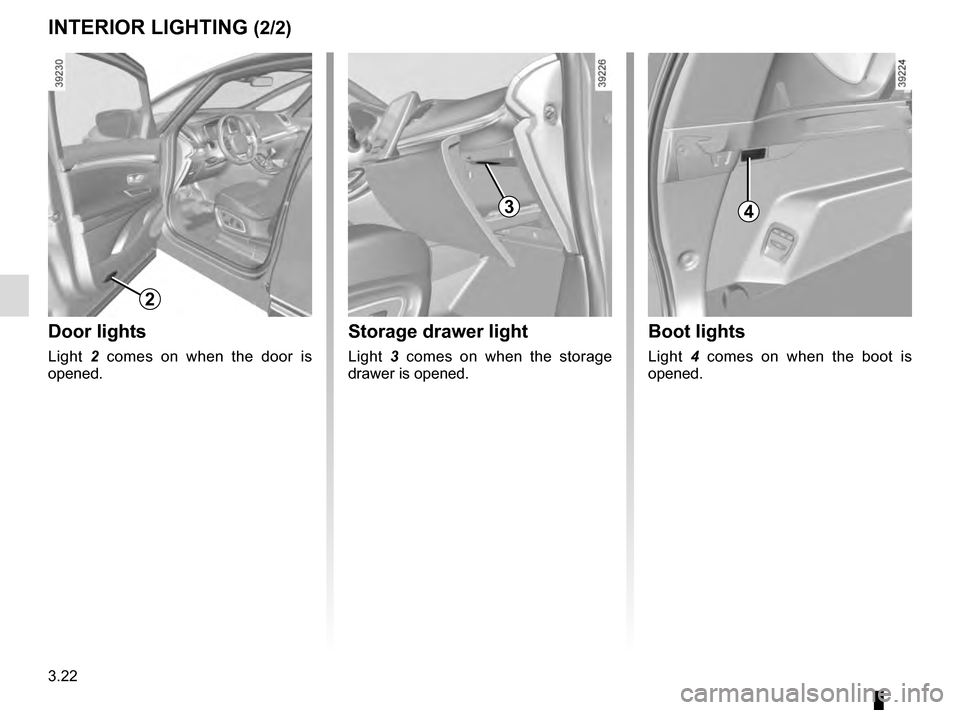
3.22
Boot lights
Light 4 comes on when the boot is
opened.
Storage drawer light
Light 3 comes on when the storage
drawer is opened.
INTERIOR LIGHTING (2/2)
3
Door lights
Light 2 comes on when the door is
opened.
2
4
Page 220 of 318
3.32
REAR SEATS (2/5)
When moving the rear
seats:
– check that no one is near
to any of the moving parts;
– check that there is sufficient space around the seat;
– check that nothing is obstructing the section of the boot reserved
for storing the seat;
For safety reasons, carry out any
adjustments when the vehicle is sta-
tionary.
When moving the rear
seats, ensure that nothing
obstructs the anchorage
points (passenger’s arm or
leg, a pet, gravel, cloth, toys, etc.).
To unfold a seat in the third row
– Access the third row seats;
– place seat belt in hook 6 to avoid da-
maging it;
– hold the seatback, lift it up and ensure it is correctly locked in place.
5
To access the third row rear seats
– Lift the handle 5;
– guide the seat forwards until it locks;
– sit in the third row rear seat;
– hold the second row seatback and fold it down;
– Make sure the seat is correctly locked in position.
5
6
Page 221 of 318
3.33
REAR SEATS (3/5)
To automatically fold down
the seats (flat position)
The rear seats are electrically unlocked
to fold down in order to create a flat
floor.
There are two ways to manoeuvre the
seats:
– from the boot using control 7;
– on the multifunction screen 8. Disabling the function
– With the engine running, a buckled
seat belt prevents the movement of
the relevant seat.
– Once the vehicle is moving the two controls are deactivated.
7
8
Conditions of use
With the vehicle at a standstill and the
rear seat belts unlocked:
– from control 7, with the boot lid open;
– from the multifunction screen 8, with
the engine running.
Note:
All unlocking actions for folding down
the seats require that the trays on the
back of the front seats have already
been folded away.
Page 224 of 318
3.36
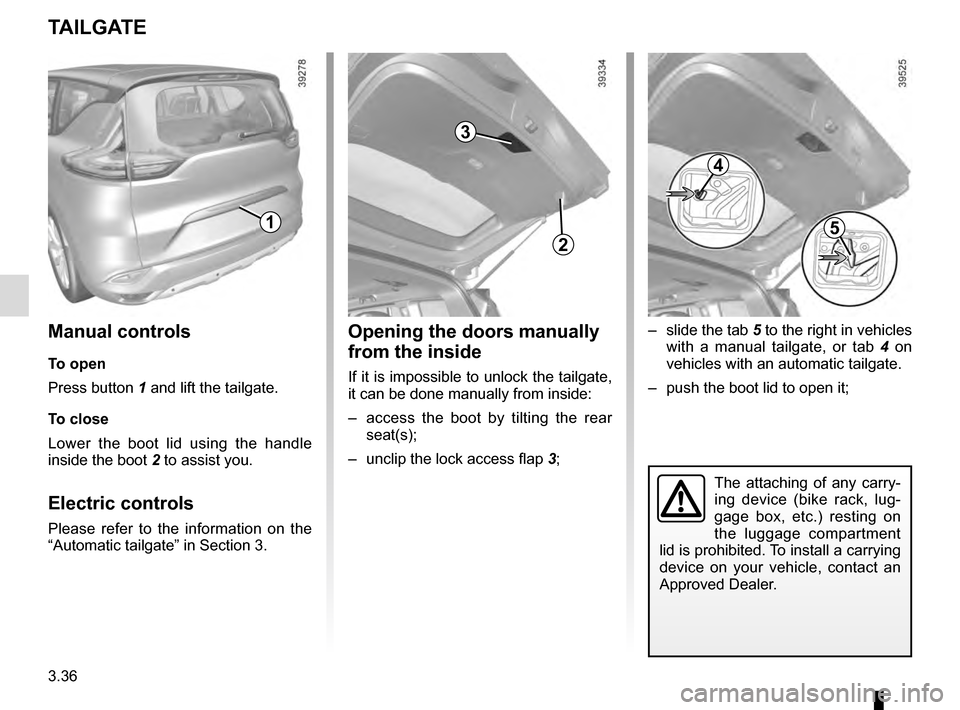
TAILGATE
1
2
Manual controls
To open
Press button 1 and lift the tailgate.
To close
Lower the boot lid using the handle
inside the boot 2 to assist you.
Electric controls
Please refer to the information on the
“Automatic tailgate” in Section 3.
Opening the doors manually
from the inside
If it is impossible to unlock the tailgate,
it can be done manually from inside:
– access the boot by tilting the rear
seat(s);
– unclip the lock access flap 3;
3
– slide the tab 5 to the right in vehicles
with a manual tailgate, or tab 4 on
vehicles with an automatic tailgate.
– push the boot lid to open it;
4
5
The attaching of any carry-
ing device (bike rack, lug-
gage box, etc.) resting on
the luggage compartment
lid is prohibited. To install a carrying
device on your vehicle, contact an
Approved Dealer.