Page 123 of 256

2.47
AUTOMATIC GEARBOX (3/4)
Special circumstances
– Depending on the vehicle, snow position: if you are driving on slip-
pery surfaces (snow, mud, etc.)
press switch 5, the operating indica-
tor light 6 comes on.
Once these special driving con-
ditions no longer apply, exit this
function by pressing switch 5
again. The warning light 6 goes
out.
5
– If the road contour and bends in
the road do not allow you to stay in
automatic mode (e.g.: in mountain-
ous areas), it is recommended that
you switch to manual mode.
This will prevent the automatic gear-
box from changing gears repeatedly
when climbing, and permit engine
braking on long descents.
– In cold weather , to prevent the
engine from stalling, wait a few sec-
onds before moving the selector
lever from position P or N and en-
gaging it in D or R. –
Vehicles not fitted with traction
control: on a slippery surface or
surface with a low level of adhesion,
change to manual mode and select
second gear (or even third) before
starting the engine to avoid wheel-
spin when accelerating.
In very cold weather, the system
may prevent the gears from being
shifted in manual mode until the
gearbox reaches the right tempera-
ture.
6
Page 126 of 256
2.50
PARKING DISTANCE CONTROL (2/2)
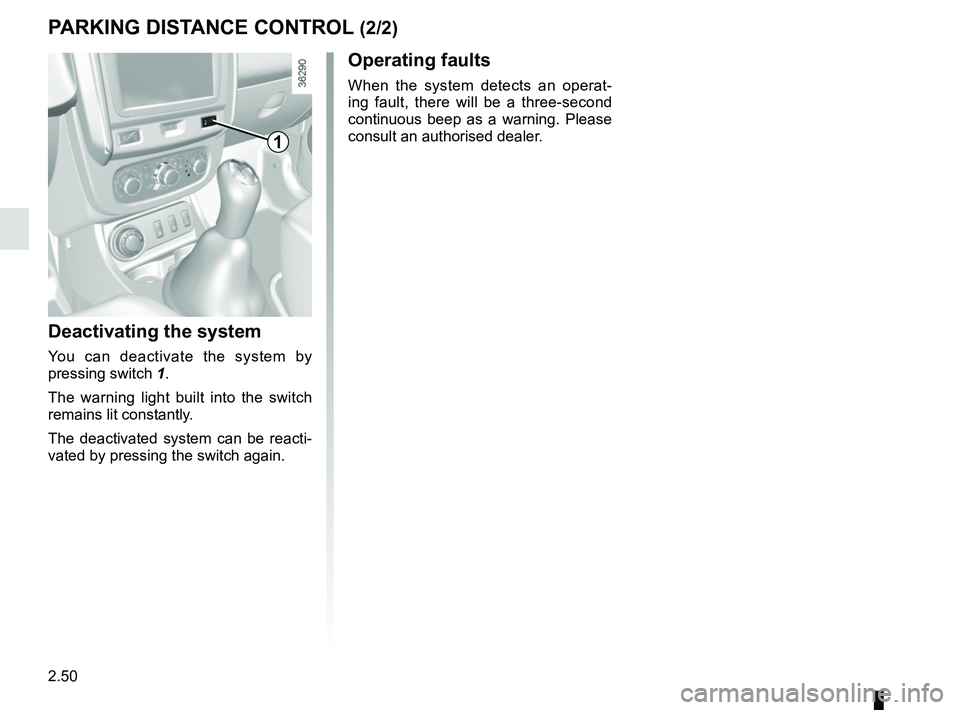
Deactivating the system
You can deactivate the system by
pressing switch 1.
The warning light built into the switch
remains lit constantly.
The deactivated system can be reacti-
vated by pressing the switch again.
Operating faults
When the system detects an operat-
ing fault, there will be a three-second
continuous beep as a warning. Please
consult an authorised dealer.
1
Page 128 of 256
2.52
REVERSING CAMERA (2/2)
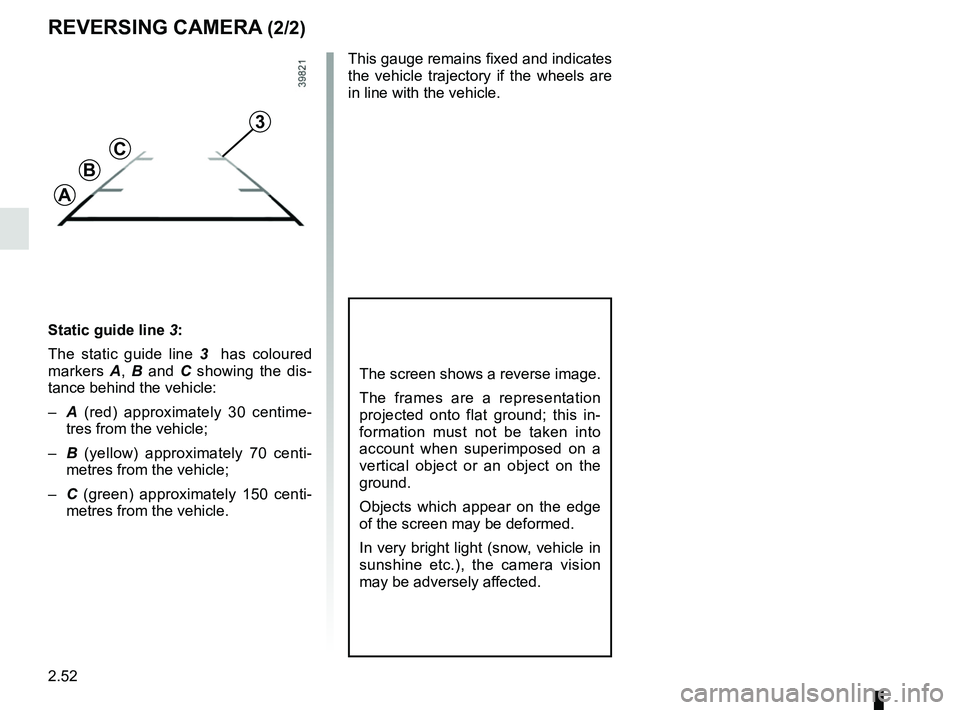
Static guide line 3:
The static guide line 3 has coloured
markers A, B and C showing the dis-
tance behind the vehicle:
– A (red) approximately 30 centime-
tres from the vehicle;
– B (yellow) approximately 70 centi-
metres from the vehicle;
– C (green) approximately 150 centi-
metres from the vehicle. This gauge remains fixed and indicates
the vehicle trajectory if the wheels are
in line with the vehicle.
The screen shows a reverse image.
The frames are a representation
projected onto flat ground; this in-
formation must not be taken into
account when superimposed on a
vertical object or an object on the
ground.
Objects which appear on the edge
of the screen may be deformed.
In very bright light (snow, vehicle in
sunshine etc.), the camera vision
may be adversely affected.
3
A
B
C
Page 129 of 256

3.1
Section 3: Your comfort
Air vents, air outlets . . . . . . . . . . . . . . . . . . . . . . . . . . . . . . . . . . . . \
. . . . . . . . . . . . . . . . . . . . . . . . . . 3.2
Heating/Ventilation/Air conditioning . . . . . . . . . . . . . . . . . . . . . . . . . . . . . . . . . . . . \
. . . . . . . . . . . . . . 3.4
Air conditioning: information and advice on use . . . . . . . . . . . . . . . . . . . . . . . . . . . . . . . . . . . .\
. . . . 3.7
Electric windows . . . . . . . . . . . . . . . . . . . . . . . . . . . . . . . . . . . .\
. . . . . . . . . . . . . . . . . . . . . . . . . . . . 3.8
Interior lighting . . . . . . . . . . . . . . . . . . . . . . . . . . . . . . . . . . . . \
. . . . . . . . . . . . . . . . . . . . . . . . . . . . . . 3.11
Sun visor/grab handle . . . . . . . . . . . . . . . . . . . . . . . . . \
. . . . . . . . . . . . . . . . . . . . . . . . . . . . . . . . . . . 3.13
Ashtrays, Cigarette lighter, Accessories socket . . . . . . . . . . . . . . . . . . . . . . . . . . . . . . . . . . . . \
. . . . . 3.14
Rear headrests . . . . . . . . . . . . . . . . . . . . . . . . . . . . . . . . . . . .\
. . . . . . . . . . . . . . . . . . . . . . . . . . . . . 3.15
Passenger compartment storage space and fittings . . . . . . . . . . . . . . . . . . . . . . . . . . . . . . . . . . . . \
. 3.16
Rear bench seat . . . . . . . . . . . . . . . . . . . . . . . . . . . . . . . . . . . .\
. . . . . . . . . . . . . . . . . . . . . . . . . . . . 3.20
Luggage compartment. . . . . . . . . . . . . . . . . . . . . . . . . . .\
. . . . . . . . . . . . . . . . . . . . . . . . . . . . . . . . . 3.23
Transporting objects in the luggage compartment . . . . . . . . . . . . . . . . . . . . . . . . . . . . . . . . . . . .\
. . 3.24
Transporting objects: towing, towing equipment) . . . . . . . . . . . . . . . . . . . . . . . . . . . . . . . . . . . .\
. . . 3.26
Rear parcel shelf . . . . . . . . . . . . . . . . . . . . . . . . . . . . . . . . . . . . \
. . . . . . . . . . . . . . . . . . . . . . . . . . . . 3.27
Roof bars . . . . . . . . . . . . . . . . . . . . . . . . . . . . . . . . . . . . \
. . . . . . . . . . . . . . . . . . . . . . . . . . . . . . . . . . 3.28
Multimedia equipment . . . . . . . . . . . . . . . . . . . . . . . . . . . . . . . . . . . . \
. . . . . . . . . . . . . . . . . . . . . . . . 3.29
Page 132 of 256

3.4
HEATING, VENTILATION, AIR CONDITIONING (1/3)
23415
ControlsThe controls will depend on the vehicle
equipment level.
1 Distribution of air.
2 Switching air conditioning on or off.
3 Adjusting the ventilation fan speed.
4 De-icing/demisting of the rear screen and, depending on the vehicle, the
door mirrors and windscreen.
5 Air temperature adjuster.
6 Switching passenger compartment isolation mode/air recirculation mode
on
Adjusting the air temperature
Turn control 5 to obtain the desired
temperature. The further towards the
red the slide is, the higher the tempera-
ture will be.
Adjusting the ventilation fan
speed.
Turn control 3 from 0 to 4. The further
to the right it is positioned, the more air
is blown into the passenger compart-
ment. If you want to shut off the flow of
air completely and stop the system, set
control 3 to 0.
The system is deactivated: the ventila-
tion speed for the passenger compart-
ment air is zero (vehicle stationary),
you can however still feel a slight flow
of air when the vehicle is moving.
Leaving this control in position 0 for
prolonged periods can lead to con-
densation forming on the side win-
dows and windscreen and problems
due to the use of non-renewed air in
the passenger compartment.
6
Information and advice on use: refer
to information on “Air conditioning: in-
formation and advice on use”.
Depending on the vehicle, in the
event of setting the “Wake up every
2 hours” remote starting function,
the ventilation system must be
stopped before leaving the vehicle.
Please see your vehicle’s multime-
dia instructions.
Page 133 of 256

3.5
HEATING, VENTILATION, AIR CONDITIONING (2/3)
43
Switching passenger
compartment isolation mode/
air recirculation mode on.
Bring lever 6 to position â.
Under these conditions, air is taken
from the passenger compartment and
is recirculated, with no air being taken
from outside the vehicle. Air recirculation is used to:
– to isolate the passenger compart-
ment from the external atmosphere
(e.g. driving in polluted areas, etc.);
– to bring the passenger compartment to the desired temperature as quickly
as possible.
Rapid demisting
Turn controls 1, 3 and 6 to positions
W:
– air from the outside;
– maximum fan speed;
– demisting.
Using the climate control increases the
speed of demisting.
VHeated rear
windscreen/
Heated windscreen
With the engine running , press
button 4 (the warning light comes on).
Depending on the vehicle, this function
de-ices/demists the rear windscreen,
the electric rear-view mirrors and the
windscreen.
Depending on the vehicle, the function
is stopped:
– automatically after a period of time set by the system (warning light goes
out);
– by pressing button 4 again (the warn-
ing light goes out).
Prolonged use of air recirculation can lead to condensation forming on t\
he side
windows and windscreen, and discomfort due to the use of non-renewed air\
in
the passenger compartment.
You are therefore advised to return to normal mode (external air) as so\
on as the
air recirculation function is no longer required, by turning control 6 to the right.
1
6
Page 134 of 256

3.6
HEATING, VENTILATION, AIR CONDITIONING (3/3)
2
Distribution of air in the
passenger compartment
Turn control 1 to choose the distribution
option.
JAll the air flow is directed to the
dashboard vents.
GThe air flow is directed towards
the dashboard vents and the
footwells.
FThe air flow is mainly distrib-
uted between the front and
rear footwells and the dashboard vents.
Close the dashboard vents to direct all
the air to the foot wells.
iThe air flow is distributed be-
tween all the air vents, the
front side window demisting air vents,
the windscreen demisting vents and the
footwells.
WAll the air is then directed to
the windscreen and front side
window demisting vents.
Switching air conditioning on
or off
The air conditioning is switched on (in-
dicator light illuminated) or off (indicator
light extinguished) using button 2.
Activation is not possible if control 3 is
set to 0.
The air conditioning system is used
for:
– lower the temperature inside the passenger compartment;
– eliminate condensation more quickly.
The air conditioning does not operate
when the exterior temperature is low.
Fuel consumption increases when
the air conditioning is being used
(switch it off when it is not required).
13
Page 139 of 256
3.11
INTERIOR LIGHTING (1/2)
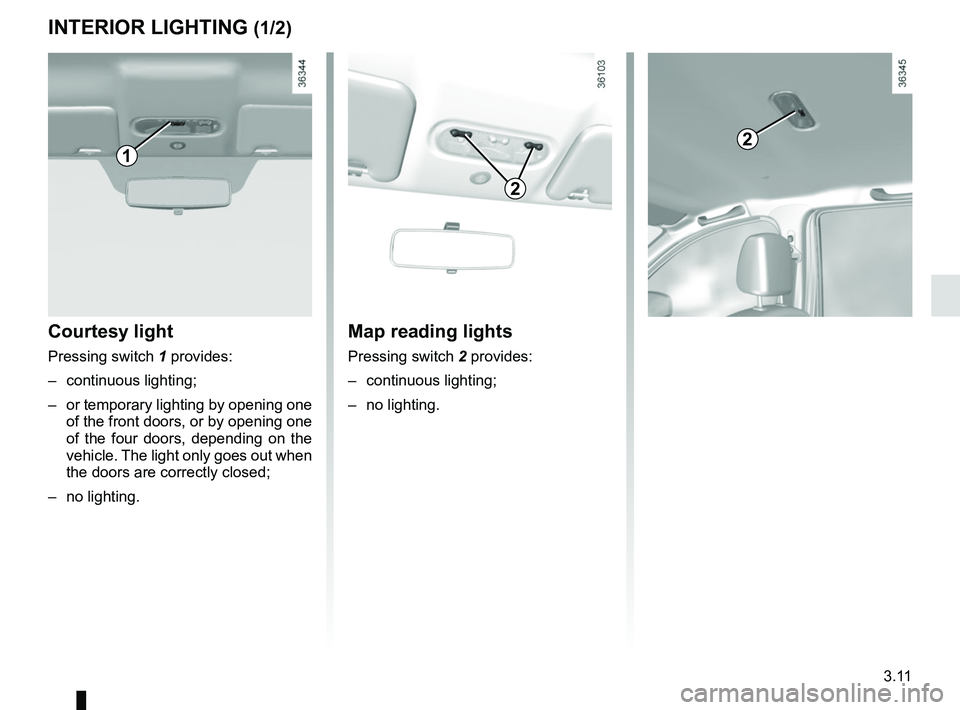
Courtesy light
Pressing switch 1 provides:
– continuous lighting;
– or temporary lighting by opening one of the front doors, or by opening one
of the four doors, depending on the
vehicle. The light only goes out when
the doors are correctly closed;
– no lighting.
1
Map reading lights
Pressing switch 2 provides:
– continuous lighting;
– no lighting.
2
2