2016 RENAULT DUSTER indicator light
[x] Cancel search: indicator lightPage 55 of 256

1.49
DISPLAY AND INDICATORS (2/2)
In 4x4 ( 4WD) mode on rough ter-
rain, there is a risk that incorrect in-
formation on the fuel level may be
displayed. Wait until you are on flat
ground again for a stable reading of
the oil level indicators.
Fuel gauge warning light 4
or 5
The number of squares lit shows the
fuel level. When it is at minimum, the
squares disappear and the low fuel
level warning light comes on, depen-
ding on the vehicle.
Trip computer and warning
system A or B
Refer to the information on the “Trip
computer and warning system” in
Section 1.
45
AB
Page 64 of 256

1.58
AUDIBLE AND VISUAL SIGNALS
Horn
Press the end of the stalk 1.
Depending on the vehicle, press on one
of areas 2.
Headlight flasher
Pull stalk 1 towards you to flash the
headlights.
Direction indicators
Move stalk 1 parallel to the steering
wheel and in the direction you are going
to turn it.
One-touch mode
When driving, it is possible that the
steering wheel may not be turned suf-
ficiently to return the stalk automatically
to its starting position.
In this case, briefly turn stalk 1 to the in-
termediate position, then release it: the
stalk returns to its original point and the
indicator light flashes three times.
1
2
1
éHazard warning lights
Press switch 3.
This switch activates all four direction
indicators and the side indicator lights
simultaneously.
It must only be used in an emergency to
warn drivers of other vehicles that you
have had to stop in an area where stop-
ping is prohibited or unexpected, or that
you are obliged to drive under special
conditions.
3
Page 65 of 256

1.59
eSwitching off the lightsFrom the main beam head-
lights position, pull the stalk 1 towards
you, then turn the end of the stalk 1
until the
e symbol appears by the
mark 2.
From the dipped beam headlights posi-
tion, turn the end of the stalk 1 until the
e symbol appears by the mark 2.
EXTERIOR LIGHTING AND SIGNALS (1/2)
šSide lights
Turn the end of stalk 1 until the
symbol is opposite mark 2.
kDipped beam
headlights
Turn the end of stalk 1 until the symbol
is opposite mark 2.
An indicator light on the instrument
panel will come on.
áMain beam headlightsWith the dipped beam head-
lights lit, push stalk 1 . This indicator
light on the instrument panel comes on.
To return to the dipped headlight posi-
tion, pull the stalk 1 towards you again.
Before driving at night, check that the electrical equipment is operatin\
g
correctly and adjust the headlight beams (if your vehicle is not carryi\
ng
its normal load). As a general precaution, check that the lights are not ob-
scured (by dirt, mud, snow or objects being transported).
112
Page 66 of 256

1.60
EXTERIOR LIGHTING AND SIGNALS (2/2)
gFront fog lights
Turn the centre ring 3 of
the stalk until the symbol is opposite
mark 2.
The fog lights only light up if the exterior
lights have been switched on. An indi-
cator light on the instrument panel then
lights up.
Do not forget to switch off the fog lights
when they are no longer needed, to
avoid inconveniencing other road
users.
hRear fog lights
Turn the centre ring 3 on
the stalk until the symbol faces mark 2.
The fog lights only light up if the exterior
lights have been switched on. An indi-
cator light on the instrument panel then
lights up.
Remember to switch off the these
lights when they are no longer required
to avoid inconveniencing other road
users.
eTurning off the fog
lights
Turn the centre ring 3 of the stalk until
the symbol is opposite mark 2.
The corresponding indicator light goes
out on the instrument panel.
The front and rear fog lights switch off
when the exterior lights are switched
off.23
Daytime running lights
function
(front lights only)
The daytime running lights come on
automatically with no action on stalk 1
when the engine is started, and they go
off once the engine is switched off. They
are deactivated when the main beams,
dipped beams or side lights are lit.
Lights-on warning buzzerIf the lights are on, a warning beep
sounds when the driver’s door is
opened to warn you that the lights are
still on.
1
Page 91 of 256
2.15
Fuel consumption is accredited in ac-
cordance with a standard regulatory
method. Identical for all manufactur-
ers, this enables vehicles to be com-
pared with one another. Consumption
in real time depends on vehicle usage
conditions, the equipment fitted and the
user’s driving style. To optimise fuel
consumption, please refer to the follow-
ing advice.
Depending on the vehicle, you will have
various functions which enable you to
lower your fuel consumption:
– the rev counter;
– gear change indicator;
– ECO mode – activated by the ECO button.
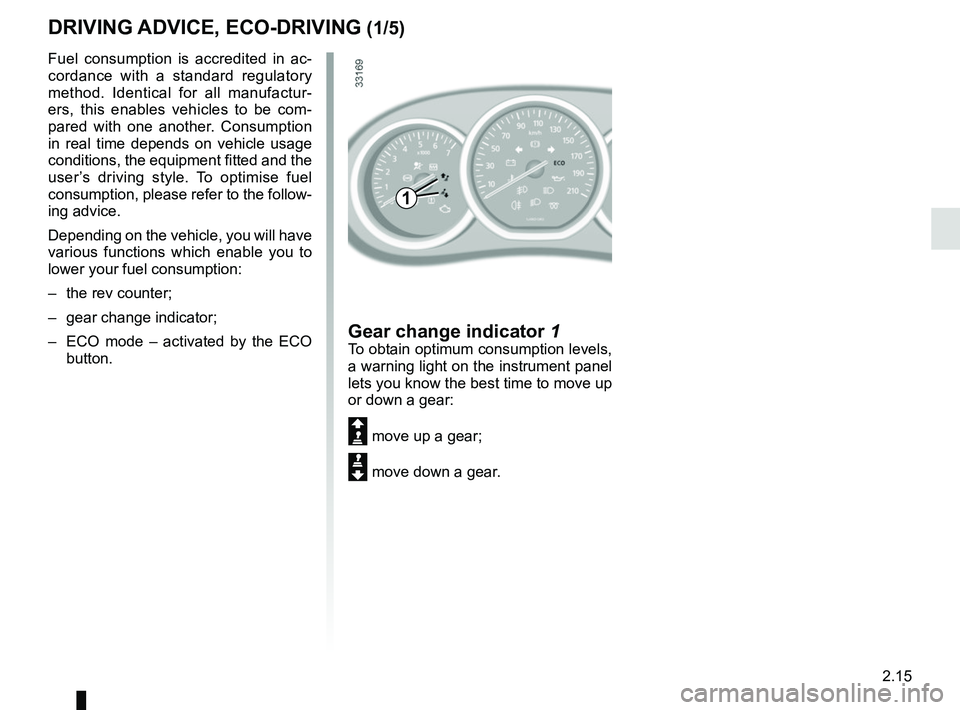
Gear change indicator 1To obtain optimum consumption levels,
a warning light on the instrument panel
lets you know the best time to move up
or down a gear:
Š move up a gear;
‰ move down a gear.
DRIVING ADVICE, ECO-DRIVING (1/5)
1
Page 107 of 256

2.31
TRANSMISSION: 4-wheel drive (4WD) (2/4)
This problem may be resolved by chan-
ging the tyres. Always use four identi-
cal tyres (same brand, profile, etc.) and
with similar wear.
In the event of excessive wheelspin,
the mechanical components may be
overheating.
If this happens:
– at first, the
’ warning light
flashes. “4WD Lock” mode is still
active, however we recommend that
you stop as soon as possible to allow
the system to cool down (until the
warning light stops flashing);
– if the wheels still spin, the system au- tomatically switches to “2WD” mode
to protect the mechanical compo-
nents.
The
‘ warning light flashes. The
mode cannot be changed while the
light is flashing.
After one minute, the system switches
to “2WD” or “AUTO” mode depending
on the position of the selector.
Note: if the vehicle is travelling at a
speed of more than approximately
49.6 mph (80 km/h) or if it is travel-
ling at a speed of between 37.2 and
49.6 mph (60 and 80 km/h) for more
than one minute in «4WD Lock" mode,
the system automatically switches back
to "AUTO" mode. The warning light
’ goes out.
Special features of the
4-wheel drive transmission
The vehicle may make more noise when
the “AUTO" or "4WD Lock" modes are
activated. This is normal. If the system
detects a difference in the dimensions
of the front and rear wheels (eg. un-
derinflation, severe wear on an axle),
the system automatically switches to
"2WD" mode.
The
‘ and Ò warning lights on
the instrument panel come on. Drive as
soon as possible at a moderate speed
to an approved dealer.
To deactivate this mode, turn selector
1
to the “AUTO” position. The
‘ indi-
cator light on the instrument panel goes
out.
“4WD Lock" mode
To activate this mode, turn selector 1 to
the “4WD Lock” position. The selector
the returns to the “AUTO” position. The
’ indicator light will light up on the
instrument panel.
Operating principle
“4WD Lock” mode distributes the
engine torque between the front and
rear axles in order to optimise the per-
formance capacity of the vehicle in off-
road situations. This mode should only
be used in extreme driving conditions
(mud, steep slopes, sand).
To deactivate this mode, turn selector 1
to the “4WD Lock” position again. The
indicator light on the instrument panel
goes out. When the engine is switched
off, the system stays in “4WD Lock”
mode for one minute.
Page 113 of 256

2.37
DRIVER CORRECTION DEVICES/AIDS (4/4)
Hill start assistance
Depending on the gradient of the in-
cline, this system assists the driver
when starting on a hill. It prevents the
vehicle from rolling backwards by au-
tomatically applying the brakes when
the driver lifts his/her foot off the brake
pedal to depress the accelerator pedal.
It only operates when the gear lever is
in a position other than neutral (other
than N or P for automatic transmis-
sions) and the vehicle is completely
stationary (brake pedal depressed).
The system holds the vehicle for ap-
proximately 2 seconds. The brakes are
then released (the vehicle will move ac-
cording to the slope).
Operating principle
A sensor in the steering wheel detects
the direction selected by the driver.
Other sensors throughout the vehicle
measure the actual direction.
The system compares driver input to
the actual trajectory of the vehicle and
corrects the trajectory if necessary by
controlling the braking of certain wheels
and/or engine power. In the event that
the system is engaged, the indicator
light
flashes on the instrument
panel.
Operating faults
When the system detects an opera-
ting fault the warning lights
Ò and
appear on the instrument panel.
In this case, the Electronic Stability
Program ESC with understeer control
and traction control are deactivated.
Please consult an authorised dealer if
these warning lights remain displayed
on the instrument panel after the igni-
tion is switched off and on again.
The hill start assistance
system cannot completely
prevent the vehicle from
rolling backwards in all sit-
uations (extremely steep gradients
etc.).
In all cases, the driver may depress
the brake pedal to prevent the vehi-
cle from rolling backwards.
The hill start assistance function
should not be used for prolonged
stops: use the brake pedal.
This function is not designed to im-
mobilise the vehicle permanently.
If necessary, use the brake pedal to
stop the vehicle.
The driver must remain particularly
vigilant when driving on slippery or
low-grip surfaces and/or on hills.
Risk of serious injury.
Page 120 of 256
2.44
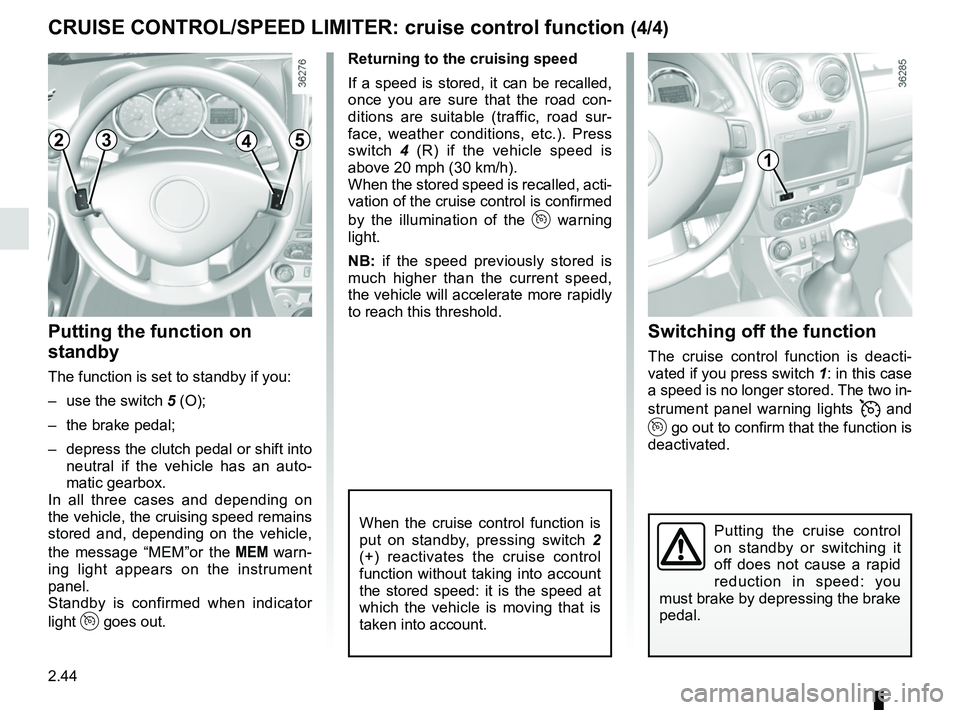
Switching off the function
The cruise control function is deacti-
vated if you press switch 1: in this case
a speed is no longer stored. The two in-
strument panel warning lights
and
go out to confirm that the function is
deactivated.
Returning to the cruising speed
If a speed is stored, it can be recalled,
once you are sure that the road con-
ditions are suitable (traffic, road sur-
face, weather conditions, etc.). Press
switch
4 (R) if the vehicle speed is
above 20 mph (30 km/h).
When the stored speed is recalled, acti-
vation of the cruise control is confirmed
by the illumination of the
warning
light.
NB: if the speed previously stored is
much higher than the current speed,
the vehicle will accelerate more rapidly
to reach this threshold.
When the cruise control function is
put on standby, pressing switch 2
(+) reactivates the cruise control
function without taking into account
the stored speed: it is the speed at
which the vehicle is moving that is
taken into account.
Putting the function on
standby
The function is set to standby if you:
– use the switch 5 (O);
– the brake pedal;
– depress the clutch pedal or shift into neutral if the vehicle has an auto-
matic gearbox.
In all three cases and depending on
the vehicle, the cruising speed remains
stored and, depending on the vehicle,
the message “MEM”or the
warn-
ing light appears on the instrument
panel.
Standby is confirmed when indicator
light
goes out.
CRUISE CONTROL/SPEED LIMITER: cruise control function (4/4)
Putting the cruise control
on standby or switching it
off does not cause a rapid
reduction in speed: you
must brake by depressing the brake
pedal.
2345
1