Page 109 of 256
 (4/4)
All-wheel drive system
– Irrespective of the mode selected, do not start the engine if one or mor\
e wheels are not in contact with the ground
(eg. when")
2.33
TRANSMISSION: 4-wheel drive (4WD) (4/4)
All-wheel drive system
– Irrespective of the mode selected, do not start the engine if one or mor\
e wheels are not in contact with the ground
(eg. when the vehicle is on a jack or roller bench).
– Do not turn the mode selector when cornering, reversing or if the wheels\
are spinning excessively. Only select the
“2WD”, “AUTO” or “4WD Lock” mode when the vehicle is being driven in a str\
aight line.
– Only use tyres which meet the required specifications.
– “4WD Lock” mode is reserved solely for use off-road. The use of this mode in any other conditions may adversely affect the
vehicle’s manoeuvrability and damage its mechanical components.
– Always ensure tyres with identical specifications are fitted to all four\
wheels (brand, size, structure, wear etc.). Fitting tyres
of different sizes to the front and rear wheels and/or left and right wheels m\
ay have serious consequences for the tyres,
gearbox, transfer gearbox and the rear differential pinions.
Page 120 of 256
2.44
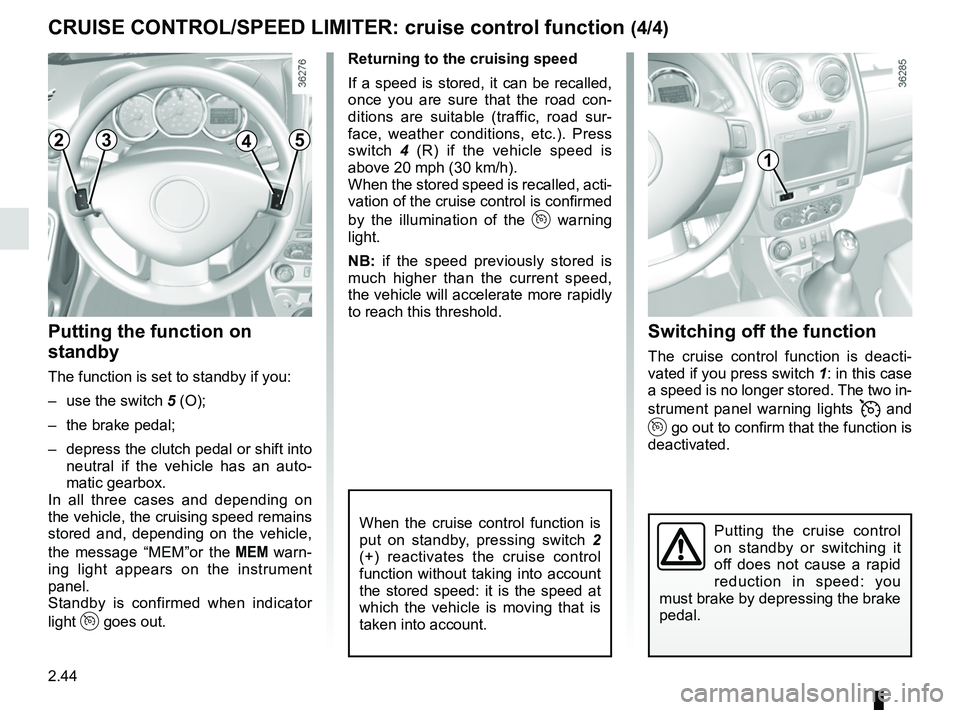
Switching off the function
The cruise control function is deacti-
vated if you press switch 1: in this case
a speed is no longer stored. The two in-
strument panel warning lights
and
go out to confirm that the function is
deactivated.
Returning to the cruising speed
If a speed is stored, it can be recalled,
once you are sure that the road con-
ditions are suitable (traffic, road sur-
face, weather conditions, etc.). Press
switch
4 (R) if the vehicle speed is
above 20 mph (30 km/h).
When the stored speed is recalled, acti-
vation of the cruise control is confirmed
by the illumination of the
warning
light.
NB: if the speed previously stored is
much higher than the current speed,
the vehicle will accelerate more rapidly
to reach this threshold.
When the cruise control function is
put on standby, pressing switch 2
(+) reactivates the cruise control
function without taking into account
the stored speed: it is the speed at
which the vehicle is moving that is
taken into account.
Putting the function on
standby
The function is set to standby if you:
– use the switch 5 (O);
– the brake pedal;
– depress the clutch pedal or shift into neutral if the vehicle has an auto-
matic gearbox.
In all three cases and depending on
the vehicle, the cruising speed remains
stored and, depending on the vehicle,
the message “MEM”or the
warn-
ing light appears on the instrument
panel.
Standby is confirmed when indicator
light
goes out.
CRUISE CONTROL/SPEED LIMITER: cruise control function (4/4)
Putting the cruise control
on standby or switching it
off does not cause a rapid
reduction in speed: you
must brake by depressing the brake
pedal.
2345
1
Page 121 of 256

2.45
AUTOMATIC GEARBOX (1/4)
Selector lever 1
Display 3 on the instrument panel
shows the mode and gear selected.
P: Park
R: Reverse
N: Neutral
D: Automatic mode
M: Manual mode
4: zone displaying gearbox mode or
gear engaged in manual mode.
Operation
With the selection lever 1 in position P,
switch on the ignition.
With your foot on the brake pedal, move
the lever out of position P.
Only engage D or R when the vehi-
cle is stopped, with your foot on the
brake and the accelerator pedal re-
leased.
To move out of position P the brake
pedal must be depressed before
pressing the unlocking button .2
For safety reasons, do not
switch off the ignition before
the vehicle has come to a
complete standstill.
1
2
3
4
Driving in automatic modePlace the lever into position D.
In the majority of driving conditions, you
will no longer have to use your gear
lever: the gears change automatically,
at the right time, to a suitable engine
speed because “automatic” takes the
vehicle’s load, road profile and driving
style into account.
2
1
Page 122 of 256

2.46
AUTOMATIC GEARBOX (2/4)
Driving in manual modeWhen the selector lever is in position D,
move the lever to the left.
Shifting the lever repeatedly allows you
to change gears manually:
– To move down through the gears, push the lever backwards;
– to move up through the gears, push the lever forwards.
Depending on the vehicle:
– to move down through the gears, push the lever forwards; – to move up through the gears, push
the lever backwards.
The gear selected is displayed on the
instrument panel.
Special cases
In certain driving conditions (e.g.: to
protect the engine) the “automated
system” may change the gear automa-
tically.
Likewise, to prevent incorrect ma-
noeuvres, a gear change may be re-
fused by the automatic system: in this
case the gear display flashes for a few
seconds as a warning.
Economical driving
When driving, always leave the lever
in position D, keeping the accelerator
pedal lightly depressed to ensure auto-
matic gear changes at a lower engine
speed.
Accelerating and overtaking
Depress the accelerator pedal firmly
and fully (so that it goes beyond the
kickdown point).
This will enable you to change down
to the optimum gear within the
engine range.
Page 123 of 256

2.47
AUTOMATIC GEARBOX (3/4)
Special circumstances
– Depending on the vehicle, snow position: if you are driving on slip-
pery surfaces (snow, mud, etc.)
press switch 5, the operating indica-
tor light 6 comes on.
Once these special driving con-
ditions no longer apply, exit this
function by pressing switch 5
again. The warning light 6 goes
out.
5
– If the road contour and bends in
the road do not allow you to stay in
automatic mode (e.g.: in mountain-
ous areas), it is recommended that
you switch to manual mode.
This will prevent the automatic gear-
box from changing gears repeatedly
when climbing, and permit engine
braking on long descents.
– In cold weather , to prevent the
engine from stalling, wait a few sec-
onds before moving the selector
lever from position P or N and en-
gaging it in D or R. –
Vehicles not fitted with traction
control: on a slippery surface or
surface with a low level of adhesion,
change to manual mode and select
second gear (or even third) before
starting the engine to avoid wheel-
spin when accelerating.
In very cold weather, the system
may prevent the gears from being
shifted in manual mode until the
gearbox reaches the right tempera-
ture.
6
Page 124 of 256
2.48
AUTOMATIC GEARBOX (4/4)
Parking the vehicle
When the vehicle is stopped, move the
lever to position P while keeping your
foot on the brake pedal: the gearbox is
in neutral and the drive wheels are me-
chanically locked by the driveshaft.
Apply the handbrake.
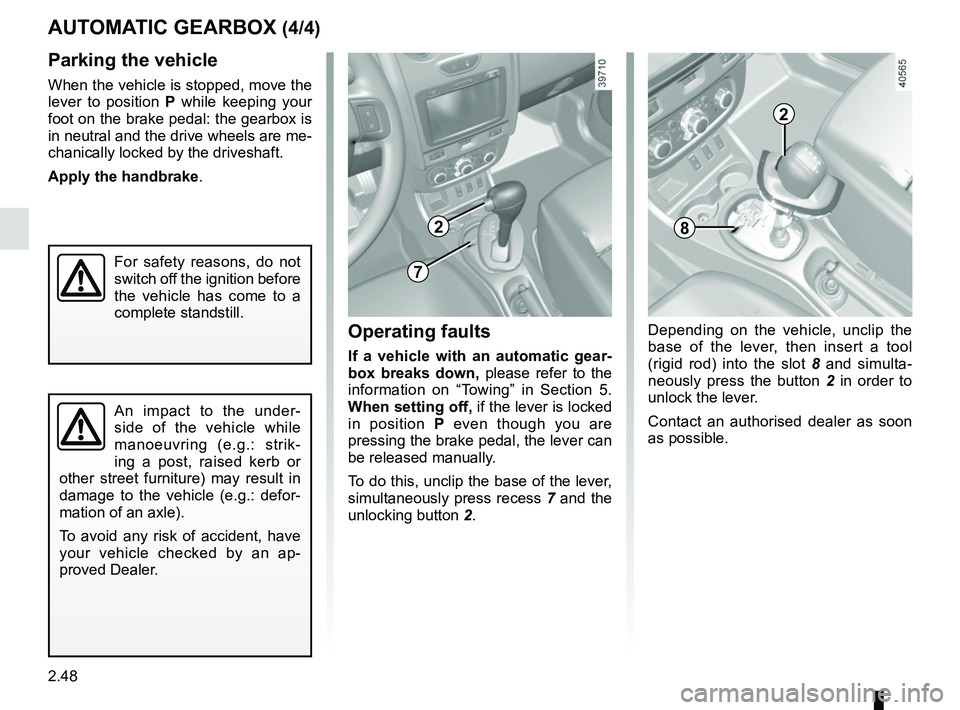
Operating faults
If a vehicle with an automatic gear-
box breaks down, please refer to the
information on “Towing” in Section 5.
When setting off, if the lever is locked
in position P even though you are
pressing the brake pedal, the lever can
be released manually.
To do this, unclip the base of the lever,
simultaneously press recess 7 and the
unlocking button 2.
An impact to the under-
side of the vehicle while
manoeuvring (e.g.: strik-
ing a post, raised kerb or
other street furniture) may result in
damage to the vehicle (e.g.: defor-
mation of an axle).
To avoid any risk of accident, have
your vehicle checked by an ap-
proved Dealer.
For safety reasons, do not
switch off the ignition before
the vehicle has come to a
complete standstill.
2
7
Depending on the vehicle, unclip the
base of the lever, then insert a tool
(rigid rod) into the slot 8 and simulta-
neously press the button 2 in order to
unlock the lever.
Contact an authorised dealer as soon
as possible.
8
2
Page 209 of 256

5.31
Number Allocation
A Driver’s side window
winder
B 4-wheel drive (4WD)
transmission
C LPG
D Rear accessories socket
E Passenger compartment
ECU, starter
1 Front electric window
2 Left-hand main beam
headlight
3 Right-hand main beam
headlight
4 Left-hand dipped beam
headlight
5 Right-hand dipped beam
headlight
6 Rear lights
7 Front side lights
8 Rear electric windowsNumber Allocation
9 Rear fog lights
10 Horn
11 Automatic door locking
12 ABS-ESC, brake switch,
clutch switch
13 Interior lights, boot light,
glovebox light
14 Empty location
15 Windscreen wiper
16 Cruise control/Speed
limiter, unfastened
seat belt warning,
parking distance
control, multimedia, air
conditioning, heated seats,
automatic gearbox lever,
UCHNumber Allocation
17 Daytime running lights
18 Brake lights
19 Injection, instrument panel
or dashboard, passenger
compartment, sequential
gearbox lever
20 Airbag
21 4-wheel drive transmission
(4WD), LPG, automatic
gearbox, sequential
gearbox, reverse gear
22 Power-assisted steering
23 Heated rear windscreen,
heated seats, seatbelt
alarm, parking distance
control, additional
passenger compartment
heating, cruise control/
speed limiter, heated
windscreen
FUSES (4/8)
Page 212 of 256
5.34
FUSES (7/8)
Number Allocation
A Driver’s side window
winder
B 4-wheel drive (4WD)
transmission
C Rear air conditioning
D Rear accessories socket
E Passenger compartment
ECU, starter
1 Front electric window
2 Left-hand main beam
headlight
3 Right-hand main beam
headlight
4 Left-hand dipped beam
headlight
5 Right-hand dipped beam
headlight
6 Rear lights
7 Front side lightsNumber Allocation
8 Rear electric windows
9 Rear fog lights
10 Horn
11 Automatic door locking
12 ABS-ESC, brake switch
13 Interior lights, boot light,
glovebox light
14 Not used
15 Windscreen wiper
16 Multimedia
17 Daytime running lightsNumber Allocation
18 Brake lights
19 Injection, instrument panel
or dashboard, passenger
compartment, sequential
gearbox lever
20 Airbag
21 4-wheel drive transmission
(4WD), reverse gear
22 Power-assisted steering
23 Cruise control/Speed
limiter, rear windscreen,
unfastened seatbelt
warning, parking distance
control, additional
passenger compartment
heating
